
Creating a SADI Service in PerlUsing the Protege SADI plug-in
Steps...What data will you consume?What data will you produce?What ontologies will you use?Model your input data v.v. these ontologiesModel your output data v.v. these ontologiesCreate the OWL models for the input and output data in ProtegeUse the SADI plugin to automatically generate the service code scaffoldAdd your business logicDeployRegister with the SADI registry
Step 1 & 2My service:  getDragonAllelesByGeneThe service consumes record identifiers corresponding to Loci from the DragonDB (Antirrhinum majus) genome database, and returns record identifiers for every known allele of those Loci.
Step3What ontologies should I use?(this will vary for every project, and you are free to use whatever ontology you wish with SADI!)LSRN (life science resource names) is an ontology of database records and identifiershttp://purl.oclc.org/SADI/LSRN/SIO (SemanticScience Integrated Ontology) is an “upper” ontology specifying how to represent scientific data, including database records. http://semanticscience.org/ontology/sio-core.owl
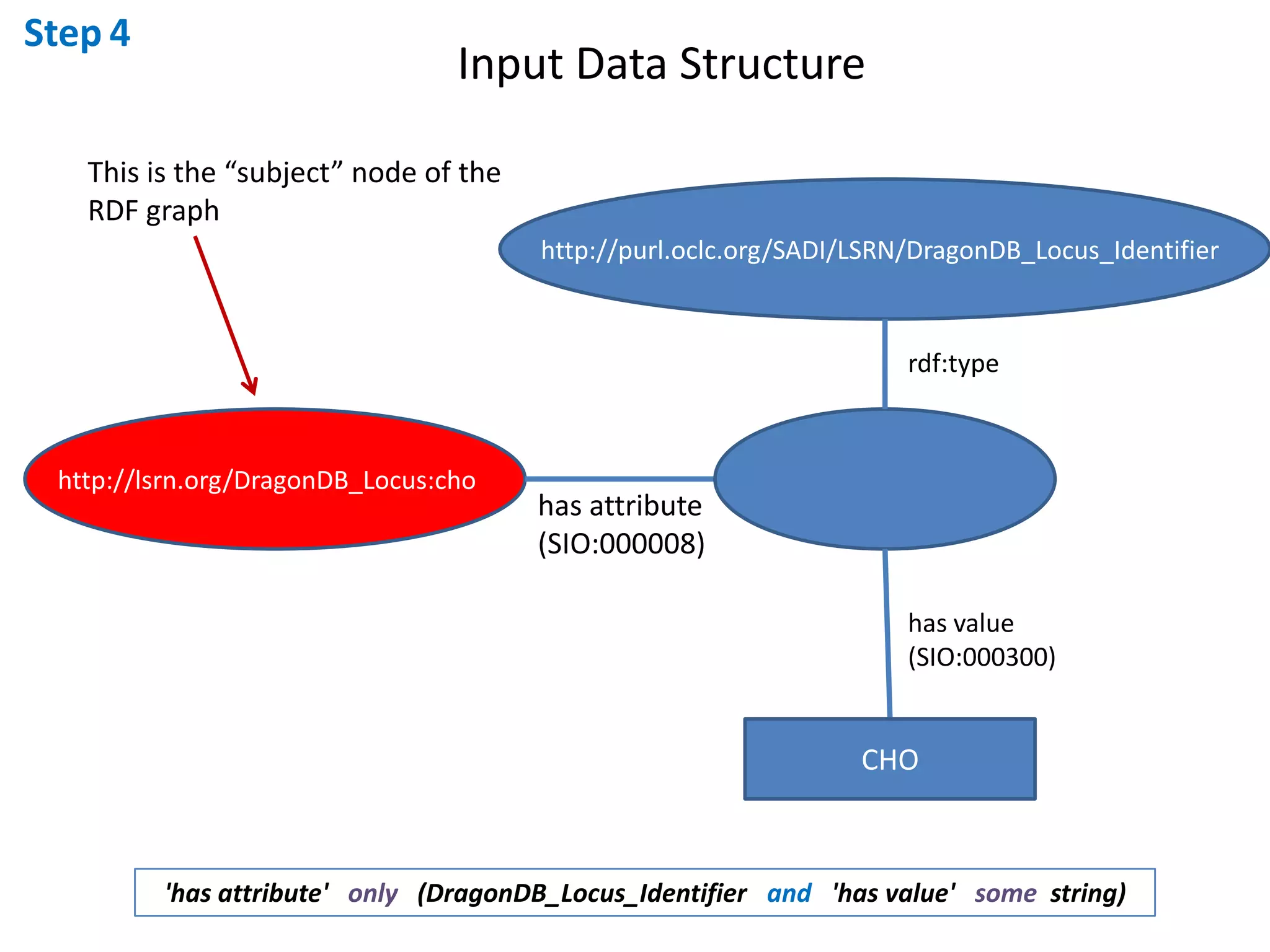
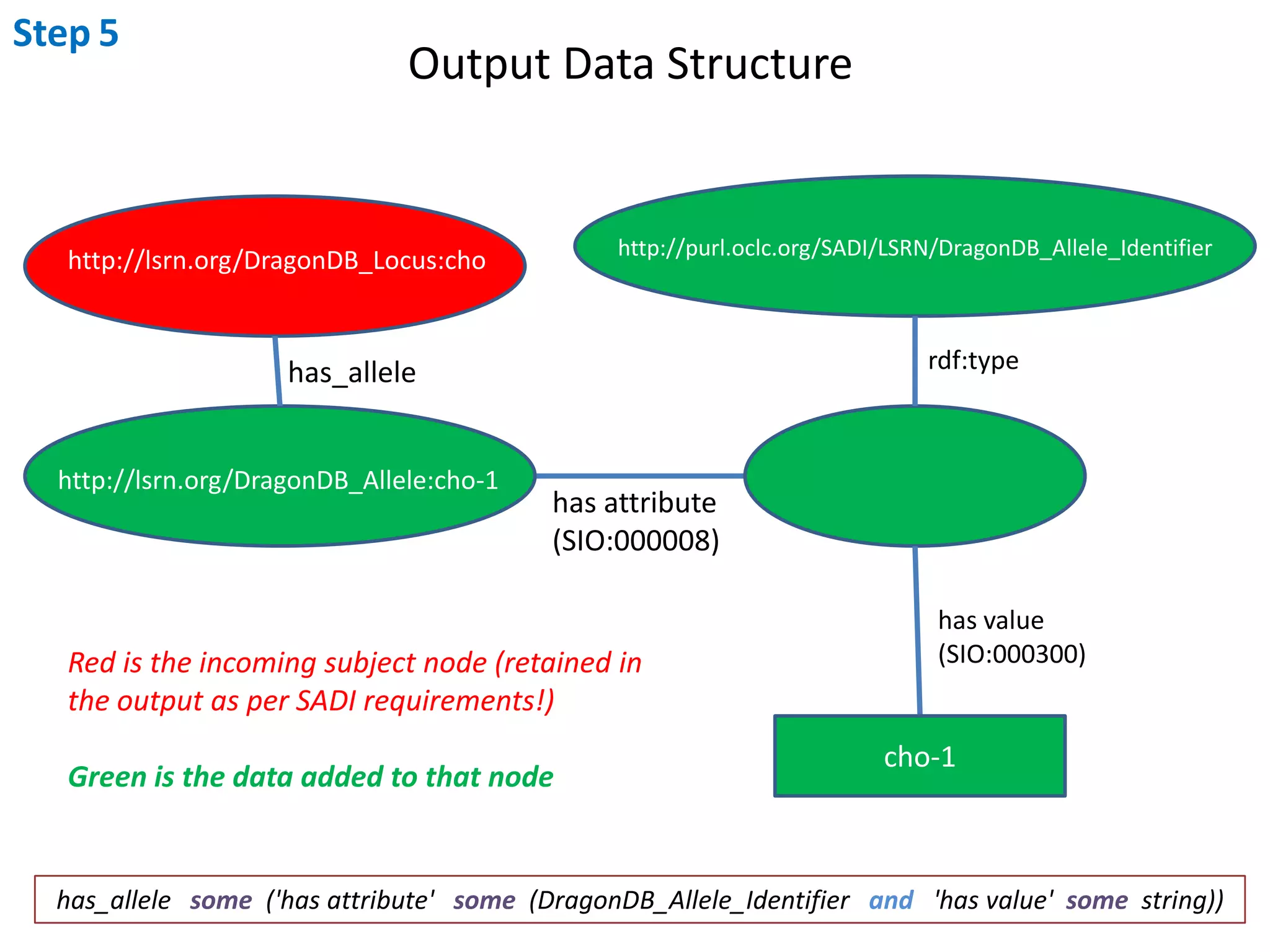
Step4 & 5Model your input and output dataThe SIO best-practices suggests that your data should be modelled as attributes which have an optional unit and value.  The identifier for any given record is an attribute of that record, where the value of that attribute is the ID number of the record.The ontological type of Antirrhinum Locus IDs is “DragonDB_Locus_Identifier” according to the LSRN ontologyThe ontological type of Antirrhnum Allele IDs is “DragonDB_Allele_Identifier” according to the LSRN ontology			Therefore... Our data models look like this:
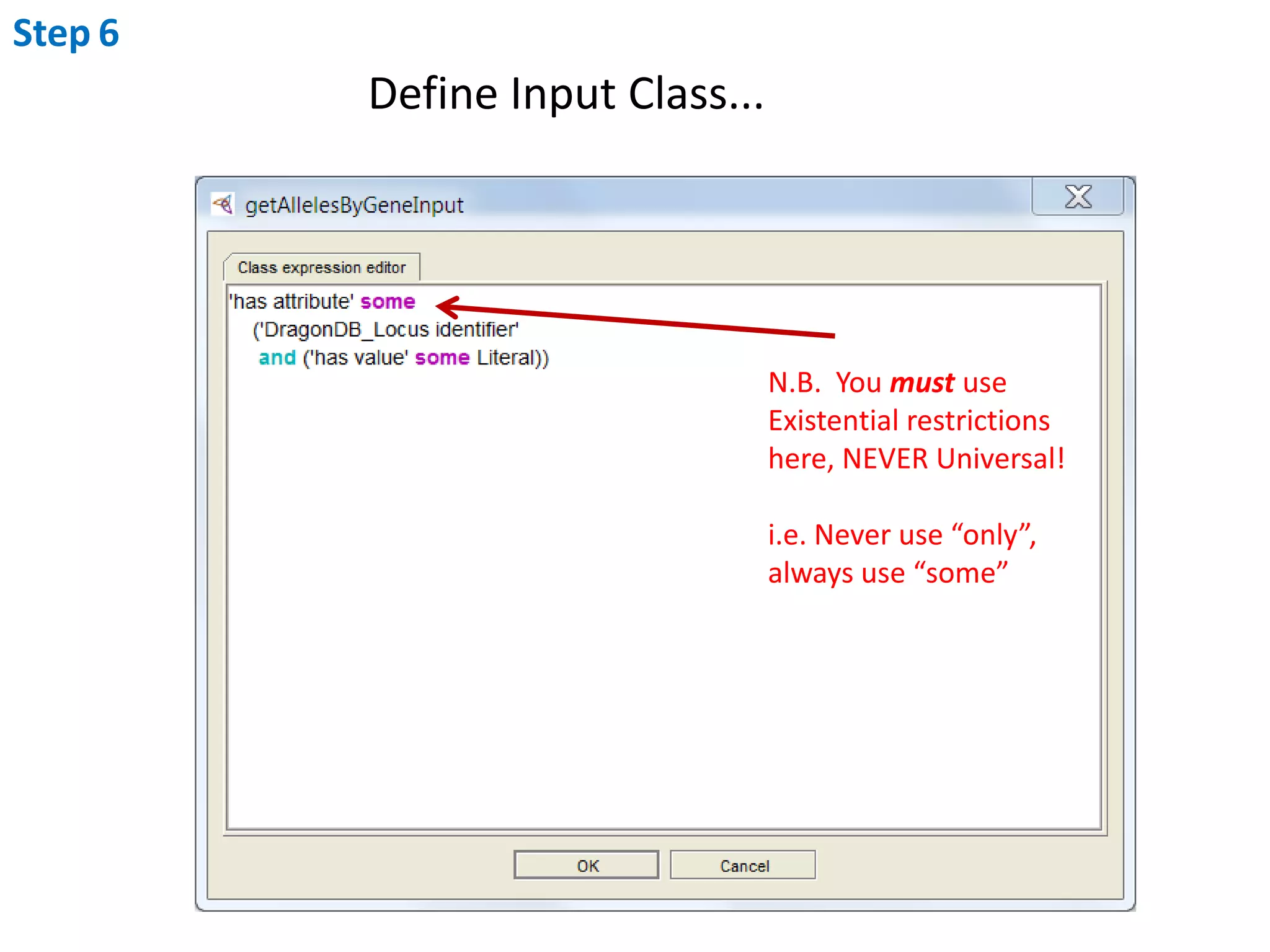
Step4Input Data StructureThis is the “subject” node of theRDF graphhttp://purl.oclc.org/SADI/LSRN/DragonDB_Locus_Identifierrdf:typehttp://lsrn.org/DragonDB_Locus:chohas attribute(SIO:000008)has value(SIO:000300)CHO'has attribute'   only   (DragonDB_Locus_Identifierand   'has value'   some  string)
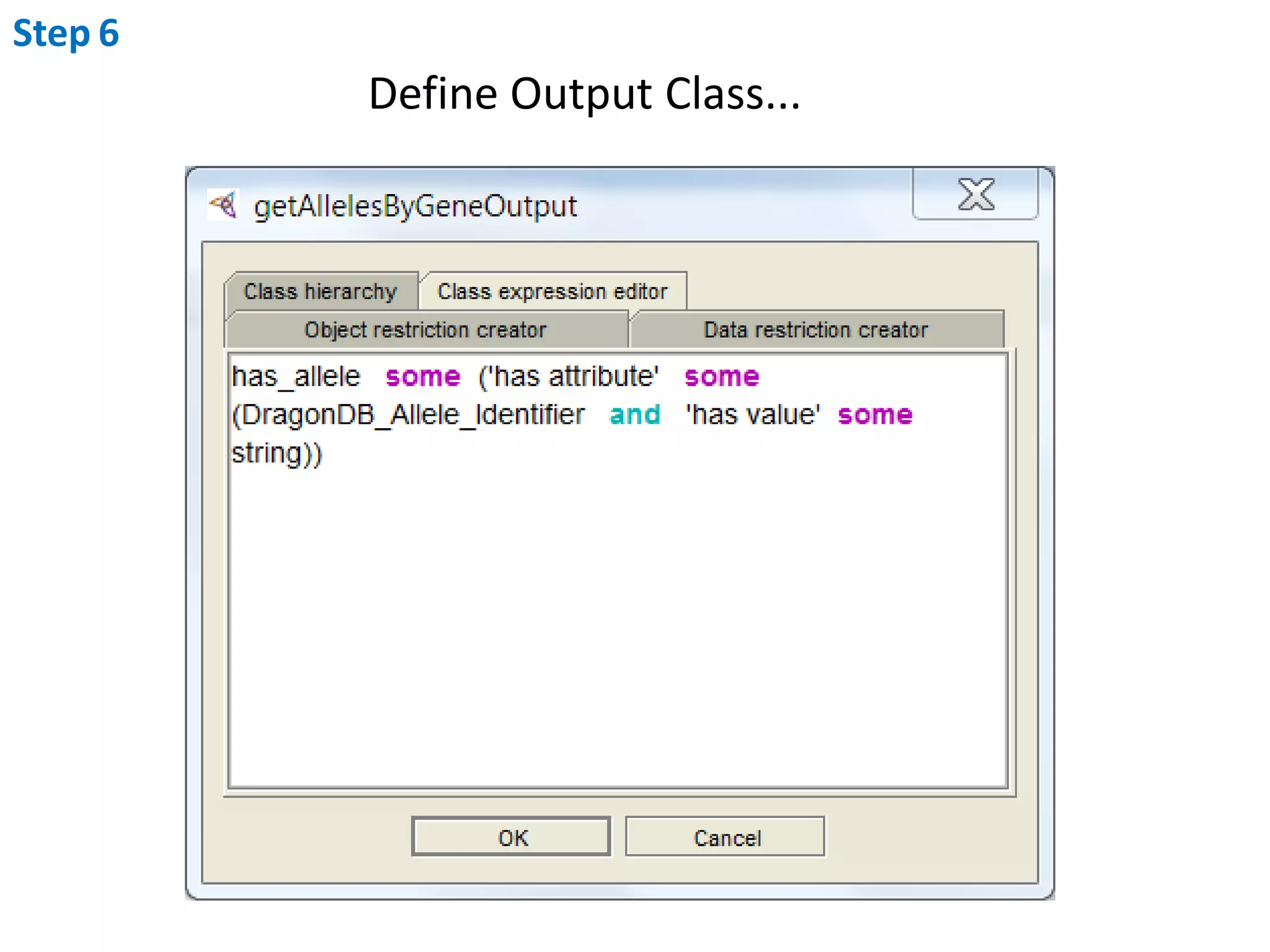
Step5Output Data Structurehttp://purl.oclc.org/SADI/LSRN/DragonDB_Allele_Identifierhttp://lsrn.org/DragonDB_Locus:chordf:typehas_allelehttp://lsrn.org/DragonDB_Allele:cho-1has attribute(SIO:000008)has value(SIO:000300)Red is the incoming subject node (retained in the output as per SADI requirements!)Green is the data added to that nodecho-1has_allele   some  ('has attribute'   some  (DragonDB_Allele_Identifierand   'has value'  some  string))
Step6Create the OWL Classes representing your Input and Outputdata models using Protege
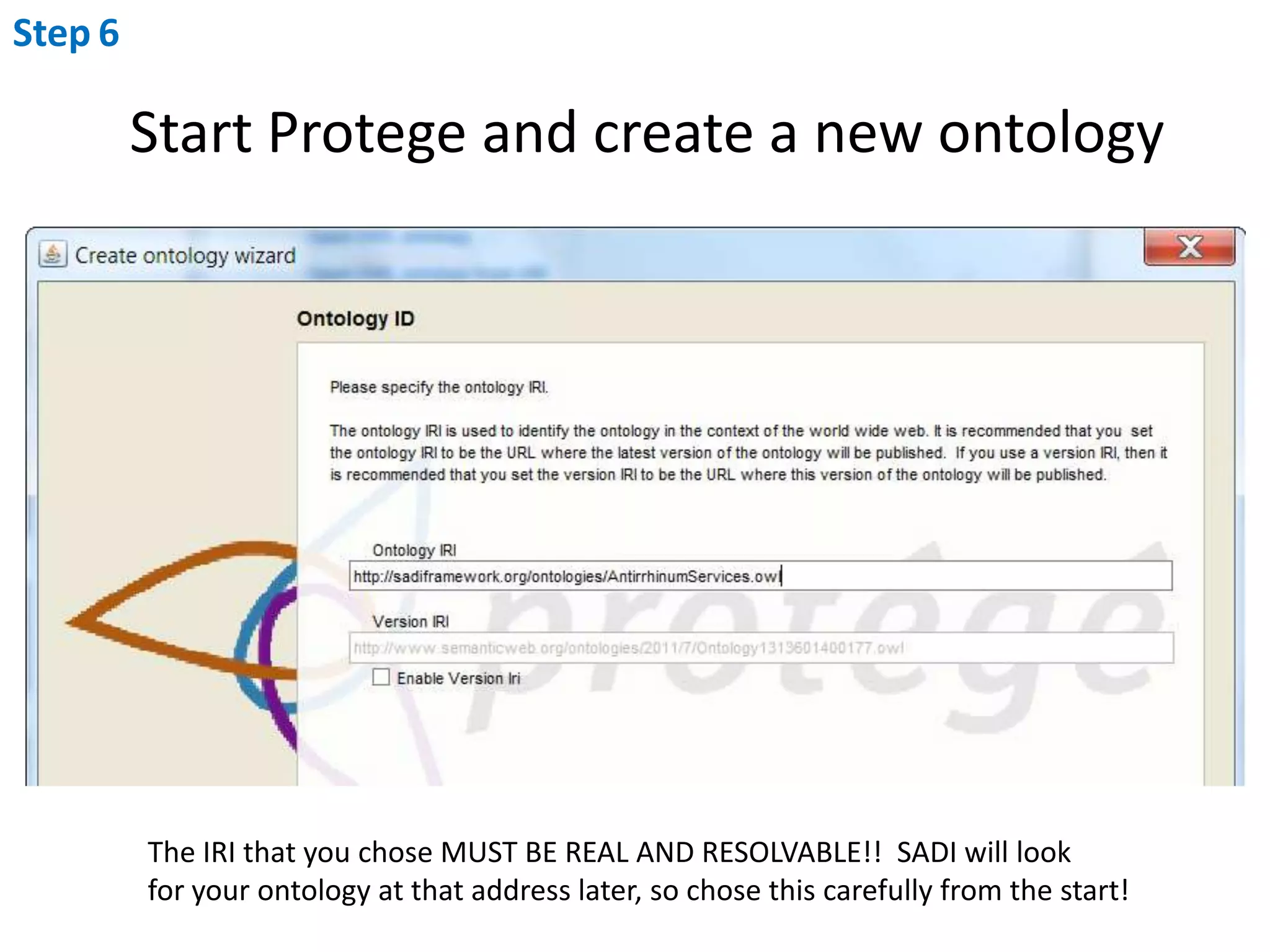
Step6Start Protege and create a new ontologyThe IRI that you chose MUST BE REAL AND RESOLVABLE!!  SADI will look for your ontology at that address later, so chose this carefully from the start!
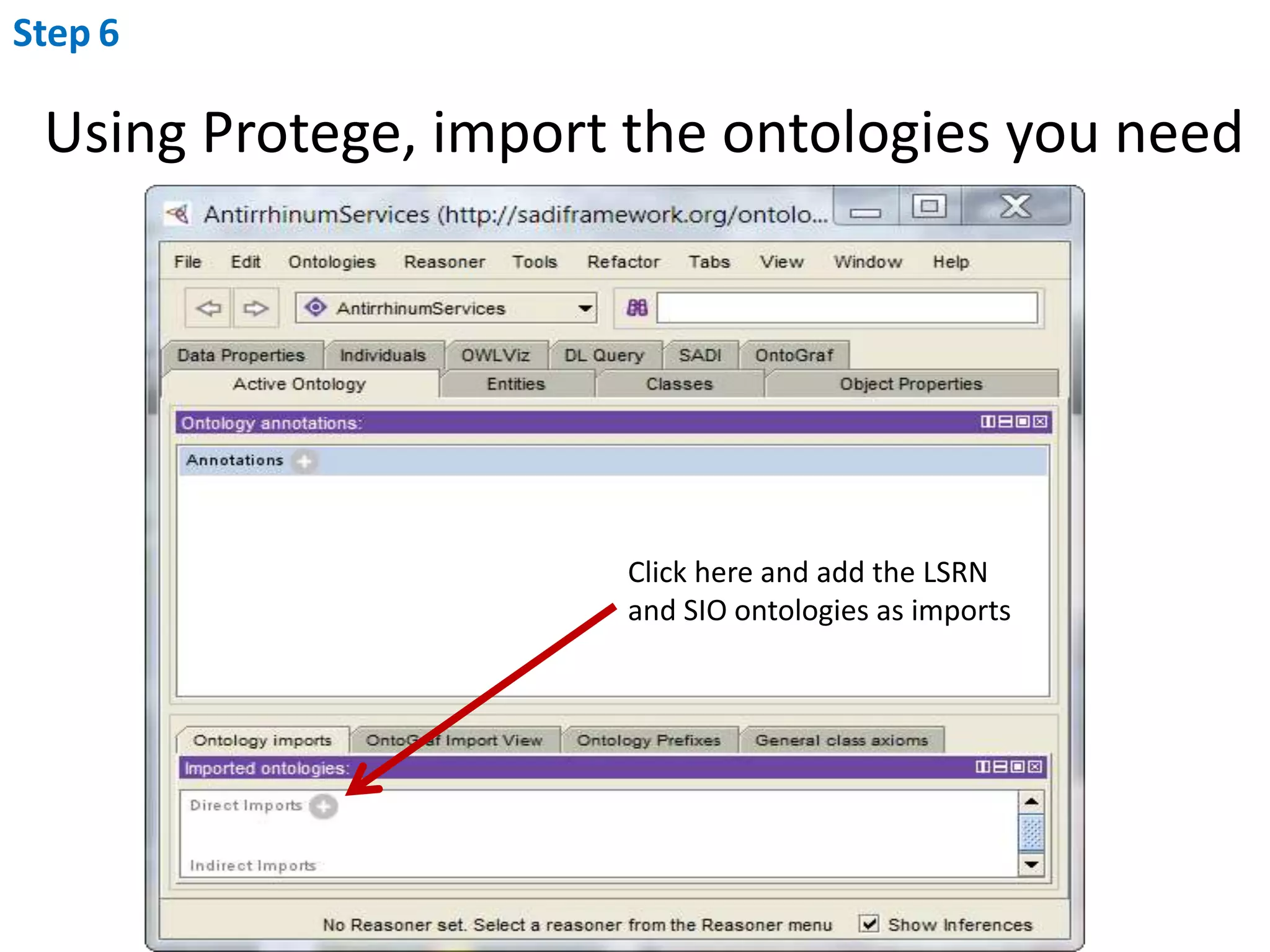
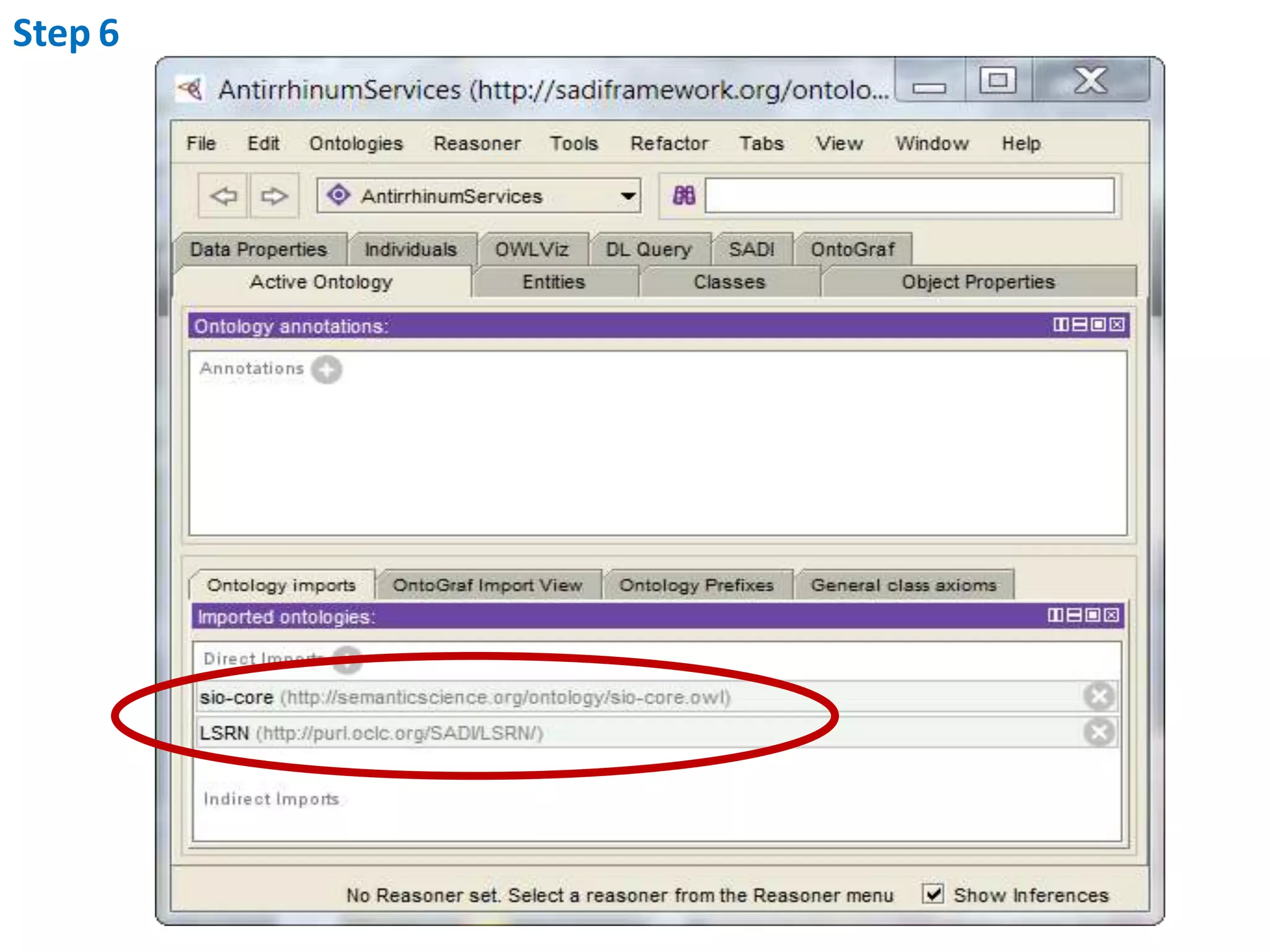
Step6Using Protege, import the ontologies you needClick here and add the LSRNand SIO ontologies as imports
Step6
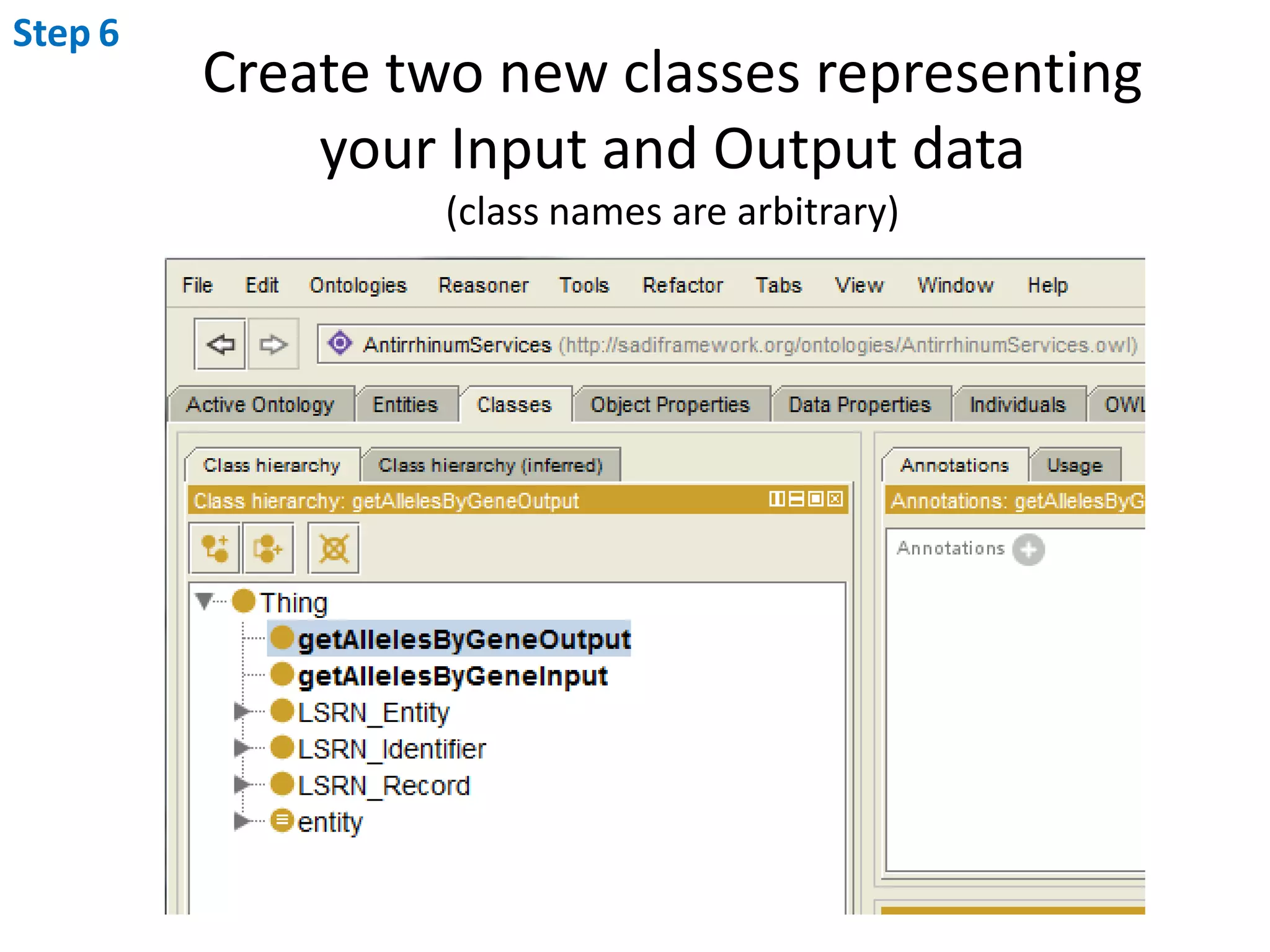
Step6Create two new classes representingyour Input and Output data(class names are arbitrary)
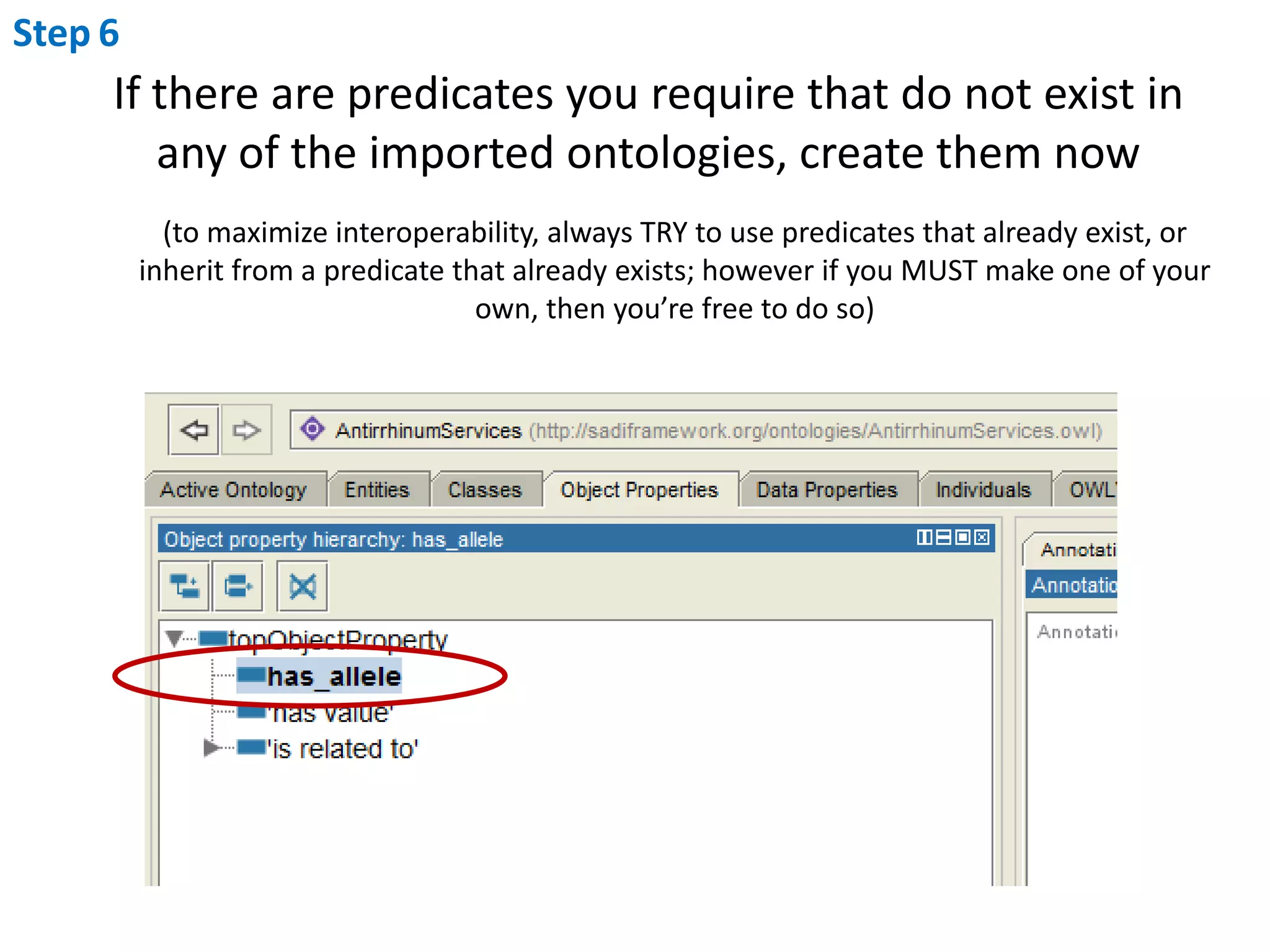
Step6If there are predicates you require that do not exist in any of the imported ontologies, create them now(to maximize interoperability, always TRY to use predicates that already exist, or inherit from a predicate that already exists; however if you MUST make one of your own, then you’re free to do so)
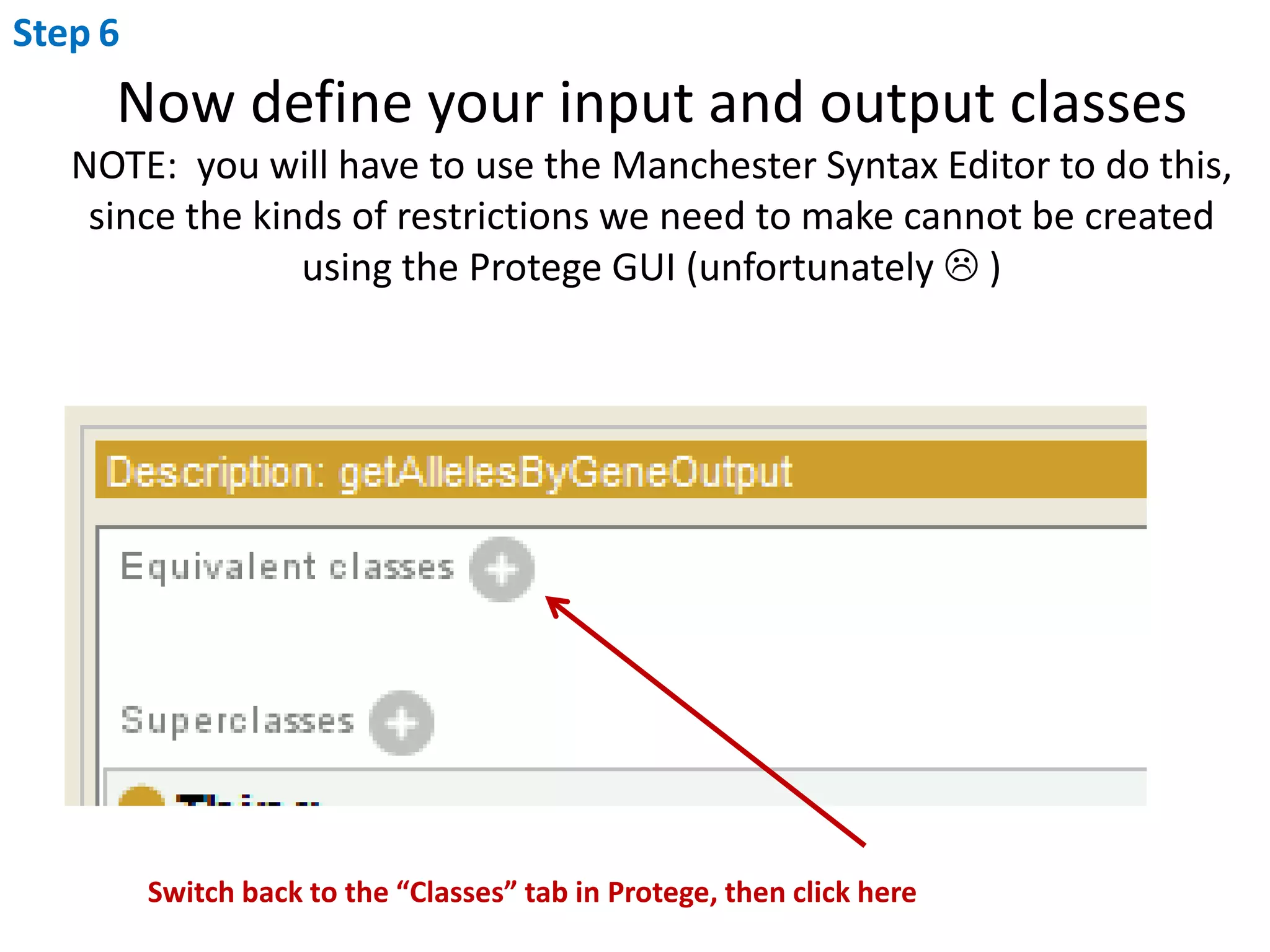
Step6Now define your input and output classesNOTE:  you will have to use the Manchester Syntax Editor to do this, since the kinds of restrictions we need to make cannot be created using the Protege GUI (unfortunately  )Switch back to the “Classes” tab in Protege, then click here
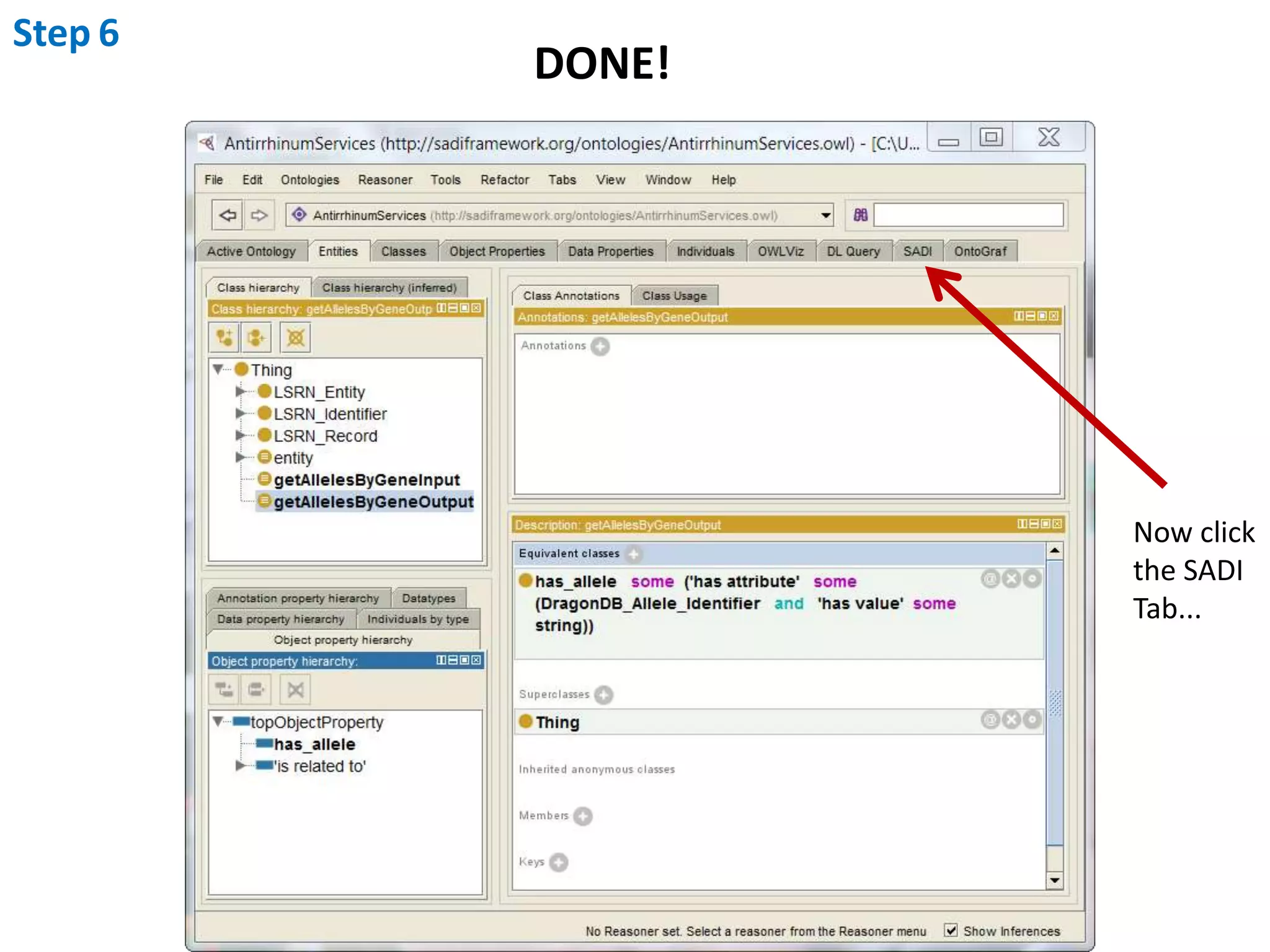
Step6Define Input Class...N.B.  You must use Existential restrictions here, NEVER Universal!i.e. Never use “only”, always use “some”
Step6Define Output Class...
Step6DONE!Now clickthe SADITab...
Step7Use the SADI Plugin to write your service code
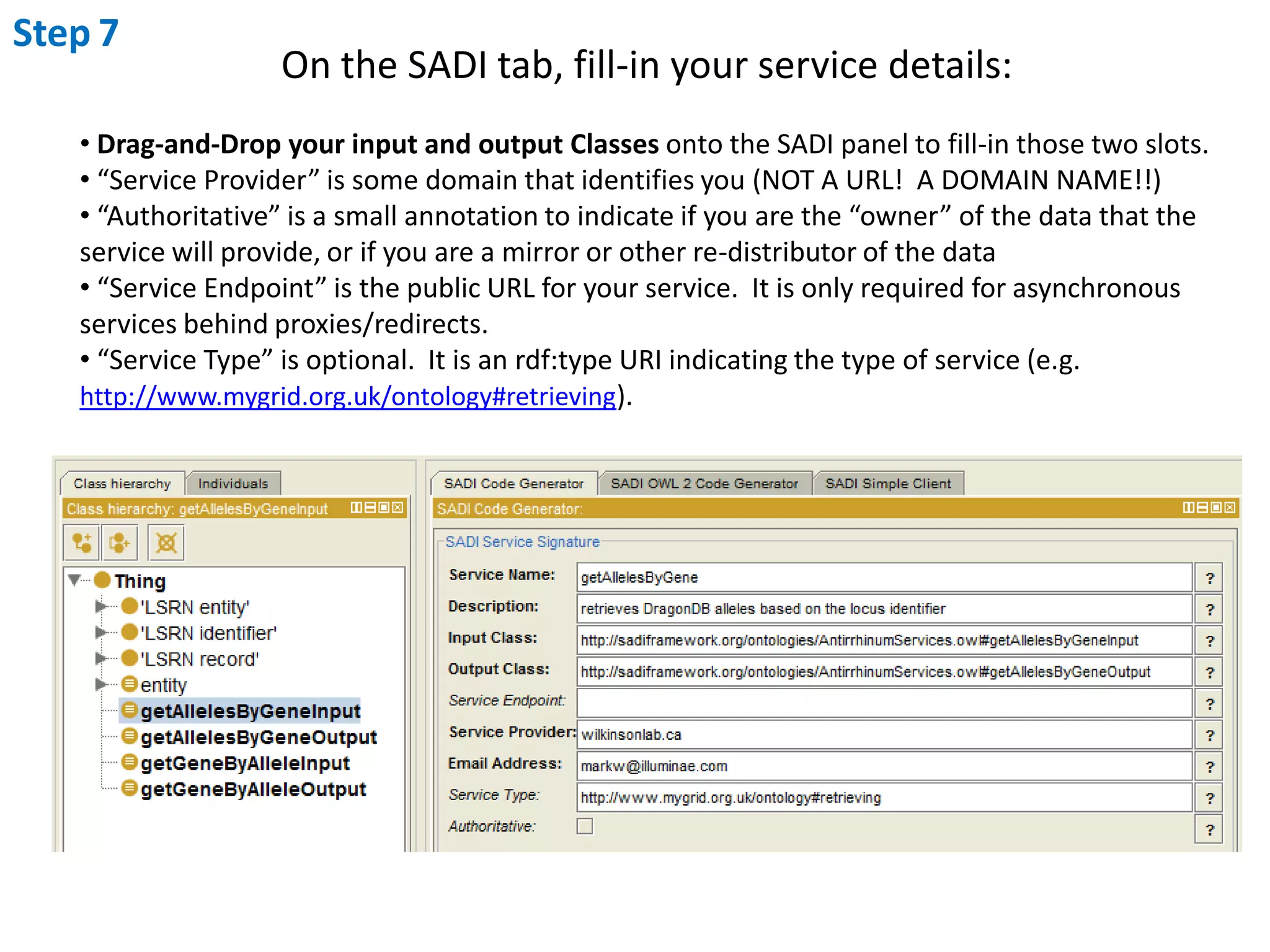
Step7On the SADI tab, fill-in your service details: Drag-and-Drop your input and output Classes onto the SADI panel to fill-in those two slots.
 “Service Provider” is some domain that identifies you (NOT A URL!  A DOMAIN NAME!!)
 “Authoritative” is a small annotation to indicate if you are the “owner” of the data that the service will provide, or if you are a mirror or other re-distributor of the data
 “Service Endpoint” is the public URL for your service.  It is only required for asynchronous services behind proxies/redirects.
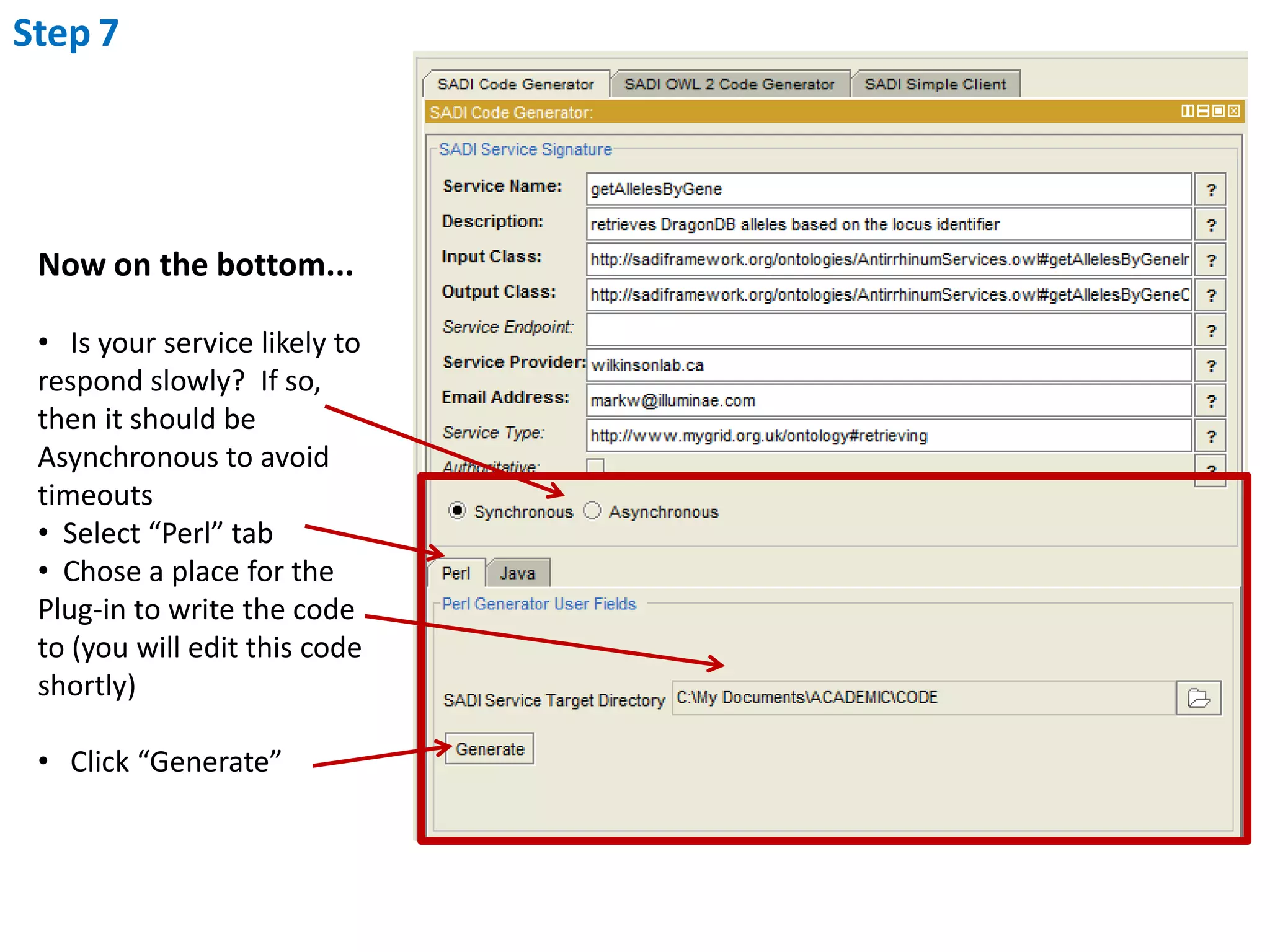
 “Service Type” is optional.  It is an rdf:type URI indicating the type of service (e.g. http://www.mygrid.org.uk/ontology#retrieving).Step7Now on the bottom...   Is your service likely to respond slowly?  If so, then it should be Asynchronous to avoid timeouts
  Select “Perl” tab
  Chose a place for the Plug-in to write the code to (you will edit this code shortly)
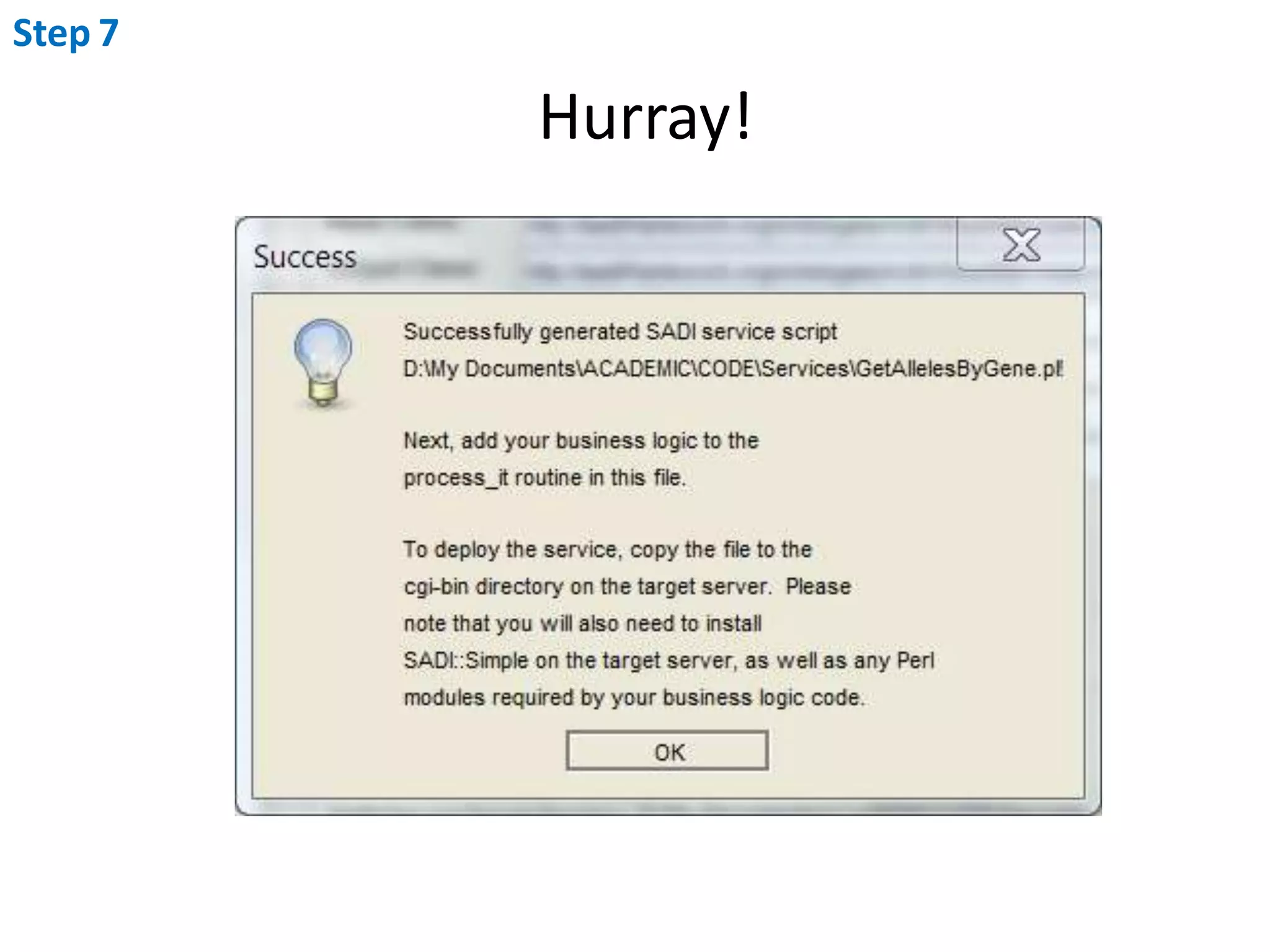
   Click “Generate”Step7Hurray!
Step8Edit code to add your business-logic
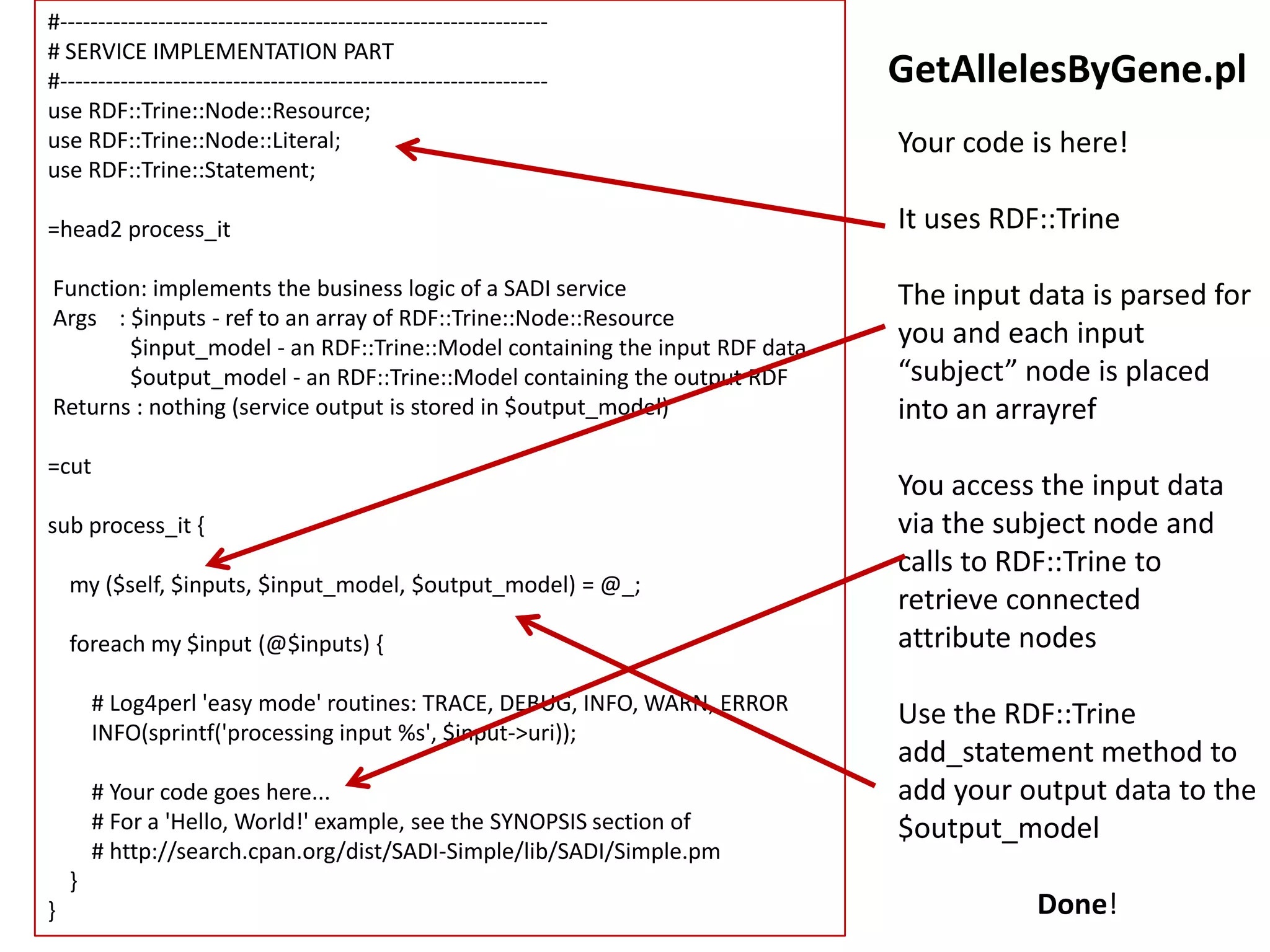
#-----------------------------------------------------------------# SERVICE IMPLEMENTATION PART#-----------------------------------------------------------------use RDF::Trine::Node::Resource;use RDF::Trine::Node::Literal;use RDF::Trine::Statement;=head2 process_it Function: implements the business logic of a SADI serviceArgs    : $inputs - ref to an array of RDF::Trine::Node::Resource               $input_model - an RDF::Trine::Model containing the input RDF data               $output_model - an RDF::Trine::Model containing the output RDF Returns : nothing (service output is stored in $output_model)=cutsub process_it {    my ($self, $inputs, $input_model, $output_model) = @_;foreach my $input (@$inputs) {        # Log4perl 'easy mode' routines: TRACE, DEBUG, INFO, WARN, ERROR        INFO(sprintf('processing input %s', $input->uri));        # Your code goes here...        # For a 'Hello, World!' example, see the SYNOPSIS section of        # http://search.cpan.org/dist/SADI-Simple/lib/SADI/Simple.pm     }}GetAllelesByGene.plYour code is here!It uses RDF::TrineThe input data is parsed for you and each input “subject” node is placed into an arrayrefYou access the input data via the subject node and calls to RDF::Trine to retrieve connected attribute nodesUse the RDF::Trine add_statement method to add your output data to the $output_modelDone!
Step8For example...	here I am just going to hard-code the	output data for simplicity, but of course	you would normally use a database call	or algorithm to generate this...
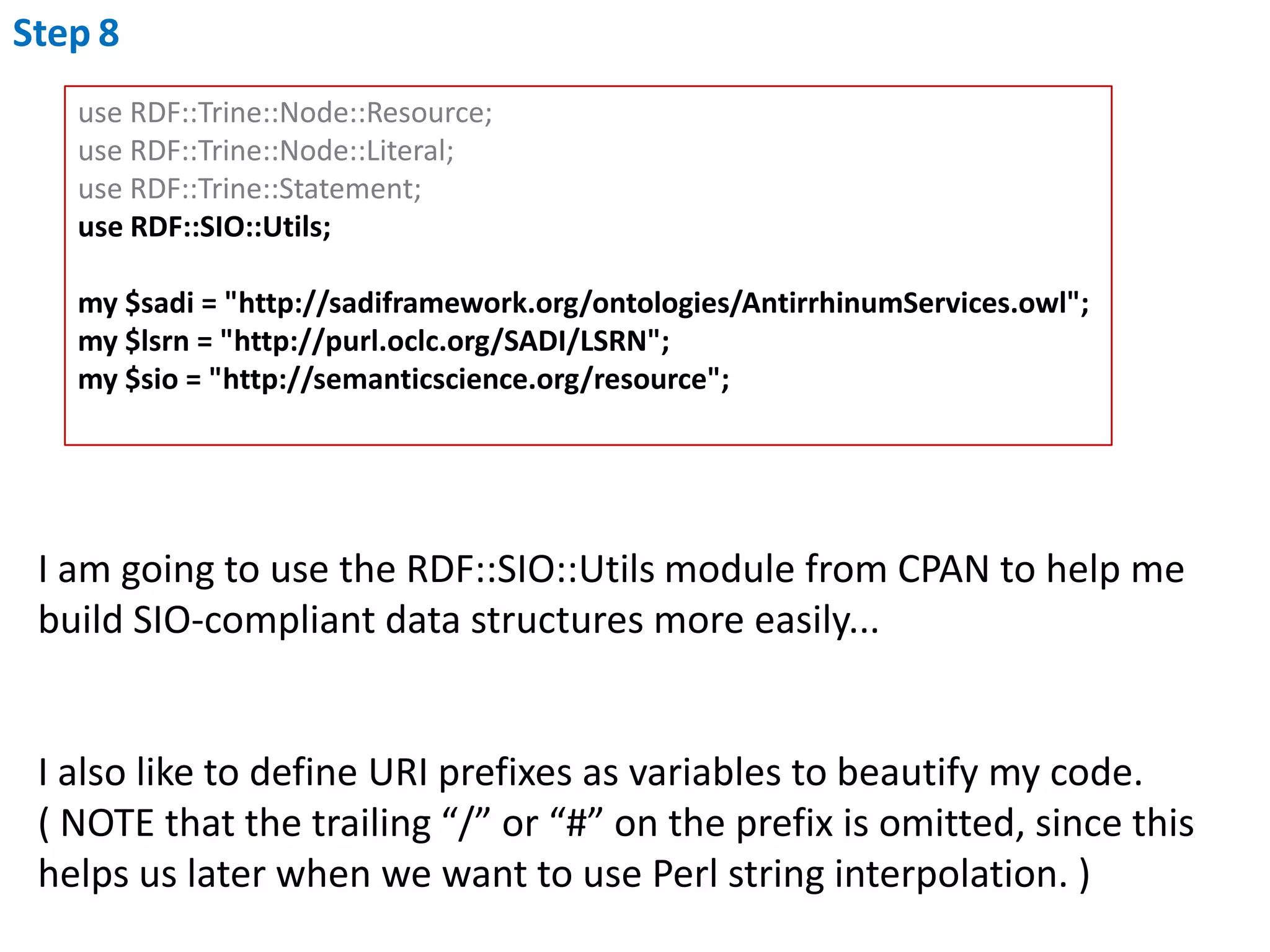
Step8use RDF::Trine::Node::Resource;use RDF::Trine::Node::Literal;use RDF::Trine::Statement;use RDF::SIO::Utils;my $sadi = "http://sadiframework.org/ontologies/AntirrhinumServices.owl";my $lsrn = "http://purl.oclc.org/SADI/LSRN";my $sio = "http://semanticscience.org/resource";I am going to use the RDF::SIO::Utils module from CPAN to help mebuild SIO-compliant data structures more easily...I also like to define URI prefixes as variables to beautify my code. ( NOTE that the trailing “/” or “#” on the prefix is omitted, since this helps us later when we want to use Perl string interpolation. )
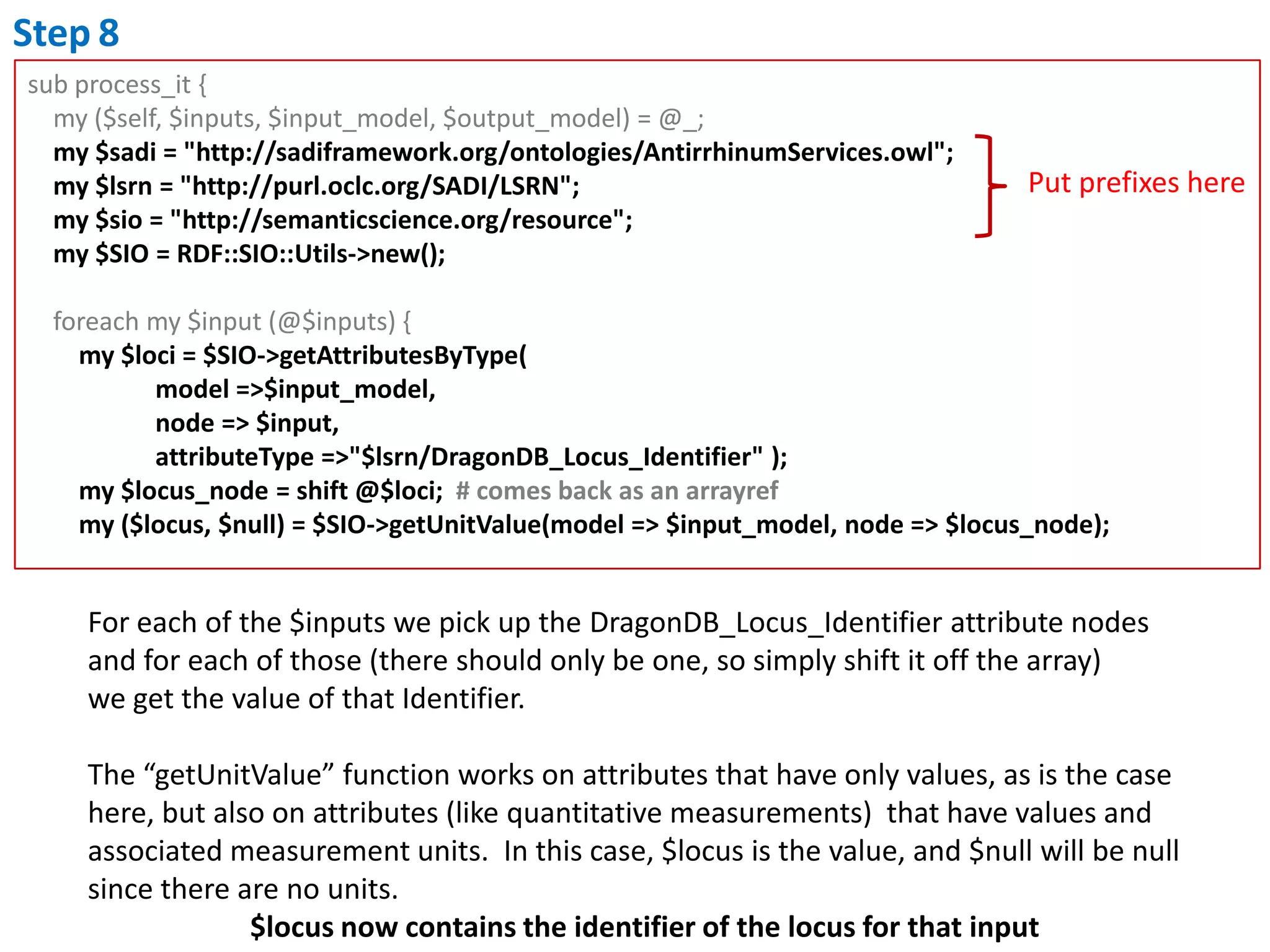
Step8sub process_it {    my ($self, $inputs, $input_model, $output_model) = @_;    my $sadi = "http://sadiframework.org/ontologies/AntirrhinumServices.owl";    my $lsrn = "http://purl.oclc.org/SADI/LSRN";    my $sio = "http://semanticscience.org/resource";my $SIO = RDF::SIO::Utils->new();foreach my $input (@$inputs) {        my $loci = $SIO->getAttributesByType(                    model =>$input_model,                    node => $input,attributeType =>"$lsrn/DragonDB_Locus_Identifier" );        my $locus_node = shift @$loci;  # comes back as an arrayref        my ($locus, $null) = $SIO->getUnitValue(model => $input_model, node => $locus_node);Put prefixes hereFor each of the $inputs we pick up the DragonDB_Locus_Identifier attribute nodesand for each of those (there should only be one, so simply shift it off the array) we get the value of that Identifier. The “getUnitValue” function works on attributes that have only values, as is the case here, but also on attributes (like quantitative measurements)  that have values and associated measurement units.  In this case, $locus is the value, and $null will be null since there are no units.$locus now contains the identifier of the locus for that input
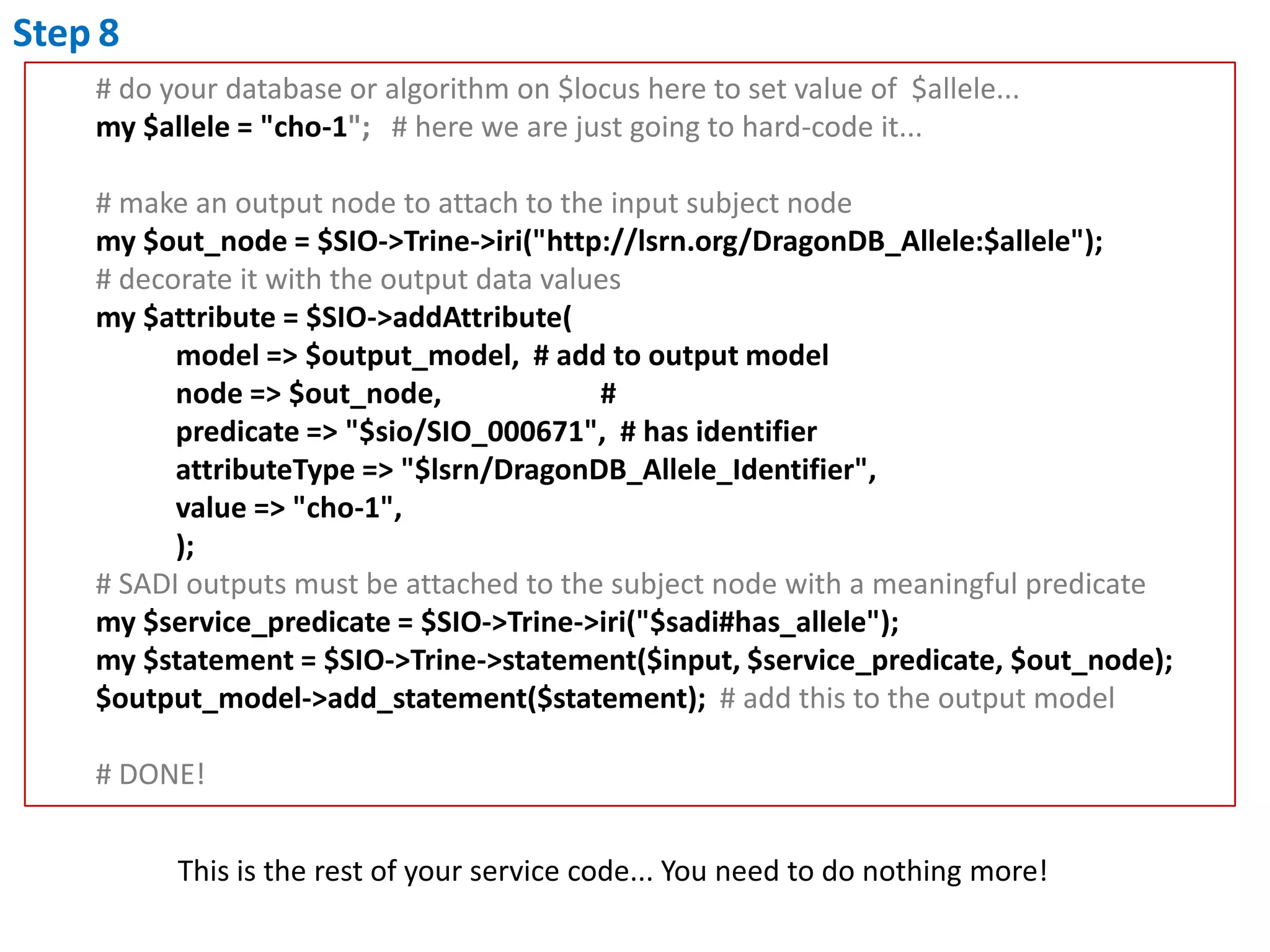
Step8        # do your database or algorithm on $locus here to set value of  $allele...my $allele = "cho-1";   # here we are just going to hard-code it...        # make an output node to attach to the input subject nodemy $out_node = $SIO->Trine->iri("http://lsrn.org/DragonDB_Allele:$allele");# decorate it with the output data values        my $attribute = $SIO->addAttribute(                   model => $output_model,  # add to output model                   node => $out_node,                      #                   predicate => "$sio/SIO_000671",  # has identifierattributeType => "$lsrn/DragonDB_Allele_Identifier",                   value => "cho-1",                   );        # SADI outputs must be attached to the subject node with a meaningful predicate        my $service_predicate = $SIO->Trine->iri("$sadi#has_allele");        my $statement = $SIO->Trine->statement($input, $service_predicate, $out_node);        $output_model->add_statement($statement);  # add this to the output model        # DONE!This is the rest of your service code... You need to do nothing more!

SADI in Perl - Protege Plugin Tutorial (fixed Aug 24, 2011)

  • 1.
    Creating a SADIService in PerlUsing the Protege SADI plug-in
  • 2.
    Steps...What data willyou consume?What data will you produce?What ontologies will you use?Model your input data v.v. these ontologiesModel your output data v.v. these ontologiesCreate the OWL models for the input and output data in ProtegeUse the SADI plugin to automatically generate the service code scaffoldAdd your business logicDeployRegister with the SADI registry
  • 3.
    Step 1 &2My service: getDragonAllelesByGeneThe service consumes record identifiers corresponding to Loci from the DragonDB (Antirrhinum majus) genome database, and returns record identifiers for every known allele of those Loci.
  • 4.
    Step3What ontologies shouldI use?(this will vary for every project, and you are free to use whatever ontology you wish with SADI!)LSRN (life science resource names) is an ontology of database records and identifiershttp://purl.oclc.org/SADI/LSRN/SIO (SemanticScience Integrated Ontology) is an “upper” ontology specifying how to represent scientific data, including database records. http://semanticscience.org/ontology/sio-core.owl
  • 5.
    Step4 & 5Modelyour input and output dataThe SIO best-practices suggests that your data should be modelled as attributes which have an optional unit and value. The identifier for any given record is an attribute of that record, where the value of that attribute is the ID number of the record.The ontological type of Antirrhinum Locus IDs is “DragonDB_Locus_Identifier” according to the LSRN ontologyThe ontological type of Antirrhnum Allele IDs is “DragonDB_Allele_Identifier” according to the LSRN ontology Therefore... Our data models look like this:
  • 6.
    Step4Input Data StructureThisis the “subject” node of theRDF graphhttp://purl.oclc.org/SADI/LSRN/DragonDB_Locus_Identifierrdf:typehttp://lsrn.org/DragonDB_Locus:chohas attribute(SIO:000008)has value(SIO:000300)CHO'has attribute' only (DragonDB_Locus_Identifierand 'has value' some string)
  • 7.
    Step5Output Data Structurehttp://purl.oclc.org/SADI/LSRN/DragonDB_Allele_Identifierhttp://lsrn.org/DragonDB_Locus:chordf:typehas_allelehttp://lsrn.org/DragonDB_Allele:cho-1hasattribute(SIO:000008)has value(SIO:000300)Red is the incoming subject node (retained in the output as per SADI requirements!)Green is the data added to that nodecho-1has_allele some ('has attribute' some (DragonDB_Allele_Identifierand 'has value' some string))
  • 8.
    Step6Create the OWLClasses representing your Input and Outputdata models using Protege
  • 9.
    Step6Start Protege andcreate a new ontologyThe IRI that you chose MUST BE REAL AND RESOLVABLE!! SADI will look for your ontology at that address later, so chose this carefully from the start!
  • 10.
    Step6Using Protege, importthe ontologies you needClick here and add the LSRNand SIO ontologies as imports
  • 11.
  • 12.
    Step6Create two newclasses representingyour Input and Output data(class names are arbitrary)
  • 13.
    Step6If there arepredicates you require that do not exist in any of the imported ontologies, create them now(to maximize interoperability, always TRY to use predicates that already exist, or inherit from a predicate that already exists; however if you MUST make one of your own, then you’re free to do so)
  • 14.
    Step6Now define yourinput and output classesNOTE: you will have to use the Manchester Syntax Editor to do this, since the kinds of restrictions we need to make cannot be created using the Protege GUI (unfortunately  )Switch back to the “Classes” tab in Protege, then click here
  • 15.
    Step6Define Input Class...N.B. You must use Existential restrictions here, NEVER Universal!i.e. Never use “only”, always use “some”
  • 16.
  • 17.
  • 18.
    Step7Use the SADIPlugin to write your service code
  • 19.
    Step7On the SADItab, fill-in your service details: Drag-and-Drop your input and output Classes onto the SADI panel to fill-in those two slots.
  • 20.
    “Service Provider”is some domain that identifies you (NOT A URL! A DOMAIN NAME!!)
  • 21.
    “Authoritative” isa small annotation to indicate if you are the “owner” of the data that the service will provide, or if you are a mirror or other re-distributor of the data
  • 22.
    “Service Endpoint”is the public URL for your service. It is only required for asynchronous services behind proxies/redirects.
  • 23.
    “Service Type”is optional. It is an rdf:type URI indicating the type of service (e.g. http://www.mygrid.org.uk/ontology#retrieving).Step7Now on the bottom... Is your service likely to respond slowly? If so, then it should be Asynchronous to avoid timeouts
  • 24.
    Select“Perl” tab
  • 25.
    Chosea place for the Plug-in to write the code to (you will edit this code shortly)
  • 26.
    Click “Generate”Step7Hurray!
  • 27.
    Step8Edit code toadd your business-logic
  • 28.
    #-----------------------------------------------------------------# SERVICE IMPLEMENTATIONPART#-----------------------------------------------------------------use RDF::Trine::Node::Resource;use RDF::Trine::Node::Literal;use RDF::Trine::Statement;=head2 process_it Function: implements the business logic of a SADI serviceArgs : $inputs - ref to an array of RDF::Trine::Node::Resource $input_model - an RDF::Trine::Model containing the input RDF data $output_model - an RDF::Trine::Model containing the output RDF Returns : nothing (service output is stored in $output_model)=cutsub process_it { my ($self, $inputs, $input_model, $output_model) = @_;foreach my $input (@$inputs) { # Log4perl 'easy mode' routines: TRACE, DEBUG, INFO, WARN, ERROR INFO(sprintf('processing input %s', $input->uri)); # Your code goes here... # For a 'Hello, World!' example, see the SYNOPSIS section of # http://search.cpan.org/dist/SADI-Simple/lib/SADI/Simple.pm }}GetAllelesByGene.plYour code is here!It uses RDF::TrineThe input data is parsed for you and each input “subject” node is placed into an arrayrefYou access the input data via the subject node and calls to RDF::Trine to retrieve connected attribute nodesUse the RDF::Trine add_statement method to add your output data to the $output_modelDone!
  • 29.
    Step8For example... here Iam just going to hard-code the output data for simplicity, but of course you would normally use a database call or algorithm to generate this...
  • 30.
    Step8use RDF::Trine::Node::Resource;use RDF::Trine::Node::Literal;useRDF::Trine::Statement;use RDF::SIO::Utils;my $sadi = "http://sadiframework.org/ontologies/AntirrhinumServices.owl";my $lsrn = "http://purl.oclc.org/SADI/LSRN";my $sio = "http://semanticscience.org/resource";I am going to use the RDF::SIO::Utils module from CPAN to help mebuild SIO-compliant data structures more easily...I also like to define URI prefixes as variables to beautify my code. ( NOTE that the trailing “/” or “#” on the prefix is omitted, since this helps us later when we want to use Perl string interpolation. )
  • 31.
    Step8sub process_it { my ($self, $inputs, $input_model, $output_model) = @_; my $sadi = "http://sadiframework.org/ontologies/AntirrhinumServices.owl"; my $lsrn = "http://purl.oclc.org/SADI/LSRN"; my $sio = "http://semanticscience.org/resource";my $SIO = RDF::SIO::Utils->new();foreach my $input (@$inputs) { my $loci = $SIO->getAttributesByType( model =>$input_model, node => $input,attributeType =>"$lsrn/DragonDB_Locus_Identifier" ); my $locus_node = shift @$loci; # comes back as an arrayref my ($locus, $null) = $SIO->getUnitValue(model => $input_model, node => $locus_node);Put prefixes hereFor each of the $inputs we pick up the DragonDB_Locus_Identifier attribute nodesand for each of those (there should only be one, so simply shift it off the array) we get the value of that Identifier. The “getUnitValue” function works on attributes that have only values, as is the case here, but also on attributes (like quantitative measurements) that have values and associated measurement units. In this case, $locus is the value, and $null will be null since there are no units.$locus now contains the identifier of the locus for that input
  • 32.
    Step8 # do your database or algorithm on $locus here to set value of $allele...my $allele = "cho-1"; # here we are just going to hard-code it... # make an output node to attach to the input subject nodemy $out_node = $SIO->Trine->iri("http://lsrn.org/DragonDB_Allele:$allele");# decorate it with the output data values my $attribute = $SIO->addAttribute( model => $output_model, # add to output model node => $out_node, # predicate => "$sio/SIO_000671", # has identifierattributeType => "$lsrn/DragonDB_Allele_Identifier", value => "cho-1", ); # SADI outputs must be attached to the subject node with a meaningful predicate my $service_predicate = $SIO->Trine->iri("$sadi#has_allele"); my $statement = $SIO->Trine->statement($input, $service_predicate, $out_node); $output_model->add_statement($statement); # add this to the output model # DONE!This is the rest of your service code... You need to do nothing more!
  • 33.
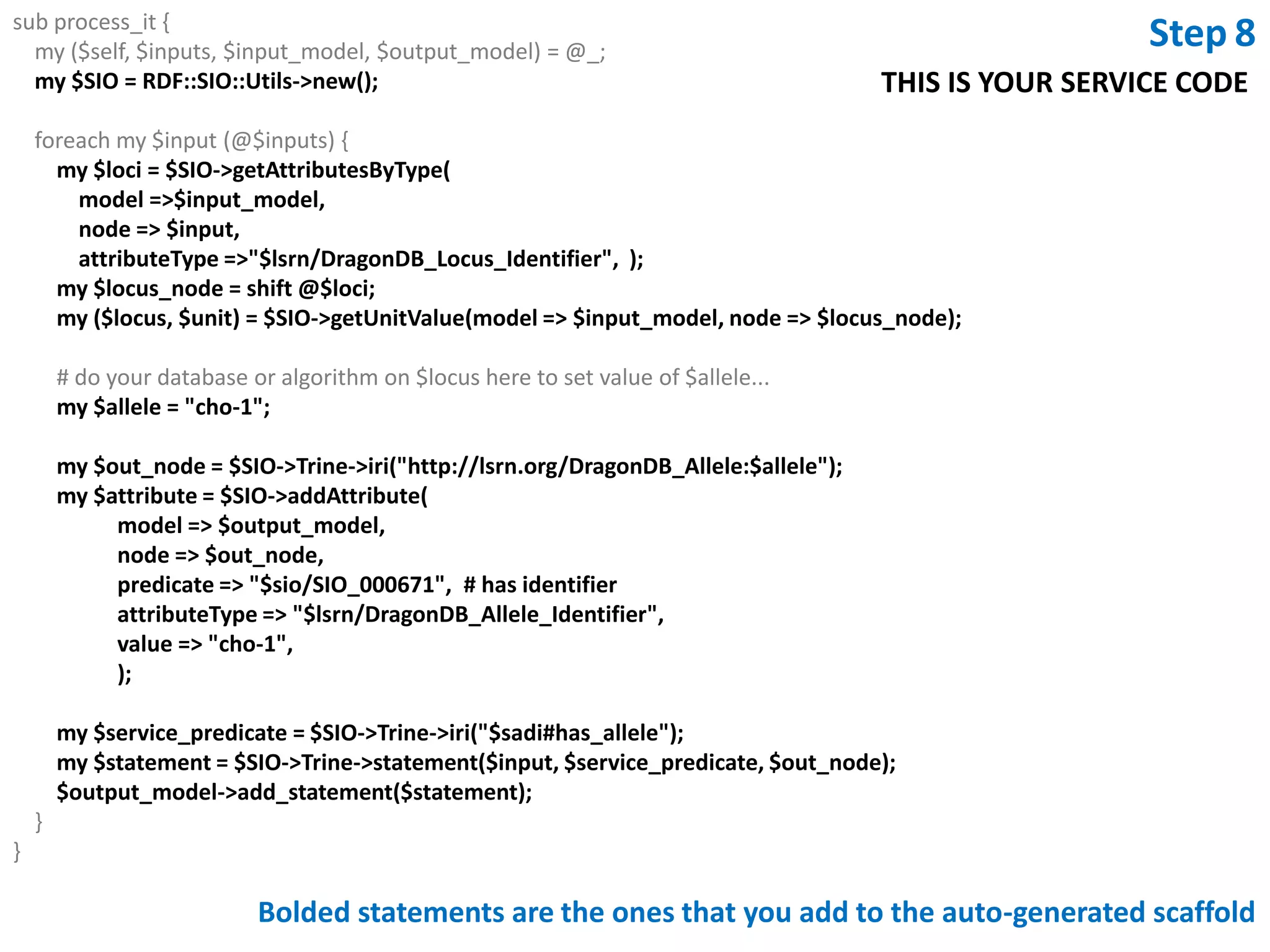
    sub process_it { my ($self, $inputs, $input_model, $output_model) = @_; my $SIO = RDF::SIO::Utils->new();foreach my $input (@$inputs) { my $loci = $SIO->getAttributesByType( model =>$input_model, node => $input,attributeType =>"$lsrn/DragonDB_Locus_Identifier", ); my $locus_node = shift @$loci; my ($locus, $unit) = $SIO->getUnitValue(model => $input_model, node => $locus_node); # do your database or algorithm on $locus here to set value of $allele... my $allele = "cho-1"; my $out_node = $SIO->Trine->iri("http://lsrn.org/DragonDB_Allele:$allele"); my $attribute = $SIO->addAttribute( model => $output_model, node => $out_node, predicate => "$sio/SIO_000671", # has identifierattributeType => "$lsrn/DragonDB_Allele_Identifier", value => "cho-1", ); my $service_predicate = $SIO->Trine->iri("$sadi#has_allele"); my $statement = $SIO->Trine->statement($input, $service_predicate, $out_node); $output_model->add_statement($statement); }}Step8THIS IS YOUR SERVICE CODEBolded statements are the ones that you add to the auto-generated scaffold
  • 34.
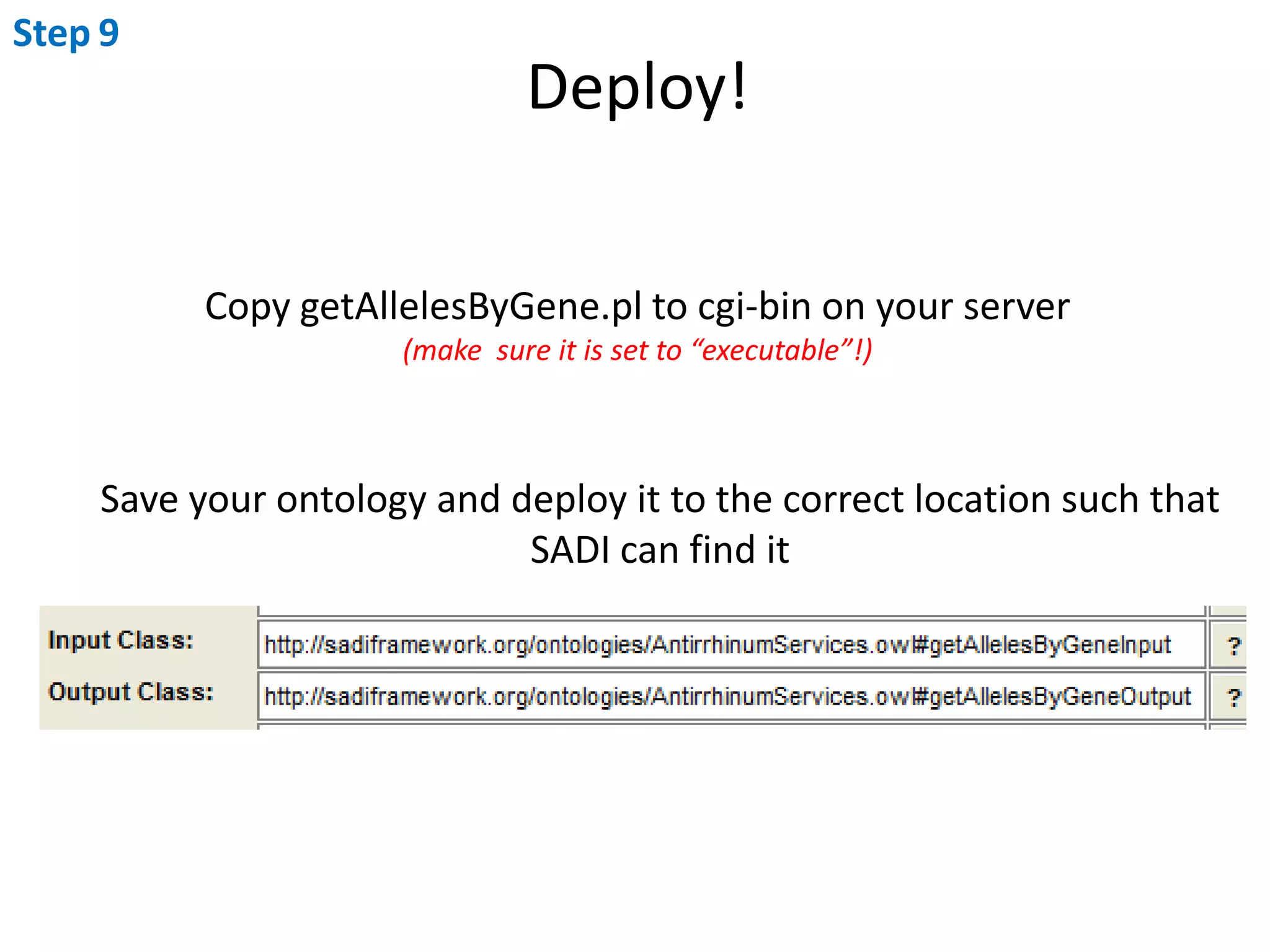
    Step9Deploy! CopygetAllelesByGene.pl to cgi-bin on your server (make sure it is set to “executable”!)Save your ontology and deploy it to the correct location such thatSADI can find it
  • 35.
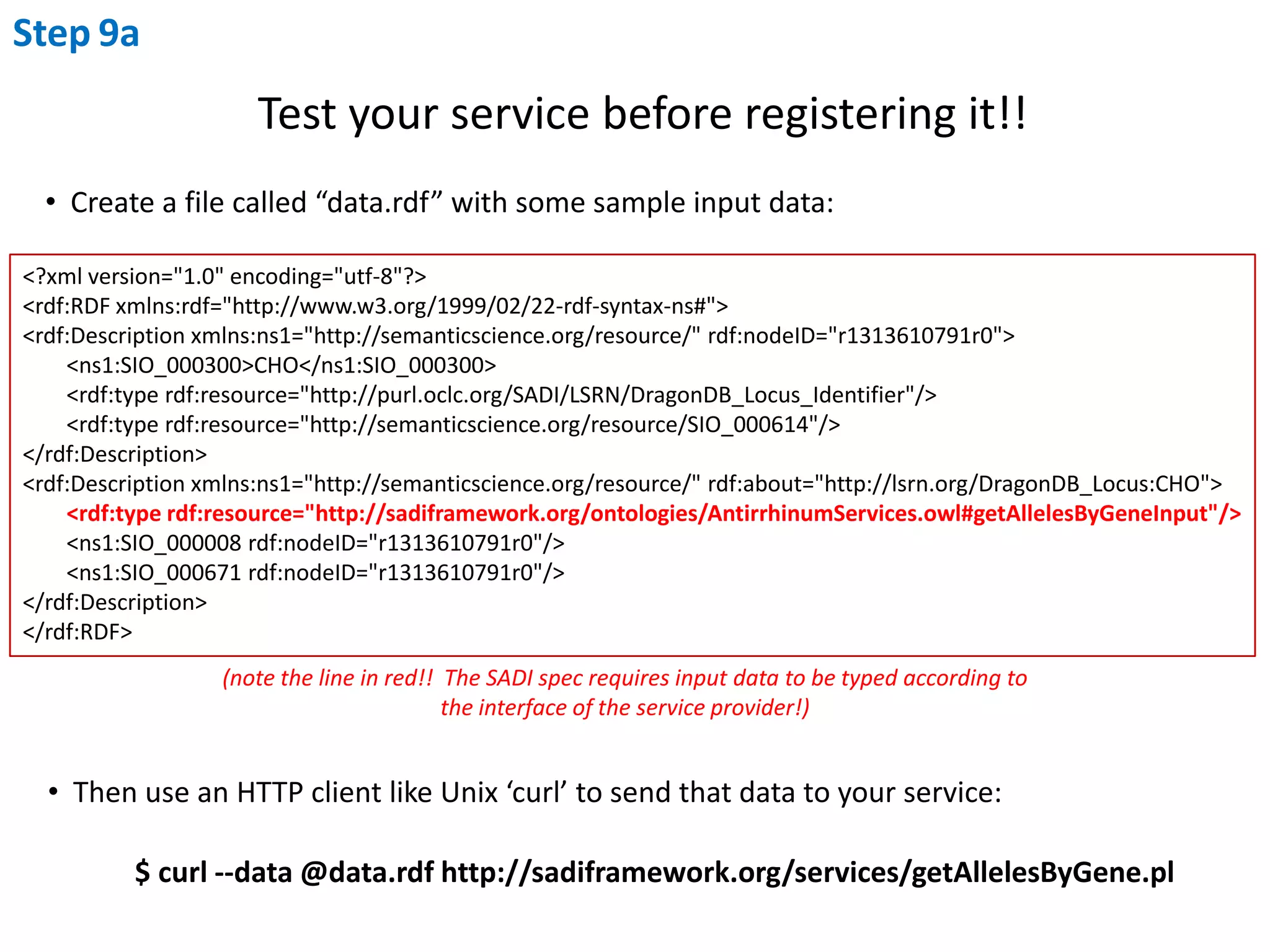
    Step9aTest your servicebefore registering it!! Create a file called “data.rdf” with some sample input data:<?xml version="1.0" encoding="utf-8"?><rdf:RDFxmlns:rdf="http://www.w3.org/1999/02/22-rdf-syntax-ns#"><rdf:Description xmlns:ns1="http://semanticscience.org/resource/" rdf:nodeID="r1313610791r0"> <ns1:SIO_000300>CHO</ns1:SIO_000300> <rdf:typerdf:resource="http://purl.oclc.org/SADI/LSRN/DragonDB_Locus_Identifier"/> <rdf:typerdf:resource="http://semanticscience.org/resource/SIO_000614"/></rdf:Description><rdf:Description xmlns:ns1="http://semanticscience.org/resource/" rdf:about="http://lsrn.org/DragonDB_Locus:CHO"> <rdf:typerdf:resource="http://sadiframework.org/ontologies/AntirrhinumServices.owl#getAllelesByGeneInput"/> <ns1:SIO_000008 rdf:nodeID="r1313610791r0"/> <ns1:SIO_000671 rdf:nodeID="r1313610791r0"/></rdf:Description></rdf:RDF>(note the line in red!! The SADI spec requires input data to be typed according to the interface of the service provider!) Then use an HTTP client like Unix ‘curl’ to send that data to your service: $ curl --data @data.rdf http://sadiframework.org/services/getAllelesByGene.pl
  • 36.
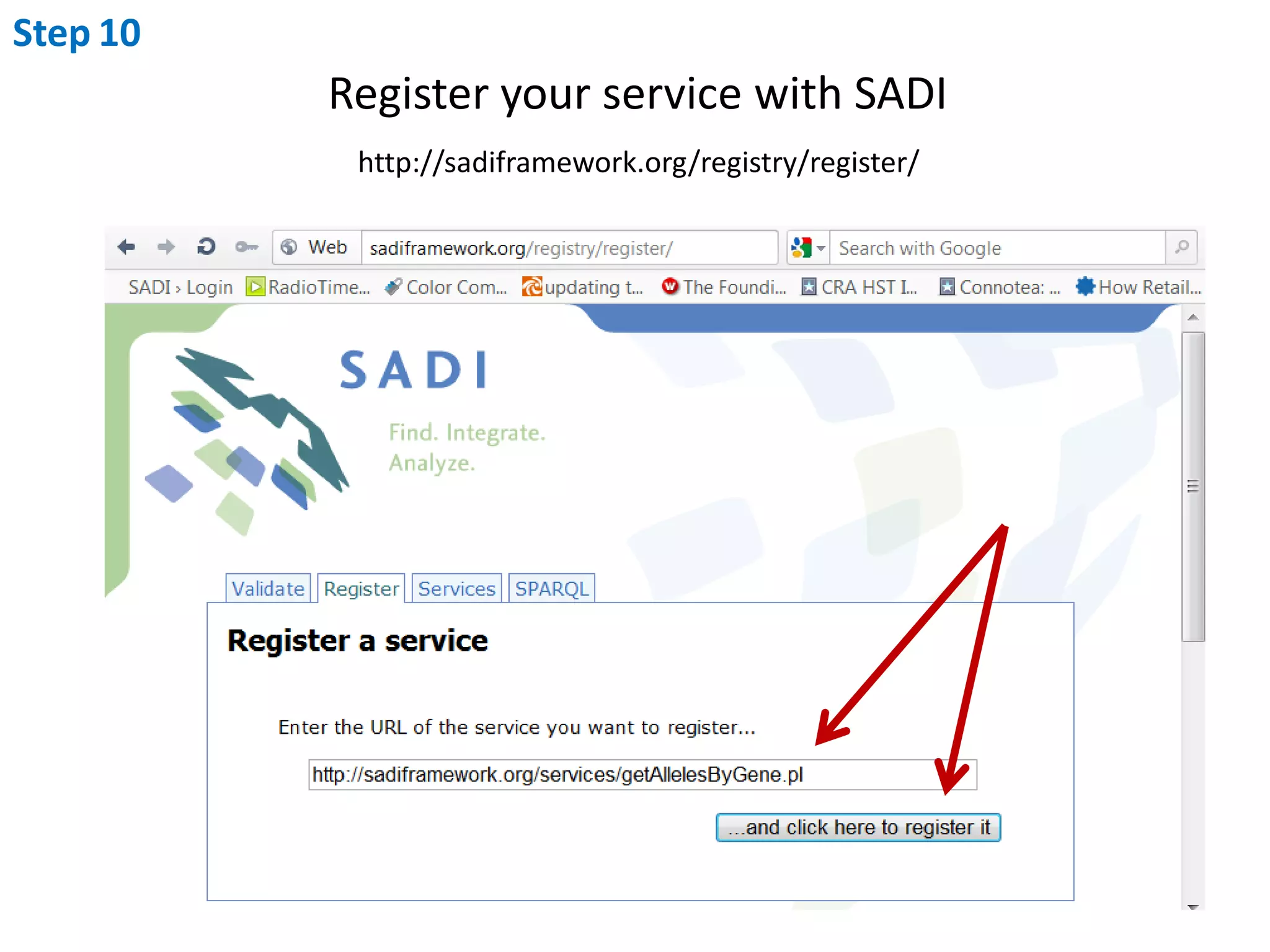
    Step10Register your servicewith SADIhttp://sadiframework.org/registry/register/
  • 37.
    Congratulations! Breakout the champagne!