Introduction to S1000D
Joe Gelb
President, Suite Solutions
© 2008 Suite Solutions
Introduction to S1000D
Main Training Topics
 What is SGML? What is XML?
 What is S1000D?
 Why S1000D?
 Purpose
 Benefits
 Key Differences Between iSpec2200 and
S1000D
 Overview of Chapters of the Specification
 Samples
© 2008 Suite Solutions
What is SGML?
Standard Generalized Markup Language
 Standard–Explicit, consistent, non-proprietary
 Generalized–Extensible, not limited to a
particular implementation or application
 Markup–“Tags” embedded within documents
 Language–defines content (elements,
attributes) and their allowable usage
© 2008 Suite Solutions
What is SGML?
Brief History
 First version was GML in 1984
 SGML became an ISO Standard in 1986
 HTML was first used in 1994
(HyperText Markup Language)
 XML was recommended as an W3C
standard in 1999
(eXtensible Markup Language )
© 2008 Suite Solutions
XML vs. SGML
 SGML and related standards complex
 Contains features rarely used
 Difficult and expensive to implement
 XML is a subset of SGML
 XML is simpler yet offers most of the power
of SGML
 Easier (and less expensive) to process
 About 90% of all SGML applications can
easily transition to XML
© 2008 Suite Solutions
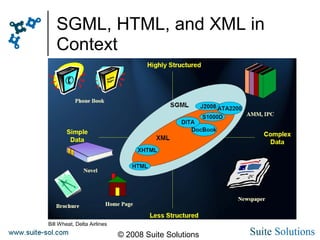
SGML, HTML, and XML in
Context
Bill Wheat, Delta Airlines
© 2008 Suite Solutions
Why XML?
 Helps us to better manage content
 Separates the formatting from the content
 Separates the structure from the content
 Separates the application from the
content
 You and your content are independent of
any vendor or application
 No more expensive conversions
 World of standard tools available for use
© 2008 Suite Solutions
Why XML?
 Allows content to be managed by
computers based on their hierarchical
structure
 Allows authors to focus on writing, not
formatting
 Permits multiple output formats to be
applied to the same content, automatically
 Allows you to add new outputs without
affecting the authoring process
 Once an XML system is up and running,
per-page costs can drop dramatically
© 2008 Suite Solutions
Introduction to XML
What is “markup”?
 Describes the content in the document
 Uses elements and attributes to do this
 Elements describe structure
<procedure> <step> <figure> <part>
 Attributes give more information about the
content
<figure chapter=“52” section=“20”>
 Each element has an open and close tag
<caution>Stay awake!</caution>
© 2008 Suite Solutions
Introduction to XML
Which markup can you use?
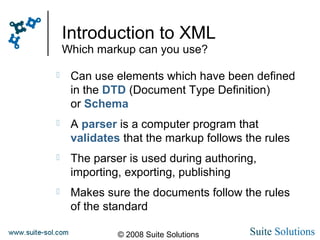
 Can use elements which have been defined
in the DTD (Document Type Definition)
or Schema
 A parser is a computer program that
validates that the markup follows the rules
 The parser is used during authoring,
importing, exporting, publishing
 Makes sure the documents follow the rules
of the standard
© 2008 Suite Solutions
Introduction to XML
Which markup can you use?
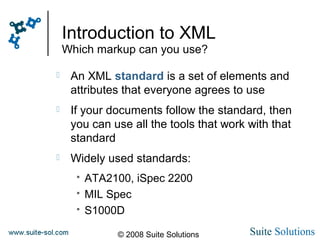
 An XML standard is a set of elements and
attributes that everyone agrees to use
 If your documents follow the standard, then
you can use all the tools that work with that
standard
 Widely used standards:
 ATA2100, iSpec 2200
 MIL Spec
 S1000D
© 2008 Suite Solutions
Introduction to XML
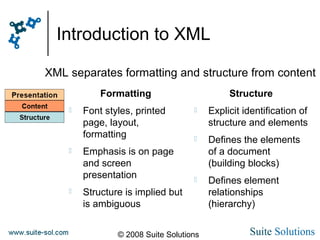
Formatting
 Font styles, printed
page, layout,
formatting
 Emphasis is on page
and screen
presentation
 Structure is implied but
is ambiguous
Structure
 Explicit identification of
structure and elements
 Defines the elements
of a document
(building blocks)
 Defines element
relationships
(hierarchy)
XML separates formatting and structure from content
© 2008 Suite Solutions
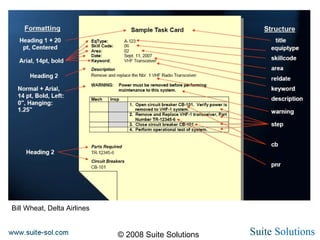
Bill Wheat, Delta Airlines
© 2008 Suite Solutions
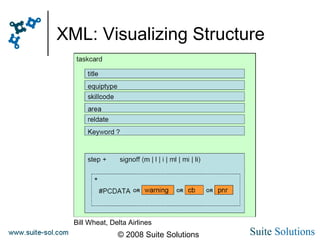
XML: Visualizing Structure
Bill Wheat, Delta Airlines
© 2008 Suite Solutions
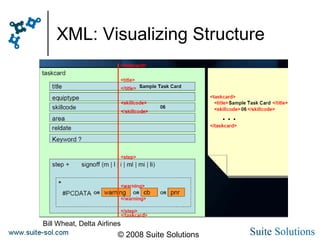
XML: Visualizing Structure
Bill Wheat, Delta Airlines
© 2008 Suite Solutions
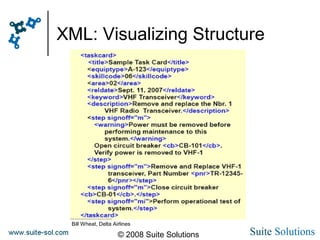
XML: Visualizing Structure
Bill Wheat, Delta Airlines
© 2008 Suite Solutions
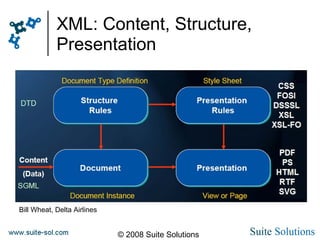
XML: Content, Structure,
Presentation
Bill Wheat, Delta Airlines
© 2008 Suite Solutions
Introduction to S1000D
Main Training Topics
 What is SGML? What is XML?
 What is S1000D?
 Why S1000D?
 Purpose
 Benefits
 Key Differences Between iSpec2200 and
S1000D
 Overview of Chapters of the Specification
 Samples
© 2008 Suite Solutions
What is S1000D?
Spec 1000D
 SGML/XML standard developed by the
Aerospace and Defense Industries
Association of Europe (ASD)
 Originally designed for aircraft, but later
modified for use with land, sea, and
commercial equipment
 Currently maintained by the Technical
Publications Specification Maintenance Group
(TPSMG)
 TPSMG represented by ASD, ATA, AIA and
other industry representatives
© 2008 Suite Solutions
Why S1000D?
Key Goals and Benefits
 Ability to re-use data
 Data modules created and stored in
database (CSDB)
 Re-use same data modules in different
projects and publications
 Reduces maintenance costs for technical
information
 Generate many types of output from the same
source: ensures consistency of data
 Page oriented, IETP
 Allow sub-sets of information to be generated
to meet specific user needs
© 2008 Suite Solutions
Why S1000D?
Key Goals and Benefits
 Facilitates complete configuration control
 Facilitate transfer of information and electronic
output between different IT systems
 Provides a single standard to support
communications and data exchange among
all participants in a given project
 Remain non-proprietary and allow neutral
delivery of data and management of data
© 2008 Suite Solutions
Why S1000D?
Key Goals and Benefits
 Active standards body
 Keeps up with evolving technologies
 Keeps an eye on backward compatibility
Therefore:
 Ensures that the standard stays up to date
 Protects your existing data investment.
© 2008 Suite Solutions
Why S1000D?
Benefits Realization Review (2003) [Stilo]
Modernization of Content for 20 Main Equipment Systems
 Information normalization reduced content by between
40% and 60%
 Eliminated over 100,000 annual translated change
packages
 Savings of over $75,000,000 per year
 Streamlined change processing with smaller work
packages
 Savings of over $15,000,000 per year
© 2008 Suite Solutions
Why S1000D?
Benefits Realization Review (2003) [Stilo]
Modernization of Content for 20 Main Equipment Systems
 Reductions in reliance on hard copies by introducing IETMs
 50% reduction in distributed hard copy change pages
 Savings of over $10,000,000 per year (printing & handling)
 Additional savings and benefits
 Improved equipment availability, fewer maintenance errors,
 better maintainer time utilization, reduction in false replacements,
 enhanced information quality, dramatically shortened change
 dissemination time
© 2008 Suite Solutions
Who is using S1000D?
Military projects
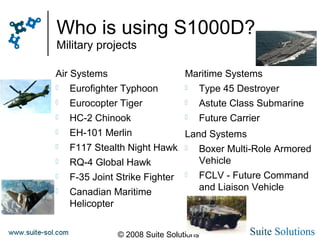
Air Systems
 Eurofighter Typhoon
 Eurocopter Tiger
 HC-2 Chinook
 EH-101 Merlin
 F117 Stealth Night Hawk
 RQ-4 Global Hawk
 F-35 Joint Strike Fighter
 Canadian Maritime
Helicopter
Maritime Systems
 Type 45 Destroyer
 Astute Class Submarine
 Future Carrier
Land Systems
 Boxer Multi-Role Armored
Vehicle
 FCLV - Future Command
and Liaison Vehicle
© 2008 Suite Solutions
Who is using S1000D?
Civilian Deployments Increasing
© 2008 Suite Solutions
What is S1000D?
Modular Architecture
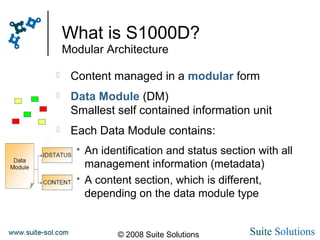
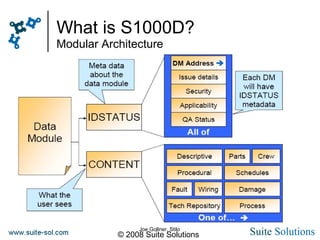
 Content managed in a modular form
 Data Module (DM)
Smallest self contained information unit
 Each Data Module contains:
 An identification and status section with all
management information (metadata)
 A content section, which is different,
depending on the data module type
© 2008 Suite Solutions
What is S1000D?
Modular Architecture
 Descriptive
 Procedural
 Crew/operator
 Fault information
 Maintenance planning
 Illustrated parts data
 Process
 Wiring data
 Technical repository
 Container
 Applicability cross-
reference table
 Products cross-
reference table
 Conditions cross-
reference table
 Business rules
exchange
Data module types supported include:
© 2008 Suite Solutions
What is S1000D?
Modular Architecture
Joe Gollner, Stilo
© 2008 Suite Solutions
What is S1000D?
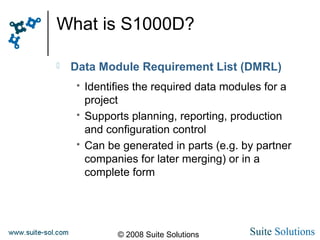
 Data Module Requirement List (DMRL)
 Identifies the required data modules for a
project
 Supports planning, reporting, production
and configuration control
 Can be generated in parts (e.g. by partner
companies for later merging) or in a
complete form
© 2008 Suite Solutions
What is S1000D?
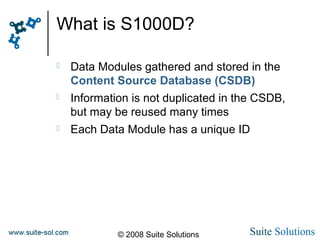
 Data Modules gathered and stored in the
Content Source Database (CSDB)
 Information is not duplicated in the CSDB,
but may be reused many times
 Each Data Module has a unique ID
© 2008 Suite Solutions
What is S1000D?
Publication Management
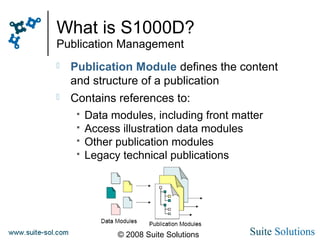
 Publication Module defines the content
and structure of a publication
 Contains references to:
 Data modules, including front matter
 Access illustration data modules
 Other publication modules
 Legacy technical publications
© 2008 Suite Solutions
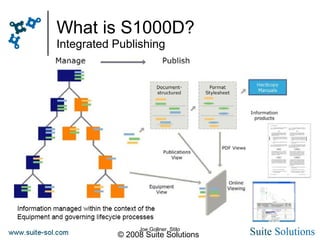
What is S1000D?
Integrated Publishing
Joe Gollner, Stilo
© 2008 Suite Solutions
Introduction to S1000D
Main Training Topics
 What is SGML? What is XML?
 What is S1000D?
 Why S1000D?
 Purpose
 Benefits
 Key Differences Between iSpec2200 and
S1000D
 Overview of Chapters of the Specification
 Samples
© 2008 Suite Solutions
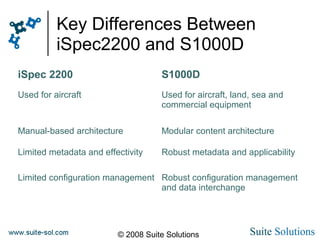
Key Differences Between
iSpec2200 and S1000D
iSpec 2200 S1000D
Used for aircraft Used for aircraft, land, sea and
commercial equipment
Manual-based architecture Modular content architecture
Limited metadata and effectivity Robust metadata and applicability
Limited configuration management Robust configuration management
and data interchange
© 2008 Suite Solutions
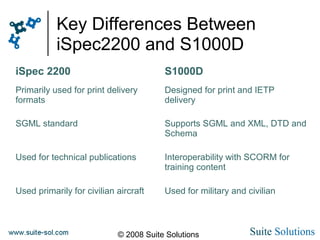
Key Differences Between
iSpec2200 and S1000D
iSpec 2200 S1000D
Primarily used for print delivery
formats
Designed for print and IETP
delivery
SGML standard Supports SGML and XML, DTD and
Schema
Used for technical publications Interoperability with SCORM for
training content
Used primarily for civilian aircraft Used for military and civilian
© 2008 Suite Solutions
Introduction to S1000D
Main Training Topics
 What is SGML? What is XML?
 What is S1000D?
 Why S1000D?
 Purpose
 Benefits
 Key Differences Between iSpec2200 and
S1000D
 Overview of Chapters of the Specification
 Samples
© 2008 Suite Solutions
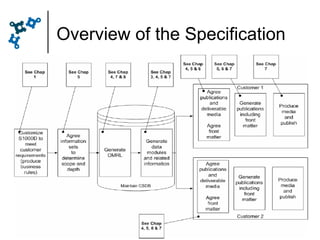
Overview of the Specification
© 2008 Suite Solutions
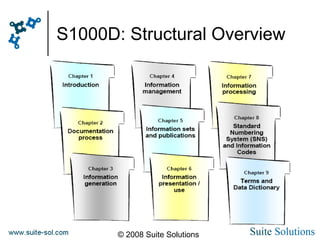
S1000D: Structural Overview
© 2008 Suite Solutions
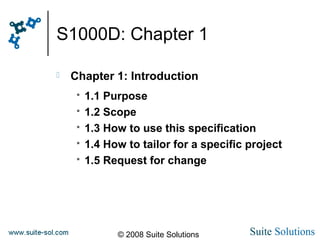
S1000D: Chapter 1
 Chapter 1: Introduction
 1.1 Purpose
 1.2 Scope
 1.3 How to use this specification
 1.4 How to tailor for a specific project
 1.5 Request for change
© 2008 Suite Solutions
S1000D: Chapter 2
 Chapter 2: Documentation process
 2.1 Overview
 2.2 Use of standards
 2.3 Relations to other processes and
 standards
 2.4 Implementation Guide
 2.5 Business Rules
© 2008 Suite Solutions
S1000D: Chapter 3
 Chapter 3: Information Generation
 3.1 Introduction
 3.2 Data modules
 3.3 Information sets
 3.4 Zoning and access
 3.5 Updating data modules
 3.6 Security and data restrictions
 3.7 Quality assurance
 3.8 Disassembly principles
 3.9 Authoring
© 2008 Suite Solutions
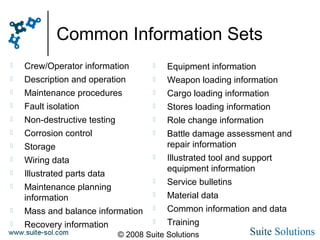
Common Information Sets
 Crew/Operator information
 Description and operation
 Maintenance procedures
 Fault isolation
 Non-destructive testing
 Corrosion control
 Storage
 Wiring data
 Illustrated parts data
 Maintenance planning
information
 Mass and balance information
 Recovery information
 Equipment information
 Weapon loading information
 Cargo loading information
 Stores loading information
 Role change information
 Battle damage assessment and
repair information
 Illustrated tool and support
equipment information
 Service bulletins
 Material data
 Common information and data
 Training
© 2008 Suite Solutions
S1000D: Chapter 4
 Chapter 4: Information Management
 4.2 CSDB
 4.3 Data Module (DM) code - DMC
 4.4 Information Control Number – ICN
 4.5 DM lists (DML)
 4.6 Commenting
 4.7 Version control of DMs
 4.8 Interchange of DMs
 4.9 Publication management
 4.10 Business rules exchange (BREX)
 4.11 Process data module
 4.12 Multiple instances of DMs
 4.13 Optimizing and Reuse
© 2008 Suite Solutions
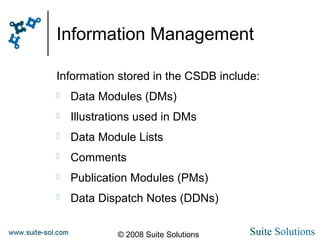
Information Management
Information stored in the CSDB include:
 Data Modules (DMs)
 Illustrations used in DMs
 Data Module Lists
 Comments
 Publication Modules (PMs)
 Data Dispatch Notes (DDNs)
© 2008 Suite Solutions
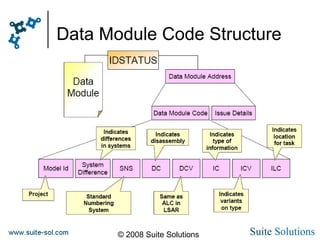
Data Module Code Structure
© 2008 Suite Solutions
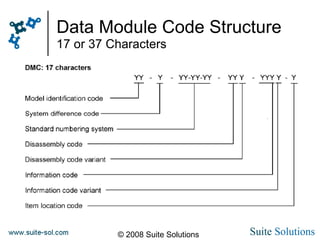
Data Module Code Structure
17 or 37 Characters
© 2008 Suite Solutions
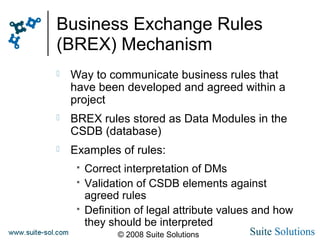
Business Exchange Rules
(BREX) Mechanism
 Way to communicate business rules that
have been developed and agreed within a
project
 BREX rules stored as Data Modules in the
CSDB (database)
 Examples of rules:
 Correct interpretation of DMs
 Validation of CSDB elements against
agreed rules
 Definition of legal attribute values and how
they should be interpreted
© 2008 Suite Solutions
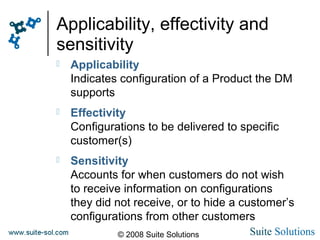
Applicability, effectivity and
sensitivity
 Applicability
Indicates configuration of a Product the DM
supports
 Effectivity
Configurations to be delivered to specific
customer(s)
 Sensitivity
Accounts for when customers do not wish
to receive information on configurations
they did not receive, or to hide a customer’s
configurations from other customers
© 2008 Suite Solutions
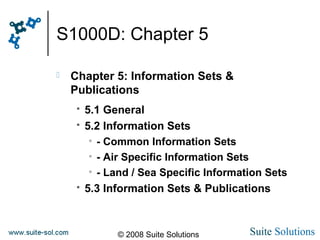
S1000D: Chapter 5
 Chapter 5: Information Sets &
Publications
 5.1 General
 5.2 Information Sets
• - Common Information Sets
• - Air Specific Information Sets
• - Land / Sea Specific Information Sets
 5.3 Information Sets & Publications
© 2008 Suite Solutions
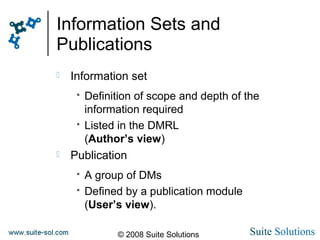
Information Sets and
Publications
 Information set
 Definition of scope and depth of the
information required
 Listed in the DMRL
(Author’s view)
 Publication
 A group of DMs
 Defined by a publication module
(User’s view).
© 2008 Suite Solutions
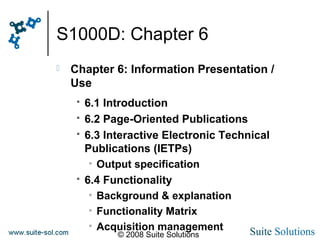
S1000D: Chapter 6
 Chapter 6: Information Presentation /
Use
 6.1 Introduction
 6.2 Page-Oriented Publications
 6.3 Interactive Electronic Technical
Publications (IETPs)
• Output specification
 6.4 Functionality
• Background & explanation
• Functionality Matrix
• Acquisition management
© 2008 Suite Solutions
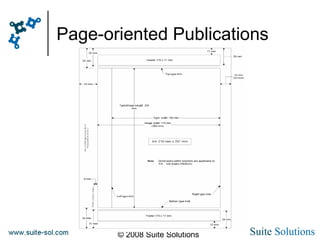
Page-oriented Publications
© 2008 Suite Solutions
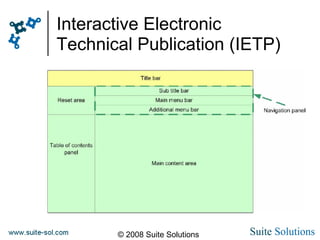
Interactive Electronic
Technical Publication (IETP)
© 2008 Suite Solutions
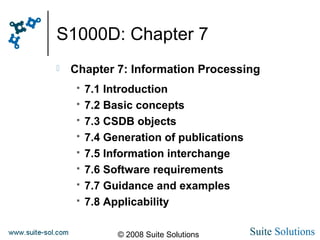
S1000D: Chapter 7
 Chapter 7: Information Processing
 7.1 Introduction
 7.2 Basic concepts
 7.3 CSDB objects
 7.4 Generation of publications
 7.5 Information interchange
 7.6 Software requirements
 7.7 Guidance and examples
 7.8 Applicability
© 2008 Suite Solutions
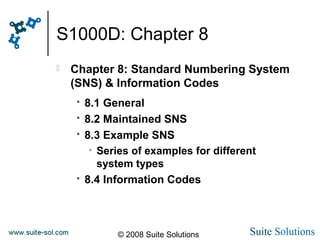
S1000D: Chapter 8
 Chapter 8: Standard Numbering System
(SNS) & Information Codes
 8.1 General
 8.2 Maintained SNS
 8.3 Example SNS
• Series of examples for different
system types
 8.4 Information Codes
© 2008 Suite Solutions
S1000D: Chapter 9
 Chapter 9: Terms & Data Dictionary
 9.1 Introduction
 9.2 Glossary of Terms
 9.3 Data Dictionary
© 2008 Suite Solutions
Introduction to S1000D
Main Training Topics
 What is SGML? What is XML?
 What is S1000D?
 Why S1000D?
 Purpose
 Benefits
 Key Differences Between iSpec2200 and
S1000D
 Overview of Chapters of the Specification
 Samples
© 2008 Suite Solutions
End of Introduction to S1000D

Introduction to S1000D

  • 1.
    Introduction to S1000D JoeGelb President, Suite Solutions
  • 2.
    © 2008 SuiteSolutions Introduction to S1000D Main Training Topics  What is SGML? What is XML?  What is S1000D?  Why S1000D?  Purpose  Benefits  Key Differences Between iSpec2200 and S1000D  Overview of Chapters of the Specification  Samples
  • 3.
    © 2008 SuiteSolutions What is SGML? Standard Generalized Markup Language  Standard–Explicit, consistent, non-proprietary  Generalized–Extensible, not limited to a particular implementation or application  Markup–“Tags” embedded within documents  Language–defines content (elements, attributes) and their allowable usage
  • 4.
    © 2008 SuiteSolutions What is SGML? Brief History  First version was GML in 1984  SGML became an ISO Standard in 1986  HTML was first used in 1994 (HyperText Markup Language)  XML was recommended as an W3C standard in 1999 (eXtensible Markup Language )
  • 5.
    © 2008 SuiteSolutions XML vs. SGML  SGML and related standards complex  Contains features rarely used  Difficult and expensive to implement  XML is a subset of SGML  XML is simpler yet offers most of the power of SGML  Easier (and less expensive) to process  About 90% of all SGML applications can easily transition to XML
  • 6.
    © 2008 SuiteSolutions SGML, HTML, and XML in Context Bill Wheat, Delta Airlines
  • 7.
    © 2008 SuiteSolutions Why XML?  Helps us to better manage content  Separates the formatting from the content  Separates the structure from the content  Separates the application from the content  You and your content are independent of any vendor or application  No more expensive conversions  World of standard tools available for use
  • 8.
    © 2008 SuiteSolutions Why XML?  Allows content to be managed by computers based on their hierarchical structure  Allows authors to focus on writing, not formatting  Permits multiple output formats to be applied to the same content, automatically  Allows you to add new outputs without affecting the authoring process  Once an XML system is up and running, per-page costs can drop dramatically
  • 9.
    © 2008 SuiteSolutions Introduction to XML What is “markup”?  Describes the content in the document  Uses elements and attributes to do this  Elements describe structure <procedure> <step> <figure> <part>  Attributes give more information about the content <figure chapter=“52” section=“20”>  Each element has an open and close tag <caution>Stay awake!</caution>
  • 10.
    © 2008 SuiteSolutions Introduction to XML Which markup can you use?  Can use elements which have been defined in the DTD (Document Type Definition) or Schema  A parser is a computer program that validates that the markup follows the rules  The parser is used during authoring, importing, exporting, publishing  Makes sure the documents follow the rules of the standard
  • 11.
    © 2008 SuiteSolutions Introduction to XML Which markup can you use?  An XML standard is a set of elements and attributes that everyone agrees to use  If your documents follow the standard, then you can use all the tools that work with that standard  Widely used standards:  ATA2100, iSpec 2200  MIL Spec  S1000D
  • 12.
    © 2008 SuiteSolutions Introduction to XML Formatting  Font styles, printed page, layout, formatting  Emphasis is on page and screen presentation  Structure is implied but is ambiguous Structure  Explicit identification of structure and elements  Defines the elements of a document (building blocks)  Defines element relationships (hierarchy) XML separates formatting and structure from content
  • 13.
    © 2008 SuiteSolutions Bill Wheat, Delta Airlines
  • 14.
    © 2008 SuiteSolutions XML: Visualizing Structure Bill Wheat, Delta Airlines
  • 15.
    © 2008 SuiteSolutions XML: Visualizing Structure Bill Wheat, Delta Airlines
  • 16.
    © 2008 SuiteSolutions XML: Visualizing Structure Bill Wheat, Delta Airlines
  • 17.
    © 2008 SuiteSolutions XML: Content, Structure, Presentation Bill Wheat, Delta Airlines
  • 18.
    © 2008 SuiteSolutions Introduction to S1000D Main Training Topics  What is SGML? What is XML?  What is S1000D?  Why S1000D?  Purpose  Benefits  Key Differences Between iSpec2200 and S1000D  Overview of Chapters of the Specification  Samples
  • 19.
    © 2008 SuiteSolutions What is S1000D? Spec 1000D  SGML/XML standard developed by the Aerospace and Defense Industries Association of Europe (ASD)  Originally designed for aircraft, but later modified for use with land, sea, and commercial equipment  Currently maintained by the Technical Publications Specification Maintenance Group (TPSMG)  TPSMG represented by ASD, ATA, AIA and other industry representatives
  • 20.
    © 2008 SuiteSolutions Why S1000D? Key Goals and Benefits  Ability to re-use data  Data modules created and stored in database (CSDB)  Re-use same data modules in different projects and publications  Reduces maintenance costs for technical information  Generate many types of output from the same source: ensures consistency of data  Page oriented, IETP  Allow sub-sets of information to be generated to meet specific user needs
  • 21.
    © 2008 SuiteSolutions Why S1000D? Key Goals and Benefits  Facilitates complete configuration control  Facilitate transfer of information and electronic output between different IT systems  Provides a single standard to support communications and data exchange among all participants in a given project  Remain non-proprietary and allow neutral delivery of data and management of data
  • 22.
    © 2008 SuiteSolutions Why S1000D? Key Goals and Benefits  Active standards body  Keeps up with evolving technologies  Keeps an eye on backward compatibility Therefore:  Ensures that the standard stays up to date  Protects your existing data investment.
  • 23.
    © 2008 SuiteSolutions Why S1000D? Benefits Realization Review (2003) [Stilo] Modernization of Content for 20 Main Equipment Systems  Information normalization reduced content by between 40% and 60%  Eliminated over 100,000 annual translated change packages  Savings of over $75,000,000 per year  Streamlined change processing with smaller work packages  Savings of over $15,000,000 per year
  • 24.
    © 2008 SuiteSolutions Why S1000D? Benefits Realization Review (2003) [Stilo] Modernization of Content for 20 Main Equipment Systems  Reductions in reliance on hard copies by introducing IETMs  50% reduction in distributed hard copy change pages  Savings of over $10,000,000 per year (printing & handling)  Additional savings and benefits  Improved equipment availability, fewer maintenance errors,  better maintainer time utilization, reduction in false replacements,  enhanced information quality, dramatically shortened change  dissemination time
  • 25.
    © 2008 SuiteSolutions Who is using S1000D? Military projects Air Systems  Eurofighter Typhoon  Eurocopter Tiger  HC-2 Chinook  EH-101 Merlin  F117 Stealth Night Hawk  RQ-4 Global Hawk  F-35 Joint Strike Fighter  Canadian Maritime Helicopter Maritime Systems  Type 45 Destroyer  Astute Class Submarine  Future Carrier Land Systems  Boxer Multi-Role Armored Vehicle  FCLV - Future Command and Liaison Vehicle
  • 26.
    © 2008 SuiteSolutions Who is using S1000D? Civilian Deployments Increasing
  • 27.
    © 2008 SuiteSolutions What is S1000D? Modular Architecture  Content managed in a modular form  Data Module (DM) Smallest self contained information unit  Each Data Module contains:  An identification and status section with all management information (metadata)  A content section, which is different, depending on the data module type
  • 28.
    © 2008 SuiteSolutions What is S1000D? Modular Architecture  Descriptive  Procedural  Crew/operator  Fault information  Maintenance planning  Illustrated parts data  Process  Wiring data  Technical repository  Container  Applicability cross- reference table  Products cross- reference table  Conditions cross- reference table  Business rules exchange Data module types supported include:
  • 29.
    © 2008 SuiteSolutions What is S1000D? Modular Architecture Joe Gollner, Stilo
  • 30.
    © 2008 SuiteSolutions What is S1000D?  Data Module Requirement List (DMRL)  Identifies the required data modules for a project  Supports planning, reporting, production and configuration control  Can be generated in parts (e.g. by partner companies for later merging) or in a complete form
  • 31.
    © 2008 SuiteSolutions What is S1000D?  Data Modules gathered and stored in the Content Source Database (CSDB)  Information is not duplicated in the CSDB, but may be reused many times  Each Data Module has a unique ID
  • 32.
    © 2008 SuiteSolutions What is S1000D? Publication Management  Publication Module defines the content and structure of a publication  Contains references to:  Data modules, including front matter  Access illustration data modules  Other publication modules  Legacy technical publications
  • 33.
    © 2008 SuiteSolutions What is S1000D? Integrated Publishing Joe Gollner, Stilo
  • 34.
    © 2008 SuiteSolutions Introduction to S1000D Main Training Topics  What is SGML? What is XML?  What is S1000D?  Why S1000D?  Purpose  Benefits  Key Differences Between iSpec2200 and S1000D  Overview of Chapters of the Specification  Samples
  • 35.
    © 2008 SuiteSolutions Key Differences Between iSpec2200 and S1000D iSpec 2200 S1000D Used for aircraft Used for aircraft, land, sea and commercial equipment Manual-based architecture Modular content architecture Limited metadata and effectivity Robust metadata and applicability Limited configuration management Robust configuration management and data interchange
  • 36.
    © 2008 SuiteSolutions Key Differences Between iSpec2200 and S1000D iSpec 2200 S1000D Primarily used for print delivery formats Designed for print and IETP delivery SGML standard Supports SGML and XML, DTD and Schema Used for technical publications Interoperability with SCORM for training content Used primarily for civilian aircraft Used for military and civilian
  • 37.
    © 2008 SuiteSolutions Introduction to S1000D Main Training Topics  What is SGML? What is XML?  What is S1000D?  Why S1000D?  Purpose  Benefits  Key Differences Between iSpec2200 and S1000D  Overview of Chapters of the Specification  Samples
  • 38.
    © 2008 SuiteSolutions Overview of the Specification
  • 39.
    © 2008 SuiteSolutions S1000D: Structural Overview
  • 40.
    © 2008 SuiteSolutions S1000D: Chapter 1  Chapter 1: Introduction  1.1 Purpose  1.2 Scope  1.3 How to use this specification  1.4 How to tailor for a specific project  1.5 Request for change
  • 41.
    © 2008 SuiteSolutions S1000D: Chapter 2  Chapter 2: Documentation process  2.1 Overview  2.2 Use of standards  2.3 Relations to other processes and  standards  2.4 Implementation Guide  2.5 Business Rules
  • 42.
    © 2008 SuiteSolutions S1000D: Chapter 3  Chapter 3: Information Generation  3.1 Introduction  3.2 Data modules  3.3 Information sets  3.4 Zoning and access  3.5 Updating data modules  3.6 Security and data restrictions  3.7 Quality assurance  3.8 Disassembly principles  3.9 Authoring
  • 43.
    © 2008 SuiteSolutions Common Information Sets  Crew/Operator information  Description and operation  Maintenance procedures  Fault isolation  Non-destructive testing  Corrosion control  Storage  Wiring data  Illustrated parts data  Maintenance planning information  Mass and balance information  Recovery information  Equipment information  Weapon loading information  Cargo loading information  Stores loading information  Role change information  Battle damage assessment and repair information  Illustrated tool and support equipment information  Service bulletins  Material data  Common information and data  Training
  • 44.
    © 2008 SuiteSolutions S1000D: Chapter 4  Chapter 4: Information Management  4.2 CSDB  4.3 Data Module (DM) code - DMC  4.4 Information Control Number – ICN  4.5 DM lists (DML)  4.6 Commenting  4.7 Version control of DMs  4.8 Interchange of DMs  4.9 Publication management  4.10 Business rules exchange (BREX)  4.11 Process data module  4.12 Multiple instances of DMs  4.13 Optimizing and Reuse
  • 45.
    © 2008 SuiteSolutions Information Management Information stored in the CSDB include:  Data Modules (DMs)  Illustrations used in DMs  Data Module Lists  Comments  Publication Modules (PMs)  Data Dispatch Notes (DDNs)
  • 46.
    © 2008 SuiteSolutions Data Module Code Structure
  • 47.
    © 2008 SuiteSolutions Data Module Code Structure 17 or 37 Characters
  • 48.
    © 2008 SuiteSolutions Business Exchange Rules (BREX) Mechanism  Way to communicate business rules that have been developed and agreed within a project  BREX rules stored as Data Modules in the CSDB (database)  Examples of rules:  Correct interpretation of DMs  Validation of CSDB elements against agreed rules  Definition of legal attribute values and how they should be interpreted
  • 49.
    © 2008 SuiteSolutions Applicability, effectivity and sensitivity  Applicability Indicates configuration of a Product the DM supports  Effectivity Configurations to be delivered to specific customer(s)  Sensitivity Accounts for when customers do not wish to receive information on configurations they did not receive, or to hide a customer’s configurations from other customers
  • 50.
    © 2008 SuiteSolutions S1000D: Chapter 5  Chapter 5: Information Sets & Publications  5.1 General  5.2 Information Sets • - Common Information Sets • - Air Specific Information Sets • - Land / Sea Specific Information Sets  5.3 Information Sets & Publications
  • 51.
    © 2008 SuiteSolutions Information Sets and Publications  Information set  Definition of scope and depth of the information required  Listed in the DMRL (Author’s view)  Publication  A group of DMs  Defined by a publication module (User’s view).
  • 52.
    © 2008 SuiteSolutions S1000D: Chapter 6  Chapter 6: Information Presentation / Use  6.1 Introduction  6.2 Page-Oriented Publications  6.3 Interactive Electronic Technical Publications (IETPs) • Output specification  6.4 Functionality • Background & explanation • Functionality Matrix • Acquisition management
  • 53.
    © 2008 SuiteSolutions Page-oriented Publications
  • 54.
    © 2008 SuiteSolutions Interactive Electronic Technical Publication (IETP)
  • 55.
    © 2008 SuiteSolutions S1000D: Chapter 7  Chapter 7: Information Processing  7.1 Introduction  7.2 Basic concepts  7.3 CSDB objects  7.4 Generation of publications  7.5 Information interchange  7.6 Software requirements  7.7 Guidance and examples  7.8 Applicability
  • 56.
    © 2008 SuiteSolutions S1000D: Chapter 8  Chapter 8: Standard Numbering System (SNS) & Information Codes  8.1 General  8.2 Maintained SNS  8.3 Example SNS • Series of examples for different system types  8.4 Information Codes
  • 57.
    © 2008 SuiteSolutions S1000D: Chapter 9  Chapter 9: Terms & Data Dictionary  9.1 Introduction  9.2 Glossary of Terms  9.3 Data Dictionary
  • 58.
    © 2008 SuiteSolutions Introduction to S1000D Main Training Topics  What is SGML? What is XML?  What is S1000D?  Why S1000D?  Purpose  Benefits  Key Differences Between iSpec2200 and S1000D  Overview of Chapters of the Specification  Samples
  • 59.
    © 2008 SuiteSolutions End of Introduction to S1000D