Localizing Style Sheets for HTML Outputs  Aliza Merzel, Suite Solutions
Who are we? Our Mission To increase our customers’ profitability by significantly improving the efficiency of their  information development and delivery processes. Qualitative Advantage Content Lifecycle Implementation (CLI) is Suite Solutions’  comprehensive approach – from concept to publication – to maximizing the value of your information assets. Our professionals are with you at every phase, determining, recommending and implementing the most cost-effective, flexible and long term solution for your business.
Clients and Partners Private and Confidential Suite Solutions©2009
Who Am I? Background in Computer Science Experience in several document technologies over the past decade+ Web applications Content management systems publishing and document conversion technologies Member of Suite Solutions team since its inception PDF and HTML style sheet projects FO plug-in support for PDF output Database development Ditaval utility Customize Eclipse Infocenter Framework
Localizing Style Sheets for HTML Outputs  Common Problems and Solutions Special Ant Parameters for Localization Special Issues with CHM
Localize strings Problem: I have new auto-generated text ath the OT did translate. Or I have to translate to a language that isn’t in the OT Solution: Files for auto-generated text are found in c:\ditaot\xsl\common Toolkit supports a large list of built-in languages and locales Files are named: strings-<language>-<locale>.xml Example: strings-en-us.xml Strings.xml maps locales to the correct strings file. A new mapping file can be specified in allstrings.xml using the dita.xsl.strings extension point in a plug-in Changes made to the strings files that come with the OT will be overwritten during a toolkit upgrade, so use plugins to add your own
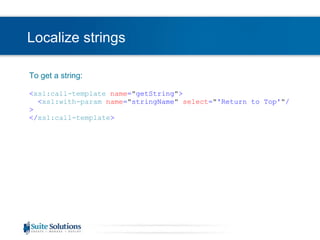
Localize strings To get a string: < xsl:call-template   name = &quot; getString &quot; > < xsl:with-param   name = &quot; stringName &quot;   select = &quot; 'Return to Top' &quot; /> </ xsl:call-template >
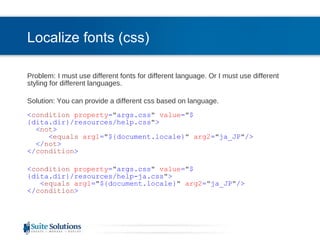
Localize fonts (css) Problem:   I must use different fonts for different language. Or I must use different styling for different languages. Solution: You can provide a different css based on language. < condition   property = &quot; args.css &quot;   value = &quot; ${dita.dir}/resources/help.css &quot; > < not > < equals   arg1 = &quot; ${document.locale} &quot;   arg2 = &quot; ja_JP &quot; /> </ not > </ condition > < condition   property = &quot; args.css &quot;   value = &quot; ${dita.dir}/resources/help-ja.css &quot; > < equals   arg1 = &quot; ${document.locale} &quot;   arg2 = &quot; ja_JP &quot; /> </ condition >
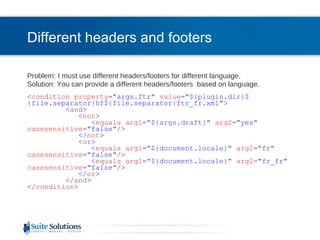
Different headers and footers Problem:   I must use different headers/footers for different language.  Solution: You can provide a different headers/footers  based on language. < condition   property = &quot; args.ftr &quot;   value = &quot; ${plugin.dir}${file.separator}hf${file.separator}ftr_fr.xml &quot; > < and > < not > < equals   arg1 = &quot; ${args.draft} &quot;   arg2 = &quot; yes &quot;   casesensitive = &quot; false &quot; /> </ not > < or > < equals   arg1 = &quot; ${document.locale} &quot;   arg2 = &quot; fr &quot;   casesensitive = &quot; false &quot; /> < equals   arg1 = &quot; ${document.locale} &quot;   arg2 = &quot; fr_fr &quot;   casesensitive = &quot; false &quot; /> </ or > </ and > </ condition >
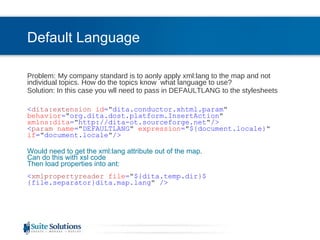
Default Language Problem:   My company standard is to aonly apply xml:lang to the map and not individual topics. How do the topics know  what language to use?  Solution: In this case you wll need to pass in DEFAULTLANG to the stylesheets < dita:extension   id = &quot; dita.conductor.xhtml.param &quot;   behavior = &quot; org.dita.dost.platform.InsertAction &quot;   xmlns:dita = &quot; http://dita-ot.sourceforge.net &quot; /> < param   name = &quot; DEFAULTLANG &quot;   expression = &quot; ${document.locale} &quot;   if = &quot; document.locale &quot; /> Would need to get the xml:lang attribute out of the map. Can do this with xsl code  Then load properties into ant: < xmlpropertyreader   file = &quot; ${dita.temp.dir}${file.separator}dita.map.lang &quot;  />
Special XSL Processing Problem:   My company requires extra characters before/after certain elements. Solution: During processing for that element, test for language < span   class = &quot; uicontrol &quot; > < xsl:if   test = &quot; starts-with($DEFAULTLANG,'ja') &quot; > < xsl:attribute   name = &quot; style &quot; > < xsl:text > font-weight:normal </ xsl:text >   </ xsl:attribute > < xsl:text > [ </ xsl:text > </ xsl:if >   < xsl:apply-templates  /> < xsl:if   test = &quot; starts-with($DEFAULTLANG,'ja') &quot; > < xsl:text > ] </ xsl:text > </ xsl:if > </ span >
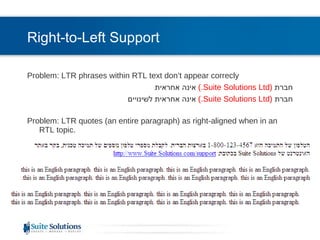
Right-to-Left Support Problem: LTR phrases within RTL text don’t appear correcly חברת  ( Suite Solutions Ltd .)   אינה אחראית   חברת   (Suite Solutions Ltd.)   אינה אחראית לשינויים   Problem: LTR quotes (an entire paragraph) as right-aligned when in an RTL topic.
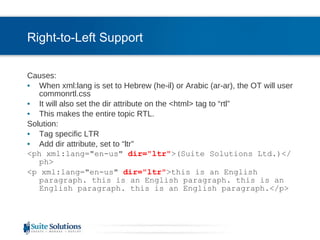
Right-to-Left Support Causes: When xml:lang is set to Hebrew (he-il) or Arabic (ar-ar), the OT will user commonrtl.css It will also set the dir attribute on the <html> tag to “rtl” This makes the entire topic RTL. Solution: Tag specific LTR  Add dir attribute, set to “ltr” <ph xml:lang=&quot;en-us&quot;  dir=&quot;ltr&quot; >(Suite Solutions Ltd.)</ph> <p xml:lang=&quot;en-us&quot;  dir=&quot;ltr&quot; >this is an English paragraph. this is an English paragraph. this is an English paragraph. this is an English paragraph.</p>
Localizing Style Sheets for HTML Outputs  Common Problems and Solutions Special Ant Parameters for Localization Special Issues with CHM
Ant parameters - EclipseHelp EclipseHelp: args.dita.locale  - Locale used for sorting indexterms. If no locale is specified, the first occurrence of &quot;xml-lang&quot; is used as the default locale. args.eclipsehelp.language  – for fragments args.eclipsehelp.country  – for fragments Based on browser language, the interface of the Infocenter will be translated and the content shown will be in the correct langauge. You need to set up the files in the correct languages. Translated content is called a “fragment” in Eclipse terminology. This is set up by language code and then country code.
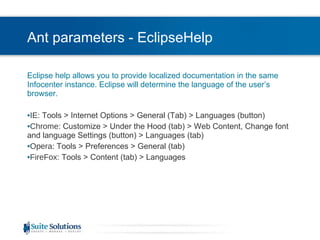
Ant parameters - EclipseHelp Eclipse help allows you to provide localized documentation in the same Infocenter instance. Eclipse will determine the language of the user’s browser.  IE : Tools > Internet Options > General (Tab) > Languages (button) Chrome : Customize > Under the Hood (tab) > Web Content, Change font and language Settings (button) > Languages (tab) Opera : Tools > Preferences > General (tab) FireFox : Tools > Content (tab) > Languages
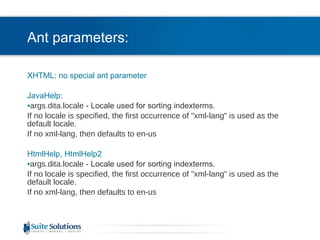
Ant parameters: XHTML: no special ant parameter JavaHelp: args.dita.locale  - Locale used for sorting indexterms. If no locale is specified, the first occurrence of &quot;xml-lang&quot; is used as the default locale.  If no xml-lang, then defaults to en-us HtmlHelp, HtmlHelp2 args.dita.locale  - Locale used for sorting indexterms. If no locale is specified, the first occurrence of &quot;xml-lang&quot; is used as the default locale.  If no xml-lang, then defaults to en-us
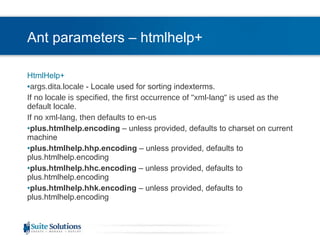
Ant parameters – htmlhelp+ HtmlHelp+ args.dita.locale  - Locale used for sorting indexterms. If no locale is specified, the first occurrence of &quot;xml-lang&quot; is used as the default locale.  If no xml-lang, then defaults to en-us plus.htmlhelp.encoding  – unless provided, defaults to charset on current machine plus.htmlhelp.hhp.encoding  – unless provided, defaults to plus.htmlhelp.encoding plus.htmlhelp.hhc.encoding  – unless provided, defaults to plus.htmlhelp.encoding plus.htmlhelp.hhk.encoding  – unless provided, defaults to plus.htmlhelp.encoding
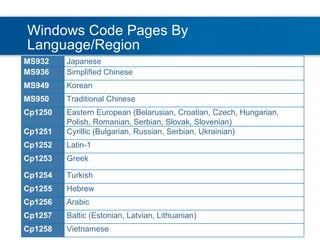
Windows Code Pages By Language/Region MS932 Japanese MS936 Simplified Chinese MS949 Korean MS950 Traditional Chinese Cp1250 Eastern European (Belarusian, Croatian, Czech, Hungarian, Polish, Romanian, Serbian, Slovak, Slovenian) Cp1251 Cyrillic (Bulgarian, Russian, Serbian, Ukrainian) Cp1252 Latin-1 Cp1253 Greek Cp1254 Turkish Cp1255 Hebrew Cp1256 Arabic Cp1257 Baltic (Estonian, Latvian, Lithuanian) Cp1258 Vietnamese
Localizing Style Sheets for HTML Outputs  Common Problems and Solutions Special Ant Parameters for Localization Special Issues with CHM
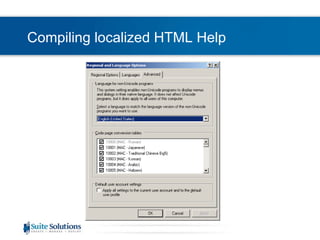
Compiling localized HTML Help HtmlHelp (CHM) is an ANSI based program, not Unicode. All files (html, hhc, hhp, hhk) must be in the correct codepage Html Help Compiler must be run under the correct ANSI Codepage. This is done through Regional Settings:
Compiling localized HTML Help
Compiling localized HTML Help Problem:  This can be cumbersome if you are compiling multiple help files in multiple languages. This can be near impossible if you are compiling off a file server or from a CMS. Solution: There is a program SBAppLocale.exe, available from  http://www.steelbytes.com . This is a command line clone of Microsoft AppLocale The command line would need to be: SBAppLocale.exe [codepage] &quot;[path to HTMLHelp Compiler]&quot; &quot;[path to hhp file]&quot;
Localizing Style Sheets for HTML Outputs  Common Problems and Solutions Special Ant Parameters for Localization Special Issues with CHM
 
End of Localizing Style Sheets for HTML Outputs   Be in touch! Aliza Merzel [email_address] Let us know how we can help you further… One-on-one support and training CMS

LocalizingStyleSheetsForHTMLOutputs

  • 1.
    Localizing Style Sheetsfor HTML Outputs Aliza Merzel, Suite Solutions
  • 2.
    Who are we?Our Mission To increase our customers’ profitability by significantly improving the efficiency of their information development and delivery processes. Qualitative Advantage Content Lifecycle Implementation (CLI) is Suite Solutions’ comprehensive approach – from concept to publication – to maximizing the value of your information assets. Our professionals are with you at every phase, determining, recommending and implementing the most cost-effective, flexible and long term solution for your business.
  • 3.
    Clients and PartnersPrivate and Confidential Suite Solutions©2009
  • 4.
    Who Am I?Background in Computer Science Experience in several document technologies over the past decade+ Web applications Content management systems publishing and document conversion technologies Member of Suite Solutions team since its inception PDF and HTML style sheet projects FO plug-in support for PDF output Database development Ditaval utility Customize Eclipse Infocenter Framework
  • 5.
    Localizing Style Sheetsfor HTML Outputs Common Problems and Solutions Special Ant Parameters for Localization Special Issues with CHM
  • 6.
    Localize strings Problem:I have new auto-generated text ath the OT did translate. Or I have to translate to a language that isn’t in the OT Solution: Files for auto-generated text are found in c:\ditaot\xsl\common Toolkit supports a large list of built-in languages and locales Files are named: strings-<language>-<locale>.xml Example: strings-en-us.xml Strings.xml maps locales to the correct strings file. A new mapping file can be specified in allstrings.xml using the dita.xsl.strings extension point in a plug-in Changes made to the strings files that come with the OT will be overwritten during a toolkit upgrade, so use plugins to add your own
  • 7.
    Localize strings Toget a string: < xsl:call-template name = &quot; getString &quot; > < xsl:with-param name = &quot; stringName &quot; select = &quot; 'Return to Top' &quot; /> </ xsl:call-template >
  • 8.
    Localize fonts (css)Problem: I must use different fonts for different language. Or I must use different styling for different languages. Solution: You can provide a different css based on language. < condition property = &quot; args.css &quot; value = &quot; ${dita.dir}/resources/help.css &quot; > < not > < equals arg1 = &quot; ${document.locale} &quot; arg2 = &quot; ja_JP &quot; /> </ not > </ condition > < condition property = &quot; args.css &quot; value = &quot; ${dita.dir}/resources/help-ja.css &quot; > < equals arg1 = &quot; ${document.locale} &quot; arg2 = &quot; ja_JP &quot; /> </ condition >
  • 9.
    Different headers andfooters Problem: I must use different headers/footers for different language. Solution: You can provide a different headers/footers based on language. < condition property = &quot; args.ftr &quot; value = &quot; ${plugin.dir}${file.separator}hf${file.separator}ftr_fr.xml &quot; > < and > < not > < equals arg1 = &quot; ${args.draft} &quot; arg2 = &quot; yes &quot; casesensitive = &quot; false &quot; /> </ not > < or > < equals arg1 = &quot; ${document.locale} &quot; arg2 = &quot; fr &quot; casesensitive = &quot; false &quot; /> < equals arg1 = &quot; ${document.locale} &quot; arg2 = &quot; fr_fr &quot; casesensitive = &quot; false &quot; /> </ or > </ and > </ condition >
  • 10.
    Default Language Problem: My company standard is to aonly apply xml:lang to the map and not individual topics. How do the topics know what language to use? Solution: In this case you wll need to pass in DEFAULTLANG to the stylesheets < dita:extension id = &quot; dita.conductor.xhtml.param &quot; behavior = &quot; org.dita.dost.platform.InsertAction &quot; xmlns:dita = &quot; http://dita-ot.sourceforge.net &quot; /> < param name = &quot; DEFAULTLANG &quot; expression = &quot; ${document.locale} &quot; if = &quot; document.locale &quot; /> Would need to get the xml:lang attribute out of the map. Can do this with xsl code Then load properties into ant: < xmlpropertyreader file = &quot; ${dita.temp.dir}${file.separator}dita.map.lang &quot; />
  • 11.
    Special XSL ProcessingProblem: My company requires extra characters before/after certain elements. Solution: During processing for that element, test for language < span class = &quot; uicontrol &quot; > < xsl:if test = &quot; starts-with($DEFAULTLANG,'ja') &quot; > < xsl:attribute name = &quot; style &quot; > < xsl:text > font-weight:normal </ xsl:text > </ xsl:attribute > < xsl:text > [ </ xsl:text > </ xsl:if >   < xsl:apply-templates /> < xsl:if test = &quot; starts-with($DEFAULTLANG,'ja') &quot; > < xsl:text > ] </ xsl:text > </ xsl:if > </ span >
  • 12.
    Right-to-Left Support Problem:LTR phrases within RTL text don’t appear correcly חברת ( Suite Solutions Ltd .) אינה אחראית חברת (Suite Solutions Ltd.) אינה אחראית לשינויים Problem: LTR quotes (an entire paragraph) as right-aligned when in an RTL topic.
  • 13.
    Right-to-Left Support Causes:When xml:lang is set to Hebrew (he-il) or Arabic (ar-ar), the OT will user commonrtl.css It will also set the dir attribute on the <html> tag to “rtl” This makes the entire topic RTL. Solution: Tag specific LTR Add dir attribute, set to “ltr” <ph xml:lang=&quot;en-us&quot; dir=&quot;ltr&quot; >(Suite Solutions Ltd.)</ph> <p xml:lang=&quot;en-us&quot; dir=&quot;ltr&quot; >this is an English paragraph. this is an English paragraph. this is an English paragraph. this is an English paragraph.</p>
  • 14.
    Localizing Style Sheetsfor HTML Outputs Common Problems and Solutions Special Ant Parameters for Localization Special Issues with CHM
  • 15.
    Ant parameters -EclipseHelp EclipseHelp: args.dita.locale - Locale used for sorting indexterms. If no locale is specified, the first occurrence of &quot;xml-lang&quot; is used as the default locale. args.eclipsehelp.language – for fragments args.eclipsehelp.country – for fragments Based on browser language, the interface of the Infocenter will be translated and the content shown will be in the correct langauge. You need to set up the files in the correct languages. Translated content is called a “fragment” in Eclipse terminology. This is set up by language code and then country code.
  • 16.
    Ant parameters -EclipseHelp Eclipse help allows you to provide localized documentation in the same Infocenter instance. Eclipse will determine the language of the user’s browser. IE : Tools > Internet Options > General (Tab) > Languages (button) Chrome : Customize > Under the Hood (tab) > Web Content, Change font and language Settings (button) > Languages (tab) Opera : Tools > Preferences > General (tab) FireFox : Tools > Content (tab) > Languages
  • 17.
    Ant parameters: XHTML:no special ant parameter JavaHelp: args.dita.locale - Locale used for sorting indexterms. If no locale is specified, the first occurrence of &quot;xml-lang&quot; is used as the default locale. If no xml-lang, then defaults to en-us HtmlHelp, HtmlHelp2 args.dita.locale - Locale used for sorting indexterms. If no locale is specified, the first occurrence of &quot;xml-lang&quot; is used as the default locale. If no xml-lang, then defaults to en-us
  • 18.
    Ant parameters –htmlhelp+ HtmlHelp+ args.dita.locale - Locale used for sorting indexterms. If no locale is specified, the first occurrence of &quot;xml-lang&quot; is used as the default locale. If no xml-lang, then defaults to en-us plus.htmlhelp.encoding – unless provided, defaults to charset on current machine plus.htmlhelp.hhp.encoding – unless provided, defaults to plus.htmlhelp.encoding plus.htmlhelp.hhc.encoding – unless provided, defaults to plus.htmlhelp.encoding plus.htmlhelp.hhk.encoding – unless provided, defaults to plus.htmlhelp.encoding
  • 19.
    Windows Code PagesBy Language/Region MS932 Japanese MS936 Simplified Chinese MS949 Korean MS950 Traditional Chinese Cp1250 Eastern European (Belarusian, Croatian, Czech, Hungarian, Polish, Romanian, Serbian, Slovak, Slovenian) Cp1251 Cyrillic (Bulgarian, Russian, Serbian, Ukrainian) Cp1252 Latin-1 Cp1253 Greek Cp1254 Turkish Cp1255 Hebrew Cp1256 Arabic Cp1257 Baltic (Estonian, Latvian, Lithuanian) Cp1258 Vietnamese
  • 20.
    Localizing Style Sheetsfor HTML Outputs Common Problems and Solutions Special Ant Parameters for Localization Special Issues with CHM
  • 21.
    Compiling localized HTMLHelp HtmlHelp (CHM) is an ANSI based program, not Unicode. All files (html, hhc, hhp, hhk) must be in the correct codepage Html Help Compiler must be run under the correct ANSI Codepage. This is done through Regional Settings:
  • 22.
  • 23.
    Compiling localized HTMLHelp Problem: This can be cumbersome if you are compiling multiple help files in multiple languages. This can be near impossible if you are compiling off a file server or from a CMS. Solution: There is a program SBAppLocale.exe, available from http://www.steelbytes.com . This is a command line clone of Microsoft AppLocale The command line would need to be: SBAppLocale.exe [codepage] &quot;[path to HTMLHelp Compiler]&quot; &quot;[path to hhp file]&quot;
  • 24.
    Localizing Style Sheetsfor HTML Outputs Common Problems and Solutions Special Ant Parameters for Localization Special Issues with CHM
  • 25.
  • 26.
    End of LocalizingStyle Sheets for HTML Outputs Be in touch! Aliza Merzel [email_address] Let us know how we can help you further… One-on-one support and training CMS