
Localizing XSL-FO  Style Sheets for PDF Reuven Weiser, Suite Solutions
Who am I? Background in Computer Science and Education Experience in several computer companies over the past decade Web applications Server-  and Client-side applications Early member of the Suite Solutions team On-site and online training seminars PDF and HTML style sheet projects CMS integration Project Management
What is Suite Solutions? Our Mission To increase our customers’ profitability by significantly improving the efficiency of their information development and delivery processes. Qualitative Advantage Content Lifecycle Implementation (CLI) is Suite Solutions’  comprehensive approach – from concept to publication – to maximizing the value of your information assets. Our professionals are with you at every phase, determining, recommending and implementing the most cost-effective, flexible and long term solution for your business.
Main Topics Locale Formatting Standard DITA-OT 1.5 – Before and After Four Components of PDF Localization Static Strings Character Sets and Fonts Index Grouping Miscellaneous Right-to-Left Support Writing Mode Left and Right Attributes
Locale Formatting Standard The  formatting standard  for locale is [language]_[REGION]. Examples: en_US  – English, as spoken in the US pt_PT  – Portugese, as spoken in Portugal (“European Portugese”) pt_BR  – Portugese, as spoken in Brazil (“Brazilian Portugese”) Other standards  (e.g., “en”, “en-us”, “en_us”) may require adjustments to the DITA-OT infrastructure to work properly. A  partial list  can be found at DITA-OT\doc\installguide\sysreqs.html Languages supported by  default  for PDF output: en_US, de_DE, es_ES, fr_FR, it_IT, ja_JP, zh_CN
Main Topics Locale Formatting Standard DITA-OT 1.5 – Before and After Four Components of PDF Localization Static Strings Character Sets and Fonts Index Grouping Miscellaneous Right-to-Left Support Writing Mode Left and Right Attributes
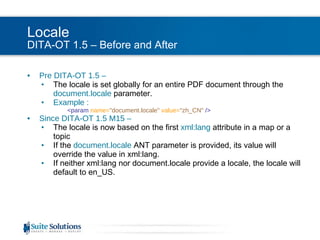
Locale DITA-OT 1.5 – Before and After Pre DITA-OT 1.5 –  The locale is set globally for an entire PDF document through the  document.locale   parameter. Example :   <param  name= &quot;document.locale&quot;   value= &quot;zh_CN&quot;  /> Since DITA-OT 1.5 M15 –  The locale is now based on the first   xml:lang   attribute in a map or a topic If the  document.locale   ANT parameter is provided, its value will override the value in xml:lang. If neither xml:lang nor document.locale provide a locale, the locale will default to en_US.
Main Topics Locale Formatting Standard DITA-OT 1.5 – Before and After Four Components of PDF Localization Static Strings Character Sets and Fonts Index Grouping Miscellaneous Right-to-Left Support Writing Mode Left and Right Attributes
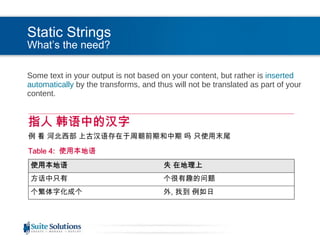
Static Strings What’s the need? Some text in your output is not based on your content, but rather is  inserted automatically  by the transforms, and thus will not be translated as part of your content.
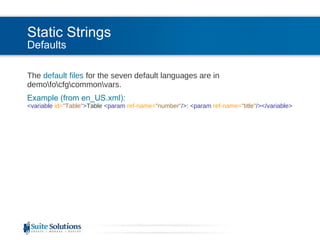
Static Strings Defaults The  default files  for the seven default languages are in demo\fo\cfg\common\vars. Example (from en_US.xml): <variable  id= &quot;Table&quot; > Table  <param  ref-name= &quot;number&quot; /> :  <param  ref-name= &quot;title&quot; /></variable>
Static Strings Usage Static strings are inserted using the  insertVariable  template. Example (from tables.xsl): <xsl:call-template  name= &quot;insertVariable&quot; >   <xsl:with-param   name= &quot;theVariableID&quot;   select= &quot;'Table'&quot; />   <xsl:with-param   name= &quot;theParameters&quot; >   <number>   <xsl:number  level= &quot;any&quot;  count= &quot;*[contains(@class, ' topic/table ')]/*[contains(@class, ' topic/title ')]&quot;  from= &quot;/&quot; />   </number>   <title>   <xsl:apply-templates/>   </title>   </xsl:with-param> </xsl:call-template>
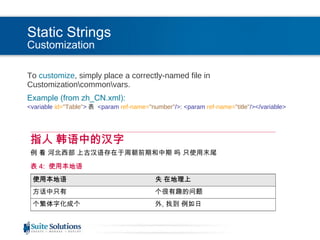
Static Strings Customization To  customize , simply place a correctly-named file in Customization\common\vars. Example (from zh_CN.xml): <variable  id= &quot;Table&quot; > 表  <param  ref-name= &quot;number&quot; /> :  <param  ref-name= &quot;title&quot; /></variable>
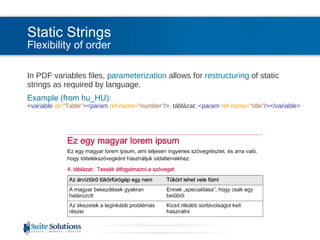
Static Strings Flexibility of order In PDF variables files,  parameterization  allows for  restructuring  of static strings as required by language. Example (from hu_HU): <variable  id= &quot;Table&quot; ><param  ref-name= &quot;number&quot; /> . táblázat:  <param  ref-name= &quot;title&quot; /></variable>
Main Topics Locale Formatting Standard DITA-OT 1.5 – Before and After Four Components of PDF Localization Static Strings Character Sets and Fonts Index Grouping Miscellaneous Right-to-Left Support Writing Mode Left and Right Attributes
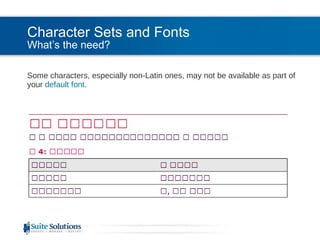
Character Sets and Fonts What’s the need? Some characters, especially non-Latin ones, may not be available as part of your  default font .
Character Sets and Fonts What’s the need? Antenna House Warnings: [exec] XSLCmd :INFO: Error Level : 1 [exec] XSLCmd :INFO: Error Code  : 24322 (5F02) [exec] XSLCmd :INFO: Missing glyph U+627E (->) in 'Verdana'. [exec] XSLCmd :INFO: Line 664, Col 370, C:\out\topic.fo Or: [exec] AHFCmd :INFO: Error Level : 1 [exec] AHFCmd :INFO: Error Code  : 24323 (5F03) [exec] AHFCmd :INFO: Fallbacked glyph U+0161 (š) to 'Times New Roman'. [exec] AHFCmd :INFO: Line 619, Col 441, C:\out\topic.fo
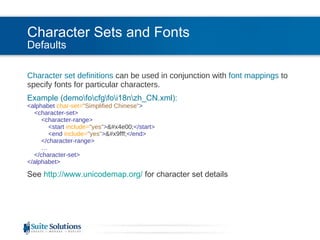
Character Sets and Fonts Defaults Character set definitions  can be used in conjunction with  font mappings  to specify fonts for particular characters. Example (demo\fo\cfg\fo\i18n\zh_CN.xml): <alphabet  char-set= &quot;Simplified Chinese&quot; >   <character-set>   <character-range>   <start  include= &quot;yes&quot; > &#x4e00; </start>   <end  include= &quot;yes&quot; > &#x9fff; </end>   </character-range> …   </character-set> </alphabet>  See  http://www.unicodemap.org/   for character set details
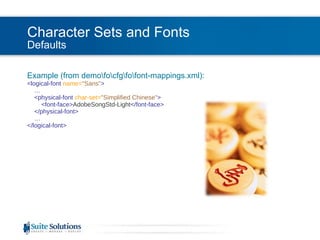
Character Sets and Fonts Defaults Example (from demo\fo\cfg\fo\font-mappings.xml): <logical-font  name= &quot;Sans&quot; >   …   <physical-font  char-set= &quot;Simplified Chinese&quot; >   <font-face> AdobeSongStd-Light </font-face>   </physical-font> … </logical-font>
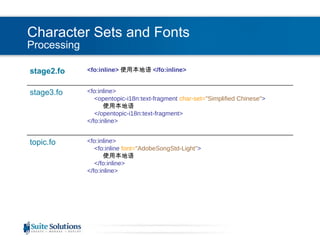
Character Sets and Fonts Processing <fo:inline> 使用本地语 </ fo:inline> stage2.fo <fo:inline> <opentopic-i18n:text-fragment  char-set= &quot;Simplified Chinese&quot; > 使用本地语 </opentopic-i18n:text-fragment> </ fo:inline> stage3.fo <fo:inline> <fo:inline  font= &quot;AdobeSongStd-Light&quot; > 使用本地语 </fo:inline> </ fo:inline> topic.fo
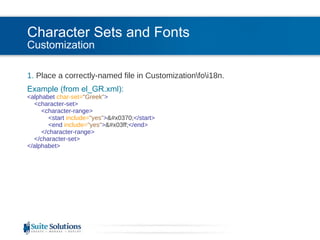
Character Sets and Fonts Customization 1.  Place a correctly-named file in Customization\fo\i18n. Example (from el_GR.xml): <alphabet  char-set= &quot;Greek&quot; >   <character-set>   <character-range>   <start  include= &quot;yes&quot; > &#x0370; </start>   <end  include= &quot;yes&quot; > &#x03ff; </end>   </character-range>   </character-set> </alphabet>
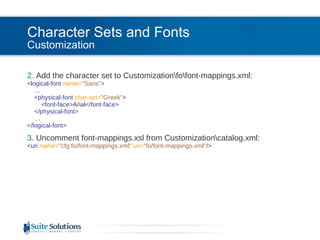
Character Sets and Fonts Customization 2.  Add the character set to Customization\fo\font-mappings.xml: <logical-font  name= &quot;Sans&quot; >   …   <physical-font  char-set= &quot;Greek&quot; >   <font-face> Arial </font-face>   </physical-font>   … </logical-font> 3.  Uncomment font-mappings.xsl from Customization\catalog.xml: <uri  name= &quot;cfg:fo/font-mappings.xml&quot;   uri= &quot;fo/font-mappings.xml&quot; />
Character Sets and Fonts Tip This method can also be useful to specify custom fonts for various  special characters  that may not be included in your default font (e.g., ”, ½, etc.).
Main Topics Locale Formatting Standard DITA-OT 1.5 – Before and After Four Components of PDF Localization Static Strings Character Sets and Fonts Index Grouping Miscellaneous Right-to-Left Support Writing Mode Left and Right Attributes
Index Grouping What’s the need? The stylesheets need to know how to  group  various  similar  but non-identical characters together in the index. [index-preprocess] [ERROR] Index entry '?' is dropped, because corresponding group is not found The transforms don’t know that “u” and “ù” are really the same letter and should both appear under the “U” heading.
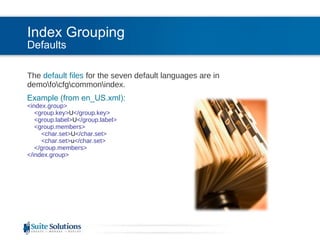
Index Grouping Defaults The  default files  for the seven default languages are in demo\fo\cfg\common\index. Example (from en_US.xml): <index.group>   <group.key> U </group.key>   <group.label> U </group.label>   <group.members>   <char.set> U </char.set>   <char.set> u </char.set>   </group.members> </index.group>
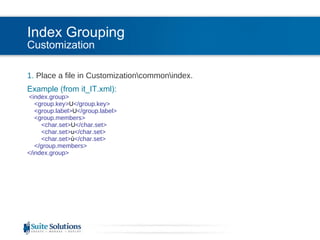
Index Grouping Customization 1.  Place a file in Customization\common\index. Example (from it_IT.xml): <index.group>   <group.key> U </group.key>   <group.label> U </group.label>   <group.members>   <char.set> U </char.set>   <char.set> u </char.set>   <char.set> ù </char.set>   </group.members> </index.group>
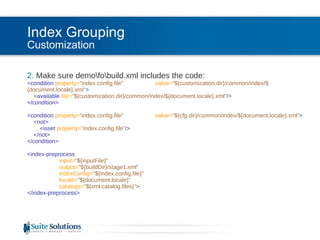
Index Grouping Customization 2.  Make sure demo\fo\build.xml includes the code: <condition  property= &quot;index.config.file&quot;   value= &quot;${customization.dir}/common/index/${document.locale}.xml&quot; > <available  file= &quot;${customization.dir}/common/index/${document.locale}.xml&quot; /> </condition>         <condition  property= &quot;index.config.file&quot;  value= &quot;${cfg.dir}/common/index/${document.locale}.xml&quot; > <not> <isset  property= &quot;index.config.file&quot; /> </not> </condition>         <index-preprocess input= &quot;${inputFile}&quot; output= &quot;${buildDir}/stage1.xml&quot; indexConfig= &quot;${index.config.file}&quot; locale= &quot;${document.locale}&quot; catalogs= &quot;${xml.catalog.files}&quot; > </index-preprocess>
Main Topics Locale Formatting Standard DITA-OT 1.5 – Before and After Four Components of PDF Localization Static Strings Character Sets and Fonts Index Grouping Miscellaneous Right-to-Left Support Writing Mode Left and Right Attributes
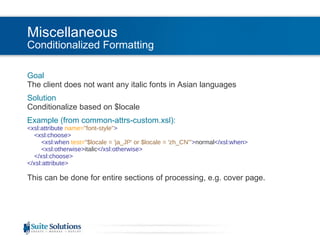
Miscellaneous Conditionalized Formatting Goal The client does not want any italic fonts in Asian languages Solution Conditionalize based on $locale Example (from common-attrs-custom.xsl): <xsl:attribute  name= &quot;font-style&quot; >   <xsl:choose>   <xsl:when  test= &quot;$locale = 'ja_JP' or $locale = 'zh_CN'&quot; > normal </xsl:when>   <xsl:otherwise> italic </xsl:otherwise>   </xsl:choose> </xsl:attribute> This can be done for entire sections of processing, e.g. cover page.
Miscellaneous Per-language Notation Goal The client wants <uicontrol> to be surrounded by brackets instead of bold in some languages Solution Use the variables file Example (from vars\ja_JP.xml and  ui-domain-custom.xsl): <variable  id= &quot;UiControlBefore&quot; > [ </variable> <variable  id= &quot;UiControlAfter&quot; > ] </variable> <xsl:call-template  name= &quot;insertVariable&quot; >   <xsl:with-param  name= &quot;theVariableID&quot;   select= &quot;'UiControlBefore'&quot; /> </xsl:call-template> <xsl:apply-templates/> <xsl:call-template  name= &quot;insertVariable&quot; >   <xsl:with-param  name= &quot;theVariableID&quot;   select= &quot;'UiControlAfter&quot; /> </xsl:call-template>
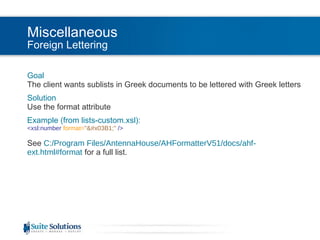
Miscellaneous Foreign Lettering Goal The client wants sublists in Greek documents to be lettered with Greek letters  Solution Use the format attribute Example (from lists-custom.xsl): <xsl:number  format= &quot;&#x03B1;&quot;  /> See  C:/Program Files/AntennaHouse/AHFormatterV51/docs/ahf-ext.html#format  for a full list.
Main Topics Locale Formatting Standard DITA-OT 1.5 – Before and After Four Components of PDF Localization Static Strings Character Sets and Fonts Index Grouping Miscellaneous Right-to-Left Support Writing Mode Left and Right Attributes
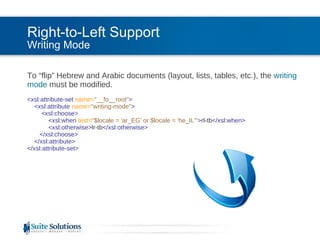
Right-to-Left Support Writing Mode To “flip” Hebrew and Arabic documents (layout, lists, tables, etc.), the  writing mode  must be modified. <xsl:attribute-set  name= &quot;__fo__root&quot; >   <xsl:attribute  name= &quot;writing-mode&quot; >   <xsl:choose>   <xsl:when  test= &quot;$locale = 'ar_EG' or $locale = 'he_IL'&quot; > rl-tb </xsl:when>   <xsl:otherwise> lr-tb </xsl:otherwise>   </xsl:choose>   </xsl:attribute> </xsl:attribute-set>
Main Topics Locale Formatting Standard DITA-OT 1.5 – Before and After Four Components of PDF Localization Static Strings Character Sets and Fonts Index Grouping Miscellaneous Right-to-Left Support Writing Mode Left and Right Attributes
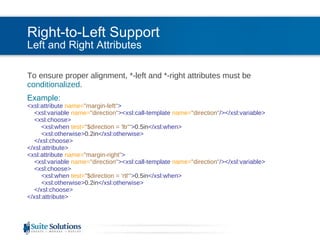
Right-to-Left Support Left and Right Attributes To ensure proper alignment, *-left and *-right attributes must be  conditionalized .  Example: <xsl:attribute  name= &quot;margin-left&quot; >    <xsl:variable  name= &quot;direction&quot; ><xsl:call-template  name= &quot;direction&quot; /></xsl:variable>   <xsl:choose>   <xsl:when  test= &quot;$direction = 'ltr'&quot; > 0.5in </xsl:when>   <xsl:otherwise> 0.2in </xsl:otherwise>   </xsl:choose> </xsl:attribute> <xsl:attribute  name= &quot;margin-right&quot; >    <xsl:variable  name= &quot;direction&quot; ><xsl:call-template  name= &quot;direction&quot; /></xsl:variable>   <xsl:choose>   <xsl:when  test= &quot;$direction = 'rtl'&quot; > 0.5in </xsl:when>   <xsl:otherwise> 0.2in </xsl:otherwise>   </xsl:choose> </xsl:attribute>
Main Topics Locale Formatting Standard DITA-OT 1.5 – Before and After Four Components of PDF Localization Static Strings Character Sets and Fonts Index Grouping Miscellaneous Right-to-Left Support Writing Mode Left and Right Attributes
End of Localizing XSL-FO  Style Sheets for PDF Be in touch! Reuven Weiser [email_address] Let us know how we can help you further… Stylesheet development  One-on-one support and training CMS integration

PDF Localization

  • 1.
    Localizing XSL-FO Style Sheets for PDF Reuven Weiser, Suite Solutions
  • 2.
    Who am I?Background in Computer Science and Education Experience in several computer companies over the past decade Web applications Server- and Client-side applications Early member of the Suite Solutions team On-site and online training seminars PDF and HTML style sheet projects CMS integration Project Management
  • 3.
    What is SuiteSolutions? Our Mission To increase our customers’ profitability by significantly improving the efficiency of their information development and delivery processes. Qualitative Advantage Content Lifecycle Implementation (CLI) is Suite Solutions’ comprehensive approach – from concept to publication – to maximizing the value of your information assets. Our professionals are with you at every phase, determining, recommending and implementing the most cost-effective, flexible and long term solution for your business.
  • 4.
    Main Topics LocaleFormatting Standard DITA-OT 1.5 – Before and After Four Components of PDF Localization Static Strings Character Sets and Fonts Index Grouping Miscellaneous Right-to-Left Support Writing Mode Left and Right Attributes
  • 5.
    Locale Formatting StandardThe formatting standard for locale is [language]_[REGION]. Examples: en_US – English, as spoken in the US pt_PT – Portugese, as spoken in Portugal (“European Portugese”) pt_BR – Portugese, as spoken in Brazil (“Brazilian Portugese”) Other standards (e.g., “en”, “en-us”, “en_us”) may require adjustments to the DITA-OT infrastructure to work properly. A partial list can be found at DITA-OT\doc\installguide\sysreqs.html Languages supported by default for PDF output: en_US, de_DE, es_ES, fr_FR, it_IT, ja_JP, zh_CN
  • 6.
    Main Topics LocaleFormatting Standard DITA-OT 1.5 – Before and After Four Components of PDF Localization Static Strings Character Sets and Fonts Index Grouping Miscellaneous Right-to-Left Support Writing Mode Left and Right Attributes
  • 7.
    Locale DITA-OT 1.5– Before and After Pre DITA-OT 1.5 – The locale is set globally for an entire PDF document through the document.locale parameter. Example : <param name= &quot;document.locale&quot; value= &quot;zh_CN&quot; /> Since DITA-OT 1.5 M15 – The locale is now based on the first xml:lang attribute in a map or a topic If the document.locale ANT parameter is provided, its value will override the value in xml:lang. If neither xml:lang nor document.locale provide a locale, the locale will default to en_US.
  • 8.
    Main Topics LocaleFormatting Standard DITA-OT 1.5 – Before and After Four Components of PDF Localization Static Strings Character Sets and Fonts Index Grouping Miscellaneous Right-to-Left Support Writing Mode Left and Right Attributes
  • 9.
    Static Strings What’sthe need? Some text in your output is not based on your content, but rather is inserted automatically by the transforms, and thus will not be translated as part of your content.
  • 10.
    Static Strings DefaultsThe default files for the seven default languages are in demo\fo\cfg\common\vars. Example (from en_US.xml): <variable id= &quot;Table&quot; > Table <param ref-name= &quot;number&quot; /> : <param ref-name= &quot;title&quot; /></variable>
  • 11.
    Static Strings UsageStatic strings are inserted using the insertVariable template. Example (from tables.xsl): <xsl:call-template name= &quot;insertVariable&quot; > <xsl:with-param name= &quot;theVariableID&quot; select= &quot;'Table'&quot; /> <xsl:with-param name= &quot;theParameters&quot; > <number> <xsl:number level= &quot;any&quot; count= &quot;*[contains(@class, ' topic/table ')]/*[contains(@class, ' topic/title ')]&quot; from= &quot;/&quot; /> </number> <title> <xsl:apply-templates/> </title> </xsl:with-param> </xsl:call-template>
  • 12.
    Static Strings CustomizationTo customize , simply place a correctly-named file in Customization\common\vars. Example (from zh_CN.xml): <variable id= &quot;Table&quot; > 表 <param ref-name= &quot;number&quot; /> : <param ref-name= &quot;title&quot; /></variable>
  • 13.
    Static Strings Flexibilityof order In PDF variables files, parameterization allows for restructuring of static strings as required by language. Example (from hu_HU): <variable id= &quot;Table&quot; ><param ref-name= &quot;number&quot; /> . táblázat: <param ref-name= &quot;title&quot; /></variable>
  • 14.
    Main Topics LocaleFormatting Standard DITA-OT 1.5 – Before and After Four Components of PDF Localization Static Strings Character Sets and Fonts Index Grouping Miscellaneous Right-to-Left Support Writing Mode Left and Right Attributes
  • 15.
    Character Sets andFonts What’s the need? Some characters, especially non-Latin ones, may not be available as part of your default font .
  • 16.
    Character Sets andFonts What’s the need? Antenna House Warnings: [exec] XSLCmd :INFO: Error Level : 1 [exec] XSLCmd :INFO: Error Code : 24322 (5F02) [exec] XSLCmd :INFO: Missing glyph U+627E (->) in 'Verdana'. [exec] XSLCmd :INFO: Line 664, Col 370, C:\out\topic.fo Or: [exec] AHFCmd :INFO: Error Level : 1 [exec] AHFCmd :INFO: Error Code  : 24323 (5F03) [exec] AHFCmd :INFO: Fallbacked glyph U+0161 (š) to 'Times New Roman'. [exec] AHFCmd :INFO: Line 619, Col 441, C:\out\topic.fo
  • 17.
    Character Sets andFonts Defaults Character set definitions can be used in conjunction with font mappings to specify fonts for particular characters. Example (demo\fo\cfg\fo\i18n\zh_CN.xml): <alphabet char-set= &quot;Simplified Chinese&quot; > <character-set> <character-range> <start include= &quot;yes&quot; > &#x4e00; </start> <end include= &quot;yes&quot; > &#x9fff; </end> </character-range> … </character-set> </alphabet> See http://www.unicodemap.org/ for character set details
  • 18.
    Character Sets andFonts Defaults Example (from demo\fo\cfg\fo\font-mappings.xml): <logical-font name= &quot;Sans&quot; > … <physical-font char-set= &quot;Simplified Chinese&quot; > <font-face> AdobeSongStd-Light </font-face> </physical-font> … </logical-font>
  • 19.
    Character Sets andFonts Processing <fo:inline> 使用本地语 </ fo:inline> stage2.fo <fo:inline> <opentopic-i18n:text-fragment char-set= &quot;Simplified Chinese&quot; > 使用本地语 </opentopic-i18n:text-fragment> </ fo:inline> stage3.fo <fo:inline> <fo:inline font= &quot;AdobeSongStd-Light&quot; > 使用本地语 </fo:inline> </ fo:inline> topic.fo
  • 20.
    Character Sets andFonts Customization 1. Place a correctly-named file in Customization\fo\i18n. Example (from el_GR.xml): <alphabet char-set= &quot;Greek&quot; > <character-set> <character-range> <start include= &quot;yes&quot; > &#x0370; </start> <end include= &quot;yes&quot; > &#x03ff; </end> </character-range> </character-set> </alphabet>
  • 21.
    Character Sets andFonts Customization 2. Add the character set to Customization\fo\font-mappings.xml: <logical-font name= &quot;Sans&quot; > … <physical-font char-set= &quot;Greek&quot; > <font-face> Arial </font-face> </physical-font> … </logical-font> 3. Uncomment font-mappings.xsl from Customization\catalog.xml: <uri name= &quot;cfg:fo/font-mappings.xml&quot; uri= &quot;fo/font-mappings.xml&quot; />
  • 22.
    Character Sets andFonts Tip This method can also be useful to specify custom fonts for various special characters that may not be included in your default font (e.g., ”, ½, etc.).
  • 23.
    Main Topics LocaleFormatting Standard DITA-OT 1.5 – Before and After Four Components of PDF Localization Static Strings Character Sets and Fonts Index Grouping Miscellaneous Right-to-Left Support Writing Mode Left and Right Attributes
  • 24.
    Index Grouping What’sthe need? The stylesheets need to know how to group various similar but non-identical characters together in the index. [index-preprocess] [ERROR] Index entry '?' is dropped, because corresponding group is not found The transforms don’t know that “u” and “ù” are really the same letter and should both appear under the “U” heading.
  • 25.
    Index Grouping DefaultsThe default files for the seven default languages are in demo\fo\cfg\common\index. Example (from en_US.xml): <index.group> <group.key> U </group.key> <group.label> U </group.label> <group.members> <char.set> U </char.set> <char.set> u </char.set> </group.members> </index.group>
  • 26.
    Index Grouping Customization1. Place a file in Customization\common\index. Example (from it_IT.xml): <index.group> <group.key> U </group.key> <group.label> U </group.label> <group.members> <char.set> U </char.set> <char.set> u </char.set> <char.set> ù </char.set> </group.members> </index.group>
  • 27.
    Index Grouping Customization2. Make sure demo\fo\build.xml includes the code: <condition property= &quot;index.config.file&quot; value= &quot;${customization.dir}/common/index/${document.locale}.xml&quot; > <available file= &quot;${customization.dir}/common/index/${document.locale}.xml&quot; /> </condition>         <condition property= &quot;index.config.file&quot; value= &quot;${cfg.dir}/common/index/${document.locale}.xml&quot; > <not> <isset property= &quot;index.config.file&quot; /> </not> </condition>         <index-preprocess input= &quot;${inputFile}&quot; output= &quot;${buildDir}/stage1.xml&quot; indexConfig= &quot;${index.config.file}&quot; locale= &quot;${document.locale}&quot; catalogs= &quot;${xml.catalog.files}&quot; > </index-preprocess>
  • 28.
    Main Topics LocaleFormatting Standard DITA-OT 1.5 – Before and After Four Components of PDF Localization Static Strings Character Sets and Fonts Index Grouping Miscellaneous Right-to-Left Support Writing Mode Left and Right Attributes
  • 29.
    Miscellaneous Conditionalized FormattingGoal The client does not want any italic fonts in Asian languages Solution Conditionalize based on $locale Example (from common-attrs-custom.xsl): <xsl:attribute name= &quot;font-style&quot; > <xsl:choose> <xsl:when test= &quot;$locale = 'ja_JP' or $locale = 'zh_CN'&quot; > normal </xsl:when> <xsl:otherwise> italic </xsl:otherwise> </xsl:choose> </xsl:attribute> This can be done for entire sections of processing, e.g. cover page.
  • 30.
    Miscellaneous Per-language NotationGoal The client wants <uicontrol> to be surrounded by brackets instead of bold in some languages Solution Use the variables file Example (from vars\ja_JP.xml and ui-domain-custom.xsl): <variable id= &quot;UiControlBefore&quot; > [ </variable> <variable id= &quot;UiControlAfter&quot; > ] </variable> <xsl:call-template name= &quot;insertVariable&quot; > <xsl:with-param name= &quot;theVariableID&quot; select= &quot;'UiControlBefore'&quot; /> </xsl:call-template> <xsl:apply-templates/> <xsl:call-template name= &quot;insertVariable&quot; > <xsl:with-param name= &quot;theVariableID&quot; select= &quot;'UiControlAfter&quot; /> </xsl:call-template>
  • 31.
    Miscellaneous Foreign LetteringGoal The client wants sublists in Greek documents to be lettered with Greek letters Solution Use the format attribute Example (from lists-custom.xsl): <xsl:number format= &quot;&#x03B1;&quot; /> See C:/Program Files/AntennaHouse/AHFormatterV51/docs/ahf-ext.html#format for a full list.
  • 32.
    Main Topics LocaleFormatting Standard DITA-OT 1.5 – Before and After Four Components of PDF Localization Static Strings Character Sets and Fonts Index Grouping Miscellaneous Right-to-Left Support Writing Mode Left and Right Attributes
  • 33.
    Right-to-Left Support WritingMode To “flip” Hebrew and Arabic documents (layout, lists, tables, etc.), the writing mode must be modified. <xsl:attribute-set name= &quot;__fo__root&quot; > <xsl:attribute name= &quot;writing-mode&quot; > <xsl:choose> <xsl:when test= &quot;$locale = 'ar_EG' or $locale = 'he_IL'&quot; > rl-tb </xsl:when> <xsl:otherwise> lr-tb </xsl:otherwise> </xsl:choose> </xsl:attribute> </xsl:attribute-set>
  • 34.
    Main Topics LocaleFormatting Standard DITA-OT 1.5 – Before and After Four Components of PDF Localization Static Strings Character Sets and Fonts Index Grouping Miscellaneous Right-to-Left Support Writing Mode Left and Right Attributes
  • 35.
    Right-to-Left Support Leftand Right Attributes To ensure proper alignment, *-left and *-right attributes must be conditionalized . Example: <xsl:attribute name= &quot;margin-left&quot; > <xsl:variable name= &quot;direction&quot; ><xsl:call-template name= &quot;direction&quot; /></xsl:variable> <xsl:choose> <xsl:when test= &quot;$direction = 'ltr'&quot; > 0.5in </xsl:when> <xsl:otherwise> 0.2in </xsl:otherwise> </xsl:choose> </xsl:attribute> <xsl:attribute name= &quot;margin-right&quot; > <xsl:variable name= &quot;direction&quot; ><xsl:call-template name= &quot;direction&quot; /></xsl:variable> <xsl:choose> <xsl:when test= &quot;$direction = 'rtl'&quot; > 0.5in </xsl:when> <xsl:otherwise> 0.2in </xsl:otherwise> </xsl:choose> </xsl:attribute>
  • 36.
    Main Topics LocaleFormatting Standard DITA-OT 1.5 – Before and After Four Components of PDF Localization Static Strings Character Sets and Fonts Index Grouping Miscellaneous Right-to-Left Support Writing Mode Left and Right Attributes
  • 37.
    End of LocalizingXSL-FO Style Sheets for PDF Be in touch! Reuven Weiser [email_address] Let us know how we can help you further… Stylesheet development One-on-one support and training CMS integration

Editor's Notes

  • #3 Suite Solutions: DITA Quick Start Training for Authors iDTP, March 16-18, 2009