





A BEGINNER’S
JOURNEY
INTO THE WORLD
OF
HARDWARE HACKING
Introduction





Hardware hackings is fun!
Or at least it seems to be, for a software guy.
Try some of the following hardware hacks and get
started.
Who am I? (this slide again? every
year?)







Research Assistant at Deakin University.
Resercher at Volvent security (Rux party sponsor!).
Just passed my PhD thesis examination (on
software).
Pics by DNZ.
Outline






Interfacing with UART
Ripping Firmware
Games with IR alarm systems
Gardening with Arduino
UART Basics





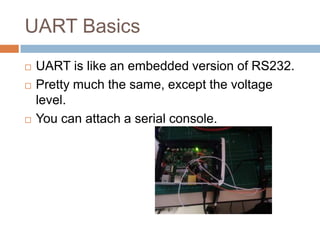
UART is like an embedded version of RS232.
Pretty much the same, except the voltage level.
You can attach a serial console.
Interfacing with UART


Serial console access give us:
 Root

shells on occasion.
 Login access.
 Boot information.
 More verbose logging, E.g. When a daemon crashes.
 The ability to interact with the bootloader to upload
new firmware.
Removing the case









Make sure to have screwdrivers.
And jewellers screwdrivers.
And a Torx screwdriver set.
Screws can be hidden in rubber feet or behind
stickers.
Sometimes the cases are clipped in.
A small flathead screwdriver is good for prying.
Finding ports








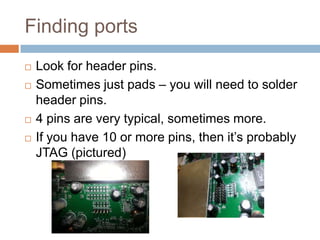
Look for header pins.
Sometimes just pads – you will need to solder
header pins.
4 pins are very typical, sometimes more.
If you have 10 or more pins, then it’s probably
JTAG (pictured)
Finding the Ground Pin and Voltage




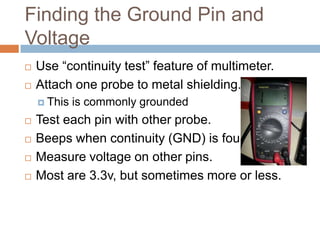
Use “continuity test” feature of multimeter.
Attach one probe to metal shielding.
 This







is commonly grounded

Test each pin with other probe.
Beeps when continuity (GND) is found.
Measure voltage on other pins.
Most are 3.3v, but sometimes more or less.
Finding the Transmit Pin






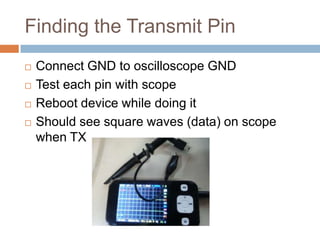
Connect GND to oscilloscope GND
Test each pin with scope
Reboot device while doing it
Should see square waves (data) on scope when TX
Interfacing to a PC


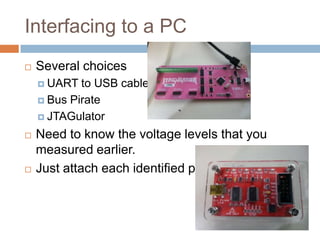
Several choices
 UART

to USB cable
 Bus Pirate
 JTAGulator




Need to know the voltage levels that you measured
earlier.
Just attach each identified pin.
Using a serial console






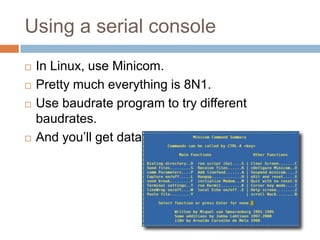
In Linux, use Minicom.
Pretty much everything is 8N1.
Use baudrate program to try different baudrates.
And you’ll get data!
Finding the Receive Pin


Brute force remaining pins
 Attach

each pin to RX.
 Try typing something in the serial console.
 If you get an echo, then you’ve found the right pin.
 Otherwise you’ll get nothing.
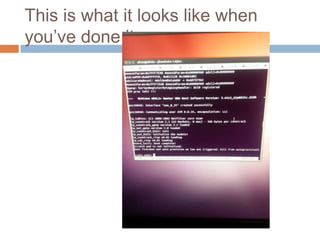
This is what it looks like when you’ve
done it.
Now what?






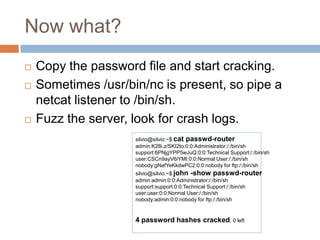
Copy the password file and start cracking.
Sometimes /usr/bin/nc is present, so pipe a netcat
listener to /bin/sh.
Fuzz the server, look for crash logs.
silvio@silvio:~$ cat passwd-router
admin:K28i.z/SKI2to:0:0:Administrator:/:/bin/sh
support:6PNjgYPP5wJuQ:0:0:Technical Support:/:/bin/sh
user:CSCn9ayV6iYMI:0:0:Normal User:/:/bin/sh
nobody:gNafYeKkdwPC2:0:0:nobody for ftp:/:/bin/sh

silvio@silvio:~$ john -show passwd-router
admin:admin:0:0:Administrator:/:/bin/sh
support:support:0:0:Technical Support:/:/bin/sh
user:user:0:0:Normal User:/:/bin/sh
nobody:admin:0:0:nobody for ftp:/:/bin/sh

4 password hashes cracked, 0 left
Final thoughts on UART







It’s actually not that hard once you know the
method.
A JTAGulator should make things easy.
Every ADSL router I own has a UART port.
It’s a good entry point into hw hacking.
Ripping Firmware


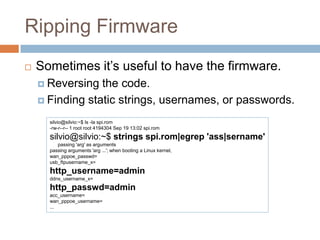
Sometimes it’s useful to have the firmware.
 Reversing

the code.
 Finding static strings, usernames, or passwords.
silvio@silvio:~$ ls -la spi.rom
-rw-r--r-- 1 root root 4194304 Sep 19 13:02 spi.rom

silvio@silvio:~$ strings spi.rom|egrep 'ass|sername'
passing 'arg' as arguments
passing arguments 'arg ...'; when booting a Linux kernel,
wan_pppoe_passwd=
usb_ftpusername_x=

http_username=admin
ddns_username_x=

http_passwd=admin
acc_username=
wan_pppoe_username=
...
IC identification







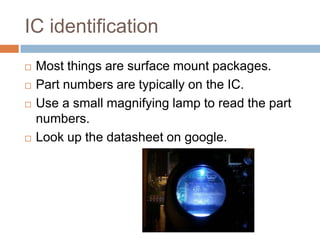
Most things are surface mount packages.
Part numbers are typically on the IC.
Use a small magnifying lamp to read the part
numbers.
Look up the datasheet on google.
Desoldering ICs







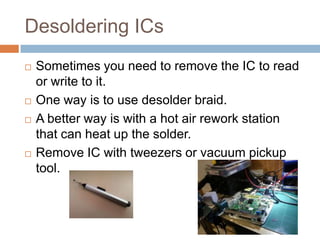
Sometimes you need to remove the IC to read or
write to it.
One way is to use desolder braid.
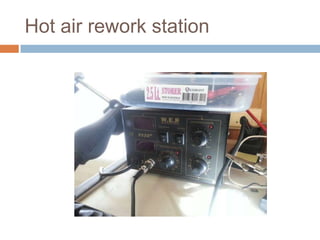
A better way is with a hot air rework station that
can heat up the solder.
Remove IC with tweezers or vacuum pickup tool.
Hot air rework station
NAND Flash Programming





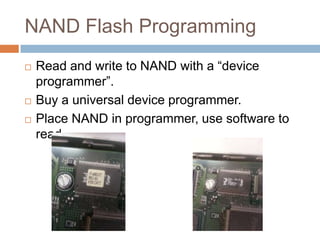
Read and write to NAND with a “device
programmer”.
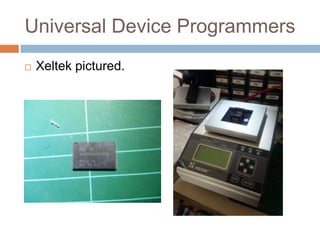
Buy a universal device programmer.
Place NAND in programmer, use software to read.
Universal Device Programmers


Xeltek pictured.
SPI Serial Flash




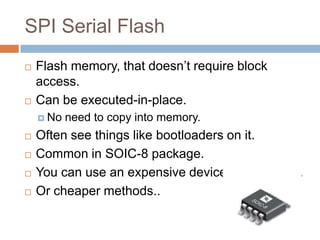
Flash memory, that doesn’t require block access.
Can be executed-in-place.
 No







need to copy into memory.

Often see things like bootloaders on it.
Common in SOIC-8 package.
You can use an expensive device programmer.
Or cheaper methods..
Reading SPI Flash incircuit







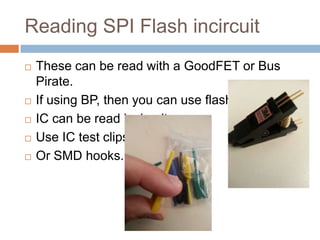
These can be read with a GoodFET or Bus Pirate.
If using BP, then you can use flashrom.
IC can be read incircuit.
Use IC test clips.
Or SMD hooks.
SPI Serial Flash Desoldering




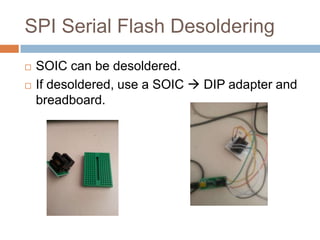
SOIC can be desoldered.
If desoldered, use a SOIC  DIP adapter and
breadboard.
Using a GoodFET to read SPI Flash





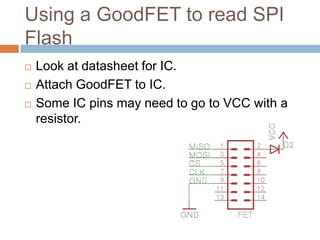
Look at datasheet for IC.
Attach GoodFET to IC.
Some IC pins may need to go to VCC with a
resistor.
Final thoughts on ripping firmware





Top of the line programmers are expensive.
A GoodFET or a Bus Pirate is affordable.
Once you rip the data from the IC, you have to
reconstruct the data.
 This

is not that trivial.
Games with IR alarm systems


Bought from Ebay.
The alarm




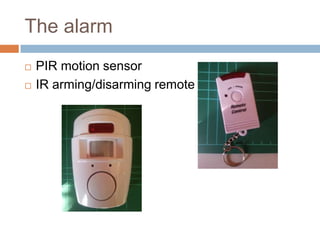
PIR motion sensor
IR arming/disarming remote
A first failed attempt





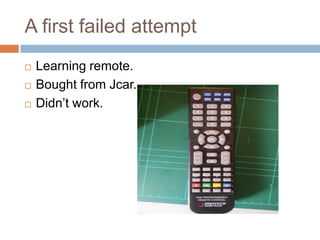
Learning remote.
Bought from Jcar.
Didn’t work.
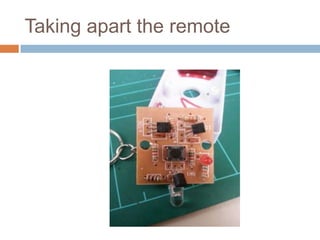
Taking apart the remote
A lesson from circuit theory





The remote is an “Astable multivibrator”
A type of oscillator.
Plug values of resistors and capacitors into
T = ln(2)R2C1+ ln(2)R3C2
f = 1/T



f = 38.52khz.
Repurposing a different remote






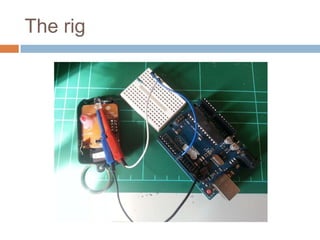
Take remote from a different device.
Attach GPIO pin of Arduino to IR LED.
Do some Arduino coding..
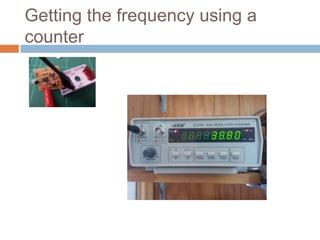
Pulse at the 38.52khz
The rig
Getting the frequency using a counter
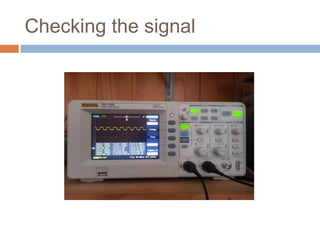
Checking the signal
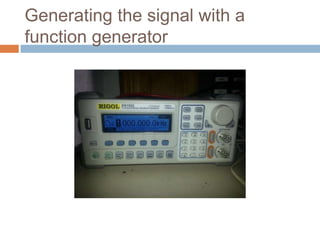
Generating the signal with a function
generator
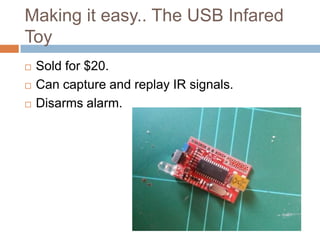
Making it easy.. The USB Infared Toy





Sold for $20.
Can capture and replay IR signals.
Disarms alarm.
Final thoughts on IR alarms




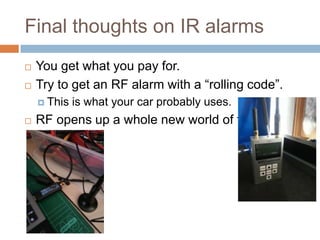
You get what you pay for.
Try to get an RF alarm with a “rolling code”.
 This



is what your car probably uses.

RF opens up a whole new world of fun.
Gardening with Arduino









Make your backyard irrigation system computer
controlled.
Arduino activates relay.
Relay controls water solenoid/valve.
PC activates Arduino.
Network controlled.
Cron job to start and stop the watering.
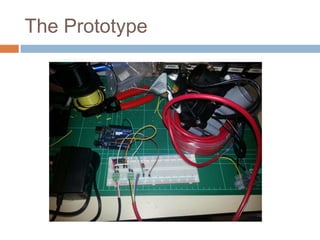
The Prototype
What does a relay do?









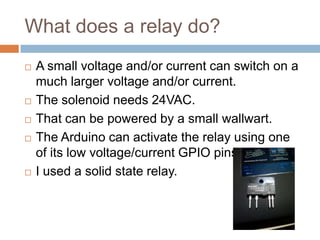
A small voltage and/or current can switch on a
much larger voltage and/or current.
The solenoid needs 24VAC.
That can be powered by a small wallwart.
The Arduino can activate the relay using one of its
low voltage/current GPIO pins.
I used a solid state relay.
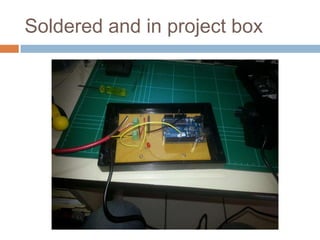
Soldered and in project box
How do I connect the Arduino to a PC?








By a USB serial!
The Arduino listens for commands over the
USB/serial interface.
If the command is start, then it turns on the pin
connected to the relay.
I wrote a small network daemon on the PC that
takes commands and relays them to the Arduino.
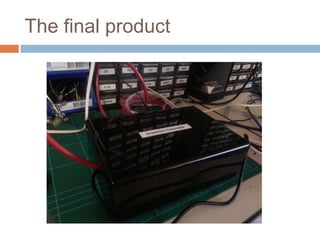
The final product
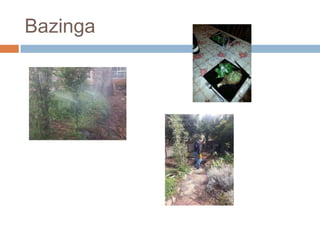
Bazinga
Conclusion








Hardware hacking is fun.
Lots of things to try.
If you’ve got a spare ADSL router, pull it apart and
attach a serial console.
Thanks to Stephen Ridley.
Any questions?

A BEGINNER’S JOURNEY INTO THE WORLD OF HARDWARE HACKING

  • 1.
    A BEGINNER’S JOURNEY INTO THEWORLD OF HARDWARE HACKING
  • 2.
    Introduction    Hardware hackings isfun! Or at least it seems to be, for a software guy. Try some of the following hardware hacks and get started.
  • 3.
    Who am I?(this slide again? every year?)     Research Assistant at Deakin University. Resercher at Volvent security (Rux party sponsor!). Just passed my PhD thesis examination (on software). Pics by DNZ.
  • 4.
    Outline     Interfacing with UART RippingFirmware Games with IR alarm systems Gardening with Arduino
  • 5.
    UART Basics    UART islike an embedded version of RS232. Pretty much the same, except the voltage level. You can attach a serial console.
  • 6.
    Interfacing with UART  Serialconsole access give us:  Root shells on occasion.  Login access.  Boot information.  More verbose logging, E.g. When a daemon crashes.  The ability to interact with the bootloader to upload new firmware.
  • 7.
    Removing the case       Makesure to have screwdrivers. And jewellers screwdrivers. And a Torx screwdriver set. Screws can be hidden in rubber feet or behind stickers. Sometimes the cases are clipped in. A small flathead screwdriver is good for prying.
  • 8.
    Finding ports     Look forheader pins. Sometimes just pads – you will need to solder header pins. 4 pins are very typical, sometimes more. If you have 10 or more pins, then it’s probably JTAG (pictured)
  • 9.
    Finding the GroundPin and Voltage   Use “continuity test” feature of multimeter. Attach one probe to metal shielding.  This     is commonly grounded Test each pin with other probe. Beeps when continuity (GND) is found. Measure voltage on other pins. Most are 3.3v, but sometimes more or less.
  • 10.
    Finding the TransmitPin     Connect GND to oscilloscope GND Test each pin with scope Reboot device while doing it Should see square waves (data) on scope when TX
  • 11.
    Interfacing to aPC  Several choices  UART to USB cable  Bus Pirate  JTAGulator   Need to know the voltage levels that you measured earlier. Just attach each identified pin.
  • 12.
    Using a serialconsole     In Linux, use Minicom. Pretty much everything is 8N1. Use baudrate program to try different baudrates. And you’ll get data!
  • 13.
    Finding the ReceivePin  Brute force remaining pins  Attach each pin to RX.  Try typing something in the serial console.  If you get an echo, then you’ve found the right pin.  Otherwise you’ll get nothing.
  • 14.
    This is whatit looks like when you’ve done it.
  • 15.
    Now what?    Copy thepassword file and start cracking. Sometimes /usr/bin/nc is present, so pipe a netcat listener to /bin/sh. Fuzz the server, look for crash logs. silvio@silvio:~$ cat passwd-router admin:K28i.z/SKI2to:0:0:Administrator:/:/bin/sh support:6PNjgYPP5wJuQ:0:0:Technical Support:/:/bin/sh user:CSCn9ayV6iYMI:0:0:Normal User:/:/bin/sh nobody:gNafYeKkdwPC2:0:0:nobody for ftp:/:/bin/sh silvio@silvio:~$ john -show passwd-router admin:admin:0:0:Administrator:/:/bin/sh support:support:0:0:Technical Support:/:/bin/sh user:user:0:0:Normal User:/:/bin/sh nobody:admin:0:0:nobody for ftp:/:/bin/sh 4 password hashes cracked, 0 left
  • 16.
    Final thoughts onUART     It’s actually not that hard once you know the method. A JTAGulator should make things easy. Every ADSL router I own has a UART port. It’s a good entry point into hw hacking.
  • 17.
    Ripping Firmware  Sometimes it’suseful to have the firmware.  Reversing the code.  Finding static strings, usernames, or passwords. silvio@silvio:~$ ls -la spi.rom -rw-r--r-- 1 root root 4194304 Sep 19 13:02 spi.rom silvio@silvio:~$ strings spi.rom|egrep 'ass|sername' passing 'arg' as arguments passing arguments 'arg ...'; when booting a Linux kernel, wan_pppoe_passwd= usb_ftpusername_x= http_username=admin ddns_username_x= http_passwd=admin acc_username= wan_pppoe_username= ...
  • 18.
    IC identification     Most thingsare surface mount packages. Part numbers are typically on the IC. Use a small magnifying lamp to read the part numbers. Look up the datasheet on google.
  • 19.
    Desoldering ICs     Sometimes youneed to remove the IC to read or write to it. One way is to use desolder braid. A better way is with a hot air rework station that can heat up the solder. Remove IC with tweezers or vacuum pickup tool.
  • 20.
  • 21.
    NAND Flash Programming    Readand write to NAND with a “device programmer”. Buy a universal device programmer. Place NAND in programmer, use software to read.
  • 22.
  • 23.
    SPI Serial Flash   Flashmemory, that doesn’t require block access. Can be executed-in-place.  No     need to copy into memory. Often see things like bootloaders on it. Common in SOIC-8 package. You can use an expensive device programmer. Or cheaper methods..
  • 24.
    Reading SPI Flashincircuit      These can be read with a GoodFET or Bus Pirate. If using BP, then you can use flashrom. IC can be read incircuit. Use IC test clips. Or SMD hooks.
  • 25.
    SPI Serial FlashDesoldering   SOIC can be desoldered. If desoldered, use a SOIC  DIP adapter and breadboard.
  • 26.
    Using a GoodFETto read SPI Flash    Look at datasheet for IC. Attach GoodFET to IC. Some IC pins may need to go to VCC with a resistor.
  • 27.
    Final thoughts onripping firmware    Top of the line programmers are expensive. A GoodFET or a Bus Pirate is affordable. Once you rip the data from the IC, you have to reconstruct the data.  This is not that trivial.
  • 28.
    Games with IRalarm systems  Bought from Ebay.
  • 29.
    The alarm   PIR motionsensor IR arming/disarming remote
  • 30.
    A first failedattempt    Learning remote. Bought from Jcar. Didn’t work.
  • 31.
  • 32.
    A lesson fromcircuit theory    The remote is an “Astable multivibrator” A type of oscillator. Plug values of resistors and capacitors into T = ln(2)R2C1+ ln(2)R3C2 f = 1/T  f = 38.52khz.
  • 33.
    Repurposing a differentremote     Take remote from a different device. Attach GPIO pin of Arduino to IR LED. Do some Arduino coding.. Pulse at the 38.52khz
  • 34.
  • 35.
    Getting the frequencyusing a counter
  • 36.
  • 37.
    Generating the signalwith a function generator
  • 38.
    Making it easy..The USB Infared Toy    Sold for $20. Can capture and replay IR signals. Disarms alarm.
  • 39.
    Final thoughts onIR alarms   You get what you pay for. Try to get an RF alarm with a “rolling code”.  This  is what your car probably uses. RF opens up a whole new world of fun.
  • 40.
    Gardening with Arduino       Makeyour backyard irrigation system computer controlled. Arduino activates relay. Relay controls water solenoid/valve. PC activates Arduino. Network controlled. Cron job to start and stop the watering.
  • 41.
  • 42.
    What does arelay do?      A small voltage and/or current can switch on a much larger voltage and/or current. The solenoid needs 24VAC. That can be powered by a small wallwart. The Arduino can activate the relay using one of its low voltage/current GPIO pins. I used a solid state relay.
  • 43.
    Soldered and inproject box
  • 44.
    How do Iconnect the Arduino to a PC?     By a USB serial! The Arduino listens for commands over the USB/serial interface. If the command is start, then it turns on the pin connected to the relay. I wrote a small network daemon on the PC that takes commands and relays them to the Arduino.
  • 45.
  • 46.
  • 47.
    Conclusion      Hardware hacking isfun. Lots of things to try. If you’ve got a spare ADSL router, pull it apart and attach a serial console. Thanks to Stephen Ridley. Any questions?