Hardware Hacking


  by Andy “Bob The Builder” Brockhurst
  For the Yahoo! Developers Network
  and SkillsMatter
   Picture “Hardware Hacking”


                                 by nicholasjon- flickr
Talk topics (in no particular order)
   Introduction
       What is hardware hacking
       How to get started
   Microprocessors
   Sensors & Switches (Hardware I/O)
       The world is your mollusc
   Basic Circuit Theory
       How to get those sensors to work
If anything should go wrong


   Blame this next guy
   Photo “Hacking”
What is hardware hacking
   Hacking
       An elegant solution to a difficult problem
       Using a technology for something it was
        not originally intended.
Types of hardware hacking
   Just hacking hardware
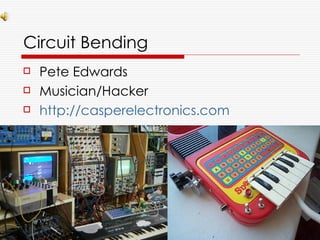
   Circuit Bending
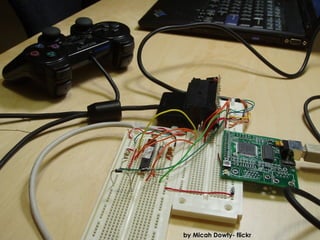
   Reverse Engineering
   Toy Hacking
   SteamPunk
   Craft Hacking/“Making”
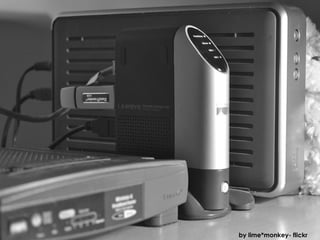
   Photo: “WRT54G & NSLU2”


                              by lime*monkey- flickr
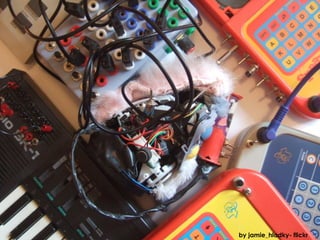
   Picture “Circuit Bending”


                                by jamie_hladky- flickr
Circuit Bending
   Pete Edwards
   Musician/Hacker
   http://casperelectronics.com
   Picture “Reverse Engineering”


                         by Micah Dowty- flickr
    Picture “Toy Hacking”


by Vanderlin - flickr
   Picture “Making”
   Photo: “Steampunk”


                         by Balakov- flickr
   Picture “Reverse Engineering”


                                    by Neal Connor- flickr
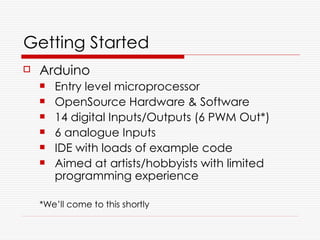
Getting Started
   Arduino
       Entry level microprocessor
       OpenSource Hardware & Software
       14 digital Inputs/Outputs (6 PWM Out*)
       6 analogue Inputs
       IDE with loads of example code
       Aimed at artists/hobbyists with limited
        programming experience

    *We’ll come to this shortly
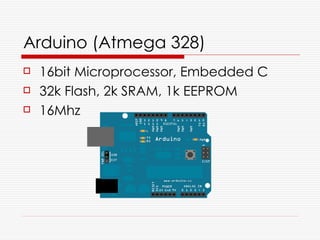
Arduino (Atmega 328)
   16bit Microprocessor, Embedded C
   32k Flash, 2k SRAM, 1k EEPROM
   16Mhz
Arduinos are not the only fruit
   Atmel Tiny (ATtiny)
   PIC AVR (PICAXE)
   Range of ARM processors
   FPGA
Arduino
   OpenSource Hardware
       Schematics freely available
       Lots of “Flavours”; Diecimila, Duemilanove,
        Mega, Mini, Nano, Lilypad
       Lots of boards for specific tasks;
        Motor/servos, Autonomous Vehicles,
        Robotics, Autopilots, CNC (*32 makers)
       Sheilds to extend functionality; Bluetooth,
        wifi, radio, ethernet, GPS, relays, LCD,
        touchscreen…
Arduino Initiatives
   Software
       Processing
           IDE is based on Processing and Wiring
       Fritzing
           Prototyping and circuit layout
   EduWear
       Introducing programming and electronics
        to children
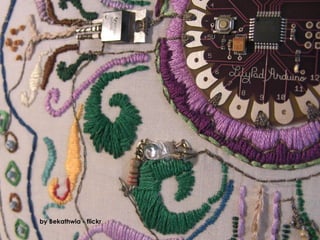
Hardware Hacking


  Let’s build some stuff!
by Bekathwia - flickr
Arduino (very) Basic I/O - Parts
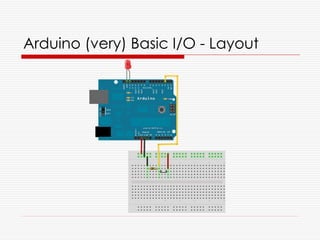
   Setup a circuit
       Arduino
       Breadboard
       LED
       Resistor
       Switch
       Wire
Arduino (very) Basic I/O - Layout
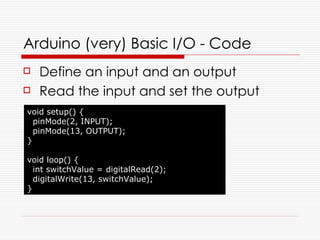
Arduino (very) Basic I/O - Code
   Define an input and an output
   Read the input and set the output
void setup() {
  pinMode(2, INPUT);
  pinMode(13, OUTPUT);
}

void loop() {
  int switchValue = digitalRead(2);
  digitalWrite(13, switchValue);
}
Take it a bit further
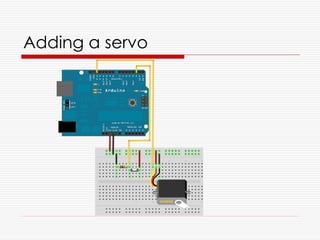
   Substitute the LED for a physical
    interaction device
       Servo
       Bit more wire
Adding a servo
Update the code
#include <Servo.h>

Servo myServo;
int steps[] = {0,60,120,180};
int currentPos = 0;

void setup() {
  pinMode(2, INPUT);
  myServo.attach(13);
  myServo.write(steps[0]);
}

void loop() {
  if (HIGH == digitalRead(2)) {
    currentPos = (3 == currentPos) ? 0 : currentPos + 1;
    myServo.write(steps[currentPos]);
    delay(500);
  }
}
Taking it further
   Substitute the switch for a physical
    interaction device
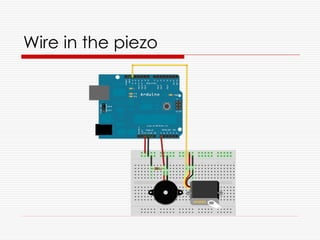
       Piezo Electric transducer
       Can be used to sense “Knocks”
Wire in the piezo
More code updates
#include <Servo.h>

Servo myServo;
int steps[] = {0,60,120,180};
int currentPos = 0;
const int KNOCKTHRESHOLD = 100;

void setup() {
  myServo.attach(13);
  myServo.write(steps[0]);
}

void loop() {
  if (KNOCKTHRESHOLD <= analogRead(0)) {
    currentPos = (3 == currentPos) ? 0 : currentPos + 1;
    myServo.write(steps[currentPos]);
    delay(500);
  }
}
Tour of the software
   Arduino IDE
   Fritzing
by pieter [iamdoom / bwrah bwrah]- flickr


   Photo “Inspiration”
Getting Inspiration
   MakeZine
       http://blog.makezine.com/
   Instructables
       http://www.instructables.com/
   Circuit-Projects
       http://www.circuit-projects.com/
   Tinker.it
       http://www.tinker.it/
Where to get stuff
   Specialist Arduino Retailers (UK)
       http://www.earthshinedesign.co.uk/
       http://www.oomlout.co.uk/
   Other Hardware suppliers (UK)
       http://www.active-robots.co.uk/
       http://www.techbotics.co.uk/
       http://www.technobots.co.uk/
       http://www.ebay.co.uk/
Finding fellow hackers
   London Hacker Space
       http://london.hackspace.org.uk/
       irc://irc.freenode.net/london-hack-space
   London DorkBot
       http://dorkbotlondon.org/
Thank you for listening


   Where I can be found:
      http://kingkludge.net/
      http://twitter.com/b3cft

   (or in the pub)

Hardware Hacking

  • 1.
    Hardware Hacking by Andy “Bob The Builder” Brockhurst For the Yahoo! Developers Network and SkillsMatter
  • 2.
    Picture “Hardware Hacking” by nicholasjon- flickr
  • 3.
    Talk topics (inno particular order)  Introduction  What is hardware hacking  How to get started  Microprocessors  Sensors & Switches (Hardware I/O)  The world is your mollusc  Basic Circuit Theory  How to get those sensors to work
  • 4.
    If anything shouldgo wrong Blame this next guy
  • 6.
    Photo “Hacking”
  • 7.
    What is hardwarehacking  Hacking  An elegant solution to a difficult problem  Using a technology for something it was not originally intended.
  • 8.
    Types of hardwarehacking  Just hacking hardware  Circuit Bending  Reverse Engineering  Toy Hacking  SteamPunk  Craft Hacking/“Making”
  • 9.
    Photo: “WRT54G & NSLU2” by lime*monkey- flickr
  • 10.
    Picture “Circuit Bending” by jamie_hladky- flickr
  • 11.
    Circuit Bending  Pete Edwards  Musician/Hacker  http://casperelectronics.com
  • 12.
    Picture “Reverse Engineering” by Micah Dowty- flickr
  • 13.
    Picture “Toy Hacking” by Vanderlin - flickr
  • 14.
    Picture “Making”
  • 15.
    Photo: “Steampunk” by Balakov- flickr
  • 16.
    Picture “Reverse Engineering” by Neal Connor- flickr
  • 17.
    Getting Started  Arduino  Entry level microprocessor  OpenSource Hardware & Software  14 digital Inputs/Outputs (6 PWM Out*)  6 analogue Inputs  IDE with loads of example code  Aimed at artists/hobbyists with limited programming experience *We’ll come to this shortly
  • 18.
    Arduino (Atmega 328)  16bit Microprocessor, Embedded C  32k Flash, 2k SRAM, 1k EEPROM  16Mhz
  • 19.
    Arduinos are notthe only fruit  Atmel Tiny (ATtiny)  PIC AVR (PICAXE)  Range of ARM processors  FPGA
  • 20.
    Arduino  OpenSource Hardware  Schematics freely available  Lots of “Flavours”; Diecimila, Duemilanove, Mega, Mini, Nano, Lilypad  Lots of boards for specific tasks; Motor/servos, Autonomous Vehicles, Robotics, Autopilots, CNC (*32 makers)  Sheilds to extend functionality; Bluetooth, wifi, radio, ethernet, GPS, relays, LCD, touchscreen…
  • 21.
    Arduino Initiatives  Software  Processing  IDE is based on Processing and Wiring  Fritzing  Prototyping and circuit layout  EduWear  Introducing programming and electronics to children
  • 22.
    Hardware Hacking Let’s build some stuff!
  • 23.
  • 24.
    Arduino (very) BasicI/O - Parts  Setup a circuit  Arduino  Breadboard  LED  Resistor  Switch  Wire
  • 25.
  • 26.
    Arduino (very) BasicI/O - Code  Define an input and an output  Read the input and set the output void setup() { pinMode(2, INPUT); pinMode(13, OUTPUT); } void loop() { int switchValue = digitalRead(2); digitalWrite(13, switchValue); }
  • 27.
    Take it abit further  Substitute the LED for a physical interaction device  Servo  Bit more wire
  • 28.
  • 29.
    Update the code #include<Servo.h> Servo myServo; int steps[] = {0,60,120,180}; int currentPos = 0; void setup() { pinMode(2, INPUT); myServo.attach(13); myServo.write(steps[0]); } void loop() { if (HIGH == digitalRead(2)) { currentPos = (3 == currentPos) ? 0 : currentPos + 1; myServo.write(steps[currentPos]); delay(500); } }
  • 30.
    Taking it further  Substitute the switch for a physical interaction device  Piezo Electric transducer  Can be used to sense “Knocks”
  • 31.
  • 32.
    More code updates #include<Servo.h> Servo myServo; int steps[] = {0,60,120,180}; int currentPos = 0; const int KNOCKTHRESHOLD = 100; void setup() { myServo.attach(13); myServo.write(steps[0]); } void loop() { if (KNOCKTHRESHOLD <= analogRead(0)) { currentPos = (3 == currentPos) ? 0 : currentPos + 1; myServo.write(steps[currentPos]); delay(500); } }
  • 33.
    Tour of thesoftware  Arduino IDE  Fritzing
  • 34.
    by pieter [iamdoom/ bwrah bwrah]- flickr  Photo “Inspiration”
  • 35.
    Getting Inspiration  MakeZine  http://blog.makezine.com/  Instructables  http://www.instructables.com/  Circuit-Projects  http://www.circuit-projects.com/  Tinker.it  http://www.tinker.it/
  • 36.
    Where to getstuff  Specialist Arduino Retailers (UK)  http://www.earthshinedesign.co.uk/  http://www.oomlout.co.uk/  Other Hardware suppliers (UK)  http://www.active-robots.co.uk/  http://www.techbotics.co.uk/  http://www.technobots.co.uk/  http://www.ebay.co.uk/
  • 37.
    Finding fellow hackers  London Hacker Space  http://london.hackspace.org.uk/  irc://irc.freenode.net/london-hack-space  London DorkBot  http://dorkbotlondon.org/
  • 38.
    Thank you forlistening Where I can be found: http://kingkludge.net/ http://twitter.com/b3cft (or in the pub)