Data Analysis Basics:
Variables and Distribution
Goals
Describe the steps of descriptive data
analysis
Be able to define variables
Understand basic coding principles
Learn simple univariate data analysis
Types of Variables
Continuous variables:
Always numeric
Can be any number, positive or negative
Examples: age in years, weight, blood pressure
readings, temperature, concentrations of
pollutants and other measurements
Categorical variables:
Information that can be sorted into categories
Types of categorical variables – ordinal, nominal
and dichotomous (binary)
Categorical Variables:
Ordinal Variables
Ordinal variable—a categorical variable with
some intrinsic order or numeric value
Examples of ordinal variables:
Education (no high school degree, HS degree,
some college, college degree)
Agreement (strongly disagree, disagree, neutral,
agree, strongly agree)
Rating (excellent, good, fair, poor)
Frequency (always, often, sometimes, never)
Any other scale (“On a scale of 1 to 5...”)
Categorical Variables:
Nominal Variables
Nominal variable – a categorical variable
without an intrinsic order
Examples of nominal variables:
Where a person lives in the U.S. (Northeast,
South, Midwest, etc.)
Sex (male, female)
Nationality (American, Mexican, French)
Race/ethnicity (African American, Hispanic, White,
Asian American)
Favorite pet (dog, cat, fish, snake)
Categorical Variables:
Dichotomous Variables
Dichotomous (or binary) variables – a
categorical variable with only 2 levels of
categories
Often represents the answer to a yes or no
question
For example:
“Did you attend the church picnic on May 24?”
“Did you eat potato salad at the picnic?”
Anything with only 2 categories
Coding
Coding – process of translating information
gathered from questionnaires or other
sources into something that can be analyzed
Involves assigning a value to the information
given—often value is given a label
Coding can make data more consistent:
Example: Question = Sex
Answers = Male, Female, M, or F
Coding will avoid such inconsistencies
Coding Systems
Common coding systems (code and label) for
dichotomous variables:
0=No 1=Yes
(1 = value assigned, Yes= label of value)
OR:1=No 2=Yes
When you assign a value you must also make it clear
what that value means
In first example above, 1=Yes but in second example 1=No
As long as it is clear how the data are coded, either is fine
You can make it clear by creating a data dictionary to
accompany the dataset
Coding: Dummy Variables
A “dummy” variable is any variable that is coded to
have 2 levels (yes/no, male/female, etc.)
Dummy variables may be used to represent more
complicated variables
Example: # of cigarettes smoked per week--answers total 75
different responses ranging from 0 cigarettes to 3 packs per
week
Can be recoded as a dummy variable:
1=smokes (at all) 0=non-smoker
This type of coding is useful in later stages of
analysis
Coding:
Attaching Labels to Values
Many analysis software packages allow you to attach a
label to the variable values
Example: Label 0’s as male and 1’s as female
Makes reading data output easier:
Without label: Variable SEX Frequency Percent
0 21 60%
1 14 40%
With label:Variable SEX Frequency Percent
Male 21 60%
Female 14 40%
Coding- Ordinal Variables
Coding process is similar with other categorical
variables
Example: variable EDUCATION, possible coding:
0 = Did not graduate from high school
1 = High school graduate
2 = Some college or post-high school education
3 = College graduate
Could be coded in reverse order (0=college graduate,
3=did not graduate high school)
For this ordinal categorical variable we want to be
consistent with numbering because the value of the
code assigned has significance
Coding – Ordinal Variables
(cont.)
Example of bad coding:
0 = Some college or post-high school education
1 = High school graduate
2 = College graduate
3 = Did not graduate from high school
Data has an inherent order but coding does
not follow that order—NOT appropriate
coding for an ordinal categorical variable
Coding: Nominal Variables
For coding nominal variables, order makes no
difference
Example: variable RESIDE
1 = Northeast
2 = South
3 = Northwest
4 = Midwest
5 = Southwest
Order does not matter, no ordered value
associated with each response
Coding: Continuous Variables
Creating categories from a continuous variable (ex.
age) is common
May break down a continuous variable into chosen
categories by creating an ordinal categorical variable
Example: variable = AGECAT
1 = 0–9 years old
2 = 10–19 years old
3 = 20–39 years old
4 = 40–59 years old
5 = 60 years or older
Coding:
Continuous Variables (cont.)
May need to code responses from fill-in-the-blank
and open-ended questions
Example: “Why did you choose not to see a doctor about
this illness?”
One approach is to group together responses with
similar themes
Example: “didn’t feel sick enough to see a doctor”,
“symptoms stopped,” and “illness didn’t last very long”
Could all be grouped together as “illness was not severe”
Also need to code for “don’t know” responses”
Typically, “don’t know” is coded as 9
Coding Tip
Though you do not code until the data
is gathered, you should think about how
you are going to code while designing
your questionnaire, before you gather
any data. This will help you to collect
the data in a format you can use.
Data Cleaning
One of the first steps in analyzing data is to
“clean” it of any obvious data entry errors:
Outliers? (really high or low numbers)
Example: Age = 110 (really 10 or 11?)
Value entered that doesn’t exist for variable?
Example: 2 entered where 1=male, 0=female
Missing values?
Did the person not give an answer? Was answer
accidentally not entered into the database?
Data Cleaning (cont.)
May be able to set defined limits when entering data
Prevents entering a 2 when only 1, 0, or missing are
acceptable values
Limits can be set for continuous and nominal
variables
Examples: Only allowing 3 digits for age, limiting words that
can be entered, assigning field types (e.g. formatting dates
as mm/dd/yyyy or specifying numeric values or text)
Many data entry systems allow “double-entry” – ie.,
entering the data twice and then comparing both
entries for discrepancies
Univariate data analysis is a useful way to check the
quality of the data
Univariate Data Analysis
Univariate data analysis-explores each
variable in a data set separately
Serves as a good method to check the quality of
the data
Inconsistencies or unexpected results should be
investigated using the original data as the
reference point
Frequencies can tell you if many study
participants share a characteristic of interest
(age, gender, etc.)
Graphs and tables can be helpful
Univariate Data Analysis (cont.)
Examining continuous variables can give you
important information:
Do all subjects have data, or are values missing?
Are most values clumped together, or is there a lot
of variation?
Are there outliers?
Do the minimum and maximum values make
sense, or could there be mistakes in the coding?
Univariate Data Analysis (cont.)
Commonly used statistics with univariate
analysis of continuous variables:
Mean – average of all values of this variable in
the dataset
Median – the middle of the distribution, the
number where half of the values are above and
half are below
Mode – the value that occurs the most times
Range of values – from minimum value to
maximum value
Statistics describing a continuous
variable distribution
84 = Maximum (an
outlier)
2 = Minimum
28 = Mode (Occurs
twice)
33 = Mean
36 = Median (50th
Percentile)
Standard Deviation
Figure left: narrowly distributed age values (SD = 7.6)
Figure right: widely distributed age values (SD = 20.4)
Distribution and Percentiles
Distribution –
whether most values
occur low in the
range, high in the
range, or grouped in
the middle
Percentiles – the
percent of the
distribution that is
equal to or below a
certain value
Distribution curves for variable AGE
25th Percentile
(4 years)
25th Percentile
(6 years)
Analysis of Categorical Data
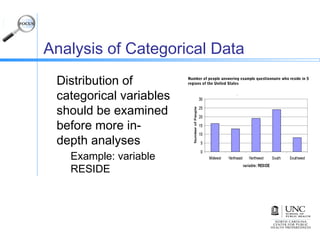
Distribution of
categorical variables
should be examined
before more in-
depth analyses
Example: variable
RESIDE
Number of people answering example questionnaire who reside in 5
regions of the United States
Analysis of Categorical Data (cont.)
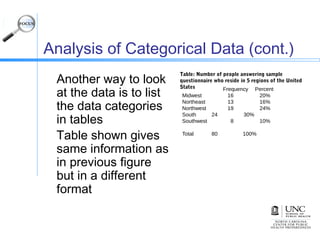
Another way to look
at the data is to list
the data categories
in tables
Table shown gives
same information as
in previous figure
but in a different
format
Frequency Percent
Midwest 16 20%
Northeast 13 16%
Northwest 19 24%
South 24 30%
Southwest 8 10%
Total 80 100%
Table: Number of people answering sample
questionnaire who reside in 5 regions of the United
States
Observed vs. Expected Distribution
Education variable
Observed distribution of
education levels (top)
Expected distribution of
education (bottom) (1)
Comparing graphs shows a
more educated study
population than expected
Are the observed data really
that different from the
expected data?
Answer would require further
exploration with statistical
tests
Observed data on level of education from a hypothetical
questionnaire
Data on the education level of the US population aged 20
years or older, from the US Census Bureau
Conclusion
Defining variables and basic coding are
basic steps in data analysis
Simple univariate analysis may be used
with continuous and categorical
variables
Further analysis may require statistical
tests such as chi-squares and other
more extensive data analysis
References
1. US Census Bureau. Educational Attainment in the
United States: 2003---Detailed Tables for Current
Population Report, P20-550 (All Races). Available at:
http://www.census.gov/population/www/socdemo/educa
. Accessed December 11, 2006.

MELJUN CORTES research seminar_1__data_analysis_basics_slides

  • 1.
  • 2.
    Goals Describe the stepsof descriptive data analysis Be able to define variables Understand basic coding principles Learn simple univariate data analysis
  • 3.
    Types of Variables Continuousvariables: Always numeric Can be any number, positive or negative Examples: age in years, weight, blood pressure readings, temperature, concentrations of pollutants and other measurements Categorical variables: Information that can be sorted into categories Types of categorical variables – ordinal, nominal and dichotomous (binary)
  • 4.
    Categorical Variables: Ordinal Variables Ordinalvariable—a categorical variable with some intrinsic order or numeric value Examples of ordinal variables: Education (no high school degree, HS degree, some college, college degree) Agreement (strongly disagree, disagree, neutral, agree, strongly agree) Rating (excellent, good, fair, poor) Frequency (always, often, sometimes, never) Any other scale (“On a scale of 1 to 5...”)
  • 5.
    Categorical Variables: Nominal Variables Nominalvariable – a categorical variable without an intrinsic order Examples of nominal variables: Where a person lives in the U.S. (Northeast, South, Midwest, etc.) Sex (male, female) Nationality (American, Mexican, French) Race/ethnicity (African American, Hispanic, White, Asian American) Favorite pet (dog, cat, fish, snake)
  • 6.
    Categorical Variables: Dichotomous Variables Dichotomous(or binary) variables – a categorical variable with only 2 levels of categories Often represents the answer to a yes or no question For example: “Did you attend the church picnic on May 24?” “Did you eat potato salad at the picnic?” Anything with only 2 categories
  • 7.
    Coding Coding – processof translating information gathered from questionnaires or other sources into something that can be analyzed Involves assigning a value to the information given—often value is given a label Coding can make data more consistent: Example: Question = Sex Answers = Male, Female, M, or F Coding will avoid such inconsistencies
  • 8.
    Coding Systems Common codingsystems (code and label) for dichotomous variables: 0=No 1=Yes (1 = value assigned, Yes= label of value) OR:1=No 2=Yes When you assign a value you must also make it clear what that value means In first example above, 1=Yes but in second example 1=No As long as it is clear how the data are coded, either is fine You can make it clear by creating a data dictionary to accompany the dataset
  • 9.
    Coding: Dummy Variables A“dummy” variable is any variable that is coded to have 2 levels (yes/no, male/female, etc.) Dummy variables may be used to represent more complicated variables Example: # of cigarettes smoked per week--answers total 75 different responses ranging from 0 cigarettes to 3 packs per week Can be recoded as a dummy variable: 1=smokes (at all) 0=non-smoker This type of coding is useful in later stages of analysis
  • 10.
    Coding: Attaching Labels toValues Many analysis software packages allow you to attach a label to the variable values Example: Label 0’s as male and 1’s as female Makes reading data output easier: Without label: Variable SEX Frequency Percent 0 21 60% 1 14 40% With label:Variable SEX Frequency Percent Male 21 60% Female 14 40%
  • 11.
    Coding- Ordinal Variables Codingprocess is similar with other categorical variables Example: variable EDUCATION, possible coding: 0 = Did not graduate from high school 1 = High school graduate 2 = Some college or post-high school education 3 = College graduate Could be coded in reverse order (0=college graduate, 3=did not graduate high school) For this ordinal categorical variable we want to be consistent with numbering because the value of the code assigned has significance
  • 12.
    Coding – OrdinalVariables (cont.) Example of bad coding: 0 = Some college or post-high school education 1 = High school graduate 2 = College graduate 3 = Did not graduate from high school Data has an inherent order but coding does not follow that order—NOT appropriate coding for an ordinal categorical variable
  • 13.
    Coding: Nominal Variables Forcoding nominal variables, order makes no difference Example: variable RESIDE 1 = Northeast 2 = South 3 = Northwest 4 = Midwest 5 = Southwest Order does not matter, no ordered value associated with each response
  • 14.
    Coding: Continuous Variables Creatingcategories from a continuous variable (ex. age) is common May break down a continuous variable into chosen categories by creating an ordinal categorical variable Example: variable = AGECAT 1 = 0–9 years old 2 = 10–19 years old 3 = 20–39 years old 4 = 40–59 years old 5 = 60 years or older
  • 15.
    Coding: Continuous Variables (cont.) Mayneed to code responses from fill-in-the-blank and open-ended questions Example: “Why did you choose not to see a doctor about this illness?” One approach is to group together responses with similar themes Example: “didn’t feel sick enough to see a doctor”, “symptoms stopped,” and “illness didn’t last very long” Could all be grouped together as “illness was not severe” Also need to code for “don’t know” responses” Typically, “don’t know” is coded as 9
  • 16.
    Coding Tip Though youdo not code until the data is gathered, you should think about how you are going to code while designing your questionnaire, before you gather any data. This will help you to collect the data in a format you can use.
  • 17.
    Data Cleaning One ofthe first steps in analyzing data is to “clean” it of any obvious data entry errors: Outliers? (really high or low numbers) Example: Age = 110 (really 10 or 11?) Value entered that doesn’t exist for variable? Example: 2 entered where 1=male, 0=female Missing values? Did the person not give an answer? Was answer accidentally not entered into the database?
  • 18.
    Data Cleaning (cont.) Maybe able to set defined limits when entering data Prevents entering a 2 when only 1, 0, or missing are acceptable values Limits can be set for continuous and nominal variables Examples: Only allowing 3 digits for age, limiting words that can be entered, assigning field types (e.g. formatting dates as mm/dd/yyyy or specifying numeric values or text) Many data entry systems allow “double-entry” – ie., entering the data twice and then comparing both entries for discrepancies Univariate data analysis is a useful way to check the quality of the data
  • 19.
    Univariate Data Analysis Univariatedata analysis-explores each variable in a data set separately Serves as a good method to check the quality of the data Inconsistencies or unexpected results should be investigated using the original data as the reference point Frequencies can tell you if many study participants share a characteristic of interest (age, gender, etc.) Graphs and tables can be helpful
  • 20.
    Univariate Data Analysis(cont.) Examining continuous variables can give you important information: Do all subjects have data, or are values missing? Are most values clumped together, or is there a lot of variation? Are there outliers? Do the minimum and maximum values make sense, or could there be mistakes in the coding?
  • 21.
    Univariate Data Analysis(cont.) Commonly used statistics with univariate analysis of continuous variables: Mean – average of all values of this variable in the dataset Median – the middle of the distribution, the number where half of the values are above and half are below Mode – the value that occurs the most times Range of values – from minimum value to maximum value
  • 22.
    Statistics describing acontinuous variable distribution 84 = Maximum (an outlier) 2 = Minimum 28 = Mode (Occurs twice) 33 = Mean 36 = Median (50th Percentile)
  • 23.
    Standard Deviation Figure left:narrowly distributed age values (SD = 7.6) Figure right: widely distributed age values (SD = 20.4)
  • 24.
    Distribution and Percentiles Distribution– whether most values occur low in the range, high in the range, or grouped in the middle Percentiles – the percent of the distribution that is equal to or below a certain value Distribution curves for variable AGE 25th Percentile (4 years) 25th Percentile (6 years)
  • 25.
    Analysis of CategoricalData Distribution of categorical variables should be examined before more in- depth analyses Example: variable RESIDE Number of people answering example questionnaire who reside in 5 regions of the United States
  • 26.
    Analysis of CategoricalData (cont.) Another way to look at the data is to list the data categories in tables Table shown gives same information as in previous figure but in a different format Frequency Percent Midwest 16 20% Northeast 13 16% Northwest 19 24% South 24 30% Southwest 8 10% Total 80 100% Table: Number of people answering sample questionnaire who reside in 5 regions of the United States
  • 27.
    Observed vs. ExpectedDistribution Education variable Observed distribution of education levels (top) Expected distribution of education (bottom) (1) Comparing graphs shows a more educated study population than expected Are the observed data really that different from the expected data? Answer would require further exploration with statistical tests Observed data on level of education from a hypothetical questionnaire Data on the education level of the US population aged 20 years or older, from the US Census Bureau
  • 28.
    Conclusion Defining variables andbasic coding are basic steps in data analysis Simple univariate analysis may be used with continuous and categorical variables Further analysis may require statistical tests such as chi-squares and other more extensive data analysis
  • 29.
    References 1. US CensusBureau. Educational Attainment in the United States: 2003---Detailed Tables for Current Population Report, P20-550 (All Races). Available at: http://www.census.gov/population/www/socdemo/educa . Accessed December 11, 2006.

Editor's Notes

  • #7 Unlike the depiction of epidemiologists in some television shows, after gathering data you don’t simply have a brilliant flash of insight and solve the outbreak; you actually have to sit down and analyze that data! It is not the most glamorous part of the epidemiologist’s job, but when the data lead to the source of an outbreak, the analysis is definitely rewarding. This issue of FOCUS will take you through the basic steps of descriptive data analysis, including types of variables, basic coding principles and simple univariate data analysis.  
  • #8 Before delving into analysis, let’s take a moment to discuss variables. This may seem a trivial topic to those with analysis experience, but variables are not a trivial matter. Much like people, variables come in many different sizes and shapes. Most field epidemiology, however, relies on garden-variety continuous and categorical variables.   Continuous variables are always numeric and theoretically can be any number, positive or negative (in reality, this depends upon the variable). Examples of continuous variables are age in years, weight, blood pressure readings, indoor and outdoor temperature, concentrations of pollutants in the air or water, and other measurements. Categorical variables contain information that can be sorted into categories, rather like sorting information into bins. Every piece of information belongs in one—and only one—bin. There are several types of categorical variables: ordinal, nominal, and dichotomous or binary.      
  • #30 1. US Census Bureau. Educational Attainment in the United States: 2003---Detailed Tables for Current Population Report, P20-550 (All Races). Available at: http://www.census.gov/population/www/socdemo/education/cps2003.html. Accessed December 11, 2006.