Rapid Math Assessment Orientation
October 13, 2023
Memorandum
DM-CT-2023-332
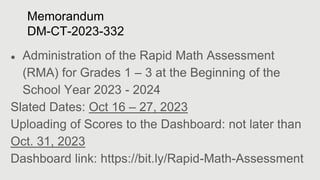
● Administration of the Rapid Math Assessment
(RMA) for Grades 1 – 3 at the Beginning of the
School Year 2023 - 2024
Slated Dates: Oct 16 – 27, 2023
Uploading of Scores to the Dashboard: not later than
Oct. 31, 2023
Dashboard link: https://bit.ly/Rapid-Math-Assessment
1. RMA administration
2. Automated Scoresheets
a. Class Summary
b. School Summary
3. RMA Dashboard
Discussion Points:
RMA Administration
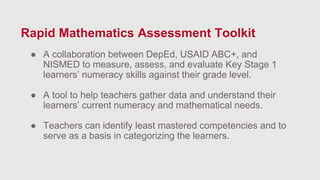
● A collaboration between DepEd, USAID ABC+, and
NISMED to measure, assess, and evaluate Key Stage 1
learners’ numeracy skills against their grade level.
● A tool to help teachers gather data and understand their
learners’ current numeracy and mathematical needs.
● Teachers can identify least mastered competencies and to
serve as a basis in categorizing the learners.
Rapid Mathematics Assessment Toolkit
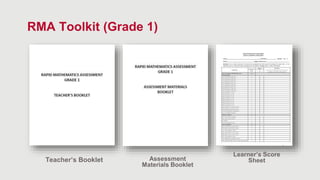
RMA Toolkit (Grade 1)
Teacher’s Booklet Assessment
Materials Booklet
Learner’s Score
Sheet
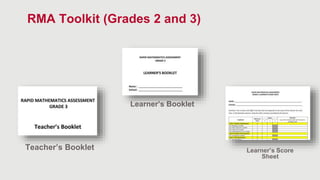
RMA Toolkit (Grades 2 and 3)
Teacher’s Booklet
Learner’s Booklet
Learner’s Score
Sheet
A.Teacher’s Booklet:
Indicates the time allotted for each
task.
Indicates the time allotted for each
subtask.
A.Teacher’s Booklet:
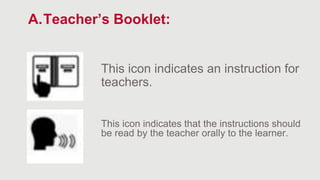
This icon indicates an instruction for
teachers.
This icon indicates that the instructions should
be read by the teacher orally to the learner.
A.Teacher’s Booklet:
Actual Task
Answer
Key
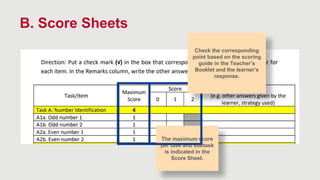
B. Score Sheets
Use the Scoring Guide in the Teacher’s
Booklet to determine the number of
points to be recorded based on the
response of the learner.
B. Score Sheets
The maximum score
per task and subtask
is indicated in the
Score Sheet.
Check the corresponding
point based on the scoring
guide in the Teacher’s
Booklet and the learner’s
response.
Automated Scoresheet
School Summary
(Automated)
All class summary results
will be collected by a school
personnel and inputted in
the school summary
automated form.
Upload the school summary
form in the given google
form.
Scoresheet
(Paper)
To be accomplished by
classroom teacher during
administration of RMA.
Class Summary
(Automated)
Teacher will input the data
that he/she collected from
the administration.
Class summary will
automatically be
generated.
9/13/2023 16
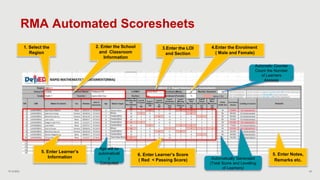
RMA Automated Scoresheets
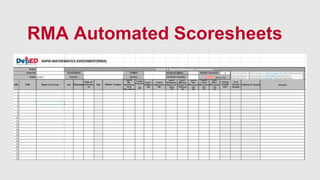
● An excel file that allow the seamless recording of
learners’ rapid math assessment results in the
classroom and school for easy monitoring.
● It automatically generate a class and school
summary containing tables and charts that
consolidate the class RMA result.
RMA Automated Scoresheets
9/13/2023 18
2. Enter the School
and Classroom
Information
3.Enter the LOI
and Section
5. Enter Learner’s
Information
5. Enter Notes,
Remarks etc.
Automatically
Computed
Automatically Generated
(Total Score and Levelling
of Learners)
1. Select the
Region
4.Enter the Enrolment
( Male and Female)
Automatic Counter
Count the Number
of Learners
Asssess
Age will be
automaticall
y
Computed
6. Enter Learner’s Score
( Red < Passing Score)
RMA Automated Scoresheets
9/13/2023 19
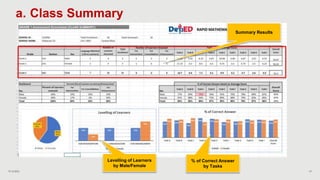
a. Class Summary
Summary Results
Levelling of Learners
by Male/Female
% of Correct Answer
by Tasks
9/13/2023 20
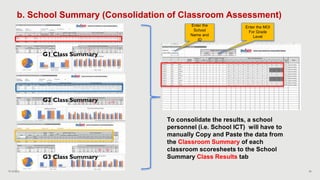
b. School Summary (Consolidation of Classroom Assessment)
To consolidate the results, a school
personnel (i.e. School ICT) will have to
manually Copy and Paste the data from
the Classroom Summary of each
classroom scoresheets to the School
Summary Class Results tab
Enter the
School
Name and
ID
G2 Class Summary
G3 Class Summary
G1 Class Summary
Enter the MOI
For Grade
Level
9/13/2023 21
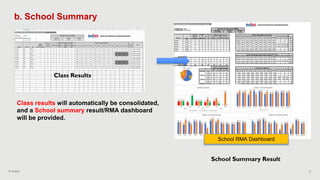
b. School Summary
Class results will automatically be consolidated,
and a School summary result/RMA dashboard
will be provided.
Class Results
School Summary Result
School RMA Dashboard
RMA Dashboard
9/13/2023 23
RMA Dashboard
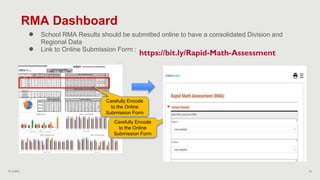
● School RMA Results should be submitted online to have a consolidated Division and
Regional Data
● Link to Online Submission Form :
Carefully Encode
to the Online
Submission Form
Carefully Encode
to the Online
Submission Form
https://bit.ly/Rapid-Math-Assessment
Thank you!

RMA-Briefer.pptx

  • 2.
    Rapid Math AssessmentOrientation October 13, 2023
  • 3.
    Memorandum DM-CT-2023-332 ● Administration ofthe Rapid Math Assessment (RMA) for Grades 1 – 3 at the Beginning of the School Year 2023 - 2024 Slated Dates: Oct 16 – 27, 2023 Uploading of Scores to the Dashboard: not later than Oct. 31, 2023 Dashboard link: https://bit.ly/Rapid-Math-Assessment
  • 4.
    1. RMA administration 2.Automated Scoresheets a. Class Summary b. School Summary 3. RMA Dashboard Discussion Points:
  • 5.
  • 6.
    ● A collaborationbetween DepEd, USAID ABC+, and NISMED to measure, assess, and evaluate Key Stage 1 learners’ numeracy skills against their grade level. ● A tool to help teachers gather data and understand their learners’ current numeracy and mathematical needs. ● Teachers can identify least mastered competencies and to serve as a basis in categorizing the learners. Rapid Mathematics Assessment Toolkit
  • 7.
    RMA Toolkit (Grade1) Teacher’s Booklet Assessment Materials Booklet Learner’s Score Sheet
  • 8.
    RMA Toolkit (Grades2 and 3) Teacher’s Booklet Learner’s Booklet Learner’s Score Sheet
  • 9.
    A.Teacher’s Booklet: Indicates thetime allotted for each task. Indicates the time allotted for each subtask.
  • 10.
    A.Teacher’s Booklet: This iconindicates an instruction for teachers. This icon indicates that the instructions should be read by the teacher orally to the learner.
  • 11.
  • 12.
    B. Score Sheets Usethe Scoring Guide in the Teacher’s Booklet to determine the number of points to be recorded based on the response of the learner.
  • 13.
    B. Score Sheets Themaximum score per task and subtask is indicated in the Score Sheet. Check the corresponding point based on the scoring guide in the Teacher’s Booklet and the learner’s response.
  • 14.
  • 15.
    School Summary (Automated) All classsummary results will be collected by a school personnel and inputted in the school summary automated form. Upload the school summary form in the given google form. Scoresheet (Paper) To be accomplished by classroom teacher during administration of RMA. Class Summary (Automated) Teacher will input the data that he/she collected from the administration. Class summary will automatically be generated.
  • 16.
    9/13/2023 16 RMA AutomatedScoresheets ● An excel file that allow the seamless recording of learners’ rapid math assessment results in the classroom and school for easy monitoring. ● It automatically generate a class and school summary containing tables and charts that consolidate the class RMA result.
  • 17.
  • 18.
    9/13/2023 18 2. Enterthe School and Classroom Information 3.Enter the LOI and Section 5. Enter Learner’s Information 5. Enter Notes, Remarks etc. Automatically Computed Automatically Generated (Total Score and Levelling of Learners) 1. Select the Region 4.Enter the Enrolment ( Male and Female) Automatic Counter Count the Number of Learners Asssess Age will be automaticall y Computed 6. Enter Learner’s Score ( Red < Passing Score) RMA Automated Scoresheets
  • 19.
    9/13/2023 19 a. ClassSummary Summary Results Levelling of Learners by Male/Female % of Correct Answer by Tasks
  • 20.
    9/13/2023 20 b. SchoolSummary (Consolidation of Classroom Assessment) To consolidate the results, a school personnel (i.e. School ICT) will have to manually Copy and Paste the data from the Classroom Summary of each classroom scoresheets to the School Summary Class Results tab Enter the School Name and ID G2 Class Summary G3 Class Summary G1 Class Summary Enter the MOI For Grade Level
  • 21.
    9/13/2023 21 b. SchoolSummary Class results will automatically be consolidated, and a School summary result/RMA dashboard will be provided. Class Results School Summary Result School RMA Dashboard
  • 22.
  • 23.
    9/13/2023 23 RMA Dashboard ●School RMA Results should be submitted online to have a consolidated Division and Regional Data ● Link to Online Submission Form : Carefully Encode to the Online Submission Form Carefully Encode to the Online Submission Form https://bit.ly/Rapid-Math-Assessment
  • 24.