TEE to Run Trusted OS
on RISC-V and Related
Technologies
1
National Institute of Advanced Industrial Science and Technology(AIST)
Kuniyasu Suzaki, Akira Tsukamoto
Contents
• What is TEE?
– RISC-V TEE
• Trusted OS
– “OP-TEE”
– Requirement to implement OP-TEE
2
The difference from Micro51 workshop.
Software view (RISC-V day Tokyo), Hardware view (Micro51 workshop)
Slides will be opened at https://www.slideshare.net/suzaki
HIEE: Hardware-assisted Isolated Execution Environments*
• HIEE is used for important process which is independent of OS.
• Current CPU has HIEE.
– X86 SMM: System Management Mode
• Used by BIOS/UEFI.
– Intel’s ME: Management Engine.
• Run MINIX. Used for remote power control.
– Intel SGX: Software Guard execution
– ARM Trust Zone
3
* F.Zhang and H.Zhang, SoK:A Study of Using Hardware-assisted Isolated Execution
Environments for Security[HASP16]
They are not programmable for a user.
They are programmable for a user.
They are used for TEE.
What is TEE?
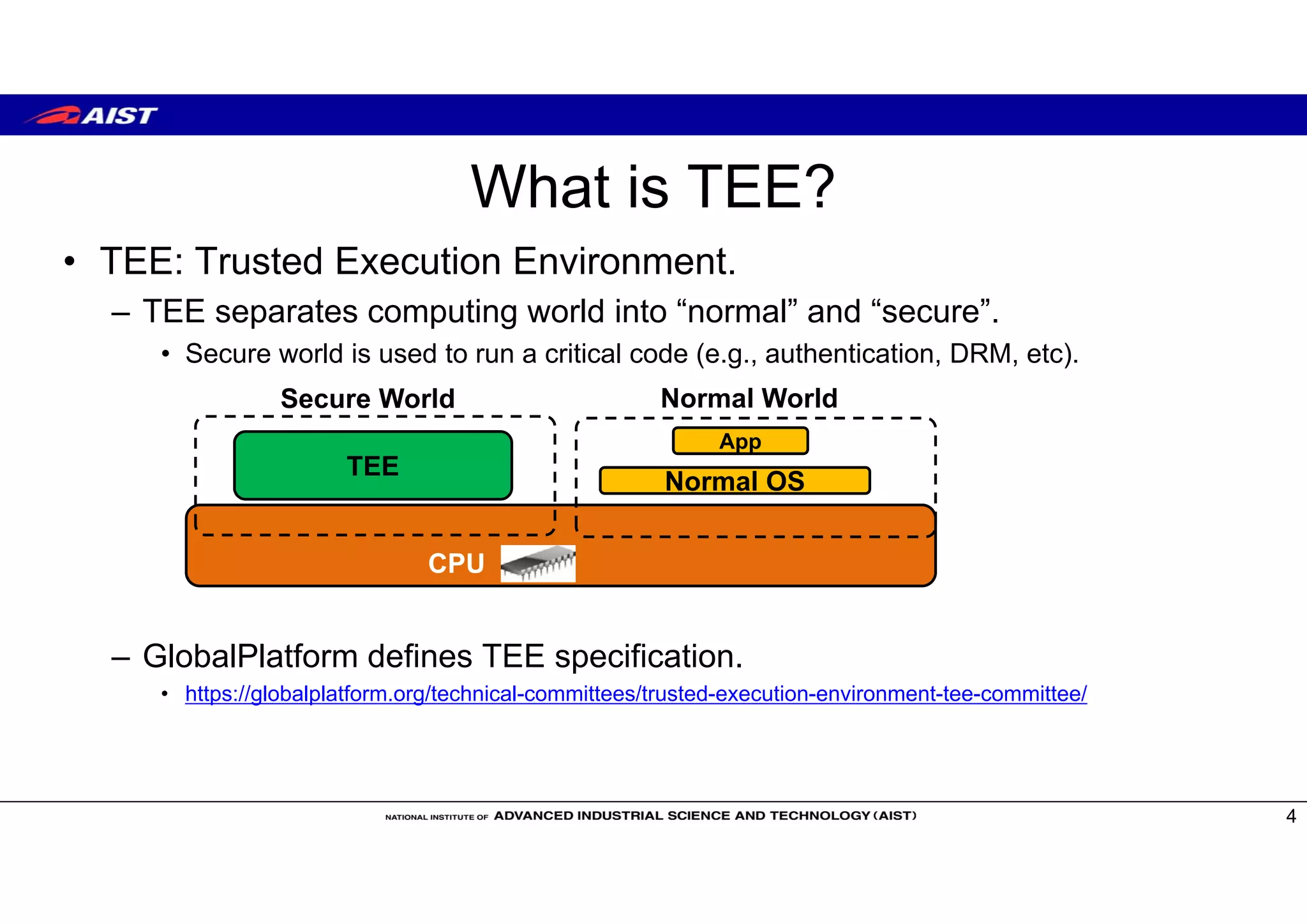
• TEE: Trusted Execution Environment.
– TEE separates computing world into “normal” and “secure”.
• Secure world is used to run a critical code (e.g., authentication, DRM, etc).
– GlobalPlatform defines TEE specification.
• https://globalplatform.org/technical-committees/trusted-execution-environment-tee-committee/
4
CPU
TEE
Secure World Normal World
App
Normal OS
Privileges for TEE
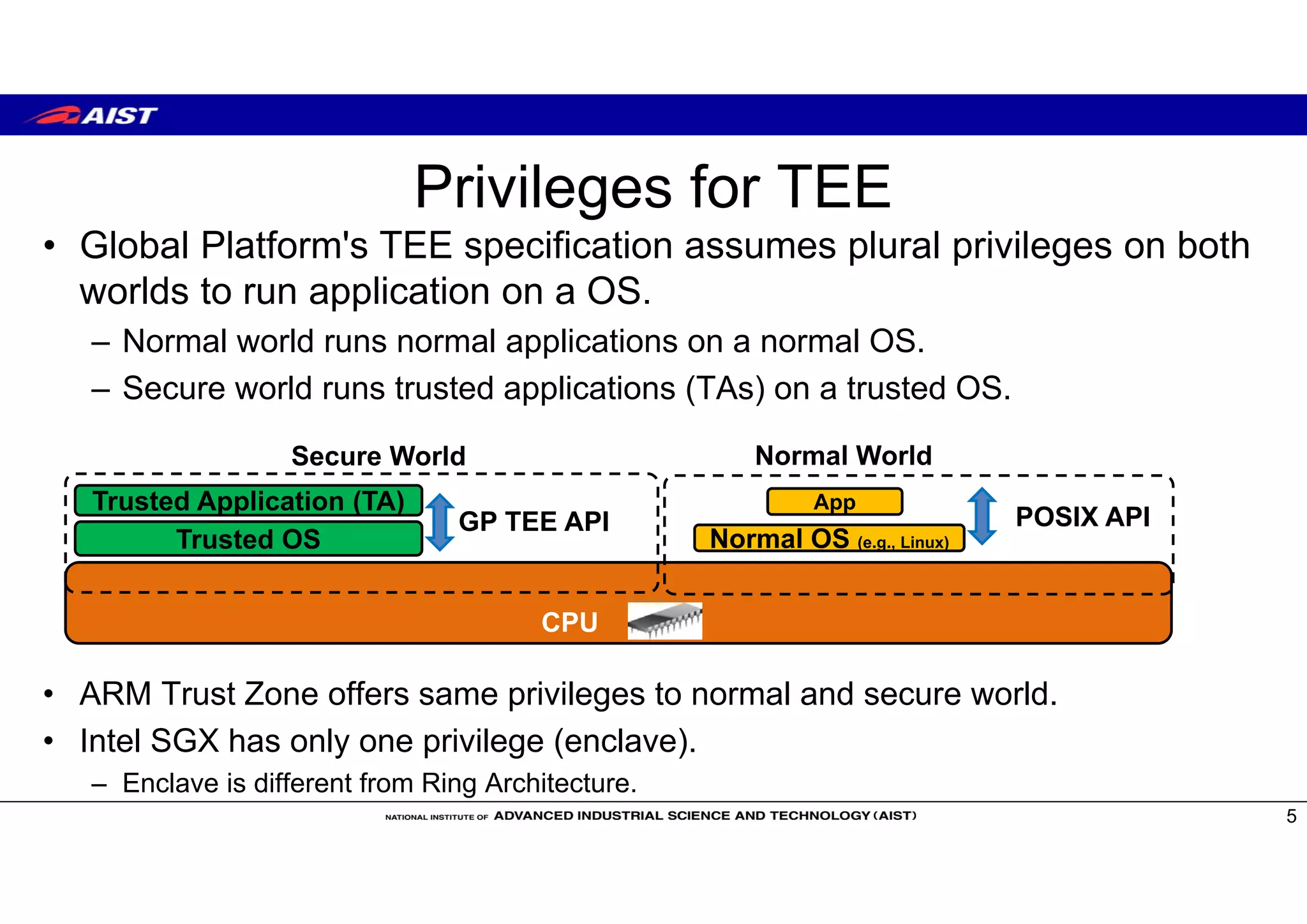
• Global Platform's TEE specification assumes plural privileges on both
worlds to run application on a OS.
– Normal world runs normal applications on a normal OS.
– Secure world runs trusted applications (TAs) on a trusted OS.
• ARM Trust Zone offers same privileges to normal and secure world.
• Intel SGX has only one privilege (enclave).
– Enclave is different from Ring Architecture.
5
CPU
Trusted OS
Secure World Normal World
App
Normal OS (e.g., Linux)
Trusted Application (TA)
POSIX APIGP TEE API
TEE projects on RISC-V
• Sanctum [MIT project, USENIX Sec’16]
• KeyStone [UCB project]
– https://keystone-enclave.org/
• MultiZone [Hex-Five product]
– https://hex-five.com/
• TEE WG of RISC-V Foundation
6
Intel SGX type
One special privilege (Enclave)
ARM Trust Zone type
plural privileges
easy to implement GlobalPlatform
style Trusted OS
ARM
Trusted OS on ARM Trust Zone
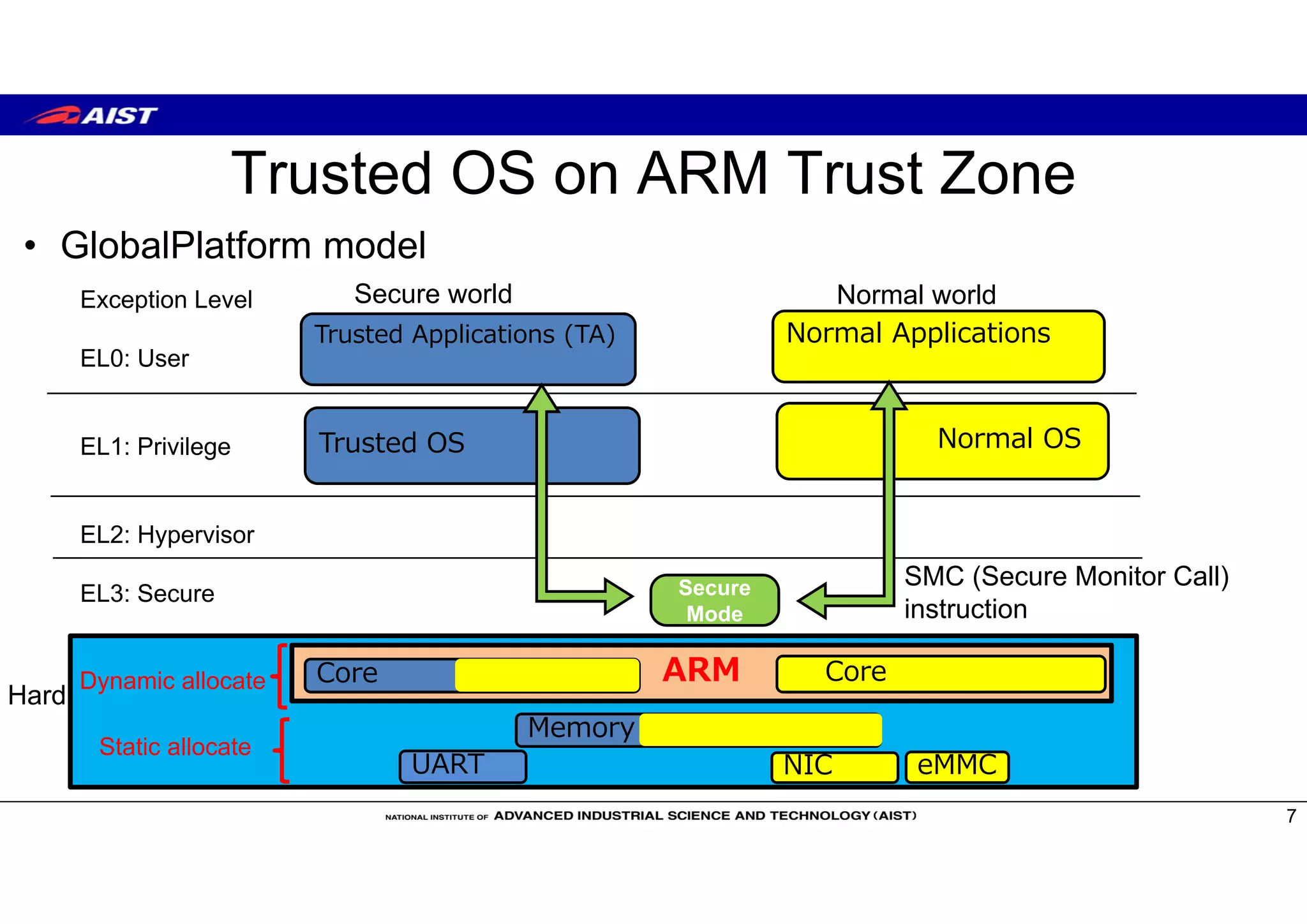
• GlobalPlatform model
7
Secure world Normal world
Normal Applications
Normal OS
NIC
Core
Trusted OS
Trusted Applications (TA)
Core
Secure
Mode
Hard
eMMCUART
Exception Level
EL0: User
EL1: Privilege
EL2: Hypervisor
EL3: Secure
SMC (Secure Monitor Call)
instruction
Memory
Static allocate
Dynamic allocate
Boot Sequence on ARM Trust Zone
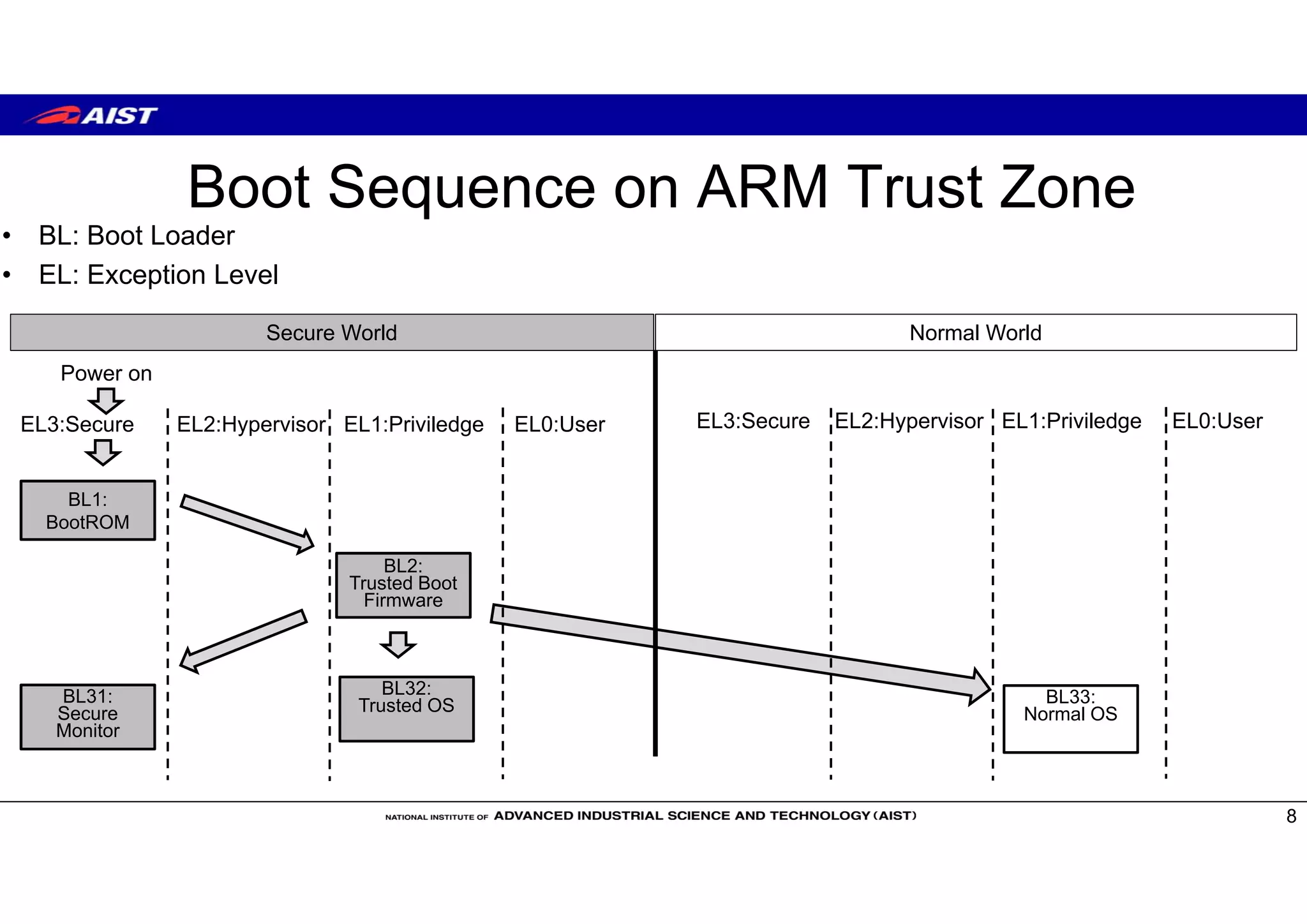
• BL: Boot Loader
• EL: Exception Level
8
Power on
BL1:
BootROM
BL2:
Trusted Boot
Firmware
Secure World Normal World
BL31:
Secure
Monitor
BL32:
Trusted OS BL33:
Normal OS
EL3:Secure EL2:Hypervisor EL1:Priviledge EL0:User EL3:Secure EL2:Hypervisor EL1:Priviledge EL0:User
Trusted OS
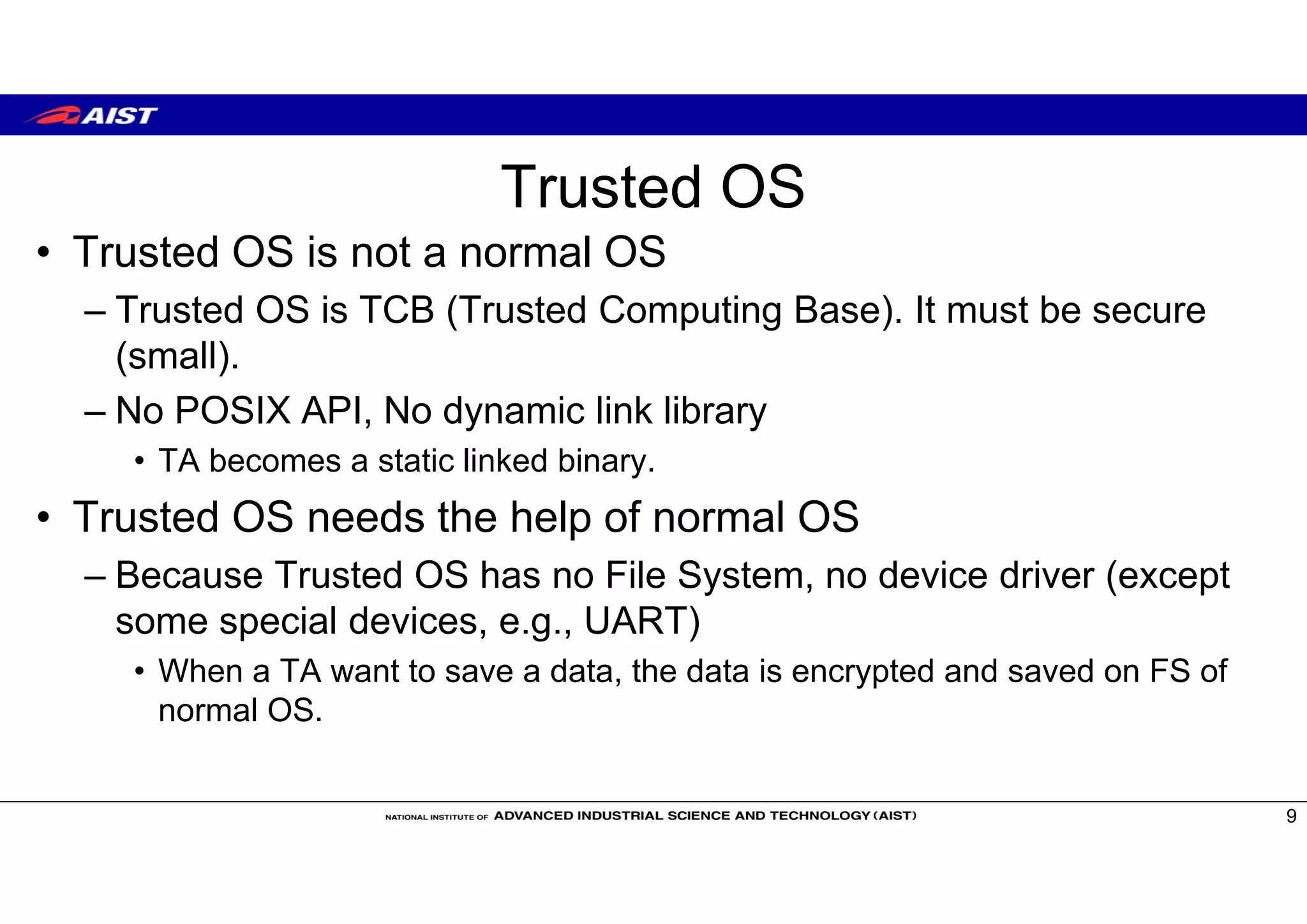
• Trusted OS is not a normal OS
– Trusted OS is TCB (Trusted Computing Base). It must be secure
(small).
– No POSIX API, No dynamic link library
• TA becomes a static linked binary.
• Trusted OS needs the help of normal OS
– Because Trusted OS has no File System, no device driver (except
some special devices, e.g., UART)
• When a TA want to save a data, the data is encrypted and saved on FS of
normal OS.
9
Trusted OS
• Open Source Trusted OS
– OP-TEE (Linaro) https://github.com/OP-TEE
– Open-TEE (Aalto University[TrustCom15]) https://open-tee.github.io/
– Trusty (Google) https://source.android.com/security/trusty/index.html
– SierraTEE (Sierra) https://www.sierraware.com/open-source-ARM-TrustZone.html
• Enterprise Trusted OS
– Apple’s Secure Enclave
– Qualcomm’s QSEE
– Samsung’s Knox https://www.samsungknox.com/en
– Trastonic Kinibi and MobiCore
10
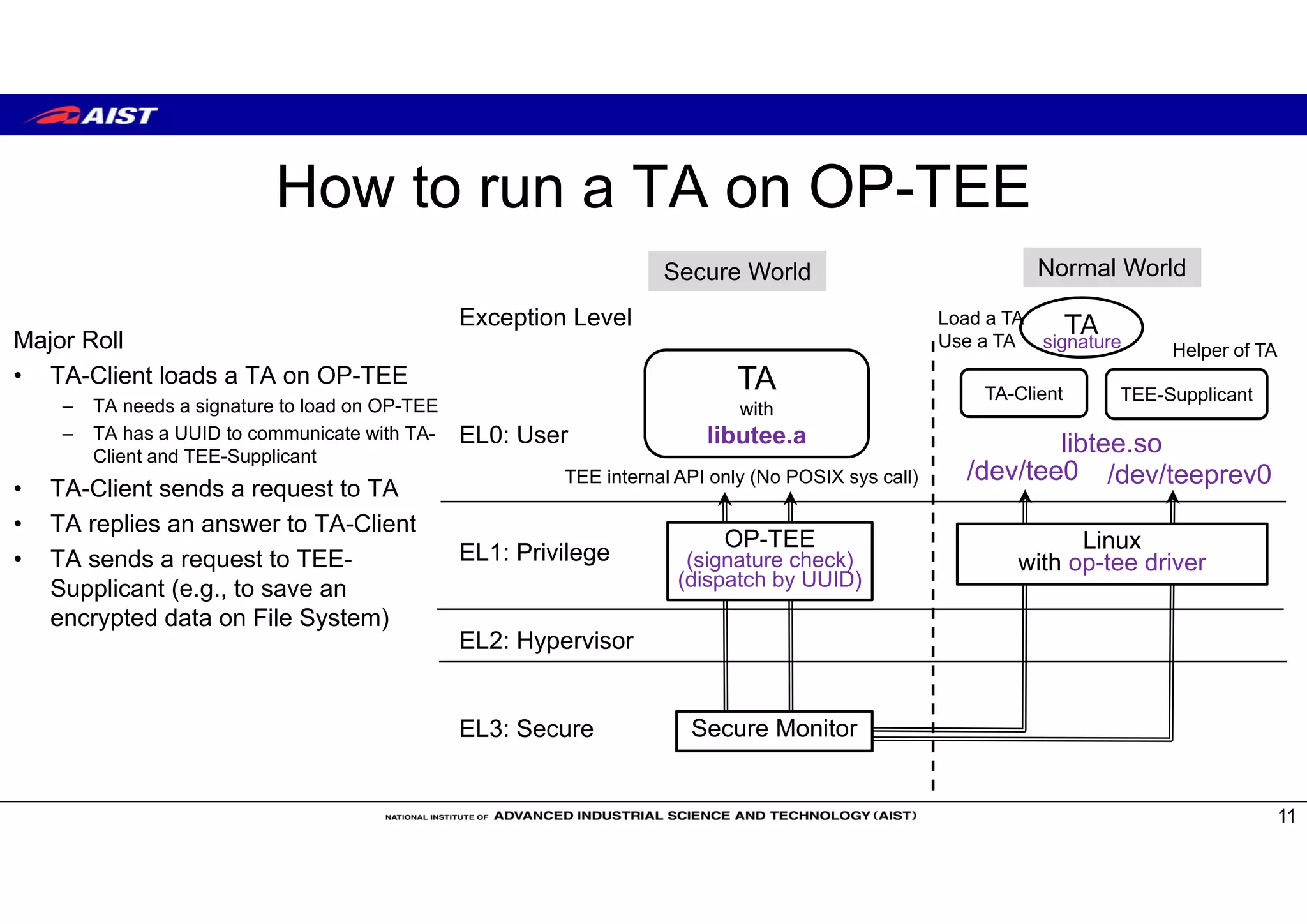
How to run a TA on OP-TEE
11
Secure World Normal World
Secure Monitor
Exception Level
EL0: User
EL1: Privilege
EL2: Hypervisor
EL3: Secure
Linux
with op-tee driver
TA
with
libutee.a
OP-TEE
(signature check)
(dispatch by UUID)
TA-Client TEE-Supplicant
/dev/tee0 /dev/teeprev0
Load a TA
Use a TA Helper of TAsignatureMajor Roll
• TA-Client loads a TA on OP-TEE
– TA needs a signature to load on OP-TEE
– TA has a UUID to communicate with TA-
Client and TEE-Supplicant
• TA-Client sends a request to TA
• TA replies an answer to TA-Client
• TA sends a request to TEE-
Supplicant (e.g., to save an
encrypted data on File System)
TEE internal API only (No POSIX sys call)
TA
libtee.so
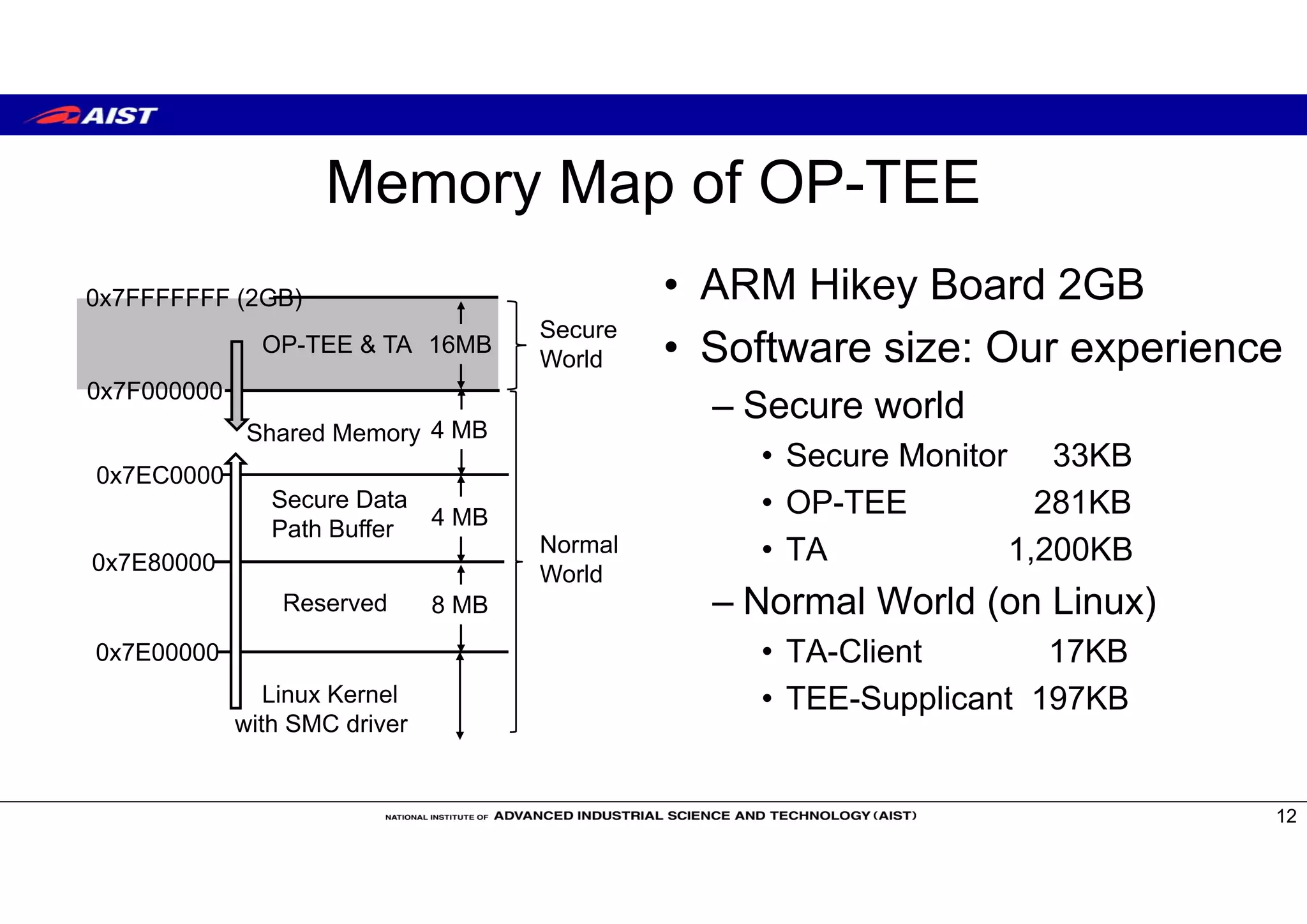
Memory Map of OP-TEE
• ARM Hikey Board 2GB
• Software size: Our experience
– Secure world
• Secure Monitor 33KB
• OP-TEE 281KB
• TA 1,200KB
– Normal World (on Linux)
• TA-Client 17KB
• TEE-Supplicant 197KB
12
0x7FFFFFFF (2GB)
OP-TEE & TA
0x7F000000
16MB
0x7EC0000
Shared Memory 4 MB
0x7E80000
Linux Kernel
with SMC driver
4 MB
0x7E00000
8 MB
Secure Data
Path Buffer
Reserved
Secure
World
Normal
World
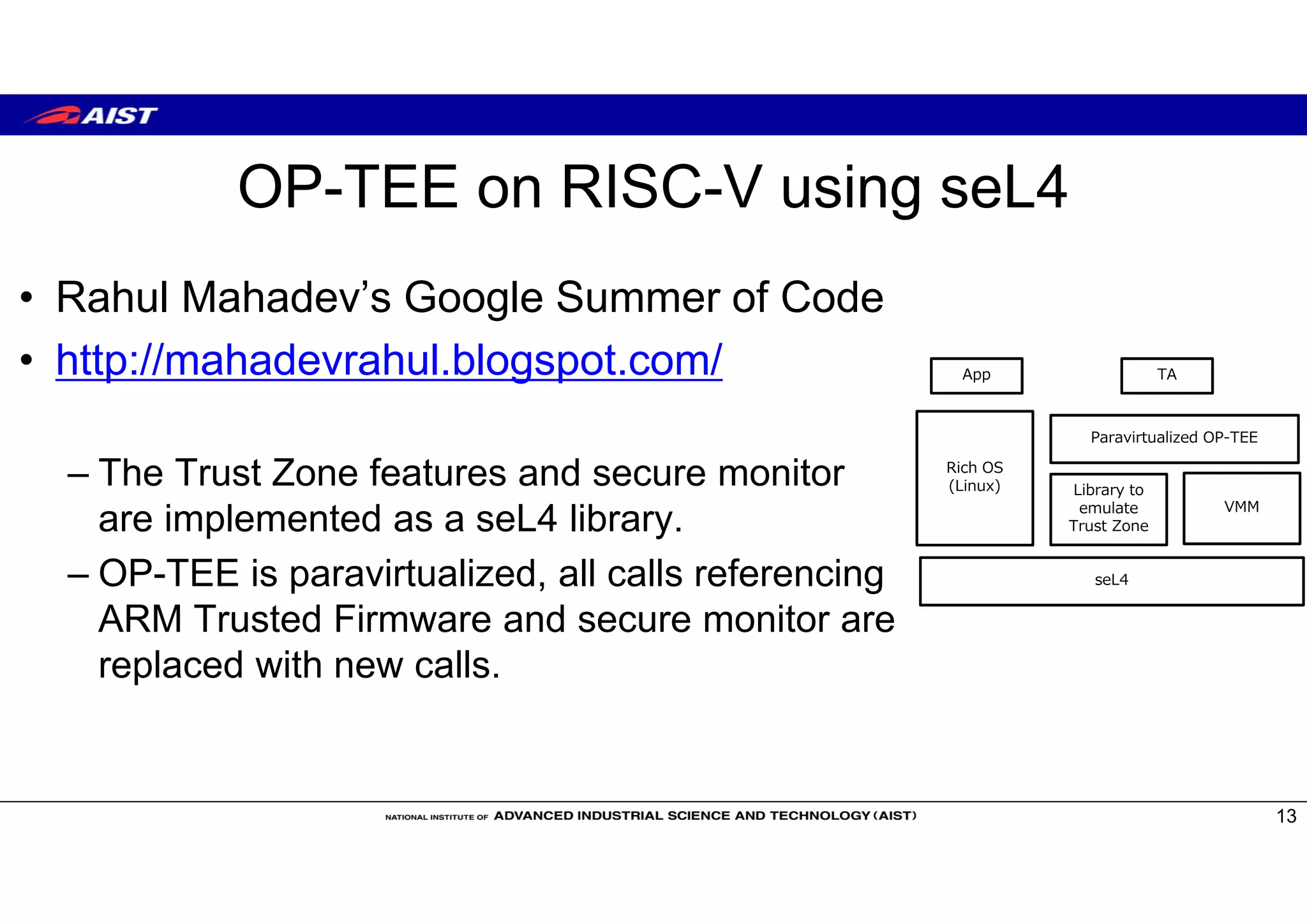
OP-TEE on RISC-V using seL4
• Rahul Mahadev’s Google Summer of Code
• http://mahadevrahul.blogspot.com/
– The Trust Zone features and secure monitor
are implemented as a seL4 library.
– OP-TEE is paravirtualized, all calls referencing
ARM Trusted Firmware and secure monitor are
replaced with new calls.
13
seL4
Rich OS
(Linux) Library to
emulate
Trust Zone
VMM
Paravirtualized OP-TEE
TAApp
Conclusions
• My talk is software view of TEE
• When we implement OP-TEE on RISC-V, we must develop
– Boot sequence: Trusted Boot Firmware, Secure Monitor
– Linux kernel driver
– Libraries (libutee.a for TA and libtee.so for Linux Apps)
– Linux application to assist TA (TEE-supplicant)
14
See Micro51 RISC-V workshop for hardware view
Slide of RISC-V Day Tokyo 2018 and Micro51 RISC-V workshop will be opened at
https://www.slideshare.net/suzaki

RISC-V-Day-Tokyo2018-suzaki

  • 1.
    TEE to RunTrusted OS on RISC-V and Related Technologies 1 National Institute of Advanced Industrial Science and Technology(AIST) Kuniyasu Suzaki, Akira Tsukamoto
  • 2.
    Contents • What isTEE? – RISC-V TEE • Trusted OS – “OP-TEE” – Requirement to implement OP-TEE 2 The difference from Micro51 workshop. Software view (RISC-V day Tokyo), Hardware view (Micro51 workshop) Slides will be opened at https://www.slideshare.net/suzaki
  • 3.
    HIEE: Hardware-assisted IsolatedExecution Environments* • HIEE is used for important process which is independent of OS. • Current CPU has HIEE. – X86 SMM: System Management Mode • Used by BIOS/UEFI. – Intel’s ME: Management Engine. • Run MINIX. Used for remote power control. – Intel SGX: Software Guard execution – ARM Trust Zone 3 * F.Zhang and H.Zhang, SoK:A Study of Using Hardware-assisted Isolated Execution Environments for Security[HASP16] They are not programmable for a user. They are programmable for a user. They are used for TEE.
  • 4.
    What is TEE? •TEE: Trusted Execution Environment. – TEE separates computing world into “normal” and “secure”. • Secure world is used to run a critical code (e.g., authentication, DRM, etc). – GlobalPlatform defines TEE specification. • https://globalplatform.org/technical-committees/trusted-execution-environment-tee-committee/ 4 CPU TEE Secure World Normal World App Normal OS
  • 5.
    Privileges for TEE •Global Platform's TEE specification assumes plural privileges on both worlds to run application on a OS. – Normal world runs normal applications on a normal OS. – Secure world runs trusted applications (TAs) on a trusted OS. • ARM Trust Zone offers same privileges to normal and secure world. • Intel SGX has only one privilege (enclave). – Enclave is different from Ring Architecture. 5 CPU Trusted OS Secure World Normal World App Normal OS (e.g., Linux) Trusted Application (TA) POSIX APIGP TEE API
  • 6.
    TEE projects onRISC-V • Sanctum [MIT project, USENIX Sec’16] • KeyStone [UCB project] – https://keystone-enclave.org/ • MultiZone [Hex-Five product] – https://hex-five.com/ • TEE WG of RISC-V Foundation 6 Intel SGX type One special privilege (Enclave) ARM Trust Zone type plural privileges easy to implement GlobalPlatform style Trusted OS
  • 7.
    ARM Trusted OS onARM Trust Zone • GlobalPlatform model 7 Secure world Normal world Normal Applications Normal OS NIC Core Trusted OS Trusted Applications (TA) Core Secure Mode Hard eMMCUART Exception Level EL0: User EL1: Privilege EL2: Hypervisor EL3: Secure SMC (Secure Monitor Call) instruction Memory Static allocate Dynamic allocate
  • 8.
    Boot Sequence onARM Trust Zone • BL: Boot Loader • EL: Exception Level 8 Power on BL1: BootROM BL2: Trusted Boot Firmware Secure World Normal World BL31: Secure Monitor BL32: Trusted OS BL33: Normal OS EL3:Secure EL2:Hypervisor EL1:Priviledge EL0:User EL3:Secure EL2:Hypervisor EL1:Priviledge EL0:User
  • 9.
    Trusted OS • TrustedOS is not a normal OS – Trusted OS is TCB (Trusted Computing Base). It must be secure (small). – No POSIX API, No dynamic link library • TA becomes a static linked binary. • Trusted OS needs the help of normal OS – Because Trusted OS has no File System, no device driver (except some special devices, e.g., UART) • When a TA want to save a data, the data is encrypted and saved on FS of normal OS. 9
  • 10.
    Trusted OS • OpenSource Trusted OS – OP-TEE (Linaro) https://github.com/OP-TEE – Open-TEE (Aalto University[TrustCom15]) https://open-tee.github.io/ – Trusty (Google) https://source.android.com/security/trusty/index.html – SierraTEE (Sierra) https://www.sierraware.com/open-source-ARM-TrustZone.html • Enterprise Trusted OS – Apple’s Secure Enclave – Qualcomm’s QSEE – Samsung’s Knox https://www.samsungknox.com/en – Trastonic Kinibi and MobiCore 10
  • 11.
    How to runa TA on OP-TEE 11 Secure World Normal World Secure Monitor Exception Level EL0: User EL1: Privilege EL2: Hypervisor EL3: Secure Linux with op-tee driver TA with libutee.a OP-TEE (signature check) (dispatch by UUID) TA-Client TEE-Supplicant /dev/tee0 /dev/teeprev0 Load a TA Use a TA Helper of TAsignatureMajor Roll • TA-Client loads a TA on OP-TEE – TA needs a signature to load on OP-TEE – TA has a UUID to communicate with TA- Client and TEE-Supplicant • TA-Client sends a request to TA • TA replies an answer to TA-Client • TA sends a request to TEE- Supplicant (e.g., to save an encrypted data on File System) TEE internal API only (No POSIX sys call) TA libtee.so
  • 12.
    Memory Map ofOP-TEE • ARM Hikey Board 2GB • Software size: Our experience – Secure world • Secure Monitor 33KB • OP-TEE 281KB • TA 1,200KB – Normal World (on Linux) • TA-Client 17KB • TEE-Supplicant 197KB 12 0x7FFFFFFF (2GB) OP-TEE & TA 0x7F000000 16MB 0x7EC0000 Shared Memory 4 MB 0x7E80000 Linux Kernel with SMC driver 4 MB 0x7E00000 8 MB Secure Data Path Buffer Reserved Secure World Normal World
  • 13.
    OP-TEE on RISC-Vusing seL4 • Rahul Mahadev’s Google Summer of Code • http://mahadevrahul.blogspot.com/ – The Trust Zone features and secure monitor are implemented as a seL4 library. – OP-TEE is paravirtualized, all calls referencing ARM Trusted Firmware and secure monitor are replaced with new calls. 13 seL4 Rich OS (Linux) Library to emulate Trust Zone VMM Paravirtualized OP-TEE TAApp
  • 14.
    Conclusions • My talkis software view of TEE • When we implement OP-TEE on RISC-V, we must develop – Boot sequence: Trusted Boot Firmware, Secure Monitor – Linux kernel driver – Libraries (libutee.a for TA and libtee.so for Linux Apps) – Linux application to assist TA (TEE-supplicant) 14 See Micro51 RISC-V workshop for hardware view Slide of RISC-V Day Tokyo 2018 and Micro51 RISC-V workshop will be opened at https://www.slideshare.net/suzaki