Access Control Pitfalls and Best Practices

© 2013 WhiteHat Security, Inc.
Access Control Best Practices
• Build a centralized AuthZ mechanism

• Code to the ACTIVITY, not the role
• Design AuthZ as a filter
• Deny by default, fail securely

• Server-side trusted data should drive AuthZ
• Be able to change entitlements in real time
• Design standardized data contextual AuthZ

• Build grouping for users and permissions

© 2013 WhiteHat Security, Inc.
Access Control Anti-Patterns
•
•
•
•
•

Hard-coded role checks in application code
Lack of centralized access control logic
Untrusted data driving access control decisions
Access control that is “open by default”
Lack of addressing horizontal access control in a standardized way
(if at all)
• Access control logic that needs to be manually added to every
endpoint in code
• Access Control that is “sticky” per session
• Access Control that requires per-user policy

© 2013 WhiteHat Security, Inc
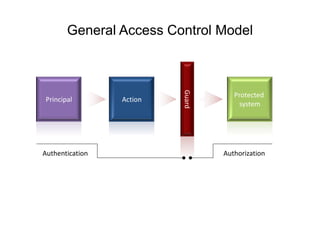
General Access Control Model

Action

Authentication

© 2013 WhiteHat Security, Inc

Guard

Principal

Protected
system

Authorization
What is Access Control?
Authorization is the process where a system determines
if a specific user has access to a resource
• Feature/Activity: Represents app behavior only
• Entitlement/Permission: What a user is actually allowed to do and
what data they can access
• Principle/User: Who/what you are entitling
• Implicit Role: Named permission, user associated
– if (user.isRole(“Manager”));

• Explicit Role: Named permission, resource associated
– if (user.isAuthorized(“report:view:3324”);
© 2013 WhiteHat Security, Inc.
Access Controls Impact
• Loss of accountability
– Attackers maliciously execute actions as other users
– Attackers maliciously execute higher level actions

• Disclosure of confidential data
– Compromising admin-level accounts often results in access to user’s
confidential data

• Data tampering
– Privilege levels do not distinguish users who can only view data and users
permitted to modify data

© 2013 WhiteHat Security, Inc.
Attacks on Access Control
• Vertical Access Control Attacks
– A standard user accessing administration functionality

• Horizontal Access Control Attacks
– Same role, but accessing another user's private data

• Business Logic Access Control Attacks
– Abuse of one or more linked activities that collectively realize a business
objective

© 2013 WhiteHat Security, Inc.
Hard-coded roles

© 2013 WhiteHat Security, Inc.
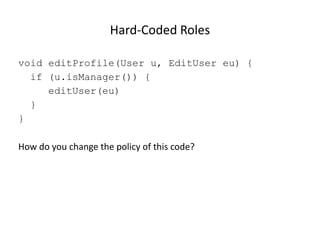
Hard-Coded Roles
void editProfile(User u, EditUser eu) {
if (u.isManager()) {
editUser(eu)
}
}
How do you change the policy of this code?

© 2013 WhiteHat Security, Inc.

9
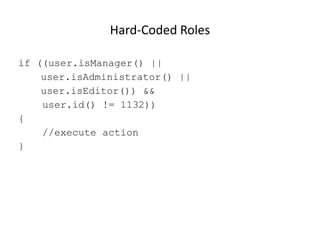
Hard-Coded Roles
if ((user.isManager() ||
user.isAdministrator() ||
user.isEditor()) &&
user.id() != 1132))
{
//execute action
}

© 2013 WhiteHat Security, Inc.

10
Hard-Coded Roles
• Makes “proving” the policy of an application difficult for audit or
Q/A purposes
• Any time access control policy needs to change, new code need to
be pushed
• RBAC is often not granular enough
• Fragile, easy to make mistakes

© 2013 WhiteHat Security, Inc. &
BCC Risk Advisory Ltd

11
Order-Specific Operations

12
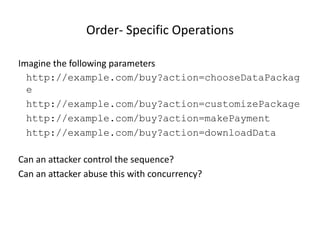
Order- Specific Operations
Imagine the following parameters
http://example.com/buy?action=chooseDataPackag
e
http://example.com/buy?action=customizePackage
http://example.com/buy?action=makePayment
http://example.com/buy?action=downloadData
Can an attacker control the sequence?
Can an attacker abuse this with concurrency?

© 2013 WhiteHat Security, Inc.

13
Rarely Depend on Untrusted Data
• Avoid trusting request data for access control decisions
• Never make access control decisions in JavaScript
• Never make authorization decisions based solely on:
– hidden fields
– cookie values
– form parameters
– URL parameters
– anything else from the request

• Never depend on the order of values sent from the client

© 2013 WhiteHat Security, Inc.

14
Best practice

© 2013 WhiteHat Security, Inc.

15
Best Practice: Centralized AuthZ
• Define a centralized access controller
– ACLService.isAuthorized(PERMISSION_CONSTANT)
– ACLService.assertAuthorized(PERMISSION_CONSTANT)

• Access control decisions go through these simple API’s
• Centralized logic to drive policy behavior and persistence
• May contain data-driven access control policy information

© 2013 WhiteHat Security, Inc.

16
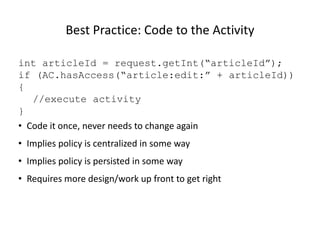
Best Practice: Code to the Activity
int articleId = request.getInt(“articleId”);
if (AC.hasAccess(“article:edit:” + articleId))
{
//execute activity
}
• Code it once, never needs to change again
• Implies policy is centralized in some way
• Implies policy is persisted in some way
• Requires more design/work up front to get right

© 2013 WhiteHat Security, Inc.

17
Using a Centralized Access Controller
In Presentation Layer
if (isAuthorized(Permission.VIEW_LOG_PANEL))
{
<h2>Here are the logs</h2>
<%=Encoder.forHTMLContent(getRawLogData());%/
>
}

© 2013 WhiteHat Security, Inc.

18
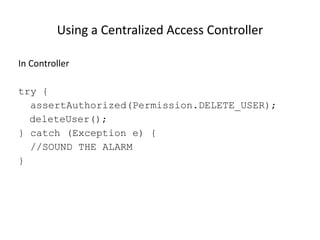
Using a Centralized Access Controller
In Controller
try {
assertAuthorized(Permission.DELETE_USER);
deleteUser();
} catch (Exception e) {
//SOUND THE ALARM
}

© 2013 WhiteHat Security, Inc.

19
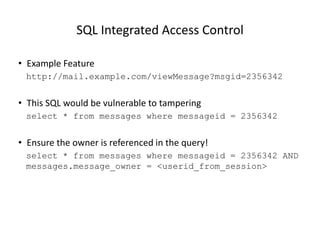
SQL Integrated Access Control
• Example Feature
http://mail.example.com/viewMessage?msgid=2356342

• This SQL would be vulnerable to tampering
select * from messages where messageid = 2356342

• Ensure the owner is referenced in the query!
select * from messages where messageid = 2356342 AND
messages.message_owner = <userid_from_session>

© 2013 WhiteHat Security, Inc. &
BCC Risk Advisory Ltd

20
Data Contextual Access Control
Data Contextual / Horizontal Access Control API examples:
ACLService.isAuthorized(“car:view:321”)
ACLService.assertAuthorized(“car:edit:321”)

Long form:
Is Authorized(user, Perm.EDIT_CAR, Car.class, 321)

• Check if the user has the right role in the context of a specific
object
• Protecting data at the lowest level!

© 2013 WhiteHat Security, Inc. &
BCC Risk Advisory Ltd

21
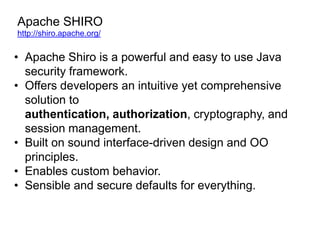
Apache SHIRO
http://shiro.apache.org/

• Apache Shiro is a powerful and easy to use Java
security framework.
• Offers developers an intuitive yet comprehensive
solution to
authentication, authorization, cryptography, and
session management.
• Built on sound interface-driven design and OO
principles.
• Enables custom behavior.
• Sensible and secure defaults for everything.
Solving Real World Access Control Problems
with the Apache Shiro
The Problem
Web Application needs secure access control mechanism

The Solution
if ( currentUser.isPermitted( "lightsaber:wield" ) ) {
log.info("You may use a lightsaber ring. Use it wisely.");
} else {
log.info("Sorry, lightsaber rings are for schwartz masters only.");
}
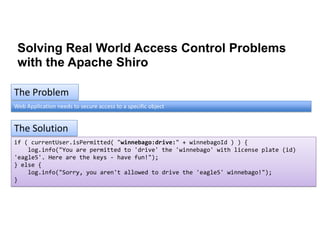
Solving Real World Access Control Problems
with the Apache Shiro
The Problem
Web Application needs to secure access to a specific object

The Solution
if ( currentUser.isPermitted( "winnebago:drive:" + winnebagoId ) ) {
log.info("You are permitted to 'drive' the 'winnebago' with license plate (id)
'eagle5'. Here are the keys - have fun!");
} else {
log.info("Sorry, you aren't allowed to drive the 'eagle5' winnebago!");
}
Data Contextual Access Control

Activity / Feature

User
User ID

Activity ID

User Name

Data Type
Data ID

Activity Name

Role
Data Name

Role ID

Role Name

Entitlement / Privilege
User ID

Activity ID

Role ID

Data Type ID

Data Instance Id
Please steal and plagiarize this presentation!
GET THE WORD OUT
jim@owasp.org
slideshare.net/jimmanico

Access Control Pitfalls v2

  • 1.
    Access Control Pitfallsand Best Practices © 2013 WhiteHat Security, Inc.
  • 2.
    Access Control BestPractices • Build a centralized AuthZ mechanism • Code to the ACTIVITY, not the role • Design AuthZ as a filter • Deny by default, fail securely • Server-side trusted data should drive AuthZ • Be able to change entitlements in real time • Design standardized data contextual AuthZ • Build grouping for users and permissions © 2013 WhiteHat Security, Inc.
  • 3.
    Access Control Anti-Patterns • • • • • Hard-codedrole checks in application code Lack of centralized access control logic Untrusted data driving access control decisions Access control that is “open by default” Lack of addressing horizontal access control in a standardized way (if at all) • Access control logic that needs to be manually added to every endpoint in code • Access Control that is “sticky” per session • Access Control that requires per-user policy © 2013 WhiteHat Security, Inc
  • 4.
    General Access ControlModel Action Authentication © 2013 WhiteHat Security, Inc Guard Principal Protected system Authorization
  • 5.
    What is AccessControl? Authorization is the process where a system determines if a specific user has access to a resource • Feature/Activity: Represents app behavior only • Entitlement/Permission: What a user is actually allowed to do and what data they can access • Principle/User: Who/what you are entitling • Implicit Role: Named permission, user associated – if (user.isRole(“Manager”)); • Explicit Role: Named permission, resource associated – if (user.isAuthorized(“report:view:3324”); © 2013 WhiteHat Security, Inc.
  • 6.
    Access Controls Impact •Loss of accountability – Attackers maliciously execute actions as other users – Attackers maliciously execute higher level actions • Disclosure of confidential data – Compromising admin-level accounts often results in access to user’s confidential data • Data tampering – Privilege levels do not distinguish users who can only view data and users permitted to modify data © 2013 WhiteHat Security, Inc.
  • 7.
    Attacks on AccessControl • Vertical Access Control Attacks – A standard user accessing administration functionality • Horizontal Access Control Attacks – Same role, but accessing another user's private data • Business Logic Access Control Attacks – Abuse of one or more linked activities that collectively realize a business objective © 2013 WhiteHat Security, Inc.
  • 8.
    Hard-coded roles © 2013WhiteHat Security, Inc.
  • 9.
    Hard-Coded Roles void editProfile(Useru, EditUser eu) { if (u.isManager()) { editUser(eu) } } How do you change the policy of this code? © 2013 WhiteHat Security, Inc. 9
  • 10.
    Hard-Coded Roles if ((user.isManager()|| user.isAdministrator() || user.isEditor()) && user.id() != 1132)) { //execute action } © 2013 WhiteHat Security, Inc. 10
  • 11.
    Hard-Coded Roles • Makes“proving” the policy of an application difficult for audit or Q/A purposes • Any time access control policy needs to change, new code need to be pushed • RBAC is often not granular enough • Fragile, easy to make mistakes © 2013 WhiteHat Security, Inc. & BCC Risk Advisory Ltd 11
  • 12.
  • 13.
    Order- Specific Operations Imaginethe following parameters http://example.com/buy?action=chooseDataPackag e http://example.com/buy?action=customizePackage http://example.com/buy?action=makePayment http://example.com/buy?action=downloadData Can an attacker control the sequence? Can an attacker abuse this with concurrency? © 2013 WhiteHat Security, Inc. 13
  • 14.
    Rarely Depend onUntrusted Data • Avoid trusting request data for access control decisions • Never make access control decisions in JavaScript • Never make authorization decisions based solely on: – hidden fields – cookie values – form parameters – URL parameters – anything else from the request • Never depend on the order of values sent from the client © 2013 WhiteHat Security, Inc. 14
  • 15.
    Best practice © 2013WhiteHat Security, Inc. 15
  • 16.
    Best Practice: CentralizedAuthZ • Define a centralized access controller – ACLService.isAuthorized(PERMISSION_CONSTANT) – ACLService.assertAuthorized(PERMISSION_CONSTANT) • Access control decisions go through these simple API’s • Centralized logic to drive policy behavior and persistence • May contain data-driven access control policy information © 2013 WhiteHat Security, Inc. 16
  • 17.
    Best Practice: Codeto the Activity int articleId = request.getInt(“articleId”); if (AC.hasAccess(“article:edit:” + articleId)) { //execute activity } • Code it once, never needs to change again • Implies policy is centralized in some way • Implies policy is persisted in some way • Requires more design/work up front to get right © 2013 WhiteHat Security, Inc. 17
  • 18.
    Using a CentralizedAccess Controller In Presentation Layer if (isAuthorized(Permission.VIEW_LOG_PANEL)) { <h2>Here are the logs</h2> <%=Encoder.forHTMLContent(getRawLogData());%/ > } © 2013 WhiteHat Security, Inc. 18
  • 19.
    Using a CentralizedAccess Controller In Controller try { assertAuthorized(Permission.DELETE_USER); deleteUser(); } catch (Exception e) { //SOUND THE ALARM } © 2013 WhiteHat Security, Inc. 19
  • 20.
    SQL Integrated AccessControl • Example Feature http://mail.example.com/viewMessage?msgid=2356342 • This SQL would be vulnerable to tampering select * from messages where messageid = 2356342 • Ensure the owner is referenced in the query! select * from messages where messageid = 2356342 AND messages.message_owner = <userid_from_session> © 2013 WhiteHat Security, Inc. & BCC Risk Advisory Ltd 20
  • 21.
    Data Contextual AccessControl Data Contextual / Horizontal Access Control API examples: ACLService.isAuthorized(“car:view:321”) ACLService.assertAuthorized(“car:edit:321”) Long form: Is Authorized(user, Perm.EDIT_CAR, Car.class, 321) • Check if the user has the right role in the context of a specific object • Protecting data at the lowest level! © 2013 WhiteHat Security, Inc. & BCC Risk Advisory Ltd 21
  • 22.
    Apache SHIRO http://shiro.apache.org/ • ApacheShiro is a powerful and easy to use Java security framework. • Offers developers an intuitive yet comprehensive solution to authentication, authorization, cryptography, and session management. • Built on sound interface-driven design and OO principles. • Enables custom behavior. • Sensible and secure defaults for everything.
  • 23.
    Solving Real WorldAccess Control Problems with the Apache Shiro The Problem Web Application needs secure access control mechanism The Solution if ( currentUser.isPermitted( "lightsaber:wield" ) ) { log.info("You may use a lightsaber ring. Use it wisely."); } else { log.info("Sorry, lightsaber rings are for schwartz masters only."); }
  • 24.
    Solving Real WorldAccess Control Problems with the Apache Shiro The Problem Web Application needs to secure access to a specific object The Solution if ( currentUser.isPermitted( "winnebago:drive:" + winnebagoId ) ) { log.info("You are permitted to 'drive' the 'winnebago' with license plate (id) 'eagle5'. Here are the keys - have fun!"); } else { log.info("Sorry, you aren't allowed to drive the 'eagle5' winnebago!"); }
  • 25.
    Data Contextual AccessControl Activity / Feature User User ID Activity ID User Name Data Type Data ID Activity Name Role Data Name Role ID Role Name Entitlement / Privilege User ID Activity ID Role ID Data Type ID Data Instance Id
  • 26.
    Please steal andplagiarize this presentation! GET THE WORD OUT jim@owasp.org slideshare.net/jimmanico

Editor's Notes

  • #5 Frank Piessens
  • #23 User Joe can execute ViewReport as a manager specific to DataSet 2314