HTML enhanced for web apps!
Agenda 
 AngularJS: Introduction 
 Introduction to Single-Page-Apps 
 Understand what AngularJS is and why it's important 
 Installing AngularJS 
 Write your first AngularJS application 
 Understand Data-binding, Directives, Filters, Controller 
& View 
 Run AngularJS application using HTTP server
Introduction 
 A 100% client-side and 100% JavaScript Framework 
 Free and open source (MIT License) 
 Built with modern development principles in mind 
 Flexible 
 Modularity 
 Versatility 
 Testability 
 Re-use, Less Code 
 SPA 
 Quick prototyping 
 Extensible
Introduction 
 Current Version - 1.2.27 
 Work in progress - 2.0 (to be mobile-first) 
 Has a port available in Dart (AngularDart) 
 Vibrant and growing community 
 Project homepage – angularjs.org 
 Guide – docs.angularjs.org/guide 
 API reference - docs.angularjs.org/api 
 Browser support – Firefox, Chrome, Safar, IE8+*
What is AngularJS?
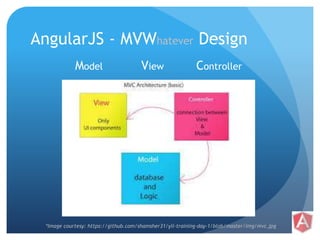
AngularJS - MVWhatever Design 
Model View Controller 
*Image courtesy: https://github.com/shamsher31/yii-training-day-1/blob/master/img/mvc.jpg
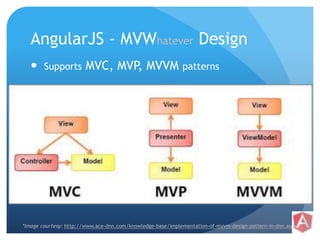
AngularJS - MVWhatever Design 
 Supports MVC, MVP, MVVM patterns 
*Image courtesy: http://www.ace-dnn.com/knowledge-base/implementation-of-mvvm-design-pattern-in-dnn.aspx
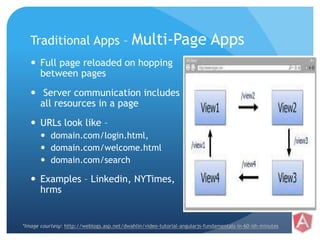
Traditional Apps – Multi-Page Apps 
 Full page reloaded on hopping 
between pages 
 Server communication includes 
all resources in a page 
 URLs look like – 
 domain.com/login.html, 
 domain.com/welcome.html 
 domain.com/search 
 Examples – Linkedin, NYTimes, 
hrms 
*Image courtesy: http://weblogs.asp.net/dwahlin/video-tutorial-angularjs-fundamentals-in-60-ish-minutes
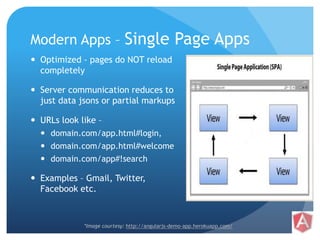
Modern Apps – Single Page Apps 
 Optimized - pages do NOT reload 
completely 
 Server communication reduces to 
just data jsons or partial markups 
 URLs look like – 
 domain.com/app.html#login, 
 domain.com/app.html#welcome 
 domain.com/app#!search 
 Examples – Gmail, Twitter, 
Facebook etc. 
*Image courtesy: http://angularjs-demo-app.herokuapp.com/
AngularJS 
 Full-featured SPA framework 
 Templating 
 Routing 
 Deep Linking 
 History
AngularJS Features 
 Data-binding 
 Directives 
 Dependency Injection 
 Form Validation 
 Server Communication 
 Localization 
 Embeddable 
 Plain JavaScript 
 etc.
Working with AngularJS
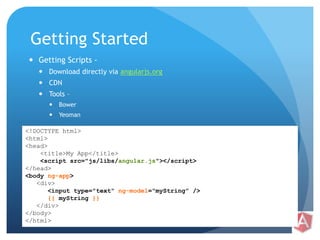
Getting Started 
 Getting Scripts - 
 Download directly via angularjs.org 
 CDN 
 Tools – 
 Bower 
 Yeoman 
<!DOCTYPE html> 
<html> 
<head> 
<title>My App</title> 
<script src="js/libs/angular.js"></script> 
</head> 
<body ng-app> 
<div> 
<input type="text" ng-model="myString" /> 
{{ myString }} 
</div> 
</body> 
</html>
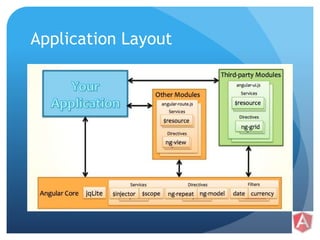
Application Layout
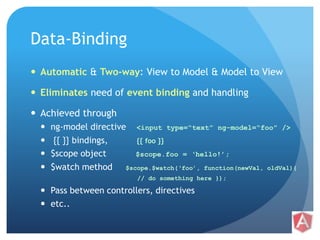
Data-Binding 
 Automatic & Two-way: View to Model & Model to View 
 Eliminates need of event binding and handling 
 Achieved through 
 ng-model directive <input type=“text” ng-model=“foo” /> 
 {{ }} bindings, {{ foo }} 
 $scope object $scope.foo = ‘hello!’; 
 $watch method $scope.$watch(‘foo’, function(newVal, oldVal){ 
// do something here }); 
 Pass between controllers, directives 
 etc..
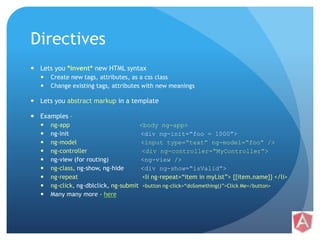
Directives 
 Lets you *invent* new HTML syntax 
 Create new tags, attributes, as a css class 
 Change existing tags, attributes with new meanings 
 Lets you abstract markup in a template 
 Examples – 
 ng-app <body ng-app> 
 ng-init <div ng-init=“foo = 1000”> 
 ng-model <input type=“text” ng-model=“foo” /> 
 ng-controller <div ng-controller=“MyController”> 
 ng-view (for routing) <ng-view /> 
 ng-class, ng-show, ng-hide <div ng-show=“isValid”> 
 ng-repeat <li ng-repeat=“item in myList”> {{item.name}} </li> 
 ng-click, ng-dblclick, ng-submit <button ng-click=“doSomething()”>Click Me</button> 
 Many many more - here
Bindings, Expressions, Filters 
 Binding – {{ <expression> | filter | orderBy }} 
 To be used in Views/HTML. 
 Expressions – 
 JavaScript *like* code-snippets – {{ 1 + 2 }}, {{ ‘hello World!’ }} 
 Evaluated against a ‘$scope’ object – {{ a + b }}, {{ user.name 
}}, {{ items[index] }}, {{ doSomething() }} 
 *Cannot* use conditionals, loops & exceptions 
 Filters – Data formatters 
 lowercase, currency, date & any custom-filters 
 orderBy – Sorts filtered result-set
Demo 1 
Data binding, built-in directives
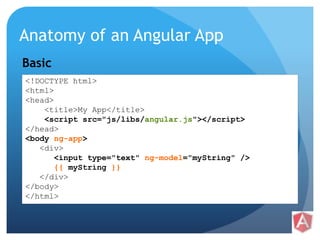
Anatomy of an Angular App 
Basic 
<!DOCTYPE html> 
<html> 
<head> 
<title>My App</title> 
<script src="js/libs/angular.js"></script> 
</head> 
<body ng-app> 
<div> 
<input type="text" ng-model="myString" /> 
{{ myString }} 
</div> 
</body> 
</html>
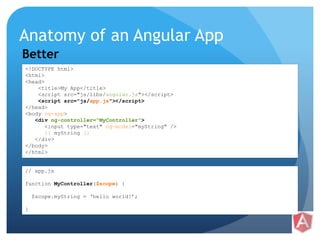
Anatomy of an Angular App 
Better 
<!DOCTYPE html> 
<html> 
<head> 
<title>My App</title> 
<script src="js/libs/angular.js"></script> 
<script src="js/app.js"></script> 
</head> 
<body ng-app> 
<div ng-controller=“MyController”> 
<input type="text" ng-model="myString" /> 
{{ myString }} 
</div> 
</body> 
</html> 
// app.js 
function MyController($scope) { 
$scope.myString = ‘hello world!’; 
}
Anatomy of an Angular App 
Even better – using Modules 
<!DOCTYPE html> 
<html> 
<head> 
<title>My App</title> 
<script src="js/libs/angular.js"></script> 
<script src="js/app.js"></script> 
</head> 
<body ng-app=“myApp”> 
<div ng-controller=“MyController”> 
<input type="text" ng-model="myString" /> 
{{ myString }} 
</div> 
</body> 
</html> 
// app.js 
var myApp = angular.module('myApp', []); 
myApp.controller(‘MyController’, [‘$scope’, function($scope) { 
$scope.myString = ‘hello world!’; 
}]);
Controllers 
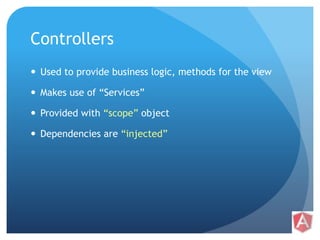
 Used to provide business logic, methods for the view 
 Makes use of “Services” 
 Provided with “scope” object 
 Dependencies are “injected”
Views 
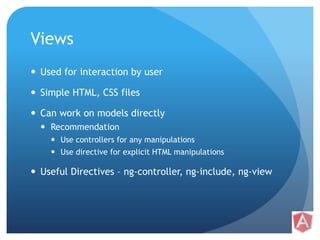
 Used for interaction by user 
 Simple HTML, CSS files 
 Can work on models directly 
 Recommendation 
 Use controllers for any manipulations 
 Use directive for explicit HTML manipulations 
 Useful Directives – ng-controller, ng-include, ng-view
Demo 2 
Anatomy – 
• Basic 
• Better 
• Best
Running using HTTPServers 
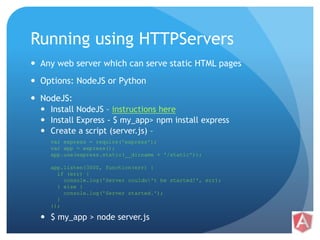
 Any web server which can serve static HTML pages 
 Options: NodeJS or Python 
 NodeJS: 
 Install NodeJS – instructions here 
 Install Express - $ my_app> npm install express 
 Create a script (server.js) – 
var express = require('express'); 
var app = express(); 
app.use(express.static(__dirname + '/static')); 
app.listen(3000, function(err) { 
if (err) { 
console.log('Server couldn't be started!', err); 
} else { 
console.log('Server started.'); 
} 
}); 
 $ my_app > node server.js
Questions.. ?
References 
 Articles 
 AngularJS official guide 
 Use AngularJS to power your application 
 Why does AngularJS rock? 
 Rapid prototyping with AngularJs 
 AngularJs Form Validation 
 Videos 
 Official YouTube channel 
 AngularJs Fundamentals in 60-ish minutes 
 Writing Directives 
 Introduction to AngularJs Unit Testing 
 End to End testing of AngularJs apps with Protractor
Thank you! 
End of Day 1.

AngularJS training - Day 1 - Basics: Why, What and basic features of AngularJS

  • 1.
  • 2.
    Agenda  AngularJS:Introduction  Introduction to Single-Page-Apps  Understand what AngularJS is and why it's important  Installing AngularJS  Write your first AngularJS application  Understand Data-binding, Directives, Filters, Controller & View  Run AngularJS application using HTTP server
  • 3.
    Introduction  A100% client-side and 100% JavaScript Framework  Free and open source (MIT License)  Built with modern development principles in mind  Flexible  Modularity  Versatility  Testability  Re-use, Less Code  SPA  Quick prototyping  Extensible
  • 4.
    Introduction  CurrentVersion - 1.2.27  Work in progress - 2.0 (to be mobile-first)  Has a port available in Dart (AngularDart)  Vibrant and growing community  Project homepage – angularjs.org  Guide – docs.angularjs.org/guide  API reference - docs.angularjs.org/api  Browser support – Firefox, Chrome, Safar, IE8+*
  • 5.
  • 6.
    AngularJS - MVWhateverDesign Model View Controller *Image courtesy: https://github.com/shamsher31/yii-training-day-1/blob/master/img/mvc.jpg
  • 7.
    AngularJS - MVWhateverDesign  Supports MVC, MVP, MVVM patterns *Image courtesy: http://www.ace-dnn.com/knowledge-base/implementation-of-mvvm-design-pattern-in-dnn.aspx
  • 8.
    Traditional Apps –Multi-Page Apps  Full page reloaded on hopping between pages  Server communication includes all resources in a page  URLs look like –  domain.com/login.html,  domain.com/welcome.html  domain.com/search  Examples – Linkedin, NYTimes, hrms *Image courtesy: http://weblogs.asp.net/dwahlin/video-tutorial-angularjs-fundamentals-in-60-ish-minutes
  • 9.
    Modern Apps –Single Page Apps  Optimized - pages do NOT reload completely  Server communication reduces to just data jsons or partial markups  URLs look like –  domain.com/app.html#login,  domain.com/app.html#welcome  domain.com/app#!search  Examples – Gmail, Twitter, Facebook etc. *Image courtesy: http://angularjs-demo-app.herokuapp.com/
  • 10.
    AngularJS  Full-featuredSPA framework  Templating  Routing  Deep Linking  History
  • 11.
    AngularJS Features Data-binding  Directives  Dependency Injection  Form Validation  Server Communication  Localization  Embeddable  Plain JavaScript  etc.
  • 12.
  • 13.
    Getting Started Getting Scripts -  Download directly via angularjs.org  CDN  Tools –  Bower  Yeoman <!DOCTYPE html> <html> <head> <title>My App</title> <script src="js/libs/angular.js"></script> </head> <body ng-app> <div> <input type="text" ng-model="myString" /> {{ myString }} </div> </body> </html>
  • 14.
  • 15.
    Data-Binding  Automatic& Two-way: View to Model & Model to View  Eliminates need of event binding and handling  Achieved through  ng-model directive <input type=“text” ng-model=“foo” />  {{ }} bindings, {{ foo }}  $scope object $scope.foo = ‘hello!’;  $watch method $scope.$watch(‘foo’, function(newVal, oldVal){ // do something here });  Pass between controllers, directives  etc..
  • 16.
    Directives  Letsyou *invent* new HTML syntax  Create new tags, attributes, as a css class  Change existing tags, attributes with new meanings  Lets you abstract markup in a template  Examples –  ng-app <body ng-app>  ng-init <div ng-init=“foo = 1000”>  ng-model <input type=“text” ng-model=“foo” />  ng-controller <div ng-controller=“MyController”>  ng-view (for routing) <ng-view />  ng-class, ng-show, ng-hide <div ng-show=“isValid”>  ng-repeat <li ng-repeat=“item in myList”> {{item.name}} </li>  ng-click, ng-dblclick, ng-submit <button ng-click=“doSomething()”>Click Me</button>  Many many more - here
  • 17.
    Bindings, Expressions, Filters  Binding – {{ <expression> | filter | orderBy }}  To be used in Views/HTML.  Expressions –  JavaScript *like* code-snippets – {{ 1 + 2 }}, {{ ‘hello World!’ }}  Evaluated against a ‘$scope’ object – {{ a + b }}, {{ user.name }}, {{ items[index] }}, {{ doSomething() }}  *Cannot* use conditionals, loops & exceptions  Filters – Data formatters  lowercase, currency, date & any custom-filters  orderBy – Sorts filtered result-set
  • 18.
    Demo 1 Databinding, built-in directives
  • 19.
    Anatomy of anAngular App Basic <!DOCTYPE html> <html> <head> <title>My App</title> <script src="js/libs/angular.js"></script> </head> <body ng-app> <div> <input type="text" ng-model="myString" /> {{ myString }} </div> </body> </html>
  • 20.
    Anatomy of anAngular App Better <!DOCTYPE html> <html> <head> <title>My App</title> <script src="js/libs/angular.js"></script> <script src="js/app.js"></script> </head> <body ng-app> <div ng-controller=“MyController”> <input type="text" ng-model="myString" /> {{ myString }} </div> </body> </html> // app.js function MyController($scope) { $scope.myString = ‘hello world!’; }
  • 21.
    Anatomy of anAngular App Even better – using Modules <!DOCTYPE html> <html> <head> <title>My App</title> <script src="js/libs/angular.js"></script> <script src="js/app.js"></script> </head> <body ng-app=“myApp”> <div ng-controller=“MyController”> <input type="text" ng-model="myString" /> {{ myString }} </div> </body> </html> // app.js var myApp = angular.module('myApp', []); myApp.controller(‘MyController’, [‘$scope’, function($scope) { $scope.myString = ‘hello world!’; }]);
  • 22.
    Controllers  Usedto provide business logic, methods for the view  Makes use of “Services”  Provided with “scope” object  Dependencies are “injected”
  • 23.
    Views  Usedfor interaction by user  Simple HTML, CSS files  Can work on models directly  Recommendation  Use controllers for any manipulations  Use directive for explicit HTML manipulations  Useful Directives – ng-controller, ng-include, ng-view
  • 24.
    Demo 2 Anatomy– • Basic • Better • Best
  • 25.
    Running using HTTPServers  Any web server which can serve static HTML pages  Options: NodeJS or Python  NodeJS:  Install NodeJS – instructions here  Install Express - $ my_app> npm install express  Create a script (server.js) – var express = require('express'); var app = express(); app.use(express.static(__dirname + '/static')); app.listen(3000, function(err) { if (err) { console.log('Server couldn't be started!', err); } else { console.log('Server started.'); } });  $ my_app > node server.js
  • 26.
  • 27.
    References  Articles  AngularJS official guide  Use AngularJS to power your application  Why does AngularJS rock?  Rapid prototyping with AngularJs  AngularJs Form Validation  Videos  Official YouTube channel  AngularJs Fundamentals in 60-ish minutes  Writing Directives  Introduction to AngularJs Unit Testing  End to End testing of AngularJs apps with Protractor
  • 28.
    Thank you! Endof Day 1.