Saeid Zebardast 
@saeid 
http://about.me/saeid 
saeid.zebardast@gmail.com 
1
Please Please Please 
Ask Questions 
As Much As You Like 
• This is not a lecture! 
- But an opportunity to learn 
from each other. 
- If you haven’t seen some of 
these frameworks, methods, 
etc. It is OK! 
- Let we know if you know 
‣ Better ways 
‣ Best practices 
‣ My mistakes!
Introduction 
• What’s Java? 
- Since 1995 
- By James Gosling and Sun Microsystems 
‣ Sun acquired by Oracle in 2009/2010, $7.4 billion. 
‣ James Gosling resigned from Oracle (April 2010). 
- Base on C/C++ 
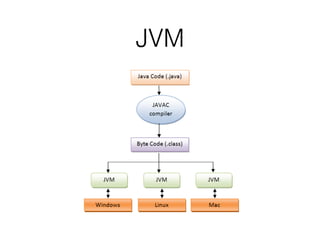
- JVM (Java Virtual Machine) 
• License Issue 
- What’s OpenJDK? 
3
JVM
Java Principles 
1. Simple 
- Syntax is based on C++. 
- No need to remove unreferenced objects. 
2.Secure 
- No explicit pointer. 
- Programs run inside virtual machine sandbox. 
3.Object Oriented 
- Object, Class, Inheritance, Abstraction and etc. 
- Java is pure OOP Language. (C++ is semi object oriented). 
4.Robust 
- Compiler detects many problems. 
- Strong memory management. 
- Lack of pointers that avoids security problem. 
- Automatic garbage collection.
Java Principles 
5.Architecture-neutral 
- Machine independent. 
- Write one, run anywhere. 
6.Portable 
- Java byte codes on any environment and any platform. 
7.High Performance 
- Byte code is "close" to native code. 
- Still somewhat slower than a compiled language (e.g., C++). 
8.Multithreaded 
- Many tasks at once by defining multiple threads. 
9.Distributed 
- URL class allows a Java application to open and access remote objects on the internet.
Java History 
• JDK 1.0 (January 21, 1996) 
• JDK 1.1 (February 19, 1997) 
• J2SE 1.2 (December 8, 1998) 
• J2SE 1.3 (May 8, 2000) 
• J2SE 1.4 (February 6, 2002) 
• J2SE 5.0 (September 30, 2004) 
• Java SE 6 (December 11, 2006) 
• Java SE 7 (July 28, 2011) 
• Java SE 8 (March 18, 2014) 
7
Java Uses 
• Desktop, Web-based and Mobile Apps 
- Android 
- JetBrains IDEs (IntelliJ Idea, CLion and etc.), Eclipse, NetBeans 
- LibreOffice (OpenOffice) 
• Embedded Systems 
- X86, ARM, MIPS, LynxOS, WinCE. 
• Big Data 
- Hadoop (Facebook), Cassandra (Netflix, CERN, Reddit) 
8
Installation 
• Just enter the following command: 
- $ sudo apt-get install openjdk-7-jdk 
• Check Java version: 
- $ java -version 
• Check Java compiler version: 
- $ javac -version 
9
Java Syntax 
• Data Types 
• Variables 
• Operators 
• Statements 
10
Data Types 
• Primitives 
- short, byte, boolean, int and etc. 
• Objects 
- Object, String, Date, Integer, Long and etc. 
11
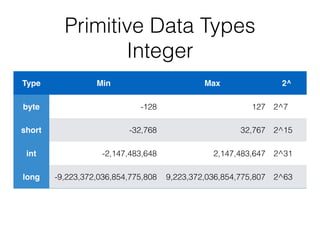
Primitive Data Types 
Integer 
Type Min Max 2^ 
byte -128 127 2^7 
short -32,768 32,767 2^15 
int -2,147,483,648 2,147,483,647 2^31 
long -9,223,372,036,854,775,808 9,223,372,036,854,775,807 2^63
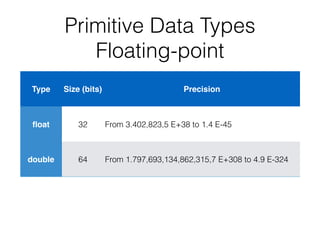
Primitive Data Types 
Floating-point 
Type Size (bits) Precision 
float 32 From 3.402,823,5 E+38 to 1.4 E-45 
double 64 From 1.797,693,134,862,315,7 E+308 to 4.9 E-324
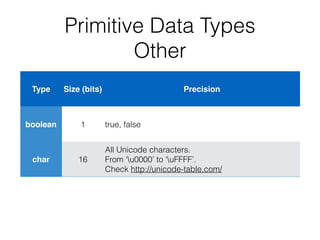
Primitive Data Types 
Other 
Type Size (bits) Precision 
boolean 1 true, false 
char 16 
All Unicode characters. 
From ‘u0000’ to ‘uFFFF’. 
Check http://unicode-table.com/
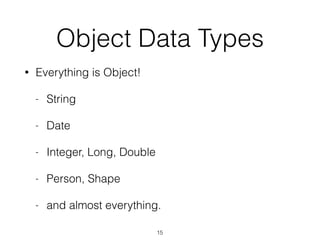
Object Data Types 
• Everything is Object! 
- String 
- Date 
- Integer, Long, Double 
- Person, Shape 
- and almost everything. 
15
Variables 
• type identifier [=value]; 
- boolean status; 
- int i = 0; 
- int d = 66, e, f = 1410; 
‣ declare three ints and initialize d and f. 
- String name; 
- Date today = new Date(); 
16
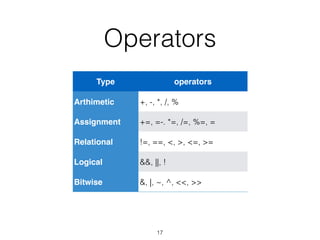
Operators 
Type operators 
Arthimetic +, -, *, /, % 
Assignment +=, =-. *=, /=, %=, = 
Relational !=, ==, <, >, <=, >= 
Logical &&, ||, ! 
Bitwise &, |, ~, ^, <<, >> 
17
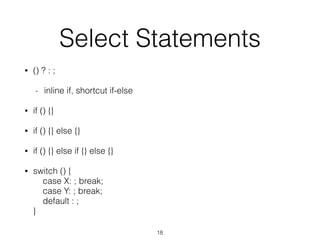
Select Statements 
• () ? : ; 
- inline if, shortcut if-else 
• if () {} 
• if () {} else {} 
• if () {} else if {} else {} 
• switch () { 
case X: ; break; 
case Y: ; break; 
default : ; 
} 
18
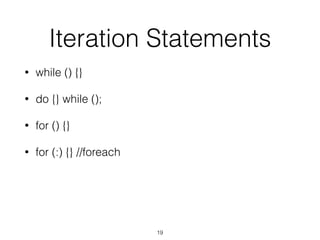
Iteration Statements 
• while () {} 
• do {} while (); 
• for () {} 
• for (:) {} //foreach 
19
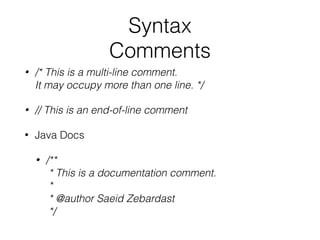
Syntax 
Comments 
• /* This is a multi-line comment. 
It may occupy more than one line. */ 
• // This is an end-of-line comment 
• Java Docs 
• /** 
* This is a documentation comment. 
* 
* @author Saeid Zebardast 
*/
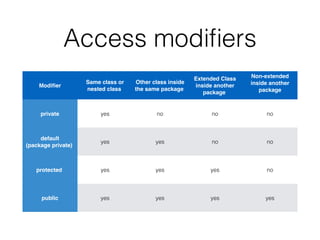
Access modifiers 
Modifier 
Same class or 
nested class 
Other class inside 
the same package 
Extended Class 
inside another 
package 
Non-extended 
inside another 
package 
private yes no no no 
default 
(package private) 
yes yes no no 
protected yes yes yes no 
public yes yes yes yes
Methods 
• [modifiers] return_type method_name([parameterType parameterName, …]) { 
method body; 
[return result] 
} 
• public static void main(String[] args) { 
System.out.println(“Hello World!”); 
// without return! 
} 
• long getMax(int a, int b) { 
if (a > b) 
return a; 
else 
return b; 
}
Classes 
• Top-level class 
- [modifiers] class CLASS_NAME { //the file name should be CLASS_NAME.java 
// Class members (variables, methods, classes) 
} 
• Inner class 
- class Foo { // Top-level class 
class Bar { // Inner class 
} 
} 
• Local class 
- class Foo { 
void bar() { 
class Foobar {// Local class within a method 
} 
} 
} 
• Initialization 
- Foo foo = new Foo();
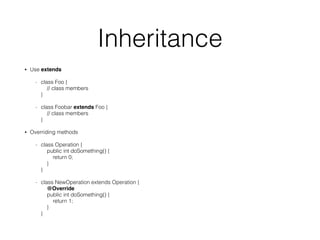
Inheritance 
• Use extends 
- class Foo { 
// class members 
} 
- class Foobar extends Foo { 
// class members 
} 
• Overriding methods 
- class Operation { 
public int doSomething() { 
return 0; 
} 
} 
- class NewOperation extends Operation { 
@Override 
public int doSomething() { 
return 1; 
} 
}
Interfaces 
• Interface (Animal.java) 
- interface Animal { 
public void eat(); 
public void sleep(); 
} 
• Implements (Cat.java) 
- public class Cat implements Animal{ 
String name; 
public Cat(String name) { 
this.name = name; 
} 
public void eat(){ 
System.out.println(name + “ eats"); 
} 
public void sleep(){ 
System.out.println(name + “sleeps"); 
} 
public String getName(){ 
return name; 
} 
public static void main(String args[]){ 
Cat cat = new Cat(“Barney”); 
cat.eat(); 
cat.sleep(); 
} 
}
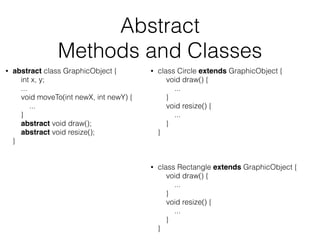
Abstract 
Methods and Classes 
• abstract class GraphicObject { 
int x, y; 
... 
void moveTo(int newX, int newY) { 
... 
} 
abstract void draw(); 
abstract void resize(); 
} 
• class Circle extends GraphicObject { 
void draw() { 
... 
} 
void resize() { 
... 
} 
} 
• class Rectangle extends GraphicObject { 
void draw() { 
... 
} 
void resize() { 
... 
} 
}
Java File Structure 
[package _________] // package directory name (com.zebardast.java.tutorials) 
[import _________] 
[import _________] 
[import _________] 
[public] class CLASS_NAME { //File Name should be CLASS_NAME.java 
//class members 
} 
class Foo { 
//class members 
} 
class Bar { 
//class members 
}
Simple Exercise 
Hello Word! 
• Create HelloWorldApp.java: 
- public class HelloWorldApp { 
public static void main(String[] args) { 
System.out.println("Hello World!"); // Print the string to the console. 
} 
} 
• Compile: 
- $ javac HelloWorldApp.java 
• Run: 
- $ java HelloWorldApp 
28
Read The F* Manual 
• RTFM 
- http://docs.oracle.com/javase/ 
• The Really Big Index 
- http://docs.oracle.com/javase/tutorial/ 
reallybigindex.html 
29
Thank You

Java for beginners

  • 1.
    Saeid Zebardast @saeid http://about.me/saeid saeid.zebardast@gmail.com 1
  • 2.
    Please Please Please Ask Questions As Much As You Like • This is not a lecture! - But an opportunity to learn from each other. - If you haven’t seen some of these frameworks, methods, etc. It is OK! - Let we know if you know ‣ Better ways ‣ Best practices ‣ My mistakes!
  • 3.
    Introduction • What’sJava? - Since 1995 - By James Gosling and Sun Microsystems ‣ Sun acquired by Oracle in 2009/2010, $7.4 billion. ‣ James Gosling resigned from Oracle (April 2010). - Base on C/C++ - JVM (Java Virtual Machine) • License Issue - What’s OpenJDK? 3
  • 4.
  • 5.
    Java Principles 1.Simple - Syntax is based on C++. - No need to remove unreferenced objects. 2.Secure - No explicit pointer. - Programs run inside virtual machine sandbox. 3.Object Oriented - Object, Class, Inheritance, Abstraction and etc. - Java is pure OOP Language. (C++ is semi object oriented). 4.Robust - Compiler detects many problems. - Strong memory management. - Lack of pointers that avoids security problem. - Automatic garbage collection.
  • 6.
    Java Principles 5.Architecture-neutral - Machine independent. - Write one, run anywhere. 6.Portable - Java byte codes on any environment and any platform. 7.High Performance - Byte code is "close" to native code. - Still somewhat slower than a compiled language (e.g., C++). 8.Multithreaded - Many tasks at once by defining multiple threads. 9.Distributed - URL class allows a Java application to open and access remote objects on the internet.
  • 7.
    Java History •JDK 1.0 (January 21, 1996) • JDK 1.1 (February 19, 1997) • J2SE 1.2 (December 8, 1998) • J2SE 1.3 (May 8, 2000) • J2SE 1.4 (February 6, 2002) • J2SE 5.0 (September 30, 2004) • Java SE 6 (December 11, 2006) • Java SE 7 (July 28, 2011) • Java SE 8 (March 18, 2014) 7
  • 8.
    Java Uses •Desktop, Web-based and Mobile Apps - Android - JetBrains IDEs (IntelliJ Idea, CLion and etc.), Eclipse, NetBeans - LibreOffice (OpenOffice) • Embedded Systems - X86, ARM, MIPS, LynxOS, WinCE. • Big Data - Hadoop (Facebook), Cassandra (Netflix, CERN, Reddit) 8
  • 9.
    Installation • Justenter the following command: - $ sudo apt-get install openjdk-7-jdk • Check Java version: - $ java -version • Check Java compiler version: - $ javac -version 9
  • 10.
    Java Syntax •Data Types • Variables • Operators • Statements 10
  • 11.
    Data Types •Primitives - short, byte, boolean, int and etc. • Objects - Object, String, Date, Integer, Long and etc. 11
  • 12.
    Primitive Data Types Integer Type Min Max 2^ byte -128 127 2^7 short -32,768 32,767 2^15 int -2,147,483,648 2,147,483,647 2^31 long -9,223,372,036,854,775,808 9,223,372,036,854,775,807 2^63
  • 13.
    Primitive Data Types Floating-point Type Size (bits) Precision float 32 From 3.402,823,5 E+38 to 1.4 E-45 double 64 From 1.797,693,134,862,315,7 E+308 to 4.9 E-324
  • 14.
    Primitive Data Types Other Type Size (bits) Precision boolean 1 true, false char 16 All Unicode characters. From ‘u0000’ to ‘uFFFF’. Check http://unicode-table.com/
  • 15.
    Object Data Types • Everything is Object! - String - Date - Integer, Long, Double - Person, Shape - and almost everything. 15
  • 16.
    Variables • typeidentifier [=value]; - boolean status; - int i = 0; - int d = 66, e, f = 1410; ‣ declare three ints and initialize d and f. - String name; - Date today = new Date(); 16
  • 17.
    Operators Type operators Arthimetic +, -, *, /, % Assignment +=, =-. *=, /=, %=, = Relational !=, ==, <, >, <=, >= Logical &&, ||, ! Bitwise &, |, ~, ^, <<, >> 17
  • 18.
    Select Statements •() ? : ; - inline if, shortcut if-else • if () {} • if () {} else {} • if () {} else if {} else {} • switch () { case X: ; break; case Y: ; break; default : ; } 18
  • 19.
    Iteration Statements •while () {} • do {} while (); • for () {} • for (:) {} //foreach 19
  • 20.
    Syntax Comments •/* This is a multi-line comment. It may occupy more than one line. */ • // This is an end-of-line comment • Java Docs • /** * This is a documentation comment. * * @author Saeid Zebardast */
  • 21.
    Access modifiers Modifier Same class or nested class Other class inside the same package Extended Class inside another package Non-extended inside another package private yes no no no default (package private) yes yes no no protected yes yes yes no public yes yes yes yes
  • 22.
    Methods • [modifiers]return_type method_name([parameterType parameterName, …]) { method body; [return result] } • public static void main(String[] args) { System.out.println(“Hello World!”); // without return! } • long getMax(int a, int b) { if (a > b) return a; else return b; }
  • 23.
    Classes • Top-levelclass - [modifiers] class CLASS_NAME { //the file name should be CLASS_NAME.java // Class members (variables, methods, classes) } • Inner class - class Foo { // Top-level class class Bar { // Inner class } } • Local class - class Foo { void bar() { class Foobar {// Local class within a method } } } • Initialization - Foo foo = new Foo();
  • 24.
    Inheritance • Useextends - class Foo { // class members } - class Foobar extends Foo { // class members } • Overriding methods - class Operation { public int doSomething() { return 0; } } - class NewOperation extends Operation { @Override public int doSomething() { return 1; } }
  • 25.
    Interfaces • Interface(Animal.java) - interface Animal { public void eat(); public void sleep(); } • Implements (Cat.java) - public class Cat implements Animal{ String name; public Cat(String name) { this.name = name; } public void eat(){ System.out.println(name + “ eats"); } public void sleep(){ System.out.println(name + “sleeps"); } public String getName(){ return name; } public static void main(String args[]){ Cat cat = new Cat(“Barney”); cat.eat(); cat.sleep(); } }
  • 26.
    Abstract Methods andClasses • abstract class GraphicObject { int x, y; ... void moveTo(int newX, int newY) { ... } abstract void draw(); abstract void resize(); } • class Circle extends GraphicObject { void draw() { ... } void resize() { ... } } • class Rectangle extends GraphicObject { void draw() { ... } void resize() { ... } }
  • 27.
    Java File Structure [package _________] // package directory name (com.zebardast.java.tutorials) [import _________] [import _________] [import _________] [public] class CLASS_NAME { //File Name should be CLASS_NAME.java //class members } class Foo { //class members } class Bar { //class members }
  • 28.
    Simple Exercise HelloWord! • Create HelloWorldApp.java: - public class HelloWorldApp { public static void main(String[] args) { System.out.println("Hello World!"); // Print the string to the console. } } • Compile: - $ javac HelloWorldApp.java • Run: - $ java HelloWorldApp 28
  • 29.
    Read The F*Manual • RTFM - http://docs.oracle.com/javase/ • The Really Big Index - http://docs.oracle.com/javase/tutorial/ reallybigindex.html 29
  • 30.