REST Webservice
REPRESENTATIONAL STATE TRANSFER
Course Section
 Section 1: REST API Concepts
 Section2: Implementation with Rest Easy
Internal | Department | 11/30/2015 | © Robert Bosch Engineering and Business Solutions Private Limited 2015. All rights reserved, also
regarding any disposal, exploitation, reproduction, editing, distribution, as well as in the event of applications for industrial property rights.
Header of section
Man behind REST
 REST was initially proposed by Roy
Thomas Fielding in his 2000 PhD
dissertation "Architectural Styles
and the Design of Network-based
Software Architectures"
3
REST
REST stands for Representational State Transfer
 It is an architectural pattern for developing web services as opposed to a
specification.
 REST web services communicate over the HTTP specification, using HTTP
vocabulary:
 Methods (GET, POST, etc.)
 HTTP URI syntax (paths, parameters, etc.)
 Media types (xml, json, html, plain text, etc)
 HTTP Response codes.
 Representational
 Clients possess the information necessary to identify, modify, and/or delete a
web resource.
 State
 All resource state information is stored on the client.
 Transfer
 Client state is passed from the client to the service through HTTP.
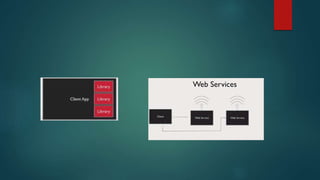
What is web services?
Web services are services that are exposed to the internet for programmatic
access.
They are online Apis that you can call from your code.
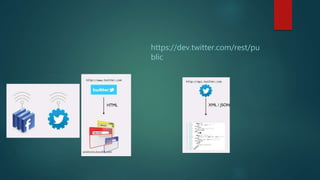
Web Services
https://dev.twitter.com/rest/pu
blic
Real time Scenarios
 http://maps.googleapis.com/maps/api/geocode/json?address=chicago
Web Services Characteristics
 WEB
Protocol
 There is no protocol unlike SOAP.
How the communication happens?
 HTTP Exchange
1. GET
2. POST
3. PUT
4. DELETE
Service Definition
 There is no formal service definition in REST. Unlike SOAP a WSDL is
mandate.
Steps to follow to create REST
 Resource Based URI
 HTTP Methods
 HTTP Status Code
 Message Headers.
Resource Based URI
 Old Web applications URIs look like
Now Get message with id 10. Consumer is not aware of URL.
/getMessages.do?id=10
Rest consumer should be aware of the URL.
Best practice to Name Resources
 Use Nouns not Verbs
 Use /profiles/{profileName}
 /messages/{messageId}
 And most importantly Resourse Based URI are resistant to change.
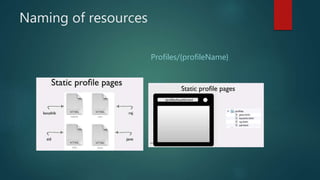
Naming of resources
Profiles/{profileName}
 The HTTP request is sent from the client.
 Identifies the location of a resource.
 Specifies the verb, or HTTP method to use when accessing the resource.
 Supplies optional request headers (name-value pairs) that provide additional
information the server may need when processing the request.
 Supplies an optional request body that identifies additional data to be
uploaded to the server (e.g. form parameters, attachments, etc.)
Resource – identified by a URL (or uniform resource locator)
Method – the action verb to perform on a resource
e.g. GET, POST, PUT, DELETE, etc.
Request Headers – name-value pairs of meta-information about the request
e.g. Content types expected by the client
Request Body – data to be streamed from the client to the server
e.g. Attachments, form parameters, etc.
 The HTTP response is sent from the server.
 Gives the status of the processed request.
 Supplies response headers (name-value pairs) that provide additional
information about the response.
 Supplies an optional response body that identifies additional data to be
downloaded to the client (html, xml, binary data, etc.)
 Status – An HTTP status code and status message
e.g. 404 Not Found, 200 OK
Response Headers – name-value pairs of meta-information about the
response
e.g. Content-Type
Response Body – Additional data to be streamed from the server to the client
e.g. HTML document, XML document, binary data
HTTP Methods supported by REST:
 GET – Requests a resource at the request URL
 Should not contain a request body, as it will be discarded.
 May be cached locally or on the server.
 May produce a resource, but should not modify on it.
 POST – Submits information to the service for processing
 Should typically return the new or modified resource.
 PUT – Add a new resource at the request URL
 DELETE – Removes the resource at the request URL
 Its safe to make duplicate GET request.
 How about put, post and delete?
 What is difference between Put and Post?
Caching
 Is GET, POST , PUT Cacheable?
 What about browser referesh?
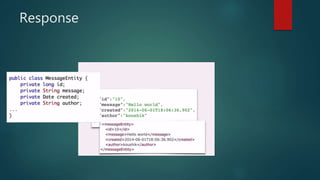
Response
Status codes
 Success Codes
1. 200 – OK
2. 204 – No Content
Client Error Codes
400 – Bad Request
401 – Unauthorized
403 – Forbidden
404 – Not Found
 500 – Internal Server Error
HATEOS
HYPERMEDIA AS THE ENGINE OF APPLICATION STATE
 Avoid hardcoding of URI is client side.
 Helps like documentation of Resourse.
 Provides additional information to consumer for a resource.
 It provides links to resources in API response. URI to next steps are handed
to them in response.
/messages
No HATEOAS
With HATEOAS
Rel Attribute
Richardson Maturity
Model
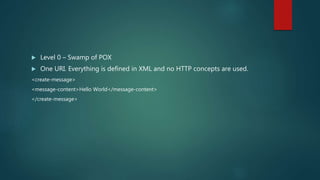
 Level 0 – Swamp of POX
 One URI. Everything is defined in XML and no HTTP concepts are used.
<create-message>
<message-content>Hello World</message-content>
</create-message>
 Level 1: Resource URI
 Individual URI for each resource. In spite of having “what needs to done” in
message itself.
 Level 2 – HTTP Methods
 Use standard HTTP Methods and error codes.
 Level 3 : Usage of HATEOAS.
 Responses have links that client can use.

Rest Webservice

  • 1.
  • 2.
    Course Section  Section1: REST API Concepts  Section2: Implementation with Rest Easy
  • 3.
    Internal | Department| 11/30/2015 | © Robert Bosch Engineering and Business Solutions Private Limited 2015. All rights reserved, also regarding any disposal, exploitation, reproduction, editing, distribution, as well as in the event of applications for industrial property rights. Header of section Man behind REST  REST was initially proposed by Roy Thomas Fielding in his 2000 PhD dissertation "Architectural Styles and the Design of Network-based Software Architectures" 3
  • 4.
    REST REST stands forRepresentational State Transfer  It is an architectural pattern for developing web services as opposed to a specification.  REST web services communicate over the HTTP specification, using HTTP vocabulary:  Methods (GET, POST, etc.)  HTTP URI syntax (paths, parameters, etc.)  Media types (xml, json, html, plain text, etc)  HTTP Response codes.
  • 5.
     Representational  Clientspossess the information necessary to identify, modify, and/or delete a web resource.  State  All resource state information is stored on the client.  Transfer  Client state is passed from the client to the service through HTTP.
  • 6.
    What is webservices? Web services are services that are exposed to the internet for programmatic access. They are online Apis that you can call from your code. Web Services
  • 8.
  • 9.
    Real time Scenarios http://maps.googleapis.com/maps/api/geocode/json?address=chicago
  • 10.
  • 11.
    Protocol  There isno protocol unlike SOAP.
  • 12.
    How the communicationhappens?  HTTP Exchange 1. GET 2. POST 3. PUT 4. DELETE
  • 13.
    Service Definition  Thereis no formal service definition in REST. Unlike SOAP a WSDL is mandate.
  • 14.
    Steps to followto create REST  Resource Based URI  HTTP Methods  HTTP Status Code  Message Headers.
  • 15.
    Resource Based URI Old Web applications URIs look like Now Get message with id 10. Consumer is not aware of URL. /getMessages.do?id=10 Rest consumer should be aware of the URL.
  • 16.
    Best practice toName Resources  Use Nouns not Verbs  Use /profiles/{profileName}  /messages/{messageId}  And most importantly Resourse Based URI are resistant to change.
  • 17.
  • 18.
     The HTTPrequest is sent from the client.  Identifies the location of a resource.  Specifies the verb, or HTTP method to use when accessing the resource.  Supplies optional request headers (name-value pairs) that provide additional information the server may need when processing the request.  Supplies an optional request body that identifies additional data to be uploaded to the server (e.g. form parameters, attachments, etc.)
  • 19.
    Resource – identifiedby a URL (or uniform resource locator) Method – the action verb to perform on a resource e.g. GET, POST, PUT, DELETE, etc. Request Headers – name-value pairs of meta-information about the request e.g. Content types expected by the client Request Body – data to be streamed from the client to the server e.g. Attachments, form parameters, etc.
  • 20.
     The HTTPresponse is sent from the server.  Gives the status of the processed request.  Supplies response headers (name-value pairs) that provide additional information about the response.  Supplies an optional response body that identifies additional data to be downloaded to the client (html, xml, binary data, etc.)
  • 21.
     Status –An HTTP status code and status message e.g. 404 Not Found, 200 OK Response Headers – name-value pairs of meta-information about the response e.g. Content-Type Response Body – Additional data to be streamed from the server to the client e.g. HTML document, XML document, binary data
  • 22.
    HTTP Methods supportedby REST:  GET – Requests a resource at the request URL  Should not contain a request body, as it will be discarded.  May be cached locally or on the server.  May produce a resource, but should not modify on it.  POST – Submits information to the service for processing  Should typically return the new or modified resource.  PUT – Add a new resource at the request URL  DELETE – Removes the resource at the request URL
  • 24.
     Its safeto make duplicate GET request.  How about put, post and delete?  What is difference between Put and Post?
  • 26.
    Caching  Is GET,POST , PUT Cacheable?  What about browser referesh?
  • 27.
  • 30.
  • 31.
     Success Codes 1.200 – OK 2. 204 – No Content Client Error Codes 400 – Bad Request 401 – Unauthorized 403 – Forbidden 404 – Not Found
  • 32.
     500 –Internal Server Error
  • 33.
    HATEOS HYPERMEDIA AS THEENGINE OF APPLICATION STATE
  • 34.
     Avoid hardcodingof URI is client side.  Helps like documentation of Resourse.  Provides additional information to consumer for a resource.  It provides links to resources in API response. URI to next steps are handed to them in response.
  • 35.
  • 36.
  • 37.
  • 38.
  • 39.
  • 40.
     Level 0– Swamp of POX  One URI. Everything is defined in XML and no HTTP concepts are used. <create-message> <message-content>Hello World</message-content> </create-message>
  • 41.
     Level 1:Resource URI  Individual URI for each resource. In spite of having “what needs to done” in message itself.
  • 42.
     Level 2– HTTP Methods  Use standard HTTP Methods and error codes.
  • 43.

     Level 3: Usage of HATEOAS.  Responses have links that client can use.