
Web Research
Compilation
Office of Marketing and Communications
Messiah College
Fall 2013
Sources
• 2012 and 2013 E-Expectations Reports (sponsored by Noel-Levitz,
OmniUpdate, CollegeWeek Live and National Research Center for College & University
Admissions)
• Surveys to prospective students, current students and faculty and
staff (conducted by the office of marketing and communications)
• Focus groups with current students (conducted by the office of marketing and
communications)
• 2013 AICUP first-year survey (conducted by Association for Independent
Colleges and Universities of Pennsylvania)
• 2013 State of the Mobile and Responsive Web in Higher Education
survey (compiled by Higher Ed Web Analytics)
• Messiah College Admitted Student Questionnaire: Fall 2013 Results
• Competitor review and analysis (conducted by the office of marketing and
communications)
• Google Analytics (for messiah.edu)
THE ROLE AND
PERCEPTION OF
MESSIAH.EDU
Does an institution’s website
affect the perception of a college?
*2013 E-Expectations Report
43 percent of students correlated colleges
with higher quality websites with campuses
that have higher quality education options.
70 percent of students answered that an
an institution’s website does affect their
perception of a college.
No.
30%
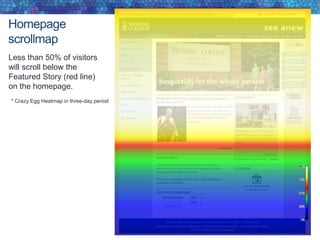
Yes.
70%
No.
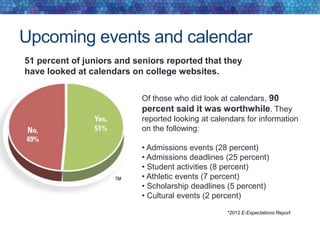
57%
Yes.
43%
*2013 E-Expectations Report
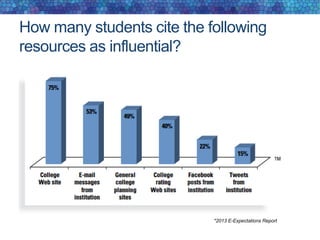
How many students cite the following
resources as influential?
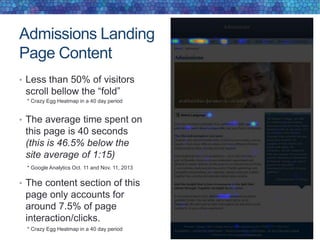
*2013 E-Expectations Report
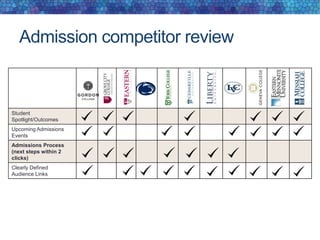
How important is the web in the
evaluation of an institution?
*2012 E-Expectations Report
Collectively, 52 percent of students responded that a campus website
played at least a significant role in their evaluation of a potential college.
What would you like to see improved?
* 2013 Prospective Student Survey
All the helpful feedback to the prospective student survey
question, “What would you like to see improved on
messiah.edu?” can be grouped into these four main areas:
• Design and layout (40)
• Content (34)
• Navigation (21)
• Mobile-friendly (7)
In summary
• The website is the most broad reaching tool we have for
student recruitment.
• Many students and families form their initial perception of
Messiah by their experience with the usability and
helpfulness of our website.
RESPONSIVE DESIGN
Overview of Messiah’s website and its
visitors’ mobile browsing behaviors
Prospective student mobile browsing
behaviors
Four in 10 respondents said they use their
mobile devices for all or nearly all of their
online browsing; only approximately one in 10
generally avoid web browsing with their mobile
devices.
*2013 E-Expectations Report
How frequently do students use mobile devices for web browsing?
How do prospective students primarily
access messiah.edu?
Access Point Response %
On my own desktop or laptop
computer
129 40%
Using a combination of the above 68 21%
On a mobile device - iPhone,
Android or similar
58 18%
I have never visited messiah.edu 29 9%
On an iPad or other tablet 26 8%
On a shared/public computer 6 2%
Other 3 1%
Total 319 100%
40% of prospective students at Messiah report that
they exclusively browse Messiah’s website on a non-
mobile device. 47% claim that they have used a
mobile device to access messiah.edu.
* 2013 Prospective Student Survey
Mobile and tablet visitor behavior
on Messiah’s website
Mobile and tablet visitors make up around 23% of Messiah’s off-
campus traffic. Mobile visitors spend 1,222 hours on Messiah’s
website each month and visit 100,176 pages. Mobile visitors
typically spend half the time on Messiah’s website that desktop
visitors do (desktop duration – 3:58/mobile duration – 1:26).
*Google Analytics -Oct. 11-Nov. 11, 2013
Inquiry form conversion rate
• Desktop Conversion Rate = 37%
• Mobile (including tablet) Conversion Rate = 31%
Assuming a responsive (mobile-friendly) inquiry form achieves a similar
conversion rate as desktop and assuming a 6.6% yield rate from inquiry
to deposit.
We could see an increase of 120 additional inquiries that
could yield 8 additional deposited students each year.
*2013 Fall Yield to Deposit = 6.6%
Mobile browsing – competitor review
Responsive
Tapability
Responsive
Inquiry Form
* 2013 Competitor Review
Responsive vs. non-responsive
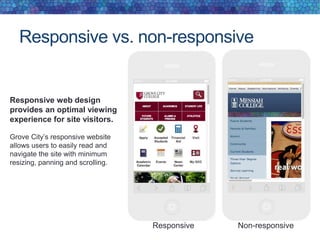
Responsive web design
provides an optimal viewing
experience for site visitors.
Grove City’s responsive website
allows users to easily read and
navigate the site with minimum
resizing, panning and scrolling.
Responsive Non-responsive
Tapability
Outdated "small format design," built for
precise navigation of a cursor, can become
frustrating for mobile site visitors. Today,
cursors have been replaced by "big fingers"
needing larger buttons and larger text links
to ensure pleasant navigation experiences.
PSU uses image links, tables and
CSS to improve tapability of
important links.
Responsive is now
According to the 2013 State of the Mobile and Responsive
Web in Higher Education survey, 15% of institutions had
adopted responsive website in Feb. 2012.
Just one year later, that percentage climbed to 51%.
Responsive design recommendations
• Move to a responsive platform for messiah.edu.
• Funding for this project is secured through FY14 capital funding
• A web advisory committee representing key campus areas is being
formed
• Project completion is start of the 2014-15 academic year
• Develop responsive inquiry and application forms.
INFORMATION
ARCHITECTURE
Providing an intuitive, clear navigational
structure for users
High school students report that one of their greatest challenges
with college and university websites is the site navigation. This
was by far the biggest issue; 55% couldn’t find what they wanted
because of challenges with the site navigation.
Site navigation
*2012 E-Expectations Report
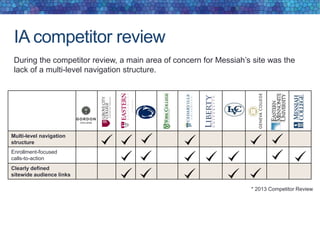
IA competitor review
Multi-level navigation
structure
Enrollment-focused
calls-to-action
Clearly defined
sitewide audience links
During the competitor review, a main area of concern for Messiah’s site was the
lack of a multi-level navigation structure.
* 2013 Competitor Review
Competitor case study: IA
Geneva’s website features a large, two-
dimensional drop-down menu that
groups navigation options to eliminate
scrolling.
Features
• Divided into groups of navigation
options
• Navigation choices structured through
layout and typography
• Navigation items are all
visible at once
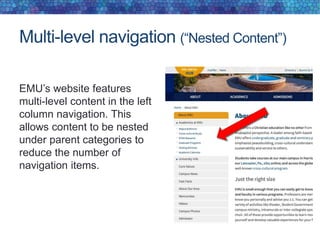
Multi-level navigation (“Nested Content”)
EMU’s website features
multi-level content in the left
column navigation. This
allows content to be nested
under parent categories to
reduce the number of
navigation items.
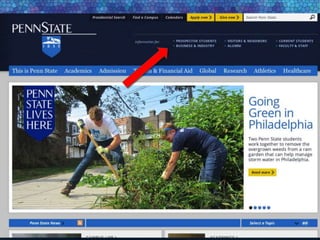
Clearly defined sitewide audience links
An organized homepage should allow each audience type easy, one-click access to
a landing page tailored for a specific audience type. Audience links should be easy to
find and above the fold.
Eastern University has
organized its site navigation
by audience. Audience links
allow site visitors one-click
access to information
tailored around their
content priorities.
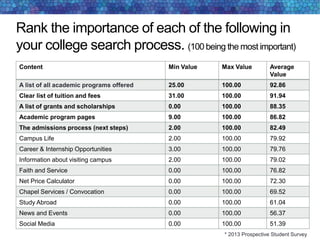
Rank the importance of each of the following in
your college search process. (100 being the most important)
Content Min Value Max Value Average
Value
A list of all academic programs offered 25.00 100.00 92.86
Clear list of tuition and fees 31.00 100.00 91.94
A list of grants and scholarships 0.00 100.00 88.35
Academic program pages 9.00 100.00 86.82
The admissions process (next steps) 2.00 100.00 82.49
Campus Life 2.00 100.00 79.92
Career & Internship Opportunities 3.00 100.00 79.76
Information about visiting campus 2.00 100.00 79.02
Faith and Service 0.00 100.00 76.82
Net Price Calculator 0.00 100.00 72.30
Chapel Services / Convocation 0.00 100.00 69.52
Study Abroad 0.00 100.00 61.04
News and Events 0.00 100.00 56.37
Social Media 0.00 100.00 51.39
* 2013 Prospective Student Survey
On a college website, where would you go to find
information about studying abroad?
Location Response %
Admissions 18 8%
Academics 129 55%
On a specific major page 56 24%
other 30 13%
Total 233 100%
* 2013 Prospective Student Survey
On a college website, where would you go to find
information about spiritual life?
Answer Response %
Student life 127 55%
Admissions 1 0%
It should have it's own drop-down menu in the main
navigation on the homepage
95 41%
other 10 4%
Total 233 100%
* 2013 Prospective Student Survey
On a college website, where would you go to find
information about student life?
Answer Response %
Admissions 12 5%
It should have it's own drop-down menu in the main
navigation on the homepage
205 88%
other 16 7%
Total 233 100%
* 2013 Prospective Student Survey
Information architecture
recommendations
• Prioritize the site navigation by areas of most valued
content by prospective students
• About
• Admissions
• Academics
• Athletics
• Student Life
• Faith and Service
• Campus Resources
• Organize content throughout the site by audience group
Audiences: Future Students, Current Students, Alumni & Friends,
Faculty & Staff, Visitors
• Implement a multi-dimensional site navigation
HOMEPAGE
Making a good first impression for
prospective students
Homepage traffic and sources
The homepage is viewed around 199,000 times each
month by roughly 150,000 unique visitors. Each
month visitors spend a combined 9,296 hours on
Messiah’s homepage.
* Google Analytics - Oct. 11- Nov. 11, 2013
Where would you
click first?
When asked “where
would you click first,”
prospective students
considering Messiah
reported the following:
Homepage Links
Future Students – 26.4%
Academics – 19.6%
Athletics – 10.4%
About – 9.2%
Study Abroad – 6%
Admissions – 4.8%
Request Info – 2%
Visit – 2%
* 2013 Prospective Student Survey
Homepage
heatmap
This heatmap represents
actual click points of off-
campus traffic to messiah.edu
Top Hits –
MCSquare – 16.6%
Athletics – 15.2%
Search – 9.4%
Academics – 6.6%
Future Students – 5.3%
Events – 5.3%
Admissions – 3.2%
Alumni – 3.1%
About – 2.9%
Apply – 2.4%
Offices – 2.1%
Three Year Degree – 1.2%
Study Abroad – 0.05%
Service Learning – 0.02%
Ministries – 0.2%
Give to Messiah – 0.01%
Donate to Scholarship – 0.0%
* Crazy Egg Heatmap in three-day period
Homepage
scrollmap
Less than 50% of visitors
will scroll below the
Featured Story (red line)
on the homepage.
* Crazy Egg Heatmap in three-day period
Navigation path from homepage
Page Name # of visits Percentage
Academics
(see admissions traffic slide for breakdown of traffic)
5,443 13.14%
Admissions Routing Page
(see admissions traffic slide for breakdown of traffic)
4,651 11.23%
Job Opportunities 2,783 6.72%
Undergrad Application 1,806 4.36%
About 1,732 4.18%
Library 1,720 4.15%
Offices 1,560 3.77%
Future Students (audience link) 1,383 3.34%
Current Students (audience link) 1,287 3.11%
Visitors Guide (campus map) 998 2.40%
The following data was collected between Oct. 11 and Nov. 11, 2013
and excludes all traffic from the Messiah College campus. * Google Analytics
* Crazy Egg Heatmap in three-day period
Homepage banner/slider
In the focus groups, current students stated that they liked the
homepage banner/slider. However, it currently only accounts for 1.4%
of the clicks on the homepage.
Upcoming events and calendar
Of those who did look at calendars, 90
percent said it was worthwhile. They
reported looking at calendars for information
on the following:
• Admissions events (28 percent)
• Admissions deadlines (25 percent)
• Student activities (8 percent)
• Athletic events (7 percent)
• Scholarship deadlines (5 percent)
• Cultural events (2 percent)
*2012 E-Expectations Report
51 percent of juniors and seniors reported that they
have looked at calendars on college websites.
Focus group themes
Anecdotal feedback we received from the 20 current
students in our focus groups about the Messiah homepage:
• Like the rotating banner because the pictures are
primarily of current students
• Find the various navigation bars confusing
• Think the homepage is cluttered
• Don’t read any of the homepage content (i.e. feature,
news)
• Affirmed that the design of the site accurately represented
who we are, but looks dated
Homepage recommendations
1. Identify prospective students as the key audience for the
Messiah homepage and make content decisions
accordingly.
2. Be more intentional with identifying audience pathways
sitewide.
3. Redesign slider to incorporate spotlight stories, branded
messaging, featured events and seasonal admissions
announcements
4. Use a widget to showcase upcoming events and
demonstrate activity on campus
5. Introduce an Academic Program Finder that allows
prospective students to search for degrees or interests
from the homepage.
UNDERGRAD
ADMISSIONS WEB
PRESENCE
Meeting the expressed content and
functionality needs of prospective students
Admissions
heatmap
Where would you
click first?
Future Student – 30%
Cost andAid – 11.6%
Student Life – 8%
Majors – 7.7%
Page Copy - 6.4%
Magazine – 4.4%
Spiritual Life – 2.8%
Visit – 2.4%
Viewbook - .08%
* 2013 Prospective Student Survey
Admissions
heatmap
Live traffic
Future Student – 16.8%
Cost andAid – 11.7%
Apply Online – 9.3%
Accepted Students - 4.3%
Admission Home – 3.5%
Visit – 3.5%
Majors – 3.4%
Contact Counselor – 3.2%
Student Life – 2.7%
Magazine – 2.3%
Viewbook – 1.4%
Spiritual Life – 0.8%
Careers - 0.4%
StudyAbroad – 0.3%
* Crazy Egg Heatmap in a 40 day period
Admissions Landing
Page Content
• Less than 50% of visitors
scroll bellow the “fold”
• The average time spent on
this page is 40 seconds
(this is 46.5% below the
site average of 1:15)
• The content section of this
page only accounts for
around 7.5% of page
interaction/clicks.
* Google Analytics Oct. 11 and Nov. 11, 2013
* Crazy Egg Heatmap in a 40 day period
Admission competitor review
Student
Spotlight/Outcomes
Upcoming Admissions
Events
Admissions Process
(next steps within 2
clicks)
Clearly Defined
Audience Links
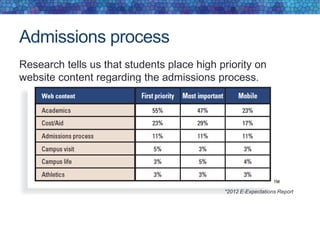
Admissions process
Research tells us that students place high priority on
website content regarding the admissions process.
*2012 E-Expectations Report
Admissions process and next steps
Gordon’s admissions process is easy
to understand and easily found on their
main admissions page for each stage
of the funnel. Accepted students can
view a welcome message from the
president along with more information
about “Now What?” The page also
includes information about engaging in
their Facebook group.
Focus group data
• Students suggested that they were primarily looking for
next steps when visiting the admissions portion of the
website.
• Students suggested that they would look outside of the
admissions pages for information about student life,
spiritual life, study abroad and academic programs.
Admissions page inquiry form
Inquiry form goal
1. Increase inquiry form
conversion rate on the
admissions homepage by 2%
2. Decrease abandonment on
inquiry form by 3%.
* Google Analytics Oct. 11-Nov. 11, 2013
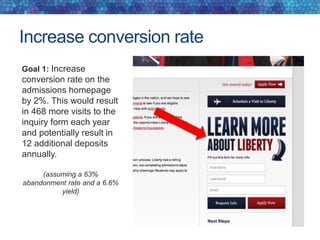
Increase conversion rate
Goal 1: Increase
conversion rate on the
admissions homepage
by 2%. This would result
in 468 more visits to the
inquiry form each year
and potentially result in
12 additional deposits
annually.
(assuming a 63%
abandonment rate and a 6.6%
yield)
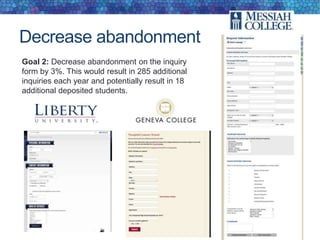
Decrease abandonment
Goal 2: Decrease abandonment on the inquiry
form by 3%. This would result in 285 additional
inquiries each year and potentially result in 18
additional deposited students.
Admissions website recommendations
1. Redesign and reorganize the undergraduate admissions website so
its primary focus is next steps.
2. Relocate content that unpacks the Messiah College experience
outside of the admissions pages.
3. Embed the “Request Information” form into the admissions landing
page.
4. Focus admissions pathways around the audience type and their
stage in the funnel.
5. Introduce a seasonal slider or graphic links to promote upcoming
admissions deadlines and calls-to-action on landing page.
6. Create more emphasis on tuition and fees/grants and scholarships
throughout the admissions site.
ACADEMICS
Demonstrating a breadth of academic
programs in a user-friendly, searchable,
optimized format
Navigation path from academics
Page Name # of visits Percentage
Undergrad List of Majors 3,010 34.12%
Grad Programs Landing Page 652 7.39%
List of Grad Programs Offered 441 5%
Academics Home (same page) 415 4.70%
Admissions Routing Page 282 3.20%
Academic Catalog 190 2.15%
Registrar 142 1.61%
School of Science Engineering and Health 137 1.55%
Academic Resources 134 1.55%
The following data was collected between Nov. 5 and Dec. 5, 2013.
The data excludes all traffic from the Messiah College campus.
* Google Analytics
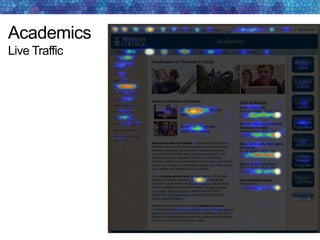
Academics
Live Traffic
Academic offerings
How prospective students
prefer to find information
about academic programs
on a college website.
• Browse through an
alphabetical list (41
percent)
• Use a site search engine
(33 percent)
• Look through school or
department webpages
for all programs within
that area (26 percent)
*2012 E-Expectations Report
Content Min Value Max Value Average
Value
Academic major overview that outlines each
major
13.00 100.00 89.57
Career opportunities 0.00 100.00 84.46
Clubs and organizations 8.00 100.00 79.43
Internship opportunities 0.00 100.00 78.75
Research opportunities for students 0.00 100.00 74.47
Alumni job outcomes 0.00 100.00 71.72
Faculty contact information 0.00 100.00 70.65
Faculty profiles that include prior work experience and
educational background
1.00 100.00 69.43
Videos that overview the academic program 0.00 100.00 66.76
Positions held by alumni 0.00 100.00 61.97
Grad schools attended by alumni 0.00 100.00 57.91
Rank the importance of the following academic content
in your college search process. (100 being the most important)
* 2013 Prospective Student Survey
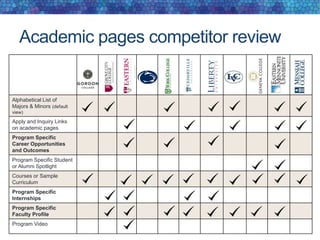
Academic pages competitor review
Alphabetical List of
Majors & Minors (default
view)
Apply and Inquiry Links
on academic pages
Program Specific
Career Opportunities
and Outcomes
Program Specific Student
or Alumni Spotlight
Courses or Sample
Curriculum
Program Specific
Internships
Program Specific
Faculty Profile
Program Video
Academic priority content
Academic program pages on Eastern’s site include links for priority content like
curriculum, internships and careers. This allows students’ easy, one-click
access to the information they are looking for.
Program specific career opportunities and
outcomes
What can students expect
after they leave the
program?
Eastern University provides
visitors with a list of possible
career outcomes along with a list
of where current graduates are
working. A link to this page is
added to the central navigation so
that it is easily accessible.
Additional recommendations
• Feature alumni who are currently
holding prestigious positions
• List graduate schools attended by
alumni
• List salary statistics
Internships
Eastern University does a great
job overviewing its internship
opportunities for each academic
program page. Each page also
features a long list of businesses
and organizations where students
have interned.
Additional recommendations
• Content should be relevant to the
specific offering and not one-size-
fits-all
• Include brief descriptions and/or
links for more information
• Internships should be attainable for
the average student
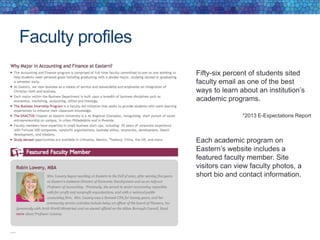
Faculty profiles
Fifty-six percent of students sited
faculty email as one of the best
ways to learn about an institution’s
academic programs.
*2013 E-Expectations Report
Each academic program on
Eastern’s website includes a
featured faculty member. Site
visitors can view faculty photos, a
short bio and contact information.
Academics recommendations
• Identify prospective undergraduate students as the
primary audience for the academics page
• Organize top level academic links by content priority
• Nest content to reduce the number of links on academics
landing page
• Streamline content using infographics
• Use the Jadu event and article module to pull in audience
specific news, events and features to academic pages
• Move “our schools” feature from current academic page to
faculty and staff and current student audience pathways
The 2013 E-Expectations Report suggests, “Put your best
institutional face on your website. Treat your website
visitors like your on-campus visitors. Keep content fresh,
make it clear where students should go, and make them
want to come back.”
Proposed Next Steps
• Recruit a web advisory committee to provide input into
key areas of the redesign project.
• Admissions representative
• Erin Bray, marketing communications writer
• Kris Hardy, director of web communications, marketing and
communications
• David Kasparek, faculty, School of the Arts
• Beth Lorow, director of communications, marketing and
communications
• Ben Taylor, director of student involvement and leadership programs,
student affairs
• Nancy Soulliard, creative director, office of marketing and
communications
• Jon Wheat, administrative programmer/analyst, ITS
Tentative Timeline
Jan.
• Share research and recommendations with president’s and
provost’s cabinets
• Establish with web advisory committee
Feb. Discovery and design processes with vendor
April Jadu implementation
June New site goes live on Messiah’s development
server for content build
Aug.-Sept. New priority-content sites go live

Web Research Compilation

  • 1.
    Web Research Compilation Office ofMarketing and Communications Messiah College Fall 2013
  • 2.
    Sources • 2012 and2013 E-Expectations Reports (sponsored by Noel-Levitz, OmniUpdate, CollegeWeek Live and National Research Center for College & University Admissions) • Surveys to prospective students, current students and faculty and staff (conducted by the office of marketing and communications) • Focus groups with current students (conducted by the office of marketing and communications) • 2013 AICUP first-year survey (conducted by Association for Independent Colleges and Universities of Pennsylvania) • 2013 State of the Mobile and Responsive Web in Higher Education survey (compiled by Higher Ed Web Analytics) • Messiah College Admitted Student Questionnaire: Fall 2013 Results • Competitor review and analysis (conducted by the office of marketing and communications) • Google Analytics (for messiah.edu)
  • 3.
  • 4.
    Does an institution’swebsite affect the perception of a college? *2013 E-Expectations Report 43 percent of students correlated colleges with higher quality websites with campuses that have higher quality education options. 70 percent of students answered that an an institution’s website does affect their perception of a college. No. 30% Yes. 70% No. 57% Yes. 43% *2013 E-Expectations Report
  • 5.
    How many studentscite the following resources as influential? *2013 E-Expectations Report
  • 6.
    How important isthe web in the evaluation of an institution? *2012 E-Expectations Report Collectively, 52 percent of students responded that a campus website played at least a significant role in their evaluation of a potential college.
  • 7.
    What would youlike to see improved? * 2013 Prospective Student Survey All the helpful feedback to the prospective student survey question, “What would you like to see improved on messiah.edu?” can be grouped into these four main areas: • Design and layout (40) • Content (34) • Navigation (21) • Mobile-friendly (7)
  • 8.
    In summary • Thewebsite is the most broad reaching tool we have for student recruitment. • Many students and families form their initial perception of Messiah by their experience with the usability and helpfulness of our website.
  • 9.
    RESPONSIVE DESIGN Overview ofMessiah’s website and its visitors’ mobile browsing behaviors
  • 10.
    Prospective student mobilebrowsing behaviors Four in 10 respondents said they use their mobile devices for all or nearly all of their online browsing; only approximately one in 10 generally avoid web browsing with their mobile devices. *2013 E-Expectations Report How frequently do students use mobile devices for web browsing?
  • 11.
    How do prospectivestudents primarily access messiah.edu? Access Point Response % On my own desktop or laptop computer 129 40% Using a combination of the above 68 21% On a mobile device - iPhone, Android or similar 58 18% I have never visited messiah.edu 29 9% On an iPad or other tablet 26 8% On a shared/public computer 6 2% Other 3 1% Total 319 100% 40% of prospective students at Messiah report that they exclusively browse Messiah’s website on a non- mobile device. 47% claim that they have used a mobile device to access messiah.edu. * 2013 Prospective Student Survey
  • 12.
    Mobile and tabletvisitor behavior on Messiah’s website Mobile and tablet visitors make up around 23% of Messiah’s off- campus traffic. Mobile visitors spend 1,222 hours on Messiah’s website each month and visit 100,176 pages. Mobile visitors typically spend half the time on Messiah’s website that desktop visitors do (desktop duration – 3:58/mobile duration – 1:26). *Google Analytics -Oct. 11-Nov. 11, 2013
  • 13.
    Inquiry form conversionrate • Desktop Conversion Rate = 37% • Mobile (including tablet) Conversion Rate = 31% Assuming a responsive (mobile-friendly) inquiry form achieves a similar conversion rate as desktop and assuming a 6.6% yield rate from inquiry to deposit. We could see an increase of 120 additional inquiries that could yield 8 additional deposited students each year. *2013 Fall Yield to Deposit = 6.6%
  • 14.
    Mobile browsing –competitor review Responsive Tapability Responsive Inquiry Form * 2013 Competitor Review
  • 15.
    Responsive vs. non-responsive Responsiveweb design provides an optimal viewing experience for site visitors. Grove City’s responsive website allows users to easily read and navigate the site with minimum resizing, panning and scrolling. Responsive Non-responsive
  • 16.
    Tapability Outdated "small formatdesign," built for precise navigation of a cursor, can become frustrating for mobile site visitors. Today, cursors have been replaced by "big fingers" needing larger buttons and larger text links to ensure pleasant navigation experiences. PSU uses image links, tables and CSS to improve tapability of important links.
  • 17.
    Responsive is now Accordingto the 2013 State of the Mobile and Responsive Web in Higher Education survey, 15% of institutions had adopted responsive website in Feb. 2012. Just one year later, that percentage climbed to 51%.
  • 18.
    Responsive design recommendations •Move to a responsive platform for messiah.edu. • Funding for this project is secured through FY14 capital funding • A web advisory committee representing key campus areas is being formed • Project completion is start of the 2014-15 academic year • Develop responsive inquiry and application forms.
  • 19.
    INFORMATION ARCHITECTURE Providing an intuitive,clear navigational structure for users
  • 20.
    High school studentsreport that one of their greatest challenges with college and university websites is the site navigation. This was by far the biggest issue; 55% couldn’t find what they wanted because of challenges with the site navigation. Site navigation *2012 E-Expectations Report
  • 21.
    IA competitor review Multi-levelnavigation structure Enrollment-focused calls-to-action Clearly defined sitewide audience links During the competitor review, a main area of concern for Messiah’s site was the lack of a multi-level navigation structure. * 2013 Competitor Review
  • 22.
    Competitor case study:IA Geneva’s website features a large, two- dimensional drop-down menu that groups navigation options to eliminate scrolling. Features • Divided into groups of navigation options • Navigation choices structured through layout and typography • Navigation items are all visible at once
  • 23.
    Multi-level navigation (“NestedContent”) EMU’s website features multi-level content in the left column navigation. This allows content to be nested under parent categories to reduce the number of navigation items.
  • 24.
    Clearly defined sitewideaudience links An organized homepage should allow each audience type easy, one-click access to a landing page tailored for a specific audience type. Audience links should be easy to find and above the fold. Eastern University has organized its site navigation by audience. Audience links allow site visitors one-click access to information tailored around their content priorities.
  • 25.
    Rank the importanceof each of the following in your college search process. (100 being the most important) Content Min Value Max Value Average Value A list of all academic programs offered 25.00 100.00 92.86 Clear list of tuition and fees 31.00 100.00 91.94 A list of grants and scholarships 0.00 100.00 88.35 Academic program pages 9.00 100.00 86.82 The admissions process (next steps) 2.00 100.00 82.49 Campus Life 2.00 100.00 79.92 Career & Internship Opportunities 3.00 100.00 79.76 Information about visiting campus 2.00 100.00 79.02 Faith and Service 0.00 100.00 76.82 Net Price Calculator 0.00 100.00 72.30 Chapel Services / Convocation 0.00 100.00 69.52 Study Abroad 0.00 100.00 61.04 News and Events 0.00 100.00 56.37 Social Media 0.00 100.00 51.39 * 2013 Prospective Student Survey
  • 26.
    On a collegewebsite, where would you go to find information about studying abroad? Location Response % Admissions 18 8% Academics 129 55% On a specific major page 56 24% other 30 13% Total 233 100% * 2013 Prospective Student Survey
  • 27.
    On a collegewebsite, where would you go to find information about spiritual life? Answer Response % Student life 127 55% Admissions 1 0% It should have it's own drop-down menu in the main navigation on the homepage 95 41% other 10 4% Total 233 100% * 2013 Prospective Student Survey
  • 28.
    On a collegewebsite, where would you go to find information about student life? Answer Response % Admissions 12 5% It should have it's own drop-down menu in the main navigation on the homepage 205 88% other 16 7% Total 233 100% * 2013 Prospective Student Survey
  • 29.
    Information architecture recommendations • Prioritizethe site navigation by areas of most valued content by prospective students • About • Admissions • Academics • Athletics • Student Life • Faith and Service • Campus Resources • Organize content throughout the site by audience group Audiences: Future Students, Current Students, Alumni & Friends, Faculty & Staff, Visitors • Implement a multi-dimensional site navigation
  • 31.
    HOMEPAGE Making a goodfirst impression for prospective students
  • 32.
    Homepage traffic andsources The homepage is viewed around 199,000 times each month by roughly 150,000 unique visitors. Each month visitors spend a combined 9,296 hours on Messiah’s homepage. * Google Analytics - Oct. 11- Nov. 11, 2013
  • 33.
    Where would you clickfirst? When asked “where would you click first,” prospective students considering Messiah reported the following: Homepage Links Future Students – 26.4% Academics – 19.6% Athletics – 10.4% About – 9.2% Study Abroad – 6% Admissions – 4.8% Request Info – 2% Visit – 2% * 2013 Prospective Student Survey
  • 34.
    Homepage heatmap This heatmap represents actualclick points of off- campus traffic to messiah.edu Top Hits – MCSquare – 16.6% Athletics – 15.2% Search – 9.4% Academics – 6.6% Future Students – 5.3% Events – 5.3% Admissions – 3.2% Alumni – 3.1% About – 2.9% Apply – 2.4% Offices – 2.1% Three Year Degree – 1.2% Study Abroad – 0.05% Service Learning – 0.02% Ministries – 0.2% Give to Messiah – 0.01% Donate to Scholarship – 0.0% * Crazy Egg Heatmap in three-day period
  • 35.
    Homepage scrollmap Less than 50%of visitors will scroll below the Featured Story (red line) on the homepage. * Crazy Egg Heatmap in three-day period
  • 36.
    Navigation path fromhomepage Page Name # of visits Percentage Academics (see admissions traffic slide for breakdown of traffic) 5,443 13.14% Admissions Routing Page (see admissions traffic slide for breakdown of traffic) 4,651 11.23% Job Opportunities 2,783 6.72% Undergrad Application 1,806 4.36% About 1,732 4.18% Library 1,720 4.15% Offices 1,560 3.77% Future Students (audience link) 1,383 3.34% Current Students (audience link) 1,287 3.11% Visitors Guide (campus map) 998 2.40% The following data was collected between Oct. 11 and Nov. 11, 2013 and excludes all traffic from the Messiah College campus. * Google Analytics
  • 37.
    * Crazy EggHeatmap in three-day period Homepage banner/slider In the focus groups, current students stated that they liked the homepage banner/slider. However, it currently only accounts for 1.4% of the clicks on the homepage.
  • 38.
    Upcoming events andcalendar Of those who did look at calendars, 90 percent said it was worthwhile. They reported looking at calendars for information on the following: • Admissions events (28 percent) • Admissions deadlines (25 percent) • Student activities (8 percent) • Athletic events (7 percent) • Scholarship deadlines (5 percent) • Cultural events (2 percent) *2012 E-Expectations Report 51 percent of juniors and seniors reported that they have looked at calendars on college websites.
  • 39.
    Focus group themes Anecdotalfeedback we received from the 20 current students in our focus groups about the Messiah homepage: • Like the rotating banner because the pictures are primarily of current students • Find the various navigation bars confusing • Think the homepage is cluttered • Don’t read any of the homepage content (i.e. feature, news) • Affirmed that the design of the site accurately represented who we are, but looks dated
  • 40.
    Homepage recommendations 1. Identifyprospective students as the key audience for the Messiah homepage and make content decisions accordingly. 2. Be more intentional with identifying audience pathways sitewide. 3. Redesign slider to incorporate spotlight stories, branded messaging, featured events and seasonal admissions announcements 4. Use a widget to showcase upcoming events and demonstrate activity on campus 5. Introduce an Academic Program Finder that allows prospective students to search for degrees or interests from the homepage.
  • 41.
    UNDERGRAD ADMISSIONS WEB PRESENCE Meeting theexpressed content and functionality needs of prospective students
  • 42.
    Admissions heatmap Where would you clickfirst? Future Student – 30% Cost andAid – 11.6% Student Life – 8% Majors – 7.7% Page Copy - 6.4% Magazine – 4.4% Spiritual Life – 2.8% Visit – 2.4% Viewbook - .08% * 2013 Prospective Student Survey
  • 43.
    Admissions heatmap Live traffic Future Student– 16.8% Cost andAid – 11.7% Apply Online – 9.3% Accepted Students - 4.3% Admission Home – 3.5% Visit – 3.5% Majors – 3.4% Contact Counselor – 3.2% Student Life – 2.7% Magazine – 2.3% Viewbook – 1.4% Spiritual Life – 0.8% Careers - 0.4% StudyAbroad – 0.3% * Crazy Egg Heatmap in a 40 day period
  • 44.
    Admissions Landing Page Content •Less than 50% of visitors scroll bellow the “fold” • The average time spent on this page is 40 seconds (this is 46.5% below the site average of 1:15) • The content section of this page only accounts for around 7.5% of page interaction/clicks. * Google Analytics Oct. 11 and Nov. 11, 2013 * Crazy Egg Heatmap in a 40 day period * Crazy Egg Heatmap in a 40 day period
  • 45.
    Admission competitor review Student Spotlight/Outcomes UpcomingAdmissions Events Admissions Process (next steps within 2 clicks) Clearly Defined Audience Links
  • 46.
    Admissions process Research tellsus that students place high priority on website content regarding the admissions process. *2012 E-Expectations Report
  • 47.
    Admissions process andnext steps Gordon’s admissions process is easy to understand and easily found on their main admissions page for each stage of the funnel. Accepted students can view a welcome message from the president along with more information about “Now What?” The page also includes information about engaging in their Facebook group.
  • 48.
    Focus group data •Students suggested that they were primarily looking for next steps when visiting the admissions portion of the website. • Students suggested that they would look outside of the admissions pages for information about student life, spiritual life, study abroad and academic programs.
  • 49.
    Admissions page inquiryform Inquiry form goal 1. Increase inquiry form conversion rate on the admissions homepage by 2% 2. Decrease abandonment on inquiry form by 3%. * Google Analytics Oct. 11-Nov. 11, 2013
  • 50.
    Increase conversion rate Goal1: Increase conversion rate on the admissions homepage by 2%. This would result in 468 more visits to the inquiry form each year and potentially result in 12 additional deposits annually. (assuming a 63% abandonment rate and a 6.6% yield)
  • 51.
    Decrease abandonment Goal 2:Decrease abandonment on the inquiry form by 3%. This would result in 285 additional inquiries each year and potentially result in 18 additional deposited students.
  • 52.
    Admissions website recommendations 1.Redesign and reorganize the undergraduate admissions website so its primary focus is next steps. 2. Relocate content that unpacks the Messiah College experience outside of the admissions pages. 3. Embed the “Request Information” form into the admissions landing page. 4. Focus admissions pathways around the audience type and their stage in the funnel. 5. Introduce a seasonal slider or graphic links to promote upcoming admissions deadlines and calls-to-action on landing page. 6. Create more emphasis on tuition and fees/grants and scholarships throughout the admissions site.
  • 53.
    ACADEMICS Demonstrating a breadthof academic programs in a user-friendly, searchable, optimized format
  • 54.
    Navigation path fromacademics Page Name # of visits Percentage Undergrad List of Majors 3,010 34.12% Grad Programs Landing Page 652 7.39% List of Grad Programs Offered 441 5% Academics Home (same page) 415 4.70% Admissions Routing Page 282 3.20% Academic Catalog 190 2.15% Registrar 142 1.61% School of Science Engineering and Health 137 1.55% Academic Resources 134 1.55% The following data was collected between Nov. 5 and Dec. 5, 2013. The data excludes all traffic from the Messiah College campus. * Google Analytics
  • 55.
  • 56.
    Academic offerings How prospectivestudents prefer to find information about academic programs on a college website. • Browse through an alphabetical list (41 percent) • Use a site search engine (33 percent) • Look through school or department webpages for all programs within that area (26 percent) *2012 E-Expectations Report
  • 57.
    Content Min ValueMax Value Average Value Academic major overview that outlines each major 13.00 100.00 89.57 Career opportunities 0.00 100.00 84.46 Clubs and organizations 8.00 100.00 79.43 Internship opportunities 0.00 100.00 78.75 Research opportunities for students 0.00 100.00 74.47 Alumni job outcomes 0.00 100.00 71.72 Faculty contact information 0.00 100.00 70.65 Faculty profiles that include prior work experience and educational background 1.00 100.00 69.43 Videos that overview the academic program 0.00 100.00 66.76 Positions held by alumni 0.00 100.00 61.97 Grad schools attended by alumni 0.00 100.00 57.91 Rank the importance of the following academic content in your college search process. (100 being the most important) * 2013 Prospective Student Survey
  • 58.
    Academic pages competitorreview Alphabetical List of Majors & Minors (default view) Apply and Inquiry Links on academic pages Program Specific Career Opportunities and Outcomes Program Specific Student or Alumni Spotlight Courses or Sample Curriculum Program Specific Internships Program Specific Faculty Profile Program Video
  • 59.
    Academic priority content Academicprogram pages on Eastern’s site include links for priority content like curriculum, internships and careers. This allows students’ easy, one-click access to the information they are looking for.
  • 60.
    Program specific careeropportunities and outcomes What can students expect after they leave the program? Eastern University provides visitors with a list of possible career outcomes along with a list of where current graduates are working. A link to this page is added to the central navigation so that it is easily accessible. Additional recommendations • Feature alumni who are currently holding prestigious positions • List graduate schools attended by alumni • List salary statistics
  • 61.
    Internships Eastern University doesa great job overviewing its internship opportunities for each academic program page. Each page also features a long list of businesses and organizations where students have interned. Additional recommendations • Content should be relevant to the specific offering and not one-size- fits-all • Include brief descriptions and/or links for more information • Internships should be attainable for the average student
  • 62.
    Faculty profiles Fifty-six percentof students sited faculty email as one of the best ways to learn about an institution’s academic programs. *2013 E-Expectations Report Each academic program on Eastern’s website includes a featured faculty member. Site visitors can view faculty photos, a short bio and contact information.
  • 63.
    Academics recommendations • Identifyprospective undergraduate students as the primary audience for the academics page • Organize top level academic links by content priority • Nest content to reduce the number of links on academics landing page • Streamline content using infographics • Use the Jadu event and article module to pull in audience specific news, events and features to academic pages • Move “our schools” feature from current academic page to faculty and staff and current student audience pathways
  • 64.
    The 2013 E-ExpectationsReport suggests, “Put your best institutional face on your website. Treat your website visitors like your on-campus visitors. Keep content fresh, make it clear where students should go, and make them want to come back.”
  • 65.
    Proposed Next Steps •Recruit a web advisory committee to provide input into key areas of the redesign project. • Admissions representative • Erin Bray, marketing communications writer • Kris Hardy, director of web communications, marketing and communications • David Kasparek, faculty, School of the Arts • Beth Lorow, director of communications, marketing and communications • Ben Taylor, director of student involvement and leadership programs, student affairs • Nancy Soulliard, creative director, office of marketing and communications • Jon Wheat, administrative programmer/analyst, ITS
  • 66.
    Tentative Timeline Jan. • Shareresearch and recommendations with president’s and provost’s cabinets • Establish with web advisory committee Feb. Discovery and design processes with vendor April Jadu implementation June New site goes live on Messiah’s development server for content build Aug.-Sept. New priority-content sites go live

Editor's Notes

  • #2 This research compilation is a combination of internal and external research about how students access and use the web in their college search. The research identifies the key content areas they seek when visiting a college website. Through careful examination of this data and assessment of Messiah’s own resources, we are pleased to make some recommendations for improving Messiah’s presence on the web.
  • #3 Talk specifically about the methodology of the research not specific to our campus. E-Expectations Reports: documents the expectations and attitudes of nearly 2,000 international high school students from 146 countries about enrolling in college in the United States is part of an ongoing research project by Noel-Levitz to provide helpful information about the college search process State of the Mobile and Responsive Web in Higher Education Survey conducted by Higher Ed Web Analytics, a partner to the Higher Ed Experts.com series 174 professions working in web and marketing offices at colleges and universities in the U.S. participated in the 2013 survey Third annual survey Both surveys provide valuable information about students’ usage of the web and mobile and higher education’s response
  • #5 Judgments about Messiah’s academic quality are being made based on perception of our website. This may happen without us having any other opportunity to shape this perception—Open House, viewbook, contact with a counselor—for some students and their families.
  • #6 ¾ of students identify a college website as their most influential information source in the college search process.
  • #7 It’s not a surprise that students place high value on an institution’s website when evaluating college.
  • #8 This slide is the perfect segue into the recommendation portion of our presentation because prospective students have identified for us the key areas where we should invest our time and energy in making improvements. The number in parentheses is the actual number of responses that fall into this category.
  • #9 The website gives us an opportunity to make a positive impression on students and families who may never take the time to connect with us in any other way (for example, students Googling various search terms together, people searching within a certain geographic radius). It is critical that we put our absolute best foot forward on the web.
  • #10 The umbrella recommendation that will most significantly impact the entire website is related to implementing responsive design. Responsive design simply means that our website will be built in such a way that it can detect the type of device viewing it and adjust/size accordingly. First we’d like to walk you through some data about students’ mobile device usage to lay the groundwork for why responsive design is an important consideration for Messiah College at this time.
  • #11 78% of students have regular access to a mobile device so it’s no surprise that they’re using that device to go online, including checking college websites. Many students also use their mobile device to check email, so even though they might not be coming to our website using their mobile browser, they may be clicking through from search emails we send.
  • #12 Here’s specific data related to prospective students in the prospective pool at Messiah College. Nearly half of surveyed prospective students have used a mobile device to view messiah.edu. We can fairly anticipate that number will only increase.
  • #13 We can deduct from these stats that a primary reason mobile visitors abandon our website so much faster than PC users is because the site is not designed and optimized for a smaller screen and, therefore, doesn’t render well. Mobile users get frustrated and move on.
  • #14 Mobile-friendly isn’t just about the appearance of the website. It’s equally about function. For example, there is great value—and perhaps even revenue—in making it easy and appealing for students to complete our inquiry form on their mobile device.
  • #15 Tapability = the ease in which someone can navigate a website with their fingers instead of a precise cursor
  • #16 Responsive design allows users optimized viewing across a wide range of devices (from desktop computer monitors to mobile phones). See example above comparing our homepage on an iPhone vs. Grove City’s homepage on an iPhone.
  • #17 Tapability is critical on a small, mobile device.
  • #18 Mobile-friendly websites are not just a trend. Responsive sites significantly improve user experience and help us keep pace with our competitors on the web.
  • #20 As we’ve already identified, future and current students identified the site’s current navigation as a weakness. ¾ of respondents in the 2012 E-Expectations Report emphasized simplicity in navigation and written content over “cool” navigation or visual design. Information architecture is a critical element of our website.
  • #21 What happens when a visitor can’t find what they want on a site? They leave.
  • #22 Multi-level navigation refers to developing sitewide navigation that allows for nesting content. Clearly defined audience links: we have these now on our homepage, but we’re recommending carrying this audience pathways through the entire site.
  • #23 IA=Information Architecture We wanted to demonstrate what a multi-level navigation system looks like. Here you can see that Geneva College employs mega menus which provide an opportunity to house a lot of links on the homepage without cluttering the page. This means of nesting is effective at creating a clean, functional page that still gives homepage visibility to many important offices and areas of the college.
  • #24 This happens to be the About page from Eastern Mennonite University. It demonstrates how you can house a lot relevant content in a navigation area without having dozens of visible links. (for example, there are 11 left navigation links on EMU’s page and 19 on ours.)
  • #25 We provide audience links on the homepage but then don’t have any throughout the rest of the site.
  • #26 This list—which reflects the priorities identified by our own prospective student survey—is helpful because it provides important perspective about the areas of web content most important to prospective students. These areas could determine content buckets and primary navigation areas on the homepage. (Emphasize that we will talk about “a list of all academic programs offered” later in the presentation.)
  • #30 Examples of these recommendations found on next slide—PSU
  • #33 By viewing this table you can see the various ways people access the Messiah homepage.
  • #34 A heatmap is technology that allows us to visually discern where web visitors are clicking on a page. The “warmer” the color, the more clicks that link or area is receiving. This technology is helpful in understanding user behaviors. Prospective students demonstrated that their information priorities on the homepage are: their audience link—future students academics athletics. These same buckets were supported by focus group comments as well.
  • #35 While the previous slide demonstrated where prospective students SAY they would click first on our homepage, this slide shows actual click points for the entire audience of messiah.edu. Something to note here: Future students, academics and athletics—all mentioned by prospective students as their key interest areas—are high on this heatmap as well. Also, as many people come to our site for event information as for future student information.
  • #36 When redesigning the homepage, it is important that we remember that many people will not scroll beyond the “fold.” On our current site you can see that many visits are missing the news, scoreboard and calendar.
  • #37 What we see here is the next step taken by most visitors to our homepage. The areas in blue represent content areas specific to enrollment. This is important information because it informs navigational areas specific to the homepage.
  • #38 Basically what this slide is intended to communicate is that the rotating photos we currently have on our homepage are well-liked. However, visitors do not realize that they can click on the image for more information about the branding language. In our recommendations we will suggest a similar slider only the images will have more direct calls to action.
  • #39 We’re switching on this slide from talking specifically about Messiah to unpacking the preferences of junior and senior high school students, as uncovered in the 2012 E-Expectations Report. While we currently have events on our homepage, it’s not treated as a priority area.
  • #40 Students were very clear about a few things on the homepage: It is still considered a BIG deal to have your photo in the homepage slide show. They pretty much all admitted that they check the homepage somewhat regularly just to see if their picture is in the rotating images. Too many navigation options! It was common for students to identify that there was simply too much trying to happen on our website. Many of the students didn’t realize we had a homepage feature, news, events calendar or athletics scoreboard on the homepage. They are either accessing that information elsewhere or are not interested in accessing it at all. In regards to affirming the design, the message we received from students is that they felt Messiah wasn’t trying to be something its not on the web. They liked that we didn’t have a super modern or whimsical site because that doesn’t represent the type of community we truly are but they felt there was room to improve the site to make it less “dated.” These are important observations for us to keep in mind as we move forward with the redesign.
  • #41 It would be very helpful to identify prospective students as THE key audience for the homepage—not at the exclusion of other important audiences—but to help us prioritize content for the limited space (and user attention) we have to work with on our homepage. Audience pathways refer to an element of the navigation. Right now the audience pathways are only clear on the homepage. They are not replicated elsewhere on the site. New navigation on the homepage would improve the user experience (and we’ll talk more about navigation challenges specifically soon). The slider—which we heard from many students they like—would be repurposed so it was clearer that an action step was possible with each image. Some of our recommendations for this space include profile stories and news (similar to what we’re doing in the homepage feature and news boxes now); clear branding messaging and language; and events and announcements that might be of particular interest to prospective students (like Open Houses, deadlines) According to our research, people are coming to the homepage for event information. Showcasing events also demonstrates to prospective students and their families that many prominent speakers and performers visit our campus and that our own students are high caliber performers. Since academic offerings are identified by many prospective as the first thing they look for on a college website, we would like to allow students to search for their desired major directly from the homepage. This is a non-intrusive search functionality that can be discreetly built into the navigation.
  • #42 We want to move on now to talk specifically about the undergraduate admissions web pages.
  • #43 This is the current admissions landing page. This heatmap confirms what we heard in surveys and focus groups about future students content priorities: cost, major, student life
  • #44 This heatmap shows actual usage patterns of visitors on the admissions website. NOTE: The Apply Online traffic rate might be higher than usual. Because of the time of year we anticipate that many seniors were probably looking for the application.
  • #45 We heard from students and believe that the content currently located on the admissions landing page—mostly branding language about the see anew metaphor—should be relocated to the revised About section. Students indicated that is where they would go to better understand Messiah.
  • #46 The goal of this particular competitor analysis is to simply demonstrate that Messiah could improve its admissions website by making the language and navigation more next-step focused for students. In many ways, we are holding our own with competitors. We have the right content, but we are not organizing it in a way that students find intuitive.
  • #47 Please note that the admissions process is the third most important section of our website for prospective students, according to E-Expectations Report. (And make note of the importance of Academics because we’ll talk about that soon.)
  • #48 This is just one example of a competitor website that uses its admissions site primarily to guide students through the enrollment process.
  • #49 Right now, our admissions website is really designed as a self-contained site or a virtual viewbook, so to speak. The goal is to anticipate future students’ desired content needs and provide it all in one place. What we heard from our focus groups (20 students) is that they actually don’t expect to find information about student life, spiritual life, study abroad and academic programs within the admissions site. They expect to navigate directly to that content from the homepage. Instead, they visit the admissions website to understand their next steps in the inquiry or application process.
  • #50 The inquiry form is a key point of action on the admissions page which is why it’s worth being very strategic about its placement, length and ease of use. Increasing traffic to the inquiry form is a critical component in the admissions process.
  • #51 One way that we think we could effectively do that is by embedding a brief inquiry form right on the admissions homepage instead of providing a separate link.
  • #52 On this slide you can see our inquiry form (far right) up against competitors Liberty and Geneva. These are just two examples of shorter inquiry forms—the type that we would like to implement on a redesigned admissions site. Of course, we would need to keep tapaility in mind with a new form as we can assume that many students will access the form on their mobile device, especially if we are pushing out links to the form via email.
  • #53 Many of these recommendations are truly best practices for admissions websites and would help us keep pace with our competitor institutions. Admissions pathways = admitted, international, transfers
  • #55 This table demonstrates where users go from messiah.edu/academics. Overwhelmingly, the list of undergraduate majors is the most visited.
  • #56 Much of the live traffic that is clicking through the drop down menus of departments within schools (on the right) is coming from internal audiences.
  • #57 The academics section of the website is the most important section of our website, particularly in regards to enrollment. Students checking out Messiah on the web first and foremost want to know whether we have their desired major or area of study. This is an area of the site we actually have just improved significantly just recently. Our comprehensive listing of academic offerings is now meeting the expressed needs of our users.
  • #58 Asked specifically about academic content, prospective students identified the following content areas as most significant in their search process.
  • #59 It’s important to note on this slide that Messiah IS taking about incorporating program specific career outcomes/internships and faculty profiles on its website. It’s just not doing so in a consistent manner across academic departments like several of our competitors are.
  • #64 As with the homepage, it will be very helpful to identify prospective students as the key audience for the academic landing page. The content will be tailored to them, but not at the exclusion of current students who might also be looking for major/department/academic information on the site. Prioritization of content continues to be a significant factor on nearly every site. By prioritizing and nesting content, we can maintain a cleaner, neater webpage that makes it easier for students to find what they’re looking for. (we currently have 43 links on our academics homepage) Infographics are an extremely effective and well-received manner of communicating information. (i.e. for distinctives, relevant stats) Jadu has functionality that we are not currently using that will streamline sharing content across departments Finally, the drop-down menus that list departments within each school currently are used primarily by internal audiences. We would move those to the faculty and staff and current student audience pages.
  • #65 At Messiah we excel at treating our on-campus visitors with helpfulness and hospitality. It’s time for our web presence to have the same impact.
  • #66 We wanted to assemble a group with pretty broad campus representation that we would help us respond to designs and decisions in the process. These are our recommendations, and we would like for you to endorse them.
  • #67 April: Jadu, our CMS, will have several weeks of work to do to help us implement the design. In June, once Jadu’s work is completed, the site will move onto our development server for our own team to begin implementing revised navigations, inserting new content