REMODEL
YOUR
WEBSITE
JAZZ UP YOUR WORDPRESS SITE FOR
FREE
TO DO TODAY
• Introductions
• Themes
• Where to find them
• What to look for
• How to customize it for your library
• Images
• Where to find them
• What to look for
• How to properly credit image creators
• Content
• Where to find it
• What to put on your site
THEMES - WHERE
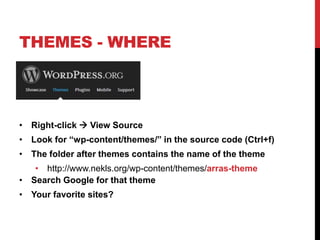
• Right-click  View Source
• Look for “wp-content/themes/” in the source code (Ctrl+f)
• The folder after themes contains the name of the theme
• http://www.nekls.org/wp-content/themes/arras-theme
• Search Google for that theme
• Your favorite sites?
THEMES - WHAT
• Buzzwords
• Responsive Design
• Mobile-first
• HTML5
• Customizable
• Colors
• Images
• Widgets
THEMES - HOW
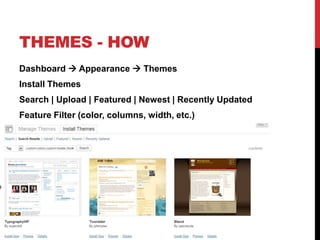
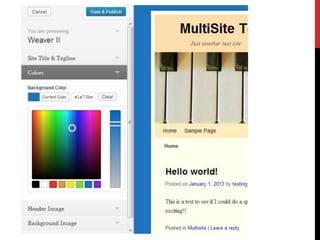
Dashboard  Appearance  Themes
Install Themes
Search | Upload | Featured | Newest | Recently Updated
Feature Filter (color, columns, width, etc.)
IMAGES - WHERE
• Compfight
• Includes WP plugin so you can search from post editing
box
• Can set the level of copyright
• Search.creativecommons.org
• Open Clip Art - http://openclipart.org/
• DPLA – http://dp.la
PicMonkey
IMAGES - WHAT
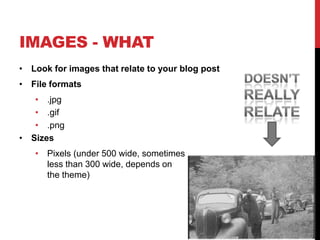
• Look for images that relate to your blog post
• File formats
• .jpg
• .gif
• .png
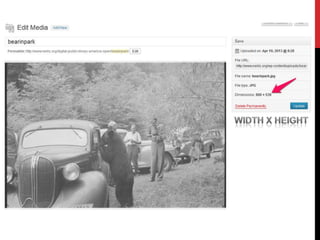
• Sizes
• Pixels (under 500 wide, sometimes
less than 300 wide, depends on
the theme)
IMAGES - HOW
• Find a CC, public domain or Open Access
image
• Download it to your computer (right-
click, Save Image)
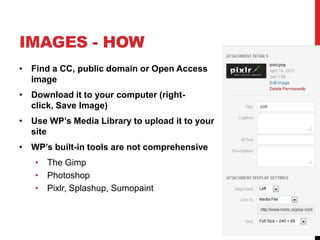
• Use WP’s Media Library to upload it to your
site
• WP’s built-in tools are not comprehensive
• The Gimp
• Photoshop
• Pixlr, Splashup, Sumopaint
CONTENT - WHERE
• Analytics
• What are people searching for?
• What links are clicked most?
• Board Meetings
• Events and Programs
• New Materials (pictures you take of book covers are yours
– no copyright issues)
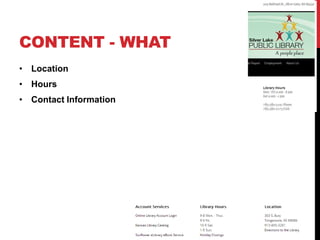
CONTENT - WHAT
• Location
• Hours
• Contact Information
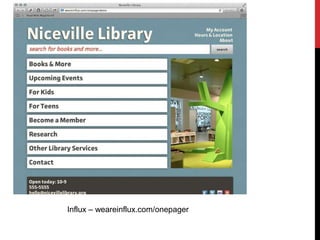
Influx – weareinflux.com/onepager
Remodel your website

Remodel your website

  • 1.
    REMODEL YOUR WEBSITE JAZZ UP YOURWORDPRESS SITE FOR FREE
  • 2.
    TO DO TODAY •Introductions • Themes • Where to find them • What to look for • How to customize it for your library • Images • Where to find them • What to look for • How to properly credit image creators • Content • Where to find it • What to put on your site
  • 3.
    THEMES - WHERE •Right-click  View Source • Look for “wp-content/themes/” in the source code (Ctrl+f) • The folder after themes contains the name of the theme • http://www.nekls.org/wp-content/themes/arras-theme • Search Google for that theme • Your favorite sites?
  • 4.
    THEMES - WHAT •Buzzwords • Responsive Design • Mobile-first • HTML5 • Customizable • Colors • Images • Widgets
  • 5.
    THEMES - HOW Dashboard Appearance  Themes Install Themes Search | Upload | Featured | Newest | Recently Updated Feature Filter (color, columns, width, etc.)
  • 7.
    IMAGES - WHERE •Compfight • Includes WP plugin so you can search from post editing box • Can set the level of copyright • Search.creativecommons.org • Open Clip Art - http://openclipart.org/ • DPLA – http://dp.la PicMonkey
  • 8.
    IMAGES - WHAT •Look for images that relate to your blog post • File formats • .jpg • .gif • .png • Sizes • Pixels (under 500 wide, sometimes less than 300 wide, depends on the theme)
  • 9.
    IMAGES - HOW •Find a CC, public domain or Open Access image • Download it to your computer (right- click, Save Image) • Use WP’s Media Library to upload it to your site • WP’s built-in tools are not comprehensive • The Gimp • Photoshop • Pixlr, Splashup, Sumopaint
  • 11.
    CONTENT - WHERE •Analytics • What are people searching for? • What links are clicked most? • Board Meetings • Events and Programs • New Materials (pictures you take of book covers are yours – no copyright issues)
  • 12.
    CONTENT - WHAT •Location • Hours • Contact Information
  • 13.

Editor's Notes

  • #2 Photo Credit: http://www.flickr.com/photos/83346641@N00/4896996561/JD Hancock
  • #6 Did feature search for custom colors, custom headers, theme options