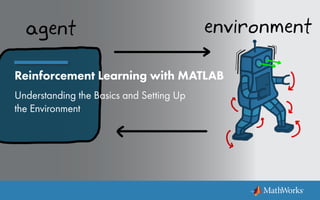
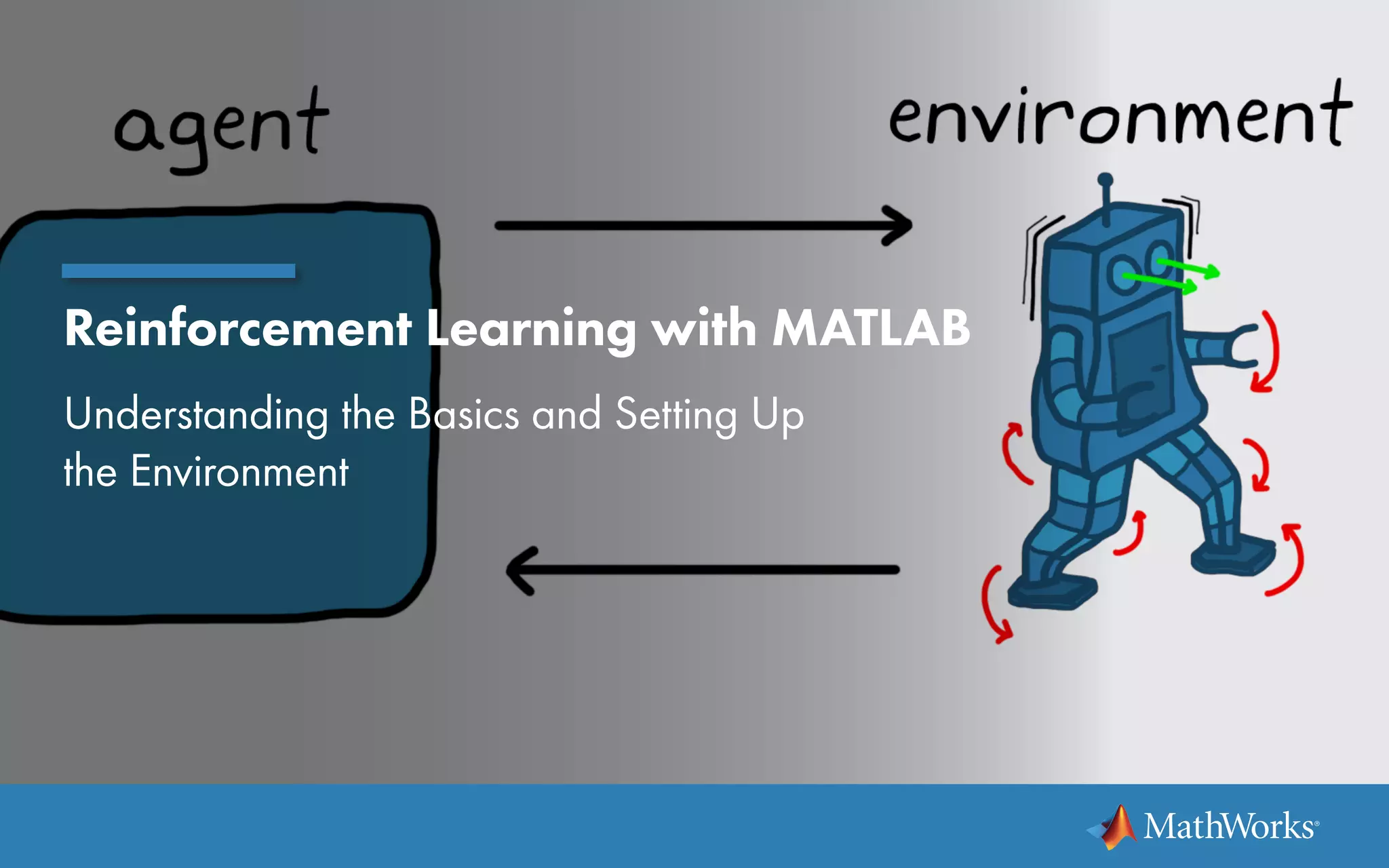
Reinforcement Learning with MATLAB
Understanding the Basics and Setting Up
the Environment
Reinforcement Learning with MATLAB | 2
What Is Reinforcement Learning?
Reinforcement learning is learning what to do—how to map
situations to actions—so as to maximize a numerical reward
signal. The learner is not told which actions to take, but instead
must discover which actions yield the most reward by trying them.
—Sutton and Barto, Reinforcement Learning: An Introduction
Reinforcement learning (RL) has successfully trained
computer programs to play games at a level higher than the
world’s best human players.
These programs find the best action to take in games with
large state and action spaces, imperfect world information,
and uncertainty around how short-term actions pay off in the
long run.
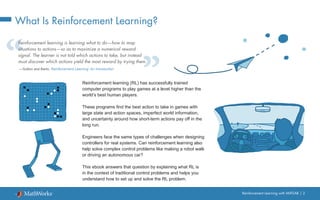
Engineers face the same types of challenges when designing
controllers for real systems. Can reinforcement learning also
help solve complex control problems like making a robot walk
or driving an autonomous car?
This ebook answers that question by explaining what RL is
in the context of traditional control problems and helps you
understand how to set up and solve the RL problem.
Reinforcement Learning with MATLAB | 3
The Goal of Control
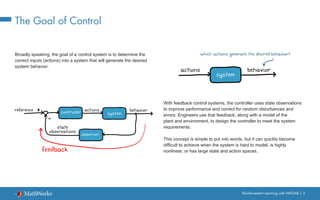
Broadly speaking, the goal of a control system is to determine the
correct inputs (actions) into a system that will generate the desired
system behavior.
With feedback control systems, the controller uses state observations
to improve performance and correct for random disturbances and
errors. Engineers use that feedback, along with a model of the
plant and environment, to design the controller to meet the system
requirements.
This concept is simple to put into words, but it can quickly become
difficult to achieve when the system is hard to model, is highly
nonlinear, or has large state and action spaces.
Reinforcement Learning with MATLAB | 4
The Control Problem
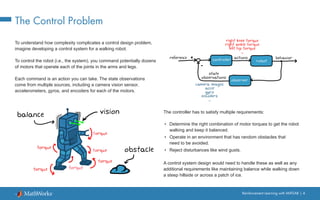
To understand how complexity complicates a control design problem,
imagine developing a control system for a walking robot.
To control the robot (i.e., the system), you command potentially dozens
of motors that operate each of the joints in the arms and legs.
Each command is an action you can take. The state observations
come from multiple sources, including a camera vision sensor,
accelerometers, gyros, and encoders for each of the motors.
The controller has to satisfy multiple requirements:
•	 Determine the right combination of motor torques to get the robot
walking and keep it balanced.
•	 Operate in an environment that has random obstacles that
need to be avoided.
•	 Reject disturbances like wind gusts.
A control system design would need to handle these as well as any
additional requirements like maintaining balance while walking down
a steep hillside or across a patch of ice.
Reinforcement Learning with MATLAB | 5
The Control Solution
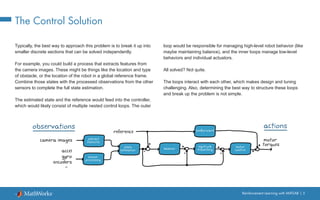
Typically, the best way to approach this problem is to break it up into
smaller discrete sections that can be solved independently.
For example, you could build a process that extracts features from
the camera images. These might be things like the location and type
of obstacle, or the location of the robot in a global reference frame.
Combine those states with the processed observations from the other
sensors to complete the full state estimation.
The estimated state and the reference would feed into the controller,
which would likely consist of multiple nested control loops. The outer
loop would be responsible for managing high-level robot behavior (like
maybe maintaining balance), and the inner loops manage low-level
behaviors and individual actuators.
All solved? Not quite.
The loops interact with each other, which makes design and tuning
challenging. Also, determining the best way to structure these loops
and break up the problem is not simple.
Reinforcement Learning with MATLAB | 6
The Appeal of Reinforcement Learning
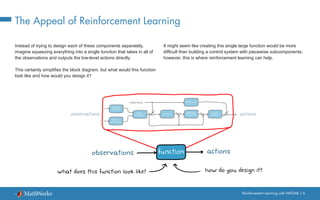
Instead of trying to design each of these components separately,
imagine squeezing everything into a single function that takes in all of
the observations and outputs the low-level actions directly.
This certainly simplifies the block diagram, but what would this function
look like and how would you design it?
It might seem like creating this single large function would be more
difficult than building a control system with piecewise subcomponents;
however, this is where reinforcement learning can help.
Reinforcement Learning with MATLAB | 7
Reinforcement Learning: A Subset of Machine Learning
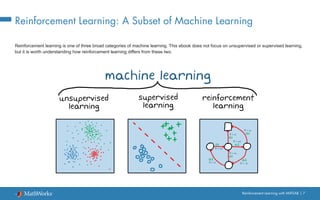
Reinforcement learning is one of three broad categories of machine learning. This ebook does not focus on unsupervised or supervised learning,
but it is worth understanding how reinforcement learning differs from these two.
Reinforcement Learning with MATLAB | 8
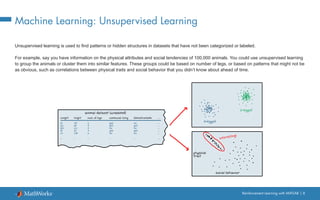
Machine Learning: Unsupervised Learning
Unsupervised learning is used to find patterns or hidden structures in datasets that have not been categorized or labeled.
For example, say you have information on the physical attributes and social tendencies of 100,000 animals. You could use unsupervised learning
to group the animals or cluster them into similar features. These groups could be based on number of legs, or based on patterns that might not be
as obvious, such as correlations between physical traits and social behavior that you didn’t know about ahead of time.
Reinforcement Learning with MATLAB | 9
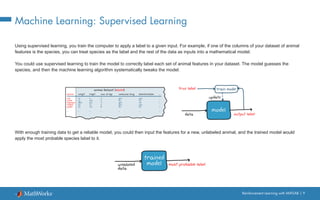
Machine Learning: Supervised Learning
Using supervised learning, you train the computer to apply a label to a given input. For example, if one of the columns of your dataset of animal
features is the species, you can treat species as the label and the rest of the data as inputs into a mathematical model.
You could use supervised learning to train the model to correctly label each set of animal features in your dataset. The model guesses the
species, and then the machine learning algorithm systematically tweaks the model.
With enough training data to get a reliable model, you could then input the features for a new, unlabeled animal, and the trained model would
apply the most probable species label to it.
Reinforcement Learning with MATLAB | 10
Machine Learning: Reinforcement Learning
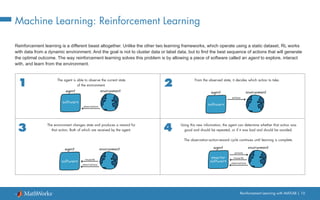
Reinforcement learning is a different beast altogether. Unlike the other two learning frameworks, which operate using a static dataset, RL works
with data from a dynamic environment. And the goal is not to cluster data or label data, but to find the best sequence of actions that will generate
the optimal outcome. The way reinforcement learning solves this problem is by allowing a piece of software called an agent to explore, interact
with, and learn from the environment.
The agent is able to observe the current state
of the environment.
The environment changes state and produces a reward for
that action. Both of which are received by the agent.
From the observed state, it decides which action to take.
Using this new information, the agent can determine whether that action was
good and should be repeated, or if it was bad and should be avoided.
The observation-action-reward cycle continues until learning is complete.
Reinforcement Learning with MATLAB | 11
Anatomy of Reinforcement Learning
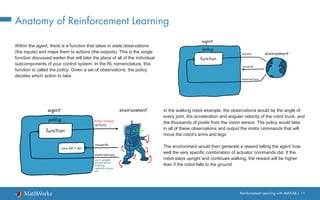
Within the agent, there is a function that takes in state observations
(the inputs) and maps them to actions (the outputs). This is the single
function discussed earlier that will take the place of all of the individual
subcomponents of your control system. In the RL nomenclature, this
function is called the policy. Given a set of observations, the policy
decides which action to take.
In the walking robot example, the observations would be the angle of
every joint, the acceleration and angular velocity of the robot trunk, and
the thousands of pixels from the vision sensor. The policy would take
in all of these observations and output the motor commands that will
move the robot’s arms and legs.
The environment would then generate a reward telling the agent how
well the very specific combination of actuator commands did. If the
robot stays upright and continues walking, the reward will be higher
than if the robot falls to the ground.
Reinforcement Learning with MATLAB | 12
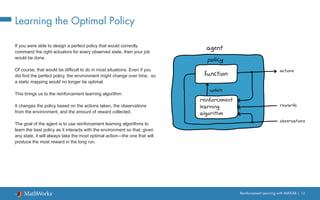
Learning the Optimal Policy
If you were able to design a perfect policy that would correctly
command the right actuators for every observed state, then your job
would be done.
Of course, that would be difficult to do in most situations. Even if you
did find the perfect policy, the environment might change over time, so
a static mapping would no longer be optimal.
This brings us to the reinforcement learning algorithm.
It changes the policy based on the actions taken, the observations
from the environment, and the amount of reward collected.
The goal of the agent is to use reinforcement learning algorithms to
learn the best policy as it interacts with the environment so that, given
any state, it will always take the most optimal action—the one that will
produce the most reward in the long run.
Reinforcement Learning with MATLAB | 13
What Does It Mean to Learn?
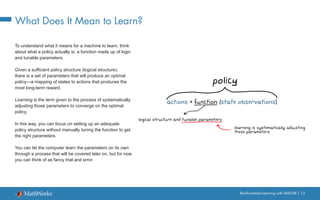
To understand what it means for a machine to learn, think
about what a policy actually is: a function made up of logic
and tunable parameters.
Given a sufficient policy structure (logical structure),
there is a set of parameters that will produce an optimal
policy—a mapping of states to actions that produces the
most long-term reward.
Learning is the term given to the process of systematically
adjusting those parameters to converge on the optimal
policy.
In this way, you can focus on setting up an adequate
policy structure without manually tuning the function to get
the right parameters.
You can let the computer learn the parameters on its own
through a process that will be covered later on, but for now
you can think of as fancy trial and error.
Reinforcement Learning with MATLAB | 14
How Is Reinforcement Learning Similar to Traditional Controls?
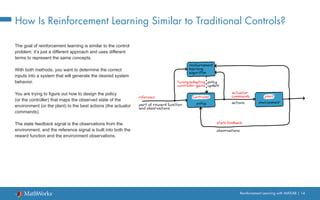
The goal of reinforcement learning is similar to the control
problem; it’s just a different approach and uses different
terms to represent the same concepts.
With both methods, you want to determine the correct
inputs into a system that will generate the desired system
behavior.
You are trying to figure out how to design the policy
(or the controller) that maps the observed state of the
environment (or the plant) to the best actions (the actuator
commands).
The state feedback signal is the observations from the
environment, and the reference signal is built into both the
reward function and the environment observations.
Reinforcement Learning with MATLAB | 15
Reinforcement Learning Workflow Overview
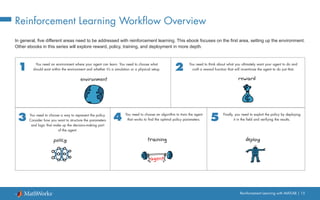
In general, five different areas need to be addressed with reinforcement learning. This ebook focuses on the first area, setting up the environment.
Other ebooks in this series will explore reward, policy, training, and deployment in more depth.
You need an environment where your agent can learn. You need to choose what
should exist within the environment and whether it’s a simulation or a physical setup.
You need to choose a way to represent the policy.
Consider how you want to structure the parameters
and logic that make up the decision-making part
of the agent.
You need to think about what you ultimately want your agent to do and
craft a reward function that will incentivize the agent to do just that.
You need to choose an algorithm to train the agent
that works to find the optimal policy parameters.
Finally, you need to exploit the policy by deploying
it in the field and verifying the results.
Reinforcement Learning with MATLAB | 16
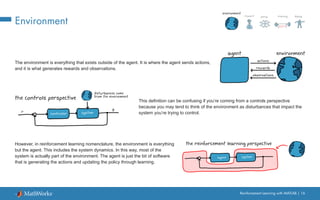
Environment
The environment is everything that exists outside of the agent. It is where the agent sends actions,
and it is what generates rewards and observations.
This definition can be confusing if you’re coming from a controls perspective
because you may tend to think of the environment as disturbances that impact the
system you’re trying to control.
However, in reinforcement learning nomenclature, the environment is everything
but the agent. This includes the system dynamics. In this way, most of the
system is actually part of the environment. The agent is just the bit of software
that is generating the actions and updating the policy through learning.
Reinforcement Learning with MATLAB | 17
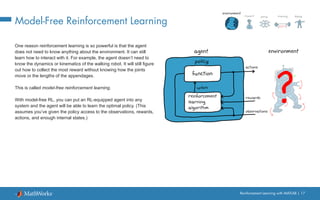
Model-Free Reinforcement Learning
One reason reinforcement learning is so powerful is that the agent
does not need to know anything about the environment. It can still
learn how to interact with it. For example, the agent doesn’t need to
know the dynamics or kinematics of the walking robot. It will still figure
out how to collect the most reward without knowing how the joints
move or the lengths of the appendages.
This is called model-free reinforcement learning.
With model-free RL, you can put an RL-equipped agent into any
system and the agent will be able to learn the optimal policy. (This
assumes you’ve given the policy access to the observations, rewards,
actions, and enough internal states.)
Reinforcement Learning with MATLAB | 18
Model-Based Reinforcement Learning
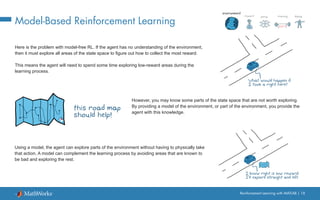
Here is the problem with model-free RL. If the agent has no understanding of the environment,
then it must explore all areas of the state space to figure out how to collect the most reward.
This means the agent will need to spend some time exploring low-reward areas during the
learning process.
However, you may know some parts of the state space that are not worth exploring.
By providing a model of the environment, or part of the environment, you provide the
agent with this knowledge.
Using a model, the agent can explore parts of the environment without having to physically take
that action. A model can complement the learning process by avoiding areas that are known to
be bad and exploring the rest.
Reinforcement Learning with MATLAB | 19
Model Free vs. Model Based
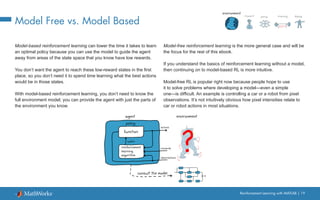
Model-based reinforcement learning can lower the time it takes to learn
an optimal policy because you can use the model to guide the agent
away from areas of the state space that you know have low rewards.
You don’t want the agent to reach these low-reward states in the first
place, so you don’t need it to spend time learning what the best actions
would be in those states.
With model-based reinforcement learning, you don’t need to know the
full environment model; you can provide the agent with just the parts of
the environment you know.
Model-free reinforcement learning is the more general case and will be
the focus for the rest of this ebook.
If you understand the basics of reinforcement learning without a model,
then continuing on to model-based RL is more intuitive.
Model-free RL is popular right now because people hope to use
it to solve problems where developing a model—even a simple
one—is difficult. An example is controlling a car or a robot from pixel
observations. It’s not intuitively obvious how pixel intensities relate to
car or robot actions in most situations.
Reinforcement Learning with MATLAB | 20
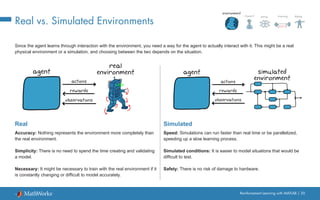
Real vs. Simulated Environments
Since the agent learns through interaction with the environment, you need a way for the agent to actually interact with it. This might be a real
physical environment or a simulation, and choosing between the two depends on the situation.
Real
Accuracy: Nothing represents the environment more completely than
the real environment.
Simplicity: There is no need to spend the time creating and validating
a model.
Necessary: It might be necessary to train with the real environment if it
is constantly changing or difficult to model accurately.
Simulated
Speed: Simulations can run faster than real time or be parallelized,
speeding up a slow learning process.
Simulated conditions: It is easier to model situations that would be
difficult to test.
Safety: There is no risk of damage to hardware.
Reinforcement Learning with MATLAB | 21
Real vs. Simulated Environments
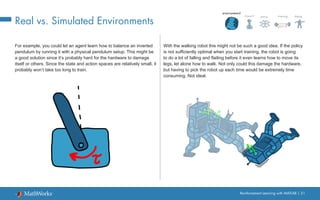
For example, you could let an agent learn how to balance an inverted
pendulum by running it with a physical pendulum setup. This might be
a good solution since it’s probably hard for the hardware to damage
itself or others. Since the state and action spaces are relatively small, it
probably won’t take too long to train.
With the walking robot this might not be such a good idea. If the policy
is not sufficiently optimal when you start training, the robot is going
to do a lot of falling and flailing before it even learns how to move its
legs, let alone how to walk. Not only could this damage the hardware,
but having to pick the robot up each time would be extremely time
consuming. Not ideal.
Reinforcement Learning with MATLAB | 22
Benefits of a Simulated Environment
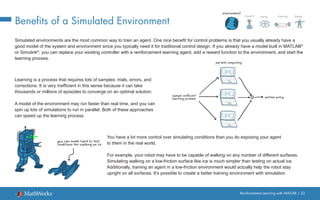
Simulated environments are the most common way to train an agent. One nice benefit for control problems is that you usually already have a
good model of the system and environment since you typically need it for traditional control design. If you already have a model built in MATLAB®
or Simulink®
, you can replace your existing controller with a reinforcement learning agent, add a reward function to the environment, and start the
learning process.
Learning is a process that requires lots of samples: trials, errors, and
corrections. It is very inefficient in this sense because it can take
thousands or millions of episodes to converge on an optimal solution.
A model of the environment may run faster than real time, and you can
spin up lots of simulations to run in parallel. Both of these approaches
can speed up the learning process.
You have a lot more control over simulating conditions than you do exposing your agent
to them in the real world.
For example, your robot may have to be capable of walking on any number of different surfaces.
Simulating walking on a low-friction surface like ice is much simpler than testing on actual ice.
Additionally, training an agent in a low-friction environment would actually help the robot stay
upright on all surfaces. It’s possible to create a better training environment with simulation.
Reinforcement Learning with MATLAB | 23
Reinforcement Learning with MATLAB and Simulink
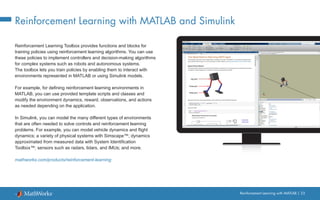
Reinforcement Learning Toolbox provides functions and blocks for
training policies using reinforcement learning algorithms. You can use
these policies to implement controllers and decision-making algorithms
for complex systems such as robots and autonomous systems.
The toolbox lets you train policies by enabling them to interact with
environments represented in MATLAB or using Simulink models.
For example, for defining reinforcement learning environments in
MATLAB, you can use provided template scripts and classes and
modify the environment dynamics, reward, observations, and actions
as needed depending on the application.
In Simulink, you can model the many different types of environments
that are often needed to solve controls and reinforcement learning
problems. For example, you can model vehicle dynamics and flight
dynamics; a variety of physical systems with Simscape™; dynamics
approximated from measured data with System Identification
Toolbox™; sensors such as radars, lidars, and IMUs; and more.
mathworks.com/products/reinforcement-learning
© 2019 The MathWorks, Inc. MATLAB and Simulink are registered trademarks of The MathWorks, Inc. See mathworks.com/trademarks for
a list of additional trademarks. Other product or brand names may be trademarks or registered trademarks of their respective holders.
Learn More
Watch
What Is Reinforcement Learning? (14:05)
Understanding the Environment and Rewards (13:27)
Simulating Walking Robot Mechanics (28:17)
Explore
Getting Started with Reinforcement Learning Toolbox
Creating Environments in MATLAB
Creating Environments in Simulink
Modeling Flight Dynamics in Simulink
Simulating Full Vehicle Dynamics in Simulink

Reinforcement learning-ebook-part1

  • 1.
    Reinforcement Learning withMATLAB Understanding the Basics and Setting Up the Environment
  • 2.
    Reinforcement Learning withMATLAB | 2 What Is Reinforcement Learning? Reinforcement learning is learning what to do—how to map situations to actions—so as to maximize a numerical reward signal. The learner is not told which actions to take, but instead must discover which actions yield the most reward by trying them. —Sutton and Barto, Reinforcement Learning: An Introduction Reinforcement learning (RL) has successfully trained computer programs to play games at a level higher than the world’s best human players. These programs find the best action to take in games with large state and action spaces, imperfect world information, and uncertainty around how short-term actions pay off in the long run. Engineers face the same types of challenges when designing controllers for real systems. Can reinforcement learning also help solve complex control problems like making a robot walk or driving an autonomous car? This ebook answers that question by explaining what RL is in the context of traditional control problems and helps you understand how to set up and solve the RL problem.
  • 3.
    Reinforcement Learning withMATLAB | 3 The Goal of Control Broadly speaking, the goal of a control system is to determine the correct inputs (actions) into a system that will generate the desired system behavior. With feedback control systems, the controller uses state observations to improve performance and correct for random disturbances and errors. Engineers use that feedback, along with a model of the plant and environment, to design the controller to meet the system requirements. This concept is simple to put into words, but it can quickly become difficult to achieve when the system is hard to model, is highly nonlinear, or has large state and action spaces.
  • 4.
    Reinforcement Learning withMATLAB | 4 The Control Problem To understand how complexity complicates a control design problem, imagine developing a control system for a walking robot. To control the robot (i.e., the system), you command potentially dozens of motors that operate each of the joints in the arms and legs. Each command is an action you can take. The state observations come from multiple sources, including a camera vision sensor, accelerometers, gyros, and encoders for each of the motors. The controller has to satisfy multiple requirements: • Determine the right combination of motor torques to get the robot walking and keep it balanced. • Operate in an environment that has random obstacles that need to be avoided. • Reject disturbances like wind gusts. A control system design would need to handle these as well as any additional requirements like maintaining balance while walking down a steep hillside or across a patch of ice.
  • 5.
    Reinforcement Learning withMATLAB | 5 The Control Solution Typically, the best way to approach this problem is to break it up into smaller discrete sections that can be solved independently. For example, you could build a process that extracts features from the camera images. These might be things like the location and type of obstacle, or the location of the robot in a global reference frame. Combine those states with the processed observations from the other sensors to complete the full state estimation. The estimated state and the reference would feed into the controller, which would likely consist of multiple nested control loops. The outer loop would be responsible for managing high-level robot behavior (like maybe maintaining balance), and the inner loops manage low-level behaviors and individual actuators. All solved? Not quite. The loops interact with each other, which makes design and tuning challenging. Also, determining the best way to structure these loops and break up the problem is not simple.
  • 6.
    Reinforcement Learning withMATLAB | 6 The Appeal of Reinforcement Learning Instead of trying to design each of these components separately, imagine squeezing everything into a single function that takes in all of the observations and outputs the low-level actions directly. This certainly simplifies the block diagram, but what would this function look like and how would you design it? It might seem like creating this single large function would be more difficult than building a control system with piecewise subcomponents; however, this is where reinforcement learning can help.
  • 7.
    Reinforcement Learning withMATLAB | 7 Reinforcement Learning: A Subset of Machine Learning Reinforcement learning is one of three broad categories of machine learning. This ebook does not focus on unsupervised or supervised learning, but it is worth understanding how reinforcement learning differs from these two.
  • 8.
    Reinforcement Learning withMATLAB | 8 Machine Learning: Unsupervised Learning Unsupervised learning is used to find patterns or hidden structures in datasets that have not been categorized or labeled. For example, say you have information on the physical attributes and social tendencies of 100,000 animals. You could use unsupervised learning to group the animals or cluster them into similar features. These groups could be based on number of legs, or based on patterns that might not be as obvious, such as correlations between physical traits and social behavior that you didn’t know about ahead of time.
  • 9.
    Reinforcement Learning withMATLAB | 9 Machine Learning: Supervised Learning Using supervised learning, you train the computer to apply a label to a given input. For example, if one of the columns of your dataset of animal features is the species, you can treat species as the label and the rest of the data as inputs into a mathematical model. You could use supervised learning to train the model to correctly label each set of animal features in your dataset. The model guesses the species, and then the machine learning algorithm systematically tweaks the model. With enough training data to get a reliable model, you could then input the features for a new, unlabeled animal, and the trained model would apply the most probable species label to it.
  • 10.
    Reinforcement Learning withMATLAB | 10 Machine Learning: Reinforcement Learning Reinforcement learning is a different beast altogether. Unlike the other two learning frameworks, which operate using a static dataset, RL works with data from a dynamic environment. And the goal is not to cluster data or label data, but to find the best sequence of actions that will generate the optimal outcome. The way reinforcement learning solves this problem is by allowing a piece of software called an agent to explore, interact with, and learn from the environment. The agent is able to observe the current state of the environment. The environment changes state and produces a reward for that action. Both of which are received by the agent. From the observed state, it decides which action to take. Using this new information, the agent can determine whether that action was good and should be repeated, or if it was bad and should be avoided. The observation-action-reward cycle continues until learning is complete.
  • 11.
    Reinforcement Learning withMATLAB | 11 Anatomy of Reinforcement Learning Within the agent, there is a function that takes in state observations (the inputs) and maps them to actions (the outputs). This is the single function discussed earlier that will take the place of all of the individual subcomponents of your control system. In the RL nomenclature, this function is called the policy. Given a set of observations, the policy decides which action to take. In the walking robot example, the observations would be the angle of every joint, the acceleration and angular velocity of the robot trunk, and the thousands of pixels from the vision sensor. The policy would take in all of these observations and output the motor commands that will move the robot’s arms and legs. The environment would then generate a reward telling the agent how well the very specific combination of actuator commands did. If the robot stays upright and continues walking, the reward will be higher than if the robot falls to the ground.
  • 12.
    Reinforcement Learning withMATLAB | 12 Learning the Optimal Policy If you were able to design a perfect policy that would correctly command the right actuators for every observed state, then your job would be done. Of course, that would be difficult to do in most situations. Even if you did find the perfect policy, the environment might change over time, so a static mapping would no longer be optimal. This brings us to the reinforcement learning algorithm. It changes the policy based on the actions taken, the observations from the environment, and the amount of reward collected. The goal of the agent is to use reinforcement learning algorithms to learn the best policy as it interacts with the environment so that, given any state, it will always take the most optimal action—the one that will produce the most reward in the long run.
  • 13.
    Reinforcement Learning withMATLAB | 13 What Does It Mean to Learn? To understand what it means for a machine to learn, think about what a policy actually is: a function made up of logic and tunable parameters. Given a sufficient policy structure (logical structure), there is a set of parameters that will produce an optimal policy—a mapping of states to actions that produces the most long-term reward. Learning is the term given to the process of systematically adjusting those parameters to converge on the optimal policy. In this way, you can focus on setting up an adequate policy structure without manually tuning the function to get the right parameters. You can let the computer learn the parameters on its own through a process that will be covered later on, but for now you can think of as fancy trial and error.
  • 14.
    Reinforcement Learning withMATLAB | 14 How Is Reinforcement Learning Similar to Traditional Controls? The goal of reinforcement learning is similar to the control problem; it’s just a different approach and uses different terms to represent the same concepts. With both methods, you want to determine the correct inputs into a system that will generate the desired system behavior. You are trying to figure out how to design the policy (or the controller) that maps the observed state of the environment (or the plant) to the best actions (the actuator commands). The state feedback signal is the observations from the environment, and the reference signal is built into both the reward function and the environment observations.
  • 15.
    Reinforcement Learning withMATLAB | 15 Reinforcement Learning Workflow Overview In general, five different areas need to be addressed with reinforcement learning. This ebook focuses on the first area, setting up the environment. Other ebooks in this series will explore reward, policy, training, and deployment in more depth. You need an environment where your agent can learn. You need to choose what should exist within the environment and whether it’s a simulation or a physical setup. You need to choose a way to represent the policy. Consider how you want to structure the parameters and logic that make up the decision-making part of the agent. You need to think about what you ultimately want your agent to do and craft a reward function that will incentivize the agent to do just that. You need to choose an algorithm to train the agent that works to find the optimal policy parameters. Finally, you need to exploit the policy by deploying it in the field and verifying the results.
  • 16.
    Reinforcement Learning withMATLAB | 16 Environment The environment is everything that exists outside of the agent. It is where the agent sends actions, and it is what generates rewards and observations. This definition can be confusing if you’re coming from a controls perspective because you may tend to think of the environment as disturbances that impact the system you’re trying to control. However, in reinforcement learning nomenclature, the environment is everything but the agent. This includes the system dynamics. In this way, most of the system is actually part of the environment. The agent is just the bit of software that is generating the actions and updating the policy through learning.
  • 17.
    Reinforcement Learning withMATLAB | 17 Model-Free Reinforcement Learning One reason reinforcement learning is so powerful is that the agent does not need to know anything about the environment. It can still learn how to interact with it. For example, the agent doesn’t need to know the dynamics or kinematics of the walking robot. It will still figure out how to collect the most reward without knowing how the joints move or the lengths of the appendages. This is called model-free reinforcement learning. With model-free RL, you can put an RL-equipped agent into any system and the agent will be able to learn the optimal policy. (This assumes you’ve given the policy access to the observations, rewards, actions, and enough internal states.)
  • 18.
    Reinforcement Learning withMATLAB | 18 Model-Based Reinforcement Learning Here is the problem with model-free RL. If the agent has no understanding of the environment, then it must explore all areas of the state space to figure out how to collect the most reward. This means the agent will need to spend some time exploring low-reward areas during the learning process. However, you may know some parts of the state space that are not worth exploring. By providing a model of the environment, or part of the environment, you provide the agent with this knowledge. Using a model, the agent can explore parts of the environment without having to physically take that action. A model can complement the learning process by avoiding areas that are known to be bad and exploring the rest.
  • 19.
    Reinforcement Learning withMATLAB | 19 Model Free vs. Model Based Model-based reinforcement learning can lower the time it takes to learn an optimal policy because you can use the model to guide the agent away from areas of the state space that you know have low rewards. You don’t want the agent to reach these low-reward states in the first place, so you don’t need it to spend time learning what the best actions would be in those states. With model-based reinforcement learning, you don’t need to know the full environment model; you can provide the agent with just the parts of the environment you know. Model-free reinforcement learning is the more general case and will be the focus for the rest of this ebook. If you understand the basics of reinforcement learning without a model, then continuing on to model-based RL is more intuitive. Model-free RL is popular right now because people hope to use it to solve problems where developing a model—even a simple one—is difficult. An example is controlling a car or a robot from pixel observations. It’s not intuitively obvious how pixel intensities relate to car or robot actions in most situations.
  • 20.
    Reinforcement Learning withMATLAB | 20 Real vs. Simulated Environments Since the agent learns through interaction with the environment, you need a way for the agent to actually interact with it. This might be a real physical environment or a simulation, and choosing between the two depends on the situation. Real Accuracy: Nothing represents the environment more completely than the real environment. Simplicity: There is no need to spend the time creating and validating a model. Necessary: It might be necessary to train with the real environment if it is constantly changing or difficult to model accurately. Simulated Speed: Simulations can run faster than real time or be parallelized, speeding up a slow learning process. Simulated conditions: It is easier to model situations that would be difficult to test. Safety: There is no risk of damage to hardware.
  • 21.
    Reinforcement Learning withMATLAB | 21 Real vs. Simulated Environments For example, you could let an agent learn how to balance an inverted pendulum by running it with a physical pendulum setup. This might be a good solution since it’s probably hard for the hardware to damage itself or others. Since the state and action spaces are relatively small, it probably won’t take too long to train. With the walking robot this might not be such a good idea. If the policy is not sufficiently optimal when you start training, the robot is going to do a lot of falling and flailing before it even learns how to move its legs, let alone how to walk. Not only could this damage the hardware, but having to pick the robot up each time would be extremely time consuming. Not ideal.
  • 22.
    Reinforcement Learning withMATLAB | 22 Benefits of a Simulated Environment Simulated environments are the most common way to train an agent. One nice benefit for control problems is that you usually already have a good model of the system and environment since you typically need it for traditional control design. If you already have a model built in MATLAB® or Simulink® , you can replace your existing controller with a reinforcement learning agent, add a reward function to the environment, and start the learning process. Learning is a process that requires lots of samples: trials, errors, and corrections. It is very inefficient in this sense because it can take thousands or millions of episodes to converge on an optimal solution. A model of the environment may run faster than real time, and you can spin up lots of simulations to run in parallel. Both of these approaches can speed up the learning process. You have a lot more control over simulating conditions than you do exposing your agent to them in the real world. For example, your robot may have to be capable of walking on any number of different surfaces. Simulating walking on a low-friction surface like ice is much simpler than testing on actual ice. Additionally, training an agent in a low-friction environment would actually help the robot stay upright on all surfaces. It’s possible to create a better training environment with simulation.
  • 23.
    Reinforcement Learning withMATLAB | 23 Reinforcement Learning with MATLAB and Simulink Reinforcement Learning Toolbox provides functions and blocks for training policies using reinforcement learning algorithms. You can use these policies to implement controllers and decision-making algorithms for complex systems such as robots and autonomous systems. The toolbox lets you train policies by enabling them to interact with environments represented in MATLAB or using Simulink models. For example, for defining reinforcement learning environments in MATLAB, you can use provided template scripts and classes and modify the environment dynamics, reward, observations, and actions as needed depending on the application. In Simulink, you can model the many different types of environments that are often needed to solve controls and reinforcement learning problems. For example, you can model vehicle dynamics and flight dynamics; a variety of physical systems with Simscape™; dynamics approximated from measured data with System Identification Toolbox™; sensors such as radars, lidars, and IMUs; and more. mathworks.com/products/reinforcement-learning
  • 24.
    © 2019 TheMathWorks, Inc. MATLAB and Simulink are registered trademarks of The MathWorks, Inc. See mathworks.com/trademarks for a list of additional trademarks. Other product or brand names may be trademarks or registered trademarks of their respective holders. Learn More Watch What Is Reinforcement Learning? (14:05) Understanding the Environment and Rewards (13:27) Simulating Walking Robot Mechanics (28:17) Explore Getting Started with Reinforcement Learning Toolbox Creating Environments in MATLAB Creating Environments in Simulink Modeling Flight Dynamics in Simulink Simulating Full Vehicle Dynamics in Simulink