





Regular Expression inRegular Expression in
ActionAction
www.folio3.com@folio_3
Folio3 – OverviewFolio3 – Overview
www.folio3.com @folio_3
Who We Are
 We are a Development Partner for our customers
 Design software solutions, not just implement them
 Focus on the solution – Platform and technology agnostic
 Expertise in building applications that are:
Mobile Social Cloud-based Gamified
What We Do
 Areas of Focus
 Enterprise
 Custom enterprise applications
 Product development targeting the enterprise
 Mobile
 Custom mobile apps for iOS, Android, Windows Phone, BB OS
 Mobile platform (server-to-server) development
 Social Media
 CMS based websites for consumers and enterprise (corporate, consumer,
community & social networking)
 Social media platform development (enterprise & consumer)
Folio3 At a Glance
 Founded in 2005
 Over 200 full time employees
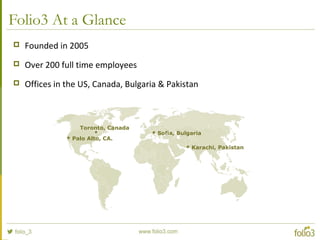
 Offices in the US, Canada, Bulgaria & Pakistan
 Palo Alto, CA.
 Sofia, Bulgaria
 Karachi, Pakistan
Toronto, Canada
Areas of Focus: Enterprise
 Automating workflows
 Cloud based solutions
 Application integration
 Platform development
 Healthcare
 Mobile Enterprise
 Digital Media
 Supply Chain
Some of Our Enterprise Clients
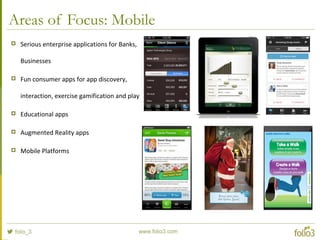
Areas of Focus: Mobile
 Serious enterprise applications for Banks,
Businesses
 Fun consumer apps for app discovery,
interaction, exercise gamification and play
 Educational apps
 Augmented Reality apps
 Mobile Platforms
Some of Our Mobile Clients
Areas of Focus: Web & Social Media
 Community Sites based on
Content Management Systems
 Enterprise Social Networking
 Social Games for Facebook &
Mobile
 Companion Apps for games
Some of Our Web Clients
Regular Expression inRegular Expression in
ActionAction
www.folio3.com @folio_3
Agenda
 What are Regular Expressions
 Literal characters and Special characters
 Build blocks of Regular Expressions
 Grouping and Backreferences
 Unicode characters in regular expressions
 Regex Matching Modes
 Lookarounds
 Parse a log file…
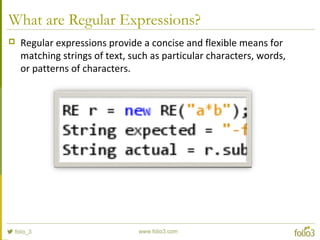
What are Regular Expressions?
 Regular expressions provide a concise and flexible means for
matching strings of text, such as particular characters, words,
or patterns of characters.
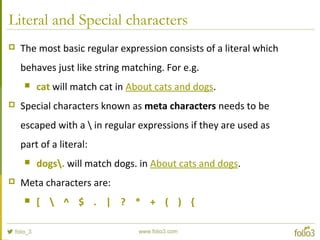
Literal and Special characters
 The most basic regular expression consists of a literal which
behaves just like string matching. For e.g.
 cat will match cat in About cats and dogs.
 Special characters known as meta characters needs to be
escaped with a  in regular expressions if they are used as
part of a literal:
 dogs. will match dogs. in About cats and dogs.
 Meta characters are:
 [  ^ $ . | ? * + ( ) {
Character Classes and Shorthands
 With a "character class", also called "character set", you can tell
the regex engine to match only one out of several characters. For
e.g.
 gr[ae]y will match grey and gray both.
 Ranges can be specified using dash. For e.g.
 [0-9] will match any digit from 0 to 9.
 [0-9a-fA-F] will match any single hexadecimal digit.
 Caret after the opening square bracket will negate the character
class. The result is that the character class will match any
character that is not in the character class. For e.g.
 [^0-9] will match any thing except number.
 q[^u] will not match Iraq but it will match Iraq is a country
Character Classes and Shorthands
 Meta characters works fine without escaping in Character classes.
For e.g.
 [+*] is a valid expression and match either * or +.
 There are some pre-defined character classes known as short
hand character classes:
 w stands for [A-Za-z0-9_]
 s stands for [ trn]
 d stands for [0-9]
 If a character class is repeated by using the ?, * or + operators,
the entire character class will be repeated, and not just the
character that it matched. For e.g.
 [0-9]+ can match 837 as well as 222
 ([0-9])1+ will match 222 but not 837.
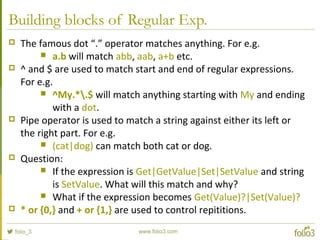
Building blocks of Regular Exp.
 The famous dot “.” operator matches anything. For e.g.
 a.b will match abb, aab, a+b etc.
 ^ and $ are used to match start and end of regular expressions.
For e.g.
 ^My.*.$ will match anything starting with My and ending
with a dot.
 Pipe operator is used to match a string against either its left or
the right part. For e.g.
 (cat|dog) can match both cat or dog.
 Question:
 If the expression is Get|GetValue|Set|SetValue and string
is SetValue. What will this match and why?
 What if the expression becomes Get(Value)?|Set(Value)?
 * or {0,} and + or {1,} are used to control repititions.
Grouping and Backreferences
 Round brackets besides grouping part of a regular expression
together, also create a "backreference". A backreference stores
the matching part of the string matched by the part of the regular
expression inside the parentheses. For e.g.
 ([0-9])1+ will match 222 but not 837.
 If backreference are not required, you can optimize this regular
expression Set(?:Value)?
 Backreferences can be used in expressions itself or in
replacement text. For e.g.
 <([A-Za-z][A-Za-z0-9]*)>.*</1> will match matching opening
and closing tags.
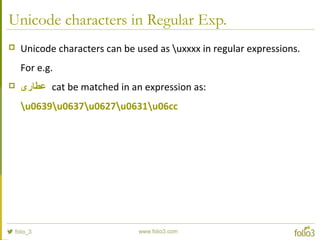
Unicode characters in Regular Exp.
 Unicode characters can be used as uxxxx in regular expressions.
For e.g.
 ‫عطاری‬ cat be matched in an expression as:
u0639u0637u0627u0631u06cc
Regular Exp. Matching Modes
 /i makes the regex match case insensitive.
 [A-Z] will match A and a with this modifier.
 /s enables "single-line mode". In this mode, the dot matches newlines as well.
 .* will match sherazrnattari with this modifier.
 /m enables "multi-line mode". In this mode, the caret and dollar match before
and after newlines in the subject string.
 .* will match only sheraz in sherazrnattari with this modifier.
 /x enables "free-spacing mode". In this mode, whitespace between regex
tokens is ignored, and an unescaped # starts a comment.
 #sherazrnrn.* will match only sheraz in with this modifier.
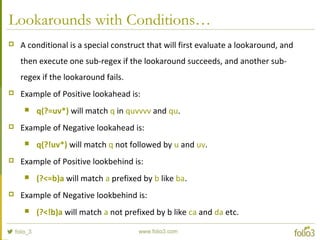
Lookarounds with Conditions…
 A conditional is a special construct that will first evaluate a lookaround, and
then execute one sub-regex if the lookaround succeeds, and another sub-
regex if the lookaround fails.
 Example of Positive lookahead is:
 q(?=uv*) will match q in quvvvv and qu.
 Example of Negative lookahead is:
 q(?!uv*) will match q not followed by u and uv.
 Example of Positive lookbehind is:
 (?<=b)a will match a prefixed by b like ba.
 Example of Negative lookbehind is:
 (?<!b)a will match a not prefixed by b like ca and da etc.
Contact
 For more details about our
services, please get in touch with
us.
contact@folio3.com
US Office: (408) 365-4638
www.folio3.com

Regular Expression in Action

  • 1.
    Regular Expression inRegularExpression in ActionAction www.folio3.com@folio_3
  • 2.
    Folio3 – OverviewFolio3– Overview www.folio3.com @folio_3
  • 3.
    Who We Are We are a Development Partner for our customers  Design software solutions, not just implement them  Focus on the solution – Platform and technology agnostic  Expertise in building applications that are: Mobile Social Cloud-based Gamified
  • 4.
    What We Do Areas of Focus  Enterprise  Custom enterprise applications  Product development targeting the enterprise  Mobile  Custom mobile apps for iOS, Android, Windows Phone, BB OS  Mobile platform (server-to-server) development  Social Media  CMS based websites for consumers and enterprise (corporate, consumer, community & social networking)  Social media platform development (enterprise & consumer)
  • 5.
    Folio3 At aGlance  Founded in 2005  Over 200 full time employees  Offices in the US, Canada, Bulgaria & Pakistan  Palo Alto, CA.  Sofia, Bulgaria  Karachi, Pakistan Toronto, Canada
  • 6.
    Areas of Focus:Enterprise  Automating workflows  Cloud based solutions  Application integration  Platform development  Healthcare  Mobile Enterprise  Digital Media  Supply Chain
  • 7.
    Some of OurEnterprise Clients
  • 8.
    Areas of Focus:Mobile  Serious enterprise applications for Banks, Businesses  Fun consumer apps for app discovery, interaction, exercise gamification and play  Educational apps  Augmented Reality apps  Mobile Platforms
  • 9.
    Some of OurMobile Clients
  • 10.
    Areas of Focus:Web & Social Media  Community Sites based on Content Management Systems  Enterprise Social Networking  Social Games for Facebook & Mobile  Companion Apps for games
  • 11.
    Some of OurWeb Clients
  • 12.
    Regular Expression inRegularExpression in ActionAction www.folio3.com @folio_3
  • 13.
    Agenda  What areRegular Expressions  Literal characters and Special characters  Build blocks of Regular Expressions  Grouping and Backreferences  Unicode characters in regular expressions  Regex Matching Modes  Lookarounds  Parse a log file…
  • 14.
    What are RegularExpressions?  Regular expressions provide a concise and flexible means for matching strings of text, such as particular characters, words, or patterns of characters.
  • 15.
    Literal and Specialcharacters  The most basic regular expression consists of a literal which behaves just like string matching. For e.g.  cat will match cat in About cats and dogs.  Special characters known as meta characters needs to be escaped with a in regular expressions if they are used as part of a literal:  dogs. will match dogs. in About cats and dogs.  Meta characters are:  [ ^ $ . | ? * + ( ) {
  • 16.
    Character Classes andShorthands  With a "character class", also called "character set", you can tell the regex engine to match only one out of several characters. For e.g.  gr[ae]y will match grey and gray both.  Ranges can be specified using dash. For e.g.  [0-9] will match any digit from 0 to 9.  [0-9a-fA-F] will match any single hexadecimal digit.  Caret after the opening square bracket will negate the character class. The result is that the character class will match any character that is not in the character class. For e.g.  [^0-9] will match any thing except number.  q[^u] will not match Iraq but it will match Iraq is a country
  • 17.
    Character Classes andShorthands  Meta characters works fine without escaping in Character classes. For e.g.  [+*] is a valid expression and match either * or +.  There are some pre-defined character classes known as short hand character classes:  w stands for [A-Za-z0-9_]  s stands for [ trn]  d stands for [0-9]  If a character class is repeated by using the ?, * or + operators, the entire character class will be repeated, and not just the character that it matched. For e.g.  [0-9]+ can match 837 as well as 222  ([0-9])1+ will match 222 but not 837.
  • 18.
    Building blocks ofRegular Exp.  The famous dot “.” operator matches anything. For e.g.  a.b will match abb, aab, a+b etc.  ^ and $ are used to match start and end of regular expressions. For e.g.  ^My.*.$ will match anything starting with My and ending with a dot.  Pipe operator is used to match a string against either its left or the right part. For e.g.  (cat|dog) can match both cat or dog.  Question:  If the expression is Get|GetValue|Set|SetValue and string is SetValue. What will this match and why?  What if the expression becomes Get(Value)?|Set(Value)?  * or {0,} and + or {1,} are used to control repititions.
  • 19.
    Grouping and Backreferences Round brackets besides grouping part of a regular expression together, also create a "backreference". A backreference stores the matching part of the string matched by the part of the regular expression inside the parentheses. For e.g.  ([0-9])1+ will match 222 but not 837.  If backreference are not required, you can optimize this regular expression Set(?:Value)?  Backreferences can be used in expressions itself or in replacement text. For e.g.  <([A-Za-z][A-Za-z0-9]*)>.*</1> will match matching opening and closing tags.
  • 20.
    Unicode characters inRegular Exp.  Unicode characters can be used as uxxxx in regular expressions. For e.g.  ‫عطاری‬ cat be matched in an expression as: u0639u0637u0627u0631u06cc
  • 21.
    Regular Exp. MatchingModes  /i makes the regex match case insensitive.  [A-Z] will match A and a with this modifier.  /s enables "single-line mode". In this mode, the dot matches newlines as well.  .* will match sherazrnattari with this modifier.  /m enables "multi-line mode". In this mode, the caret and dollar match before and after newlines in the subject string.  .* will match only sheraz in sherazrnattari with this modifier.  /x enables "free-spacing mode". In this mode, whitespace between regex tokens is ignored, and an unescaped # starts a comment.  #sherazrnrn.* will match only sheraz in with this modifier.
  • 22.
    Lookarounds with Conditions… A conditional is a special construct that will first evaluate a lookaround, and then execute one sub-regex if the lookaround succeeds, and another sub- regex if the lookaround fails.  Example of Positive lookahead is:  q(?=uv*) will match q in quvvvv and qu.  Example of Negative lookahead is:  q(?!uv*) will match q not followed by u and uv.  Example of Positive lookbehind is:  (?<=b)a will match a prefixed by b like ba.  Example of Negative lookbehind is:  (?<!b)a will match a not prefixed by b like ca and da etc.
  • 23.
    Contact  For moredetails about our services, please get in touch with us. contact@folio3.com US Office: (408) 365-4638 www.folio3.com