Red Hat Enterprise Linux OpenStack Platform 7
VM Instance HA Architecture
Etsuji Nakai
Senior Solution Architect
and Cloud Evangelist
Red Hat K.K.
v1.1 2015/11/22
2
Red Hat Enterprise Linux OpenStack Platform 7 VM Instance HA Architecture
Contents
 Architecture summary
 Configuration details
 Evacuation process
 Reference
※ This document is based on RHEL-OSP7 as of 2015/11/22. Details may change due to minor/major
updates in the future. We recommend that you would use the Red Hat consultation service for
the deployment with the cluster configuration.
Architecture summary
4
Red Hat Enterprise Linux OpenStack Platform 7 VM Instance HA Architecture
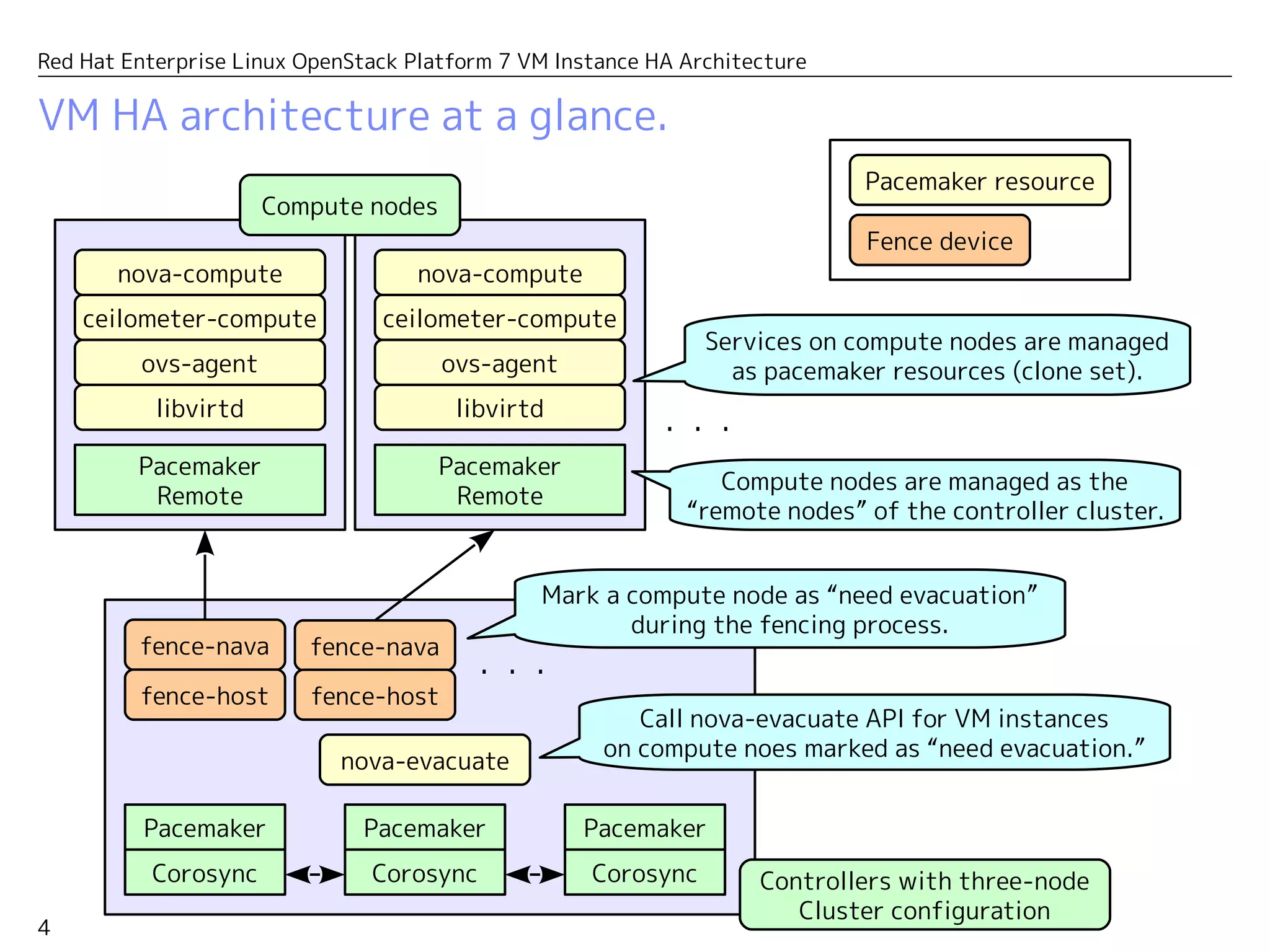
VM HA architecture at a glance.
Corosync
Pacemaker
Pacemaker
Remote
nova-evacuate
Corosync
Pacemaker
Corosync
Pacemaker
Call nova-evacuate API for VM instances
on compute nodes marked as “need evacuation.”
fence-nava
Mark a compute node as “need evacuation”
during the fencing process.
fence-nava
・・・
・・・
fence-host fence-host
ceilometer-compute
ovs-agent
libvirtd
nova-compute
Pacemaker
Remote
ceilometer-compute
ovs-agent
libvirtd
nova-compute
Services on compute nodes are managed
as pacemaker resources (clone set).
Controllers with three-node
Cluster configuration
Compute nodes
Compute nodes are managed as
“remote nodes” from the controller cluster.
Fence device
Pacemaker resource
5
Red Hat Enterprise Linux OpenStack Platform 7 VM Instance HA Architecture
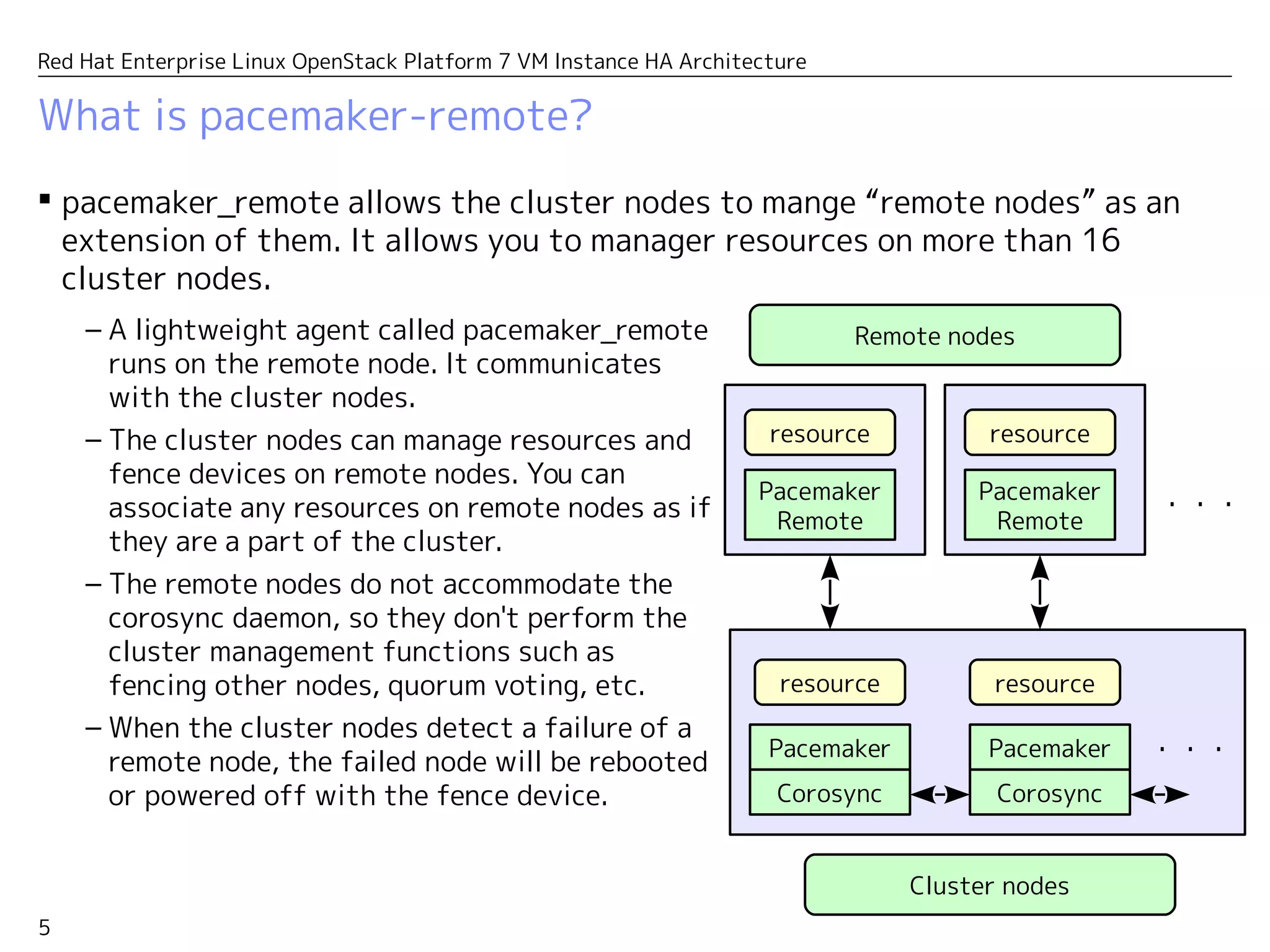
What is pacemaker-remote?
 Pacemaker-remote allows the cluster nodes to manage “remote nodes” as an
extension of them. It allows you to manager resources on more than 16
cluster nodes.
Corosync
Pacemaker
Pacemaker
Remote
Corosync
Pacemaker
resource
– A lightweight agent called pacemaker_remote
runs on the remote node. It communicates
with the cluster nodes.
– The cluster nodes can manage resources and
fence devices on the remote nodes. You can
associate any resources on the remote nodes
as if they are a part of the cluster.
– The remote nodes do not accommodate the
corosync daemon, so they don't perform the
cluster management functions such as
fencing other nodes, quorum voting, etc.
– When the cluster nodes detect a failure of a
remote node, the failed node will be rebooted
or powered off with the fence device.
・・・
resource
Pacemaker
Remote
resource
resource
・・・
Cluster nodes
Remote nodes
Configuration details
7
Red Hat Enterprise Linux OpenStack Platform 7 VM Instance HA Architecture
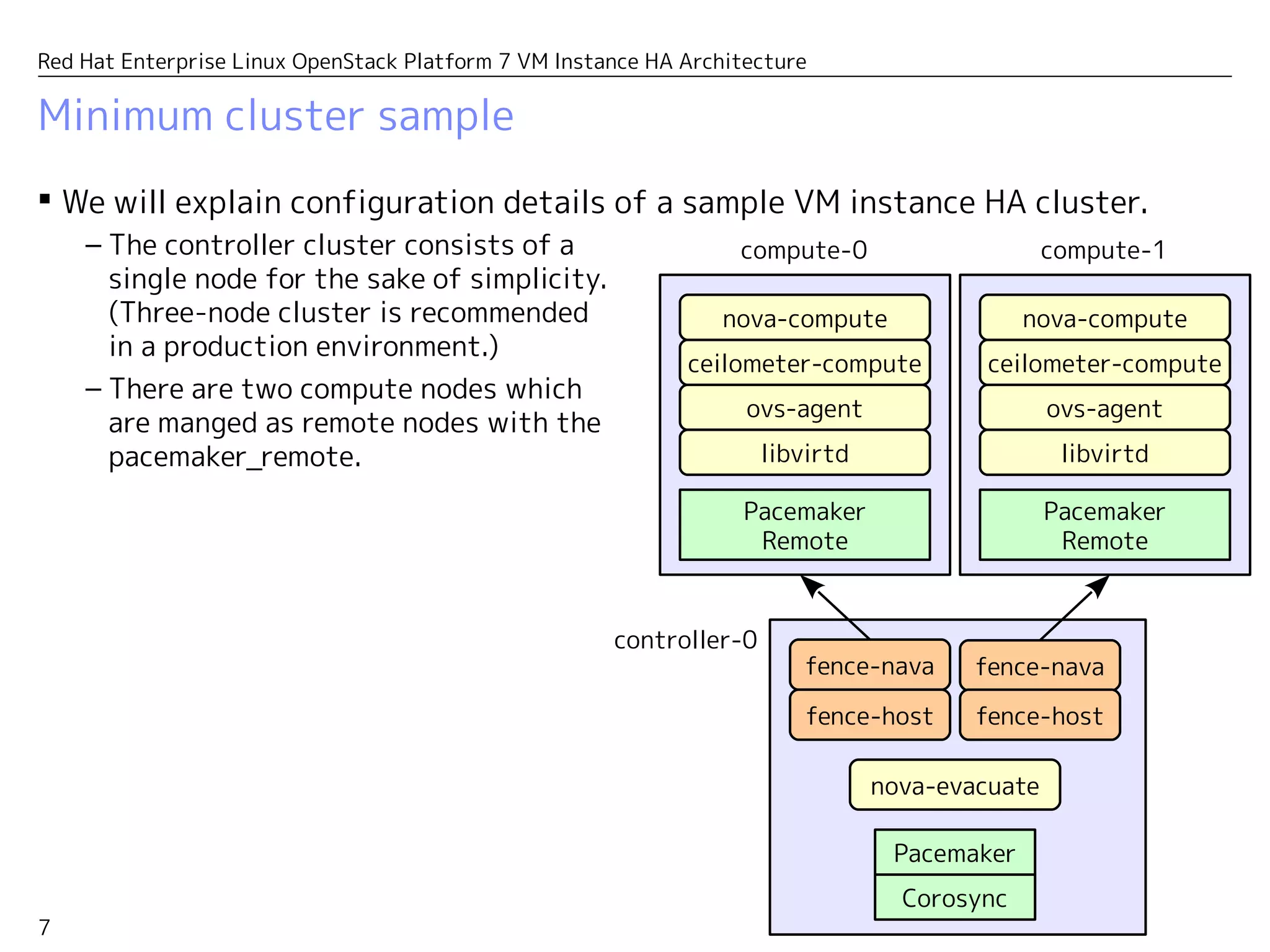
Minimum cluster sample
 We will explain configuration details of a sample VM instance HA cluster.
Corosync
Pacemaker
Pacemaker
Remote
nova-evacuate
fence-nava fence-nava
fence-host fence-host
ceilometer-compute
ovs-agent
libvirtd
nova-compute
Pacemaker
Remote
ceilometer-compute
ovs-agent
libvirtd
nova-compute
– The controller cluster consists of a
single node for the sake of simplicity.
(Three-node cluster is recommended
in a production environment.)
– There are two compute nodes which
are manged as remote nodes with the
pacemaker_remote.
compute-0
controller-0
compute-1
8
Red Hat Enterprise Linux OpenStack Platform 7 VM Instance HA Architecture
Cluster definition
 controller-0 is defined as a cluster node while compute-0 and compute-1 are
defined as remote nodes.
– Only controller-0 has the quorum vote. So from the corosync's viewpoint, it's just a
single node cluster.
# pcs cluster status
Cluster Status:
Last updated: Sun Nov 22 03:16:01 2015 Last change: Sat Nov 21 02:40:39 2015
by root via cibadmin on controller-0
Stack: corosync
Current DC: controller-0 (version 1.1.13-a14efad) - partition with quorum
3 nodes and 126 resources configured
Online: [ controller-0 ]
RemoteOnline: [ compute-0 compute-1 ]
PCSD Status:
controller-0: Online
9
Red Hat Enterprise Linux OpenStack Platform 7 VM Instance HA Architecture
Resource definition
 OpenStack services on compute nodes are started as managed resources.
– In this example, neutron-ovs-agent, libirtd, ceilometer-compute and nova-compute
are defined as managed resources with clone type. (The clone type resources are
enabled on multiple nodes in parallel.)
# pcs resource
...
nova-evacuate (ocf::openstack:NovaEvacuate): Started
Clone Set: neutron-openvswitch-agent-compute-clone [neutron-openvswitch-agent-compute]
Started: [ compute-0 compute-1 ]
Stopped: [ controller-0 ]
Clone Set: libvirtd-compute-clone [libvirtd-compute]
Started: [ compute-0 compute-1 ]
Stopped: [ controller-0 ]
Clone Set: ceilometer-compute-clone [ceilometer-compute]
Started: [ compute-0 compute-1 ]
Stopped: [ controller-0 ]
Clone Set: nova-compute-clone [nova-compute]
Started: [ compute-0 compute-1 ]
Stopped: [ controller-0 ]
...
10
Red Hat Enterprise Linux OpenStack Platform 7 VM Instance HA Architecture
Resource definition
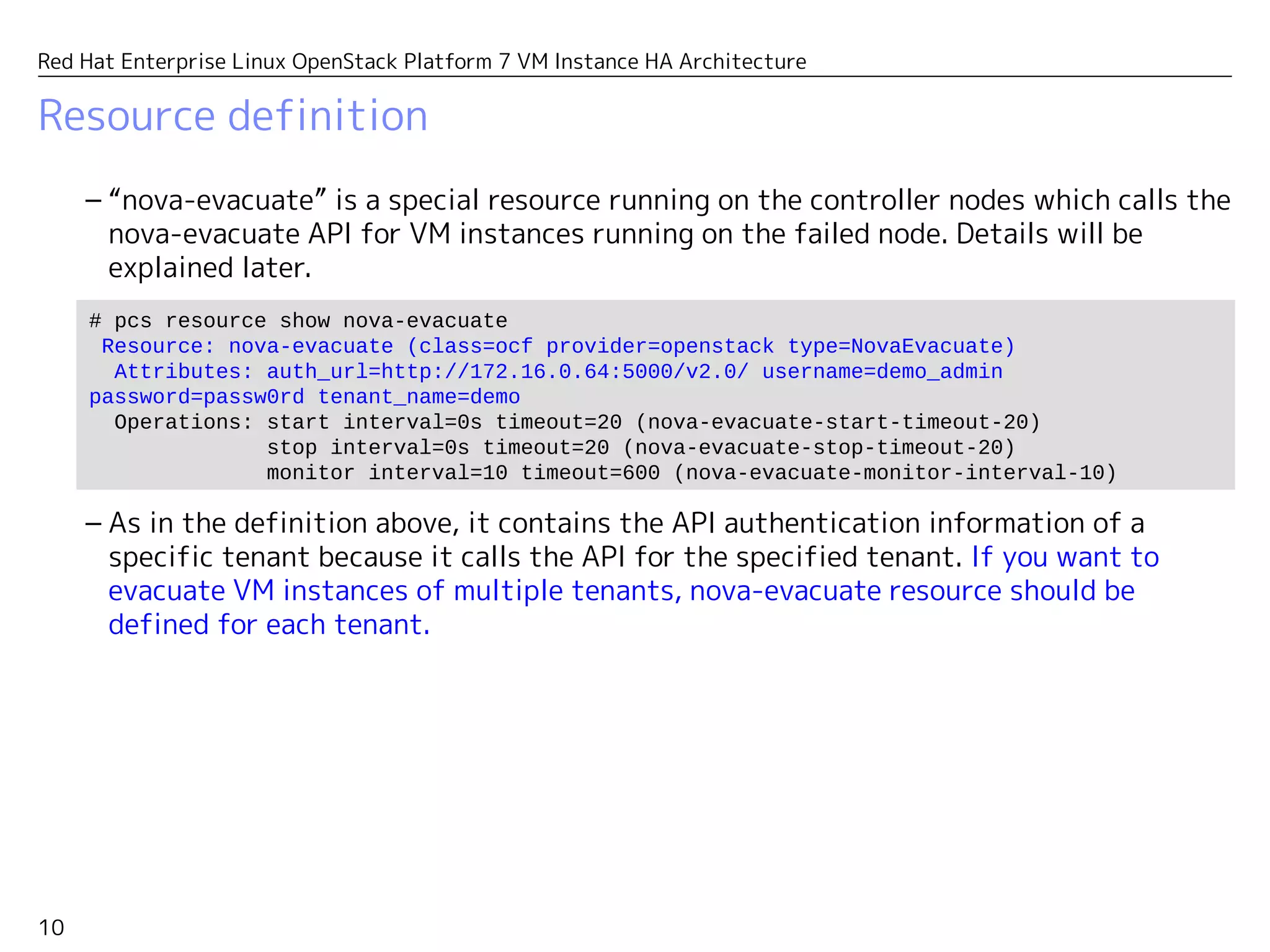
– “nova-evacuate” is a special resource running on the controller nodes which calls the
nova-evacuate API for VM instances running on the failed node. Details will be
explained later.
– As in the definition above, it contains the API authentication information of a
specific user which should have an admin authority to evacuate VM instances of all
tenants.
# pcs resource show nova-evacuate
Resource: nova-evacuate (class=ocf provider=openstack type=NovaEvacuate)
Attributes: auth_url=http://172.16.0.64:5000/v2.0/ username=demo_admin
password=passw0rd tenant_name=demo
Operations: start interval=0s timeout=20 (nova-evacuate-start-timeout-20)
stop interval=0s timeout=20 (nova-evacuate-stop-timeout-20)
monitor interval=10 timeout=600 (nova-evacuate-monitor-interval-10)
11
Red Hat Enterprise Linux OpenStack Platform 7 VM Instance HA Architecture
Fence devices
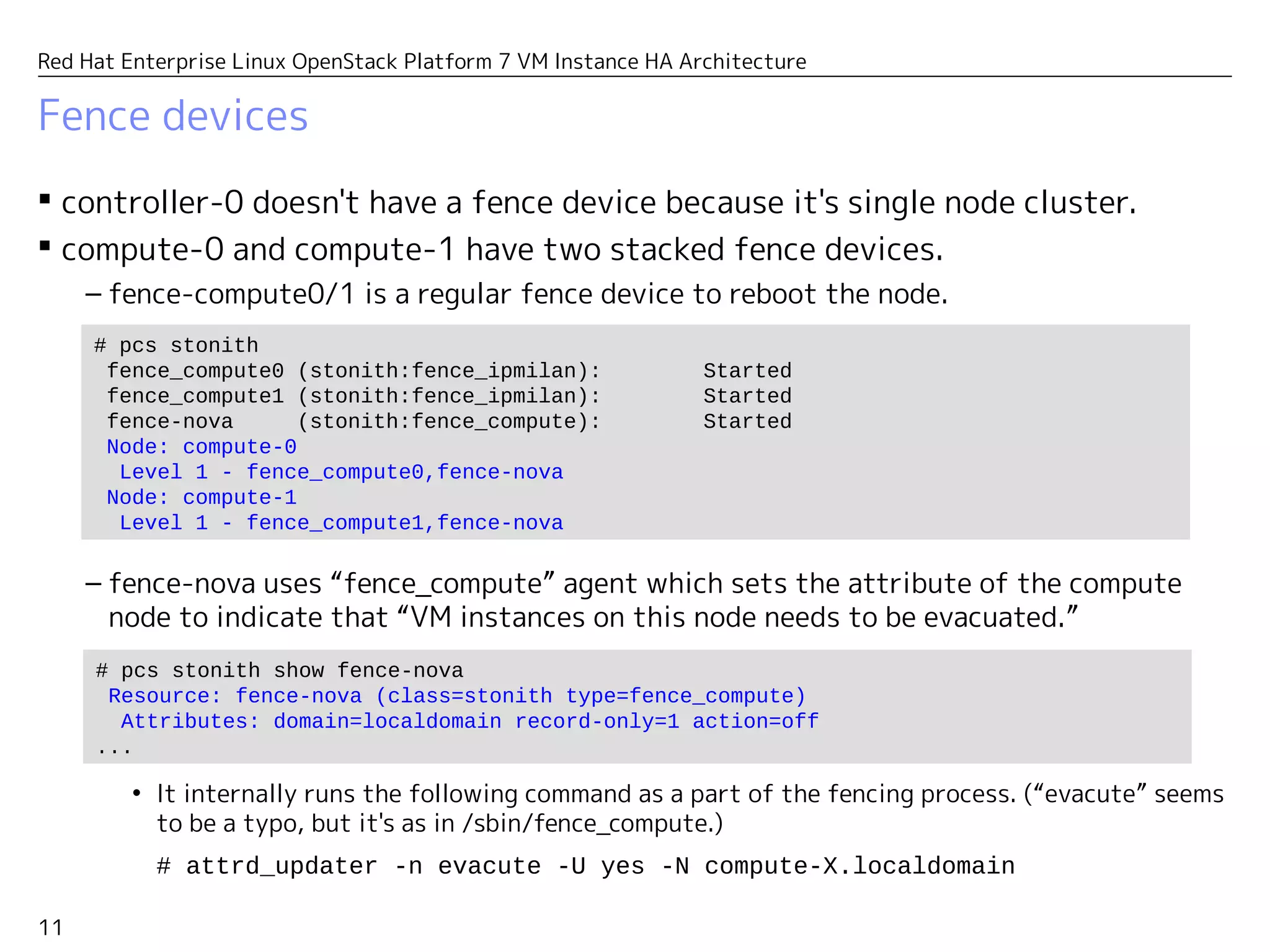
 controller-0 doesn't have a fence device because it's a single node cluster.
 compute-0 and compute-1 have two stacked fence devices.
– fence-compute0/1 is a regular fence device to reboot the node.
– fence-nova uses “fence_compute” agent to set the attribute of the compute node
indicating that “VM instances on this node need to be evacuated.”
• It internally runs the following command as a part of the fencing process. (“evacute” seems
to be a typo, but it's as in /sbin/fence_compute.)
# attrd_updater -n evacute -U yes -N compute-X.localdomain
# pcs stonith
fence_compute0 (stonith:fence_ipmilan): Started
fence_compute1 (stonith:fence_ipmilan): Started
fence-nova (stonith:fence_compute): Started
Node: compute-0
Level 1 - fence_compute0,fence-nova
Node: compute-1
Level 1 - fence_compute1,fence-nova
# pcs stonith show fence-nova
Resource: fence-nova (class=stonith type=fence_compute)
Attributes: domain=localdomain record-only=1 action=off
...
Evacuation process
13
Red Hat Enterprise Linux OpenStack Platform 7 VM Instance HA Architecture
How does the evacuation work?
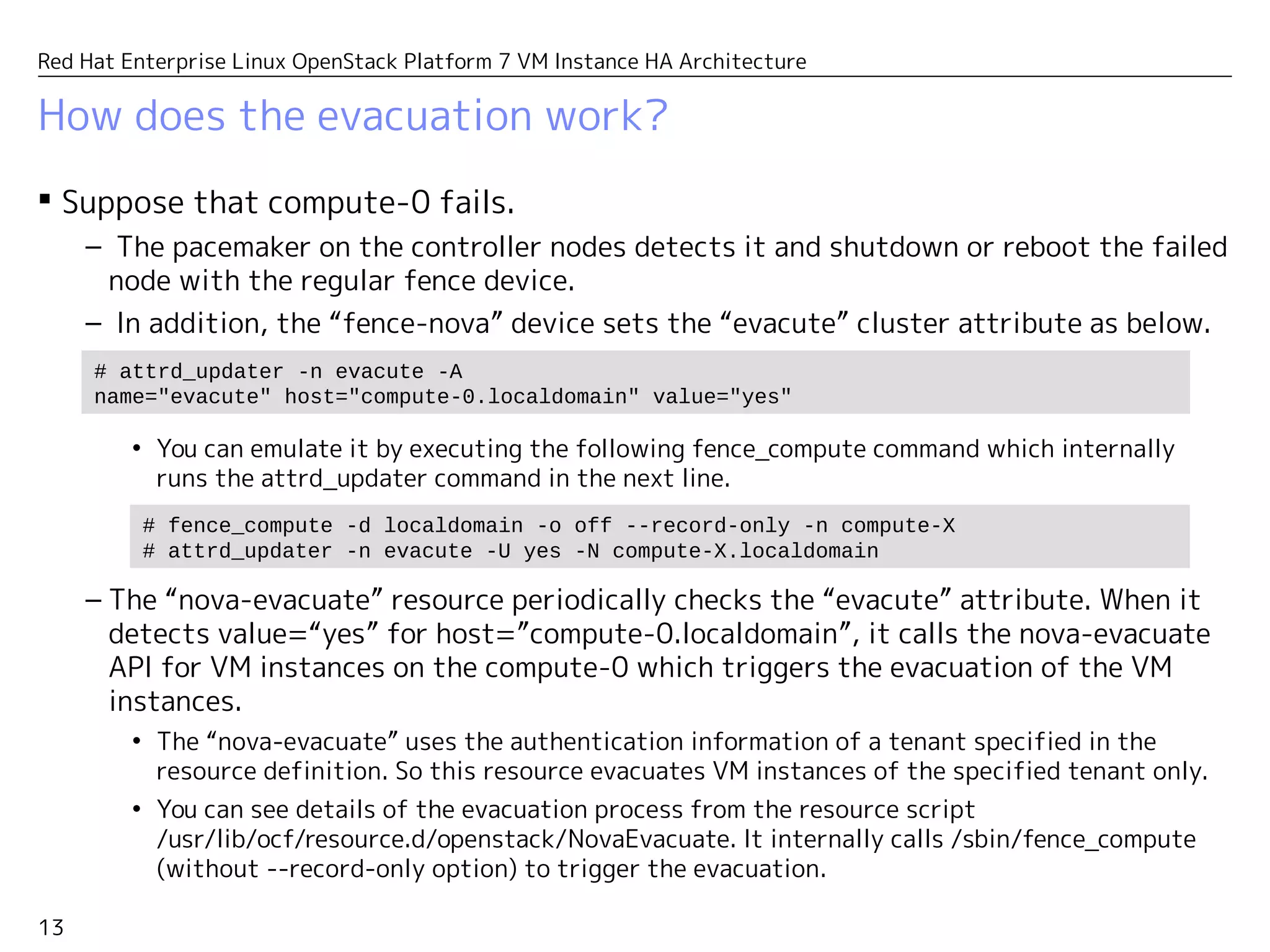
 Suppose that compute-0 fails.
– The pacemaker on the controller nodes detects it and shutdown or reboot the failed
node with the regular fence device.
– In addition, the “fence-nova” device sets the “evacute” cluster attribute as below.
• You can emulate it by executing the following fence_compute command which internally
runs the attrd_updater command in the next line.
– The “nova-evacuate” resource periodically checks the “evacute” attribute. When it
detects value=“yes” for host=”compute-0.localdomain”, it calls the nova-evacuate
API for VM instances on the compute-0 which triggers the evacuation of the VM
instances.
• The “nova-evacuate” uses the authentication information specified in the resource
definition. The specified user should have an admin authority which can evacuate VM
instances of all tenants.
• You can see details of the evacuation process from the resource script
/usr/lib/ocf/resource.d/openstack/NovaEvacuate. It internally calls /sbin/fence_compute
(without --record-only option) to trigger the evacuation.
# fence_compute -d localdomain -o off --record-only -n compute-X
# attrd_updater -n evacute -U yes -N compute-X.localdomain
# attrd_updater -n evacute -A
name="evacute" host="compute-0.localdomain" value="yes"
14
Red Hat Enterprise Linux OpenStack Platform 7 VM Instance HA Architecture
Resource constraints
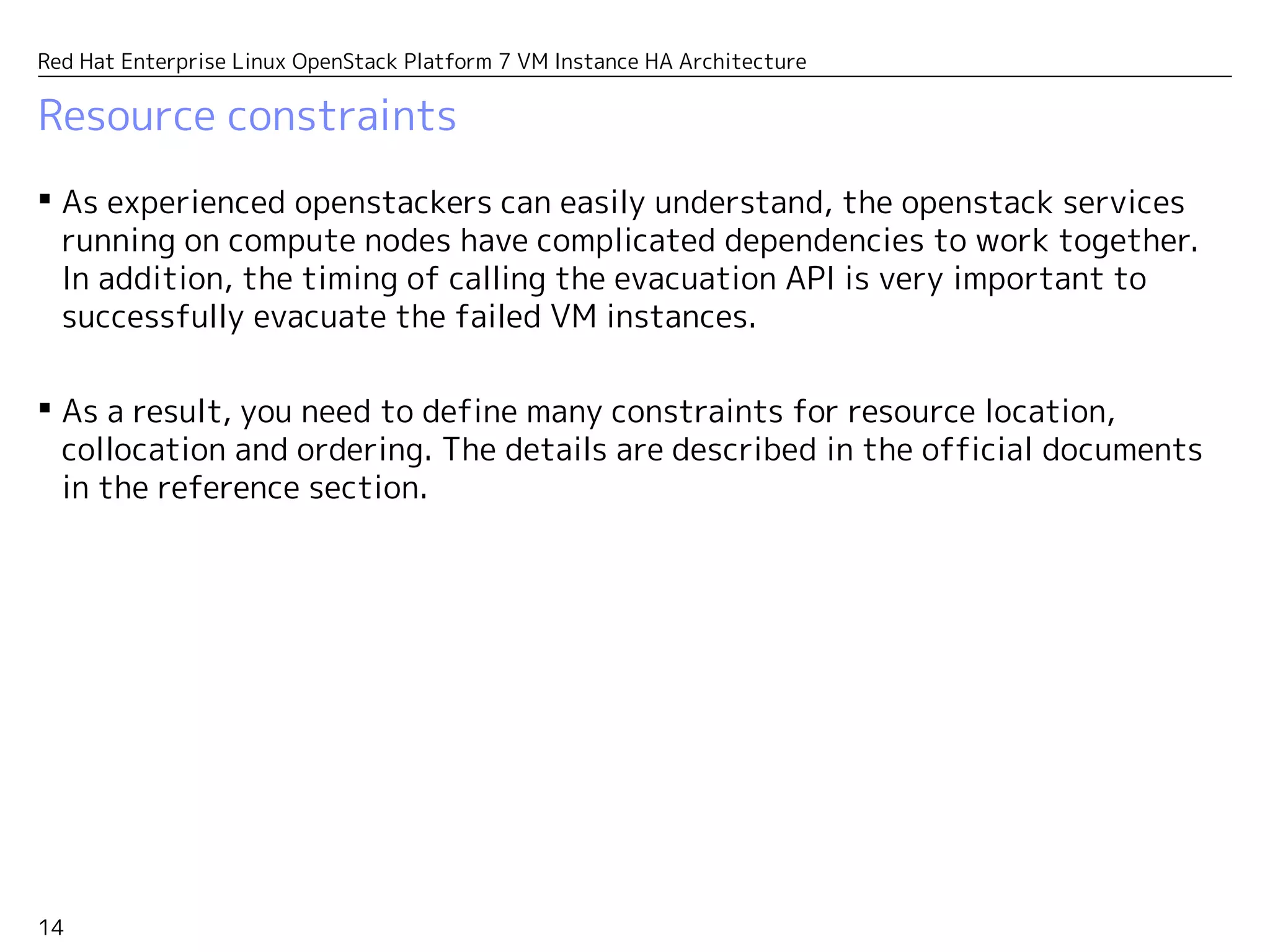
 As experienced openstackers can easily understand, the openstack services
running on compute nodes have complicated dependencies to work together.
In addition, the timing of calling the evacuation API is very important to
successfully evacuate the failed VM instances.
 As a result, you need to define many constraints for resource location,
collocation and ordering. The details are described in the official documents
in the reference section.
Reference
16
Red Hat Enterprise Linux OpenStack Platform 7 VM Instance HA Architecture
References
 Highly available virtual machines in RHEL OpenStack Platform 7
– http://redhatstackblog.redhat.com/2015/09/24/highly-available-virtual-machines-in-rhel-
openstack-platform-7/
 Use High Availability to Protect Instances in Red Hat Enterprise Linux OpenStack
Platform 7
– https://access.redhat.com/articles/1544823
 Pacemaker Remote Scaling High Availability Clusters
– http://clusterlabs.org/doc/en-US/Pacemaker/1.1/html-single/Pacemaker_Remote/
 Red Hat Enterprise Linux 7 High Availability Add-On Reference
– https://access.redhat.com/documentation/en-US/Red_Hat_Enterprise_Linux/7/html-
single/High_Availability_Add-On_Reference/index.html
EMPOWER PEOPLE,
EMPOWER ENTERPRISE,
OPEN INNOVATION.

Red Hat Enterprise Linux OpenStack Platform 7 - VM Instance HA Architecture

  • 1.
    Red Hat EnterpriseLinux OpenStack Platform 7 VM Instance HA Architecture Etsuji Nakai Senior Solution Architect and Cloud Evangelist Red Hat K.K. v1.1 2015/11/22
  • 2.
    2 Red Hat EnterpriseLinux OpenStack Platform 7 VM Instance HA Architecture Contents  Architecture summary  Configuration details  Evacuation process  Reference ※ This document is based on RHEL-OSP7 as of 2015/11/22. Details may change due to minor/major updates in the future. We recommend that you would use the Red Hat consultation service for the deployment with the cluster configuration.
  • 3.
  • 4.
    4 Red Hat EnterpriseLinux OpenStack Platform 7 VM Instance HA Architecture VM HA architecture at a glance. Corosync Pacemaker Pacemaker Remote nova-evacuate Corosync Pacemaker Corosync Pacemaker Call nova-evacuate API for VM instances on compute nodes marked as “need evacuation.” fence-nava Mark a compute node as “need evacuation” during the fencing process. fence-nava ・・・ ・・・ fence-host fence-host ceilometer-compute ovs-agent libvirtd nova-compute Pacemaker Remote ceilometer-compute ovs-agent libvirtd nova-compute Services on compute nodes are managed as pacemaker resources (clone set). Controllers with three-node Cluster configuration Compute nodes Compute nodes are managed as “remote nodes” from the controller cluster. Fence device Pacemaker resource
  • 5.
    5 Red Hat EnterpriseLinux OpenStack Platform 7 VM Instance HA Architecture What is pacemaker-remote?  Pacemaker-remote allows the cluster nodes to manage “remote nodes” as an extension of them. It allows you to manager resources on more than 16 cluster nodes. Corosync Pacemaker Pacemaker Remote Corosync Pacemaker resource – A lightweight agent called pacemaker_remote runs on the remote node. It communicates with the cluster nodes. – The cluster nodes can manage resources and fence devices on the remote nodes. You can associate any resources on the remote nodes as if they are a part of the cluster. – The remote nodes do not accommodate the corosync daemon, so they don't perform the cluster management functions such as fencing other nodes, quorum voting, etc. – When the cluster nodes detect a failure of a remote node, the failed node will be rebooted or powered off with the fence device. ・・・ resource Pacemaker Remote resource resource ・・・ Cluster nodes Remote nodes
  • 6.
  • 7.
    7 Red Hat EnterpriseLinux OpenStack Platform 7 VM Instance HA Architecture Minimum cluster sample  We will explain configuration details of a sample VM instance HA cluster. Corosync Pacemaker Pacemaker Remote nova-evacuate fence-nava fence-nava fence-host fence-host ceilometer-compute ovs-agent libvirtd nova-compute Pacemaker Remote ceilometer-compute ovs-agent libvirtd nova-compute – The controller cluster consists of a single node for the sake of simplicity. (Three-node cluster is recommended in a production environment.) – There are two compute nodes which are manged as remote nodes with the pacemaker_remote. compute-0 controller-0 compute-1
  • 8.
    8 Red Hat EnterpriseLinux OpenStack Platform 7 VM Instance HA Architecture Cluster definition  controller-0 is defined as a cluster node while compute-0 and compute-1 are defined as remote nodes. – Only controller-0 has the quorum vote. So from the corosync's viewpoint, it's just a single node cluster. # pcs cluster status Cluster Status: Last updated: Sun Nov 22 03:16:01 2015 Last change: Sat Nov 21 02:40:39 2015 by root via cibadmin on controller-0 Stack: corosync Current DC: controller-0 (version 1.1.13-a14efad) - partition with quorum 3 nodes and 126 resources configured Online: [ controller-0 ] RemoteOnline: [ compute-0 compute-1 ] PCSD Status: controller-0: Online
  • 9.
    9 Red Hat EnterpriseLinux OpenStack Platform 7 VM Instance HA Architecture Resource definition  OpenStack services on compute nodes are started as managed resources. – In this example, neutron-ovs-agent, libirtd, ceilometer-compute and nova-compute are defined as managed resources with clone type. (The clone type resources are enabled on multiple nodes in parallel.) # pcs resource ... nova-evacuate (ocf::openstack:NovaEvacuate): Started Clone Set: neutron-openvswitch-agent-compute-clone [neutron-openvswitch-agent-compute] Started: [ compute-0 compute-1 ] Stopped: [ controller-0 ] Clone Set: libvirtd-compute-clone [libvirtd-compute] Started: [ compute-0 compute-1 ] Stopped: [ controller-0 ] Clone Set: ceilometer-compute-clone [ceilometer-compute] Started: [ compute-0 compute-1 ] Stopped: [ controller-0 ] Clone Set: nova-compute-clone [nova-compute] Started: [ compute-0 compute-1 ] Stopped: [ controller-0 ] ...
  • 10.
    10 Red Hat EnterpriseLinux OpenStack Platform 7 VM Instance HA Architecture Resource definition – “nova-evacuate” is a special resource running on the controller nodes which calls the nova-evacuate API for VM instances running on the failed node. Details will be explained later. – As in the definition above, it contains the API authentication information of a specific user which should have an admin authority to evacuate VM instances of all tenants. # pcs resource show nova-evacuate Resource: nova-evacuate (class=ocf provider=openstack type=NovaEvacuate) Attributes: auth_url=http://172.16.0.64:5000/v2.0/ username=demo_admin password=passw0rd tenant_name=demo Operations: start interval=0s timeout=20 (nova-evacuate-start-timeout-20) stop interval=0s timeout=20 (nova-evacuate-stop-timeout-20) monitor interval=10 timeout=600 (nova-evacuate-monitor-interval-10)
  • 11.
    11 Red Hat EnterpriseLinux OpenStack Platform 7 VM Instance HA Architecture Fence devices  controller-0 doesn't have a fence device because it's a single node cluster.  compute-0 and compute-1 have two stacked fence devices. – fence-compute0/1 is a regular fence device to reboot the node. – fence-nova uses “fence_compute” agent to set the attribute of the compute node indicating that “VM instances on this node need to be evacuated.” • It internally runs the following command as a part of the fencing process. (“evacute” seems to be a typo, but it's as in /sbin/fence_compute.) # attrd_updater -n evacute -U yes -N compute-X.localdomain # pcs stonith fence_compute0 (stonith:fence_ipmilan): Started fence_compute1 (stonith:fence_ipmilan): Started fence-nova (stonith:fence_compute): Started Node: compute-0 Level 1 - fence_compute0,fence-nova Node: compute-1 Level 1 - fence_compute1,fence-nova # pcs stonith show fence-nova Resource: fence-nova (class=stonith type=fence_compute) Attributes: domain=localdomain record-only=1 action=off ...
  • 12.
  • 13.
    13 Red Hat EnterpriseLinux OpenStack Platform 7 VM Instance HA Architecture How does the evacuation work?  Suppose that compute-0 fails. – The pacemaker on the controller nodes detects it and shutdown or reboot the failed node with the regular fence device. – In addition, the “fence-nova” device sets the “evacute” cluster attribute as below. • You can emulate it by executing the following fence_compute command which internally runs the attrd_updater command in the next line. – The “nova-evacuate” resource periodically checks the “evacute” attribute. When it detects value=“yes” for host=”compute-0.localdomain”, it calls the nova-evacuate API for VM instances on the compute-0 which triggers the evacuation of the VM instances. • The “nova-evacuate” uses the authentication information specified in the resource definition. The specified user should have an admin authority which can evacuate VM instances of all tenants. • You can see details of the evacuation process from the resource script /usr/lib/ocf/resource.d/openstack/NovaEvacuate. It internally calls /sbin/fence_compute (without --record-only option) to trigger the evacuation. # fence_compute -d localdomain -o off --record-only -n compute-X # attrd_updater -n evacute -U yes -N compute-X.localdomain # attrd_updater -n evacute -A name="evacute" host="compute-0.localdomain" value="yes"
  • 14.
    14 Red Hat EnterpriseLinux OpenStack Platform 7 VM Instance HA Architecture Resource constraints  As experienced openstackers can easily understand, the openstack services running on compute nodes have complicated dependencies to work together. In addition, the timing of calling the evacuation API is very important to successfully evacuate the failed VM instances.  As a result, you need to define many constraints for resource location, collocation and ordering. The details are described in the official documents in the reference section.
  • 15.
  • 16.
    16 Red Hat EnterpriseLinux OpenStack Platform 7 VM Instance HA Architecture References  Highly available virtual machines in RHEL OpenStack Platform 7 – http://redhatstackblog.redhat.com/2015/09/24/highly-available-virtual-machines-in-rhel- openstack-platform-7/  Use High Availability to Protect Instances in Red Hat Enterprise Linux OpenStack Platform 7 – https://access.redhat.com/articles/1544823  Pacemaker Remote Scaling High Availability Clusters – http://clusterlabs.org/doc/en-US/Pacemaker/1.1/html-single/Pacemaker_Remote/  Red Hat Enterprise Linux 7 High Availability Add-On Reference – https://access.redhat.com/documentation/en-US/Red_Hat_Enterprise_Linux/7/html- single/High_Availability_Add-On_Reference/index.html
  • 17.