RECEIVE AND PROCESS
RESERVATIONS
D1.HFO.CL2.01
D2.TTA.CL2.17
Slide 1
Describe the elements of the
reservation system
All reservation systems
require:
 Ability to check availability via
a chart, computer, or diary
 Ability to offer alternatives
when the requested booking
is not available
 Ability to provide information
on the costs and product features
(continued)
Slide 2
 Records the details and requirements of the person
making the reservation
 Is a way of recording the acceptable method of
payment
 Provides a confirmation of the details
Slide 3
Describe the elements of the
reservation system
Manual system:
 Used by smaller establishments
 Less common today
 Cheaper to maintain
 Requires duplication in filing –
date/name
 The basis for the development of a
computer system
 Labour intensive
Slide 4
Describe the elements of the
reservation system
Computerized system:
 Up to date “real” time information
 Greater reporting ability – marketing and profit
 Less staff required
 What system will work best
for my establishment?
Slide 5
Describe the elements of the
reservation system
Slide 6
Types of bookings that may be processed
Accommodation suppliers:
 Resorts, guest houses, backpackers,
boutique hotels
 Hotel chains – Hilton, Hyatt, Starwood
hotels and resorts, Marriott Hotels,
Accor, Jin Jiang Hotels
Aircraft:
 Upgrades to a suite on A380 flights and first
class, business and economy class reservations
(continued)
Describe the elements of the
reservation system
Cruise ships:
 Variety of rooms available
 Increase in destinations -European,
Caribbean, and Asian destinations
 Includes all meals
(continued)
Slide 7
Describe the elements of the
reservation system
Coaches or buses:
 Insight tours, ConTiki,
Globebus, Trafalgar
 5 star luxury tours.
Limousines (hire cars/vans – chauffeurs):
 Many varieties available - electronic
navigation to assist travellers
(continued)
Slide 8
Describe the elements of the
reservation system
 Day/extended tours including meals and possibly
accommodation and entrance fees
 Dining and meal reservations
 Entertainment
 Tourist attractions
 Events
Slide 9
Describe the elements of the
reservation system
How reservations are received:
 Telephone
 In person – face to face
 Mail
 Email
(continued)
Slide 10
Describe the elements of the
reservation system
 Facsimile (fax)
 Internet – on-line bookings
 Third party reservations – e.g. Wotif,
AsiaRooms
 Central reservation service (CRS)
 Same chain referrals
 “One-time registrations”
Slide 11
Describe the elements of the
reservation system
Customers who require reservations
There are 2 types of customers :
 The business customer
and
 The leisure customer
Slide 12
Describe the elements of the
reservation system
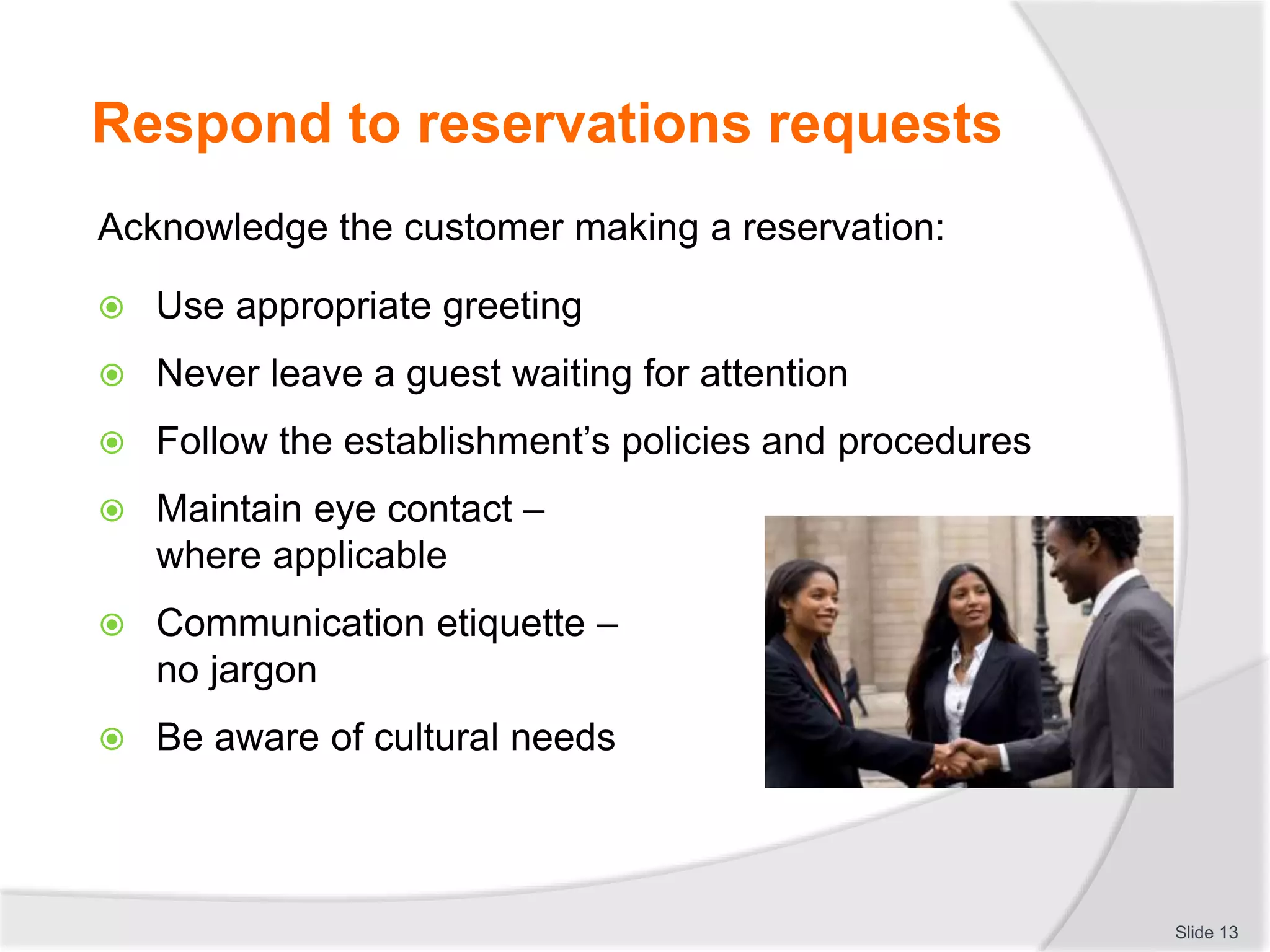
Respond to reservations requests
Acknowledge the customer making a reservation:
 Use appropriate greeting
 Never leave a guest waiting for attention
 Follow the establishment’s policies and procedures
 Maintain eye contact –
where applicable
 Communication etiquette –
no jargon
 Be aware of cultural needs
Slide 13
Identify required reservation details:
 Dates – arrival and departure dates
 Ask the right questions e.g. hiring a car –
where do you want to go? Car size,
4 x 4 or sedan? Number of passengers?
Luggage? Do you have a valid licence?
Can you spell that?
 Type of booking accommodation,
transport or tours
 Guest name
(continued)
Slide 14
Respond to reservations requests
 Contact details
 Number of rooms
 Special requirements – baby facilities,
handicapped needs, religious requirements.
 Cost / Do you have a budget?
Slide 15
Respond to reservations requests
Ask the right questions
Case Study 1:
You have received a phone call from Mai who is the manager
of a Travel and Tour company. She is putting together a
package for a Pharmaceutical Convention coming to your city.
What questions do you need to ask of Mai?
Slide 16
Respond to reservations requests
Mai’s request
Case Study 2:
 Mai’s Pharmaceutical Convention will be in town for 4 days
 Airport arrival will be at 10.00am
 There are 50 doubles, 12 singles and 2 triples (in this
convention. This totals 118 guests. They expect to pay
no more than US$180.00 per room)
 Meal arrangements – breakfast and lunch will be provided
every day for delegates
 The Itinerary is as follows:
• Day 1: Registration and welcome drinks from 16.30 – 20.30
• Day 2: Convention from 09.00 – 16.30
• Day 3: Site seeing – arranged for the convention group
• Day 4: End of conference – arrange to depart at 10.00
Slide 17
Respond to reservations requests
Advise customer of availability of requested booking:
 Check availability
 Know the reservation systems
 Be familiar with airlines, hotels, events
(Continued)
Slide 18
Respond to reservations requests
 Terms and conditions of booking request – restrictions,
minimum numbers, method of payment
 Product knowledge – leads to selling techniques
Slide 19
Respond to reservations requests
Offer alternative if requested booking is unavailable:
 Advise of waitlist options or standby – know policies and
procedures for overbooking
 Offer alternate times, dates, type etc
 Over-book
 Recommend suitable alternatives
(continued)
Slide 20
Respond to reservations requests
Suitable alternative means
Knowledge of:
 Seasonal influences
 Local attractions
 Tourist developments
 Natural Heritage Sites
 Local markets
 Museums
 Sport events
 Theatre
Slide 21
Respond to reservations requests
Role Play: Reservations staff
Staff member who is unable to assist the customer with a
reservation:
 Person 1: Pretends to answer the phone, uses appropriate
greeting
 Person 2: Pretends to be on the phone and wants to make a
reservation
 Person 1: Unable to help, must ask them
to go on waitlist or offer an
alternative
 Swap roles
Slide 22
Respond to reservations requests
Offer advice and information about available products,
services and facilities:
 Apply selling techniques
 Know your market
Slide 23
Respond to reservations requests
Respond to questions asked by customer:
 Know your product:
• Advise customers of the features and benefits of
your product
Slide 24
Respond to reservations requests
When responding to questions and making a sale:
 Capture attention of the customer
 Maintain their interest
 Create a desire
 Read buying signals
 Close the sale
Slide 25
Respond to reservations requests
Enter reservation details into system
Record reservation details:
 Dates – Arrival and Departure
 Name of the guest
 Type of room/request – usually affects the rate quoted
 Time of arrival – 24 hour clock
(continued)
Slide 26
 Number of guests
 Rate code
 Market segment
 An indication of the type of reservation
Slide 27
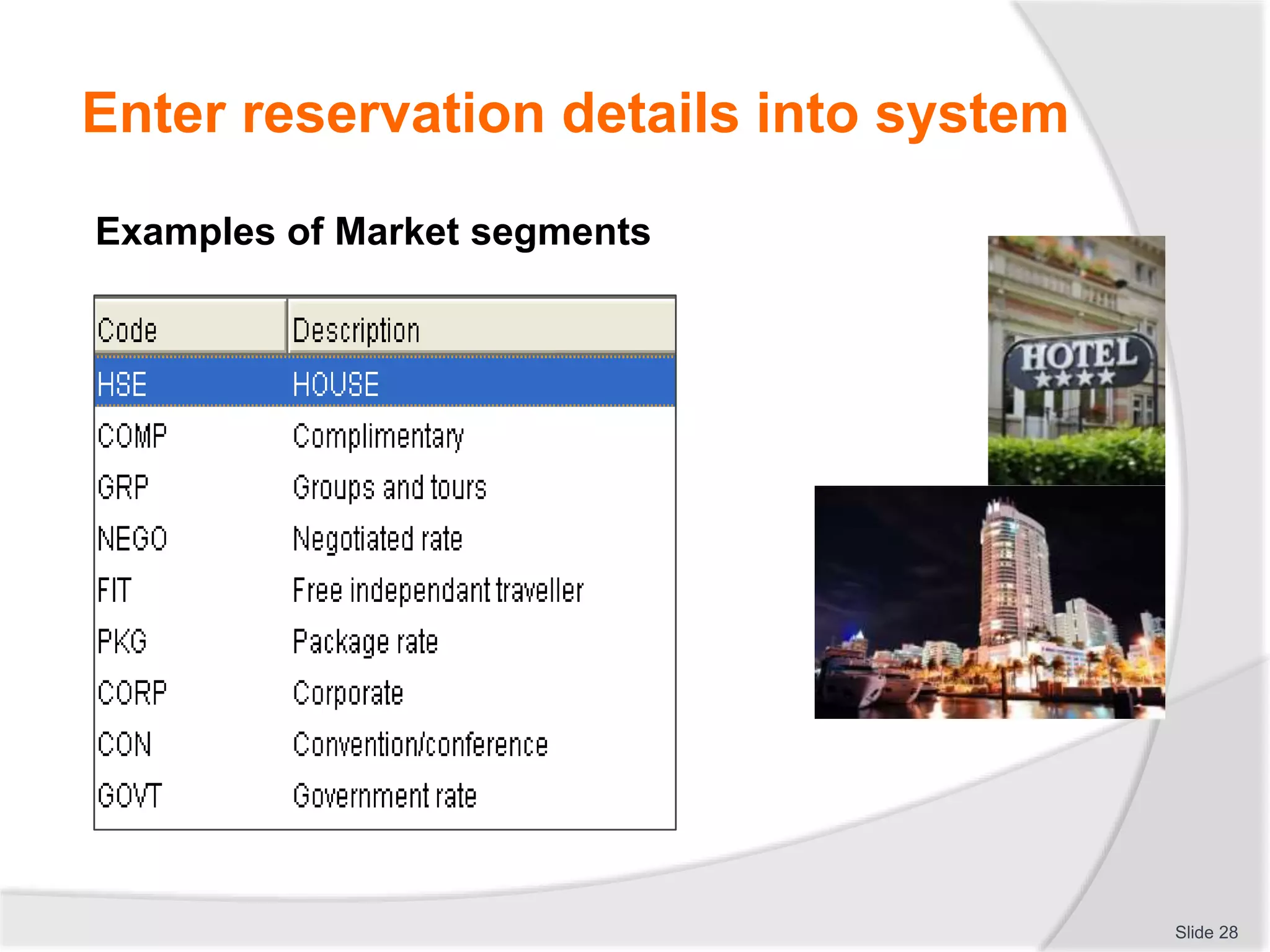
Enter reservation details into system
Examples of Market segments
Slide 28
Enter reservation details into system
 Address
 Contact details
 Passport number
Slide 29
Enter reservation details into system
 Method of payment:
• Terms and conditions attached to payments
 Special requests
 Confirmation number
 Date and taken by information
Slide 30
Enter reservation details into system
Activity:
Using your reservation form work in pairs to record the following
reservations:
 Role play one of the following situations, then change roles so you
each have a chance to be the reservation clerk and role play a
different situation
 Guest – make up a name and have a special requirement such as
feather pillows, single beds, a view, non-smoking, paying by credit
card:
• Book a room for a father and 12 year old son
• Book a room for your boss to attend a conference
• Book a room in Bali for a couple to spend a romantic getaway
holiday
• Book a room for yourself and a friend to go to the theatre
• Book a room for yourself as cheap as possible for tonight
Slide 31
Enter reservation details into system
Update and utilize existing customer history
Providing Customer Service:
 Using Guest History profiles will provide you with the
customer details and any special requests
Slide 32
Enter reservation details into system
Sharing data with relevant departments
You can share this history data with other departments:
 Housekeeping
 Food and Beverage Outlets
 Car service and maintenance
 Sales and marketing
 Airline Catering – dietary requirements
Slide 33
Enter reservation details into system
Activity
From this reservation information select the data and describe
which department it needs to go to:
Mr. and Mrs. Smith will be returning to the hotel for 4 nights. They
have 2 children aged 2 and 5. It is Mrs. Smith’s
birthday on the second night. The family
have a room rate that includes breakfast
every day in the Lotus Flower restaurant.
They have a hire car with them for the
days they are here
Slide 34
Enter reservation details into system
Confirm existing data:
 Use a suitable phrase to confirm you have the correct
guest and the right history details
 Confirm special requests – non-smoking room or baby cot
– this may no longer be required
Slide 35
Enter reservation details into system
Confirm booking details with customer on completion of
data entry:
 Confirm all the reservation details:
• Verbally
• In writing
Slide 36
Enter reservation details into system
Explain relevant reservation issues:
 Arrival and departure times
 Transfer of information
 Payment
 Refunds, surcharges and exchange policies
Slide 37
Enter reservation details into system
Accept payment for reservations:
 Credit card
 Cash
 Company charge
 Vouchers
 Cheques/checks
 Deposits
Slide 38
Enter reservation details into system
File reservation
How is information filed:
 Manually:
• Numerically or alphabetically
• Both as back up
 Electronically:
• Unlimited search functions - name,
date, company
• Disc back up systems and reports
Slide 39
Enter reservation details into system
Generate reservation related documentation
What documentation is required:
 Receipts
 Invoices
 Vouchers
 Confirmation letter
 Information packs and brochures
Slide 40
Enter reservation details into system
The nature of customers means they will need to change
reservation information.
What needs to be changed:
 Length of stay
 Altering a flight or travel details
 Changing times and customer numbers
 Updating customer contact details
 Altering billing details or
making a payment
 Change or add special requests
Slide 41
Maintain reservations
Process to change or cancel reservations:
 Always locate the original reservation
 Verify that you have the correct guest
 Discuss the changes to be made
 Check whether it is possible to make these changes
 Process cancellation and refund if applicable
 Provide a cancellation number
 Otherwise make changes or sell alternatives
 Confirm changes and costs if any
 Thank caller, close with a suitable phrase
Slide 42
Maintain reservations
Ways to follow up on unconfirmed reservations
 Contact customers who have not paid for their
reservations
 Solicit payment or balance of payment
 Advise the customer of the status of a
reservation that has not been paid.
It will not be guaranteed (or kept)
for the arrival date without
full payment
 Make courtesy reminder calls
 Advise the customer of the enterprise
requirements for charges and
cancellation fees
Slide 43
Maintain reservations
Update internal records, documents and files as required:
 When new information is received update all records:
 New information can arrive both from
external sources or internally from
other departments.
 Remember you are “accumulating” a
history on your customers
 This may involve other departments
within your establishment
 File or store any “written” documents
that arrive
Slide 44
Maintain reservations
Communicate reservation details to others
 Different departments for different requests
 Communication with other departments for a hotel
reservation:
• Front Office
• Concierge
• Housekeeping
• Maintenance
• Sales and Marketing
(continued)
Slide 45
Maintain reservations
 Accounting
 Food and Beverage
 Security
 Management
Slide 46
Maintain reservations
Notify external organisations in relation to reservations:
 It is always important to think about external
organizations that will also be affected by reservations at
your establishment
 What impact would an international doctors conference
involving over 500 delegates from all around the world
arriving in your city for 4 days have on the local
organisations?
Slide 47
Maintain reservations
External organizations:
 Airlines
 Taxis, hire cars and bus operators
 Local shops and restaurants
 Tourist attractions
 Travel agents
 Doctors and Medical clinics
Slide 48
Maintain reservations
Activity
Internal and external communications:
1) When a tour group arrives at your hotel what
reservations related documentation needs to be
distributed to the other departments within a hotel?
2) You book a yacht to take a group of people on a
fishing trip for 2 nights. Describe the other
business that would need to contribute to
arranging for this yacht ready for the charter:
 Identify the documentation you would need to send
to each establishment to request their services
Slide 49
Maintain reservations
Completion of unit:
Receive and process reservations
Slide 50

Receive__process_reservations.pptx

  • 1.
  • 2.
    Describe the elementsof the reservation system All reservation systems require:  Ability to check availability via a chart, computer, or diary  Ability to offer alternatives when the requested booking is not available  Ability to provide information on the costs and product features (continued) Slide 2
  • 3.
     Records thedetails and requirements of the person making the reservation  Is a way of recording the acceptable method of payment  Provides a confirmation of the details Slide 3 Describe the elements of the reservation system
  • 4.
    Manual system:  Usedby smaller establishments  Less common today  Cheaper to maintain  Requires duplication in filing – date/name  The basis for the development of a computer system  Labour intensive Slide 4 Describe the elements of the reservation system
  • 5.
    Computerized system:  Upto date “real” time information  Greater reporting ability – marketing and profit  Less staff required  What system will work best for my establishment? Slide 5 Describe the elements of the reservation system
  • 6.
    Slide 6 Types ofbookings that may be processed Accommodation suppliers:  Resorts, guest houses, backpackers, boutique hotels  Hotel chains – Hilton, Hyatt, Starwood hotels and resorts, Marriott Hotels, Accor, Jin Jiang Hotels Aircraft:  Upgrades to a suite on A380 flights and first class, business and economy class reservations (continued) Describe the elements of the reservation system
  • 7.
    Cruise ships:  Varietyof rooms available  Increase in destinations -European, Caribbean, and Asian destinations  Includes all meals (continued) Slide 7 Describe the elements of the reservation system
  • 8.
    Coaches or buses: Insight tours, ConTiki, Globebus, Trafalgar  5 star luxury tours. Limousines (hire cars/vans – chauffeurs):  Many varieties available - electronic navigation to assist travellers (continued) Slide 8 Describe the elements of the reservation system
  • 9.
     Day/extended toursincluding meals and possibly accommodation and entrance fees  Dining and meal reservations  Entertainment  Tourist attractions  Events Slide 9 Describe the elements of the reservation system
  • 10.
    How reservations arereceived:  Telephone  In person – face to face  Mail  Email (continued) Slide 10 Describe the elements of the reservation system
  • 11.
     Facsimile (fax) Internet – on-line bookings  Third party reservations – e.g. Wotif, AsiaRooms  Central reservation service (CRS)  Same chain referrals  “One-time registrations” Slide 11 Describe the elements of the reservation system
  • 12.
    Customers who requirereservations There are 2 types of customers :  The business customer and  The leisure customer Slide 12 Describe the elements of the reservation system
  • 13.
    Respond to reservationsrequests Acknowledge the customer making a reservation:  Use appropriate greeting  Never leave a guest waiting for attention  Follow the establishment’s policies and procedures  Maintain eye contact – where applicable  Communication etiquette – no jargon  Be aware of cultural needs Slide 13
  • 14.
    Identify required reservationdetails:  Dates – arrival and departure dates  Ask the right questions e.g. hiring a car – where do you want to go? Car size, 4 x 4 or sedan? Number of passengers? Luggage? Do you have a valid licence? Can you spell that?  Type of booking accommodation, transport or tours  Guest name (continued) Slide 14 Respond to reservations requests
  • 15.
     Contact details Number of rooms  Special requirements – baby facilities, handicapped needs, religious requirements.  Cost / Do you have a budget? Slide 15 Respond to reservations requests
  • 16.
    Ask the rightquestions Case Study 1: You have received a phone call from Mai who is the manager of a Travel and Tour company. She is putting together a package for a Pharmaceutical Convention coming to your city. What questions do you need to ask of Mai? Slide 16 Respond to reservations requests
  • 17.
    Mai’s request Case Study2:  Mai’s Pharmaceutical Convention will be in town for 4 days  Airport arrival will be at 10.00am  There are 50 doubles, 12 singles and 2 triples (in this convention. This totals 118 guests. They expect to pay no more than US$180.00 per room)  Meal arrangements – breakfast and lunch will be provided every day for delegates  The Itinerary is as follows: • Day 1: Registration and welcome drinks from 16.30 – 20.30 • Day 2: Convention from 09.00 – 16.30 • Day 3: Site seeing – arranged for the convention group • Day 4: End of conference – arrange to depart at 10.00 Slide 17 Respond to reservations requests
  • 18.
    Advise customer ofavailability of requested booking:  Check availability  Know the reservation systems  Be familiar with airlines, hotels, events (Continued) Slide 18 Respond to reservations requests
  • 19.
     Terms andconditions of booking request – restrictions, minimum numbers, method of payment  Product knowledge – leads to selling techniques Slide 19 Respond to reservations requests
  • 20.
    Offer alternative ifrequested booking is unavailable:  Advise of waitlist options or standby – know policies and procedures for overbooking  Offer alternate times, dates, type etc  Over-book  Recommend suitable alternatives (continued) Slide 20 Respond to reservations requests
  • 21.
    Suitable alternative means Knowledgeof:  Seasonal influences  Local attractions  Tourist developments  Natural Heritage Sites  Local markets  Museums  Sport events  Theatre Slide 21 Respond to reservations requests
  • 22.
    Role Play: Reservationsstaff Staff member who is unable to assist the customer with a reservation:  Person 1: Pretends to answer the phone, uses appropriate greeting  Person 2: Pretends to be on the phone and wants to make a reservation  Person 1: Unable to help, must ask them to go on waitlist or offer an alternative  Swap roles Slide 22 Respond to reservations requests
  • 23.
    Offer advice andinformation about available products, services and facilities:  Apply selling techniques  Know your market Slide 23 Respond to reservations requests
  • 24.
    Respond to questionsasked by customer:  Know your product: • Advise customers of the features and benefits of your product Slide 24 Respond to reservations requests
  • 25.
    When responding toquestions and making a sale:  Capture attention of the customer  Maintain their interest  Create a desire  Read buying signals  Close the sale Slide 25 Respond to reservations requests
  • 26.
    Enter reservation detailsinto system Record reservation details:  Dates – Arrival and Departure  Name of the guest  Type of room/request – usually affects the rate quoted  Time of arrival – 24 hour clock (continued) Slide 26
  • 27.
     Number ofguests  Rate code  Market segment  An indication of the type of reservation Slide 27 Enter reservation details into system
  • 28.
    Examples of Marketsegments Slide 28 Enter reservation details into system
  • 29.
     Address  Contactdetails  Passport number Slide 29 Enter reservation details into system
  • 30.
     Method ofpayment: • Terms and conditions attached to payments  Special requests  Confirmation number  Date and taken by information Slide 30 Enter reservation details into system
  • 31.
    Activity: Using your reservationform work in pairs to record the following reservations:  Role play one of the following situations, then change roles so you each have a chance to be the reservation clerk and role play a different situation  Guest – make up a name and have a special requirement such as feather pillows, single beds, a view, non-smoking, paying by credit card: • Book a room for a father and 12 year old son • Book a room for your boss to attend a conference • Book a room in Bali for a couple to spend a romantic getaway holiday • Book a room for yourself and a friend to go to the theatre • Book a room for yourself as cheap as possible for tonight Slide 31 Enter reservation details into system
  • 32.
    Update and utilizeexisting customer history Providing Customer Service:  Using Guest History profiles will provide you with the customer details and any special requests Slide 32 Enter reservation details into system
  • 33.
    Sharing data withrelevant departments You can share this history data with other departments:  Housekeeping  Food and Beverage Outlets  Car service and maintenance  Sales and marketing  Airline Catering – dietary requirements Slide 33 Enter reservation details into system
  • 34.
    Activity From this reservationinformation select the data and describe which department it needs to go to: Mr. and Mrs. Smith will be returning to the hotel for 4 nights. They have 2 children aged 2 and 5. It is Mrs. Smith’s birthday on the second night. The family have a room rate that includes breakfast every day in the Lotus Flower restaurant. They have a hire car with them for the days they are here Slide 34 Enter reservation details into system
  • 35.
    Confirm existing data: Use a suitable phrase to confirm you have the correct guest and the right history details  Confirm special requests – non-smoking room or baby cot – this may no longer be required Slide 35 Enter reservation details into system
  • 36.
    Confirm booking detailswith customer on completion of data entry:  Confirm all the reservation details: • Verbally • In writing Slide 36 Enter reservation details into system
  • 37.
    Explain relevant reservationissues:  Arrival and departure times  Transfer of information  Payment  Refunds, surcharges and exchange policies Slide 37 Enter reservation details into system
  • 38.
    Accept payment forreservations:  Credit card  Cash  Company charge  Vouchers  Cheques/checks  Deposits Slide 38 Enter reservation details into system
  • 39.
    File reservation How isinformation filed:  Manually: • Numerically or alphabetically • Both as back up  Electronically: • Unlimited search functions - name, date, company • Disc back up systems and reports Slide 39 Enter reservation details into system
  • 40.
    Generate reservation relateddocumentation What documentation is required:  Receipts  Invoices  Vouchers  Confirmation letter  Information packs and brochures Slide 40 Enter reservation details into system
  • 41.
    The nature ofcustomers means they will need to change reservation information. What needs to be changed:  Length of stay  Altering a flight or travel details  Changing times and customer numbers  Updating customer contact details  Altering billing details or making a payment  Change or add special requests Slide 41 Maintain reservations
  • 42.
    Process to changeor cancel reservations:  Always locate the original reservation  Verify that you have the correct guest  Discuss the changes to be made  Check whether it is possible to make these changes  Process cancellation and refund if applicable  Provide a cancellation number  Otherwise make changes or sell alternatives  Confirm changes and costs if any  Thank caller, close with a suitable phrase Slide 42 Maintain reservations
  • 43.
    Ways to followup on unconfirmed reservations  Contact customers who have not paid for their reservations  Solicit payment or balance of payment  Advise the customer of the status of a reservation that has not been paid. It will not be guaranteed (or kept) for the arrival date without full payment  Make courtesy reminder calls  Advise the customer of the enterprise requirements for charges and cancellation fees Slide 43 Maintain reservations
  • 44.
    Update internal records,documents and files as required:  When new information is received update all records:  New information can arrive both from external sources or internally from other departments.  Remember you are “accumulating” a history on your customers  This may involve other departments within your establishment  File or store any “written” documents that arrive Slide 44 Maintain reservations
  • 45.
    Communicate reservation detailsto others  Different departments for different requests  Communication with other departments for a hotel reservation: • Front Office • Concierge • Housekeeping • Maintenance • Sales and Marketing (continued) Slide 45 Maintain reservations
  • 46.
     Accounting  Foodand Beverage  Security  Management Slide 46 Maintain reservations
  • 47.
    Notify external organisationsin relation to reservations:  It is always important to think about external organizations that will also be affected by reservations at your establishment  What impact would an international doctors conference involving over 500 delegates from all around the world arriving in your city for 4 days have on the local organisations? Slide 47 Maintain reservations
  • 48.
    External organizations:  Airlines Taxis, hire cars and bus operators  Local shops and restaurants  Tourist attractions  Travel agents  Doctors and Medical clinics Slide 48 Maintain reservations
  • 49.
    Activity Internal and externalcommunications: 1) When a tour group arrives at your hotel what reservations related documentation needs to be distributed to the other departments within a hotel? 2) You book a yacht to take a group of people on a fishing trip for 2 nights. Describe the other business that would need to contribute to arranging for this yacht ready for the charter:  Identify the documentation you would need to send to each establishment to request their services Slide 49 Maintain reservations
  • 50.
    Completion of unit: Receiveand process reservations Slide 50