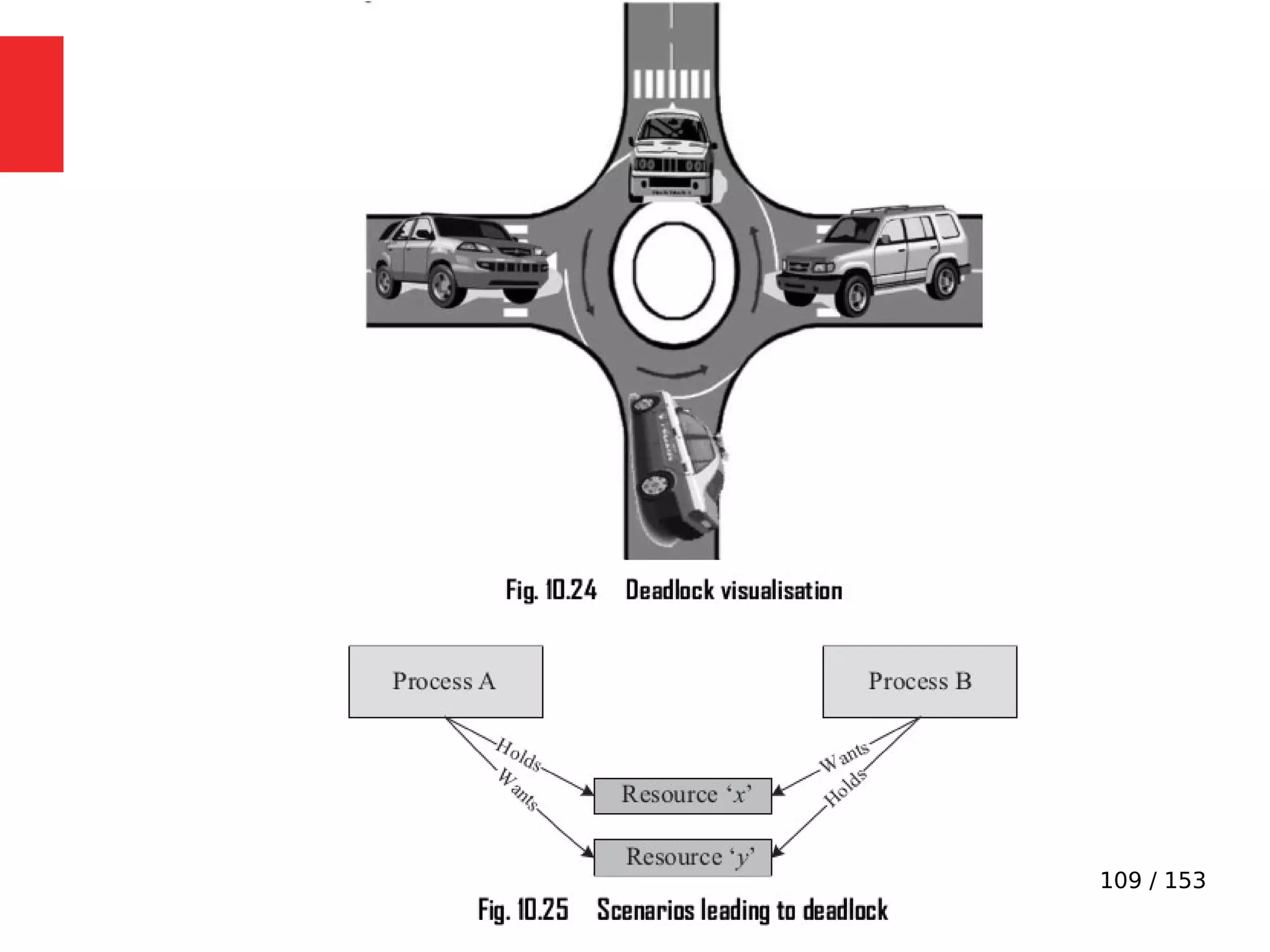
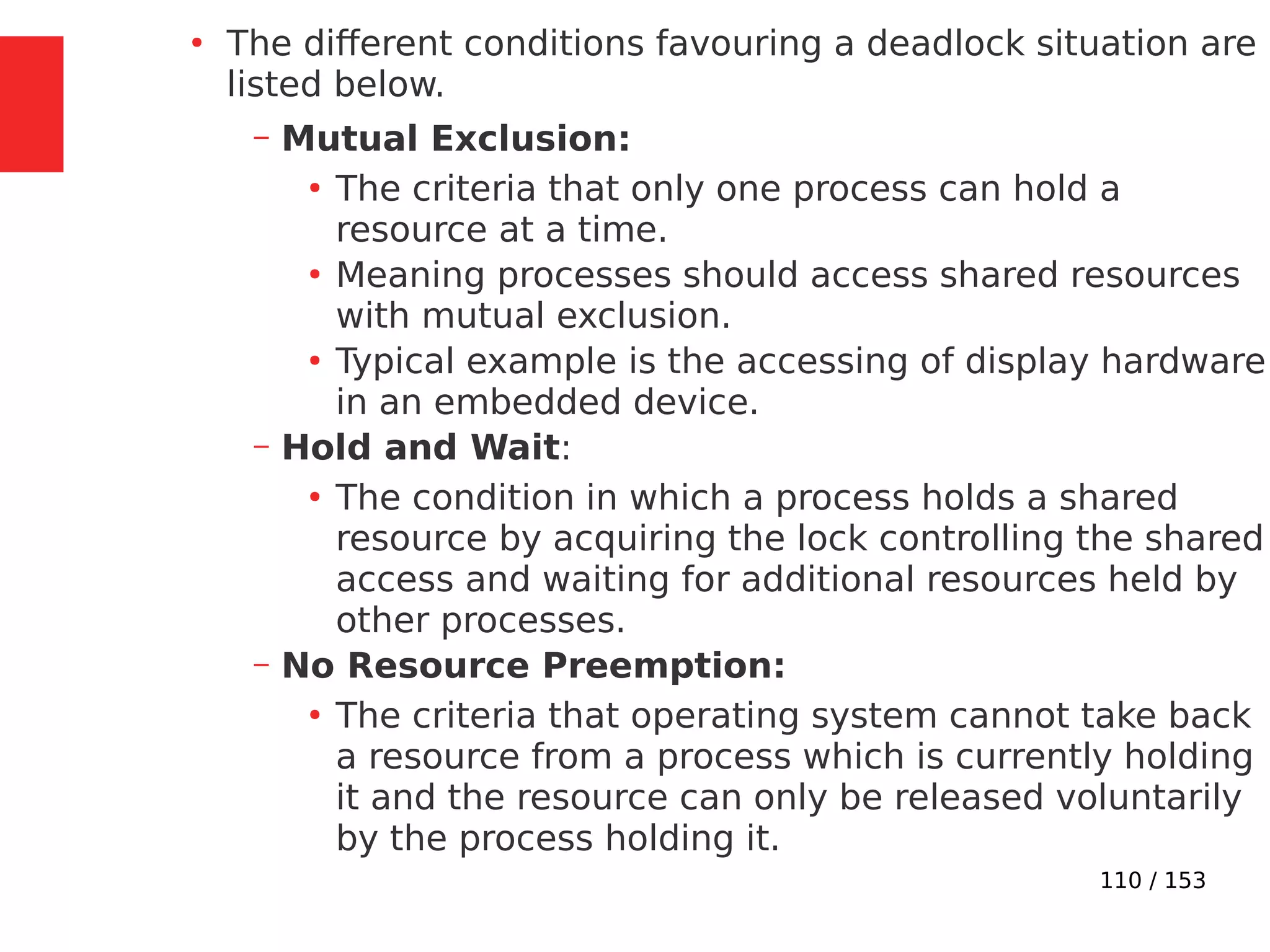
1 / 153
Real-Time Embedded
System Design
Module 3
2 / 153
OPERATING SYSTEM BASICS
●
The operating system acts as a bridge between the user
applications / tasks and the underlying system resources
through a set of system functionalities and services.
●
The OS manages the system resources and makes them
available to the user applications/tasks on a need basis.
●
A normal computing system is a collection of different I/O
subsystems, working, and storage memory.
●
The primary functions of an operating system is
– Make the system convenient to use
– Organise and manage the system resources efficiently and
correctly
3 / 153
4 / 153
●
The Kernel
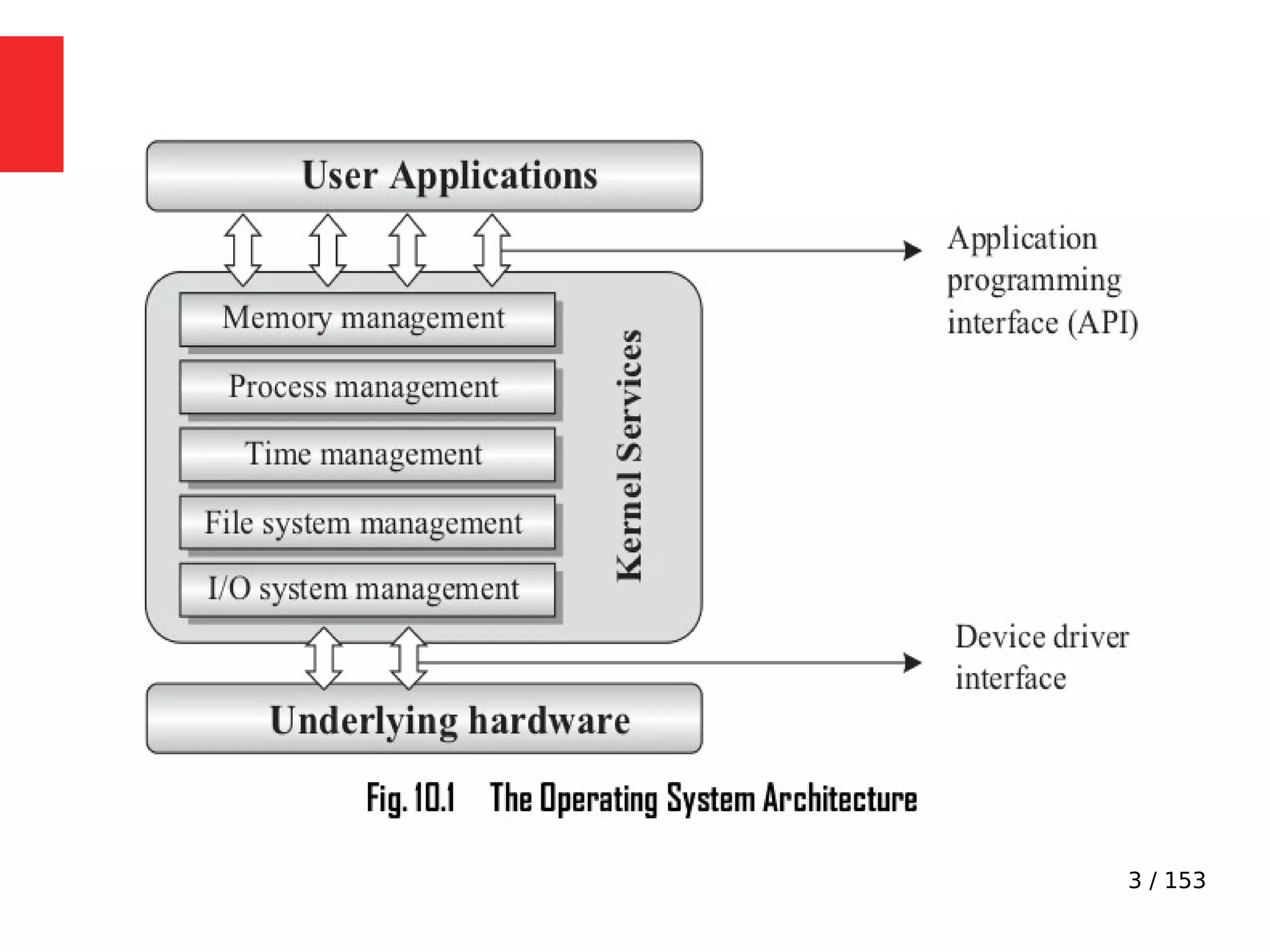
– The kernel is the core of the operating system and is
responsible for managing the system resources and the
communication among the hardware and other system
services.
– Kernel acts as the abstraction layer between system
resources and user applications.
– Kernel contains a set of system libraries and services.
– For a general purpose OS, the kernel contains different
services for handling the following.
●
Process Management
– Process management deals with managing the
processes/tasks.
– Process management includes setting up the memory
space for the process, loading the process’s code into
the memory space, allocating system resources,
scheduling and managing the execution of the process,
setting up and managing the Process Control Block
(PCB), Inter Process Communication and
synchronisation, process termination/ deletion, etc.
5 / 153
●
Primary Memory Management
– The term primary memory refers to the volatile
memory (RAM) where processes are loaded and
variables and shared data associated with each
process are stored.
– The Memory Management Unit (MMU) of the kernel is
responsible for
●
Keeping track of which part of the memory area is
currently used by which process
●
Allocating and De-allocating memory space on a
need basis (Dynamic memory allocation).
●
File System Management
– File is a collection of related information.
– A file could be a program (source code or executable),
text files, image files, word documents, audio/video
files, etc.
– Each of these files differ in the kind of information
they hold and the way in which the information is
stored.
– The file operation is a useful service provided by the
OS.
6 / 153
– The file system management service of Kernel is
responsible for
●
The creation, deletion and alteration of files
●
Creation, deletion and alteration of directories
●
Saving of files in the secondary storage memory
(e.g. Hard disk storage)
●
Providing automatic allocation of file space based on
the amount of free space available
●
Providing a flexible naming convention for the files
– The various file system management operations are OS
dependent.
– For example, the kernel of Microsoft®DOS OS supports
a specific set of file system management operations
and they are not the same as the file system operations
supported by UNIX Kernel.
●
I/O System (Device) Management
– Kernel is responsible for routing the I/O requests coming
from different user applications to the appropriate I/O
devices of the system.
7 / 153
– In a well-structured OS, the direct accessing of I/O
devices are not allowed and the access to them are
provided through a set of Application Programming
Interfaces (APIs) exposed by the kernel.
– The kernel maintains a list of all the I/O devices of the
system.
– This list may be available in advance, at the time of
building the kernel.
– Some kernels, dynamically updates the list of
available devices as and when a new device is
installed (e.g. Windows NT kernel keeps the list
updated when a new plug ‘n’ play USB device is
attached to the system).
– The service ‘Device Manager’ (Name may vary across
different OS kernels) of the kernel is responsible for
handling all I/O device related operations.
– The kernel talks to the I/O device through a set of low-
level systems calls, which are implemented in a
service, called device drivers.
– The device drivers are specific to a device or a class of
devices.
8 / 153
– The Device Manager is responsible for
●
Loading and unloading of device drivers
●
Exchanging information and the system specific
control signals to and from the device
●
Secondary Storage Management
– The secondary storage management deals with
managing the secondary storage memory devices, if
any, connected to the system.
– Secondary memory is used as backup medium for
programs and data since the main memory is volatile.
– In most of the systems, the secondary storage is kept
in disks (Hard Disk).
– The secondary storage management service of kernel
deals with
●
Disk storage allocation
●
Disk scheduling (Time interval at which the disk is
activated to backup data)
●
Free Disk space management
9 / 153
●
Protection Systems
– Most of the modern operating systems are designed in
such a way to support multiple users with different
levels of access permissions (e.g. Windows 10 with
user permissions like ‘Administrator’, ‘Standard’,
‘Restricted’, etc.).
– Protection deals with implementing the security
policies to restrict the access to both user and system
resources by different applications or processes or
users.
– In multiuser supported operating systems, one user
may not be allowed to view or modify the
whole/portions of another user’s data or profile details.
– In addition, some application may not be granted with
permission to make use of some of the system
resources.
– This kind of protection is provided by the protection
services running within the kernel.
●
Interrupt Handler
– Kernel provides handler mechanism for all
external/internal interrupts generated by the system.
10 / 153
– These are some of the important services offered by the
kernel of an operating system.
– It does not mean that a kernel contains no more than
components/services explained above.
– Depending on the type of the operating system, a kernel
may contain lesser number of components/services or more
number of components/ services.
– In addition to the components/services listed above, many
operating systems offer a number of add-on system
components/services to the kernel.
– Network communication, network management, user-
interface graphics, timer services (delays, timeouts, etc.),
error handler, database management, etc. are examples for
such components/services.
– Kernel exposes the interface to the various kernel
applications/services, hosted by kernel, to the user
applications through a set of standard Application
Programming Interfaces (APIs).
– User applications can avail these API calls to access the
various kernel application/services.
11 / 153
– Kernel Space and User Space
●
The applications/services are classified into two
categories, namely:
– user applications and
– kernel applications.
●
The program code corresponding to the kernel
applications/services are kept in a contiguous area (OS
dependent) of primary (working) memory and is protected
from the unauthorised access by user
programs/applications.
●
The memory space at which the kernel code is located is
known as ‘ Kernel Space’.
●
Similarly, all user applications are loaded to a specific area
of primary memory and this memory area is referred as ‘
User Space’.
●
User space is the memory area where user applications
are loaded and executed.
●
The partitioning of memory into kernel and user space is
purely Operating System dependent.
12 / 153
●
Some OS implements this kind of partitioning and
protection whereas some OS do not segregate the kernel
and user application code storage into two separate
areas.
●
In an operating system with virtual memory support, the
user applications are loaded into its corresponding virtual
memory space with demand paging technique;
●
Meaning, the entire code for the user application need
not be loaded to the main (primary) memory at once;
instead the user application code is split into different
pages and these pages are loaded into and out of the
main memory area on a need basis.
●
The act of loading the code into and out of the main
memory is termed as ‘Swapping’.
●
Swapping happens between the main (primary) memory
and secondary storage memory.
●
Each process run in its own virtual memory space and
are not allowed accessing the memory space
corresponding to another processes, unless explicitly
requested by the process.
13 / 153
●
Each process will have certain privilege levels on
accessing the memory of other processes and based on
the privilege settings, processes can request kernel to
map another process’s memory to its own or share
through some other mechanism.
●
Most of the operating systems keep the kernel application
code in main memory and it is not swapped out into the
secondary memory.
– Monolithic Kernel and Microkernel
●
Monolithic Kernel In monolithic kernel architecture, all
kernel services run in the kernel space.
●
Here all kernel modules run within the same memory
space under a single kernel thread.
●
The tight internal integration of kernel modules in
monolithic kernel architecture allows the effective
utilisation of the low-level features of the underlying
system.
●
The major drawback of monolithic kernel is that any error
or failure in any one of the kernel modules leads to the
crashing of the entire kernel application.
14 / 153
●
LINUX, SOLARIS, MS-DOS kernels are examples of
monolithic kernel.
●
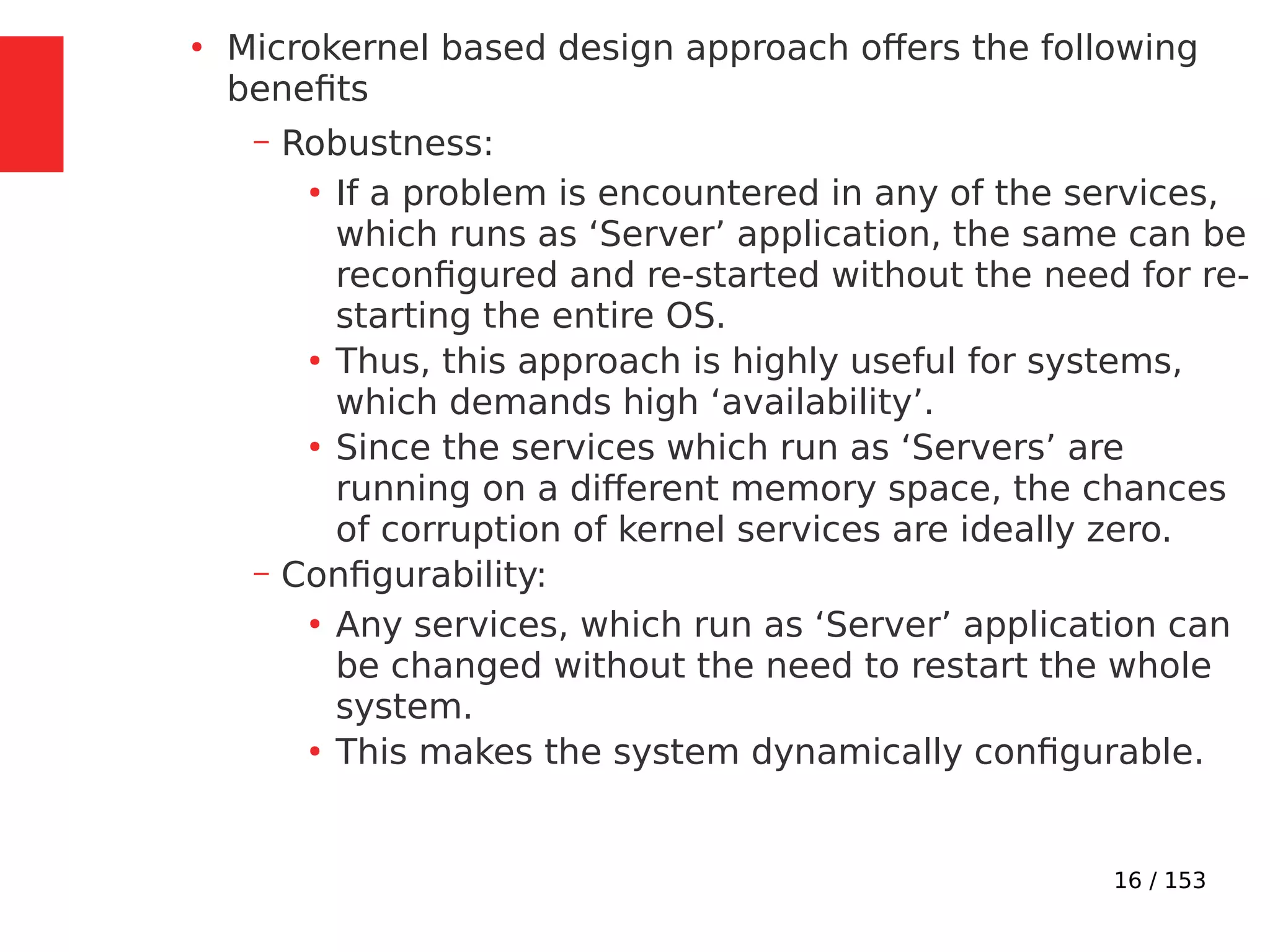
The microkernel design incorporates only the essential set
of Operating System services Servers (kernel into the
kernel.
●
The rest of the Operating System services running
Applications services are implemented in programs known
as in user space) ‘Servers’ which runs in user space.
●
This provides a highly modular design and OS-neutral
abstraction to the kernel.
15 / 153
●
Memory management, process management, timer
systems and interrupt handlers are the essential
services, which forms the part of Microkernel with
essential the microkernel.
●
Mach, QNX, Minix 3 kernels are services like memory
examples for microkernel.
16 / 153
●
Microkernel based design approach offers the following
benefits
– Robustness:
●
If a problem is encountered in any of the services,
which runs as ‘Server’ application, the same can be
reconfigured and re-started without the need for re-
starting the entire OS.
●
Thus, this approach is highly useful for systems,
which demands high ‘availability’.
●
Since the services which run as ‘Servers’ are
running on a different memory space, the chances
of corruption of kernel services are ideally zero.
– Configurability:
●
Any services, which run as ‘Server’ application can
be changed without the need to restart the whole
system.
●
This makes the system dynamically configurable.
17 / 153
TYPES OF OPERATING SYSTEMS
●
General Purpose Operating System (GPOS)
– The operating systems, which are deployed in general
computing systems, are referred as General Purpose
Operating Systems ( GPOS).
– The kernel of such an OS is more generalised and it contains
all kinds of services required for executing generic
applications.
– General-purpose operating systems are often quite non-
deterministic in behaviour.
– Their services can inject random delays into application
software and may cause slow responsiveness of an
application at unexpected times.
– GPOS are usually deployed in computing systems where
deterministic behaviour is not an important criterion.
– Personal Computer/Desktop system is a typical example for
a system where GPOSs are deployed.
– Windows 10/8.x/XP/MS-DOS etc are examples for General
Purpose Operating Systems.
18 / 153
●
Real-Time Operating System (RTOS)
– There is no universal definition available for the term ‘ Real-
Time’ when it is used in conjunction with operating systems.
– What ‘Real-Time’ means in Operating System context is still a
debatable topic and there are many definitions available.
– In a broad sense, ‘Real-Time’ implies deterministic timing
behaviour.
– Deterministic timing behaviour in RTOS context means the
OS services consumes only known and expected amounts of
time regardless the number of services.
– A Real-Time Operating System or RTOS implements policies
and rules concerning time-critical allocation of a system’s
resources.
– The RTOS decides which applications should run in which
order and how much time needs to be allocated for each
application.
– Predictable performance is the hallmark of a well-designed
RTOS.
19 / 153
– This is best achieved by the consistent application of policies
and rules.
– Policies guide the design of an RTOS.
– Rules implement those policies and resolve policy conflicts.
– Windows Embedded Compact, QNX, VxWorks MicroC/OS-II
etc are examples of Real Time Operating Systems (RTOS).
– The Real-Time Kernel
●
The kernel of a Real-Time Operating System is referred as
Real.
●
Time kernel. In complement to the conventional OS
kernel, the Real-Time kernel is highly specialised and it
contains only the minimal set of services required for
running the user applications/tasks.
●
The basic functions of a Real-Time kernel are listed below:
– Task/Process management
– Task/Process scheduling
– Task/Process synchronisation
– Error/Exception handling
– Memory management
20 / 153
– Interrupt handling
– Time management
●
Task/ Process management
– Deals with setting up the memory space for the tasks,
loading the task’s code into the memory space,
allocating system resources, setting up a Task Control
Block (TCB) for the task and task/process termination /
deletion.
– A Task Control Block (TCB) is used for holding the
information corresponding to a task.
– TCB usually contains the following set of information.
●
Task ID: Task Identification Number
●
Task State: The current state of the task (e.g. State
= ‘Ready’ for a task which is ready to execute)
●
Task Type: Task type. Indicates what is the type for
this task. The task can be a hard real time or soft
real time or background task.
●
Task Priority: Task priority (e.g. Task priority = 1 for
task with priority = 1)
●
Task Context Pointer: Context pointer. Pointer for
context saving
21 / 153
●
Task Memory Pointers: Pointers to the code memory,
data memory and stack memory for the task
●
Task System Resource Pointers: Pointers to system
resources (semaphores, mutex, etc.) used by the task
●
Task Pointers: Pointers to other TCBs (TCBs for
preceding, next and waiting tasks)
●
Other Parameters: Other relevant task parameters
– The parameters and implementation of the TCB is kernel
dependent.
– The TCB parameters vary across different kernels, based
on the task management implementation.
– Task management service utilises the TCB of a task in
the following way
●
Creates a TCB for a task on creating a task
●
Delete/remove the TCB of a task when the task is
terminated or deleted
●
Reads the TCB to get the state of a task
●
Update the TCB with updated parameters on need
basis (e.g. on a context switch)
●
Modify the TCB to change the priority of the task
dynamically
22 / 153
●
Task/ Process Scheduling
– Deals with sharing the CPU among various tasks /
processes.
– A kernel application called ‘Scheduler’ handles the
task scheduling.
– Scheduler is nothing but an algorithm implementation,
which performs the efficient and optimal scheduling of
tasks to provide a deterministic behaviour.
●
Task/ Process Synchronisation
– Deals with synchronising the concurrent access of a
resource, which is shared across multiple tasks and
the communication between various tasks.
●
Error/ Exception Handling
– Deals with registering and handling the errors
occurred/exceptions raised during the execution of
tasks.
– Insufficient memory, timeouts, deadlocks, deadline
missing, bus error, divide by zero, unknown instruction
execution, etc. are examples of errors/exceptions.
– Errors/Exceptions can happen at the kernel level
services or at task level.
23 / 153
– Deadlock is an example for kernel level exception,
whereas timeout is an example for a task level
exception.
– The OS kernel gives the information about the error in
the form of a system call (API).
– GetLastError() API provided by Windows CE/Embedded
Compact RTOS is an example for such a system call.
– Watchdog timer is a mechanism for handling the
timeouts for tasks.
– Certain tasks may involve the waiting of external
events from devices.
– These tasks will wait infinitely when the external
device is not responding and the task will generate a
hang-up behaviour.
– In order to avoid these types of scenarios, a proper
timeout mechanism should be implemented.
– A watchdog is normally used in such situations.
– The watchdog will be loaded with the maximum
expected wait time for the event and if the event is not
triggered within this wait time, the same is informed to
the task and the task is timed out.
24 / 153
– If the event happens before the timeout, the watchdog
is resetted.
●
Memory Management
– Compared to the General Purpose Operating Systems,
the memory management function of an RTOS kernel is
slightly different.
– In general, the memory allocation time increases
depending on the size of the block of memory needs to
be allocated and the state of the allocated memory
block (initialised memory block consumes more
allocation time than un-initialised memory block).
– Since predictable timing and deterministic behaviour
are the primary focus of an RTOS, RTOS achieves this
by compromising the effectiveness of memory
allocation.
– RTOS makes use of ‘block’ based memory allocation
technique, instead of the usual dynamic memory
allocation techniques used by the GPOS.
– RTOS kernel uses blocks of fixed size of dynamic
memory and the block is allocated for a task on a need
basis.
25 / 153
– The blocks are stored in a ‘Free Buffer Queue’.
– To achieve predictable timing and avoid the timing
overheads, most of the RTOS kernels allow tasks to
access any of the memory blocks without any memory
protection.
– RTOS kernels assume that the whole design is proven
correct and protection is unnecessary.
– Some commercial RTOS kernels allow memory
protection as optional and the kernel enters a fail-safe
mode when an illegal memory access occurs.
– A few RTOS kernels implement Virtual Memory concept
for memory allocation if the system supports secondary
memory storage (like HDD and FLASH memory).
– In the ‘block’ based memory allocation, a block of fixed
memory is always allocated for tasks on need basis and
it is taken as a unit.
– Hence, there will not be any memory fragmentation
issues.
– The memory allocation can be implemented as
constant functions and thereby it consumes fixed
amount of time for memory allocation.
26 / 153
– This leaves the deterministic behaviour of the RTOS kernel
untouched.
– The ‘block’ memory concept avoids the garbage collection
overhead also.
– The ‘block’ based memory allocation achieves deterministic
behaviour with the trade-of limited choice of memory chunk
size and suboptimal memory usage.
– Virtual Memory is an imaginary memory supported by certain
operating systems.
– Virtual memory expands the address space available to a
task beyond the actual physical memory (RAM) supported by
the system.
– Virtual memory is implemented with the help of a Memory
Management Unit (MMU) and ‘memory paging’.
– The program memory for a task can be viewed as different
pages and the page corresponding to a piece of code that
needs to be executed is loaded into the main physical
memory (RAM).
– When a memory page is no longer required, it is moved out
to secondary storage memory and another page which
contains the code snippet to be executed is loaded into the
main memory.
27 / 153
– This memory movement technique is known as
demand paging.
– The MMU handles the demand paging and converts the
virtual address of a location in a page to corresponding
physical address in the RAM.
●
Interrupt Handling
– Deals with the handling of various types of interrupts.
– Interrupts provide Real-Time behaviour to systems.
– Interrupts inform the processor that an external device
or an associated task requires immediate attention of
the CPU.
– Interrupts can be either Synchronous or Asynchronous.
– Interrupts which occurs in sync with the currently
executing task is known as Synchronous interrupts.
– Usually the software interrupts fall under the
Synchronous Interrupt category.
– Divide by zero, memory segmentation error, etc. Are
examples of synchronous interrupts.
– Asynchronous interrupts are interrupts, which occurs at
any point of execution of any task, and are not in sync
with the currently executing task.
28 / 153
– The interrupts generated by external devices (by
asserting the interrupt line of the processor/controller
to which the interrupt line of the device is connected)
connected to the processor/controller, timer overflow
interrupts, serial data reception/ transmission
interrupts, etc. are examples for asynchronous
interrupts.
– For asynchronous interrupts, the interrupt handler is
usually written as separate task (Depends on OS kernel
implementation) and it runs in a different context.
– Hence, a context switch happens while handling the
asynchronous interrupts.
– Priority levels can be assigned to the interrupts and
each interrupts can be enabled or disabled individually.
– Most of the RTOS kernel implements ‘Nested
Interrupts’ architecture.
– Interrupt nesting allows the pre-emption (interruption)
of an Interrupt Service Routine (ISR), servicing an
interrupt, by a high priority interrupt.
29 / 153
●
Time Management
– Accurate time management is essential for providing
precise time reference for all applications.
– The time reference to kernel is provided by a high-
resolution Real-Time Clock (RTC) hardware chip (hardware
timer).
– The hardware timer is programmed to interrupt the
processor/controller at a fixed rate.
– This timer interrupt is referred as ‘ Timer tick’.
– The ‘Timer tick’ is taken as the timing reference by the
kernel.
– The ‘Timer tick’ interval may vary depending on the
hardware timer.
– Usually the ‘Timer tick’ varies in the microseconds range.
– The time parameters for tasks are expressed as the
multiples of the ‘Timer tick’.
– The System time is updated based on the ‘Timer tick’.
– If the System time register is 32 bits wide and the ‘Timer
tick’ interval is 1 microsecond, the System time register
will reset in 2 32 * 10 –6 / (24 * 60 * 60) = 49700 Days = ~
0.0497 Days = 1.19 Hours
30 / 153
– If the ‘Timer tick’ interval is 1 millisecond, the system
time register will reset in 2 32 * 10 –3 / (24 * 60 * 60) =
497 Days = 49.7 Days = ~ 50 Days
– The ‘Timer tick’ interrupt is handled by the ‘Timer
Interrupt’ handler of kernel.
– The ‘Timer tick’ interrupt can be utilised for
implementing the following actions.
●
Save the current context (Context of the currently
executing task).
●
Increment the System time register by one.
Generate timing error and reset the System time
register if the timer tick count is greater than the
maximum range available for System time register.
●
Update the timers implemented in kernel (Increment
or decrement the timer registers for each timer
depending on the count direction setting for each
register.
●
Increment registers with count direction setting =
‘count up’ and decrement registers with count
direction setting = ‘count down’).
●
Activate the periodic tasks, which are in the idle
state.
31 / 153
●
Invoke the scheduler and schedule the tasks again
based on the scheduling algorithm.
●
Delete all the terminated tasks and their associated
data structures (TCBs)
●
Load the context for the first task in the ready
queue. Due to the re-scheduling, the ready task
might be changed to a new one from the task, which
was preempted by the ‘Timer Interrupt’ task.
– Apart from these basic functions, some RTOS provide
other functionalities also (Examples are file
management and network functions).
– Some RTOS kernel provides options for selecting the
required kernel functions at the time of building a
kernel.
– The user can pick the required functions from the set of
available functions and compile the same to generate
the kernel binary.
– Windows CE is a typical example for such an RTOS.
– While building the target, the user can select the
required components for the kernel.
32 / 153
– Hard Real-Time
●
Real-Time Operating Systems that strictly adhere to the
timing constraints for a task is referred as ‘Hard Real-Time’
systems.
●
A Hard Real-Time system must meet the deadlines for a
task without any slippage.
●
Missing any deadline may produce catastrophic results for
Hard Real-Time Systems, including permanent data lose
and irrecoverable damages to the system/users.
●
Hard Real-Time systems emphasise the principle ‘A late
answer is a wrong answer’.
●
A system can have several such tasks and the key to their
correct operation lies in scheduling them so that they
meet their time constraints.
●
Air bag control systems and Anti-lock Brake Systems (ABS)
of vehicles are typical examples for Hard Real-Time
Systems.
●
The Air bag control system should be into action and
deploy the air bags when the vehicle meets a severe
accident.
33 / 153
●
Ideally speaking, the time for triggering the air bag
deployment task, when an accident is sensed by the Air
bag control system, should be zero and the air bags should
be deployed exactly within the time frame, which is
predefined for the air bag deployment task.
●
Any delay in the deployment of the air bags makes the life
of the passengers under threat.
●
When the air bag deployment task is triggered, the
currently executing task must be pre-empted, the air bag
deployment task should be brought into execution, and the
necessary I/O systems should be made readily available for
the air bag deployment task.
●
To meet the strict deadline, the time between the air bag
deployment event triggering and start of the air bag
deployment task execution should be minimum, ideally
zero.
●
As a rule of thumb, Hard Real-Time Systems does not
implement the virtual memory model for handling the
memory.
●
This eliminates the delay in swapping in and out the code
corresponding to the task to and from the primary memory.
34 / 153
●
In general, the presence of Human in the loop (HITL) for
tasks introduces unexpected delays in the task execution.
●
Most of the Hard Real-Time Systems are automatic and
does not contain a ‘human in the loop’.
– Soft Real-Time
●
Real-Time Operating System that does not guarantee
meeting deadlines, but offer the best effort to meet the
deadline are referred as ‘Soft Real-Time’ systems.
●
Missing deadlines for tasks are acceptable for a Soft Real
time system if the frequency of deadline missing is within
the compliance limit of the Quality of Service (QoS).
●
A Soft Real-Time system emphasises the principle ‘A late
answer is an acceptable answer, but it could have done
bit faster’.
●
Soft Real-Time systems most often have a ‘human in the
loop (HITL)’.
●
Automatic Teller Machine (ATM) is a typical example for
Soft-Real-Time System.
●
If the ATM takes a few seconds more than the ideal
operation time, nothing fatal happens.
35 / 153
●
An audio-video playback system is another example for
Soft Real-Time system.
●
No potential damage arises if a sample comes late by
fraction of a second, for playback.
36 / 153
TASKS, PROCESS AND THREADS
●
The term ‘ task’ refers to something that needs to be done.
●
In our day-to-day life, we are bound to the execution of a
number of tasks.
●
The task can be the one assigned by our managers or the one
assigned by our professors/teachers or the one related to our
personal or family needs.
●
In addition, we will have an order of priority and schedule /
timeline for executing these tasks.
●
In the operating system context, a task is defined as the
program in execution and the related information maintained by
the operating system for the program.
●
Task is also known as ‘Job’ in the operating system context.
●
A program or part of it in execution is also called a ‘Process’.
●
The terms ‘Task’, ‘Job’ and ‘Process’ refer to the same entity in
the operating system context and most often they are used
interchangeably.
37 / 153
●
Process
– A ‘Process’ is a program, or part of it, in execution.
– Process is also known as an instance of a program in
execution.
– Multiple instances of the same program can execute
simultaneously.
– A process requires various system resources like CPU for
executing the process, memory for storing the code
corresponding to the process and associated variables, I/O
devices for information exchange, etc.
– A process is sequential in execution.
– The Structure of a Process
●
The concept of ‘Process’ leads to concurrent execution
(pseudo parallelism) of tasks and thereby the efficient
utilisation of the CPU and other system resources.
●
Concurrent execution is achieved through the sharing of
CPU among the processes.
38 / 153
●
A process mimics a processor in properties and holds a
set of registers, process status, a Program Counter (PC)
to point to the next executable instruction of the process,
a stack for holding the local variables associated with the
process and the code corresponding to the process.
39 / 153
●
A process which inherits all the properties of the CPU can
be considered as a virtual processor, awaiting its turn to
have its properties switched into the physical processor.
●
When the process gets its turn, its registers and the
program counter register becomes mapped to the
physical registers of the CPU.
●
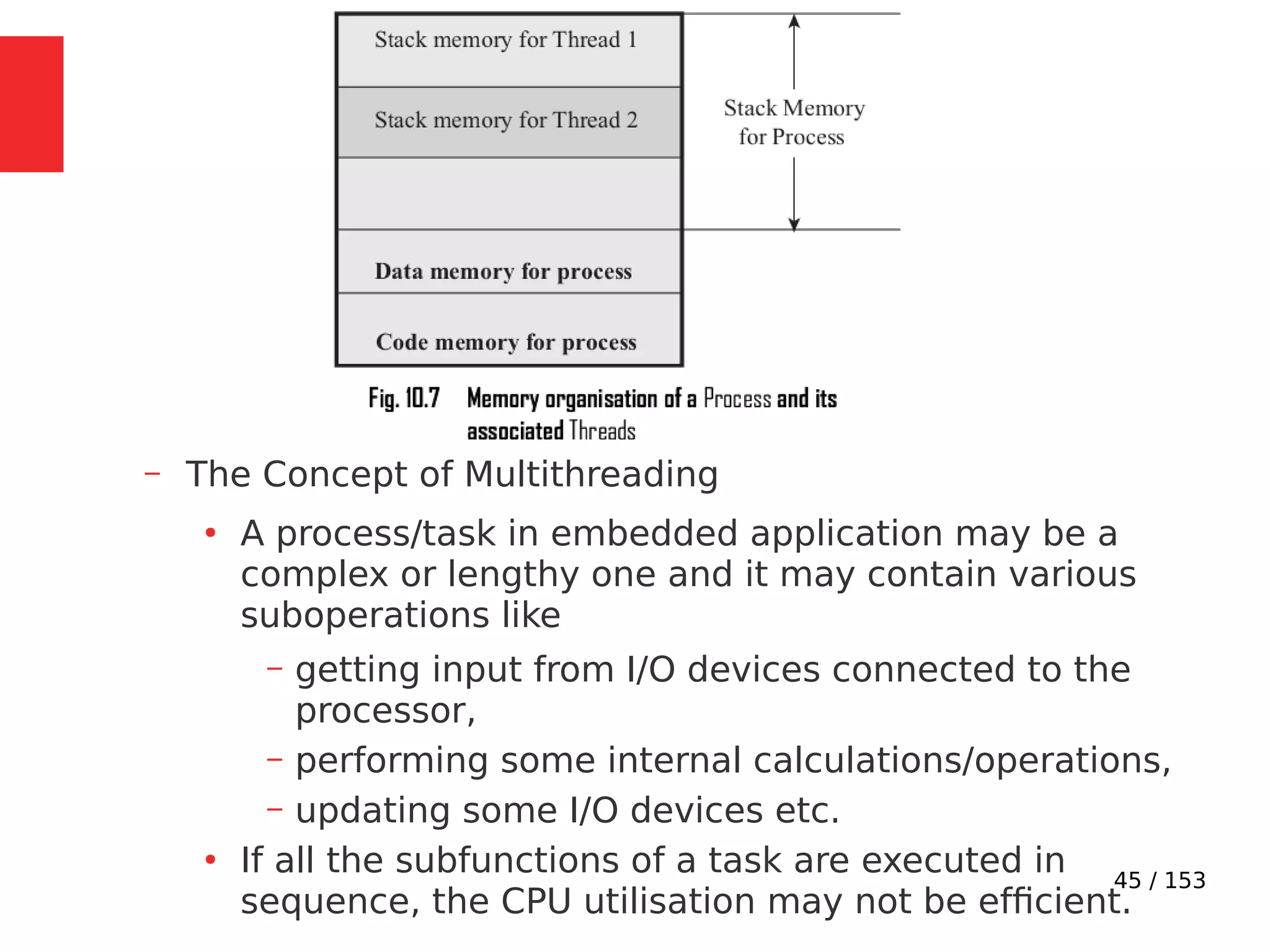
From a memory perspective, the memory occupied by
the process is segregated into three regions, namely,
Stack memory, Data memory and Code memory.
●
The ‘ Stack’ memory holds all temporary data such as
variables local to the process.
●
Data memory holds all global data for the process.
●
The code memory contains the program code
(instructions) corresponding to the process.
●
On loading a process into the main memory, a specific
area of memory is allocated for the process.
●
The stack memory usually starts (OS Kernel
implementation dependent) at the highest memory
address from the memory area allocated for the process.
40 / 153
●
Say for example, the memory map of the memory area
allocated for the process is 2048 to 2100, the stack
memory starts at address 2100 and grows downwards to
accommodate the variables local to the process.
– Process States and State Transition
●
The creation of a process to its termination is not a single
step operation.
●
The process traverses through a series of states during its
transition from the newly created state to the terminated
state.
●
The cycle through which a process changes its state from
‘newly created’ to ‘execution completed’ is known as ‘
Process Life Cycle’.
●
The various states through which a process traverses
through during a Process Life Cycle indicates the current
status of the process with respect to time and also
provides information on what it is allowed to do next.
41 / 153
42 / 153
●
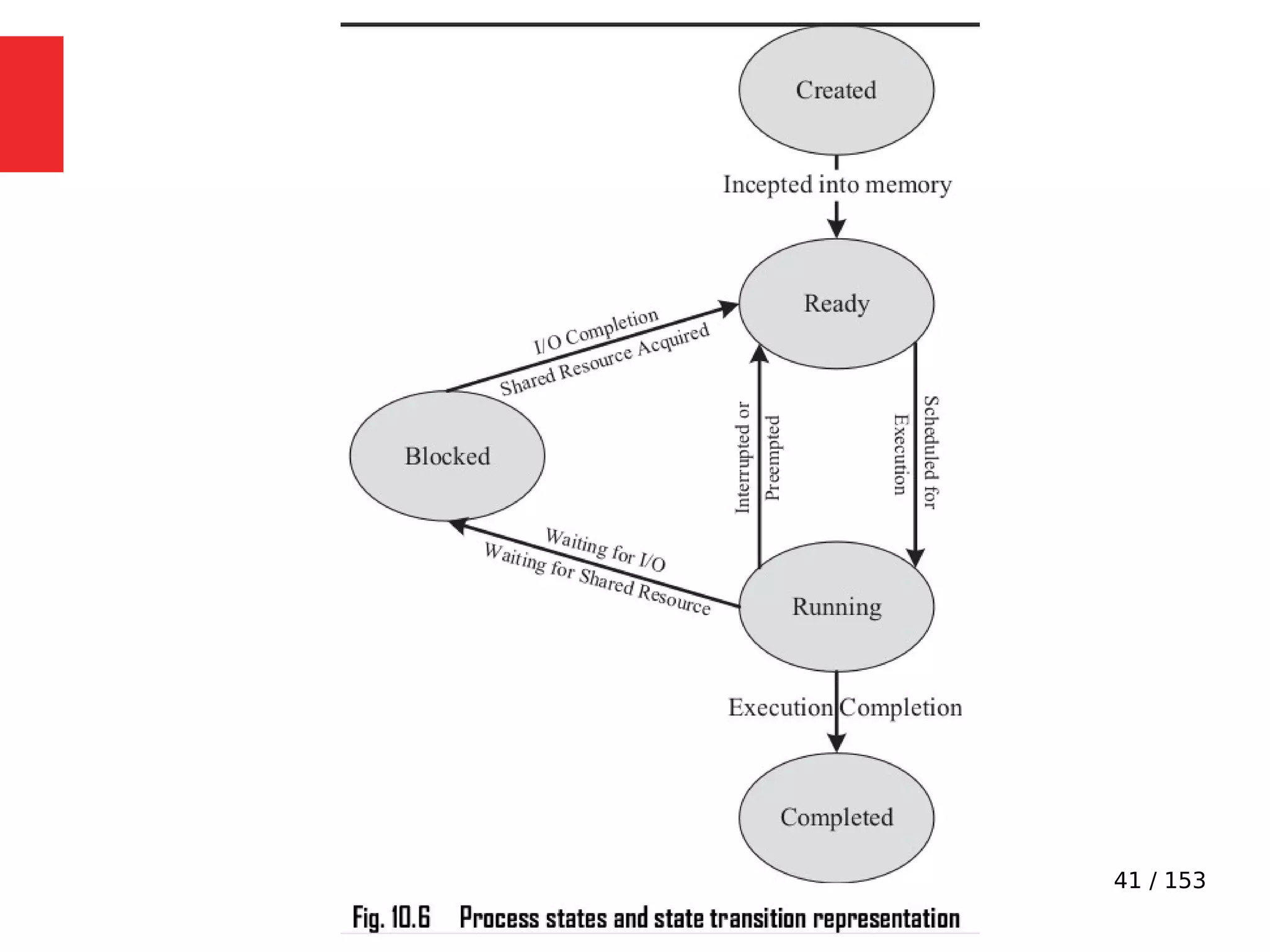
The state at which a process is being created is
referred as ‘Created State’.
●
The Operating System recognises a process in the
‘Created State’ but no resources are allocated to the
process.
●
The state, where a process is incepted into the memory
and awaiting the processor time for execution, is known
as ‘Ready State’.
●
At this stage, the process is placed in the ‘Ready list’
queue maintained by the OS.
●
The state where in the source code instructions
corresponding to the process is being executed is
called ‘Running State’.
●
Running state is the state at which the process
execution happens.
●
‘Blocked State/Wait State’ refers to a state where a
running process is temporarily suspended from
execution and does not have immediate access to
resources.
43 / 153
●
The blocked state might be invoked by various conditions
like: the process enters a wait state for an event to occur
(e.g. Waiting for user inputs such as keyboard input) or
waiting for getting access to a shared resource.
●
A state where the process completes its execution is
known as ‘Completed State’.
●
The transition of a process from one state to another is
known as ‘State transition’.
●
When a process changes its state from Ready to running
or from running to blocked or terminated or from blocked
to running, the CPU allocation for the process may also
change.
●
It should be noted that the state representation for a
process/task mentioned here is a generic representation.
●
The states associated with a task may be known with a
different name or there may be more or less number of
states than the one explained here under different OS
kernel.
44 / 153
– Process Management
●
Process management deals with the creation of a
process, setting up the memory space for the process,
loading the process’s code into the memory space,
allocating system resources, setting up a Process Control
Block ( PCB) for the process and process termination
/deletion.
●
Threads
– A thread is the primitive that can execute code.
– A thread is a single sequential flow of control within a
process.
– ‘Thread’ is also known as lightweight process.
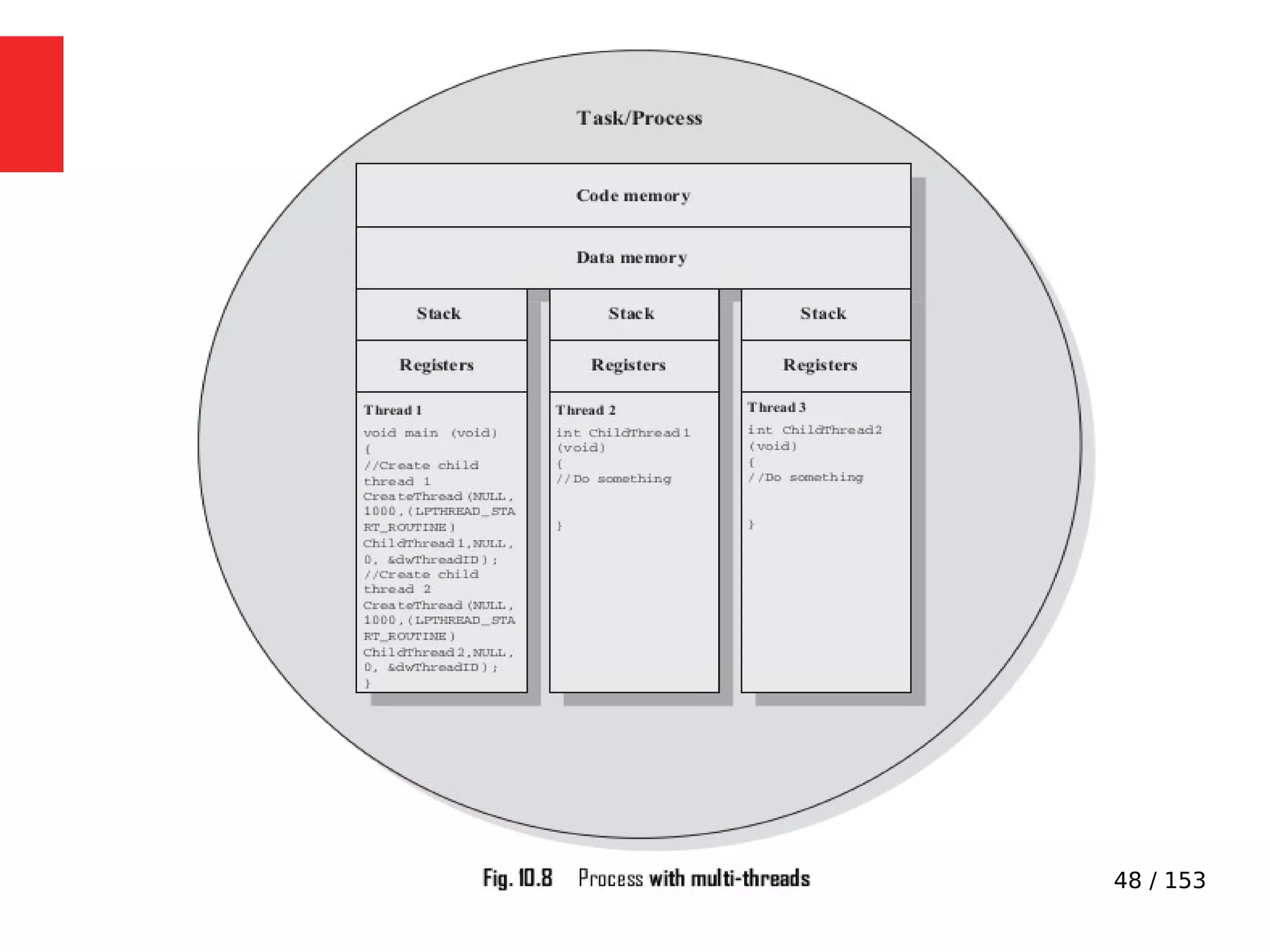
– A process can have many threads of execution.
– Different threads, which are part of a process, share the
same address space; meaning they share the data memory,
code memory and heap memory area.
– Threads maintain their own thread status (CPU register
values), Program Counter (PC) and stack.
45 / 153
– The Concept of Multithreading
●
A process/task in embedded application may be a
complex or lengthy one and it may contain various
suboperations like
– getting input from I/O devices connected to the
processor,
– performing some internal calculations/operations,
– updating some I/O devices etc.
●
If all the subfunctions of a task are executed in
sequence, the CPU utilisation may not be efficient.
46 / 153
●
For example, if the process is waiting for a user input, the
CPU enters the wait state for the event, and the process
execution also enters a wait state.
●
Instead of this single sequential execution of the whole
process,
– if the task/process is split into different threads
carrying out the different subfunctionalities of the
process,
– the CPU can be effectively utilised and when the
thread corresponding to the I/O operation enters the
wait state,
– another threads which do not require the I/O event for
their operation can be switched into execution.
●
This leads to more speedy execution of the process and
the efficient utilisation of the processor time and
resources.
●
If the process is split into multiple threads, which executes
a portion of the process, there will be a main thread and
rest of the threads will be created within the main thread.
47 / 153
●
Use of multiple threads to execute a process brings the
following advantage.
– Better memory utilisation.
●
Multiple threads of the same process share the
address space for data memory.
●
This also reduces the complexity of inter thread
communication since variables can be shared
across the threads.
– Since the process is split into different threads,
●
when one thread enters a wait state,
●
the CPU can be utilised by other threads of the
process that do not require the event,
●
which the other thread is waiting, for processing.
●
This speeds up the execution of the process.
– Efficient CPU utilisation.
●
The CPU is engaged all time.
48 / 153
49 / 153
– Thread Pre-emption
●
Thread pre-emption is the act of pre-empting the currently
running thread (stopping the currently running thread
temporarily).
●
Thread pre-emption ability is solely dependent on the
Operating System.
●
Thread pre-emption is performed for sharing the CPU time
among all the threads.
●
The execution switching among threads are known as
‘Thread context switching’.
●
Thread context switching is dependent on the Operating
system’s scheduler and the type of the thread.
●
When we say ‘Thread’, it falls into any one of the following
types.
– User Level Thread
●
User level threads do not have kernel/Operating
System support and they exist solely in the running
process.
50 / 153
●
Even if a process contains multiple user level
threads, the OS treats it as single thread and will
not switch the execution among the different
threads of it.
●
It is the responsibility of the process to schedule
each thread as and when required.
●
In summary, user level threads of a process are
non-preemptive at thread level from OS
perspective.
– Kernel/System Level Thread
●
Kernel level threads are individual units of
execution, which the OS treats as separate threads.
●
The OS interrupts the execution of the currently
running kernel thread and switches the execution
to another kernel thread based on the scheduling
policies implemented by the OS.
●
In summary kernel level threads are pre-emptive.
●
For user level threads, the execution switching
(thread context switching) happens only when the
currently executing user level thread is voluntarily
blocked.
51 / 153
●
Hence, no OS intervention and system calls are involved
in the context switching of user level threads.
●
This makes context switching of user level threads very
fast.
●
On the other hand, kernel level threads involve lots of
kernel overhead and involve system calls for context
switching.
●
However, kernel threads maintain a clear layer of
abstraction and allow threads to use system calls
independently.
●
There are many ways for binding user level threads with
system/kernel level threads.
●
The following section gives an overview of various thread
binding models.
– Many-to-One Model
●
Here many user level threads are mapped to a single
kernel thread.
●
In this model, the kernel treats all user level threads as
single thread and the execution switching among the user
level threads happens when a currently executing user
level thread voluntarily blocks itself or relinquishes the
CPU.
52 / 153
●
Solaris Green threads and GNU Portable Threads
are examples for this.
●
The ‘PThread’ example given under the POSIX
thread library section is an illustrative example for
application with Many-to-One thread model.
– One-to-One Model
●
In One-to-One model, each user level thread is
bonded to a kernel/system level thread.
●
Windows NT and Linux threads are examples for
One-to-One thread models.
●
The modified ‘Pthread’ example given under the
‘Thread Pre-emption’ section is an illustrative
example for application with One-to-One thread
model.
– Many-to-Many Model
●
In this model many user level threads are allowed
to be mapped to many kernel threads.
●
Windows NT/2000 with ThreadFibre package is an
example for this.
53 / 153
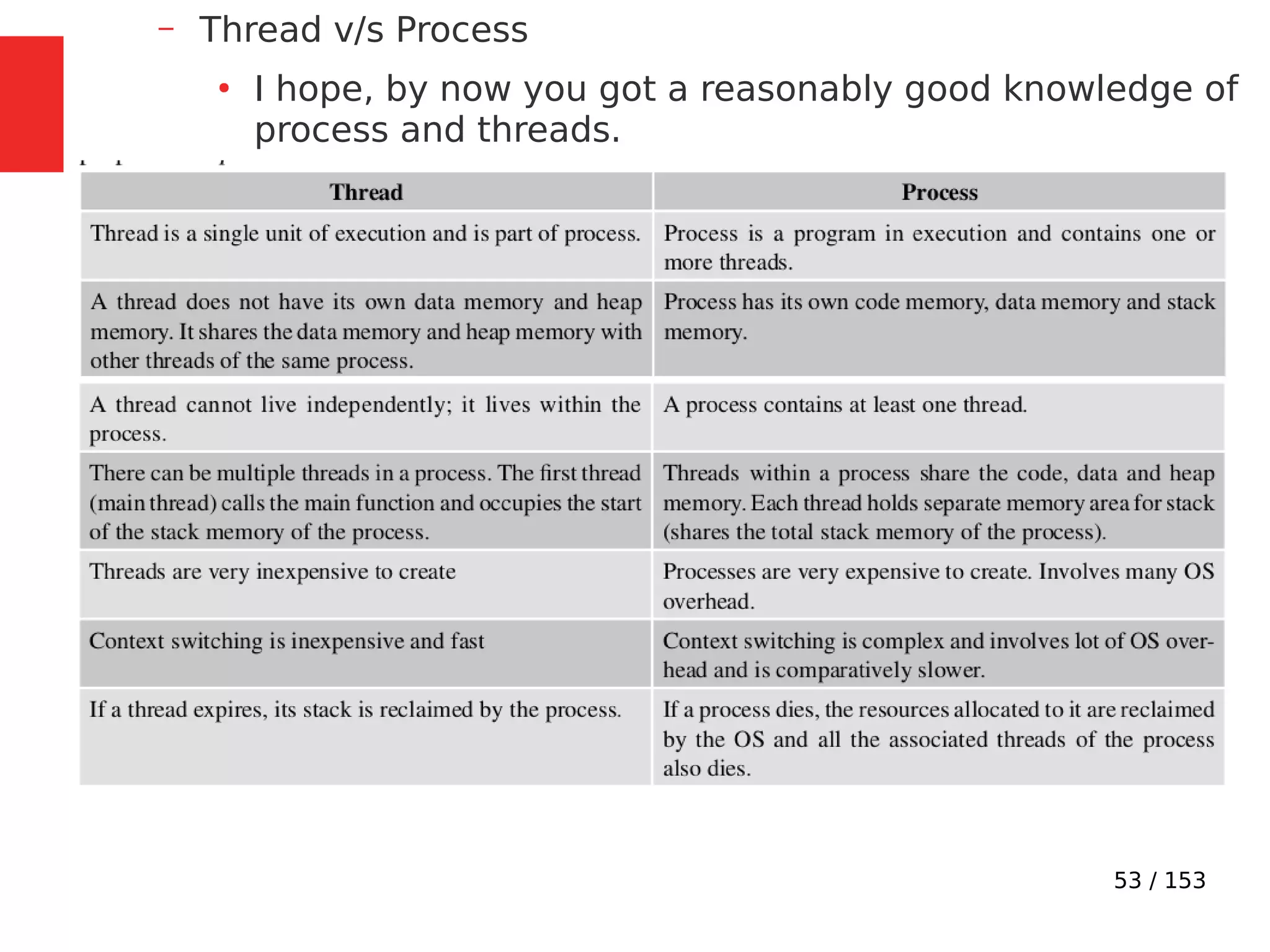
– Thread v/s Process
●
I hope, by now you got a reasonably good knowledge of
process and threads.
54 / 153
MULTIPROCESSING AND MULTITASKING
●
In the operating system context multiprocessing describes the
ability to execute multiple processes simultaneously.
●
Systems which are capable of performing multiprocessing, are
known as multiprocessor systems.
●
Multiprocessor systems possess multiple CPUs and can execute
multiple processes simultaneously.
●
The ability of the operating system to have multiple programs
in memory, which are ready for execution, is referred as
multiprogramming.
●
In a uniprocessor system, it is not possible to execute multiple
processes simultaneously.
●
However, it is possible for a uniprocessor system to achieve
some degree of pseudo parallelism in the execution of multiple
processes by switching the execution among different
processes.
●
The ability of an operating system to hold multiple processes in
memory and switch the processor (CPU) from executing one
process to another process is known as multitasking.
55 / 153
●
Multitasking creates the illusion of multiple tasks executing in
parallel.
●
Multitasking involves the switching of CPU from executing one
task to another.
●
Process is identical to the physical processor in the sense it has
own register set which mirrors the CPU registers, stack and
Program Counter (PC).
●
Hence, a ‘process’ is considered as a ‘Virtual processor’,
awaiting its turn to have its properties switched into the
physical processor.
●
In a multitasking environment, when task/process switching
happens, the virtual processor (task/process) gets its properties
converted into that of the physical processor.
●
The switching of the virtual processor to physical processor is
controlled by the scheduler of the OS kernel.
●
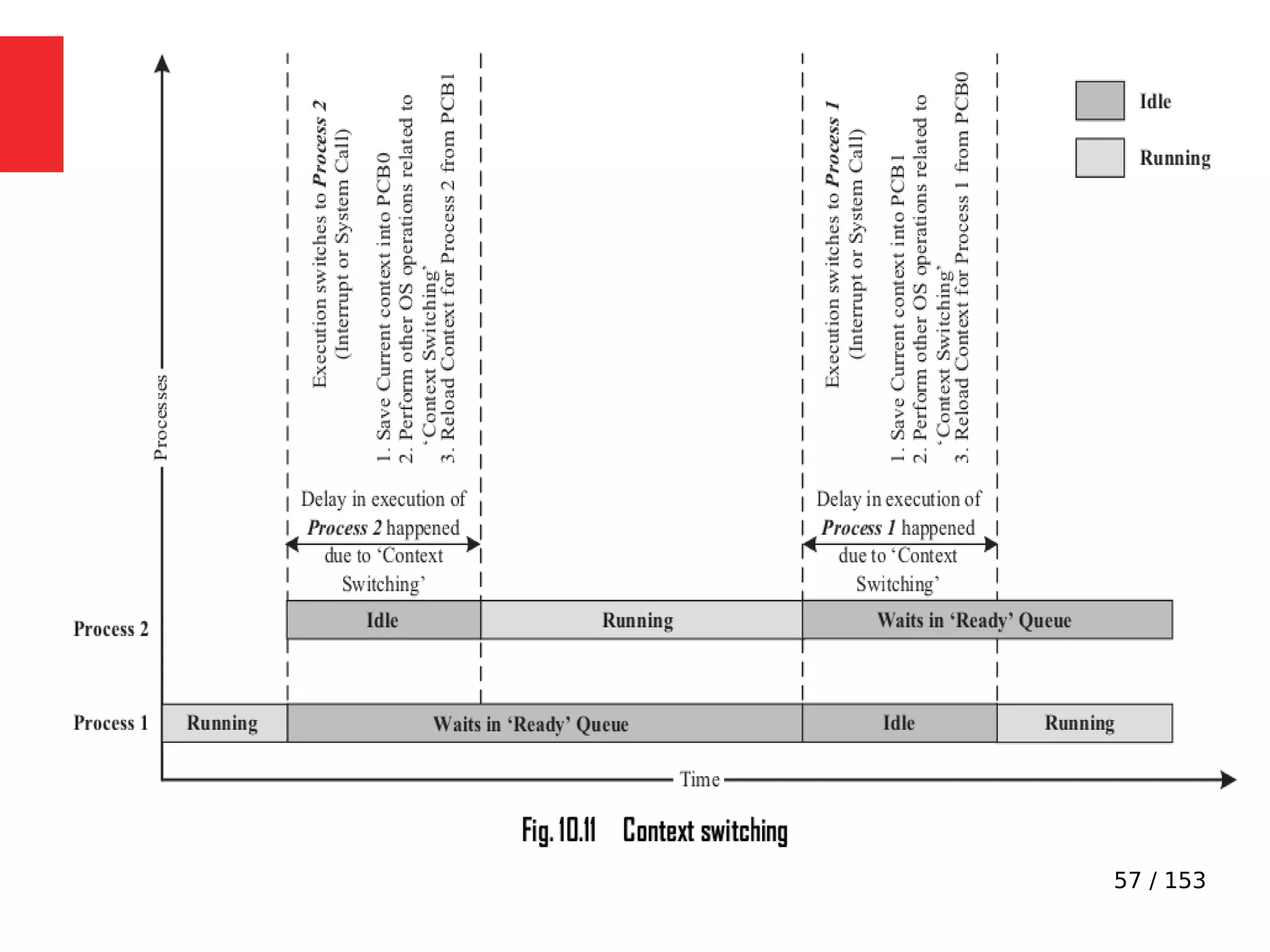
Whenever a CPU switching happens, the current context of
execution should be saved to retrieve it at a later point of time
when the CPU executes the process, which is interrupted
currently due to execution switching.
56 / 153
●
The context saving and retrieval is essential for resuming a
process exactly from the point where it was interrupted due to
CPU switching.
●
The act of switching CPU among the processes or changing the
current execution context is known as ‘Context switching’.
●
The act of saving the current context which contains the
context details (Register details, memory details, system
resource usage details, execution details, etc.) for the currently
running process at the time of CPU switching is known as ‘
Context saving’.
●
The process of retrieving the saved context details for a
process, which is going to be executed due to CPU switching, is
known as ‘ Context retrieval’.
●
Multitasking involves ‘ Context switching’ ,‘Context saving’ and
‘Context retrieval’.
57 / 153
58 / 153
●
Types of Multitasking
– Co-operative Multitasking
●
Co-operative multitasking is the most primitive form of
multitasking in which a task/process gets a chance to
execute only when the currently executing task/process
voluntarily relinquishes the CPU.
●
In this method, any task/process can hold the CPU as
much time as it wants.
●
Since this type of implementation involves the mercy of
the tasks each other for getting the CPU time for
execution, it is known as co-operative multitasking.
●
If the currently executing task is non-cooperative, the
other tasks may have to wait for a long time to get the
CPU.
– Preemptive Multitasking
●
Preemptive multitasking ensures that every task/process
gets a chance to execute.
●
When and how much time a process gets is dependent on
the implementation of the preemptive scheduling.
59 / 153
●
As the name indicates, in preemptive multitasking, the
currently running task/process is preempted to give a
chance to other tasks/ process to execute.
●
The preemption of task may be based on time slots or
task/process priority.
– Non-preemptive Multitasking
●
In non-preemptive multitasking, the process/task, which
is currently given the CPU time, is allowed to execute
until it terminates (enters the ‘Completed’ state) or
enters the ‘Blocked/Wait’ state, waiting for an I/O or
system resource.
●
The co-operative and non-preemptive multitasking
differs in their behaviour when they are in the
‘Blocked/Wait’ state.
●
In co-operative multitasking, the currently executing
process/task need not relinquish the CPU when it enters
the ‘Blocked/Wait’ state, waiting for an I/O, or a shared
resource access or an event to occur whereas in non-
preemptive multitasking the currently executing task
relinquishes the CPU when it waits for an I/O or system
resource or an event to occur.
60 / 153
TASK SCHEDULING
●
Determining which task/process is to be executed at a given
point of time is known as task/process scheduling.
●
Task scheduling forms the basis of multitasking. Scheduling
policies forms the guidelines for determining which task is to be
executed when.
●
The scheduling policies are implemented in an algorithm and it
is run by the kernel as a service.
●
The kernel service/application, which implements the
scheduling algorithm, is known as ‘Scheduler’.
●
The process scheduling decision may take place when a process
switches its state to
1. ‘Ready’ state from ‘Running’ state
2. ‘Blocked/Wait’ state from ‘Running’ state
3. ‘Ready’ state from ‘Blocked/Wait’ state
4. ‘Completed’ state
61 / 153
●
A process switches to ‘Ready’ state from the ‘Running’ state
when it is preempted. Hence, the type of scheduling in scenario
1 is pre-emptive.
●
When a high priority process in the ‘Blocked/Wait’ state
completes its I/O and switches to the ‘Ready’ state, the
scheduler picks it for execution if the scheduling policy used is
priority based preemptive. This is indicated by scenario 3.
●
In preemptive/non-preemptive multitasking, the process
relinquishes the CPU when it enters the ‘Blocked/Wait’ state or
the ‘Completed’ state and switching of the CPU happens at this
stage.
●
Scheduling under scenario 2 can be either preemptive or non-
preemptive.
●
Scheduling under scenario 4 can be preemptive, non-preemptive
or co-operative.
●
The selection of a scheduling criterion/algorithm should consider
the following factors:
– CPU Utilisation: The scheduling algorithm should always make
the CPU utilisation high. CPU utilisation is a direct measure of
how much percentage of the CPU is being utilised.
62 / 153
– Throughput: This gives an indication of the number of
processes executed per unit of time. The throughput for a
good scheduler should always be higher.
– Turnaround Time: It is the amount of time taken by a process
for completing its execution. It includes the time spent by the
process for waiting for the main memory, time spent in the
ready queue, time spent on completing the I/O operations,
and the time spent in execution. The turnaround time should
be a minimal for a good scheduling algorithm.
– Waiting Time: It is the amount of time spent by a process in
the ‘Ready’ queue waiting to get the CPU time for execution.
The waiting time should be minimal for a good scheduling
algorithm.
– Response Time: It is the time elapsed between the
submission of a process and the first response. For a good
scheduling algorithm, the response time should be as least as
possible.
●
To summarise, a good scheduling algorithm has high CPU
utilisation, minimum Turn Around Time (TAT), maximum
throughput and least response time.
63 / 153
●
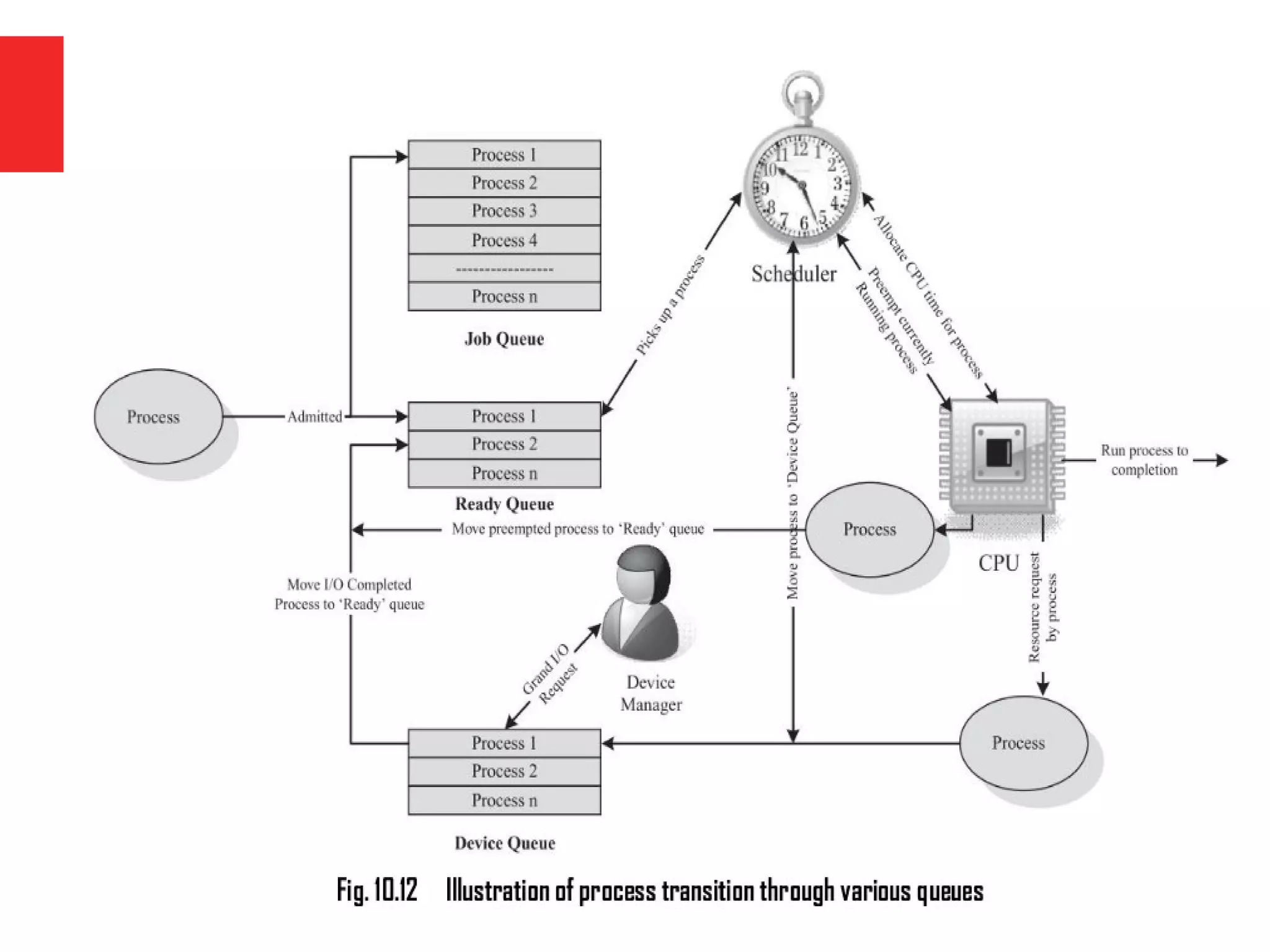
The Operating System maintains various queues † in
connection with the CPU scheduling, and a process passes
through these queues during the course of its admittance to
execution completion.
●
The various queues maintained by OS in association with CPU
scheduling are:
– Job Queue:
●
Job queue contains all the processes in the system
– Ready Queue:
●
Contains all the processes, which are ready for execution
and waiting for CPU to get their turn for execution.
●
The Ready queue is empty when there is no process
ready for running.
– Device Queue:
●
Contains the set of processes, which are waiting for an
I/O device.
●
A process migrates through all these queues during its journey
from ‘Admitted’ to ‘Completed’ stage.
64 / 153
65 / 153
●
Non-preemptive Scheduling
– Non-preemptive scheduling is employed in systems, which
implement non-preemptive multitasking model.
– In this scheduling type, the currently executing task/process
is allowed to run until it terminates or enters the ‘Wait’ state
waiting for an I/O or system resource.
●
First-Come-First-Served (FCFS)/ FIFO Scheduling
– First-Come-First-Served ( FCFS) scheduling algorithm
allocates CPU time to the processes based on the order
in which they enter the ‘Ready’ queue.
– The first entered process is serviced first.
– It is same as any real world application where queue
systems are used;
– e.g. Ticketing reservation system where people need to
stand in a queue and the first person standing in the
queue is serviced first.
– FCFS scheduling is also known as First In First Out
(FIFO) where the process which is put first into the
‘Ready’ queue is serviced first.
66 / 153
– The Average waiting time and Turn Around Time (TAT)
depends on the order in which the processes enter the
‘Ready’ queue, regardless there estimated completion
time.
– Average waiting time and Turn Around Time improve if
the process with shortest execution completion time is
scheduled first.
– The major drawback of FCFS algorithm is that it
favours monopoly of process.
– A process, which does not contain any I/O operation,
continues its execution until it finishes its task.
– If the process contains any I/O operation, the CPU is
relinquished by the process.
– In general, FCFS favours CPU bound processes and I/O
bound processes may have to wait until the completion
of CPU bound process, if the currently executing
process is a CPU bound process.
– This leads to poor device utilisation.
– The average waiting time is not minimal for FCFS
scheduling algorithm.
67 / 153
●
Last-Come-First Served (LCFS)/LIFO Scheduling
– The Last-Come-First Served (LCFS) scheduling
algorithm also allocates CPU time to the processes
based on the order in which they are entered in the
‘Ready’ queue.
– The last entered process is serviced first.
– LCFS scheduling is also known as Last In First Out
( LIFO) where the process, which is put last into the
‘Ready’ queue, is serviced first.
– LCFS scheduling is not optimal and it also possesses
the same drawback as that of FCFS algorithm.
●
Shortest Job First (SJF) Scheduling
– Shortest Job First ( SJF) scheduling algorithm ‘sorts the
‘Ready’ queue’ each time a process relinquishes the
CPU (either the process terminates or enters the ‘Wait’
state waiting for I/O or system resource) to pick the
process with shortest (least) estimated completion/run
time.
– In SJF, the process with the shortest estimated run time
is scheduled first, followed by the next shortest
process, and so on.
68 / 153
– The average waiting time for a given set of process is
minimal in SJF scheduling and so it is optimal
compared to other non-preemptive scheduling like
FCFS.
– The major drawback of SJF algorithm is that a process
whose estimated execution completion time is high
may not get a chance to execute if more and more
processes with least estimated execution time enters
the ‘Ready’ queue before the process with longest
estimated execution time started its execution (In non-
preemptive SJF ). This condition is known as
‘Starvation’.
– Another drawback of SJF is that it is difficult to know in
advance the next shortest process in the ‘Ready’
queue for scheduling since new processes with
different estimated execution time keep entering the
‘Ready’ queue at any point of time.
●
Priority Based Scheduling
– The Turn Around Time (TAT) and waiting time for
processes in non-preemptive scheduling varies with
the type of scheduling algorithm.
69 / 153
– Priority based non-preemptive scheduling algorithm
ensures that a process with high priority is serviced at
the earliest compared to other low priority processes in
the ‘Ready’ queue.
– The priority of a task/process can be indicated through
various mechanisms.
– The Shortest Job First (SJF) algorithm can be viewed as
a priority based scheduling where each task is
prioritised in the order of the time required to
complete the task.
– The lower the time required for completing a process
the higher is its priority in SJF algorithm.
– Another way of priority assigning is associating a
priority to the task/process at the time of creation of
the task/process.
– The priority is a number ranging from 0 to the
maximum priority supported by the OS.
– The maximum level of priority is OS dependent.
– For Example, Windows CE supports 256 levels of
priority (0 to 255 priority numbers).
70 / 153
– While creating the process/task, the priority can be
assigned to it.
– The priority number associated with a task/process is
the direct indication of its priority.
– The priority variation from high to low is represented
by numbers from 0 to the maximum priority or by
numbers from maximum priority to 0.
– For Windows CE operating system a priority number 0
indicates the highest priority and 255 indicates the
lowest priority.
– This convention need not be universal and it depends
on the kernel level implementation of the priority
structure.
– The non-preemptive priority based scheduler sorts the
‘Ready’ queue based on priority and picks the process
with the highest level of priority for execution.
– Possess the drawback of ‘Starvation’ where a process
whose priority is low may not get a chance to execute
if more and more processes with higher priorities enter
the ‘Ready’ queue before the process with lower
priority started its execution.
71 / 153
– ‘Starvation’ can be effectively tackled in priority based
non-preemptive scheduling by dynamically raising the
priority of the low priority task/process which is under
starvation (waiting in the ready queue for a longer time
for getting the CPU time).
– The technique of gradually raising the priority of
processes which are waiting in the ‘Ready’ queue as
time progresses, for preventing ‘Starvation’, is known
as ‘Aging’.
●
Preemptive Scheduling
– Preemptive scheduling is employed in systems, which
implements preemptive multitasking model.
– In preemptive scheduling, every task in the ‘Ready’ queue
gets a chance to execute.
– When and how often each process gets a chance to execute
(gets the CPU time) is dependent on the type of preemptive
scheduling algorithm used for scheduling the processes.
– In this kind of scheduling, the scheduler can preempt (stop
temporarily) the currently executing task/process and select
another task from the ‘Ready’ queue for execution.
72 / 153
– When to pre-empt a task and which task is to be picked up
from the ‘Ready’ queue for execution after preempting the
current task is purely dependent on the scheduling
algorithm.
– A task which is preempted by the scheduler is moved to the
‘Ready’ queue.
– The act of moving a ‘Running’ process/task into the ‘Ready’
queue by the scheduler, without the processes requesting
for it is known as ‘Preemption’.
– Preemptive scheduling can be implemented in different
approaches.
– The two important approaches adopted in preemptive
scheduling are time-based preemption and priority-based
preemption.
●
Preemp ve SJF Scheduling/ Shortest Remaining Time
(SRT)
– The non-preemptive SJF scheduling algorithm sorts the
‘Ready’ queue only after completing the execution of
the current process or when the process enters ‘Wait’
state,
73 / 153
– whereas the preemptive SJF scheduling algorithm sorts
the ‘Ready’ queue when a new process enters the
‘Ready’ queue and checks whether the execution time
of the new process is shorter than the remaining of the
total estimated time for the currently executing
process.
– If the execution time of the new process is less, the
currently executing process is preempted and the new
process is scheduled for execution.
– Thus preemptive SJF scheduling always compares the
execution completion time (It is same as the remaining
time for the new process) of a new process entered the
‘Ready’ queue with the remaining time for completion
of the currently executing process and schedules the
process with shortest remaining time for execution.
– Preemptive SJF scheduling is also known as Shortest
Remaining Time ( SRT) scheduling.
– Average waiting Time and Turn Around Time (TAT)
improves significantly with preemptive SJF scheduling.
74 / 153
●
Round Robin (RR) Scheduling
– In Round Robin scheduling, each process in the ‘Ready’
queue is executed for a pre-defined time slot.
– The execution starts with picking up the first process in the
‘Ready’ queue.
– It is executed for a pre-defined time and when the pre-
defined time elapses or the process completes, the next
process in the ‘Ready’ queue is selected for execution.
– This is repeated for all the processes in the ‘Ready’ queue.
– Once each process in the ‘Ready’ queue is executed for the
pre-defined time period, the scheduler comes back and
picks the first process in the ‘Ready’ queue again for
execution.The sequence is repeated.
– This reveals that the RR scheduling is similar to the FCFS
scheduling and the only difference is that a time slice
based preemption is added to switch the execution
between the processes in the ‘Ready’ queue.
– The ‘Ready’ queue can be a circular queue , scheduler
picks up the first process for execution and moves to the
next till the end of the queue and then comes back to the
beginning of the queue to pick up the first process.
75 / 153
– The time slice is provided by the timer tick feature of the time
management unit of the OS kernel .
– Time slice is kernel dependent and it varies in the order of a
few microseconds to milliseconds.
– Certain OS kernels may allow the time slice as user
configurable.
– Round Robin scheduling ensures that every process gets a
fixed amount of CPU time for execution.
– When the process gets its fixed time for execution is
determined by the FCFS policy.
– If a process terminates before the elapse of the time slice, the
process releases the CPU voluntarily and the next process in
the queue is scheduled for execution by the scheduler.
– The implementation of RR scheduling is kernel dependent.
– The limitations of RR with interrupt generic approach are the
limited number of interrupts supported by embedded
processors and the interrupt latency happening due to the
context switching overhead.
– RR scheduling involves lot of overhead in maintaining the
time slice information for every process which is currently
being executed.
76 / 153
●
Priority Based Scheduling
– Priority based preemptive scheduling algorithm is
same as that of the non-preemptive priority based
scheduling except for the switching of execution
between tasks.
– In preemptive scheduling, any high priority process
entering the ‘Ready’ queue is immediately scheduled
for execution whereas in the non-preemptive
scheduling any high priority process entering the
‘Ready’ queue is scheduled only after the currently
executing process completes its execution or only
when it voluntarily relinquishes the CPU.
– Priority based preemptive scheduling gives Real-Time
attention to high priority tasks.
– Thus priority based preemptive scheduling is adopted
in systems which demands ‘Real-Time’ behaviour.
– Most of the RTOSs make use of the preemptive priority
based scheduling algorithm for process scheduling.
Preemptive priority based scheduling also possesses
the same drawback of non-preemptive priority based
scheduling–‘ Starvation’. This can be eliminated by the
‘ Aging’ technique.
77 / 153
●
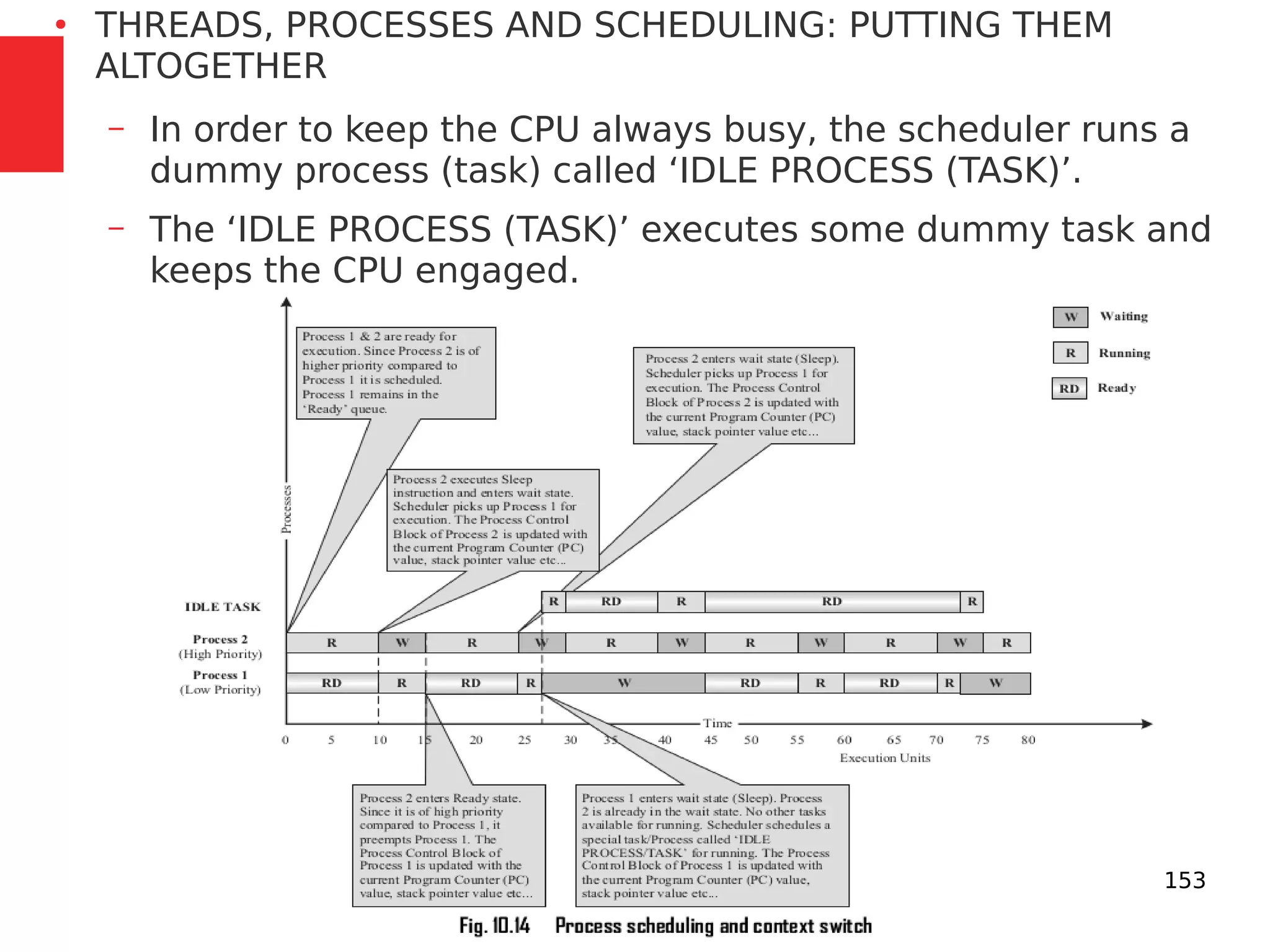
THREADS, PROCESSES AND SCHEDULING: PUTTING THEM
ALTOGETHER
– In order to keep the CPU always busy, the scheduler runs a
dummy process (task) called ‘IDLE PROCESS (TASK)’.
– The ‘IDLE PROCESS (TASK)’ executes some dummy task and
keeps the CPU engaged.
78 / 153
TASK COMMUNICATION
●
In a multitasking system, multiple tasks/processes run
concurrently (in pseudo parallelism) and each process may or
may not interact between.
●
Based on the degree of interaction, the processes running on an
OS are classified as
– Co-operating Processes: In the co-operating interaction model
one process requires the inputs from other processes to
complete its execution.
– Competing Processes: The competing processes do not share
anything among themselves but they share the system
resources. The competing processes compete for the system
resources such as file, display device, etc.
●
Co-operating processes exchanges information and communicate
through the following methods.
– Co-operation through Sharing: The co-operating process
exchange data through some shared resources.
– Co-operation through Communication: No data is shared
between the processes. But they communicate for
synchronisation.
79 / 153
●
The mechanism through which processes/tasks communicate
each other is known as Inter Process/Task Communication (IPC).
●
Inter Process Communication is essential for process co-
ordination.
●
The various types of Inter Process Communication (IPC)
mechanisms adopted by process are kernel (OS) dependent.
●
Some of the important IPC mechanisms adopted by various
kernels are explained below.
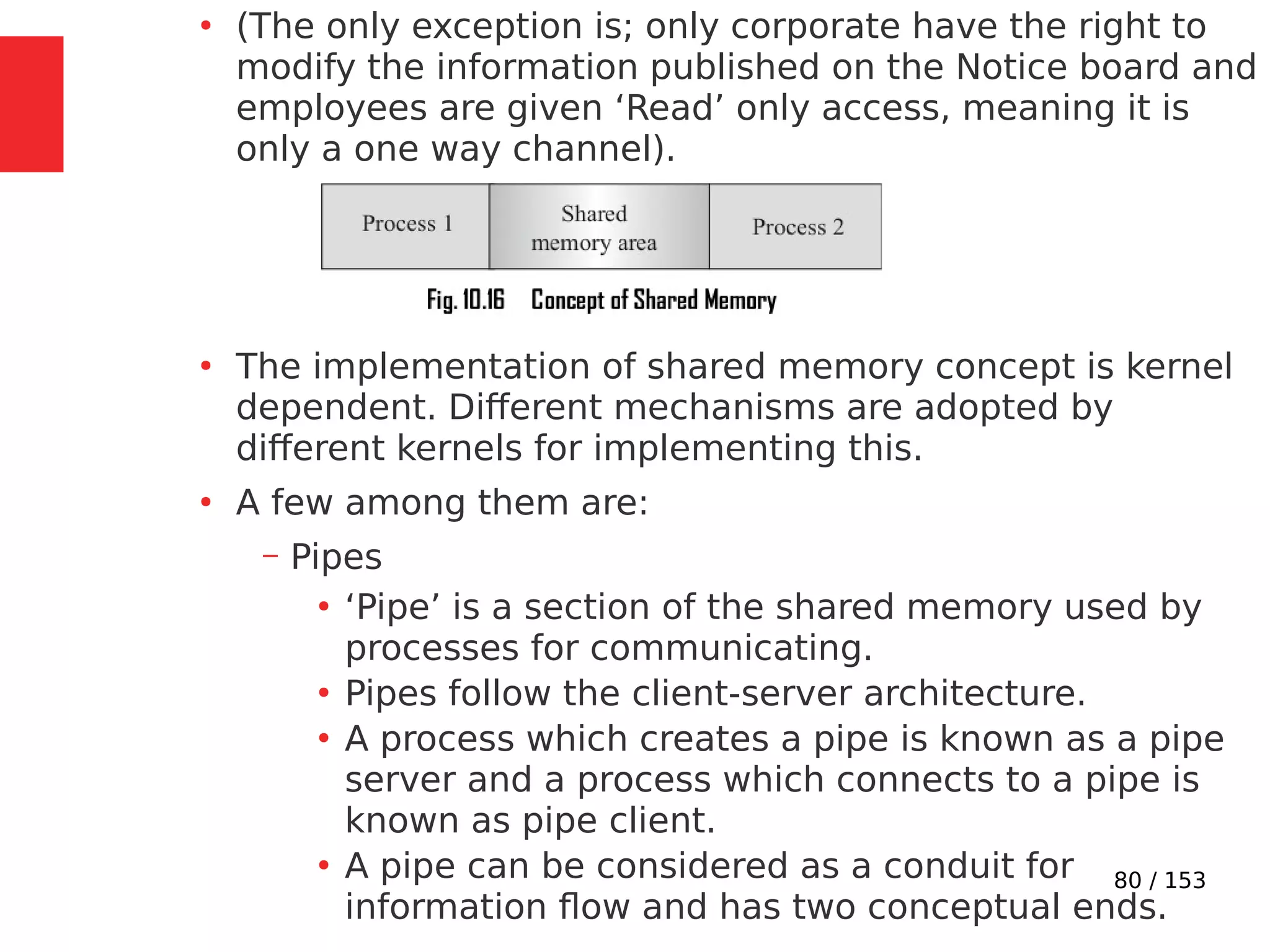
– Shared Memory
●
Processes share some area of the memory to
communicate among them.
●
Information to be communicated by the process is written
to the shared memory area.
●
Other processes which require this information can read
the same from the shared memory area.
●
It is same as the real world example where ‘Notice Board’
is used by corporate to publish the public information
among the employees
80 / 153
●
(The only exception is; only corporate have the right to
modify the information published on the Notice board and
employees are given ‘Read’ only access, meaning it is
only a one way channel).
●
The implementation of shared memory concept is kernel
dependent. Different mechanisms are adopted by
different kernels for implementing this.
●
A few among them are:
– Pipes
●
‘Pipe’ is a section of the shared memory used by
processes for communicating.
●
Pipes follow the client-server architecture.
●
A process which creates a pipe is known as a pipe
server and a process which connects to a pipe is
known as pipe client.
●
A pipe can be considered as a conduit for
information flow and has two conceptual ends.
81 / 153
●
It can be unidirectional, allowing information flow in
one direction or bidirectional allowing bi-directional
information flow.
●
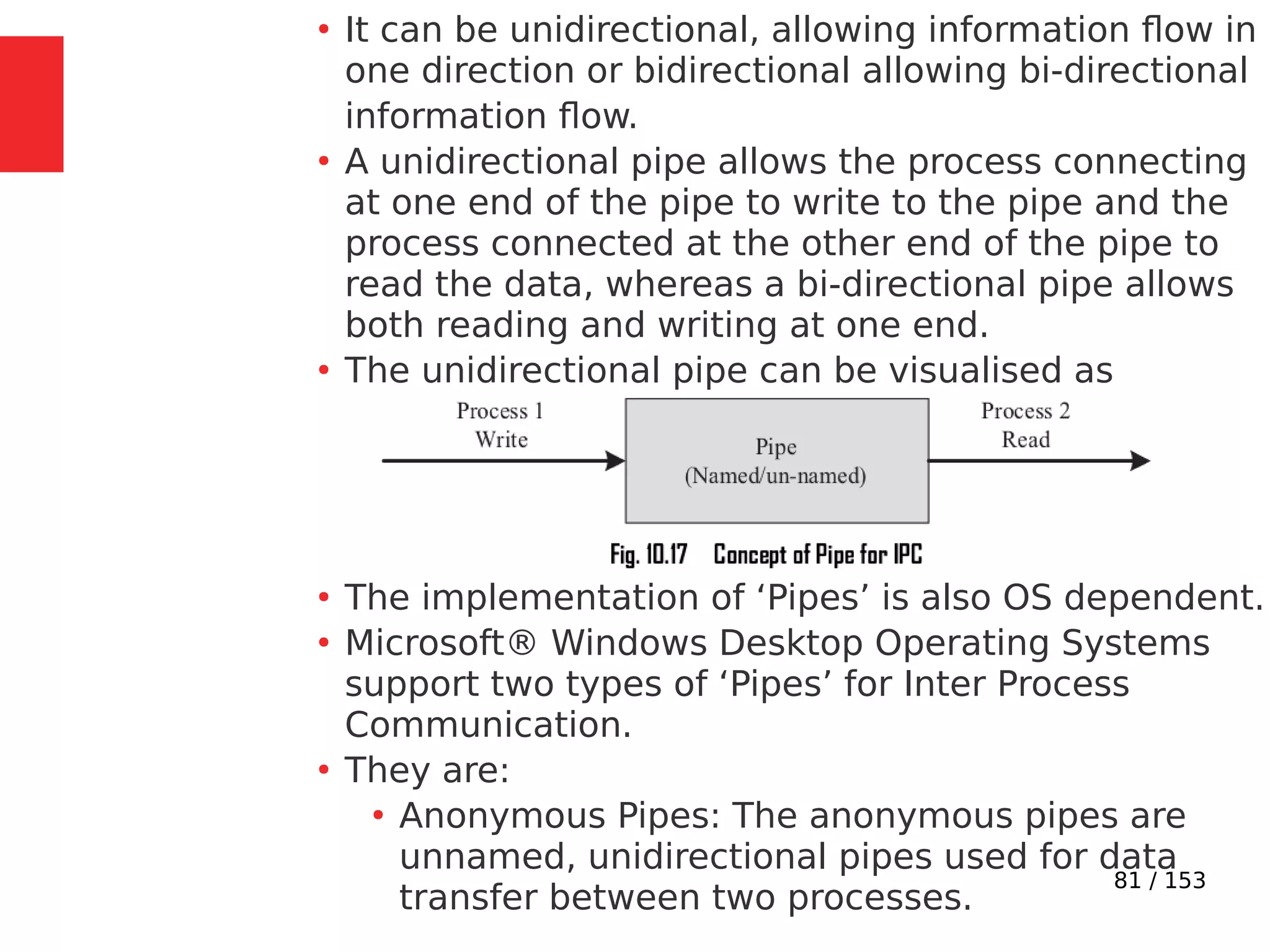
A unidirectional pipe allows the process connecting
at one end of the pipe to write to the pipe and the
process connected at the other end of the pipe to
read the data, whereas a bi-directional pipe allows
both reading and writing at one end.
●
The unidirectional pipe can be visualised as
●
The implementation of ‘Pipes’ is also OS dependent.
●
Microsoft® Windows Desktop Operating Systems
support two types of ‘Pipes’ for Inter Process
Communication.
●
They are:
●
Anonymous Pipes: The anonymous pipes are
unnamed, unidirectional pipes used for data
transfer between two processes.
82 / 153
●
Named Pipes: Named pipe is a named,
unidirectional or bi-directional pipe for data
exchange between processes.
●
Like anonymous pipes, the process which
creates the named pipe is known as pipe server.
●
A process which connects to the named pipe is
known as pipe client.
●
With named pipes, any process can act as both
client and server allowing point-to-point
communication.
●
Named pipes can be used for communicating
between processes running on the same
machine or between processes running on
different machines connected to a network.
– Memory Mapped Objects
●
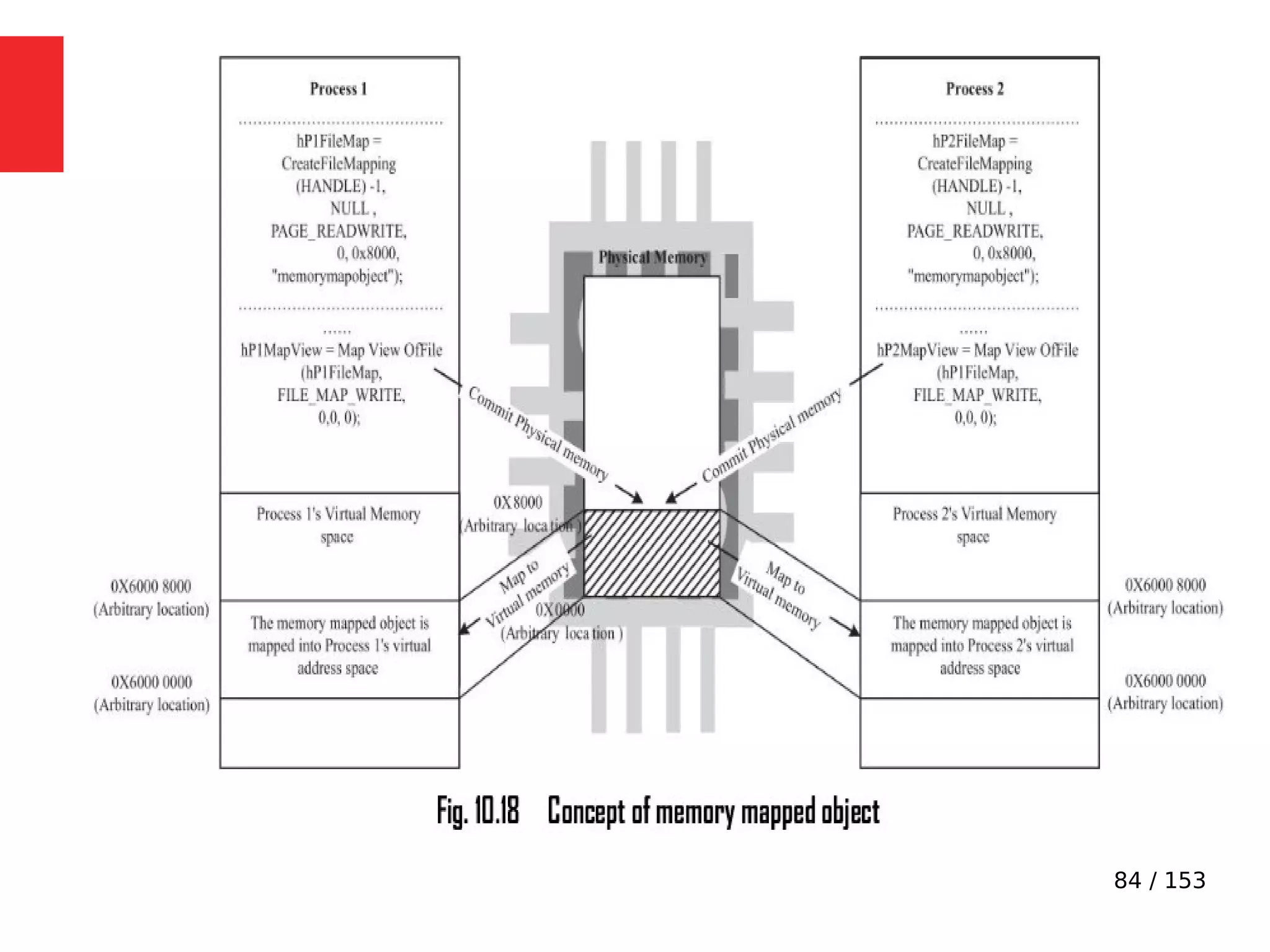
Memory mapped object is a shared memory
technique adopted by certain Real-Time Operating
Systems for allocating a shared block of memory
which can be accessed by multiple process
simultaneously.
●
In this approach a mapping object is created and
physical storage for it is reserved and committed.
83 / 153
●
A process can map the entire committed physical
area or a block of it to its virtual address space.
●
All read and write operation to this virtual address
space by a process is directed to its committed
physical area.
●
Any process which wants to share data with other
processes can map the physical memory area of the
mapped object to its virtual memory space and use
it for sharing the data.
●
Windows Embedded Compact RTOS uses the
memory mapped object based shared memory
technique for Inter Process Communication
84 / 153
85 / 153
– Message Passing
●
Message passing is an (a)synchronous information
exchange mechanism used for Inter Process/Thread
Communication.
●
The major difference between shared memory and
message passing technique is that, through shared
memory lots of data can be shared whereas only limited
amount of info/data is passed through message passing.
●
Also message passing is relatively fast and free from the
synchronisation overheads compared to shared memory.
●
Based on the message passing operation between the
processes, message passing is classified into
– Message Queue
●
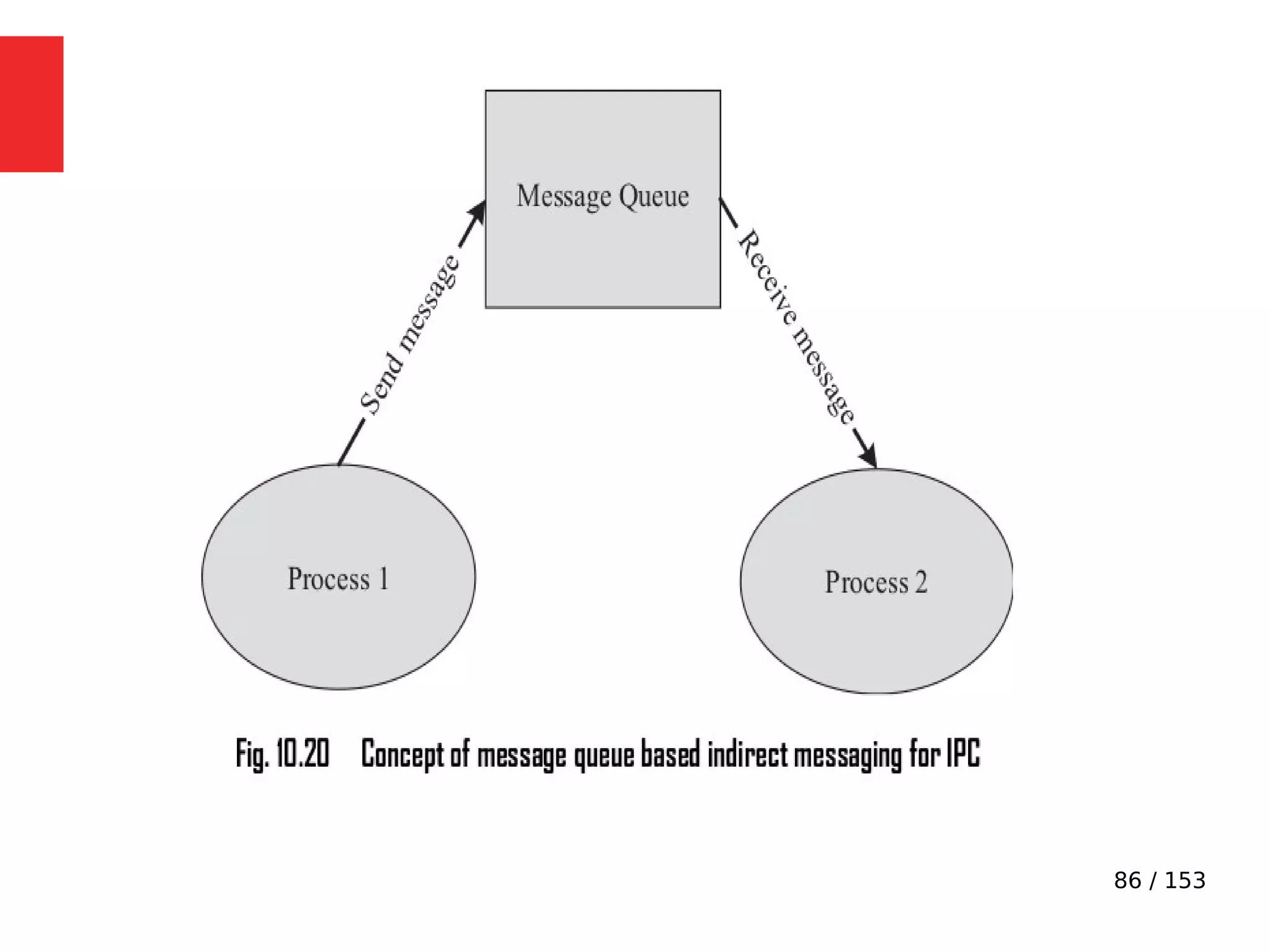
Usually the process which wants to talk to another
process posts the message to a First-In-First-Out
(FIFO) queue called ‘Message queue’, which stores
the messages temporarily in a system defined
memory object, to pass it to the desired process
86 / 153
87 / 153
●
Messages are sent and received through send
(Name of the process to which the message is to be
sent, message) and receive (Name of the process
from which the message is to be received, message)
methods.
●
The messages are exchanged through a message
queue.
●
The implementation of the message queue, send
and receive methods are OS kernel dependent.
●
The Windows XP OS kernel maintains a single
system message queue and one process/thread
(Process and threads are used interchangeably here,
since thread is the basic unit of process in windows)
specific message queue.
●
A thread which wants to communicate with another
thread posts the message to the system message
queue.
●
The kernel picks up the message from the system
message queue one at a time and examines the
message for finding the destination thread and then
posts the message to the message queue of the
corresponding thread.
88 / 153
●
For posting a message to a thread’s message
queue, the kernel fills a message structure MSG and
copies it to the message queue of the thread.
●
The message structure MSG contains the handle of
the process /thread for which the message is
intended, the message parameters, the time at
which the message is posted, etc.
●
A thread can simply post a message to another
thread and can continue its operation or it may wait
for a response from the thread to which the
message is posted.
●
The messaging mechanism is classified into
synchronous and asynchronous based on the
behaviour of the message posting thread.
●
In asynchronous messaging, the message posting
thread just posts the message to the queue and it
will not wait for an acceptance (return) from the
thread to which the message is posted, whereas in
synchronous messaging, the thread which posts a
message enters waiting state and waits for the
message result from the thread to which the
message is posted.
89 / 153
●
The thread which invoked the send message
becomes blocked and the scheduler will not pick it
up for scheduling.
●
‘Message queue’ is the primary inter-task
communication mechanism under VxWorks kernel.
●
Message queues support two-way communication
of messages of variable length.
●
The two-way messaging between tasks can be
implemented using one message queue for
incoming messages and another one for outgoing
messages.
●
Messaging mechanism can be used for task-to task
and task to Interrupt Service Routine (ISR)
communication.
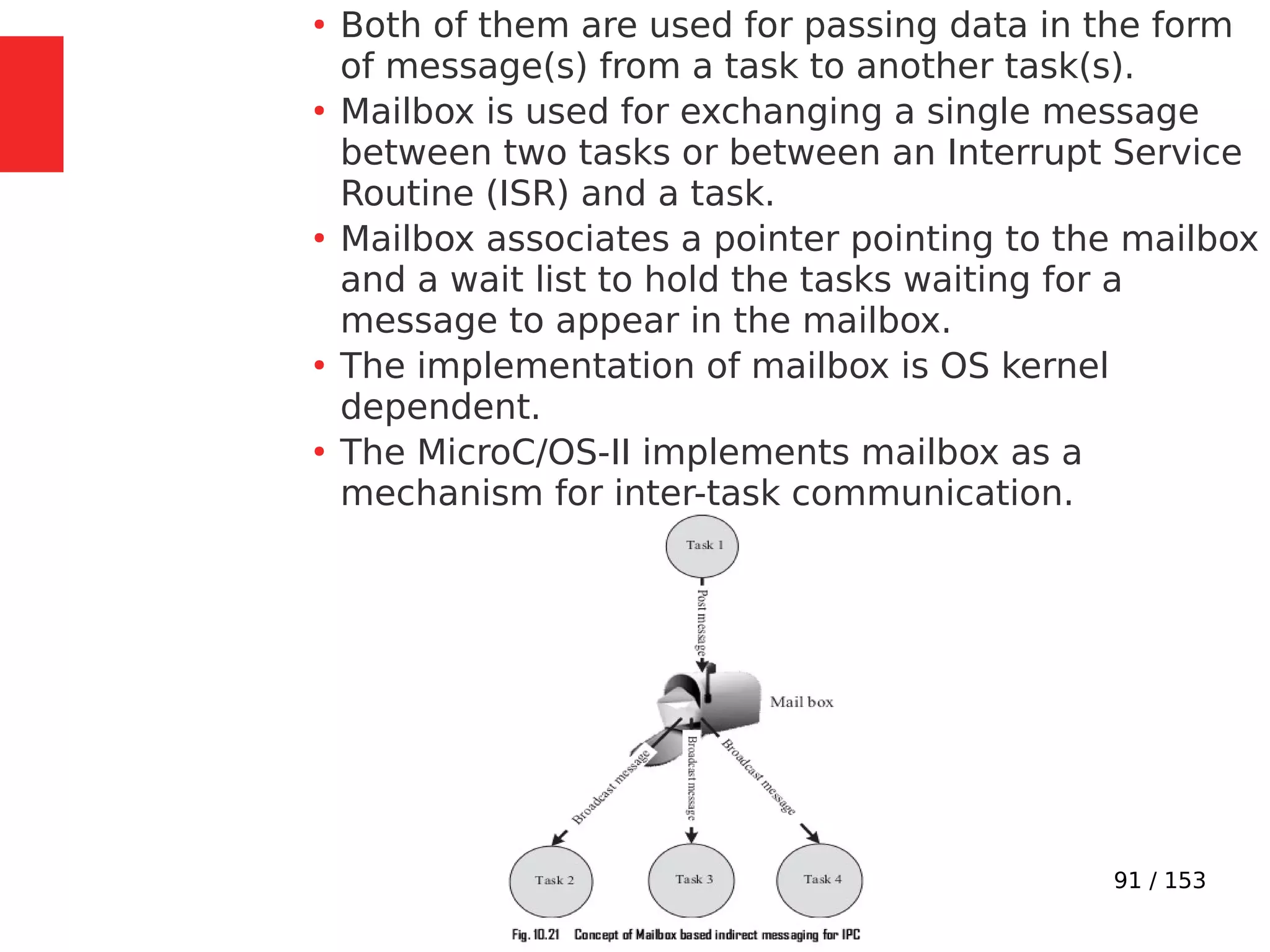
– Mailbox
●
Mailbox is an alternate form of ‘Message queues’
and it is used in certain Real-Time Operating
Systems for IPC.
●
Mailbox technique for IPC in RTOS is usually used for
one way messaging.
90 / 153
●
The task/thread which wants to send a message to
other tasks/threads creates a mailbox for posting
the messages.
●
The threads which are interested in receiving the
messages posted to the mailbox by the mailbox
creator thread can subscribe to the mailbox.
●
The thread which creates the mailbox is known as
‘mailbox server’ and the threads which subscribe to
the mailbox are known as ‘mailbox clients’.
●
The mailbox server posts messages to the mailbox
and notifies it to the clients which are subscribed to
the mailbox.
●
The clients read the message from the mailbox on
receiving the notification.
●
The mailbox creation, subscription, message reading
and writing are achieved through OS kernel provided
API calls.
●
Mailbox and message queues are same in
functionality.
●
The only difference is in the number of messages
supported by them.
91 / 153
●
Both of them are used for passing data in the form
of message(s) from a task to another task(s).
●
Mailbox is used for exchanging a single message
between two tasks or between an Interrupt Service
Routine (ISR) and a task.
●
Mailbox associates a pointer pointing to the mailbox
and a wait list to hold the tasks waiting for a
message to appear in the mailbox.
●
The implementation of mailbox is OS kernel
dependent.
●
The MicroC/OS-II implements mailbox as a
mechanism for inter-task communication.
92 / 153
– Signalling
●
Signalling is a primitive way of communication
between processes/threads.
●
Signals are used for asynchronous notifications
where one process/thread fires a signal, indicating
the occurrence of a scenario which the other
process(es)/thread(s) is waiting.
●
Signals are not queued and they do not carry any
data.
●
The communication mechanisms used in RTX51
Tiny OS is an example for Signalling.
●
The os_send_signal kernel call under RTX 51 sends
a signal from one task to a specified task.
●
Similarly the os_wait kernel call waits for a specified
signal.
●
The VxWorks RTOS kernel also implements ‘signals’
for interprocess communication.
●
Whenever a specified signal occurs it is handled in
a signal handler associated with the signal.
93 / 153
– Remote Procedure Call ( RPC) and Sockets
●
Remote Procedure Call or RPC is the Inter Process
Communication (IPC) mechanism used by a process to call
a procedure of another process running on the same CPU
or on a different CPU which is interconnected in a network.
94 / 153
●
In the object oriented language terminology RPC is also
known as Remote Invocation or Remote Method Invocation
( RMI).
●
RPC is mainly used for distributed applications like client-
server applications.
●
With RPC it is possible to communicate over a
heterogeneous network.
●
The CPU/process containing the procedure which needs to
be invoked remotely is known as server.
●
The CPU/process which initiates an RPC request is known
as client.
●
It is possible to implement RPC communication with
different invocation interfaces.
●
In order to make the RPC communication compatible
across all platforms it should stick on to certain standard
formats.
●
Interface Definition Language ( IDL) defi nes the interfaces
for RPC.
●
Microsoft Interface Defi nition Language (MIDL) is the IDL
implementation from Microsoft for all Microsoft platforms.
95 / 153
●
The RPC communication can be either Synchronous
(Blocking) or Asynchronous (Non-blocking).
●
In the Synchronous communication, the process which
calls the remote procedure is blocked until it receives a
response back from the other process.
●
In asynchronous RPC calls, the calling process continues
its execution while the remote process performs the
execution of the procedure.
●
The result from the remote procedure is returned back to
the caller through mechanisms like callback functions.
●
On security front, RPC employs authentication
mechanisms to protect the systems against
vulnerabilities.
●
The client applications (processes) should authenticate
themselves with the server for getting access.
●
Authentication mechanisms like IDs, public key
cryptography (like DES, 3DES), etc. are used by the client
for authentication.
●
Without authentication, any client can access the remote
procedure. This may lead to potential security risks.
96 / 153
●
Sockets are used for RPC communication.
●
Socket is a logical endpoint in a two-way communication
link between two applications running on a network.
●
A port number is associated with a socket so that the
network layer of the communication channel can deliver
the data to the designated application.
●
Sockets are of different types, namely, Internet sockets
(INET), UNIX sockets, etc.
●
The INET socket works on internet communication
protocol.
●
TCP/IP, UDP, etc. are the communication protocols used by
INET sockets.
●
INET sockets are classified into:
– 1. Stream sockets
– 2. Datagram sockets
●
Stream sockets are connection oriented and they use TCP
to establish a reliable connection.
●
On the other hand, Datagram sockets rely on UDP for
establishing a connection.
97 / 153
●
The UDP connection is unreliable when compared to TCP.
●
The client-server communication model uses a socket at
the client side and a socket at the server side.
●
A port number is assigned to both of these sockets.
●
The client and server should be aware of the port number
associated with the socket.
●
In order to start the communication, the client needs to
send a connection request to the server at the specified
port number.
●
The client should be aware of the name of the server
along with its port number.
●
The server always listens to the specified port number on
the network.
●
Upon receiving a connection request from the client,
based on the success of authentication, the server grants
the connection request and a communication channel is
established between the client and server.
●
The client uses the host name and port number of server
for sending requests and server uses the client’s name
and port number for sending responses.
98 / 153
●
If the client and server applications (both processes) are
running on the same CPU, both can use the same host
name and port number for communication.
●
The physical communication link between the client and
server uses network interfaces like Ethernet or Wi-Fi for
data communication.
●
The underlying implementation of socket is OS kernel
dependent.
●
Different types of OSs provide different socket interfaces.
●
Under Windows, the socket function library Winsock should
be initiated before using the socket related functions.
●
The function WSAStartup performs this initiation.
●
The socket() function call creates a socket.
●
The socket type, connection type and protocols for
communication are the parameters for socket creation.
●
Here the socket type is INET (AF_INET) and connection
type is stream socket (SOCK_STREAM).
●
The protocol selected for communication is TCP/IP
(IPPROTO_TCP).
99 / 153
●
After creating the socket it is connected to a server.
●
For connecting to server, the server address and port
number should be indicated in the connection request.
●
The sockaddr_in structure specifies the socket type, IP
address and port of the server to be connected to.
●
The connect () function connects the socket with a specified
server.
●
If the server grants the connection request, the connect ()
function returns success.
●
The send() function is used for sending data to a server.
●
It takes the socket name and data to be sent as parameters.
●
Data from server is received using the function call recv().
●
It takes the socket name and details of buffer to hold the
received data as parameters.
●
The TCP/IP network stack expects network byte order for
data.
●
The function htons() converts the byte order of an unsigned
short integer to the network order.
●
The closesocket() function closes the socket connection.
100 / 153
●
On the server side, the server creates a socket using the
function socket() and binds the socket with a port using
the bind() function.
●
It listens to the port bonded to the socket for any
incoming connection request.
●
The function listen() performs this. Upon receiving a
connection request, the server accepts it.
●
The function accept() performs the accepting operation.
●
Now the connectivity is established.
●
Server can receive and transmit data using the function
calls recv() and send() respectively.
101 / 153
102 / 153
103 / 153
TASK SYNCHRONISATION
●
In a multitasking environment, multiple processes run
concurrently (in pseudo parallelism) and share the system
resources.
●
Apart from this, each process has its own boundary wall and
they communicate with each other with different IPC
mechanisms including shared memory and variables.
●
Imagine a situation where two processes try to access display
hardware connected to the system or two environment
processes try to access a shared memory area where one
process tries to write to a memory location when the other
process is trying to read from this.
●
What could be the result in these scenarios?
– Obviously unexpected results.
●
How these issues can be addressed?
– The solution is, make each process aware of the access of a
shared resource either directly or indirectly.
104 / 153
– The act of making processes aware of the access of shared
resources by each process to avoid conflicts is known as
‘Task/ Process Synchronisation’.
●
Various synchronisation issues may arise in a multitasking
environment if processes are not synchronised properly.
●
Task Communication/Synchronisation Issues
– Racing
105 / 153
●
From a programmer perspective the value of counter will
be 10 at the end of execution of processes A & B.
●
But ‘it need not be always’ in a real world execution of this
piece of code under a multitasking kernel.
●
The results depend on the process scheduling policies
adopted by the OS kernel.
●
Now let’s dig into the piece of code illustrated above.
●
The program statement counter++; looks like a single
statement from a high level programming language (‘C’
language) perspective.
●
The low level implementation of this statement is
dependent on the underlying processor instruction set and
the (cross) compiler in use.
●
The low level implementation of the high level program
statement counter++;
106 / 153
●
Imagine a situation where a process switching (context
switching) happens from Process A to Process B when
Process A is executing the counter++; statement.
●
Process A accomplishes the counter++; statement
through three different low level instructions.
●
Now imagine that the process switching happened at the
point where Process A executed the low level instruction,
‘mov eax,dword ptr [ebp-4]’ and is about to execute the
next instruction ‘add eax,1’.
107 / 153
●
Process B increments the shared variable ‘counter’ in the
middle of the operation where Process A tries to increment it.
●
When Process A gets the CPU time for execution, it starts from
the point where it got interrupted.
●
Though the variable counter is incremented by Process B,
Process A is unaware of it and it increments the variable with
the old value.
●
This leads to the loss of one increment for the variable
counter.
●
This problem occurs due to non-atomic operation on variables.
●
This issue wouldn’t have been occurred if the underlying
actions corresponding to the program statement counter++;
is finished in a single CPU execution cycle.
●
The best way to avoid this situation is make the access and
modification of shared variables mutually exclusive; meaning
when one process accesses a shared variable, prevent the
other processes from accessing it.
●
Racing or Race condition is the situation in which multiple
processes compete (race) each other to access and
manipulate shared data concurrently.
108 / 153
●
In a Race condition the final value of the shared data
depends on the process which acted on the data finally.
– Deadlock
●
A race condition produces incorrect results whereas a
deadlock condition creates a situation where none of the
processes are able to make any progress in their
execution, resulting in a set of deadlocked processes.
●
In its simplest form ‘deadlock’ is the condition in which a
process is waiting for a resource held by another process
which is waiting for a resource held by the first process.
●
To elaborate: Process A holds a resource x and it wants a
resource y held by Process B.
●
Process B is currently holding resource y and it wants the
resource x which is currently held by Process A.
●
Both hold the respective resources and they compete each
other to get the resource held by the respective processes.
●
The result of the competition is ‘deadlock’.
●
None of the competing process will be able to access the
resources held by other processes since they are locked by
the respective processes
109 / 153
110 / 153
●
The different conditions favouring a deadlock situation are
listed below.
– Mutual Exclusion:
●
The criteria that only one process can hold a
resource at a time.
●
Meaning processes should access shared resources
with mutual exclusion.
●
Typical example is the accessing of display hardware
in an embedded device.
– Hold and Wait:
●
The condition in which a process holds a shared
resource by acquiring the lock controlling the shared
access and waiting for additional resources held by
other processes.
– No Resource Preemption:
●
The criteria that operating system cannot take back
a resource from a process which is currently holding
it and the resource can only be released voluntarily
by the process holding it.
111 / 153
– Circular Wait:
●
A process is waiting for a resource which is currently
held by another process which in turn is waiting for
a resource held by the first process.
●
In general, there exists a set of waiting process P0,
P1 …Pn with P0 is waiting for a resource held by P1
and P1 is waiting for a resource held by P0, …, Pn is
waiting for a resource held by P0 and P0 is waiting
for a resource held by Pn and so on… This forms a
circular wait queue.
●
‘Deadlock’ is a result of the combined occurrence of these
four conditions listed above.
●
These conditions are first described by E. G. Coffman in
1971 and it is popularly known as Coffman conditions.
●
Deadlock Handling:- The reaction to deadlock condition by
OS is nonuniform.
●
The OS may adopt any of the following techniques to
detect and prevent deadlock conditions.
– Ignore Deadlocks:
●
Always assume that the system design is deadlock
free.
112 / 153
●
This is acceptable for the reason the cost of removing
a deadlock is large compared to the chance of
happening a deadlock.
●
UNIX is an example for an OS following this principle.
●
A life critical system cannot pretend that it is deadlock
free for any reason.
– Detect and Recover:
●
This approach suggests the detection of a deadlock
situation and recovery from it.
●
This is similar to the deadlock condition that may arise
at a traffic junction.
●
When the vehicles from different directions compete
to cross the junction, deadlock (traffic jam) condition
is resulted.
●
Once a deadlock (traffic jam) is happened at the
junction, the only solution is to back up the vehicles
from one direction and allow the vehicles from
opposite direction to cross the junction.
●
If the traffic is too high, lots of vehicles may have to
be backed up to resolve the traffi c jam.
●
This technique is also known as ‘back up cars’
technique.
113 / 153
●
Operating systems keep a resource graph in their
memory.
●
The resource graph is updated on each resource
request and release.
●
A deadlock condition can be detected by analysing
the resource graph by graph analyser algorithms.
●
Once a deadlock condition is detected, the system
can terminate a process or preempt the resource to
break the deadlocking cycle.
114 / 153
– Avoid Deadlocks:
●
Deadlock is avoided by the careful resource
allocation techniques by the Operating System.
●
It is similar to the traffic light mechanism at junctions
to avoid the traffic jams.
– Prevent Deadlocks:
●
Prevent the deadlock condition by negating one of
the four conditions favouring the deadlock situation.
●
Ensure that a process does not hold any other
resources when it requests a resource.
●
This can be achieved by implementing the
following set of rules/guidelines in allocating
resources to processes.
●
1. A process must request all its required
resource and the resources should be allocated
before the process begins its execution.
●
2. Grant resource allocation requests from
processes only if the process does not hold a
resource currently.
●
Ensure that resource preemption (resource
releasing) is possible at operating system level.
115 / 153
●
This can be achieved by implementing the following
set of rules/guidelines in resources allocation and
releasing.
●
1. Release all the resources currently held by a
process if a request made by the process for a
new resource is not able to fulfil immediately.
●
2. Add the resources which are preempted
(released) to a resource list describing the
resources which the process requires to
complete its execution.
●
3. Reschedule the process for execution only
when the process gets its old resources and the
new resource which is requested by the process.
●
Imposing these criterions may introduce negative
impacts like low resource utilisation and starvation
of processes
●
Livelock
– The Livelock condition is similar to the deadlock condition
except that a process in livelock condition changes its
state with time.
116 / 153
– While in deadlock a process enters in wait state for a
resource and continues in that state forever without
making any progress in the execution, in a livelock
condition a process always does something but is
unable to make any progress in the execution
completion.
– The livelock condition is better explained with the real
world example, two people attempting to cross each
other in a narrow corridor.
– Both the persons move towards each side of the
corridor to allow the opposite person to cross.
– Since the corridor is narrow, none of them are able to
cross each other.
– Here both of the persons perform some action but still
they are unable to achieve their target, cross each
other.
●
Starvation
– In the multitasking context, starvation is the condition
in which a process does not get the resources required
to continue its execution for a long time.
– As time progresses the process starvestion resource.
117 / 153
– Starvation may arise due to various conditions like
byproduct of preventive measures of deadlock,
scheduling policies favouring high priority tasks and
tasks with shortest execution time, etc.
– The Dining Philosophers’ Problem
●
Five philosophers (It can be ‘n’. The number 5 is taken for
illustration) are sitting around a round table, involved in
eating and brainstorming.
●
At any point of time each philosopher will be in any one of
the three states: eating, hungry or brainstorming.
●
While eating the philosopher is not involved in
brainstorming and while brainstorming the philosopher is
not involved in eating.
●
For eating, each philosopher requires 2 forks.
●
There are only 5 forks available on the dining table (‘n’ for
‘n’ number of philosophers) and they are arranged in a
fashion one fork in between two philosophers.
●
The philosopher can only use the forks on his/her
immediate left and right that too in the order pickup the
left fork first and then the right fork.
118 / 153
●
Scenario 1:
– All involve in brainstorming together and try to eat together.
– Each picks up the left fork and is unable to proceed since
two forks are required for eating the spaghetti present in
the plate.
– Philosopher 1 thinks that Philosopher 2 sitting to the right of
him/her will put the fork down and waits for it.
– Philosopher 2 thinks that Philosopher 3 sitting to the right of
him/her will put the fork down and waits for it, and so on.
– This forms a circular chain of un-granted requests.
– If the all continue in this state waiting for the fork from the
one sitting to the right of each, they will not make any
progress in eating and this will result in starvation of the
philosophers and deadlock.
119 / 153
●
Scenario 2:
– All the philosophers start brainstorming together.
– One of the philosophers is hungry and he/she picks up
the left fork.
– When the philosopher is about to pick up the right fork,
the philosopher sitting to his right also become hungry
and tries to grab the left fork which is the right fork of
his neighbouring philosopher who is trying to lift it,
resulting in a ‘ Race condition’.
●
Scenario 3:
– All the philosophers involve in brainstorming together
and try to eat together.
120 / 153
– Each philosopher picks up the left fork and is unable to
proceed, since two forks are required for eating the
spaghetti present in the plate.
– Each of them anticipates that the adjacently sitting
philosopher will put his/her fork down and waits for a fixed
duration and after this puts the fork down.
– Each of them again tries to lift the fork after a fixed
duration of time.
– Since all philosophers are trying to lift the fork at the
same time, none of them will be able to grab two forks.
– This condition leads to livelock and starvation of
philosophers, where each philosopher tries to do
something, but they are unable to make any progress in
achieving the target.
121 / 153
●
Solution:
– We need to find out alternative solutions to avoid the
deadlock, livelock, racing and starvation condition that
may arise due to the concurrent access of forks by
philosophers.
– This situation can be handled in many ways by
allocating the forks in different allocation techniques
including Round Robin allocation, FIFO allocation, etc.
– But the requirement is that the solution should be
optimal, avoiding deadlock and starvation of the
philosophers and allowing maximum number of
philosophers to eat at a time.
– One solution that we could think of is:
●
Imposing rules in accessing the forks by
philosophers, like: The philosophers should put
down the fork he/she already have in hand (left
fork) after waiting for a fixed duration for the
second fork (right fork) and should wait for a fixed
time before making the next attempt.
●
This solution works fine to some extent, but, if all
the philosophers try to lift the forks at the same
time, a livelock situation is resulted.
122 / 153
– Another solution which gives maximum concurrency
that can be thought of is each philosopher acquires a
semaphore (mutex) before picking up any fork.
– When a philosopher feels hungry he/she checks
whether the philosopher sitting to the left and right of
him is already using the fork, by checking the state of
the associated semaphore.
– If the forks are in use by the neighbouring philosophers,
the philosopher waits till the forks are available.
– A philosopher when finished eating puts the forks down
and informs the philosophers sitting to his/her left and
right, who are hungry (waiting for the forks), by
signalling the semaphores associated with the forks.
– In the operating system context, the dining
philosophers represent the processes and forks
represent the resources.
– The dining philosophers’ problem is an analogy of
processes competing for shared resources and the
different problems like racing, deadlock, starvation and
livelock arising from the competition.
123 / 153
– Producer-Consumer/ Bounded Buffer Problem
●
It is a common data sharing problem where two processes
concurrently access a shared buffer with fixed size.
●
A thread/process which produces data is called ‘Producer
thread/process’ and a thread/process which consumes the
data produced by a producer thread/process is known as
‘Consumer thread/process’.
●
Imagine a situation where the producer thread keeps on
producing data and puts it into the buffer and the
consumer thread keeps on consuming the data from the
buffer and there is no synchronisation between the two.
●
There may be chances where in which the producer
produces data at a faster rate than the rate at which it is
consumed by the consumer.
●
This will lead to ‘buffer overrun’ where the producer tries
to put data to a full buffer.
●
If the consumer consumes data at a faster rate than the
rate at which it is produced by the producer, it will lead to
the situation ‘buffer under-run’ in which the consumer
tries to read from an empty buffer.
●
Both of these conditions will lead to inaccurate data and
data loss.
124 / 153
125 / 153
●
Here the ‘producer thread’ produces random numbers and
puts it in a buffer of size 20.
●
If the ‘producer thread’ fills the buffer fully it re-starts the
filling of the buffer from the bottom.
●
The ‘consumer thread’ consumes the data produced by
the ‘producer thread’.
●
For consuming the data, the ‘consumer thread’ reads the
buffer which is shared with the ‘producer thread’.
●
Once the ‘consumer thread’ consumes all the data, it
starts consuming the data from the bottom of the buffer.
●
These two threads run independently and are scheduled
for execution based on the scheduling policies adopted by
the OS.
●
The different situations that may arise based on the
scheduling of the ‘producer thread’ and ‘consumer thread’
is listed below.
– 1. ‘Producer thread’ is scheduled more frequently than
the ‘consumer thread’: There are chances for
overwriting the data in the buffer by the ‘producer
thread’. This leads to inaccurate data.
126 / 153
– 2. Consumer thread’ is scheduled more frequently than
the ‘producer thread’: There are chances for reading the
old data in the buffer again by the ‘consumer thread’.
This will also lead to inaccurate data.
●
The output shows that the consumer thread runs faster
than the producer thread and most often leads to buffer
under-run and thereby inaccurate data.
●
The producer-consumer problem can be rectified in various
methods. One simple solution is the ‘sleep and wake-up’.
●
The ‘sleep and wake-up’ can be implemented in various
process synchronisation techniques like semaphores,
mutex, monitors, etc.
– Readers-Writers Problem
●
This is a common issue observed in processes competing
for limited shared resources.
●
This is characterised by multiple processes trying to read
and write shared data concurrently.
●
A typical real-world example for problem is the banking
system where one process tries to read the account
information like available balance and the other process
tries to update the available balance for that account.
127 / 153
●
This may result in inconsistent results.
●
If multiple processes try to read a shared data
concurrently it may not create any impacts, whereas
when multiple processes try to write and read
concurrently it will definitely create inconsistent results.
●
Proper synchronisation techniques should be applied to
avoid the readers-writers problem.
128 / 153
●
Priority Inversion
– Priority inversion is the byproduct of the combination of
blocking based (lock based) process synchronisation and pre-
emptive priority scheduling.
– ‘Priority inversion’ is the condition in which a high priority
task needs to wait for a low priority task to release a resource
which is shared between the high priority task and the low
priority task, and a medium priority task which doesn’t
require the shared resource continue its execution by
preempting the low priority task.
– Priority based preemptive scheduling technique ensures that
a high priority task is always executed first, whereas the lock
based process synchronisation mechanism ensures that a
process will not access a shared resource, which is currently
in use by another process.
– The synchronisation technique is only interested in avoiding
conflicts that may arise due to the concurrent access of the
shared resources and not at all bothered about the priority of
the process which tries to access the shared resource.
– In fact, the priority based preemption and lock based
synchronisation are the two contradicting OS primitives.
129 / 153
130 / 153
– Priority inversion may be sporadic in nature but can lead to
potential damages as a result of missing critical deadlines.
– Literally speaking, priority inversion ‘inverts’ the priority of a
high priority task with that of a low priority task.
– Proper workaround mechanism should be adopted for
handling the priority inversion problem.
– The commonly adopted priority inversion workarounds are:
●
Priority Inheritance:
– A low-priority task that is currently accessing (by
holding the lock) a shared resource requested by a
high-priority task temporarily ‘inherits’ the priority of
that high-priority task, from the moment the high-
priority task raises the request.
– Boosting the priority of the low priority task to that of
the priority of the task which requested the shared
resource holding by the low priority task eliminates the
preemption of the low priority task by other tasks
whose priority are below that of the task requested the
shared resource and thereby reduces the delay in
waiting to get the resource requested by the high
priority task.
131 / 153
– The priority of the low priority task which is temporarily
boosted to high is brought to the original value when it
releases the shared resource.
132 / 153
– Priority inheritance is only a work around and it will not
eliminate the delay in waiting the high priority task to
get the resource from the low priority task.
– The only thing is that it helps the low priority task to
continue its execution and release the shared resource
as soon as possible.
– The moment, at which the low priority task releases the
shared resource, the high priority task kicks the low
priority task out and grabs the CPU – A true form of
selfishness☺.
– Priority inheritance handles priority inversion at the
cost of run-time overhead at scheduler.
– It imposes the overhead of checking the priorities of all
tasks which tries to access shared resources and adjust
the priorities dynamically.
●
Priority Ceiling
– In ‘Priority Ceiling’, a priority is associated with each
shared resource.
– The priority associated to each resource is the priority
of the highest priority task which uses this shared
resource.
133 / 153
– This priority level is called ‘ceiling priority’.
– Whenever a task accesses a shared resource, the
scheduler elevates the priority of the task to that of the
ceiling priority of the resource.
– If the task which accesses the shared resource is a low
priority task, its priority is temporarily boosted to the
priority of the highest priority task to which the
resource is also shared.
– This eliminates the pre-emption of the task by other
medium priority tasks leading to priority inversion.
– The priority of the task is brought back to the original
level once the task completes the accessing of the
shared resource.
– ‘Priority Ceiling’ brings the added advantage of sharing
resources without the need for synchronisation
techniques like locks.
– Since the priority of the task accessing a shared
resource is boosted to the highest priority of the task
among which the resource is shared, the concurrent
access of shared resource is automatically handled.
134 / 153
– Another advantage of ‘Priority Ceiling’ technique is
that all the overheads are at compile time instead of
run-time.
135 / 153
– The biggest drawback of ‘Priority Ceiling’ is that it may
produce hidden priority inversion.
– With ‘Priority Ceiling’ technique, the priority of a task is
always elevated no matter another task wants the
shared resources.
– This unnecessary priority elevation always boosts the
priority of a low priority task to that of the highest
priority tasks among which the resource is shared and
other tasks with priorities higher than that of the low
priority task is not allowed to preempt the low priority
task when it is accessing a shared resource.
– This always gives the low priority task the luxury of
running at high priority when accessing shared
resources.
136 / 153
Task Synchronisation Techniques
●
Process/Task synchronisation is essential for
– Avoiding conflicts in resource access (racing, deadlock,
starvation, livelock, etc.) in a multitasking environment.
– Ensuring proper sequence of operation across processes.
●
The producer consumer problem is a typical example for
processes requiring proper sequence of operation.
●
In producer consumer problem, accessing the shared
buffer by different processes is not the issue, the issue is
the writing process should write to the shared buffer only
if the buffer is not full and the consumer thread should
not read from the buffer if it is empty.
●
Hence proper synchronisation should be provided to
implement this sequence of operations.
– Communicating between processes.
●
The code memory area which holds the program instructions
(piece of code) for accessing a shared resource (like shared
memory, shared variables, etc.) is known as ‘critical section’.
●
In order to synchronise the access to shared resources, the
access to the critical section should be exclusive.
137 / 153
●
The exclusive access to critical section of code is provided
through mutual exclusion mechanism.
●
Consider two processes Process A and Process B running on a
multitasking system.
●
Process A is currently running and it enters its critical section.
Before Process A completes its operation in the critical section,
the scheduler preempts Process A and schedules Process B for
execution.
●
Process B also contains the access to the critical section which
is already in use by Process A.
●
If Process B continues its execution and enters the critical
section which is already in use by Process A, a racing condition
will be resulted.
●
A mutual exclusion policy enforces mutually exclusive access of
critical sections.
●
Mutual exclusions can be enforced in different ways.
●
Mutual exclusion blocks a process.
●
Based on the behaviour of the blocked process, mutual
exclusion methods can be classified into two categories.
138 / 153
– Mutual Exclusion through Busy Waiting/ Spin Lock
●
The ‘Busy waiting’ technique uses a lock variable for
implementing mutual exclusion.
●
Each process/thread checks this lock variable before
entering the critical section.
●
The lock is set to ‘1’ by a process/ thread if the
process/thread is already in its critical section; otherwise
the lock is set to ‘0’.
●
The major challenge in implementing the lock variable
based synchronisation is the non-availability of a single
atomic instruction which combines the reading, comparing
and setting of the lock variable.
●
Most often the three different operations related to the
locks, viz. the operation of Reading the lock variable,
checking its present value and setting it are achieved with
multiple low level instructions.
●
The low level implementation of these operations are
dependent on the underlying processor instruction set and
the (cross) compiler in use.
●
The lock based mutual exclusion implementation always
checks the state of a lock and waits till the lock is available.
139 / 153
●
This keeps the processes/threads always busy and forces
the processes/threads to wait for the availability of the
lock for proceeding further.
●
Hence this synchronisation mechanism is popularly known
as ‘Busy waiting’.
●
The ‘Busy waiting’ technique can also be visualised as a
lock around which the process/ thread spins, checking for
its availability.
●
Spin locks are useful in handling scenarios where the
processes/ threads are likely to be blocked for a shorter
period of time on waiting the lock, as they avoid OS
overheads on context saving and process re-scheduling.
●
Another drawback of Spin lock based synchronisation is
that if the lock is being held for a long time by a process
and if it is preempted by the OS, the other threads waiting
for this lock may have to spin a longer time for getting it.
●
The ‘Busy waiting’ mechanism keeps the process/ threads
always active, performing a task which is not useful and
leads to the wastage of processor time and high power
consumption.
140 / 153
●
The interlocked operations are the most efficient
synchronisation primitives when compared to the classic
lock based synchronisation mechanism.
●
Interlocked function based synchronisation technique
brings the following value adds.
– The interlocked operation is free from waiting. Unlike
the mutex, semaphore and critical section
synchronisation objects which may require waiting on
the object, if they are not available at the time of
request, the interlocked function simply performs the
operation and returns immediately. This avoids the
blocking of the thread which calls the interlocked
function.
– The interlocked function call is directly converted to a
processor specific instruction and there is no user
mode to kernel mode transition as in the case of
mutex, semaphore and critical section objects. This
avoids the user mode to kernel mode transition delay
and thereby increases the overall performance.
141 / 153
– Mutual Exclusion through Sleep & Wakeup
●
The ‘Busy waiting’ mutual exclusion enforcement mechanism
used by processes makes the CPU always busy by checking
the lock to see whether they can proceed.
●
This results in the wastage of CPU time and leads to high
power consumption.
●
This is not affordable in embedded systems powered on
battery, since it affects the battery backup time of the
device.
●
An alternative to ‘busy waiting’ is the ‘Sleep & Wakeup’
mechanism.
●
When a process is not allowed to access the critical section,
which is currently being locked by another process, the
process undergoes ‘Sleep’ and enters the ‘blocked’ state.
●
The process which is blocked on waiting for access to the
critical section is awakened by the process which currently
owns the critical section.
●
The process which owns the critical section sends a wakeup
message to the process, which is sleeping as a result of
waiting for the access to the critical section, when the
process leaves the critical section.
142 / 153
●
The ‘Sleep & Wakeup’ policy for mutual exclusion can be
implemented in different ways.
●
Implementation of this policy is OS kernel dependent.
●
Semaphore
– Semaphore is a sleep and wakeup based mutual
exclusion implementation for shared resource access.
– Semaphore is a system resource and the process which
wants to access the shared resource can first acquire
this system object to indicate the other processes
which wants the shared resource that the shared
resource is currently acquired by it.
– The resources which are shared among a process can
be either for exclusive use by a process or for using by
a number of processes at a time.
– The display device of an embedded system is a typical
example for the shared resource which needs exclusive
access by a process.
– The Hard disk (secondary storage) of a system is a
typical example for sharing the resource among a
limited number of multiple processes.
143 / 153
– Various processes can access the different sectors of
the hard-disk concurrently.
– Based on the implementation of the sharing limitation
of the shared resource, semaphores are classified into
two; namely ‘Binary Semaphore’ and ‘ Counting
Semaphore’.
– The binary semaphore provides exclusive access to
shared resource by allocating the resource to a single
process at a time and not allowing the other processes
to access it when it is being owned by a process.
– The implementation of binary semaphore is OS kernel
dependent.
– Under certain OS kernel it is referred as mutex.
– Unlike a binary semaphore, the ‘Counting Semaphore’
limits the access of resources by a fixed number of
processes/threads.
– ‘Counting Semaphore’ maintains a count between zero
and a maximum value.
– It limits the usage of the resource to the maximum
value of the count supported by it.
144 / 153
– The state of the counting semaphore object is set to
‘signalled’ when the count of the object is greater than
zero.
– The count associated with a ‘Semaphore object’ is
decremented by one when a process/thread acquires it
and the count is incremented by one when a
process/thread releases the ‘Semaphore object’.
– The state of the ‘Semaphore object’ is set to non-
signalled when the semaphore is acquired by the
maximum number of processes/threads that the
semaphore can support (i.e. when the count
associated with the ‘Semaphore object’ becomes zero).
– A real world example for the counting semaphore
concept is the dormitory system for accommodation.
– Counting Semaphores are similar to Binary
Semaphores in operation.
– The only difference between Counting Semaphore and
Binary Semaphore is that Binary Semaphore can only
be used for exclusive access, whereas Counting
Semaphores can be used for both exclusive access and
limited access.
145 / 153
146 / 153
147 / 153
●
Critical Section Objects
– In Windows Embedded Compact, the ‘Critical Section object’
is same as the ‘mutex object’ except that ‘Critical Section
object’ can only be used by the threads of a single process.
– The piece of code which needs to be made as ‘Critical
Section’ is placed at the ‘Critical Section’ area by the
process.
– The memory area which is to be used as the ‘Critical
Section’ is allocated by the process.
●
Events
– Event object is a synchronisation technique which uses the
notification mechanism for synchronisation.
– In concurrent execution we may come across situations
which demand the processes to wait for a particular
sequence for its operations.
– Event objects are used for implementing notification
mechanisms.
– A thread/process can wait for an event and another
thread/process can set this event for processing by the
waiting thread/process.
– The creation and handling of event objects for notifi cation is
OS kernel dependent.
148 / 153
HOW TO CHOOSE AN RTOS
●
The decision of choosing an RTOS for an embedded design is
very crucial.
●
A lot of factors needs to be analysed carefully before making a
decision on the selection of an RTOS.
●
These factors can be either functional or non-functional.
– Functional Requirements
●
Processor Support
– It is not necessary that all RTOS’s support all kinds of
processor architecture.
– It is essential to ensure the processor support by the
RTOS.
●
Memory Requirements
– The OS requires ROM memory for holding the OS fi les
and it is normally stored in a non-volatile memory like
FLASH.
– OS also requires working memory RAM for loading the
OS services.
149 / 153
– Since embedded systems are memory constrained, it
is essential to evaluate the minimal ROM and RAM
requirements for the OS under consideration.
●
Real-time Capabilities
– It is not mandatory that the operating system for all
embedded systems need to be Real-time and all
embedded Operating systems are ‘Real-time’ in
behaviour.
– The task/process scheduling policies plays an
important role in the ‘Real-time’ behaviour of an OS.
– Analyse the real-time capabilities of the OS under
consideration and the standards met by the operating
system for real-time capabilities.
●
Kernel and Interrupt Latency
– The kernel of the OS may disable interrupts while
executing certain services and it may lead to interrupt
latency.
– For an embedded system whose response
requirements are high, this latency should be
minimal.
150 / 153
●
Inter Process Communica on and Task Synchronisation
– The implementation of Inter Process Communication and
Synchronisation is OS kernel dependent.
– Certain kernels may provide a bunch of options whereas
others provide very limited options.
– Certain kernels implement policies for avoiding priority
inversion issues in resource sharing.
●
Modularisation Support
– Most of the operating systems provide a bunch of features.
– At times it may not be necessary for an embedded product
for its functioning.
– It is very useful if the OS supports modularisation where in
which the developer can choose the essential modules
and re-compile the OS image for functioning.
– Windows CE is an example for a highly modular operating
system.
●
Support for Networking and Communication
– The OS kernel may provide stack implementation and
driver support for a bunch of communication interfaces
and networking.
151 / 153
– Ensure that the OS under consideration provides
support for all the interfaces required by the
embedded product.
●
Development Language Support
– Certain operating systems include the run time
libraries required for running applications written in
languages like Java and C#.
– A Java Virtual Machine (JVM) customised for the
Operating System is essential for running java
applications.
– Similarly the .NET Compact Framework (.NETCF) is
required for running Microsoft® .NET applications on
top of the Operating System.
– The OS may include these components as built-in
component, if not, check the availability of the same
from a third party vendor for the OS under
consideration.
– Non-functional Requirements
●
Cost
– The total cost for developing or buying the OS
152 / 153
– and maintaining it in terms of commercial product and
custom build needs to be evaluated before taking a
decision on the selection of OS.
●
Custom Developed or Off the Shelf
– Depending on the OS requirement, it is possible to go
for the complete development of an operating system
suiting the embedded system needs or use an off the
shelf, readily available operating system, which is
either a commercial product or an Open Source
product, which is in close match with the system
requirements.
– Sometimes it may be possible to build the required
features by customising an Open source OS.
– The decision on which to select is purely dependent on
the development cost, licensing fees for the OS,
development time and availability of skilled resources.
●
Development and Debugging Tools Availability
– The availability of development and debugging tools is
a critical decision making factor in the selection of an
OS for embedded design.
153 / 153
– Certain Operating Systems may be superior in
performance, but the availability of tools for supporting
the development may be limited.
– Explore the different tools available for the OS under
consideration.
●
Ease of Use
– How easy it is to use a commercial RTOS is another
important feature that needs to be considered in the
RTOS selection.
●
After Sales
– For a commercial embedded RTOS, after sales in the
form of e-mail, on-call services, etc. for bug fixes,
critical patch updates and support for production
issues, etc. should be analysed thoroughly.

Real-Time Embedded System Design

  • 1.
    1 / 153 Real-TimeEmbedded System Design Module 3
  • 2.
    2 / 153 OPERATINGSYSTEM BASICS ● The operating system acts as a bridge between the user applications / tasks and the underlying system resources through a set of system functionalities and services. ● The OS manages the system resources and makes them available to the user applications/tasks on a need basis. ● A normal computing system is a collection of different I/O subsystems, working, and storage memory. ● The primary functions of an operating system is – Make the system convenient to use – Organise and manage the system resources efficiently and correctly
  • 3.
  • 4.
    4 / 153 ● TheKernel – The kernel is the core of the operating system and is responsible for managing the system resources and the communication among the hardware and other system services. – Kernel acts as the abstraction layer between system resources and user applications. – Kernel contains a set of system libraries and services. – For a general purpose OS, the kernel contains different services for handling the following. ● Process Management – Process management deals with managing the processes/tasks. – Process management includes setting up the memory space for the process, loading the process’s code into the memory space, allocating system resources, scheduling and managing the execution of the process, setting up and managing the Process Control Block (PCB), Inter Process Communication and synchronisation, process termination/ deletion, etc.
  • 5.
    5 / 153 ● PrimaryMemory Management – The term primary memory refers to the volatile memory (RAM) where processes are loaded and variables and shared data associated with each process are stored. – The Memory Management Unit (MMU) of the kernel is responsible for ● Keeping track of which part of the memory area is currently used by which process ● Allocating and De-allocating memory space on a need basis (Dynamic memory allocation). ● File System Management – File is a collection of related information. – A file could be a program (source code or executable), text files, image files, word documents, audio/video files, etc. – Each of these files differ in the kind of information they hold and the way in which the information is stored. – The file operation is a useful service provided by the OS.
  • 6.
    6 / 153 –The file system management service of Kernel is responsible for ● The creation, deletion and alteration of files ● Creation, deletion and alteration of directories ● Saving of files in the secondary storage memory (e.g. Hard disk storage) ● Providing automatic allocation of file space based on the amount of free space available ● Providing a flexible naming convention for the files – The various file system management operations are OS dependent. – For example, the kernel of Microsoft®DOS OS supports a specific set of file system management operations and they are not the same as the file system operations supported by UNIX Kernel. ● I/O System (Device) Management – Kernel is responsible for routing the I/O requests coming from different user applications to the appropriate I/O devices of the system.
  • 7.
    7 / 153 –In a well-structured OS, the direct accessing of I/O devices are not allowed and the access to them are provided through a set of Application Programming Interfaces (APIs) exposed by the kernel. – The kernel maintains a list of all the I/O devices of the system. – This list may be available in advance, at the time of building the kernel. – Some kernels, dynamically updates the list of available devices as and when a new device is installed (e.g. Windows NT kernel keeps the list updated when a new plug ‘n’ play USB device is attached to the system). – The service ‘Device Manager’ (Name may vary across different OS kernels) of the kernel is responsible for handling all I/O device related operations. – The kernel talks to the I/O device through a set of low- level systems calls, which are implemented in a service, called device drivers. – The device drivers are specific to a device or a class of devices.
  • 8.
    8 / 153 –The Device Manager is responsible for ● Loading and unloading of device drivers ● Exchanging information and the system specific control signals to and from the device ● Secondary Storage Management – The secondary storage management deals with managing the secondary storage memory devices, if any, connected to the system. – Secondary memory is used as backup medium for programs and data since the main memory is volatile. – In most of the systems, the secondary storage is kept in disks (Hard Disk). – The secondary storage management service of kernel deals with ● Disk storage allocation ● Disk scheduling (Time interval at which the disk is activated to backup data) ● Free Disk space management
  • 9.
    9 / 153 ● ProtectionSystems – Most of the modern operating systems are designed in such a way to support multiple users with different levels of access permissions (e.g. Windows 10 with user permissions like ‘Administrator’, ‘Standard’, ‘Restricted’, etc.). – Protection deals with implementing the security policies to restrict the access to both user and system resources by different applications or processes or users. – In multiuser supported operating systems, one user may not be allowed to view or modify the whole/portions of another user’s data or profile details. – In addition, some application may not be granted with permission to make use of some of the system resources. – This kind of protection is provided by the protection services running within the kernel. ● Interrupt Handler – Kernel provides handler mechanism for all external/internal interrupts generated by the system.
  • 10.
    10 / 153 –These are some of the important services offered by the kernel of an operating system. – It does not mean that a kernel contains no more than components/services explained above. – Depending on the type of the operating system, a kernel may contain lesser number of components/services or more number of components/ services. – In addition to the components/services listed above, many operating systems offer a number of add-on system components/services to the kernel. – Network communication, network management, user- interface graphics, timer services (delays, timeouts, etc.), error handler, database management, etc. are examples for such components/services. – Kernel exposes the interface to the various kernel applications/services, hosted by kernel, to the user applications through a set of standard Application Programming Interfaces (APIs). – User applications can avail these API calls to access the various kernel application/services.
  • 11.
    11 / 153 –Kernel Space and User Space ● The applications/services are classified into two categories, namely: – user applications and – kernel applications. ● The program code corresponding to the kernel applications/services are kept in a contiguous area (OS dependent) of primary (working) memory and is protected from the unauthorised access by user programs/applications. ● The memory space at which the kernel code is located is known as ‘ Kernel Space’. ● Similarly, all user applications are loaded to a specific area of primary memory and this memory area is referred as ‘ User Space’. ● User space is the memory area where user applications are loaded and executed. ● The partitioning of memory into kernel and user space is purely Operating System dependent.
  • 12.
    12 / 153 ● SomeOS implements this kind of partitioning and protection whereas some OS do not segregate the kernel and user application code storage into two separate areas. ● In an operating system with virtual memory support, the user applications are loaded into its corresponding virtual memory space with demand paging technique; ● Meaning, the entire code for the user application need not be loaded to the main (primary) memory at once; instead the user application code is split into different pages and these pages are loaded into and out of the main memory area on a need basis. ● The act of loading the code into and out of the main memory is termed as ‘Swapping’. ● Swapping happens between the main (primary) memory and secondary storage memory. ● Each process run in its own virtual memory space and are not allowed accessing the memory space corresponding to another processes, unless explicitly requested by the process.
  • 13.
    13 / 153 ● Eachprocess will have certain privilege levels on accessing the memory of other processes and based on the privilege settings, processes can request kernel to map another process’s memory to its own or share through some other mechanism. ● Most of the operating systems keep the kernel application code in main memory and it is not swapped out into the secondary memory. – Monolithic Kernel and Microkernel ● Monolithic Kernel In monolithic kernel architecture, all kernel services run in the kernel space. ● Here all kernel modules run within the same memory space under a single kernel thread. ● The tight internal integration of kernel modules in monolithic kernel architecture allows the effective utilisation of the low-level features of the underlying system. ● The major drawback of monolithic kernel is that any error or failure in any one of the kernel modules leads to the crashing of the entire kernel application.
  • 14.
    14 / 153 ● LINUX,SOLARIS, MS-DOS kernels are examples of monolithic kernel. ● The microkernel design incorporates only the essential set of Operating System services Servers (kernel into the kernel. ● The rest of the Operating System services running Applications services are implemented in programs known as in user space) ‘Servers’ which runs in user space. ● This provides a highly modular design and OS-neutral abstraction to the kernel.
  • 15.
    15 / 153 ● Memorymanagement, process management, timer systems and interrupt handlers are the essential services, which forms the part of Microkernel with essential the microkernel. ● Mach, QNX, Minix 3 kernels are services like memory examples for microkernel.
  • 16.
    16 / 153 ● Microkernelbased design approach offers the following benefits – Robustness: ● If a problem is encountered in any of the services, which runs as ‘Server’ application, the same can be reconfigured and re-started without the need for re- starting the entire OS. ● Thus, this approach is highly useful for systems, which demands high ‘availability’. ● Since the services which run as ‘Servers’ are running on a different memory space, the chances of corruption of kernel services are ideally zero. – Configurability: ● Any services, which run as ‘Server’ application can be changed without the need to restart the whole system. ● This makes the system dynamically configurable.
  • 17.
    17 / 153 TYPESOF OPERATING SYSTEMS ● General Purpose Operating System (GPOS) – The operating systems, which are deployed in general computing systems, are referred as General Purpose Operating Systems ( GPOS). – The kernel of such an OS is more generalised and it contains all kinds of services required for executing generic applications. – General-purpose operating systems are often quite non- deterministic in behaviour. – Their services can inject random delays into application software and may cause slow responsiveness of an application at unexpected times. – GPOS are usually deployed in computing systems where deterministic behaviour is not an important criterion. – Personal Computer/Desktop system is a typical example for a system where GPOSs are deployed. – Windows 10/8.x/XP/MS-DOS etc are examples for General Purpose Operating Systems.
  • 18.
    18 / 153 ● Real-TimeOperating System (RTOS) – There is no universal definition available for the term ‘ Real- Time’ when it is used in conjunction with operating systems. – What ‘Real-Time’ means in Operating System context is still a debatable topic and there are many definitions available. – In a broad sense, ‘Real-Time’ implies deterministic timing behaviour. – Deterministic timing behaviour in RTOS context means the OS services consumes only known and expected amounts of time regardless the number of services. – A Real-Time Operating System or RTOS implements policies and rules concerning time-critical allocation of a system’s resources. – The RTOS decides which applications should run in which order and how much time needs to be allocated for each application. – Predictable performance is the hallmark of a well-designed RTOS.
  • 19.
    19 / 153 –This is best achieved by the consistent application of policies and rules. – Policies guide the design of an RTOS. – Rules implement those policies and resolve policy conflicts. – Windows Embedded Compact, QNX, VxWorks MicroC/OS-II etc are examples of Real Time Operating Systems (RTOS). – The Real-Time Kernel ● The kernel of a Real-Time Operating System is referred as Real. ● Time kernel. In complement to the conventional OS kernel, the Real-Time kernel is highly specialised and it contains only the minimal set of services required for running the user applications/tasks. ● The basic functions of a Real-Time kernel are listed below: – Task/Process management – Task/Process scheduling – Task/Process synchronisation – Error/Exception handling – Memory management
  • 20.
    20 / 153 –Interrupt handling – Time management ● Task/ Process management – Deals with setting up the memory space for the tasks, loading the task’s code into the memory space, allocating system resources, setting up a Task Control Block (TCB) for the task and task/process termination / deletion. – A Task Control Block (TCB) is used for holding the information corresponding to a task. – TCB usually contains the following set of information. ● Task ID: Task Identification Number ● Task State: The current state of the task (e.g. State = ‘Ready’ for a task which is ready to execute) ● Task Type: Task type. Indicates what is the type for this task. The task can be a hard real time or soft real time or background task. ● Task Priority: Task priority (e.g. Task priority = 1 for task with priority = 1) ● Task Context Pointer: Context pointer. Pointer for context saving
  • 21.
    21 / 153 ● TaskMemory Pointers: Pointers to the code memory, data memory and stack memory for the task ● Task System Resource Pointers: Pointers to system resources (semaphores, mutex, etc.) used by the task ● Task Pointers: Pointers to other TCBs (TCBs for preceding, next and waiting tasks) ● Other Parameters: Other relevant task parameters – The parameters and implementation of the TCB is kernel dependent. – The TCB parameters vary across different kernels, based on the task management implementation. – Task management service utilises the TCB of a task in the following way ● Creates a TCB for a task on creating a task ● Delete/remove the TCB of a task when the task is terminated or deleted ● Reads the TCB to get the state of a task ● Update the TCB with updated parameters on need basis (e.g. on a context switch) ● Modify the TCB to change the priority of the task dynamically
  • 22.
    22 / 153 ● Task/Process Scheduling – Deals with sharing the CPU among various tasks / processes. – A kernel application called ‘Scheduler’ handles the task scheduling. – Scheduler is nothing but an algorithm implementation, which performs the efficient and optimal scheduling of tasks to provide a deterministic behaviour. ● Task/ Process Synchronisation – Deals with synchronising the concurrent access of a resource, which is shared across multiple tasks and the communication between various tasks. ● Error/ Exception Handling – Deals with registering and handling the errors occurred/exceptions raised during the execution of tasks. – Insufficient memory, timeouts, deadlocks, deadline missing, bus error, divide by zero, unknown instruction execution, etc. are examples of errors/exceptions. – Errors/Exceptions can happen at the kernel level services or at task level.
  • 23.
    23 / 153 –Deadlock is an example for kernel level exception, whereas timeout is an example for a task level exception. – The OS kernel gives the information about the error in the form of a system call (API). – GetLastError() API provided by Windows CE/Embedded Compact RTOS is an example for such a system call. – Watchdog timer is a mechanism for handling the timeouts for tasks. – Certain tasks may involve the waiting of external events from devices. – These tasks will wait infinitely when the external device is not responding and the task will generate a hang-up behaviour. – In order to avoid these types of scenarios, a proper timeout mechanism should be implemented. – A watchdog is normally used in such situations. – The watchdog will be loaded with the maximum expected wait time for the event and if the event is not triggered within this wait time, the same is informed to the task and the task is timed out.
  • 24.
    24 / 153 –If the event happens before the timeout, the watchdog is resetted. ● Memory Management – Compared to the General Purpose Operating Systems, the memory management function of an RTOS kernel is slightly different. – In general, the memory allocation time increases depending on the size of the block of memory needs to be allocated and the state of the allocated memory block (initialised memory block consumes more allocation time than un-initialised memory block). – Since predictable timing and deterministic behaviour are the primary focus of an RTOS, RTOS achieves this by compromising the effectiveness of memory allocation. – RTOS makes use of ‘block’ based memory allocation technique, instead of the usual dynamic memory allocation techniques used by the GPOS. – RTOS kernel uses blocks of fixed size of dynamic memory and the block is allocated for a task on a need basis.
  • 25.
    25 / 153 –The blocks are stored in a ‘Free Buffer Queue’. – To achieve predictable timing and avoid the timing overheads, most of the RTOS kernels allow tasks to access any of the memory blocks without any memory protection. – RTOS kernels assume that the whole design is proven correct and protection is unnecessary. – Some commercial RTOS kernels allow memory protection as optional and the kernel enters a fail-safe mode when an illegal memory access occurs. – A few RTOS kernels implement Virtual Memory concept for memory allocation if the system supports secondary memory storage (like HDD and FLASH memory). – In the ‘block’ based memory allocation, a block of fixed memory is always allocated for tasks on need basis and it is taken as a unit. – Hence, there will not be any memory fragmentation issues. – The memory allocation can be implemented as constant functions and thereby it consumes fixed amount of time for memory allocation.
  • 26.
    26 / 153 –This leaves the deterministic behaviour of the RTOS kernel untouched. – The ‘block’ memory concept avoids the garbage collection overhead also. – The ‘block’ based memory allocation achieves deterministic behaviour with the trade-of limited choice of memory chunk size and suboptimal memory usage. – Virtual Memory is an imaginary memory supported by certain operating systems. – Virtual memory expands the address space available to a task beyond the actual physical memory (RAM) supported by the system. – Virtual memory is implemented with the help of a Memory Management Unit (MMU) and ‘memory paging’. – The program memory for a task can be viewed as different pages and the page corresponding to a piece of code that needs to be executed is loaded into the main physical memory (RAM). – When a memory page is no longer required, it is moved out to secondary storage memory and another page which contains the code snippet to be executed is loaded into the main memory.
  • 27.
    27 / 153 –This memory movement technique is known as demand paging. – The MMU handles the demand paging and converts the virtual address of a location in a page to corresponding physical address in the RAM. ● Interrupt Handling – Deals with the handling of various types of interrupts. – Interrupts provide Real-Time behaviour to systems. – Interrupts inform the processor that an external device or an associated task requires immediate attention of the CPU. – Interrupts can be either Synchronous or Asynchronous. – Interrupts which occurs in sync with the currently executing task is known as Synchronous interrupts. – Usually the software interrupts fall under the Synchronous Interrupt category. – Divide by zero, memory segmentation error, etc. Are examples of synchronous interrupts. – Asynchronous interrupts are interrupts, which occurs at any point of execution of any task, and are not in sync with the currently executing task.
  • 28.
    28 / 153 –The interrupts generated by external devices (by asserting the interrupt line of the processor/controller to which the interrupt line of the device is connected) connected to the processor/controller, timer overflow interrupts, serial data reception/ transmission interrupts, etc. are examples for asynchronous interrupts. – For asynchronous interrupts, the interrupt handler is usually written as separate task (Depends on OS kernel implementation) and it runs in a different context. – Hence, a context switch happens while handling the asynchronous interrupts. – Priority levels can be assigned to the interrupts and each interrupts can be enabled or disabled individually. – Most of the RTOS kernel implements ‘Nested Interrupts’ architecture. – Interrupt nesting allows the pre-emption (interruption) of an Interrupt Service Routine (ISR), servicing an interrupt, by a high priority interrupt.
  • 29.
    29 / 153 ● TimeManagement – Accurate time management is essential for providing precise time reference for all applications. – The time reference to kernel is provided by a high- resolution Real-Time Clock (RTC) hardware chip (hardware timer). – The hardware timer is programmed to interrupt the processor/controller at a fixed rate. – This timer interrupt is referred as ‘ Timer tick’. – The ‘Timer tick’ is taken as the timing reference by the kernel. – The ‘Timer tick’ interval may vary depending on the hardware timer. – Usually the ‘Timer tick’ varies in the microseconds range. – The time parameters for tasks are expressed as the multiples of the ‘Timer tick’. – The System time is updated based on the ‘Timer tick’. – If the System time register is 32 bits wide and the ‘Timer tick’ interval is 1 microsecond, the System time register will reset in 2 32 * 10 –6 / (24 * 60 * 60) = 49700 Days = ~ 0.0497 Days = 1.19 Hours
  • 30.
    30 / 153 –If the ‘Timer tick’ interval is 1 millisecond, the system time register will reset in 2 32 * 10 –3 / (24 * 60 * 60) = 497 Days = 49.7 Days = ~ 50 Days – The ‘Timer tick’ interrupt is handled by the ‘Timer Interrupt’ handler of kernel. – The ‘Timer tick’ interrupt can be utilised for implementing the following actions. ● Save the current context (Context of the currently executing task). ● Increment the System time register by one. Generate timing error and reset the System time register if the timer tick count is greater than the maximum range available for System time register. ● Update the timers implemented in kernel (Increment or decrement the timer registers for each timer depending on the count direction setting for each register. ● Increment registers with count direction setting = ‘count up’ and decrement registers with count direction setting = ‘count down’). ● Activate the periodic tasks, which are in the idle state.
  • 31.
    31 / 153 ● Invokethe scheduler and schedule the tasks again based on the scheduling algorithm. ● Delete all the terminated tasks and their associated data structures (TCBs) ● Load the context for the first task in the ready queue. Due to the re-scheduling, the ready task might be changed to a new one from the task, which was preempted by the ‘Timer Interrupt’ task. – Apart from these basic functions, some RTOS provide other functionalities also (Examples are file management and network functions). – Some RTOS kernel provides options for selecting the required kernel functions at the time of building a kernel. – The user can pick the required functions from the set of available functions and compile the same to generate the kernel binary. – Windows CE is a typical example for such an RTOS. – While building the target, the user can select the required components for the kernel.
  • 32.
    32 / 153 –Hard Real-Time ● Real-Time Operating Systems that strictly adhere to the timing constraints for a task is referred as ‘Hard Real-Time’ systems. ● A Hard Real-Time system must meet the deadlines for a task without any slippage. ● Missing any deadline may produce catastrophic results for Hard Real-Time Systems, including permanent data lose and irrecoverable damages to the system/users. ● Hard Real-Time systems emphasise the principle ‘A late answer is a wrong answer’. ● A system can have several such tasks and the key to their correct operation lies in scheduling them so that they meet their time constraints. ● Air bag control systems and Anti-lock Brake Systems (ABS) of vehicles are typical examples for Hard Real-Time Systems. ● The Air bag control system should be into action and deploy the air bags when the vehicle meets a severe accident.
  • 33.
    33 / 153 ● Ideallyspeaking, the time for triggering the air bag deployment task, when an accident is sensed by the Air bag control system, should be zero and the air bags should be deployed exactly within the time frame, which is predefined for the air bag deployment task. ● Any delay in the deployment of the air bags makes the life of the passengers under threat. ● When the air bag deployment task is triggered, the currently executing task must be pre-empted, the air bag deployment task should be brought into execution, and the necessary I/O systems should be made readily available for the air bag deployment task. ● To meet the strict deadline, the time between the air bag deployment event triggering and start of the air bag deployment task execution should be minimum, ideally zero. ● As a rule of thumb, Hard Real-Time Systems does not implement the virtual memory model for handling the memory. ● This eliminates the delay in swapping in and out the code corresponding to the task to and from the primary memory.
  • 34.
    34 / 153 ● Ingeneral, the presence of Human in the loop (HITL) for tasks introduces unexpected delays in the task execution. ● Most of the Hard Real-Time Systems are automatic and does not contain a ‘human in the loop’. – Soft Real-Time ● Real-Time Operating System that does not guarantee meeting deadlines, but offer the best effort to meet the deadline are referred as ‘Soft Real-Time’ systems. ● Missing deadlines for tasks are acceptable for a Soft Real time system if the frequency of deadline missing is within the compliance limit of the Quality of Service (QoS). ● A Soft Real-Time system emphasises the principle ‘A late answer is an acceptable answer, but it could have done bit faster’. ● Soft Real-Time systems most often have a ‘human in the loop (HITL)’. ● Automatic Teller Machine (ATM) is a typical example for Soft-Real-Time System. ● If the ATM takes a few seconds more than the ideal operation time, nothing fatal happens.
  • 35.
    35 / 153 ● Anaudio-video playback system is another example for Soft Real-Time system. ● No potential damage arises if a sample comes late by fraction of a second, for playback.
  • 36.
    36 / 153 TASKS,PROCESS AND THREADS ● The term ‘ task’ refers to something that needs to be done. ● In our day-to-day life, we are bound to the execution of a number of tasks. ● The task can be the one assigned by our managers or the one assigned by our professors/teachers or the one related to our personal or family needs. ● In addition, we will have an order of priority and schedule / timeline for executing these tasks. ● In the operating system context, a task is defined as the program in execution and the related information maintained by the operating system for the program. ● Task is also known as ‘Job’ in the operating system context. ● A program or part of it in execution is also called a ‘Process’. ● The terms ‘Task’, ‘Job’ and ‘Process’ refer to the same entity in the operating system context and most often they are used interchangeably.
  • 37.
    37 / 153 ● Process –A ‘Process’ is a program, or part of it, in execution. – Process is also known as an instance of a program in execution. – Multiple instances of the same program can execute simultaneously. – A process requires various system resources like CPU for executing the process, memory for storing the code corresponding to the process and associated variables, I/O devices for information exchange, etc. – A process is sequential in execution. – The Structure of a Process ● The concept of ‘Process’ leads to concurrent execution (pseudo parallelism) of tasks and thereby the efficient utilisation of the CPU and other system resources. ● Concurrent execution is achieved through the sharing of CPU among the processes.
  • 38.
    38 / 153 ● Aprocess mimics a processor in properties and holds a set of registers, process status, a Program Counter (PC) to point to the next executable instruction of the process, a stack for holding the local variables associated with the process and the code corresponding to the process.
  • 39.
    39 / 153 ● Aprocess which inherits all the properties of the CPU can be considered as a virtual processor, awaiting its turn to have its properties switched into the physical processor. ● When the process gets its turn, its registers and the program counter register becomes mapped to the physical registers of the CPU. ● From a memory perspective, the memory occupied by the process is segregated into three regions, namely, Stack memory, Data memory and Code memory. ● The ‘ Stack’ memory holds all temporary data such as variables local to the process. ● Data memory holds all global data for the process. ● The code memory contains the program code (instructions) corresponding to the process. ● On loading a process into the main memory, a specific area of memory is allocated for the process. ● The stack memory usually starts (OS Kernel implementation dependent) at the highest memory address from the memory area allocated for the process.
  • 40.
    40 / 153 ● Sayfor example, the memory map of the memory area allocated for the process is 2048 to 2100, the stack memory starts at address 2100 and grows downwards to accommodate the variables local to the process. – Process States and State Transition ● The creation of a process to its termination is not a single step operation. ● The process traverses through a series of states during its transition from the newly created state to the terminated state. ● The cycle through which a process changes its state from ‘newly created’ to ‘execution completed’ is known as ‘ Process Life Cycle’. ● The various states through which a process traverses through during a Process Life Cycle indicates the current status of the process with respect to time and also provides information on what it is allowed to do next.
  • 41.
  • 42.
    42 / 153 ● Thestate at which a process is being created is referred as ‘Created State’. ● The Operating System recognises a process in the ‘Created State’ but no resources are allocated to the process. ● The state, where a process is incepted into the memory and awaiting the processor time for execution, is known as ‘Ready State’. ● At this stage, the process is placed in the ‘Ready list’ queue maintained by the OS. ● The state where in the source code instructions corresponding to the process is being executed is called ‘Running State’. ● Running state is the state at which the process execution happens. ● ‘Blocked State/Wait State’ refers to a state where a running process is temporarily suspended from execution and does not have immediate access to resources.
  • 43.
    43 / 153 ● Theblocked state might be invoked by various conditions like: the process enters a wait state for an event to occur (e.g. Waiting for user inputs such as keyboard input) or waiting for getting access to a shared resource. ● A state where the process completes its execution is known as ‘Completed State’. ● The transition of a process from one state to another is known as ‘State transition’. ● When a process changes its state from Ready to running or from running to blocked or terminated or from blocked to running, the CPU allocation for the process may also change. ● It should be noted that the state representation for a process/task mentioned here is a generic representation. ● The states associated with a task may be known with a different name or there may be more or less number of states than the one explained here under different OS kernel.
  • 44.
    44 / 153 –Process Management ● Process management deals with the creation of a process, setting up the memory space for the process, loading the process’s code into the memory space, allocating system resources, setting up a Process Control Block ( PCB) for the process and process termination /deletion. ● Threads – A thread is the primitive that can execute code. – A thread is a single sequential flow of control within a process. – ‘Thread’ is also known as lightweight process. – A process can have many threads of execution. – Different threads, which are part of a process, share the same address space; meaning they share the data memory, code memory and heap memory area. – Threads maintain their own thread status (CPU register values), Program Counter (PC) and stack.
  • 45.
    45 / 153 –The Concept of Multithreading ● A process/task in embedded application may be a complex or lengthy one and it may contain various suboperations like – getting input from I/O devices connected to the processor, – performing some internal calculations/operations, – updating some I/O devices etc. ● If all the subfunctions of a task are executed in sequence, the CPU utilisation may not be efficient.
  • 46.
    46 / 153 ● Forexample, if the process is waiting for a user input, the CPU enters the wait state for the event, and the process execution also enters a wait state. ● Instead of this single sequential execution of the whole process, – if the task/process is split into different threads carrying out the different subfunctionalities of the process, – the CPU can be effectively utilised and when the thread corresponding to the I/O operation enters the wait state, – another threads which do not require the I/O event for their operation can be switched into execution. ● This leads to more speedy execution of the process and the efficient utilisation of the processor time and resources. ● If the process is split into multiple threads, which executes a portion of the process, there will be a main thread and rest of the threads will be created within the main thread.
  • 47.
    47 / 153 ● Useof multiple threads to execute a process brings the following advantage. – Better memory utilisation. ● Multiple threads of the same process share the address space for data memory. ● This also reduces the complexity of inter thread communication since variables can be shared across the threads. – Since the process is split into different threads, ● when one thread enters a wait state, ● the CPU can be utilised by other threads of the process that do not require the event, ● which the other thread is waiting, for processing. ● This speeds up the execution of the process. – Efficient CPU utilisation. ● The CPU is engaged all time.
  • 48.
  • 49.
    49 / 153 –Thread Pre-emption ● Thread pre-emption is the act of pre-empting the currently running thread (stopping the currently running thread temporarily). ● Thread pre-emption ability is solely dependent on the Operating System. ● Thread pre-emption is performed for sharing the CPU time among all the threads. ● The execution switching among threads are known as ‘Thread context switching’. ● Thread context switching is dependent on the Operating system’s scheduler and the type of the thread. ● When we say ‘Thread’, it falls into any one of the following types. – User Level Thread ● User level threads do not have kernel/Operating System support and they exist solely in the running process.
  • 50.
    50 / 153 ● Evenif a process contains multiple user level threads, the OS treats it as single thread and will not switch the execution among the different threads of it. ● It is the responsibility of the process to schedule each thread as and when required. ● In summary, user level threads of a process are non-preemptive at thread level from OS perspective. – Kernel/System Level Thread ● Kernel level threads are individual units of execution, which the OS treats as separate threads. ● The OS interrupts the execution of the currently running kernel thread and switches the execution to another kernel thread based on the scheduling policies implemented by the OS. ● In summary kernel level threads are pre-emptive. ● For user level threads, the execution switching (thread context switching) happens only when the currently executing user level thread is voluntarily blocked.
  • 51.
    51 / 153 ● Hence,no OS intervention and system calls are involved in the context switching of user level threads. ● This makes context switching of user level threads very fast. ● On the other hand, kernel level threads involve lots of kernel overhead and involve system calls for context switching. ● However, kernel threads maintain a clear layer of abstraction and allow threads to use system calls independently. ● There are many ways for binding user level threads with system/kernel level threads. ● The following section gives an overview of various thread binding models. – Many-to-One Model ● Here many user level threads are mapped to a single kernel thread. ● In this model, the kernel treats all user level threads as single thread and the execution switching among the user level threads happens when a currently executing user level thread voluntarily blocks itself or relinquishes the CPU.
  • 52.
    52 / 153 ● SolarisGreen threads and GNU Portable Threads are examples for this. ● The ‘PThread’ example given under the POSIX thread library section is an illustrative example for application with Many-to-One thread model. – One-to-One Model ● In One-to-One model, each user level thread is bonded to a kernel/system level thread. ● Windows NT and Linux threads are examples for One-to-One thread models. ● The modified ‘Pthread’ example given under the ‘Thread Pre-emption’ section is an illustrative example for application with One-to-One thread model. – Many-to-Many Model ● In this model many user level threads are allowed to be mapped to many kernel threads. ● Windows NT/2000 with ThreadFibre package is an example for this.
  • 53.
    53 / 153 –Thread v/s Process ● I hope, by now you got a reasonably good knowledge of process and threads.
  • 54.
    54 / 153 MULTIPROCESSINGAND MULTITASKING ● In the operating system context multiprocessing describes the ability to execute multiple processes simultaneously. ● Systems which are capable of performing multiprocessing, are known as multiprocessor systems. ● Multiprocessor systems possess multiple CPUs and can execute multiple processes simultaneously. ● The ability of the operating system to have multiple programs in memory, which are ready for execution, is referred as multiprogramming. ● In a uniprocessor system, it is not possible to execute multiple processes simultaneously. ● However, it is possible for a uniprocessor system to achieve some degree of pseudo parallelism in the execution of multiple processes by switching the execution among different processes. ● The ability of an operating system to hold multiple processes in memory and switch the processor (CPU) from executing one process to another process is known as multitasking.
  • 55.
    55 / 153 ● Multitaskingcreates the illusion of multiple tasks executing in parallel. ● Multitasking involves the switching of CPU from executing one task to another. ● Process is identical to the physical processor in the sense it has own register set which mirrors the CPU registers, stack and Program Counter (PC). ● Hence, a ‘process’ is considered as a ‘Virtual processor’, awaiting its turn to have its properties switched into the physical processor. ● In a multitasking environment, when task/process switching happens, the virtual processor (task/process) gets its properties converted into that of the physical processor. ● The switching of the virtual processor to physical processor is controlled by the scheduler of the OS kernel. ● Whenever a CPU switching happens, the current context of execution should be saved to retrieve it at a later point of time when the CPU executes the process, which is interrupted currently due to execution switching.
  • 56.
    56 / 153 ● Thecontext saving and retrieval is essential for resuming a process exactly from the point where it was interrupted due to CPU switching. ● The act of switching CPU among the processes or changing the current execution context is known as ‘Context switching’. ● The act of saving the current context which contains the context details (Register details, memory details, system resource usage details, execution details, etc.) for the currently running process at the time of CPU switching is known as ‘ Context saving’. ● The process of retrieving the saved context details for a process, which is going to be executed due to CPU switching, is known as ‘ Context retrieval’. ● Multitasking involves ‘ Context switching’ ,‘Context saving’ and ‘Context retrieval’.
  • 57.
  • 58.
    58 / 153 ● Typesof Multitasking – Co-operative Multitasking ● Co-operative multitasking is the most primitive form of multitasking in which a task/process gets a chance to execute only when the currently executing task/process voluntarily relinquishes the CPU. ● In this method, any task/process can hold the CPU as much time as it wants. ● Since this type of implementation involves the mercy of the tasks each other for getting the CPU time for execution, it is known as co-operative multitasking. ● If the currently executing task is non-cooperative, the other tasks may have to wait for a long time to get the CPU. – Preemptive Multitasking ● Preemptive multitasking ensures that every task/process gets a chance to execute. ● When and how much time a process gets is dependent on the implementation of the preemptive scheduling.
  • 59.
    59 / 153 ● Asthe name indicates, in preemptive multitasking, the currently running task/process is preempted to give a chance to other tasks/ process to execute. ● The preemption of task may be based on time slots or task/process priority. – Non-preemptive Multitasking ● In non-preemptive multitasking, the process/task, which is currently given the CPU time, is allowed to execute until it terminates (enters the ‘Completed’ state) or enters the ‘Blocked/Wait’ state, waiting for an I/O or system resource. ● The co-operative and non-preemptive multitasking differs in their behaviour when they are in the ‘Blocked/Wait’ state. ● In co-operative multitasking, the currently executing process/task need not relinquish the CPU when it enters the ‘Blocked/Wait’ state, waiting for an I/O, or a shared resource access or an event to occur whereas in non- preemptive multitasking the currently executing task relinquishes the CPU when it waits for an I/O or system resource or an event to occur.
  • 60.
    60 / 153 TASKSCHEDULING ● Determining which task/process is to be executed at a given point of time is known as task/process scheduling. ● Task scheduling forms the basis of multitasking. Scheduling policies forms the guidelines for determining which task is to be executed when. ● The scheduling policies are implemented in an algorithm and it is run by the kernel as a service. ● The kernel service/application, which implements the scheduling algorithm, is known as ‘Scheduler’. ● The process scheduling decision may take place when a process switches its state to 1. ‘Ready’ state from ‘Running’ state 2. ‘Blocked/Wait’ state from ‘Running’ state 3. ‘Ready’ state from ‘Blocked/Wait’ state 4. ‘Completed’ state
  • 61.
    61 / 153 ● Aprocess switches to ‘Ready’ state from the ‘Running’ state when it is preempted. Hence, the type of scheduling in scenario 1 is pre-emptive. ● When a high priority process in the ‘Blocked/Wait’ state completes its I/O and switches to the ‘Ready’ state, the scheduler picks it for execution if the scheduling policy used is priority based preemptive. This is indicated by scenario 3. ● In preemptive/non-preemptive multitasking, the process relinquishes the CPU when it enters the ‘Blocked/Wait’ state or the ‘Completed’ state and switching of the CPU happens at this stage. ● Scheduling under scenario 2 can be either preemptive or non- preemptive. ● Scheduling under scenario 4 can be preemptive, non-preemptive or co-operative. ● The selection of a scheduling criterion/algorithm should consider the following factors: – CPU Utilisation: The scheduling algorithm should always make the CPU utilisation high. CPU utilisation is a direct measure of how much percentage of the CPU is being utilised.
  • 62.
    62 / 153 –Throughput: This gives an indication of the number of processes executed per unit of time. The throughput for a good scheduler should always be higher. – Turnaround Time: It is the amount of time taken by a process for completing its execution. It includes the time spent by the process for waiting for the main memory, time spent in the ready queue, time spent on completing the I/O operations, and the time spent in execution. The turnaround time should be a minimal for a good scheduling algorithm. – Waiting Time: It is the amount of time spent by a process in the ‘Ready’ queue waiting to get the CPU time for execution. The waiting time should be minimal for a good scheduling algorithm. – Response Time: It is the time elapsed between the submission of a process and the first response. For a good scheduling algorithm, the response time should be as least as possible. ● To summarise, a good scheduling algorithm has high CPU utilisation, minimum Turn Around Time (TAT), maximum throughput and least response time.
  • 63.
    63 / 153 ● TheOperating System maintains various queues † in connection with the CPU scheduling, and a process passes through these queues during the course of its admittance to execution completion. ● The various queues maintained by OS in association with CPU scheduling are: – Job Queue: ● Job queue contains all the processes in the system – Ready Queue: ● Contains all the processes, which are ready for execution and waiting for CPU to get their turn for execution. ● The Ready queue is empty when there is no process ready for running. – Device Queue: ● Contains the set of processes, which are waiting for an I/O device. ● A process migrates through all these queues during its journey from ‘Admitted’ to ‘Completed’ stage.
  • 64.
  • 65.
    65 / 153 ● Non-preemptiveScheduling – Non-preemptive scheduling is employed in systems, which implement non-preemptive multitasking model. – In this scheduling type, the currently executing task/process is allowed to run until it terminates or enters the ‘Wait’ state waiting for an I/O or system resource. ● First-Come-First-Served (FCFS)/ FIFO Scheduling – First-Come-First-Served ( FCFS) scheduling algorithm allocates CPU time to the processes based on the order in which they enter the ‘Ready’ queue. – The first entered process is serviced first. – It is same as any real world application where queue systems are used; – e.g. Ticketing reservation system where people need to stand in a queue and the first person standing in the queue is serviced first. – FCFS scheduling is also known as First In First Out (FIFO) where the process which is put first into the ‘Ready’ queue is serviced first.
  • 66.
    66 / 153 –The Average waiting time and Turn Around Time (TAT) depends on the order in which the processes enter the ‘Ready’ queue, regardless there estimated completion time. – Average waiting time and Turn Around Time improve if the process with shortest execution completion time is scheduled first. – The major drawback of FCFS algorithm is that it favours monopoly of process. – A process, which does not contain any I/O operation, continues its execution until it finishes its task. – If the process contains any I/O operation, the CPU is relinquished by the process. – In general, FCFS favours CPU bound processes and I/O bound processes may have to wait until the completion of CPU bound process, if the currently executing process is a CPU bound process. – This leads to poor device utilisation. – The average waiting time is not minimal for FCFS scheduling algorithm.
  • 67.
    67 / 153 ● Last-Come-FirstServed (LCFS)/LIFO Scheduling – The Last-Come-First Served (LCFS) scheduling algorithm also allocates CPU time to the processes based on the order in which they are entered in the ‘Ready’ queue. – The last entered process is serviced first. – LCFS scheduling is also known as Last In First Out ( LIFO) where the process, which is put last into the ‘Ready’ queue, is serviced first. – LCFS scheduling is not optimal and it also possesses the same drawback as that of FCFS algorithm. ● Shortest Job First (SJF) Scheduling – Shortest Job First ( SJF) scheduling algorithm ‘sorts the ‘Ready’ queue’ each time a process relinquishes the CPU (either the process terminates or enters the ‘Wait’ state waiting for I/O or system resource) to pick the process with shortest (least) estimated completion/run time. – In SJF, the process with the shortest estimated run time is scheduled first, followed by the next shortest process, and so on.
  • 68.
    68 / 153 –The average waiting time for a given set of process is minimal in SJF scheduling and so it is optimal compared to other non-preemptive scheduling like FCFS. – The major drawback of SJF algorithm is that a process whose estimated execution completion time is high may not get a chance to execute if more and more processes with least estimated execution time enters the ‘Ready’ queue before the process with longest estimated execution time started its execution (In non- preemptive SJF ). This condition is known as ‘Starvation’. – Another drawback of SJF is that it is difficult to know in advance the next shortest process in the ‘Ready’ queue for scheduling since new processes with different estimated execution time keep entering the ‘Ready’ queue at any point of time. ● Priority Based Scheduling – The Turn Around Time (TAT) and waiting time for processes in non-preemptive scheduling varies with the type of scheduling algorithm.
  • 69.
    69 / 153 –Priority based non-preemptive scheduling algorithm ensures that a process with high priority is serviced at the earliest compared to other low priority processes in the ‘Ready’ queue. – The priority of a task/process can be indicated through various mechanisms. – The Shortest Job First (SJF) algorithm can be viewed as a priority based scheduling where each task is prioritised in the order of the time required to complete the task. – The lower the time required for completing a process the higher is its priority in SJF algorithm. – Another way of priority assigning is associating a priority to the task/process at the time of creation of the task/process. – The priority is a number ranging from 0 to the maximum priority supported by the OS. – The maximum level of priority is OS dependent. – For Example, Windows CE supports 256 levels of priority (0 to 255 priority numbers).
  • 70.
    70 / 153 –While creating the process/task, the priority can be assigned to it. – The priority number associated with a task/process is the direct indication of its priority. – The priority variation from high to low is represented by numbers from 0 to the maximum priority or by numbers from maximum priority to 0. – For Windows CE operating system a priority number 0 indicates the highest priority and 255 indicates the lowest priority. – This convention need not be universal and it depends on the kernel level implementation of the priority structure. – The non-preemptive priority based scheduler sorts the ‘Ready’ queue based on priority and picks the process with the highest level of priority for execution. – Possess the drawback of ‘Starvation’ where a process whose priority is low may not get a chance to execute if more and more processes with higher priorities enter the ‘Ready’ queue before the process with lower priority started its execution.
  • 71.
    71 / 153 –‘Starvation’ can be effectively tackled in priority based non-preemptive scheduling by dynamically raising the priority of the low priority task/process which is under starvation (waiting in the ready queue for a longer time for getting the CPU time). – The technique of gradually raising the priority of processes which are waiting in the ‘Ready’ queue as time progresses, for preventing ‘Starvation’, is known as ‘Aging’. ● Preemptive Scheduling – Preemptive scheduling is employed in systems, which implements preemptive multitasking model. – In preemptive scheduling, every task in the ‘Ready’ queue gets a chance to execute. – When and how often each process gets a chance to execute (gets the CPU time) is dependent on the type of preemptive scheduling algorithm used for scheduling the processes. – In this kind of scheduling, the scheduler can preempt (stop temporarily) the currently executing task/process and select another task from the ‘Ready’ queue for execution.
  • 72.
    72 / 153 –When to pre-empt a task and which task is to be picked up from the ‘Ready’ queue for execution after preempting the current task is purely dependent on the scheduling algorithm. – A task which is preempted by the scheduler is moved to the ‘Ready’ queue. – The act of moving a ‘Running’ process/task into the ‘Ready’ queue by the scheduler, without the processes requesting for it is known as ‘Preemption’. – Preemptive scheduling can be implemented in different approaches. – The two important approaches adopted in preemptive scheduling are time-based preemption and priority-based preemption. ● Preemp ve SJF Scheduling/ Shortest Remaining Time (SRT) – The non-preemptive SJF scheduling algorithm sorts the ‘Ready’ queue only after completing the execution of the current process or when the process enters ‘Wait’ state,
  • 73.
    73 / 153 –whereas the preemptive SJF scheduling algorithm sorts the ‘Ready’ queue when a new process enters the ‘Ready’ queue and checks whether the execution time of the new process is shorter than the remaining of the total estimated time for the currently executing process. – If the execution time of the new process is less, the currently executing process is preempted and the new process is scheduled for execution. – Thus preemptive SJF scheduling always compares the execution completion time (It is same as the remaining time for the new process) of a new process entered the ‘Ready’ queue with the remaining time for completion of the currently executing process and schedules the process with shortest remaining time for execution. – Preemptive SJF scheduling is also known as Shortest Remaining Time ( SRT) scheduling. – Average waiting Time and Turn Around Time (TAT) improves significantly with preemptive SJF scheduling.
  • 74.
    74 / 153 ● RoundRobin (RR) Scheduling – In Round Robin scheduling, each process in the ‘Ready’ queue is executed for a pre-defined time slot. – The execution starts with picking up the first process in the ‘Ready’ queue. – It is executed for a pre-defined time and when the pre- defined time elapses or the process completes, the next process in the ‘Ready’ queue is selected for execution. – This is repeated for all the processes in the ‘Ready’ queue. – Once each process in the ‘Ready’ queue is executed for the pre-defined time period, the scheduler comes back and picks the first process in the ‘Ready’ queue again for execution.The sequence is repeated. – This reveals that the RR scheduling is similar to the FCFS scheduling and the only difference is that a time slice based preemption is added to switch the execution between the processes in the ‘Ready’ queue. – The ‘Ready’ queue can be a circular queue , scheduler picks up the first process for execution and moves to the next till the end of the queue and then comes back to the beginning of the queue to pick up the first process.
  • 75.
    75 / 153 –The time slice is provided by the timer tick feature of the time management unit of the OS kernel . – Time slice is kernel dependent and it varies in the order of a few microseconds to milliseconds. – Certain OS kernels may allow the time slice as user configurable. – Round Robin scheduling ensures that every process gets a fixed amount of CPU time for execution. – When the process gets its fixed time for execution is determined by the FCFS policy. – If a process terminates before the elapse of the time slice, the process releases the CPU voluntarily and the next process in the queue is scheduled for execution by the scheduler. – The implementation of RR scheduling is kernel dependent. – The limitations of RR with interrupt generic approach are the limited number of interrupts supported by embedded processors and the interrupt latency happening due to the context switching overhead. – RR scheduling involves lot of overhead in maintaining the time slice information for every process which is currently being executed.
  • 76.
    76 / 153 ● PriorityBased Scheduling – Priority based preemptive scheduling algorithm is same as that of the non-preemptive priority based scheduling except for the switching of execution between tasks. – In preemptive scheduling, any high priority process entering the ‘Ready’ queue is immediately scheduled for execution whereas in the non-preemptive scheduling any high priority process entering the ‘Ready’ queue is scheduled only after the currently executing process completes its execution or only when it voluntarily relinquishes the CPU. – Priority based preemptive scheduling gives Real-Time attention to high priority tasks. – Thus priority based preemptive scheduling is adopted in systems which demands ‘Real-Time’ behaviour. – Most of the RTOSs make use of the preemptive priority based scheduling algorithm for process scheduling. Preemptive priority based scheduling also possesses the same drawback of non-preemptive priority based scheduling–‘ Starvation’. This can be eliminated by the ‘ Aging’ technique.
  • 77.
    77 / 153 ● THREADS,PROCESSES AND SCHEDULING: PUTTING THEM ALTOGETHER – In order to keep the CPU always busy, the scheduler runs a dummy process (task) called ‘IDLE PROCESS (TASK)’. – The ‘IDLE PROCESS (TASK)’ executes some dummy task and keeps the CPU engaged.
  • 78.
    78 / 153 TASKCOMMUNICATION ● In a multitasking system, multiple tasks/processes run concurrently (in pseudo parallelism) and each process may or may not interact between. ● Based on the degree of interaction, the processes running on an OS are classified as – Co-operating Processes: In the co-operating interaction model one process requires the inputs from other processes to complete its execution. – Competing Processes: The competing processes do not share anything among themselves but they share the system resources. The competing processes compete for the system resources such as file, display device, etc. ● Co-operating processes exchanges information and communicate through the following methods. – Co-operation through Sharing: The co-operating process exchange data through some shared resources. – Co-operation through Communication: No data is shared between the processes. But they communicate for synchronisation.
  • 79.
    79 / 153 ● Themechanism through which processes/tasks communicate each other is known as Inter Process/Task Communication (IPC). ● Inter Process Communication is essential for process co- ordination. ● The various types of Inter Process Communication (IPC) mechanisms adopted by process are kernel (OS) dependent. ● Some of the important IPC mechanisms adopted by various kernels are explained below. – Shared Memory ● Processes share some area of the memory to communicate among them. ● Information to be communicated by the process is written to the shared memory area. ● Other processes which require this information can read the same from the shared memory area. ● It is same as the real world example where ‘Notice Board’ is used by corporate to publish the public information among the employees
  • 80.
    80 / 153 ● (Theonly exception is; only corporate have the right to modify the information published on the Notice board and employees are given ‘Read’ only access, meaning it is only a one way channel). ● The implementation of shared memory concept is kernel dependent. Different mechanisms are adopted by different kernels for implementing this. ● A few among them are: – Pipes ● ‘Pipe’ is a section of the shared memory used by processes for communicating. ● Pipes follow the client-server architecture. ● A process which creates a pipe is known as a pipe server and a process which connects to a pipe is known as pipe client. ● A pipe can be considered as a conduit for information flow and has two conceptual ends.
  • 81.
    81 / 153 ● Itcan be unidirectional, allowing information flow in one direction or bidirectional allowing bi-directional information flow. ● A unidirectional pipe allows the process connecting at one end of the pipe to write to the pipe and the process connected at the other end of the pipe to read the data, whereas a bi-directional pipe allows both reading and writing at one end. ● The unidirectional pipe can be visualised as ● The implementation of ‘Pipes’ is also OS dependent. ● Microsoft® Windows Desktop Operating Systems support two types of ‘Pipes’ for Inter Process Communication. ● They are: ● Anonymous Pipes: The anonymous pipes are unnamed, unidirectional pipes used for data transfer between two processes.
  • 82.
    82 / 153 ● NamedPipes: Named pipe is a named, unidirectional or bi-directional pipe for data exchange between processes. ● Like anonymous pipes, the process which creates the named pipe is known as pipe server. ● A process which connects to the named pipe is known as pipe client. ● With named pipes, any process can act as both client and server allowing point-to-point communication. ● Named pipes can be used for communicating between processes running on the same machine or between processes running on different machines connected to a network. – Memory Mapped Objects ● Memory mapped object is a shared memory technique adopted by certain Real-Time Operating Systems for allocating a shared block of memory which can be accessed by multiple process simultaneously. ● In this approach a mapping object is created and physical storage for it is reserved and committed.
  • 83.
    83 / 153 ● Aprocess can map the entire committed physical area or a block of it to its virtual address space. ● All read and write operation to this virtual address space by a process is directed to its committed physical area. ● Any process which wants to share data with other processes can map the physical memory area of the mapped object to its virtual memory space and use it for sharing the data. ● Windows Embedded Compact RTOS uses the memory mapped object based shared memory technique for Inter Process Communication
  • 84.
  • 85.
    85 / 153 –Message Passing ● Message passing is an (a)synchronous information exchange mechanism used for Inter Process/Thread Communication. ● The major difference between shared memory and message passing technique is that, through shared memory lots of data can be shared whereas only limited amount of info/data is passed through message passing. ● Also message passing is relatively fast and free from the synchronisation overheads compared to shared memory. ● Based on the message passing operation between the processes, message passing is classified into – Message Queue ● Usually the process which wants to talk to another process posts the message to a First-In-First-Out (FIFO) queue called ‘Message queue’, which stores the messages temporarily in a system defined memory object, to pass it to the desired process
  • 86.
  • 87.
    87 / 153 ● Messagesare sent and received through send (Name of the process to which the message is to be sent, message) and receive (Name of the process from which the message is to be received, message) methods. ● The messages are exchanged through a message queue. ● The implementation of the message queue, send and receive methods are OS kernel dependent. ● The Windows XP OS kernel maintains a single system message queue and one process/thread (Process and threads are used interchangeably here, since thread is the basic unit of process in windows) specific message queue. ● A thread which wants to communicate with another thread posts the message to the system message queue. ● The kernel picks up the message from the system message queue one at a time and examines the message for finding the destination thread and then posts the message to the message queue of the corresponding thread.
  • 88.
    88 / 153 ● Forposting a message to a thread’s message queue, the kernel fills a message structure MSG and copies it to the message queue of the thread. ● The message structure MSG contains the handle of the process /thread for which the message is intended, the message parameters, the time at which the message is posted, etc. ● A thread can simply post a message to another thread and can continue its operation or it may wait for a response from the thread to which the message is posted. ● The messaging mechanism is classified into synchronous and asynchronous based on the behaviour of the message posting thread. ● In asynchronous messaging, the message posting thread just posts the message to the queue and it will not wait for an acceptance (return) from the thread to which the message is posted, whereas in synchronous messaging, the thread which posts a message enters waiting state and waits for the message result from the thread to which the message is posted.
  • 89.
    89 / 153 ● Thethread which invoked the send message becomes blocked and the scheduler will not pick it up for scheduling. ● ‘Message queue’ is the primary inter-task communication mechanism under VxWorks kernel. ● Message queues support two-way communication of messages of variable length. ● The two-way messaging between tasks can be implemented using one message queue for incoming messages and another one for outgoing messages. ● Messaging mechanism can be used for task-to task and task to Interrupt Service Routine (ISR) communication. – Mailbox ● Mailbox is an alternate form of ‘Message queues’ and it is used in certain Real-Time Operating Systems for IPC. ● Mailbox technique for IPC in RTOS is usually used for one way messaging.
  • 90.
    90 / 153 ● Thetask/thread which wants to send a message to other tasks/threads creates a mailbox for posting the messages. ● The threads which are interested in receiving the messages posted to the mailbox by the mailbox creator thread can subscribe to the mailbox. ● The thread which creates the mailbox is known as ‘mailbox server’ and the threads which subscribe to the mailbox are known as ‘mailbox clients’. ● The mailbox server posts messages to the mailbox and notifies it to the clients which are subscribed to the mailbox. ● The clients read the message from the mailbox on receiving the notification. ● The mailbox creation, subscription, message reading and writing are achieved through OS kernel provided API calls. ● Mailbox and message queues are same in functionality. ● The only difference is in the number of messages supported by them.
  • 91.
    91 / 153 ● Bothof them are used for passing data in the form of message(s) from a task to another task(s). ● Mailbox is used for exchanging a single message between two tasks or between an Interrupt Service Routine (ISR) and a task. ● Mailbox associates a pointer pointing to the mailbox and a wait list to hold the tasks waiting for a message to appear in the mailbox. ● The implementation of mailbox is OS kernel dependent. ● The MicroC/OS-II implements mailbox as a mechanism for inter-task communication.
  • 92.
    92 / 153 –Signalling ● Signalling is a primitive way of communication between processes/threads. ● Signals are used for asynchronous notifications where one process/thread fires a signal, indicating the occurrence of a scenario which the other process(es)/thread(s) is waiting. ● Signals are not queued and they do not carry any data. ● The communication mechanisms used in RTX51 Tiny OS is an example for Signalling. ● The os_send_signal kernel call under RTX 51 sends a signal from one task to a specified task. ● Similarly the os_wait kernel call waits for a specified signal. ● The VxWorks RTOS kernel also implements ‘signals’ for interprocess communication. ● Whenever a specified signal occurs it is handled in a signal handler associated with the signal.
  • 93.
    93 / 153 –Remote Procedure Call ( RPC) and Sockets ● Remote Procedure Call or RPC is the Inter Process Communication (IPC) mechanism used by a process to call a procedure of another process running on the same CPU or on a different CPU which is interconnected in a network.
  • 94.
    94 / 153 ● Inthe object oriented language terminology RPC is also known as Remote Invocation or Remote Method Invocation ( RMI). ● RPC is mainly used for distributed applications like client- server applications. ● With RPC it is possible to communicate over a heterogeneous network. ● The CPU/process containing the procedure which needs to be invoked remotely is known as server. ● The CPU/process which initiates an RPC request is known as client. ● It is possible to implement RPC communication with different invocation interfaces. ● In order to make the RPC communication compatible across all platforms it should stick on to certain standard formats. ● Interface Definition Language ( IDL) defi nes the interfaces for RPC. ● Microsoft Interface Defi nition Language (MIDL) is the IDL implementation from Microsoft for all Microsoft platforms.
  • 95.
    95 / 153 ● TheRPC communication can be either Synchronous (Blocking) or Asynchronous (Non-blocking). ● In the Synchronous communication, the process which calls the remote procedure is blocked until it receives a response back from the other process. ● In asynchronous RPC calls, the calling process continues its execution while the remote process performs the execution of the procedure. ● The result from the remote procedure is returned back to the caller through mechanisms like callback functions. ● On security front, RPC employs authentication mechanisms to protect the systems against vulnerabilities. ● The client applications (processes) should authenticate themselves with the server for getting access. ● Authentication mechanisms like IDs, public key cryptography (like DES, 3DES), etc. are used by the client for authentication. ● Without authentication, any client can access the remote procedure. This may lead to potential security risks.
  • 96.
    96 / 153 ● Socketsare used for RPC communication. ● Socket is a logical endpoint in a two-way communication link between two applications running on a network. ● A port number is associated with a socket so that the network layer of the communication channel can deliver the data to the designated application. ● Sockets are of different types, namely, Internet sockets (INET), UNIX sockets, etc. ● The INET socket works on internet communication protocol. ● TCP/IP, UDP, etc. are the communication protocols used by INET sockets. ● INET sockets are classified into: – 1. Stream sockets – 2. Datagram sockets ● Stream sockets are connection oriented and they use TCP to establish a reliable connection. ● On the other hand, Datagram sockets rely on UDP for establishing a connection.
  • 97.
    97 / 153 ● TheUDP connection is unreliable when compared to TCP. ● The client-server communication model uses a socket at the client side and a socket at the server side. ● A port number is assigned to both of these sockets. ● The client and server should be aware of the port number associated with the socket. ● In order to start the communication, the client needs to send a connection request to the server at the specified port number. ● The client should be aware of the name of the server along with its port number. ● The server always listens to the specified port number on the network. ● Upon receiving a connection request from the client, based on the success of authentication, the server grants the connection request and a communication channel is established between the client and server. ● The client uses the host name and port number of server for sending requests and server uses the client’s name and port number for sending responses.
  • 98.
    98 / 153 ● Ifthe client and server applications (both processes) are running on the same CPU, both can use the same host name and port number for communication. ● The physical communication link between the client and server uses network interfaces like Ethernet or Wi-Fi for data communication. ● The underlying implementation of socket is OS kernel dependent. ● Different types of OSs provide different socket interfaces. ● Under Windows, the socket function library Winsock should be initiated before using the socket related functions. ● The function WSAStartup performs this initiation. ● The socket() function call creates a socket. ● The socket type, connection type and protocols for communication are the parameters for socket creation. ● Here the socket type is INET (AF_INET) and connection type is stream socket (SOCK_STREAM). ● The protocol selected for communication is TCP/IP (IPPROTO_TCP).
  • 99.
    99 / 153 ● Aftercreating the socket it is connected to a server. ● For connecting to server, the server address and port number should be indicated in the connection request. ● The sockaddr_in structure specifies the socket type, IP address and port of the server to be connected to. ● The connect () function connects the socket with a specified server. ● If the server grants the connection request, the connect () function returns success. ● The send() function is used for sending data to a server. ● It takes the socket name and data to be sent as parameters. ● Data from server is received using the function call recv(). ● It takes the socket name and details of buffer to hold the received data as parameters. ● The TCP/IP network stack expects network byte order for data. ● The function htons() converts the byte order of an unsigned short integer to the network order. ● The closesocket() function closes the socket connection.
  • 100.
    100 / 153 ● Onthe server side, the server creates a socket using the function socket() and binds the socket with a port using the bind() function. ● It listens to the port bonded to the socket for any incoming connection request. ● The function listen() performs this. Upon receiving a connection request, the server accepts it. ● The function accept() performs the accepting operation. ● Now the connectivity is established. ● Server can receive and transmit data using the function calls recv() and send() respectively.
  • 101.
  • 102.
  • 103.
    103 / 153 TASKSYNCHRONISATION ● In a multitasking environment, multiple processes run concurrently (in pseudo parallelism) and share the system resources. ● Apart from this, each process has its own boundary wall and they communicate with each other with different IPC mechanisms including shared memory and variables. ● Imagine a situation where two processes try to access display hardware connected to the system or two environment processes try to access a shared memory area where one process tries to write to a memory location when the other process is trying to read from this. ● What could be the result in these scenarios? – Obviously unexpected results. ● How these issues can be addressed? – The solution is, make each process aware of the access of a shared resource either directly or indirectly.
  • 104.
    104 / 153 –The act of making processes aware of the access of shared resources by each process to avoid conflicts is known as ‘Task/ Process Synchronisation’. ● Various synchronisation issues may arise in a multitasking environment if processes are not synchronised properly. ● Task Communication/Synchronisation Issues – Racing
  • 105.
    105 / 153 ● Froma programmer perspective the value of counter will be 10 at the end of execution of processes A & B. ● But ‘it need not be always’ in a real world execution of this piece of code under a multitasking kernel. ● The results depend on the process scheduling policies adopted by the OS kernel. ● Now let’s dig into the piece of code illustrated above. ● The program statement counter++; looks like a single statement from a high level programming language (‘C’ language) perspective. ● The low level implementation of this statement is dependent on the underlying processor instruction set and the (cross) compiler in use. ● The low level implementation of the high level program statement counter++;
  • 106.
    106 / 153 ● Imaginea situation where a process switching (context switching) happens from Process A to Process B when Process A is executing the counter++; statement. ● Process A accomplishes the counter++; statement through three different low level instructions. ● Now imagine that the process switching happened at the point where Process A executed the low level instruction, ‘mov eax,dword ptr [ebp-4]’ and is about to execute the next instruction ‘add eax,1’.
  • 107.
    107 / 153 ● ProcessB increments the shared variable ‘counter’ in the middle of the operation where Process A tries to increment it. ● When Process A gets the CPU time for execution, it starts from the point where it got interrupted. ● Though the variable counter is incremented by Process B, Process A is unaware of it and it increments the variable with the old value. ● This leads to the loss of one increment for the variable counter. ● This problem occurs due to non-atomic operation on variables. ● This issue wouldn’t have been occurred if the underlying actions corresponding to the program statement counter++; is finished in a single CPU execution cycle. ● The best way to avoid this situation is make the access and modification of shared variables mutually exclusive; meaning when one process accesses a shared variable, prevent the other processes from accessing it. ● Racing or Race condition is the situation in which multiple processes compete (race) each other to access and manipulate shared data concurrently.
  • 108.
    108 / 153 ● Ina Race condition the final value of the shared data depends on the process which acted on the data finally. – Deadlock ● A race condition produces incorrect results whereas a deadlock condition creates a situation where none of the processes are able to make any progress in their execution, resulting in a set of deadlocked processes. ● In its simplest form ‘deadlock’ is the condition in which a process is waiting for a resource held by another process which is waiting for a resource held by the first process. ● To elaborate: Process A holds a resource x and it wants a resource y held by Process B. ● Process B is currently holding resource y and it wants the resource x which is currently held by Process A. ● Both hold the respective resources and they compete each other to get the resource held by the respective processes. ● The result of the competition is ‘deadlock’. ● None of the competing process will be able to access the resources held by other processes since they are locked by the respective processes
  • 109.
  • 110.
    110 / 153 ● Thedifferent conditions favouring a deadlock situation are listed below. – Mutual Exclusion: ● The criteria that only one process can hold a resource at a time. ● Meaning processes should access shared resources with mutual exclusion. ● Typical example is the accessing of display hardware in an embedded device. – Hold and Wait: ● The condition in which a process holds a shared resource by acquiring the lock controlling the shared access and waiting for additional resources held by other processes. – No Resource Preemption: ● The criteria that operating system cannot take back a resource from a process which is currently holding it and the resource can only be released voluntarily by the process holding it.
  • 111.
    111 / 153 –Circular Wait: ● A process is waiting for a resource which is currently held by another process which in turn is waiting for a resource held by the first process. ● In general, there exists a set of waiting process P0, P1 …Pn with P0 is waiting for a resource held by P1 and P1 is waiting for a resource held by P0, …, Pn is waiting for a resource held by P0 and P0 is waiting for a resource held by Pn and so on… This forms a circular wait queue. ● ‘Deadlock’ is a result of the combined occurrence of these four conditions listed above. ● These conditions are first described by E. G. Coffman in 1971 and it is popularly known as Coffman conditions. ● Deadlock Handling:- The reaction to deadlock condition by OS is nonuniform. ● The OS may adopt any of the following techniques to detect and prevent deadlock conditions. – Ignore Deadlocks: ● Always assume that the system design is deadlock free.
  • 112.
    112 / 153 ● Thisis acceptable for the reason the cost of removing a deadlock is large compared to the chance of happening a deadlock. ● UNIX is an example for an OS following this principle. ● A life critical system cannot pretend that it is deadlock free for any reason. – Detect and Recover: ● This approach suggests the detection of a deadlock situation and recovery from it. ● This is similar to the deadlock condition that may arise at a traffic junction. ● When the vehicles from different directions compete to cross the junction, deadlock (traffic jam) condition is resulted. ● Once a deadlock (traffic jam) is happened at the junction, the only solution is to back up the vehicles from one direction and allow the vehicles from opposite direction to cross the junction. ● If the traffic is too high, lots of vehicles may have to be backed up to resolve the traffi c jam. ● This technique is also known as ‘back up cars’ technique.
  • 113.
    113 / 153 ● Operatingsystems keep a resource graph in their memory. ● The resource graph is updated on each resource request and release. ● A deadlock condition can be detected by analysing the resource graph by graph analyser algorithms. ● Once a deadlock condition is detected, the system can terminate a process or preempt the resource to break the deadlocking cycle.
  • 114.
    114 / 153 –Avoid Deadlocks: ● Deadlock is avoided by the careful resource allocation techniques by the Operating System. ● It is similar to the traffic light mechanism at junctions to avoid the traffic jams. – Prevent Deadlocks: ● Prevent the deadlock condition by negating one of the four conditions favouring the deadlock situation. ● Ensure that a process does not hold any other resources when it requests a resource. ● This can be achieved by implementing the following set of rules/guidelines in allocating resources to processes. ● 1. A process must request all its required resource and the resources should be allocated before the process begins its execution. ● 2. Grant resource allocation requests from processes only if the process does not hold a resource currently. ● Ensure that resource preemption (resource releasing) is possible at operating system level.
  • 115.
    115 / 153 ● Thiscan be achieved by implementing the following set of rules/guidelines in resources allocation and releasing. ● 1. Release all the resources currently held by a process if a request made by the process for a new resource is not able to fulfil immediately. ● 2. Add the resources which are preempted (released) to a resource list describing the resources which the process requires to complete its execution. ● 3. Reschedule the process for execution only when the process gets its old resources and the new resource which is requested by the process. ● Imposing these criterions may introduce negative impacts like low resource utilisation and starvation of processes ● Livelock – The Livelock condition is similar to the deadlock condition except that a process in livelock condition changes its state with time.
  • 116.
    116 / 153 –While in deadlock a process enters in wait state for a resource and continues in that state forever without making any progress in the execution, in a livelock condition a process always does something but is unable to make any progress in the execution completion. – The livelock condition is better explained with the real world example, two people attempting to cross each other in a narrow corridor. – Both the persons move towards each side of the corridor to allow the opposite person to cross. – Since the corridor is narrow, none of them are able to cross each other. – Here both of the persons perform some action but still they are unable to achieve their target, cross each other. ● Starvation – In the multitasking context, starvation is the condition in which a process does not get the resources required to continue its execution for a long time. – As time progresses the process starvestion resource.
  • 117.
    117 / 153 –Starvation may arise due to various conditions like byproduct of preventive measures of deadlock, scheduling policies favouring high priority tasks and tasks with shortest execution time, etc. – The Dining Philosophers’ Problem ● Five philosophers (It can be ‘n’. The number 5 is taken for illustration) are sitting around a round table, involved in eating and brainstorming. ● At any point of time each philosopher will be in any one of the three states: eating, hungry or brainstorming. ● While eating the philosopher is not involved in brainstorming and while brainstorming the philosopher is not involved in eating. ● For eating, each philosopher requires 2 forks. ● There are only 5 forks available on the dining table (‘n’ for ‘n’ number of philosophers) and they are arranged in a fashion one fork in between two philosophers. ● The philosopher can only use the forks on his/her immediate left and right that too in the order pickup the left fork first and then the right fork.
  • 118.
    118 / 153 ● Scenario1: – All involve in brainstorming together and try to eat together. – Each picks up the left fork and is unable to proceed since two forks are required for eating the spaghetti present in the plate. – Philosopher 1 thinks that Philosopher 2 sitting to the right of him/her will put the fork down and waits for it. – Philosopher 2 thinks that Philosopher 3 sitting to the right of him/her will put the fork down and waits for it, and so on. – This forms a circular chain of un-granted requests. – If the all continue in this state waiting for the fork from the one sitting to the right of each, they will not make any progress in eating and this will result in starvation of the philosophers and deadlock.
  • 119.
    119 / 153 ● Scenario2: – All the philosophers start brainstorming together. – One of the philosophers is hungry and he/she picks up the left fork. – When the philosopher is about to pick up the right fork, the philosopher sitting to his right also become hungry and tries to grab the left fork which is the right fork of his neighbouring philosopher who is trying to lift it, resulting in a ‘ Race condition’. ● Scenario 3: – All the philosophers involve in brainstorming together and try to eat together.
  • 120.
    120 / 153 –Each philosopher picks up the left fork and is unable to proceed, since two forks are required for eating the spaghetti present in the plate. – Each of them anticipates that the adjacently sitting philosopher will put his/her fork down and waits for a fixed duration and after this puts the fork down. – Each of them again tries to lift the fork after a fixed duration of time. – Since all philosophers are trying to lift the fork at the same time, none of them will be able to grab two forks. – This condition leads to livelock and starvation of philosophers, where each philosopher tries to do something, but they are unable to make any progress in achieving the target.
  • 121.
    121 / 153 ● Solution: –We need to find out alternative solutions to avoid the deadlock, livelock, racing and starvation condition that may arise due to the concurrent access of forks by philosophers. – This situation can be handled in many ways by allocating the forks in different allocation techniques including Round Robin allocation, FIFO allocation, etc. – But the requirement is that the solution should be optimal, avoiding deadlock and starvation of the philosophers and allowing maximum number of philosophers to eat at a time. – One solution that we could think of is: ● Imposing rules in accessing the forks by philosophers, like: The philosophers should put down the fork he/she already have in hand (left fork) after waiting for a fixed duration for the second fork (right fork) and should wait for a fixed time before making the next attempt. ● This solution works fine to some extent, but, if all the philosophers try to lift the forks at the same time, a livelock situation is resulted.
  • 122.
    122 / 153 –Another solution which gives maximum concurrency that can be thought of is each philosopher acquires a semaphore (mutex) before picking up any fork. – When a philosopher feels hungry he/she checks whether the philosopher sitting to the left and right of him is already using the fork, by checking the state of the associated semaphore. – If the forks are in use by the neighbouring philosophers, the philosopher waits till the forks are available. – A philosopher when finished eating puts the forks down and informs the philosophers sitting to his/her left and right, who are hungry (waiting for the forks), by signalling the semaphores associated with the forks. – In the operating system context, the dining philosophers represent the processes and forks represent the resources. – The dining philosophers’ problem is an analogy of processes competing for shared resources and the different problems like racing, deadlock, starvation and livelock arising from the competition.
  • 123.
    123 / 153 –Producer-Consumer/ Bounded Buffer Problem ● It is a common data sharing problem where two processes concurrently access a shared buffer with fixed size. ● A thread/process which produces data is called ‘Producer thread/process’ and a thread/process which consumes the data produced by a producer thread/process is known as ‘Consumer thread/process’. ● Imagine a situation where the producer thread keeps on producing data and puts it into the buffer and the consumer thread keeps on consuming the data from the buffer and there is no synchronisation between the two. ● There may be chances where in which the producer produces data at a faster rate than the rate at which it is consumed by the consumer. ● This will lead to ‘buffer overrun’ where the producer tries to put data to a full buffer. ● If the consumer consumes data at a faster rate than the rate at which it is produced by the producer, it will lead to the situation ‘buffer under-run’ in which the consumer tries to read from an empty buffer. ● Both of these conditions will lead to inaccurate data and data loss.
  • 124.
  • 125.
    125 / 153 ● Herethe ‘producer thread’ produces random numbers and puts it in a buffer of size 20. ● If the ‘producer thread’ fills the buffer fully it re-starts the filling of the buffer from the bottom. ● The ‘consumer thread’ consumes the data produced by the ‘producer thread’. ● For consuming the data, the ‘consumer thread’ reads the buffer which is shared with the ‘producer thread’. ● Once the ‘consumer thread’ consumes all the data, it starts consuming the data from the bottom of the buffer. ● These two threads run independently and are scheduled for execution based on the scheduling policies adopted by the OS. ● The different situations that may arise based on the scheduling of the ‘producer thread’ and ‘consumer thread’ is listed below. – 1. ‘Producer thread’ is scheduled more frequently than the ‘consumer thread’: There are chances for overwriting the data in the buffer by the ‘producer thread’. This leads to inaccurate data.
  • 126.
    126 / 153 –2. Consumer thread’ is scheduled more frequently than the ‘producer thread’: There are chances for reading the old data in the buffer again by the ‘consumer thread’. This will also lead to inaccurate data. ● The output shows that the consumer thread runs faster than the producer thread and most often leads to buffer under-run and thereby inaccurate data. ● The producer-consumer problem can be rectified in various methods. One simple solution is the ‘sleep and wake-up’. ● The ‘sleep and wake-up’ can be implemented in various process synchronisation techniques like semaphores, mutex, monitors, etc. – Readers-Writers Problem ● This is a common issue observed in processes competing for limited shared resources. ● This is characterised by multiple processes trying to read and write shared data concurrently. ● A typical real-world example for problem is the banking system where one process tries to read the account information like available balance and the other process tries to update the available balance for that account.
  • 127.
    127 / 153 ● Thismay result in inconsistent results. ● If multiple processes try to read a shared data concurrently it may not create any impacts, whereas when multiple processes try to write and read concurrently it will definitely create inconsistent results. ● Proper synchronisation techniques should be applied to avoid the readers-writers problem.
  • 128.
    128 / 153 ● PriorityInversion – Priority inversion is the byproduct of the combination of blocking based (lock based) process synchronisation and pre- emptive priority scheduling. – ‘Priority inversion’ is the condition in which a high priority task needs to wait for a low priority task to release a resource which is shared between the high priority task and the low priority task, and a medium priority task which doesn’t require the shared resource continue its execution by preempting the low priority task. – Priority based preemptive scheduling technique ensures that a high priority task is always executed first, whereas the lock based process synchronisation mechanism ensures that a process will not access a shared resource, which is currently in use by another process. – The synchronisation technique is only interested in avoiding conflicts that may arise due to the concurrent access of the shared resources and not at all bothered about the priority of the process which tries to access the shared resource. – In fact, the priority based preemption and lock based synchronisation are the two contradicting OS primitives.
  • 129.
  • 130.
    130 / 153 –Priority inversion may be sporadic in nature but can lead to potential damages as a result of missing critical deadlines. – Literally speaking, priority inversion ‘inverts’ the priority of a high priority task with that of a low priority task. – Proper workaround mechanism should be adopted for handling the priority inversion problem. – The commonly adopted priority inversion workarounds are: ● Priority Inheritance: – A low-priority task that is currently accessing (by holding the lock) a shared resource requested by a high-priority task temporarily ‘inherits’ the priority of that high-priority task, from the moment the high- priority task raises the request. – Boosting the priority of the low priority task to that of the priority of the task which requested the shared resource holding by the low priority task eliminates the preemption of the low priority task by other tasks whose priority are below that of the task requested the shared resource and thereby reduces the delay in waiting to get the resource requested by the high priority task.
  • 131.
    131 / 153 –The priority of the low priority task which is temporarily boosted to high is brought to the original value when it releases the shared resource.
  • 132.
    132 / 153 –Priority inheritance is only a work around and it will not eliminate the delay in waiting the high priority task to get the resource from the low priority task. – The only thing is that it helps the low priority task to continue its execution and release the shared resource as soon as possible. – The moment, at which the low priority task releases the shared resource, the high priority task kicks the low priority task out and grabs the CPU – A true form of selfishness☺. – Priority inheritance handles priority inversion at the cost of run-time overhead at scheduler. – It imposes the overhead of checking the priorities of all tasks which tries to access shared resources and adjust the priorities dynamically. ● Priority Ceiling – In ‘Priority Ceiling’, a priority is associated with each shared resource. – The priority associated to each resource is the priority of the highest priority task which uses this shared resource.
  • 133.
    133 / 153 –This priority level is called ‘ceiling priority’. – Whenever a task accesses a shared resource, the scheduler elevates the priority of the task to that of the ceiling priority of the resource. – If the task which accesses the shared resource is a low priority task, its priority is temporarily boosted to the priority of the highest priority task to which the resource is also shared. – This eliminates the pre-emption of the task by other medium priority tasks leading to priority inversion. – The priority of the task is brought back to the original level once the task completes the accessing of the shared resource. – ‘Priority Ceiling’ brings the added advantage of sharing resources without the need for synchronisation techniques like locks. – Since the priority of the task accessing a shared resource is boosted to the highest priority of the task among which the resource is shared, the concurrent access of shared resource is automatically handled.
  • 134.
    134 / 153 –Another advantage of ‘Priority Ceiling’ technique is that all the overheads are at compile time instead of run-time.
  • 135.
    135 / 153 –The biggest drawback of ‘Priority Ceiling’ is that it may produce hidden priority inversion. – With ‘Priority Ceiling’ technique, the priority of a task is always elevated no matter another task wants the shared resources. – This unnecessary priority elevation always boosts the priority of a low priority task to that of the highest priority tasks among which the resource is shared and other tasks with priorities higher than that of the low priority task is not allowed to preempt the low priority task when it is accessing a shared resource. – This always gives the low priority task the luxury of running at high priority when accessing shared resources.
  • 136.
    136 / 153 TaskSynchronisation Techniques ● Process/Task synchronisation is essential for – Avoiding conflicts in resource access (racing, deadlock, starvation, livelock, etc.) in a multitasking environment. – Ensuring proper sequence of operation across processes. ● The producer consumer problem is a typical example for processes requiring proper sequence of operation. ● In producer consumer problem, accessing the shared buffer by different processes is not the issue, the issue is the writing process should write to the shared buffer only if the buffer is not full and the consumer thread should not read from the buffer if it is empty. ● Hence proper synchronisation should be provided to implement this sequence of operations. – Communicating between processes. ● The code memory area which holds the program instructions (piece of code) for accessing a shared resource (like shared memory, shared variables, etc.) is known as ‘critical section’. ● In order to synchronise the access to shared resources, the access to the critical section should be exclusive.
  • 137.
    137 / 153 ● Theexclusive access to critical section of code is provided through mutual exclusion mechanism. ● Consider two processes Process A and Process B running on a multitasking system. ● Process A is currently running and it enters its critical section. Before Process A completes its operation in the critical section, the scheduler preempts Process A and schedules Process B for execution. ● Process B also contains the access to the critical section which is already in use by Process A. ● If Process B continues its execution and enters the critical section which is already in use by Process A, a racing condition will be resulted. ● A mutual exclusion policy enforces mutually exclusive access of critical sections. ● Mutual exclusions can be enforced in different ways. ● Mutual exclusion blocks a process. ● Based on the behaviour of the blocked process, mutual exclusion methods can be classified into two categories.
  • 138.
    138 / 153 –Mutual Exclusion through Busy Waiting/ Spin Lock ● The ‘Busy waiting’ technique uses a lock variable for implementing mutual exclusion. ● Each process/thread checks this lock variable before entering the critical section. ● The lock is set to ‘1’ by a process/ thread if the process/thread is already in its critical section; otherwise the lock is set to ‘0’. ● The major challenge in implementing the lock variable based synchronisation is the non-availability of a single atomic instruction which combines the reading, comparing and setting of the lock variable. ● Most often the three different operations related to the locks, viz. the operation of Reading the lock variable, checking its present value and setting it are achieved with multiple low level instructions. ● The low level implementation of these operations are dependent on the underlying processor instruction set and the (cross) compiler in use. ● The lock based mutual exclusion implementation always checks the state of a lock and waits till the lock is available.
  • 139.
    139 / 153 ● Thiskeeps the processes/threads always busy and forces the processes/threads to wait for the availability of the lock for proceeding further. ● Hence this synchronisation mechanism is popularly known as ‘Busy waiting’. ● The ‘Busy waiting’ technique can also be visualised as a lock around which the process/ thread spins, checking for its availability. ● Spin locks are useful in handling scenarios where the processes/ threads are likely to be blocked for a shorter period of time on waiting the lock, as they avoid OS overheads on context saving and process re-scheduling. ● Another drawback of Spin lock based synchronisation is that if the lock is being held for a long time by a process and if it is preempted by the OS, the other threads waiting for this lock may have to spin a longer time for getting it. ● The ‘Busy waiting’ mechanism keeps the process/ threads always active, performing a task which is not useful and leads to the wastage of processor time and high power consumption.
  • 140.
    140 / 153 ● Theinterlocked operations are the most efficient synchronisation primitives when compared to the classic lock based synchronisation mechanism. ● Interlocked function based synchronisation technique brings the following value adds. – The interlocked operation is free from waiting. Unlike the mutex, semaphore and critical section synchronisation objects which may require waiting on the object, if they are not available at the time of request, the interlocked function simply performs the operation and returns immediately. This avoids the blocking of the thread which calls the interlocked function. – The interlocked function call is directly converted to a processor specific instruction and there is no user mode to kernel mode transition as in the case of mutex, semaphore and critical section objects. This avoids the user mode to kernel mode transition delay and thereby increases the overall performance.
  • 141.
    141 / 153 –Mutual Exclusion through Sleep & Wakeup ● The ‘Busy waiting’ mutual exclusion enforcement mechanism used by processes makes the CPU always busy by checking the lock to see whether they can proceed. ● This results in the wastage of CPU time and leads to high power consumption. ● This is not affordable in embedded systems powered on battery, since it affects the battery backup time of the device. ● An alternative to ‘busy waiting’ is the ‘Sleep & Wakeup’ mechanism. ● When a process is not allowed to access the critical section, which is currently being locked by another process, the process undergoes ‘Sleep’ and enters the ‘blocked’ state. ● The process which is blocked on waiting for access to the critical section is awakened by the process which currently owns the critical section. ● The process which owns the critical section sends a wakeup message to the process, which is sleeping as a result of waiting for the access to the critical section, when the process leaves the critical section.
  • 142.
    142 / 153 ● The‘Sleep & Wakeup’ policy for mutual exclusion can be implemented in different ways. ● Implementation of this policy is OS kernel dependent. ● Semaphore – Semaphore is a sleep and wakeup based mutual exclusion implementation for shared resource access. – Semaphore is a system resource and the process which wants to access the shared resource can first acquire this system object to indicate the other processes which wants the shared resource that the shared resource is currently acquired by it. – The resources which are shared among a process can be either for exclusive use by a process or for using by a number of processes at a time. – The display device of an embedded system is a typical example for the shared resource which needs exclusive access by a process. – The Hard disk (secondary storage) of a system is a typical example for sharing the resource among a limited number of multiple processes.
  • 143.
    143 / 153 –Various processes can access the different sectors of the hard-disk concurrently. – Based on the implementation of the sharing limitation of the shared resource, semaphores are classified into two; namely ‘Binary Semaphore’ and ‘ Counting Semaphore’. – The binary semaphore provides exclusive access to shared resource by allocating the resource to a single process at a time and not allowing the other processes to access it when it is being owned by a process. – The implementation of binary semaphore is OS kernel dependent. – Under certain OS kernel it is referred as mutex. – Unlike a binary semaphore, the ‘Counting Semaphore’ limits the access of resources by a fixed number of processes/threads. – ‘Counting Semaphore’ maintains a count between zero and a maximum value. – It limits the usage of the resource to the maximum value of the count supported by it.
  • 144.
    144 / 153 –The state of the counting semaphore object is set to ‘signalled’ when the count of the object is greater than zero. – The count associated with a ‘Semaphore object’ is decremented by one when a process/thread acquires it and the count is incremented by one when a process/thread releases the ‘Semaphore object’. – The state of the ‘Semaphore object’ is set to non- signalled when the semaphore is acquired by the maximum number of processes/threads that the semaphore can support (i.e. when the count associated with the ‘Semaphore object’ becomes zero). – A real world example for the counting semaphore concept is the dormitory system for accommodation. – Counting Semaphores are similar to Binary Semaphores in operation. – The only difference between Counting Semaphore and Binary Semaphore is that Binary Semaphore can only be used for exclusive access, whereas Counting Semaphores can be used for both exclusive access and limited access.
  • 145.
  • 146.
  • 147.
    147 / 153 ● CriticalSection Objects – In Windows Embedded Compact, the ‘Critical Section object’ is same as the ‘mutex object’ except that ‘Critical Section object’ can only be used by the threads of a single process. – The piece of code which needs to be made as ‘Critical Section’ is placed at the ‘Critical Section’ area by the process. – The memory area which is to be used as the ‘Critical Section’ is allocated by the process. ● Events – Event object is a synchronisation technique which uses the notification mechanism for synchronisation. – In concurrent execution we may come across situations which demand the processes to wait for a particular sequence for its operations. – Event objects are used for implementing notification mechanisms. – A thread/process can wait for an event and another thread/process can set this event for processing by the waiting thread/process. – The creation and handling of event objects for notifi cation is OS kernel dependent.
  • 148.
    148 / 153 HOWTO CHOOSE AN RTOS ● The decision of choosing an RTOS for an embedded design is very crucial. ● A lot of factors needs to be analysed carefully before making a decision on the selection of an RTOS. ● These factors can be either functional or non-functional. – Functional Requirements ● Processor Support – It is not necessary that all RTOS’s support all kinds of processor architecture. – It is essential to ensure the processor support by the RTOS. ● Memory Requirements – The OS requires ROM memory for holding the OS fi les and it is normally stored in a non-volatile memory like FLASH. – OS also requires working memory RAM for loading the OS services.
  • 149.
    149 / 153 –Since embedded systems are memory constrained, it is essential to evaluate the minimal ROM and RAM requirements for the OS under consideration. ● Real-time Capabilities – It is not mandatory that the operating system for all embedded systems need to be Real-time and all embedded Operating systems are ‘Real-time’ in behaviour. – The task/process scheduling policies plays an important role in the ‘Real-time’ behaviour of an OS. – Analyse the real-time capabilities of the OS under consideration and the standards met by the operating system for real-time capabilities. ● Kernel and Interrupt Latency – The kernel of the OS may disable interrupts while executing certain services and it may lead to interrupt latency. – For an embedded system whose response requirements are high, this latency should be minimal.
  • 150.
    150 / 153 ● InterProcess Communica on and Task Synchronisation – The implementation of Inter Process Communication and Synchronisation is OS kernel dependent. – Certain kernels may provide a bunch of options whereas others provide very limited options. – Certain kernels implement policies for avoiding priority inversion issues in resource sharing. ● Modularisation Support – Most of the operating systems provide a bunch of features. – At times it may not be necessary for an embedded product for its functioning. – It is very useful if the OS supports modularisation where in which the developer can choose the essential modules and re-compile the OS image for functioning. – Windows CE is an example for a highly modular operating system. ● Support for Networking and Communication – The OS kernel may provide stack implementation and driver support for a bunch of communication interfaces and networking.
  • 151.
    151 / 153 –Ensure that the OS under consideration provides support for all the interfaces required by the embedded product. ● Development Language Support – Certain operating systems include the run time libraries required for running applications written in languages like Java and C#. – A Java Virtual Machine (JVM) customised for the Operating System is essential for running java applications. – Similarly the .NET Compact Framework (.NETCF) is required for running Microsoft® .NET applications on top of the Operating System. – The OS may include these components as built-in component, if not, check the availability of the same from a third party vendor for the OS under consideration. – Non-functional Requirements ● Cost – The total cost for developing or buying the OS
  • 152.
    152 / 153 –and maintaining it in terms of commercial product and custom build needs to be evaluated before taking a decision on the selection of OS. ● Custom Developed or Off the Shelf – Depending on the OS requirement, it is possible to go for the complete development of an operating system suiting the embedded system needs or use an off the shelf, readily available operating system, which is either a commercial product or an Open Source product, which is in close match with the system requirements. – Sometimes it may be possible to build the required features by customising an Open source OS. – The decision on which to select is purely dependent on the development cost, licensing fees for the OS, development time and availability of skilled resources. ● Development and Debugging Tools Availability – The availability of development and debugging tools is a critical decision making factor in the selection of an OS for embedded design.
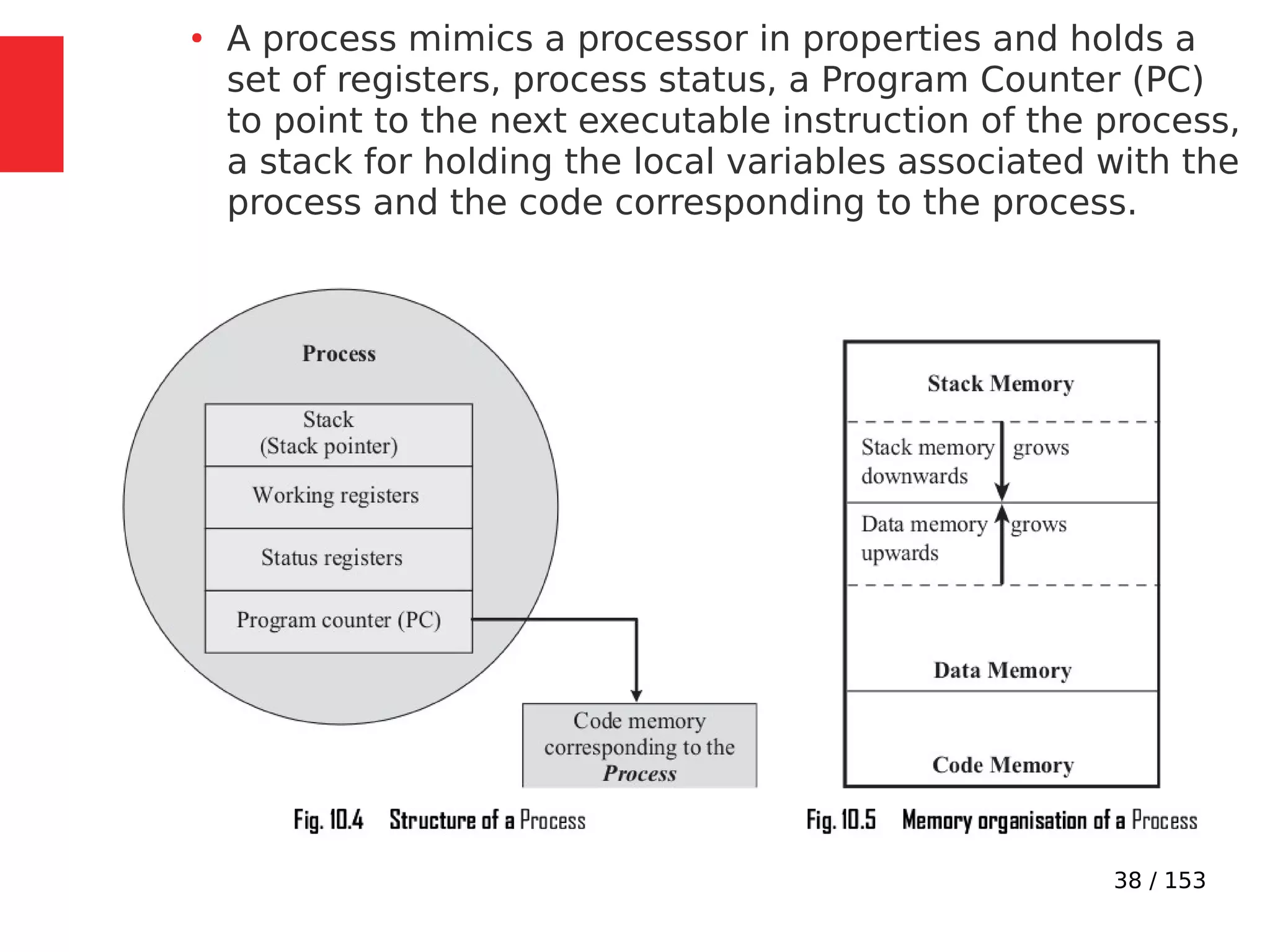
  • 153.
    153 / 153 –Certain Operating Systems may be superior in performance, but the availability of tools for supporting the development may be limited. – Explore the different tools available for the OS under consideration. ● Ease of Use – How easy it is to use a commercial RTOS is another important feature that needs to be considered in the RTOS selection. ● After Sales – For a commercial embedded RTOS, after sales in the form of e-mail, on-call services, etc. for bug fixes, critical patch updates and support for production issues, etc. should be analysed thoroughly.