21CS43-Microcontroller and Embedded Systems - Mod 5 Notes
21CS43-Microcontroller and Embedded Systems - Mod 5 Notes
Embedded Sytems Notes
Microcontroller Notes
4th Sem AIML - VTU
operating system basics kernel
process management
File system Management
IO device
management
Monolithic kernal and microkernal
21CS43-Microcontroller and Embedded Systems - Mod 5 Notes
1.
RTOS and IDEfor Embedded System Design
IDE – Integrated Development
Environment
2.
OPERATING SYSTEM BASICS
The operating system acts as a bridge between
the user applications/tasks and the underlying
system resources through a set of system
functionalities and services.
The OS manages the system resources and makes
them available to the user applications/tasks on a
need basis.
OPERATING SYSTEM BASICS
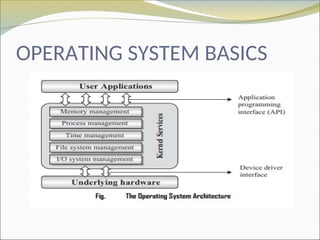
The Kernel
The kernel is the core of the operating system and is
responsible for managing the system resources and the
communication among the hardware and other system
services
forms the heart of an operating system
5.
OPERATING SYSTEM BASICS
The Kernel
Acts as a bridge between applications and data
processing performed at hardware level
It is the part of the OS that always resides in
computer memory and enables the communication
between software and hardware components.
6.
OPERATING SYSTEM BASICS
Process Management
Process management deals with managing the
processes/tasks. Process management includes
setting up the memory space for the process,
loading the process’s code into the memory
space, allocating system resources, scheduling
and managing the execution of the process
7.
OPERATING SYSTEM BASICS
Primary Memory Management
The term primary memory refers to the volatile
memory (RAM) where processes are loaded and
variables and shared data associated with each
process are stored.
The Memory Management Unit (MMU) of the
kernel is responsible for
1. Keeping track of which part of the memory area
is currently used by which process
2. Allocating and De-allocating memory space on a
need basis (Dynamic memory allocation).
8.
OPERATING SYSTEM BASICS
File System Management
File is a collection of related information.
A file could be a program (source code or
executable), text fi les, image files, word
documents, audio/video fi les, etc.
Each of these files differ in the kind of
information they hold and the way in which the
information is stored
9.
OPERATING SYSTEM BASICS
The file system management service of Kernel is
responsible for
1.The creation, deletion and alteration of files
2. Creation, deletion and alteration of directories
3.Saving of files in the secondary storage memory
(e.g. Hard disk storage)
4. Providing automatic allocation of file space
based on the amount of free space available
5. Providing a flexible naming convention for the
files
10.
OPERATING SYSTEM BASICS
I/O System (Device) Management
Kernel is responsible for routing the I/O requests
coming from different user applications to the
appropriate I/O devices of the system.
In a well-structured OS, the direct accessing of
I/O devices are not allowed and the access to
them are provided through a set of Application
Programming Interfaces (APIs) exposed by the
kernel
11.
OPERATING SYSTEM BASICS
Secondary Storage Management
The secondary storage management deals with
managing the secondary storage memory
devices, if any, connected to the system.
In most of the systems, the secondary storage is
kept in disks (Hard Disk).
The secondary storage management service of
kernel deals with
1.Disk storage allocation
2.Disk scheduling (Time interval at which the disk
is activated to backup data)
3. Free Disk space management
12.
OPERATING SYSTEM BASICS
Kernel Space and User Space
Kernal Space : The program code corresponding
to the kernel applications/services
The memory space at which the kernel code is
located is known as ‘ Kernel Space’
all user applications are loaded to a specific area
of primary memory and this memory area is
referred as ‘ User Space
13.
OPERATING SYSTEM BASICS
Monolithic Kernel and Microkernel
Monolithic Kernel
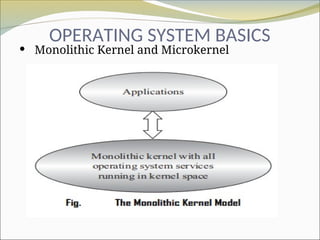
In monolithic kernel architecture, all kernel
services run in the kernel space.
Here all kernel modules run within the same
memory space under a single kernel thread.
The tight internal integration of kernel modules
allows the effective utilisation of the low-level
features
OPERATING SYSTEM BASICS
Monolithic Kernel and Microkernel
The major drawback of monolithic kernel is that
any error or failure in any one of the kernel
modules leads to the crashing of the entire
kernel application.
LINUX, SOLARIS, MS-DOS kernels are examples
of monolithic kernel.
16.
OPERATING SYSTEM BASICS
Monolithic Kernel and Microkernel
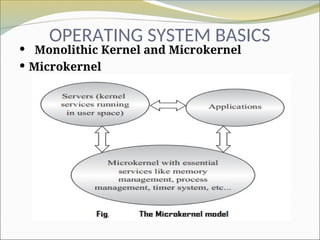
Microkernel
The microkernel design incorporates only the
essential set of Operating System services into
the kernel.
The rest of the Operating System services are
implemented in programs known as ‘Servers’
which runs in user space