Windows Operating SystemInternals - by David A. Solomon and Mark E. Russinovich with Andreas Polze
Windows Operating System Internals - by David A. Solomon and Mark E. Russinovich with Andreas Polze
Unit OS1:
Unit OS1:
Overview of Operating Systems
Overview of Operating Systems
1.2. The Evolution of Operating Systems
1.2. The Evolution of Operating Systems
3
Roadmap for Section1.2.
Roadmap for Section 1.2.
History of Operating Systems
History of Operating Systems
Tasks of an Operating System
Tasks of an Operating System
OS as extension of the hardware
OS as extension of the hardware
Main concepts: processes, files, system calls
Main concepts: processes, files, system calls
Operating system structuring
Operating system structuring
4.
4
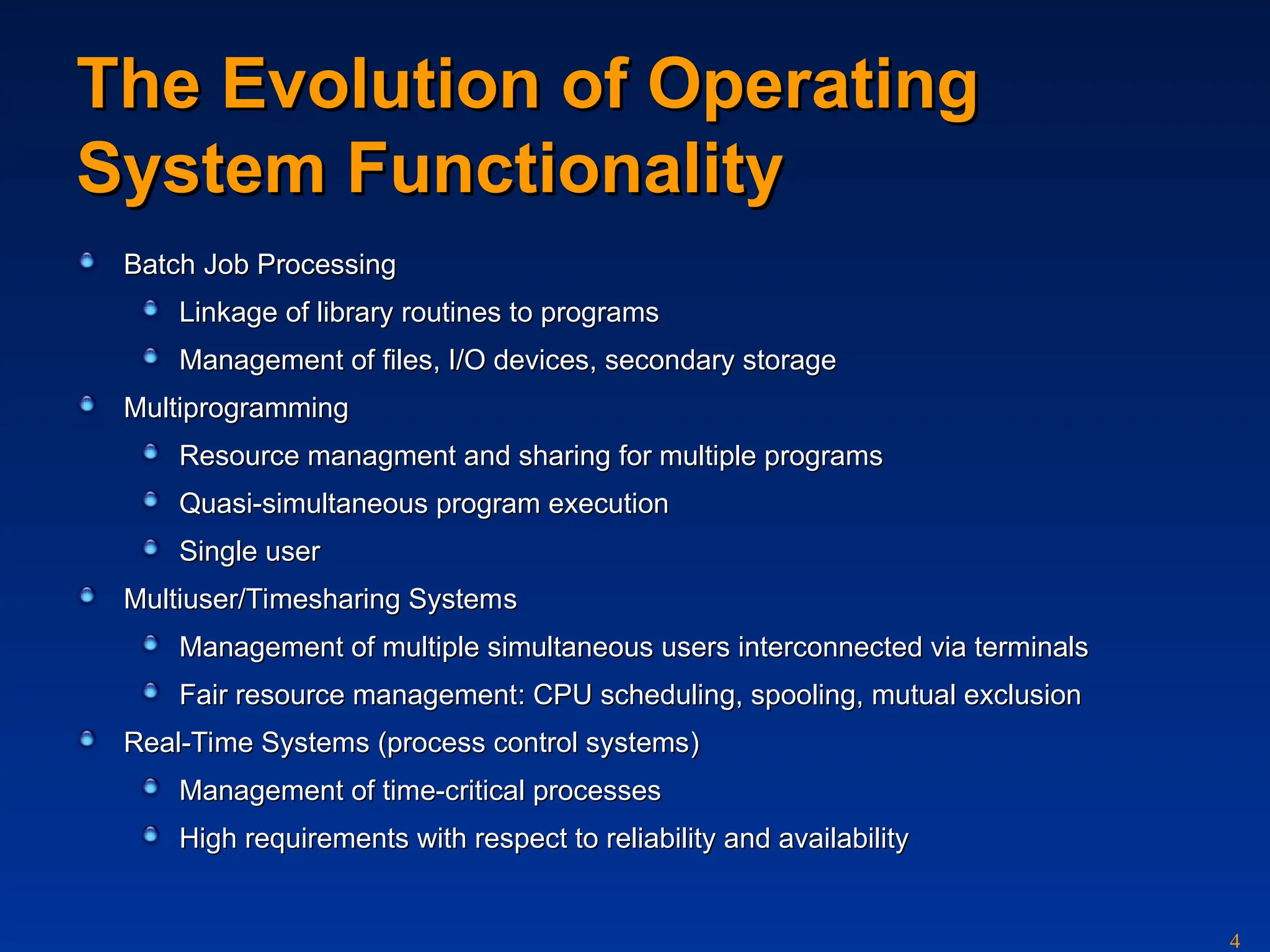
The Evolution ofOperating
The Evolution of Operating
System Functionality
System Functionality
Batch
Batch Job
Job Processing
Processing
Linkage of library routines to programs
Linkage of library routines to programs
Management of files, I/O devices, secondary storage
Management of files, I/O devices, secondary storage
Multiprogramming
Multiprogramming
Resource managment and sharing for multiple programs
Resource managment and sharing for multiple programs
Quasi-
Quasi-simultaneous program execution
simultaneous program execution
Single user
Single user
Multiuser/Timesharing System
Multiuser/Timesharing Systems
s
Management of multiple simultaneous users interconnected via terminals
Management of multiple simultaneous users interconnected via terminals
Fair resource management
Fair resource management:
: CPU
CPU scheduling
scheduling, spooling, mutual exclusion
, spooling, mutual exclusion
Real-Time System
Real-Time Systems
s (
(process control systems
process control systems)
)
Management of time-critical processes
Management of time-critical processes
High requirements with respect to reliability and availability
High requirements with respect to reliability and availability
5.
5
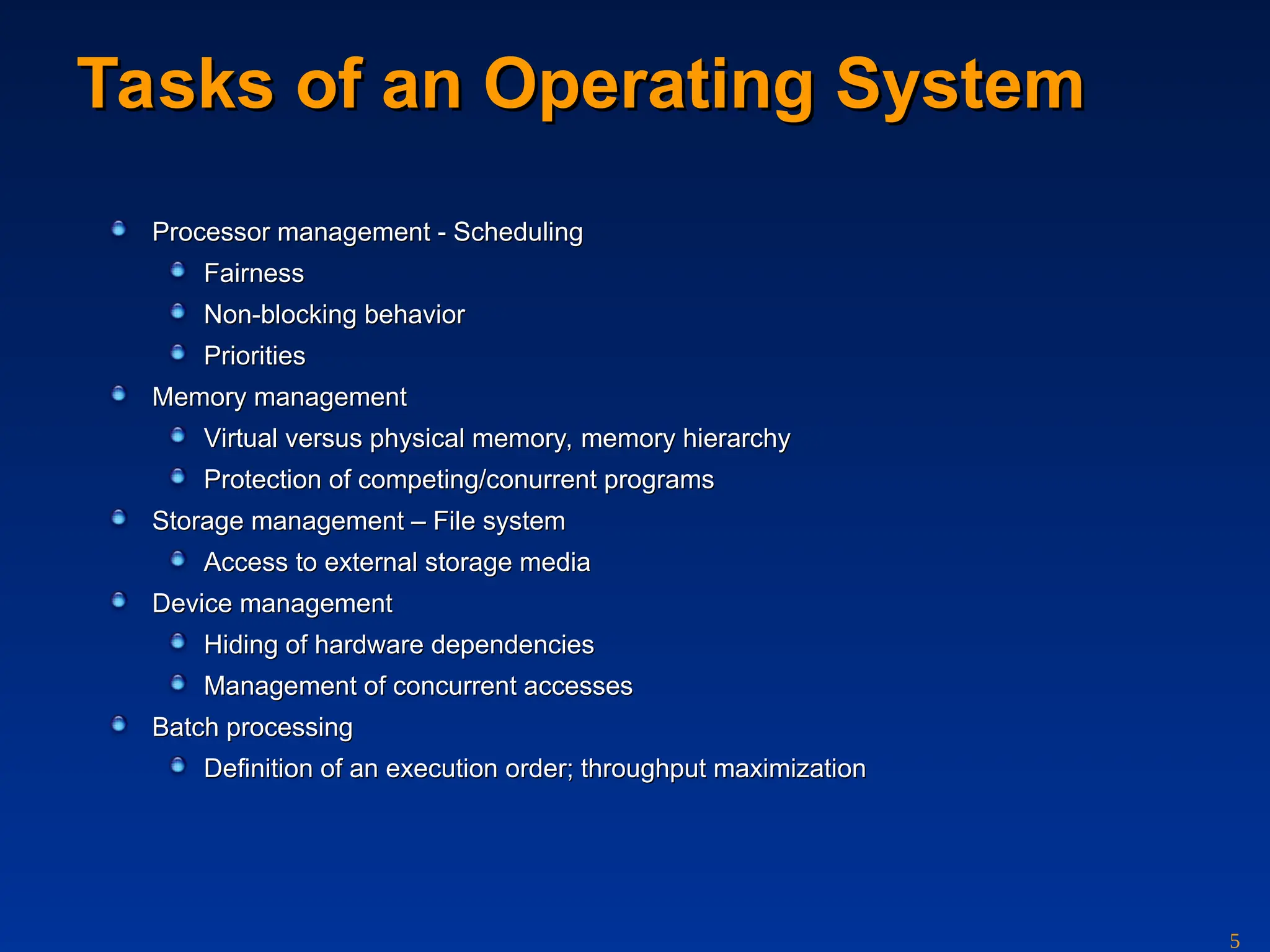
Tasks of anOperating System
Tasks of an Operating System
Processor management
Processor management - Scheduling
- Scheduling
Fairness
Fairness
Non-blocking behavior
Non-blocking behavior
Priorities
Priorities
Memory management
Memory management
V
Virtu
irtual
al versus physi
versus physical
cal memory, memory hierarchy
memory, memory hierarchy
Protection of competing/conurrent programs
Protection of competing/conurrent programs
Storage management
Storage management – File
– File system
system
Access to external storage media
Access to external storage media
Device management
Device management
Hiding of hardware dependencies
Hiding of hardware dependencies
Management of concurrent accesses
Management of concurrent accesses
Batch
Batch p
processing
rocessing
Definition of an execution order; throughput maximization
Definition of an execution order; throughput maximization
6.
6
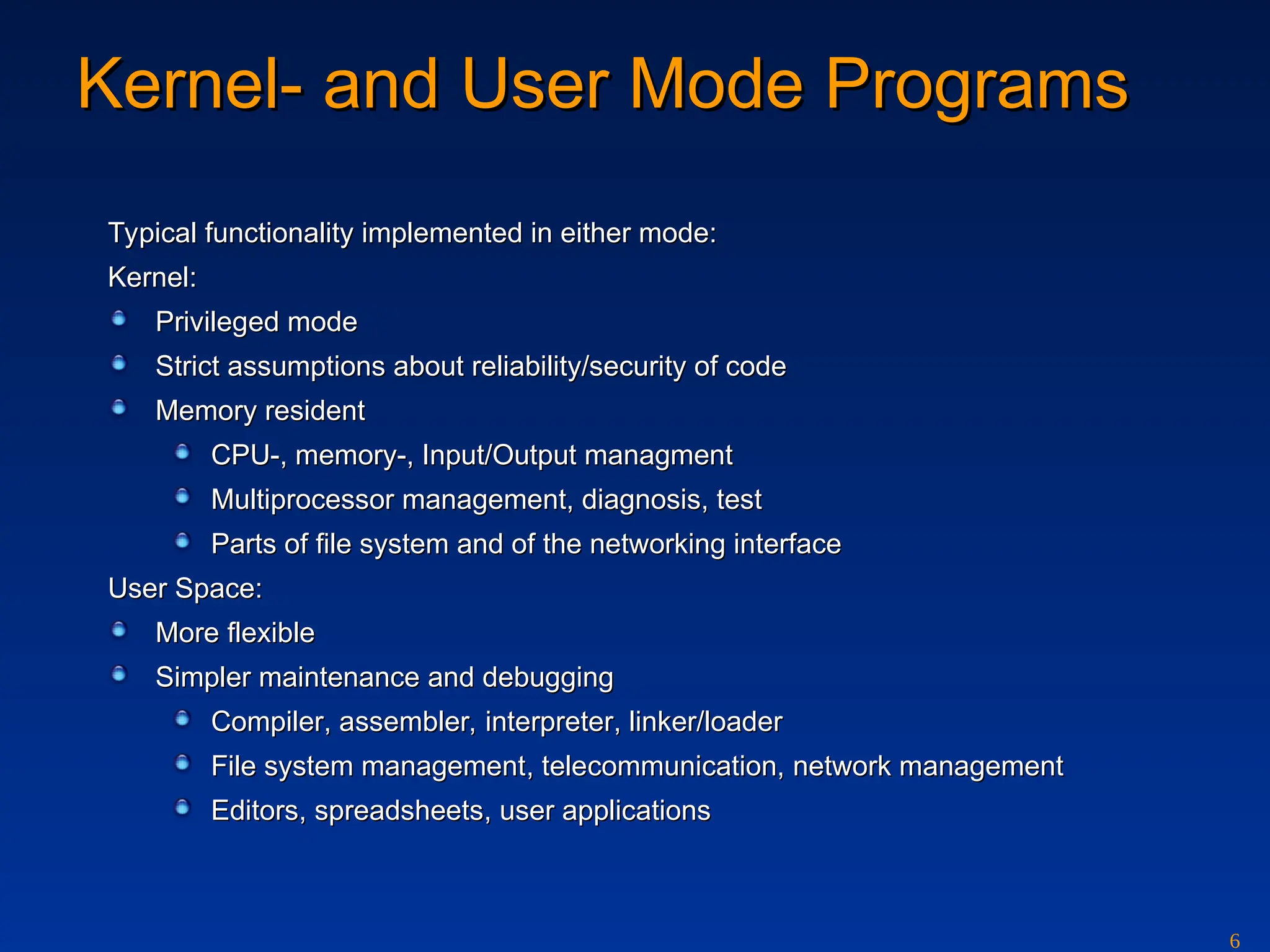
Kernel-
Kernel- and
and UserMode
User Mode Programs
Programs
Typical functionality implemented in either mode:
Typical functionality implemented in either mode:
Kernel:
Kernel:
Privileg
Privileged mode
ed mode
Strict assumptions about reliability/security of code
Strict assumptions about reliability/security of code
Memory resident
Memory resident
CPU-, memory-, Input/Output managment
CPU-, memory-, Input/Output managment
Multiprocessor management, diagnosis, test
Multiprocessor management, diagnosis, test
Parts of file system and of the networking interface
Parts of file system and of the networking interface
User Space:
User Space:
More flexible
More flexible
Simpler maintenance and debugging
Simpler maintenance and debugging
Compiler
Compiler, a
, assembler,
ssembler, i
interpreter
nterpreter, linker/loader
, linker/loader
File system management
File system management,
, t
tele
elec
communi
ommunic
cation,
ation, network management
network management
Editor
Editors
s,
, spreadsheets
spreadsheets,
, user applications
user applications
7.
7
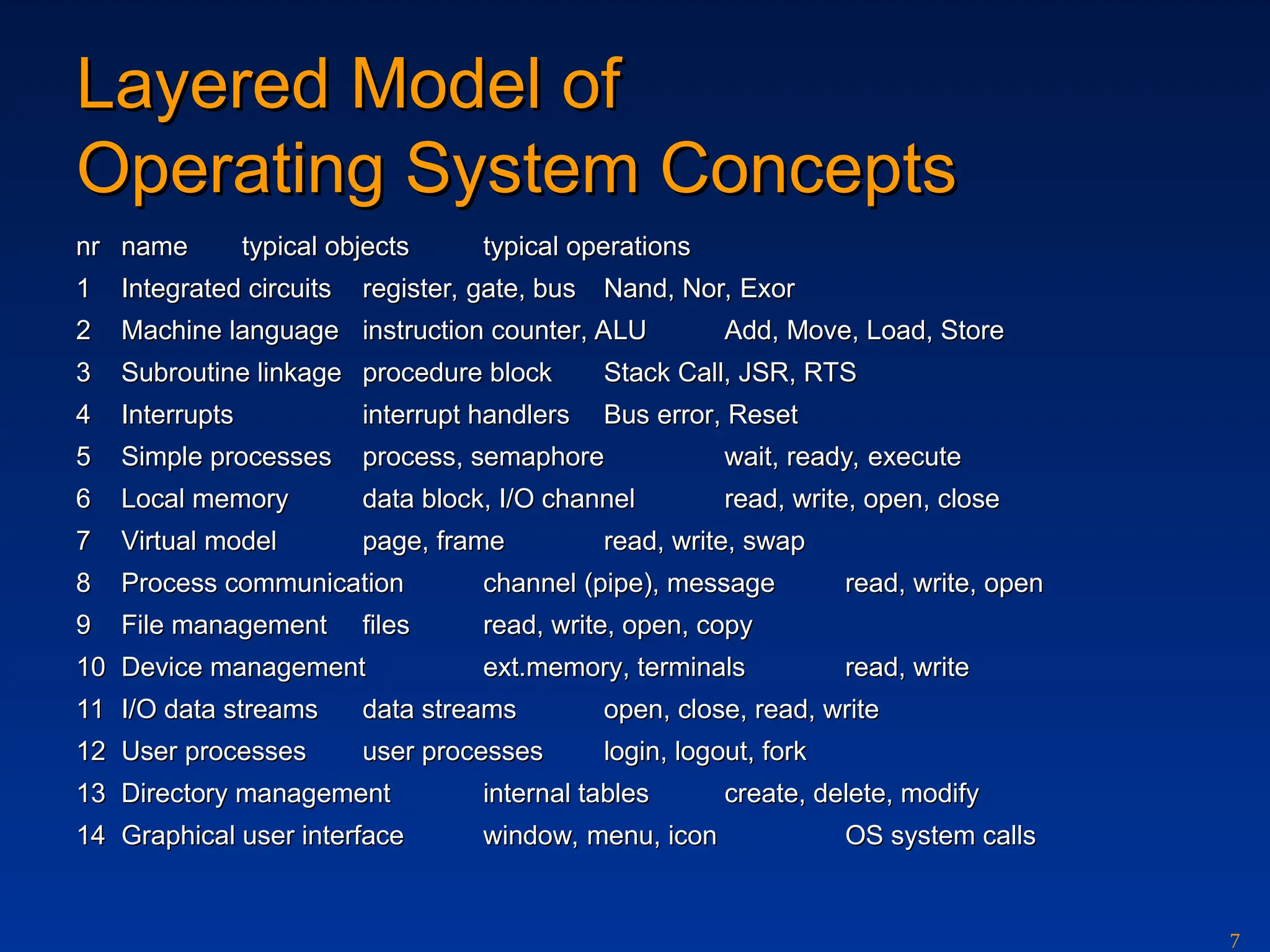
Layered Model of
LayeredModel of
Operating System Concepts
Operating System Concepts
n
nr
r n
name
ame typ
typical
ical o
obje
bjec
ct
ts
s typical
typical o
operation
perations
s
1
1 Integrated circuits
Integrated circuits r
register,
egister, gate
gate,
, b
bus
us Nand, Nor, Exor
Nand, Nor, Exor
2
2 Machine language
Machine language inst
instr
ruction counter
uction counter, ALU
, ALU Add, Move, Load, Store
Add, Move, Load, Store
3
3 Subroutine linkage
Subroutine linkage procedure block
procedure block Stack Call, JSR, RTS
Stack Call, JSR, RTS
4
4 Interrupts
Interrupts interrupt handlers
interrupt handlers Bus
Bus error
error, Reset
, Reset
5
5 Simple p
Simple pro
roc
cesse
esses
s process
process,
, s
semaphor
emaphore
e wait, ready, execute
wait, ready, execute
6
6 Local memory
Local memory data block
data block,
, I/O channel
I/O channel read, write, open, close
read, write, open, close
7
7 V
Virtu
irtua
al
l model
model page, frame
page, frame read, write, swap
read, write, swap
8
8 Process communication
Process communication channel
channel (pipe),
(pipe), message
message read, write, open
read, write, open
9
9 File management
File management files
files read, write, open, copy
read, write, open, copy
10
10 Device management
Device management ext.
ext.memory
memory,
, t
terminals
erminals read, write
read, write
11
11 I/O data streams
I/O data streams data streams
data streams open, close, read, write
open, close, read, write
12
12 User processes
User processes user processes
user processes login, logout, fork
login, logout, fork
13
13 Directory management
Directory management intern
internal tables
al tables create, delete, modify
create, delete, modify
14
14 Graphical user interface
Graphical user interface window, menu, icon
window, menu, icon OS system calls
OS system calls
8.
8
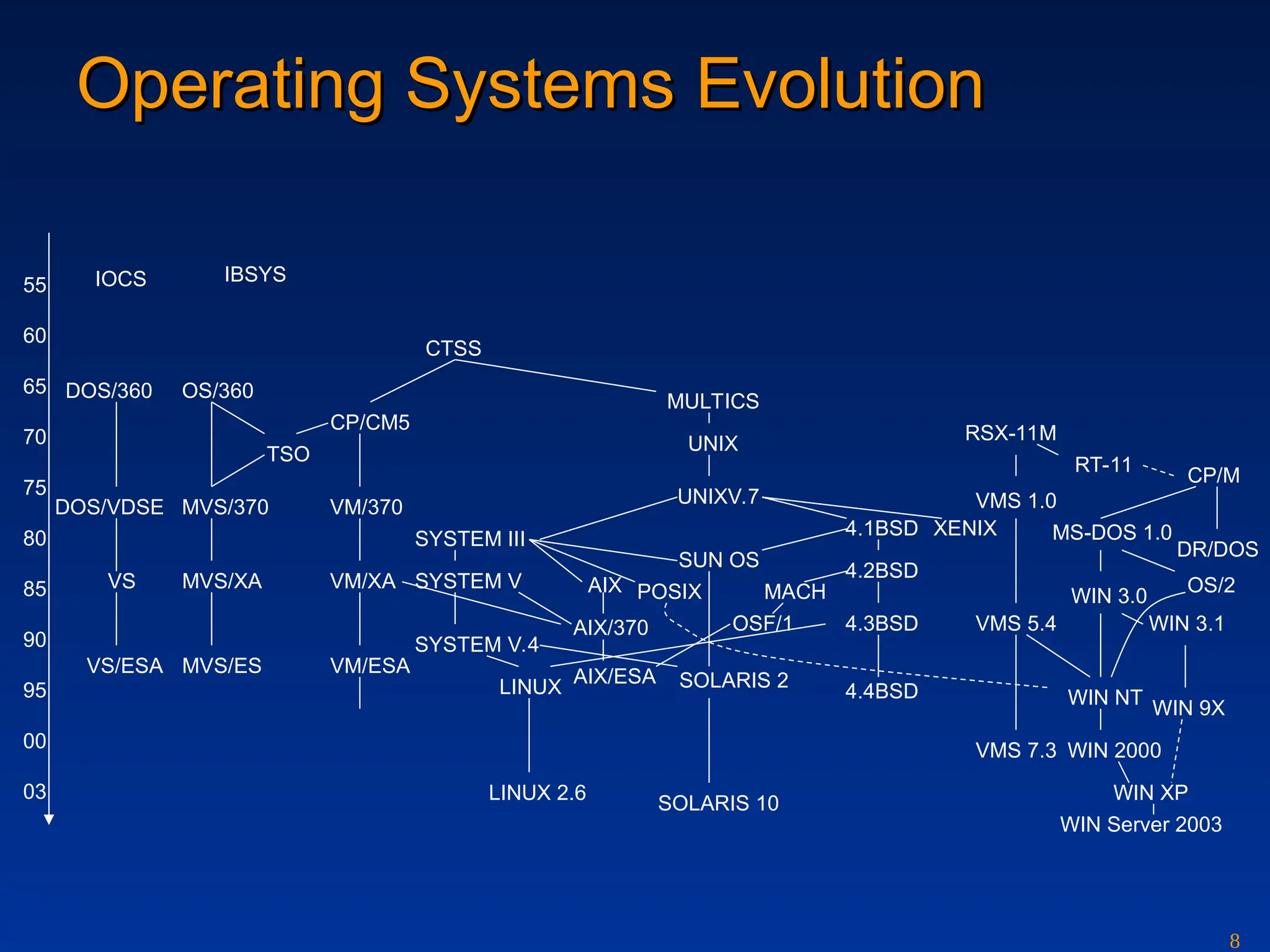
Operating Systems
Operating SystemsEvolution
Evolution
55
60
65
70
75
80
85
90
95
00
03
IOCS
DOS/360
DOS/VDSE
VS
VS/ESA
OS/360
MVS/370
MVS/XA
MVS/ES
TSO
IBSYS
CTSS
CP/CM5
VM/370
VM/XA
VM/ESA
SYSTEM III
SYSTEM V
SYSTEM V.4
MULTICS
UNIX
UNIXV.7
AIX/370
AIX
SUN OS
POSIX
SOLARIS 2
4.1BSD
4.2BSD
4.3BSD
4.4BSD
MACH
OSF/1
AIX/ESA
XENIX MS-DOS 1.0
CP/M
DR/DOS
OS/2
WIN 3.0
WIN NT
WIN 2000
WIN 9X
WIN XP
LINUX
RSX-11M
VMS 1.0
VMS 5.4
VMS 7.3
WIN 3.1
SOLARIS 10
RT-11
LINUX 2.6
WIN Server 2003
9.
9
Structuring of OperatingSystems
Structuring of Operating Systems
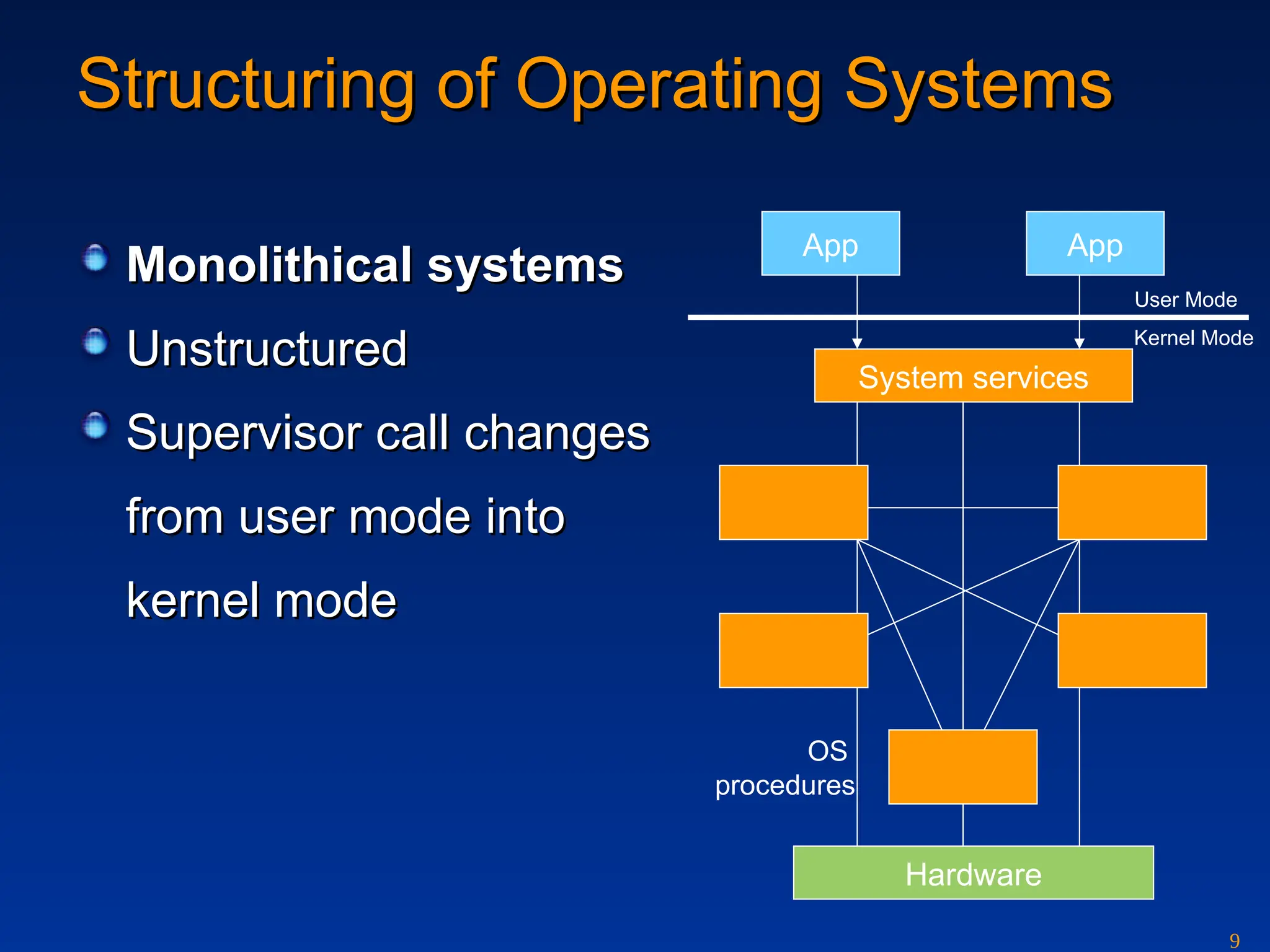
Monolithical systems
Monolithical systems
Unstructured
Unstructured
Supervisor call
Supervisor call changes
changes
from
from user mode in
user mode into
to
kernel mode
kernel mode
App App
System services
Hardware
OS
procedures
User Mode
Kernel Mode
10.
10
Layered OS
Layered OS
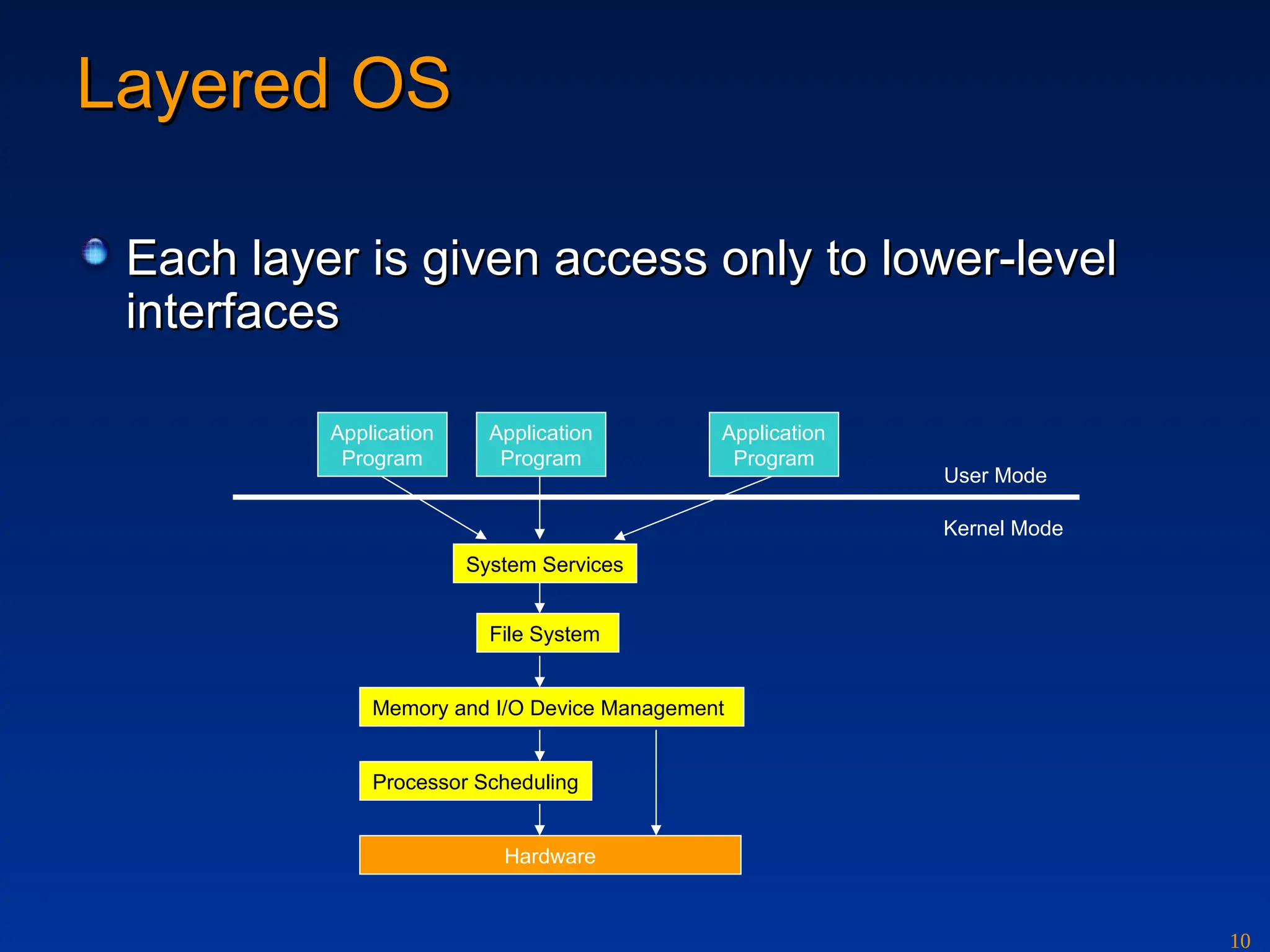
Eachlayer is given access only to lower-level
Each layer is given access only to lower-level
interfaces
interfaces
Application
Program
Application
Program
Application
Program
System Services
File System
Memory and I/O Device Management
Processor Scheduling
Hardware
User Mode
Kernel Mode
11.
11
Microkernel OS
Microkernel OS
(Client/serverOS)
(Client/server OS)
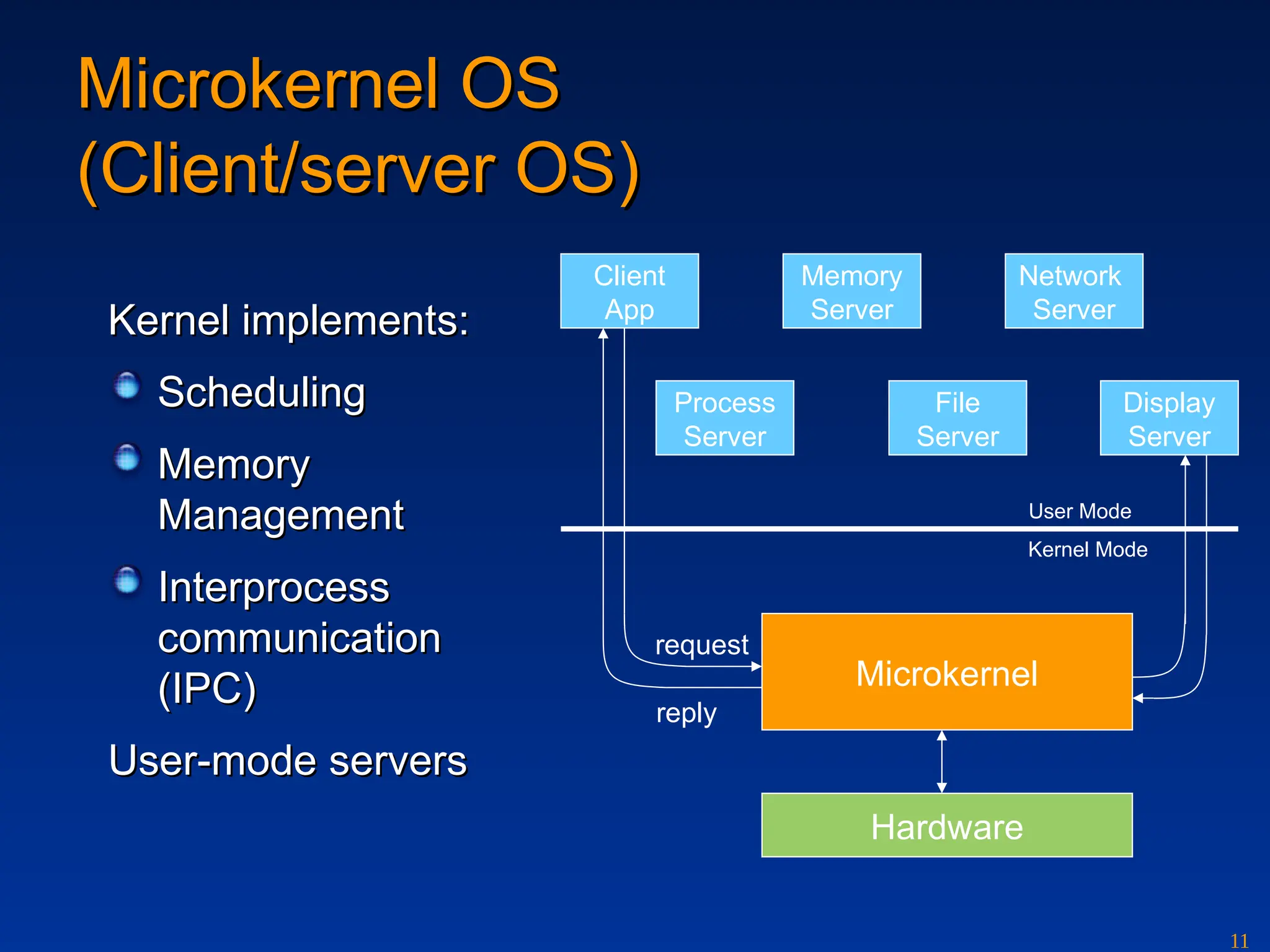
Kernel implements:
Kernel implements:
Scheduling
Scheduling
Memory
Memory
Management
Management
Interprocess
Interprocess
communication
communication
(IPC)
(IPC)
User-mode servers
User-mode servers
Memory
Server
Client
App
Network
Server
Process
Server
File
Server
Display
Server
Microkernel
Hardware
request
reply
User Mode
Kernel Mode
12.
12
VMS and Windows
VMSand Windows
- a bird’s-eye view on architectures
- a bird’s-eye view on architectures
System-wide data structures
Memory
Management
I/O Subsystem
Process and
time management
System services
Kernel
Record Management Service (RMS)
Executive
Command Language Interpreter (CLI)
Supervisor
Platform-Adaptation Layer (PAL) - Alpha
Support Libraries
Utilities
Program
Development Tools
Layered Products
(Apps)
User
Layered design for VAX/VMS
operating system
Windows
high-level architecture
OS/2
Windows
POSIX
Environment Subsystems
User
Application
Subsystem DLL
Windows
User/GDI
Device
Driver
Executive
Device Drivers Kernel
Hardware Abstraction Layer (HAL)
User
Mode
Kernel
Mode
System
& Service
Processes
Windows
13.
13
Release History
Release History
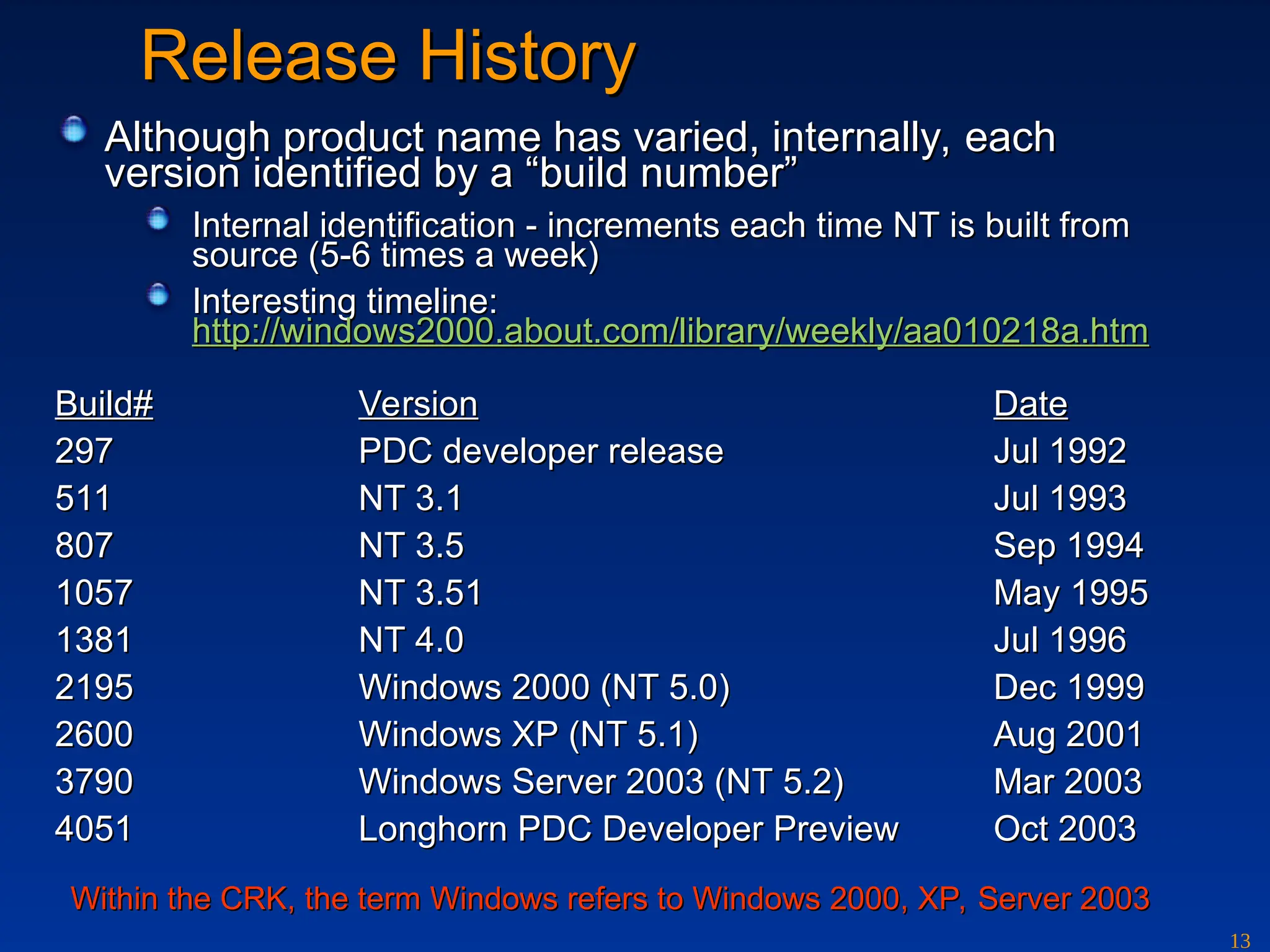
Althoughproduct name has varied, internally, each
Although product name has varied, internally, each
version identified by a “build number”
version identified by a “build number”
Internal identification - increments each time NT is built from
Internal identification - increments each time NT is built from
source (5-6 times a week)
source (5-6 times a week)
Interesting timeline:
Interesting timeline:
http://windows2000.about.com/library/weekly/aa010218a.htm
http://windows2000.about.com/library/weekly/aa010218a.htm
Build#
Build# Version
Version Date
Date
297
297 PDC developer release
PDC developer release Jul 1992
Jul 1992
511
511 NT 3.1
NT 3.1 Jul 1993
Jul 1993
807
807 NT 3.5
NT 3.5 Sep 1994
Sep 1994
1057
1057 NT 3.51
NT 3.51 May 1995
May 1995
1381
1381 NT 4.0
NT 4.0 Jul 1996
Jul 1996
2195
2195 Windows 2000 (NT 5.0)
Windows 2000 (NT 5.0) Dec 1999
Dec 1999
2600
2600 Windows XP (NT 5.1)
Windows XP (NT 5.1) Aug 2001
Aug 2001
3790
3790 Windows Server 2003 (NT 5.2)
Windows Server 2003 (NT 5.2) Mar 2003
Mar 2003
4051
4051 Longhorn PDC Developer Preview
Longhorn PDC Developer Preview Oct 2003
Oct 2003
Within the CRK, the term Windows refers to Windows 2000, XP, Server 2003
Within the CRK, the term Windows refers to Windows 2000, XP, Server 2003
14.
14
Windows And LinuxEvolution
Windows And Linux Evolution
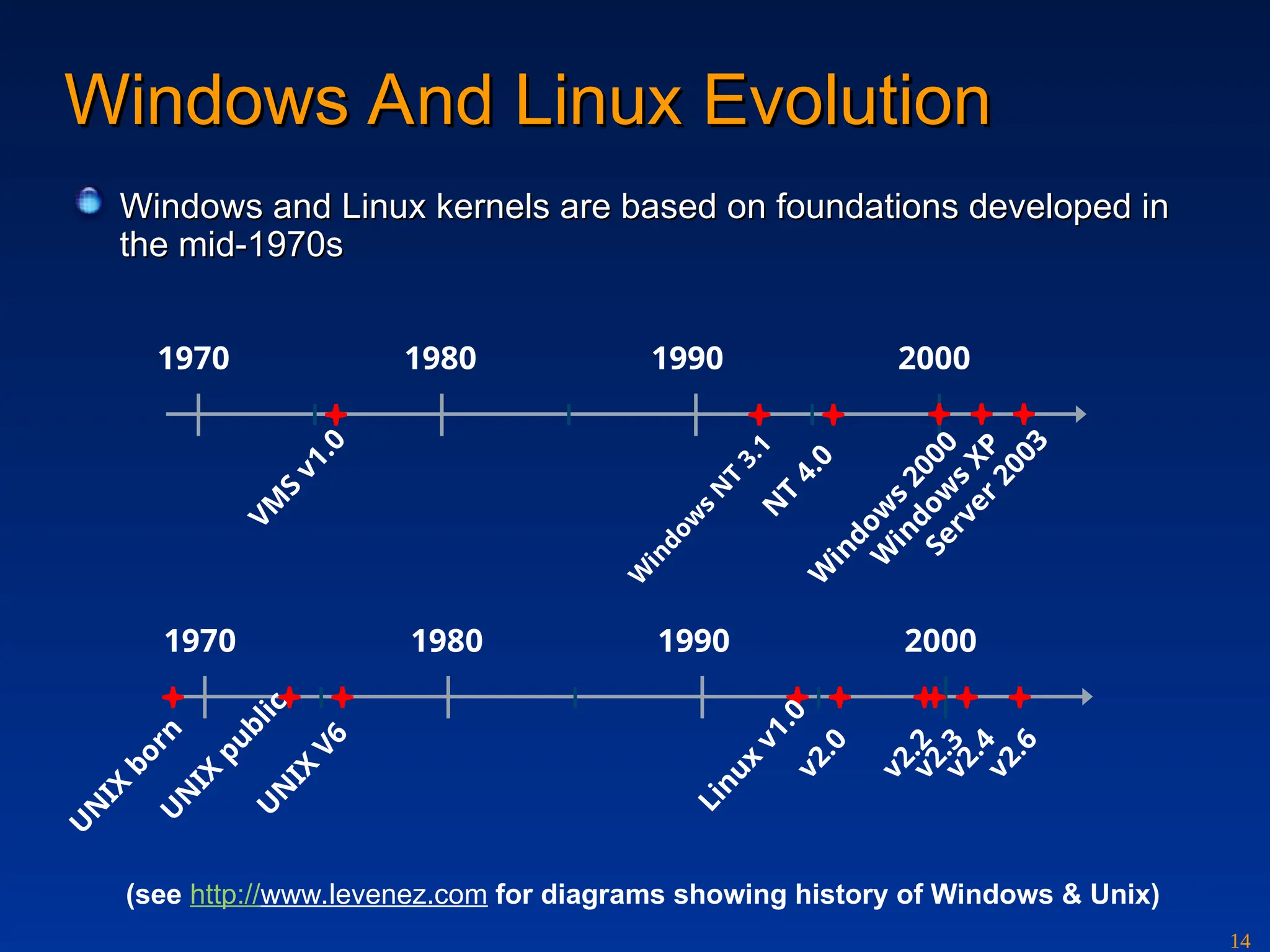
Windows and Linux kernels are based on foundations developed in
Windows and Linux kernels are based on foundations developed in
the mid-1970s
the mid-1970s
1970 1980 1990 2000
V
M
S
v
1
.
0
W
i
n
d
o
w
s
N
T
3
.
1
N
T
4
.
0
W
i
n
d
o
w
s
2
0
0
0
W
i
n
d
o
w
s
X
P
S
e
r
v
e
r
2
0
0
3
1970 1980 1990 2000
U
N
I
X
b
o
r
n
U
N
I
X
p
u
b
l
i
c
U
N
I
X
V
6
L
i
n
u
x
v
1
.
0
v
2
.
0
v
2
.
2
v
2
.
3
v
2
.
4
v
2
.
6
(see http://www.levenez.com for diagrams showing history of Windows & Unix)
15.
15
Further Reading
Further Reading
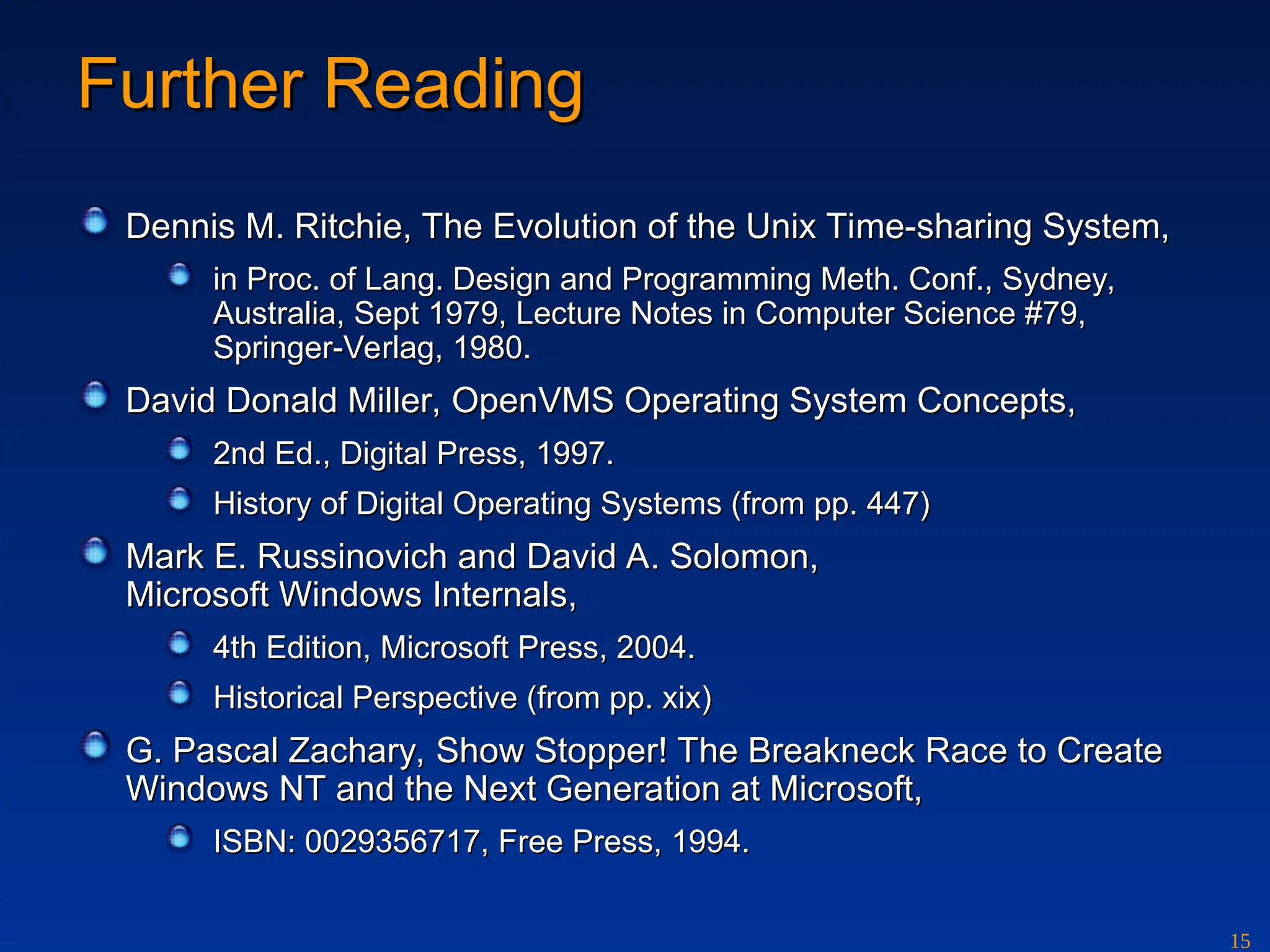
DennisM. Ritchie, The Evolution of the Unix Time-sharing System,
Dennis M. Ritchie, The Evolution of the Unix Time-sharing System,
in Proc. of Lang. Design and Programming Meth. Conf., Sydney,
in Proc. of Lang. Design and Programming Meth. Conf., Sydney,
Australia, Sept 1979, Lecture Notes in Computer Science #79,
Australia, Sept 1979, Lecture Notes in Computer Science #79,
Springer-Verlag, 1980.
Springer-Verlag, 1980.
David Donald Miller, OpenVMS Operating System Concepts,
David Donald Miller, OpenVMS Operating System Concepts,
2nd Ed., Digital Press, 1997.
2nd Ed., Digital Press, 1997.
History of Digital Operating Systems (from pp. 447)
History of Digital Operating Systems (from pp. 447)
Mark E. Russinovich and David A. Solomon,
Mark E. Russinovich and David A. Solomon,
Microsoft Windows Internals,
Microsoft Windows Internals,
4th Edition, Microsoft Press, 2004.
4th Edition, Microsoft Press, 2004.
Historical Perspective (from pp. xix)
Historical Perspective (from pp. xix)
G. Pascal Zachary, Show Stopper! The Breakneck Race to Create
G. Pascal Zachary, Show Stopper! The Breakneck Race to Create
Windows NT and the Next Generation at Microsoft,
Windows NT and the Next Generation at Microsoft,
ISBN: 0029356717, Free Press, 1994.
ISBN: 0029356717, Free Press, 1994.
Editor's Notes
#3 An operating system is a program that acts as an intermediary between a user of a computer and the computer hardware. The purpose of an operating system is to provide an environment in which a user can execute programs. The primary goal is thus to make the computer system convenient to use. A secondary goal is to use the computer hardware in an efficient manner.
A computer system can be divided roughly into four components: the hardware, the operating system, the applications programs, and the users. The hardware – the central processing unit (CPU), memory, and input/output (I/O) devices – provides the basic computing resources. The application programs – such as compilers, database systems, games, and business programs – define the ways in which these resources are used to solve the computing problems of the users. There may be many different users and many different application programs. The operating system controls and coordinates the use of hardware among the various applications programs for the various users.
#8 This diagram represents only a small fraction of the world of desktop operating systems. Due to space limitations, some important candidates had to be excluded from the picture.
For comprehensive diagrams showing the Unix and Windows OS evolution see:
http://www.levenez.com
#11 Is Windows a Microkernel-Based System?
Although some claim it as such, Windows isn’t a microkernel-based operating system in the classic definition of microkernels, where the principal operating system components (such as the memory manager, process manager, and I/O manager) run as separate processes in their own private address spaces, layered on a primitive set of services the microkernel provides. For example, the Carnegie Mellon University Mach operating system, a contemporary example of a microkernel architecture, implements a minimal kernel that comprises thread scheduling, message passing, virtual memory, and device drivers. Everything else, including various APIs, file systems, and networking, runs in user mode. However, commercial implementations of the Mach microkernel operating system typically run at least all file system, networking, and memory management code in kernel mode. The reason is simple: the pure microkernel design is commercially impractical because it’s too inefficient.
#12 The VMS operating system and the VAX architecture were designed at the same time - several features of the VAX architecture can be traced to specific usages in the operating system.
One particular design feature is the four modes of protection enforced by the hardware (Kernel, Executive, Supervisor, and User).
The full instruction set of the VAX is available to programs executing in kernel mode. The entire VMS database (scheduler, IS, and memory) is accessible only in kernel mode. Most of the system services operate in kernel mode.
The executive modes is reserved for RMS, the Record Management Services, responsible for managing all files on disk. The Command Language Interpreter (CLI) executes in supervisor mode, calling both RMS and VMS kernel services. The least privileged and by far the greatest number of programs execute in user mode, as do the utilities, compiler, editors, and certain Digital products.
The architecture of Windows also uses a layered design. However, Windows uses only two different protection modes, namely kernel mode (privileged) and user mode. Interestingly enough, the VAX/VMS design has influenced the feature set of other processor architectures as well - even the Intel 80368 series of CPUs supports four distinct protection modes (ring 0..3).
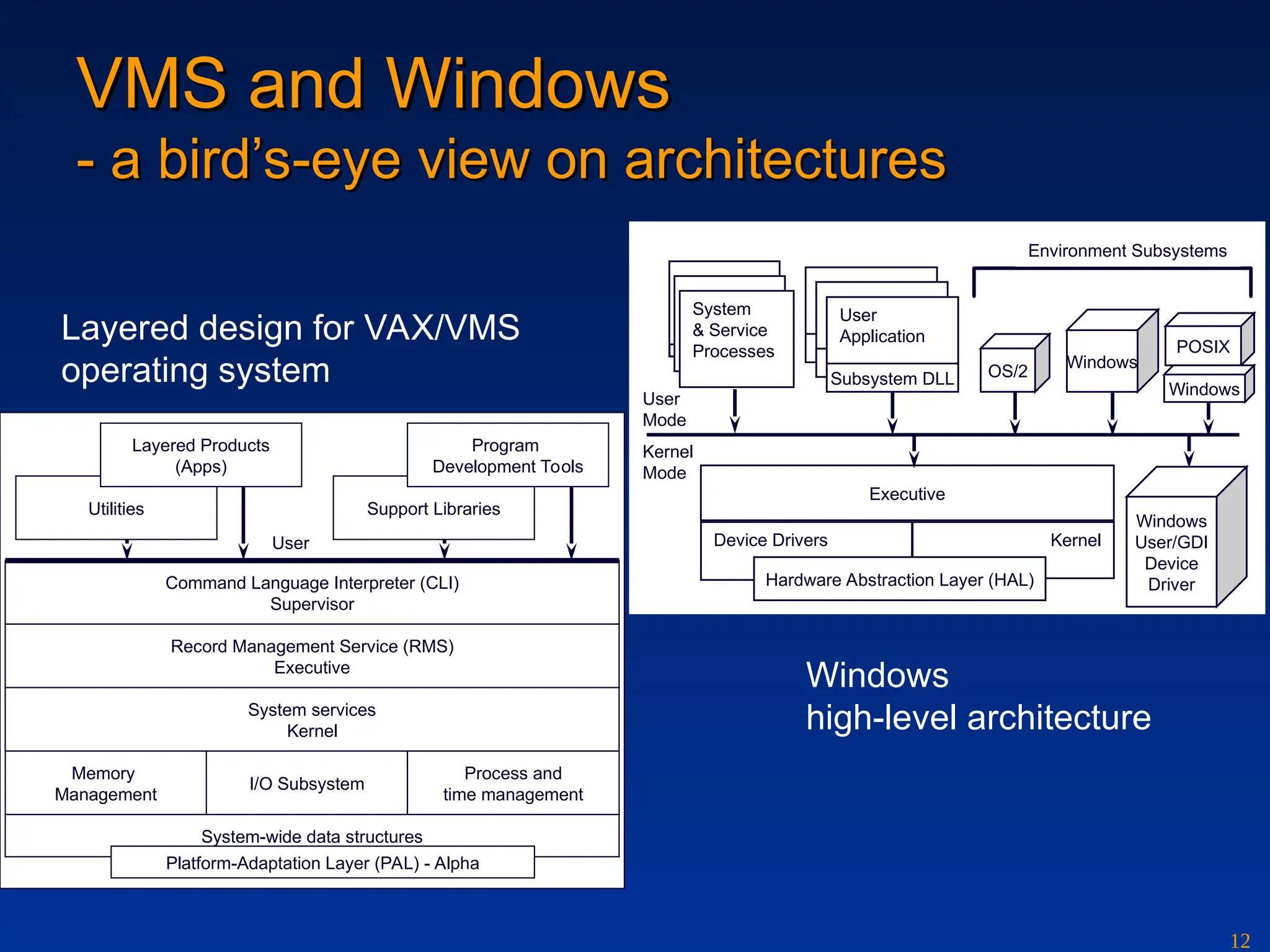


![Vibe Coding vs. Spec-Driven Development [Free Meetup]](https://cdn.slidesharecdn.com/ss_thumbnails/vibecodingvsspecdrivendevelopment-251209105622-43f455e7-thumbnail.jpg?width=640&height=640&fit=bounds)


