Azure SignalR Service
Udaiappa Ramachandran ( Udai )
https://udai.io
Who am I?
• Udaiappa Ramachandran ( Udai )
• CTO, Akumina, Inc.,
• Consultant
• Focus on Cloud Computing
• Microsoft Azure, Amazon Web Services and Google
• New Hampshire Cloud User Group (http://www.meetup.com/nashuaug )
• https://udai.io
Agenda
• Real-time Web
• Polling and Long Polling
• Server Sent Events (SSE)
• WebSockets
• SignalR
• Azure SignalR Service
• Demo
Real-time Web
• Monitoring
• Dashboard
• Email Clients
• Social media
• Auctions
• Stocks Quote
• Flight Tracking
• Gaming
Real-time Web
• Polling
• Long Polling
• Server Sent Events
• WebSockets
• SignalR
• Azure SignalR
Polling and Long Polling
• Polling
• Http Request between Client and Server
• clients to periodically poll information from the server through an HTTP request
• Long Polling
• clients to periodically poll information from the server through an HTTP request
• Client makes the request and wait for the response (or update)
• Client may time out (if no update) then client creates new request to server
• No need to repeat the call (ex., setTimeout) in client, instead server iterates until update
available (ex., Thread.Sleep(…))
• Better than polling but still needs http request
Server Sent Events (SSE)
• SSE is a unidirectional protocol to push messages from server to client
(Server creates http connection to client)
• Client wait for message (stream) from Server
• Client communicates using EventSource (ex., new EventSource(‘<EndPoint>’))
• Connection left open until closed
• Max Http connection issue (6 connection allowed)
• Better than polling or long polling
• Supports Auto Reconnect
• Works only in modern browsers (HTML5 feature)
• Text based message only
Web Sockets
• bidirectional and full-duplex communication protocol over a single TCP
connection
• Full duplex messaging
• No http connection limit
• Multi Data-Type support
• TCP Upgrade
• Mesasge Types: Text, Binary, Ping/Pong, Close
• Client uses WebSocket class (ex., “ws://<server>/”)
SignalR
• Uses RPC to communicate client and server
• ASP.NET Core and ASP.NET
• With ASP.NET Core Light weight, fast, cross platform
• Transport: WebSocket, SSE, Long Polling
• Fall back based on the supported transport
• Hub: Server-Side implementation to send and receive a message from client
• Send message to Connected, All, Users and Groups
• JSON or MessagePack
• Single Hub per connection
• Sticky is required
SignalR – Scale out
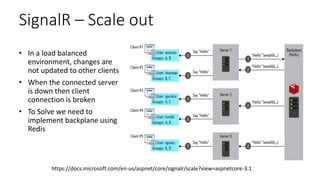
• In a load balanced
environment, changes are
not updated to other clients
• When the connected server
is down then client
connection is broken
• To Solve we need to
implement backplane using
Redis
https://docs.microsoft.com/en-us/aspnet/core/signalr/scale?view=aspnetcore-3.1
Azure SignalR Service
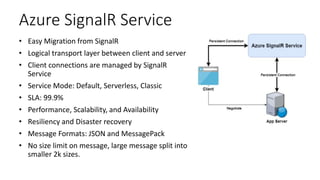
• Easy Migration from SignalR
• Logical transport layer between client and server
• Client connections are managed by SignalR
Service
• Service Mode: Default, Serverless, Classic
• SLA: 99.9%
• Performance, Scalability, and Availability
• Resiliency and Disaster recovery
• Message Formats: JSON and MessagePack
• No size limit on message, large message split into
smaller 2k sizes.
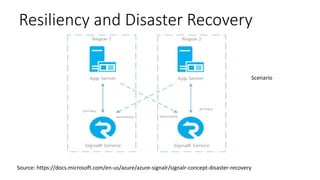
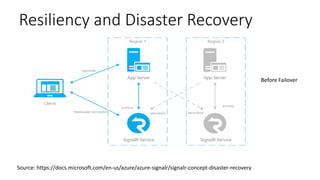
Resiliency and Disaster Recovery
Source: https://docs.microsoft.com/en-us/azure/azure-signalr/signalr-concept-disaster-recovery
Scenario
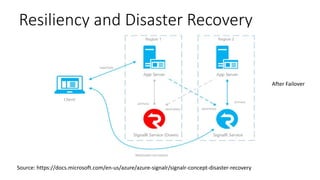
Resiliency and Disaster Recovery
Source: https://docs.microsoft.com/en-us/azure/azure-signalr/signalr-concept-disaster-recovery
Before Failover
Resiliency and Disaster Recovery
Source: https://docs.microsoft.com/en-us/azure/azure-signalr/signalr-concept-disaster-recovery
After Failover
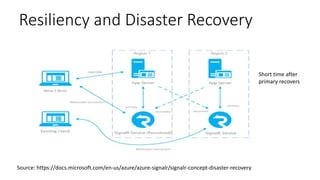
Resiliency and Disaster Recovery
Source: https://docs.microsoft.com/en-us/azure/azure-signalr/signalr-concept-disaster-recovery
Short time after
primary recovers
References
• https://docs.microsoft.com/en-us/azure/azure-signalr/signalr-overview
• https://docs.microsoft.com/en-us/azure/azure-signalr/signalr-concept-disaster-
recovery
• https://docs.microsoft.com/en-us/aspnet/core/signalr/redis-
backplane?view=aspnetcore-3.1
• https://docs.microsoft.com/en-us/aspnet/core/signalr/scale?view=aspnetcore-3.1
• Demo Code: https://github.com/nhcloud/techtalk

Azure signalr service

  • 1.
    Azure SignalR Service UdaiappaRamachandran ( Udai ) https://udai.io
  • 2.
    Who am I? •Udaiappa Ramachandran ( Udai ) • CTO, Akumina, Inc., • Consultant • Focus on Cloud Computing • Microsoft Azure, Amazon Web Services and Google • New Hampshire Cloud User Group (http://www.meetup.com/nashuaug ) • https://udai.io
  • 3.
    Agenda • Real-time Web •Polling and Long Polling • Server Sent Events (SSE) • WebSockets • SignalR • Azure SignalR Service • Demo
  • 4.
    Real-time Web • Monitoring •Dashboard • Email Clients • Social media • Auctions • Stocks Quote • Flight Tracking • Gaming
  • 5.
    Real-time Web • Polling •Long Polling • Server Sent Events • WebSockets • SignalR • Azure SignalR
  • 6.
    Polling and LongPolling • Polling • Http Request between Client and Server • clients to periodically poll information from the server through an HTTP request • Long Polling • clients to periodically poll information from the server through an HTTP request • Client makes the request and wait for the response (or update) • Client may time out (if no update) then client creates new request to server • No need to repeat the call (ex., setTimeout) in client, instead server iterates until update available (ex., Thread.Sleep(…)) • Better than polling but still needs http request
  • 7.
    Server Sent Events(SSE) • SSE is a unidirectional protocol to push messages from server to client (Server creates http connection to client) • Client wait for message (stream) from Server • Client communicates using EventSource (ex., new EventSource(‘<EndPoint>’)) • Connection left open until closed • Max Http connection issue (6 connection allowed) • Better than polling or long polling • Supports Auto Reconnect • Works only in modern browsers (HTML5 feature) • Text based message only
  • 8.
    Web Sockets • bidirectionaland full-duplex communication protocol over a single TCP connection • Full duplex messaging • No http connection limit • Multi Data-Type support • TCP Upgrade • Mesasge Types: Text, Binary, Ping/Pong, Close • Client uses WebSocket class (ex., “ws://<server>/”)
  • 9.
    SignalR • Uses RPCto communicate client and server • ASP.NET Core and ASP.NET • With ASP.NET Core Light weight, fast, cross platform • Transport: WebSocket, SSE, Long Polling • Fall back based on the supported transport • Hub: Server-Side implementation to send and receive a message from client • Send message to Connected, All, Users and Groups • JSON or MessagePack • Single Hub per connection • Sticky is required
  • 10.
    SignalR – Scaleout • In a load balanced environment, changes are not updated to other clients • When the connected server is down then client connection is broken • To Solve we need to implement backplane using Redis https://docs.microsoft.com/en-us/aspnet/core/signalr/scale?view=aspnetcore-3.1
  • 11.
    Azure SignalR Service •Easy Migration from SignalR • Logical transport layer between client and server • Client connections are managed by SignalR Service • Service Mode: Default, Serverless, Classic • SLA: 99.9% • Performance, Scalability, and Availability • Resiliency and Disaster recovery • Message Formats: JSON and MessagePack • No size limit on message, large message split into smaller 2k sizes.
  • 12.
    Resiliency and DisasterRecovery Source: https://docs.microsoft.com/en-us/azure/azure-signalr/signalr-concept-disaster-recovery Scenario
  • 13.
    Resiliency and DisasterRecovery Source: https://docs.microsoft.com/en-us/azure/azure-signalr/signalr-concept-disaster-recovery Before Failover
  • 14.
    Resiliency and DisasterRecovery Source: https://docs.microsoft.com/en-us/azure/azure-signalr/signalr-concept-disaster-recovery After Failover
  • 15.
    Resiliency and DisasterRecovery Source: https://docs.microsoft.com/en-us/azure/azure-signalr/signalr-concept-disaster-recovery Short time after primary recovers
  • 16.
    References • https://docs.microsoft.com/en-us/azure/azure-signalr/signalr-overview • https://docs.microsoft.com/en-us/azure/azure-signalr/signalr-concept-disaster- recovery •https://docs.microsoft.com/en-us/aspnet/core/signalr/redis- backplane?view=aspnetcore-3.1 • https://docs.microsoft.com/en-us/aspnet/core/signalr/scale?view=aspnetcore-3.1 • Demo Code: https://github.com/nhcloud/techtalk

Editor's Notes

  • #9 -TCP Connection left open -About 50 connections -Text, Binary( Audio, Video, etc.,) -Normal request uses TCP, client request can be upgrade? If 101: then it switches to WS over TCP Message Types: Ping/Pong (check if server alive), Close (terminate the websocket)
  • #11 filtering - traffic filtering, blazor support, signalr client used in blazor web assembly realtime http environment client--->server SSE client-->new EventSource(...)-->server <----message <---message (upgrade but not a realtime) WebSockets client -->upgrade websocket-->server <--http 1.1 101 switching protocols client<---message-->server on and invoke signalr is not durable .withAutomaticReconnect() connection.onreconnecting((error)=>{ console.assert(connection.state===signalR.HubConnectionState.Reconnecting) }); connection.onreconnected((error)=>{ console.assert(connection.state===signalR.HubConnectionState.Connected) }); Clients.User("").sendMesage("") Scaling a SignalR back-end: Backplanes
  • #12 Server Connection: With SignalR Service, the application server is no longer accepting persistent client connections, instead: A negotiate endpoint is exposed by Azure SignalR Service SDK for each hub. This endpoint will respond to client's negotiation requests and redirect clients to SignalR Service. Eventually, clients will be connected to SignalR Service. Client Connection: When used SignalR service, client connects to signalr service instead of app service Data transmit between client and server: When a client is connected to the SignalR Service, service runtime will find a server connection to serve this client This step happens only once, and is a one-to-one mapping between the client and server connections. The mapping is maintained in SignalR Service until the client or server disconnects. At this point, the application server receives an event with information from the new client. A logical connection to the client is created in the application server. The data channel is established from client to application server, via SignalR Service. SignalR Service transmits data from the client to the pairing application server. And data from the application server will be sent to the mapped clients. SignalR Service does not save or store customer data, all customer data received is transmitted to target server or clients in real-time. As you can see, the Azure SignalR Service is essentially a logical transport layer between application server and clients. All persistent connections are offloaded to SignalR Service. Application server only needs to handle the business logic in hub class, without worrying about client connections. Service Mode: Default-websocket connections between hub server and SignalR service (called server connections). These connections are used to transfer messages between server and client. When a new client is connected, SignalR service will route the client to one hub server (assume you have more than one server) through existing server connections. Then the client connection will stick to the same hub server during its lifetime. When client sends messages, they always go to the same hub server. With this behavior, you can safely maintain some states for individual connections on your hub server. For example, if you want to stream something between server and client, you don't need to consider the case that data packets go to different servers. This routing model also means when a hub server goes offline, the connections routed that server will be dropped. So you should expect connection drop when your hub server is offline for maintenance and handle reconnect properly so that it won't have negative impact to your application. Serverless Mode: Cannot have hub server. In this mode client doesn’t require hub server to get connected (Client < - - > SignalRService < - - WebHook/REST API/WebSocket - - > Server Application) Classic: Classic is a mixed mode of default and serverless mode. In this mode, connection mode is decided by whether there is hub server connected when client connection is established. If there is hub server, client connection will be routed to a hub server. Otherwise it will enter a serverless mode where client to server message cannot be delivered to hub server. This will cause some discrepancies, for example if all hub servers are unavailable for a short time, all client connections created during that time will be in serverless mode and cannot send messages to hub server.
  • #17 https://github.com/bradygaster/MoveShip