REACT 101
Anatoliy Sieryi
Submit PHP 2016
Anatoliy Sieryi
JS Developer
Binary Studio Academy
JS group coach
“Sir are you classified as human?”
“Negative, I am a meat popsicle”
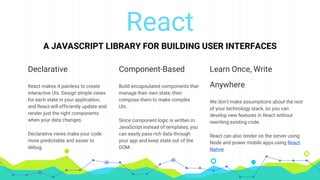
React
A JAVASCRIPT LIBRARY FOR BUILDING USER INTERFACES
Declarative
React makes it painless to create
interactive UIs. Design simple views
for each state in your application,
and React will efficiently update and
render just the right components
when your data changes.
Declarative views make your code
more predictable and easier to
debug.
Component-Based
Build encapsulated components that
manage their own state, then
compose them to make complex
UIs.
Since component logic is written in
JavaScript instead of templates, you
can easily pass rich data through
your app and keep state out of the
DOM.
Learn Once, Write
Anywhere
We don't make assumptions about the rest
of your technology stack, so you can
develop new features in React without
rewriting existing code.
React can also render on the server using
Node and power mobile apps using React
Native.
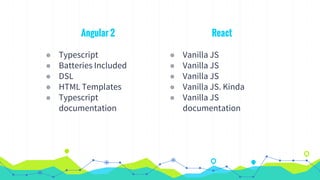
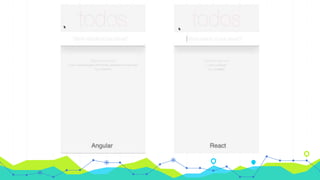
React
◉ Vanilla JS
◉ Vanilla JS
◉ Vanilla JS
◉ Vanilla JS. Kinda
◉ Vanilla JS
documentation
Angular 2
◉ Typescript
◉ Batteries Included
◉ DSL
◉ HTML Templates
◉ Typescript
documentation
Hello World Component
// React.createElement(component, [props], [...children])
function Hello(props) {
return React.createElement('div', null, `Hello, ${props.name}`);
}
React.createElement(Hello, { name: "World" });
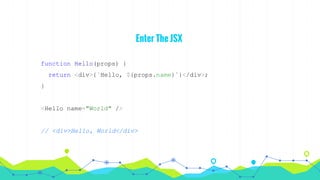
Enter The JSX
function Hello(props) {
return <div>{`Hello, ${props.name}`}</div>;
}
<Hello name="World" />
// <div>Hello, World</div>
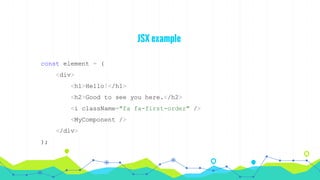
JSX example
const element = (
<div>
<h1>Hello!</h1>
<h2>Good to see you here.</h2>
<i className="fa fa-first-order" />
<MyComponent />
</div>
);
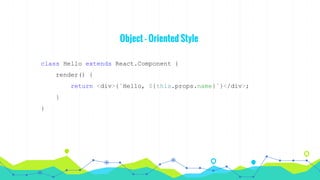
Object - Oriented Style
class Hello extends React.Component {
render() {
return <div>{`Hello, ${this.props.name}`}</div>;
}
}
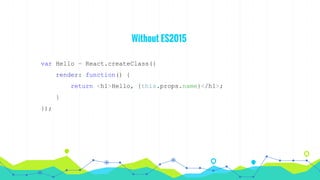
Without ES2015
var Hello = React.createClass({
render: function() {
return <h1>Hello, {this.props.name}</h1>;
}
});
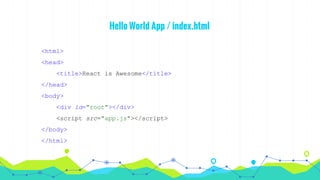
Hello World App / index.html
<html>
<head>
<title>React is Awesome</title>
</head>
<body>
<div id="root"></div>
<script src="app.js"></script>
</body>
</html>
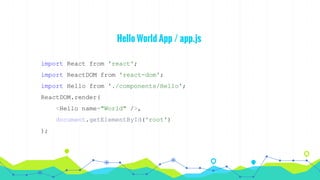
Hello World App / app.js
import React from 'react';
import ReactDOM from 'react-dom';
import Hello from './components/Hello';
ReactDOM.render(
<Hello name="World" />,
document.getElementById('root')
);
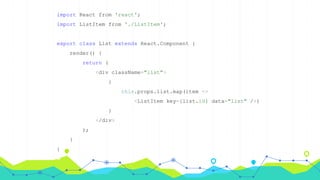
import React from 'react';
import ListItem from './ListItem';
export class List extends React.Component {
render() {
return (
<div className="list">
{
this.props.list.map(item =>
<ListItem key={list.id} data="list" />)
}
</div>
);
}
}
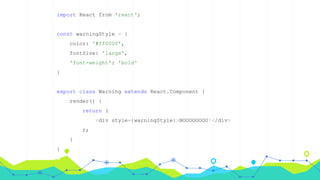
import React from 'react';
const warningStyle = {
color: '#ff0000',
fontSize: 'large',
'font-weight': 'bold'
}
export class Warning extends React.Component {
render() {
return (
<div style={warningStyle}>NOOOOOOOO!</div>
);
}
}
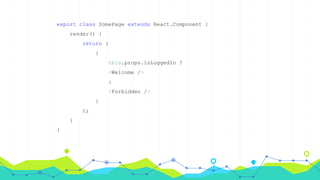
export class SomePage extends React.Component {
render() {
return (
{
this.props.isLoggedIn ?
<Welcome />
:
<Forbidden />
}
);
}
}
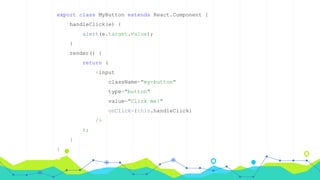
export class MyButton extends React.Component {
handleClick(e) {
alert(e.target.value);
}
render() {
return (
<input
className="my-button"
type="button"
value="Click me!"
onClick={this.handleClick}
/>
);
}
}
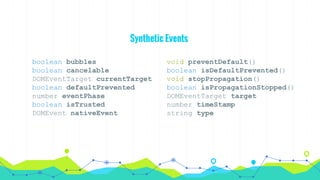
Synthetic Events
boolean bubbles
boolean cancelable
DOMEventTarget currentTarget
boolean defaultPrevented
number eventPhase
boolean isTrusted
DOMEvent nativeEvent
void preventDefault()
boolean isDefaultPrevented()
void stopPropagation()
boolean isPropagationStopped()
DOMEventTarget target
number timeStamp
string type
State
constructor(props) {
super(props);
this.state = {
activeTab: this.props.tabs[0].id,
foo: 'bar'
};
}
onSwitch(id) {
this.setState({ activeTab: id });
}
render() {
const tab = this.props.tabs.find(tab =>
tab.id === this.state.activeTab);
return (
<div className="tabs">
<TabControls
tabs={this.props.tabs}
onSwitch={this.onSwitch.bind(this)}
/>
<TabContent data={tab} />
</div>
);
}
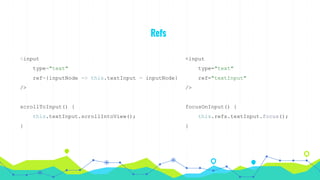
Refs
<input
type="text"
ref={inputNode => this.textInput = inputNode}
/>
scrollToInput() {
this.textInput.scrollIntoView();
}
<input
type="text"
ref="textInput"
/>
focusOnInput() {
this.refs.textInput.focus();
}
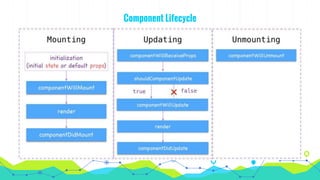
Component Lifecycle
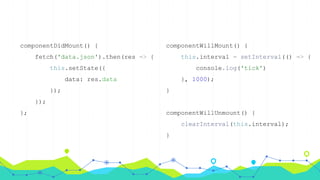
componentDidMount() {
fetch('data.json').then(res => {
this.setState({
data: res.data
});
});
};
componentWillMount() {
this.interval = setInterval(() => {
console.log('tick')
}, 1000);
}
componentWillUnmount() {
clearInterval(this.interval);
}
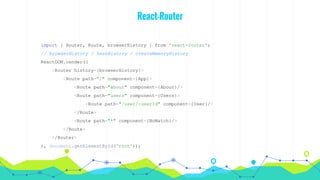
React-Router
import { Router, Route, browserHistory } from 'react-router';
// browserHistory / hashHistory / createMemoryHistory
ReactDOM.render((
<Router history={browserHistory}>
<Route path="/" component={App}>
<Route path="about" component={About}/>
<Route path="users" component={Users}>
<Route path="/user/:userId" component={User}/>
</Route>
<Route path="*" component={NoMatch}/>
</Route>
</Router>
), document.getElementById('root'));
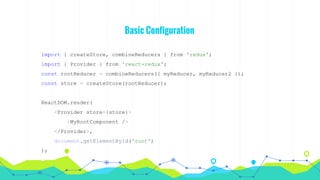
Basic Configuration
import { createStore, combineReducers } from 'redux';
import { Provider } from 'react-redux';
const rootReducer = combineReducers({ myReducer, myReducer2 });
const store = createStore(rootReducer);
ReactDOM.render(
<Provider store={store}>
<MyRootComponent />
</Provider>,
document.getElementById('root')
);
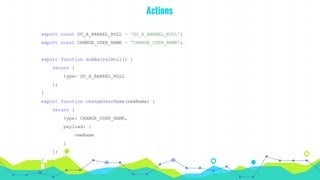
Actions
export const DO_A_BARREL_ROLL = 'DO_A_BARREL_ROLL';
export const CHANGE_USER_NAME = 'CHANGE_USER_NAME';
export function doABarrelRoll() {
return {
type: DO_A_BARREL_ROLL
};
}
export function changeUserName(newName) {
return {
type: CHANGE_USER_NAME,
payload: {
newName
}
};
}
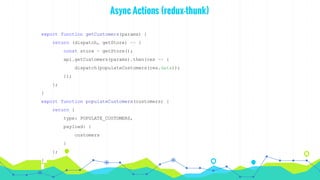
Async Actions (redux-thunk)
export function getCustomers(params) {
return (dispatch, getStore) => {
const store = getStore();
api.getCustomers(params).then(res => {
dispatch(populateCustomers(res.data));
});
};
}
export function populateCustomers(customers) {
return {
type: POPULATE_CUSTOMERS,
payload: {
customers
}
};
}
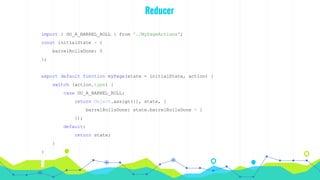
Reducer
import { DO_A_BARREL_ROLL } from './MyPageActions';
const initialState = {
barrelRollsDone: 0
};
export default function myPage(state = initialState, action) {
switch (action.type) {
case DO_A_BARREL_ROLL:
return Object.assign({}, state, {
barrelRollsDone: state.barrelRollsDone + 1
});
default:
return state;
}
}
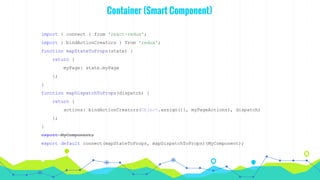
Container (Smart Component)
import { connect } from 'react-redux';
import { bindActionCreators } from 'redux';
function mapStateToProps(state) {
return {
myPage: state.myPage
};
}
function mapDispatchToProps(dispatch) {
return {
actions: bindActionCreators(Object.assign({}, myPageActions), dispatch)
};
}
export MyComponent;
export default connect(mapStateToProps, mapDispatchToProps)(MyComponent);
Links
React
Redux
The Evolution of Flux Frameworks
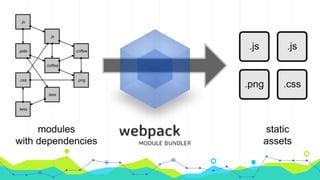
Webpack
React boilerplates
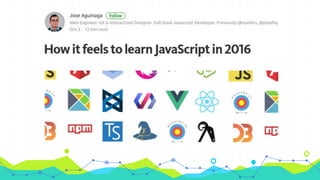
How it feels to learn JavaScript in 2016
THANKS!
Any questions?

React 101 by Anatoliy Sieryi

  • 1.
  • 2.
    Anatoliy Sieryi JS Developer BinaryStudio Academy JS group coach “Sir are you classified as human?” “Negative, I am a meat popsicle”
  • 8.
    React A JAVASCRIPT LIBRARYFOR BUILDING USER INTERFACES Declarative React makes it painless to create interactive UIs. Design simple views for each state in your application, and React will efficiently update and render just the right components when your data changes. Declarative views make your code more predictable and easier to debug. Component-Based Build encapsulated components that manage their own state, then compose them to make complex UIs. Since component logic is written in JavaScript instead of templates, you can easily pass rich data through your app and keep state out of the DOM. Learn Once, Write Anywhere We don't make assumptions about the rest of your technology stack, so you can develop new features in React without rewriting existing code. React can also render on the server using Node and power mobile apps using React Native.
  • 10.
    React ◉ Vanilla JS ◉Vanilla JS ◉ Vanilla JS ◉ Vanilla JS. Kinda ◉ Vanilla JS documentation Angular 2 ◉ Typescript ◉ Batteries Included ◉ DSL ◉ HTML Templates ◉ Typescript documentation
  • 14.
    Hello World Component //React.createElement(component, [props], [...children]) function Hello(props) { return React.createElement('div', null, `Hello, ${props.name}`); } React.createElement(Hello, { name: "World" });
  • 15.
    Enter The JSX functionHello(props) { return <div>{`Hello, ${props.name}`}</div>; } <Hello name="World" /> // <div>Hello, World</div>
  • 16.
    JSX example const element= ( <div> <h1>Hello!</h1> <h2>Good to see you here.</h2> <i className="fa fa-first-order" /> <MyComponent /> </div> );
  • 17.
    Object - OrientedStyle class Hello extends React.Component { render() { return <div>{`Hello, ${this.props.name}`}</div>; } }
  • 18.
    Without ES2015 var Hello= React.createClass({ render: function() { return <h1>Hello, {this.props.name}</h1>; } });
  • 19.
    Hello World App/ index.html <html> <head> <title>React is Awesome</title> </head> <body> <div id="root"></div> <script src="app.js"></script> </body> </html>
  • 20.
    Hello World App/ app.js import React from 'react'; import ReactDOM from 'react-dom'; import Hello from './components/Hello'; ReactDOM.render( <Hello name="World" />, document.getElementById('root') );
  • 21.
    import React from'react'; import ListItem from './ListItem'; export class List extends React.Component { render() { return ( <div className="list"> { this.props.list.map(item => <ListItem key={list.id} data="list" />) } </div> ); } }
  • 22.
    import React from'react'; const warningStyle = { color: '#ff0000', fontSize: 'large', 'font-weight': 'bold' } export class Warning extends React.Component { render() { return ( <div style={warningStyle}>NOOOOOOOO!</div> ); } }
  • 23.
    export class SomePageextends React.Component { render() { return ( { this.props.isLoggedIn ? <Welcome /> : <Forbidden /> } ); } }
  • 24.
    export class MyButtonextends React.Component { handleClick(e) { alert(e.target.value); } render() { return ( <input className="my-button" type="button" value="Click me!" onClick={this.handleClick} /> ); } }
  • 25.
    Synthetic Events boolean bubbles booleancancelable DOMEventTarget currentTarget boolean defaultPrevented number eventPhase boolean isTrusted DOMEvent nativeEvent void preventDefault() boolean isDefaultPrevented() void stopPropagation() boolean isPropagationStopped() DOMEventTarget target number timeStamp string type
  • 26.
    State constructor(props) { super(props); this.state ={ activeTab: this.props.tabs[0].id, foo: 'bar' }; } onSwitch(id) { this.setState({ activeTab: id }); } render() { const tab = this.props.tabs.find(tab => tab.id === this.state.activeTab); return ( <div className="tabs"> <TabControls tabs={this.props.tabs} onSwitch={this.onSwitch.bind(this)} /> <TabContent data={tab} /> </div> ); }
  • 27.
    Refs <input type="text" ref={inputNode => this.textInput= inputNode} /> scrollToInput() { this.textInput.scrollIntoView(); } <input type="text" ref="textInput" /> focusOnInput() { this.refs.textInput.focus(); }
  • 29.
  • 30.
    componentDidMount() { fetch('data.json').then(res =>{ this.setState({ data: res.data }); }); }; componentWillMount() { this.interval = setInterval(() => { console.log('tick') }, 1000); } componentWillUnmount() { clearInterval(this.interval); }
  • 31.
    React-Router import { Router,Route, browserHistory } from 'react-router'; // browserHistory / hashHistory / createMemoryHistory ReactDOM.render(( <Router history={browserHistory}> <Route path="/" component={App}> <Route path="about" component={About}/> <Route path="users" component={Users}> <Route path="/user/:userId" component={User}/> </Route> <Route path="*" component={NoMatch}/> </Route> </Router> ), document.getElementById('root'));
  • 36.
    Basic Configuration import {createStore, combineReducers } from 'redux'; import { Provider } from 'react-redux'; const rootReducer = combineReducers({ myReducer, myReducer2 }); const store = createStore(rootReducer); ReactDOM.render( <Provider store={store}> <MyRootComponent /> </Provider>, document.getElementById('root') );
  • 37.
    Actions export const DO_A_BARREL_ROLL= 'DO_A_BARREL_ROLL'; export const CHANGE_USER_NAME = 'CHANGE_USER_NAME'; export function doABarrelRoll() { return { type: DO_A_BARREL_ROLL }; } export function changeUserName(newName) { return { type: CHANGE_USER_NAME, payload: { newName } }; }
  • 38.
    Async Actions (redux-thunk) exportfunction getCustomers(params) { return (dispatch, getStore) => { const store = getStore(); api.getCustomers(params).then(res => { dispatch(populateCustomers(res.data)); }); }; } export function populateCustomers(customers) { return { type: POPULATE_CUSTOMERS, payload: { customers } }; }
  • 39.
    Reducer import { DO_A_BARREL_ROLL} from './MyPageActions'; const initialState = { barrelRollsDone: 0 }; export default function myPage(state = initialState, action) { switch (action.type) { case DO_A_BARREL_ROLL: return Object.assign({}, state, { barrelRollsDone: state.barrelRollsDone + 1 }); default: return state; } }
  • 40.
    Container (Smart Component) import{ connect } from 'react-redux'; import { bindActionCreators } from 'redux'; function mapStateToProps(state) { return { myPage: state.myPage }; } function mapDispatchToProps(dispatch) { return { actions: bindActionCreators(Object.assign({}, myPageActions), dispatch) }; } export MyComponent; export default connect(mapStateToProps, mapDispatchToProps)(MyComponent);
  • 52.
    Links React Redux The Evolution ofFlux Frameworks Webpack React boilerplates How it feels to learn JavaScript in 2016
  • 53.