Integrating external products into EclipseEclipse Day India 2011Presenters: Aditya MadduriGirish Kumar Balre
AgendaNeed for IntegrationChallenges in IntegrationEclipse Integration PointsDiscussing different scenarios:Web Services Testing Tool Win32 ApplicationsSwing Applications
Leverage Eclipse’s predefined facilities and usabilityEnforce company standardsMultiple tools under ONE application (e.g., IDE)Improved usage of the screen real estateIncreased functionality thereby increased productivityRetaining Legacy ApplicationsHuge customer baseHuge effort for full migrationNeed for Integration
Challenges in IntegrationCommunication Between different technologiesBetween different languagesAttaching to Eclipse UIHosting foreign technology inside Eclipse UIEvent Handling, and Wiring between views, menus etc
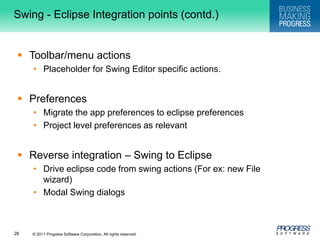
Eclipse Integration PointsEditor/View integrationOutline/Properties View integrationProblems View IntegrationToolbar/menu actionsPerspectivePreferences
Agenda…Need for IntegrationChallenges in IntegrationDiscussing different scenariosWeb apps Win32 appsSwing apps
Integrating Web ApplicationsNeed a web serverEclipse ships Jetty ServerConfigure any server using WTPLaunching applicationToolbar/Menu actionsNeeds Artifacts – Use WizardsLinks to different pagesViewsSWT TreesCommunicate between Web app & Eclipse controlsEclipse  Web App (change URLs)Web App  Eclipse (???)
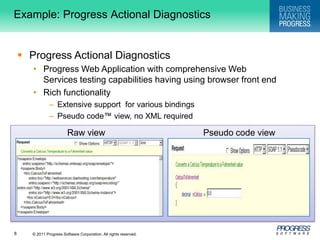
Example: Progress Actional DiagnosticsProgress Actional DiagnosticsProgress Web Application with comprehensive Web Services testing capabilities having using browser front end Rich functionalityExtensive support  for various bindingsPseudo code™ view, no XML requiredRaw viewPseudo code view
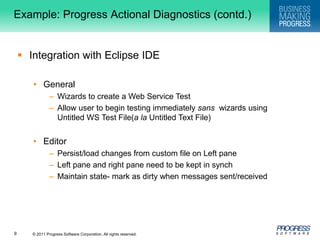
Example: Progress Actional Diagnostics (contd.)Integration with Eclipse IDEGeneralWizards to create a Web Service TestAllow user to begin testing immediately sans  wizards using Untitled WS Test File(a la Untitled Text File) EditorPersist/load changes from custom file on Left paneLeft pane and right pane need to be kept in synchMaintain state- mark as dirty when messages sent/received
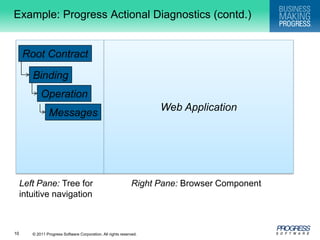
Example: Progress Actional Diagnostics (contd.)Web ApplicationRoot ContractBindingOperationMessagesRight Pane: Browser ComponentLeft Pane: Tree for intuitive navigation
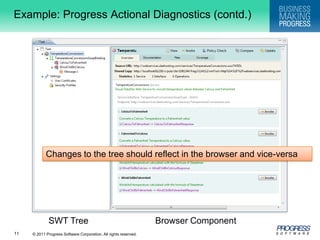
Example: Progress Actional Diagnostics (contd.)Changes to the tree should reflect in the browser and vice-versaSWT TreeBrowser Component
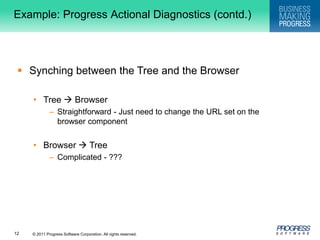
Example: Progress Actional Diagnostics (contd.)Synching between the Tree and the BrowserTree  BrowserStraightforward - Just need to change the URL set on the browser componentBrowser  TreeComplicated - ???
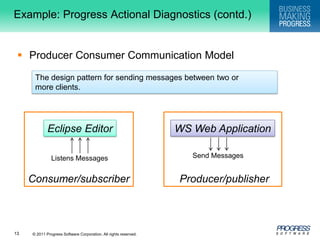
Example: Progress Actional Diagnostics (contd.)Producer Consumer Communication ModelThe design pattern for sending messages between two or more clients.Consumer/subscriber    Producer/publisher   Eclipse EditorWS Web ApplicationSend MessagesListens Messages
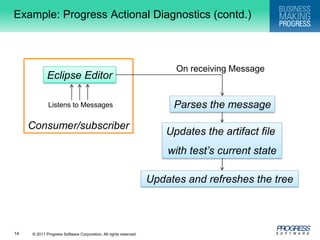
Example: Progress Actional Diagnostics (contd.)Consumer/subscriberOn receiving MessageEclipse EditorParses the messageListens to MessagesUpdates the artifact file with test’s current stateUpdates and refreshes the tree
Agenda…Need for IntegrationChallenges in IntegrationDiscussing different scenariosWeb appsWin32 appsSwing apps
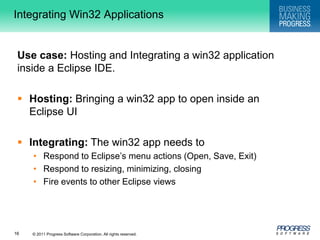
Integrating Win32 ApplicationsUse case: Hosting and Integrating a win32 application inside a Eclipse IDE.Hosting:Bringing a win32 app to open inside an Eclipse UIIntegrating: The win32 app needs toRespond to Eclipse’s menu actions (Open, Save, Exit)Respond to resizing, minimizing, closingFire events to other Eclipse views
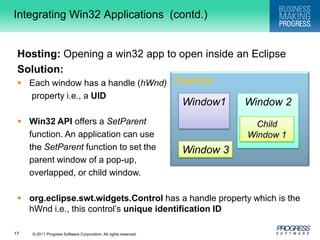
DesktopIntegrating Win32 Applications  (contd.)Hosting:Opening a win32 app to open inside an EclipseSolution:Each window has a handle (hWnd)property i.e., a UIDWin32 API offers a SetParentfunction. An application can use 	the SetParent function to set the parent window of a pop-up, overlapped, or child window.org.eclipse.swt.widgets.Controlhas a handle property which is the hWnd i.e., this control’s unique identification IDWindow1Window 2Child Window 1Window 3
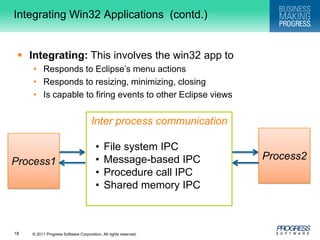
Interprocess communicationFile system IPC
Message-based IPC
Procedure call IPC
Shared memory IPCIntegrating Win32 Applications  (contd.)Integrating: This involves the win32 app toResponds to Eclipse’s menu actionsResponds to resizing, minimizing, closingIs capable to firing events to other Eclipse viewsProcess2Process1
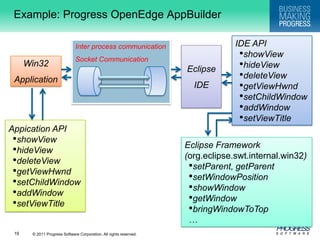
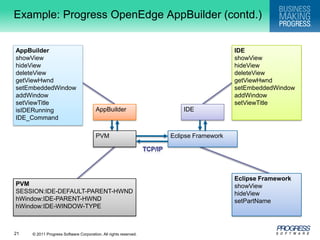
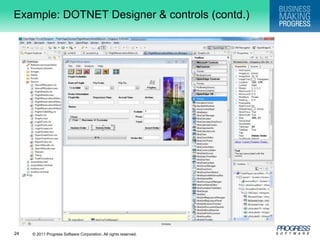
Example: Progress OpenEdgeAppBuilderIDE APIshowView
hideView
deleteView
getViewHwnd
setChildWindow
addWindow
setViewTitleInter process communicationSocket CommunicationEclipseIDE  Win32ApplicationAppicationAPIshowView
hideView
deleteView
getViewHwnd
setChildWindow
addWindow
setViewTitleEclipse Framework (org.eclipse.swt.internal.win32)setParent, getParent
setWindowPosition
showWindow
getWindow

Integrating external products into eclipse

  • 1.
    Integrating external productsinto EclipseEclipse Day India 2011Presenters: Aditya MadduriGirish Kumar Balre
  • 2.
    AgendaNeed for IntegrationChallengesin IntegrationEclipse Integration PointsDiscussing different scenarios:Web Services Testing Tool Win32 ApplicationsSwing Applications
  • 3.
    Leverage Eclipse’s predefinedfacilities and usabilityEnforce company standardsMultiple tools under ONE application (e.g., IDE)Improved usage of the screen real estateIncreased functionality thereby increased productivityRetaining Legacy ApplicationsHuge customer baseHuge effort for full migrationNeed for Integration
  • 4.
    Challenges in IntegrationCommunicationBetween different technologiesBetween different languagesAttaching to Eclipse UIHosting foreign technology inside Eclipse UIEvent Handling, and Wiring between views, menus etc
  • 5.
    Eclipse Integration PointsEditor/ViewintegrationOutline/Properties View integrationProblems View IntegrationToolbar/menu actionsPerspectivePreferences
  • 6.
    Agenda…Need for IntegrationChallengesin IntegrationDiscussing different scenariosWeb apps Win32 appsSwing apps
  • 7.
    Integrating Web ApplicationsNeeda web serverEclipse ships Jetty ServerConfigure any server using WTPLaunching applicationToolbar/Menu actionsNeeds Artifacts – Use WizardsLinks to different pagesViewsSWT TreesCommunicate between Web app & Eclipse controlsEclipse  Web App (change URLs)Web App  Eclipse (???)
  • 8.
    Example: Progress ActionalDiagnosticsProgress Actional DiagnosticsProgress Web Application with comprehensive Web Services testing capabilities having using browser front end Rich functionalityExtensive support for various bindingsPseudo code™ view, no XML requiredRaw viewPseudo code view
  • 9.
    Example: Progress ActionalDiagnostics (contd.)Integration with Eclipse IDEGeneralWizards to create a Web Service TestAllow user to begin testing immediately sans wizards using Untitled WS Test File(a la Untitled Text File) EditorPersist/load changes from custom file on Left paneLeft pane and right pane need to be kept in synchMaintain state- mark as dirty when messages sent/received
  • 10.
    Example: Progress ActionalDiagnostics (contd.)Web ApplicationRoot ContractBindingOperationMessagesRight Pane: Browser ComponentLeft Pane: Tree for intuitive navigation
  • 11.
    Example: Progress ActionalDiagnostics (contd.)Changes to the tree should reflect in the browser and vice-versaSWT TreeBrowser Component
  • 12.
    Example: Progress ActionalDiagnostics (contd.)Synching between the Tree and the BrowserTree  BrowserStraightforward - Just need to change the URL set on the browser componentBrowser  TreeComplicated - ???
  • 13.
    Example: Progress ActionalDiagnostics (contd.)Producer Consumer Communication ModelThe design pattern for sending messages between two or more clients.Consumer/subscriber Producer/publisher Eclipse EditorWS Web ApplicationSend MessagesListens Messages
  • 14.
    Example: Progress ActionalDiagnostics (contd.)Consumer/subscriberOn receiving MessageEclipse EditorParses the messageListens to MessagesUpdates the artifact file with test’s current stateUpdates and refreshes the tree
  • 15.
    Agenda…Need for IntegrationChallengesin IntegrationDiscussing different scenariosWeb appsWin32 appsSwing apps
  • 16.
    Integrating Win32 ApplicationsUsecase: Hosting and Integrating a win32 application inside a Eclipse IDE.Hosting:Bringing a win32 app to open inside an Eclipse UIIntegrating: The win32 app needs toRespond to Eclipse’s menu actions (Open, Save, Exit)Respond to resizing, minimizing, closingFire events to other Eclipse views
  • 17.
    DesktopIntegrating Win32 Applications (contd.)Hosting:Opening a win32 app to open inside an EclipseSolution:Each window has a handle (hWnd)property i.e., a UIDWin32 API offers a SetParentfunction. An application can use the SetParent function to set the parent window of a pop-up, overlapped, or child window.org.eclipse.swt.widgets.Controlhas a handle property which is the hWnd i.e., this control’s unique identification IDWindow1Window 2Child Window 1Window 3
  • 18.
  • 19.
  • 20.
  • 21.
    Shared memory IPCIntegratingWin32 Applications (contd.)Integrating: This involves the win32 app toResponds to Eclipse’s menu actionsResponds to resizing, minimizing, closingIs capable to firing events to other Eclipse viewsProcess2Process1
  • 22.
  • 23.
  • 24.
  • 25.
  • 26.
  • 27.
  • 28.
    setViewTitleInter process communicationSocketCommunicationEclipseIDE Win32ApplicationAppicationAPIshowView
  • 29.
  • 30.
  • 31.
  • 32.
  • 33.
  • 34.
  • 35.
  • 36.
  • 37.

Editor's Notes

  • #10 Need to provide a WSDL/WADL URLCreates a .mrp file for storing state/data of testingWizards to create a Web Service TestINPUT – WSDL/WADL URLOUTPUT – .mrp fileEditor support to open .mrp fileShow the stored tests state (.mrp file)Show the web-application as part of Editor
  • #19 File System Sender writes to a file Receiver reads from it But when does the receiver do the read? Often synchronized with file locking or lock files Special types of files can make file-based IPC easierMessage-Based IPC Sender formats data into a formal message With some form of address for receiver OS delivers message to receiver’s message input queue (might signal too) Receiver (when ready) reads a message from the queue Sender might or might not blockProcedure Call IPCInterprocess communication uses same procedure call interface as intraprocess Data passed as parameters Information returned via return values Complicated since destination procedure is in a different address space Generally, calling procedure blocks till call returnsShared Memory IPC Different processes share a common piece of memory Either physically or virtually Communications via normal reads/writes May need semaphores or locks In or associated with the shared memory
  • #22 AppBuilder: show, hide, delete : proxies for IDE viewgetViewHwnd: get window handlesetEmbeddedWindow: Sets the given view as the parent for the given windowHandleaddWindow: With this API multiple windows can be attached to a view. (add palette and )
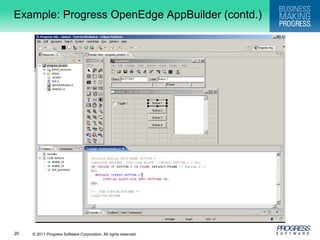
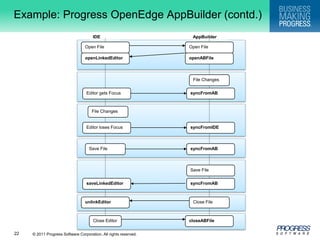
  • #23 Description:1. A .w file can be opened from the IDE by double-clicking the file in the Project Explorer view, or by dragging the file from the the Project Explorer view onto the AppBuilder window. Alternatively, a .w file can be opened from theAppBuilder. In either case, the openLinkedEditor method is called in the IDE to link an OEIDE Editor instance to the AppBuilder. The actual file is opened in the editor and a copy via a temporary file, is opened in the AppBuilder. The editor and the AppBuilder have the same content.2. Using the Edit Code option (Section Editor) in the AppBuilder causes the AppBuilder to synchronize the changes to the temporary file (syncFromAB), and then it invokes the selectSection method to reposition the code to the trigger section for the selected widget. If there are no triggers defined for the selected widget, a default trigger is created when synchronizing. The editor gets updated from the AppBuilder.3. Any of the AppBuilder dialogs and windows can be used to modify the instance of the .w file in the AppBuilder.4. When the OEIDE Editor gets focus, the syncFromAB method is called in the AppBuilder to synchronize the file. The editor gets updated from the AppBuilder.5. Any of the OEIDE functionality, in particular templates, can be used to modify the instance of the .w file in the OEIDE Editor.6. When the editor loses focus, the syncFromIDE method is called in the AppBuilder to synchronize the file. The AppBuilder gets updated from the OEIDE Editor.7. When the file is saved in the IDE, the syncFromAB method is called in the AppBuilder to synchronize the file. The editor gets updated from the AppBuilder.8. When the file is saved in the AppBuilder, the file is synchronized (syncFromAB), and then the saveLinkedEditor method is used to save the file on the IDE side. The editor and the AppBuilder have the same content.9. When the file is closed in the AppBuilder, the unlinkEditor method is called in the IDE so the editor does not try to synchronize with the AppBuilder.10. When the file is closed in the IDE, the instance of the .w file in the AppBuilder is closed.
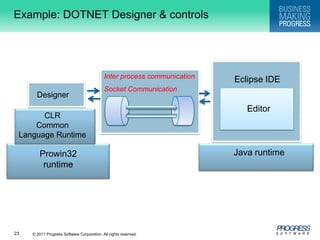
  • #24 .NET presentation container is used for users looking for a modern UI with very rich functionality that can be used to present their Progress applications. These customers want to be able to make use of the .NET presentation container with little or no knowledge of any of the .NET languages. SerializationDeserializationCodeDOMASTABL language