More React.js
Jerry
Jan 2020
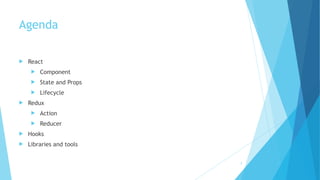
Agenda
! React
! Component
! State and Props
! Lifecycle
! Redux
! Action
! Reducer
! Hooks
! Libraries and tools
2
React.js
JSX
! const element = <h1>Hello, world!</h1>;
! Contains html syntax
4
Embedding Expressions in JSX
function formatName(user) {
return user.firstName + ' ' +
user.lastName;
}
const user = {
firstName: 'Harper',
lastName: 'Perez’
};
const element = (
<h1>
Hello, {formatName(user)}!
</h1>
);
ReactDOM.render(
element,
document.getElementById('root')
);
5
Specifying Attributes with JSX
You may use quotes to specify string literals as
attributes:
! const element = <div tabIndex="0"></div>;
You may also use curly braces to embed a
JavaScript expression in an attribute:
! const element = <img src={user.avatarUrl} ></
img>;
If a tag is empty, you may close it immediately
with />, like XML:
! const element = <img src={user.avatarUrl} />;


contain children:
! const element = (
<div>
<h1>Hello!</h1>
<h2>Good to see you here.</h2>
</div>
);
**class becomes className in JSX, and tabindex
becomes tabIndex
6
Rendering
const element = <h1>Hello, world</h1>;
ReactDOM.render(
element,
document.getElementById('root')
);
! Example: http://codepen.io/gaearon/pen/rrpgNB?editors=1010
7
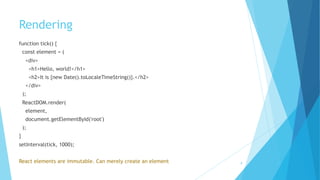
Rendering
function tick() {
const element = (
<div>
<h1>Hello, world!</h1>
<h2>It is {new Date().toLocaleTimeString()}.</h2>
</div>
);
ReactDOM.render(
element,
document.getElementById('root')
);
} 
setInterval(tick, 1000);
React elements are immutable. Can merely create an element 8
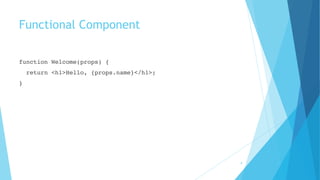
Functional Component
function Welcome(props) {
return <h1>Hello, {props.name}</h1>;
}
9
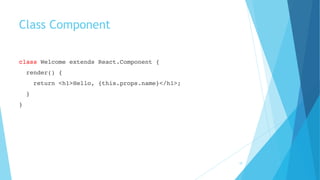
Class Component
class Welcome extends React.Component {
render() {
return <h1>Hello, {this.props.name}</h1>;
}
}
10
Rendering a Component
function Welcome(props) { // Props are Read-Only
return <h1>Hello, {props.name}</h1>;
}
const element = <Welcome name="Sara" />;
ReactDOM.render(
element,
document.getElementById('root')
);
! Example: http://codepen.io/gaearon/pen/YGYmEG?editors=0010
11
Rendering a Component
function App() {
return (
<div>
<Welcome name="Sara" />
<Welcome name="Cahal" />
<Welcome name="Edite" />
</div>
);
}
 
ReactDOM.render(
<App />,
document.getElementById('root')
);
! Example: http://codepen.io/gaearon/pen/KgQKPr?editors=0010
12
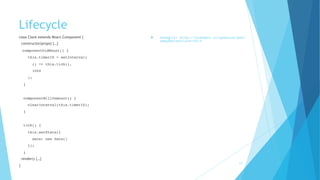
Lifecycle
class Clock extends React.Component {
constructor(props) {…}
componentDidMount() {
this.timerID = setInterval(
() => this.tick(),
1000
);
}
 
componentWillUnmount() {
clearInterval(this.timerID);
}
 
tick() {
this.setState({
date: new Date()
});
}
render() {…}
}
! Example: http://codepen.io/gaearon/pen/
amqdNA?editors=0010
13
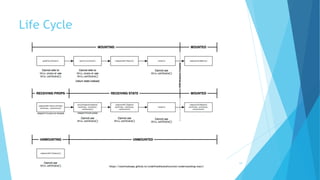
Life Cycle
https://staminaloops.github.io/undefinedisnotafunction/understanding-react/
14
State
class Clock extends React.Component {
constructor(props) {
super(props);
this.state = {date: new Date()};
}
render() {
return (
<div>
<h1>Hello, world!</h1>
<h2>It is {this.state.date.toLocaleTimeString()}.</h2>
</div>
);
}
}
ReactDOM.render(
<Clock />,
document.getElementById('root')
);
! Example: http://codepen.io/gaearon/pen/
KgQpJd?editors=0010
15
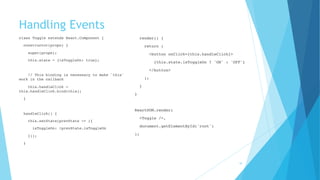
Handling Events
class Toggle extends React.Component {
constructor(props) {
super(props);
this.state = {isToggleOn: true};
 
// This binding is necessary to make `this`
work in the callback
this.handleClick =
this.handleClick.bind(this);
}
 
handleClick() {
this.setState(prevState => ({
isToggleOn: !prevState.isToggleOn
}));
}
 
render() {
return (
<button onClick={this.handleClick}>
{this.state.isToggleOn ? 'ON' : 'OFF'}
</button>
);
}
}
 
ReactDOM.render(
<Toggle />,
document.getElementById('root')
);
16
Inline Logical && Operator
function Mailbox(props) {
const unreadMessages = props.unreadMessages;
return (
<div>
<h1>Hello!</h1>
{unreadMessages.length > 0 &&
<h2>
You have {unreadMessages.length} unread messages.
</h2>
}
</div>
);
}
! Example: https://codepen.io/gaearon/pen/ozJddz?editors=0010
17
Inline Ternary Operator
render() {
const isLoggedIn = this.state.isLoggedIn;
return (
<div>
The user is <b>{isLoggedIn ? 'currently' : 'not'}</b>
logged in.
</div>
);
}
18
List and Key
function NumberList(props) {
const numbers = props.numbers;
const listItems = numbers.map((number) =>
<li key={number.toString()}>
{number}
</li>
);
return (
<ul>{listItems}</ul>
);
}
! Example: https://codepen.io/gaearon/pen/jrXYRR?editors=0011
19
Summary
! JSX
! Component
! State vs Props
! Lifecycle
! One-way data binding
! Lightweight
20
Redux
Motivation
! manage more state than ever before
! lost control over the when, why, and how of its state
! mutation and asynchronicity
! Redux attempts to make state mutations predictable
22
Three Principles
! Single source of truth
! The state of your whole application is stored in an object tree within a single store.
console.log(store.getState())
 
/* Prints
{
visibilityFilter: 'SHOW_ALL',
todos: [
{
text: 'Consider using Redux',
completed: true,
},
{
text: 'Keep all state in a single tree',
completed: false
}
]
}
*/
23
Three Principles
! State is read-only
! The only way to change the state is to emit an action, an object describing what happened.
store.dispatch({
type: 'COMPLETE_TODO',
index: 1
})
store.dispatch({
type: 'SET_VISIBILITY_FILTER',
filter: 'SHOW_COMPLETED'
})
24
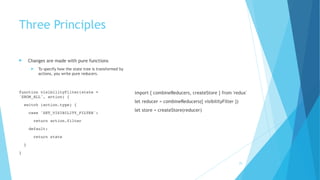
Three Principles
! Changes are made with pure functions
! To specify how the state tree is transformed by
actions, you write pure reducers.
function visibilityFilter(state =
'SHOW_ALL', action) {
switch (action.type) {
case 'SET_VISIBILITY_FILTER':
return action.filter
default:
return state
}
}
import { combineReducers, createStore } from 'redux'
let reducer = combineReducers({ visibilityFilter })
let store = createStore(reducer)
25
Action
function addTodo(text) {
return {
type: ADD_TODO,
text
}
}
dispatch(addTodo(text))
26
Reducer
import { VisibilityFilters } from './actions'
 
const initialState = {
visibilityFilter: VisibilityFilters.SHOW_ALL,
todos: []
}
function todoApp(state = initialState, action) {
switch (action.type) {
case SET_VISIBILITY_FILTER:
return Object.assign({}, state, {
visibilityFilter: action.filter
})
default:
return state
}
} 
27
Reducer - Handling More Actions
function todos(state = [], action) {
switch (action.type) {
case ADD_TODO:
return [
...state,
{
text: action.text,
completed: false
}
]
case TOGGLE_TODO:
return state.map((todo, index) => {
if (index === action.index) {
return Object.assign({}, todo, {
completed: !todo.completed
})
}
return todo
})
default:
return state
}
}
28
Store
import { createStore } from 'redux’;
import todoApp from './reducers’;
let store = createStore(todoApp)
import { addTodo, toggleTodo,
setVisibilityFilter, VisibilityFilters } from './
actions’
// Dispatch some actions
store.dispatch(addTodo('Learn about actions'))
store.dispatch(addTodo('Learn about reducers'))
store.dispatch(addTodo('Learn about store'))
store.dispatch(setVisibilityFilter(VisibilityFilt
ers.SHOW_COMPLETED))
29
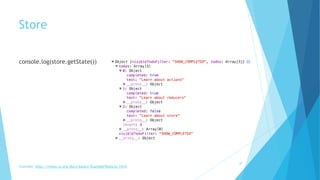
Store
console.log(store.getState()) 

30
Example: http://redux.js.org/docs/basics/ExampleTodoList.html
Hooks
Motivation
! It’s hard to reuse stateful logic between components
! Complex components become hard to understand
! componentDidMount
! componentDidUpdate
! componentWillUnmount
32
State Hook
import React, { useState, useEffect } from 'react';


function Example() {
const [count, setCount] = useState(0);
return (
<div>
<p>You clicked {count} times</p>
<button onClick={() => setCount(count + 1)}>
Click me
</button>
</div>
);
} 33
Effect Hook
import React, { useState, useEffect } from 'react';

function Example() {
const [count, setCount] = useState(0);
// Similar to componentDidMount and componentDidUpdate:
useEffect(() => {
// Update the document title using the browser API
document.title = `You clicked ${count} times`;
});
return (
<div>
<p>You clicked {count} times</p>
<button onClick={() => setCount(count + 1)}>
Click me
</button>
</div>
);
}
34
Effect Hook
useEffect(() => {
document.title = `You clicked ${count} times`;
}, [count]); // Only re-run the effect if count changes
35
Multiple States
function ExampleWithManyStates() {
// Declare multiple state variables!
const [age, setAge] = useState(42);
const [fruit, setFruit] = useState('banana');
const [todos, setTodos] = useState([{ text: 'Learn Hooks' }]);
}
36
But
Hooks don’t work inside classes


You can use them instead of writing classes
37
Libraries & Tools
List
! Demo code https://github.com/pronoun66/react-demo
! Create react app https://github.com/facebook/create-react-app
! React Dev Tool https://www.npmjs.com/package/react-devtools
39
Trending
FAQ

Stay with React.js in 2020

  • 1.
  • 2.
    Agenda ! React ! Component !State and Props ! Lifecycle ! Redux ! Action ! Reducer ! Hooks ! Libraries and tools 2
  • 3.
  • 4.
    JSX ! const element= <h1>Hello, world!</h1>; ! Contains html syntax 4
  • 5.
    Embedding Expressions inJSX function formatName(user) { return user.firstName + ' ' + user.lastName; } const user = { firstName: 'Harper', lastName: 'Perez’ }; const element = ( <h1> Hello, {formatName(user)}! </h1> ); ReactDOM.render( element, document.getElementById('root') ); 5
  • 6.
    Specifying Attributes withJSX You may use quotes to specify string literals as attributes: ! const element = <div tabIndex="0"></div>; You may also use curly braces to embed a JavaScript expression in an attribute: ! const element = <img src={user.avatarUrl} ></ img>; If a tag is empty, you may close it immediately with />, like XML: ! const element = <img src={user.avatarUrl} />;
 
 contain children: ! const element = ( <div> <h1>Hello!</h1> <h2>Good to see you here.</h2> </div> ); **class becomes className in JSX, and tabindex becomes tabIndex 6
  • 7.
    Rendering const element =<h1>Hello, world</h1>; ReactDOM.render( element, document.getElementById('root') ); ! Example: http://codepen.io/gaearon/pen/rrpgNB?editors=1010 7
  • 8.
    Rendering function tick() { constelement = ( <div> <h1>Hello, world!</h1> <h2>It is {new Date().toLocaleTimeString()}.</h2> </div> ); ReactDOM.render( element, document.getElementById('root') ); }  setInterval(tick, 1000); React elements are immutable. Can merely create an element 8
  • 9.
    Functional Component function Welcome(props){ return <h1>Hello, {props.name}</h1>; } 9
  • 10.
    Class Component class Welcomeextends React.Component { render() { return <h1>Hello, {this.props.name}</h1>; } } 10
  • 11.
    Rendering a Component functionWelcome(props) { // Props are Read-Only return <h1>Hello, {props.name}</h1>; } const element = <Welcome name="Sara" />; ReactDOM.render( element, document.getElementById('root') ); ! Example: http://codepen.io/gaearon/pen/YGYmEG?editors=0010 11
  • 12.
    Rendering a Component functionApp() { return ( <div> <Welcome name="Sara" /> <Welcome name="Cahal" /> <Welcome name="Edite" /> </div> ); }   ReactDOM.render( <App />, document.getElementById('root') ); ! Example: http://codepen.io/gaearon/pen/KgQKPr?editors=0010 12
  • 13.
    Lifecycle class Clock extendsReact.Component { constructor(props) {…} componentDidMount() { this.timerID = setInterval( () => this.tick(), 1000 ); }   componentWillUnmount() { clearInterval(this.timerID); }   tick() { this.setState({ date: new Date() }); } render() {…} } ! Example: http://codepen.io/gaearon/pen/ amqdNA?editors=0010 13
  • 14.
  • 15.
    State class Clock extendsReact.Component { constructor(props) { super(props); this.state = {date: new Date()}; } render() { return ( <div> <h1>Hello, world!</h1> <h2>It is {this.state.date.toLocaleTimeString()}.</h2> </div> ); } } ReactDOM.render( <Clock />, document.getElementById('root') ); ! Example: http://codepen.io/gaearon/pen/ KgQpJd?editors=0010 15
  • 16.
    Handling Events class Toggleextends React.Component { constructor(props) { super(props); this.state = {isToggleOn: true};   // This binding is necessary to make `this` work in the callback this.handleClick = this.handleClick.bind(this); }   handleClick() { this.setState(prevState => ({ isToggleOn: !prevState.isToggleOn })); }   render() { return ( <button onClick={this.handleClick}> {this.state.isToggleOn ? 'ON' : 'OFF'} </button> ); } }   ReactDOM.render( <Toggle />, document.getElementById('root') ); 16
  • 17.
    Inline Logical &&Operator function Mailbox(props) { const unreadMessages = props.unreadMessages; return ( <div> <h1>Hello!</h1> {unreadMessages.length > 0 && <h2> You have {unreadMessages.length} unread messages. </h2> } </div> ); } ! Example: https://codepen.io/gaearon/pen/ozJddz?editors=0010 17
  • 18.
    Inline Ternary Operator render(){ const isLoggedIn = this.state.isLoggedIn; return ( <div> The user is <b>{isLoggedIn ? 'currently' : 'not'}</b> logged in. </div> ); } 18
  • 19.
    List and Key functionNumberList(props) { const numbers = props.numbers; const listItems = numbers.map((number) => <li key={number.toString()}> {number} </li> ); return ( <ul>{listItems}</ul> ); } ! Example: https://codepen.io/gaearon/pen/jrXYRR?editors=0011 19
  • 20.
    Summary ! JSX ! Component !State vs Props ! Lifecycle ! One-way data binding ! Lightweight 20
  • 21.
  • 22.
    Motivation ! manage morestate than ever before ! lost control over the when, why, and how of its state ! mutation and asynchronicity ! Redux attempts to make state mutations predictable 22
  • 23.
    Three Principles ! Singlesource of truth ! The state of your whole application is stored in an object tree within a single store. console.log(store.getState())   /* Prints { visibilityFilter: 'SHOW_ALL', todos: [ { text: 'Consider using Redux', completed: true, }, { text: 'Keep all state in a single tree', completed: false } ] } */ 23
  • 24.
    Three Principles ! Stateis read-only ! The only way to change the state is to emit an action, an object describing what happened. store.dispatch({ type: 'COMPLETE_TODO', index: 1 }) store.dispatch({ type: 'SET_VISIBILITY_FILTER', filter: 'SHOW_COMPLETED' }) 24
  • 25.
    Three Principles ! Changesare made with pure functions ! To specify how the state tree is transformed by actions, you write pure reducers. function visibilityFilter(state = 'SHOW_ALL', action) { switch (action.type) { case 'SET_VISIBILITY_FILTER': return action.filter default: return state } } import { combineReducers, createStore } from 'redux' let reducer = combineReducers({ visibilityFilter }) let store = createStore(reducer) 25
  • 26.
    Action function addTodo(text) { return{ type: ADD_TODO, text } } dispatch(addTodo(text)) 26
  • 27.
    Reducer import { VisibilityFilters} from './actions'   const initialState = { visibilityFilter: VisibilityFilters.SHOW_ALL, todos: [] } function todoApp(state = initialState, action) { switch (action.type) { case SET_VISIBILITY_FILTER: return Object.assign({}, state, { visibilityFilter: action.filter }) default: return state } }  27
  • 28.
    Reducer - HandlingMore Actions function todos(state = [], action) { switch (action.type) { case ADD_TODO: return [ ...state, { text: action.text, completed: false } ] case TOGGLE_TODO: return state.map((todo, index) => { if (index === action.index) { return Object.assign({}, todo, { completed: !todo.completed }) } return todo }) default: return state } } 28
  • 29.
    Store import { createStore} from 'redux’; import todoApp from './reducers’; let store = createStore(todoApp) import { addTodo, toggleTodo, setVisibilityFilter, VisibilityFilters } from './ actions’ // Dispatch some actions store.dispatch(addTodo('Learn about actions')) store.dispatch(addTodo('Learn about reducers')) store.dispatch(addTodo('Learn about store')) store.dispatch(setVisibilityFilter(VisibilityFilt ers.SHOW_COMPLETED)) 29
  • 30.
  • 31.
  • 32.
    Motivation ! It’s hardto reuse stateful logic between components ! Complex components become hard to understand ! componentDidMount ! componentDidUpdate ! componentWillUnmount 32
  • 33.
    State Hook import React,{ useState, useEffect } from 'react'; 
 
 function Example() { const [count, setCount] = useState(0); return ( <div> <p>You clicked {count} times</p> <button onClick={() => setCount(count + 1)}> Click me </button> </div> ); } 33
  • 34.
    Effect Hook import React,{ useState, useEffect } from 'react';
 function Example() { const [count, setCount] = useState(0); // Similar to componentDidMount and componentDidUpdate: useEffect(() => { // Update the document title using the browser API document.title = `You clicked ${count} times`; }); return ( <div> <p>You clicked {count} times</p> <button onClick={() => setCount(count + 1)}> Click me </button> </div> ); } 34
  • 35.
    Effect Hook useEffect(() =>{ document.title = `You clicked ${count} times`; }, [count]); // Only re-run the effect if count changes 35
  • 36.
    Multiple States function ExampleWithManyStates(){ // Declare multiple state variables! const [age, setAge] = useState(42); const [fruit, setFruit] = useState('banana'); const [todos, setTodos] = useState([{ text: 'Learn Hooks' }]); } 36
  • 37.
    But Hooks don’t work inside classes
 
 Youcan use them instead of writing classes 37
  • 38.
  • 39.
    List ! Demo codehttps://github.com/pronoun66/react-demo ! Create react app https://github.com/facebook/create-react-app ! React Dev Tool https://www.npmjs.com/package/react-devtools 39
  • 40.
  • 41.