Raster Scan Displays
Presented By: Syed M. Bilal Shah
Roll No. 11
Raster Scan Displays
• Raster: A rectangular array of points or dots
• Pixel: One dot or picture element of the raster
• Scan Line: A row of pixels
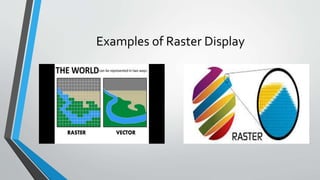
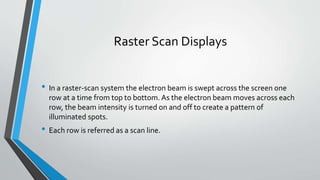
Examples of Raster Display
Raster Scan Displays
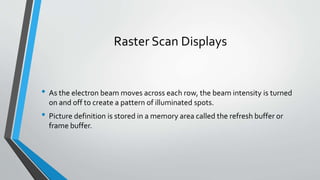
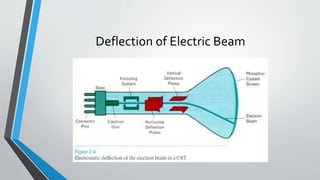
• In a raster-scan system the electron beam is swept across the screen one
row at a time from top to bottom. As the electron beam moves across each
row, the beam intensity is turned on and off to create a pattern of
illuminated spots.
• Each row is referred as a scan line.
Raster Scan Displays
• As the electron beam moves across each row, the beam intensity is turned
on and off to create a pattern of illuminated spots.
• Picture definition is stored in a memory area called the refresh buffer or
frame buffer.
Deflection of Electric Beam
Frame Buffer
• This memory area holds the set of intensity values for all the screen points.
• A frame buffer is characterized by size, x, y, and pixel depth.
• The resolution of a frame buffer is the number of pixels in the display. e.g.
1024x1024 pixels.
Display
• These stored intensity values are then retrieved from the
refresh buffer and used to control the intensity of the
electron beam as it moves from spot to spot across the
screen.
• They are painted on the screen one row (scan line) at a time.
Display
• Intensity range for pixel positions depends on the capability of the raster
system.
• In a black and white system each screen point is either on or off, so only one
bit per pixel is needed to control the intensity of screen positions. And this is
called a bitmap.
• For system with multiple bits per pixel, the frame buffer is called pixmap.
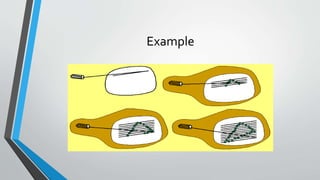
Example
Refreshing and Retracing
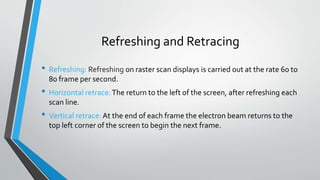
• Refreshing: Refreshing on raster scan displays is carried out at the rate 60 to
80 frame per second.
• Horizontal retrace:The return to the left of the screen, after refreshing each
scan line.
• Vertical retrace: At the end of each frame the electron beam returns to the
top left corner of the screen to begin the next frame.
Raster Image Disadvantage
• Raster graphics cannot be scaled to a higher resolution without loss of
apparent quality.
• The reason is the pixels and if we try to open on bigger resolutions, the
number of pixels of raster image wont meet the display.
THE END

Raster scan displays

  • 1.
    Raster Scan Displays PresentedBy: Syed M. Bilal Shah Roll No. 11
  • 2.
    Raster Scan Displays •Raster: A rectangular array of points or dots • Pixel: One dot or picture element of the raster • Scan Line: A row of pixels
  • 3.
  • 4.
    Raster Scan Displays •In a raster-scan system the electron beam is swept across the screen one row at a time from top to bottom. As the electron beam moves across each row, the beam intensity is turned on and off to create a pattern of illuminated spots. • Each row is referred as a scan line.
  • 5.
    Raster Scan Displays •As the electron beam moves across each row, the beam intensity is turned on and off to create a pattern of illuminated spots. • Picture definition is stored in a memory area called the refresh buffer or frame buffer.
  • 6.
  • 7.
    Frame Buffer • Thismemory area holds the set of intensity values for all the screen points. • A frame buffer is characterized by size, x, y, and pixel depth. • The resolution of a frame buffer is the number of pixels in the display. e.g. 1024x1024 pixels.
  • 8.
    Display • These storedintensity values are then retrieved from the refresh buffer and used to control the intensity of the electron beam as it moves from spot to spot across the screen. • They are painted on the screen one row (scan line) at a time.
  • 9.
    Display • Intensity rangefor pixel positions depends on the capability of the raster system. • In a black and white system each screen point is either on or off, so only one bit per pixel is needed to control the intensity of screen positions. And this is called a bitmap. • For system with multiple bits per pixel, the frame buffer is called pixmap.
  • 10.
  • 11.
    Refreshing and Retracing •Refreshing: Refreshing on raster scan displays is carried out at the rate 60 to 80 frame per second. • Horizontal retrace:The return to the left of the screen, after refreshing each scan line. • Vertical retrace: At the end of each frame the electron beam returns to the top left corner of the screen to begin the next frame.
  • 12.
    Raster Image Disadvantage •Raster graphics cannot be scaled to a higher resolution without loss of apparent quality. • The reason is the pixels and if we try to open on bigger resolutions, the number of pixels of raster image wont meet the display.
  • 13.