Rancho Cucamonga
LittleeLit Training
March 26, 2014
New Media in Storytime
Cen Campbell
LittleeLit.com & Bookboard.com
Carisa Kluver
Digital-Storytime.com & DigitalMediaDiet.com
Goals for the workshop
1. Confidence to begin (or continue!) using
new media in storytime
2. Evaluate Apps & eBooks (appvisory)
3. Traditional storytelling in the digital age
4. Model positive media behaviors
Day 1
● Introductions & Expectations
● What is new media?
● New media and kids- concerns
● What is screen time?
● The role of librarians in the new media
conversation
Day 2
● Media and device demos (E-books, Book
Apps, Game/Activity Apps, etc)
● Access, Content & Engagement
● Evaluating apps and other digital media
● App reviews- where do you find them?
● Positive media behaviors
Introductions
1. Name
2. Position
3. Experience or Interest in New Media &
Young Children
Expectations
1. Share Your Experience
2. Share Your Concerns & Ideas
3. Listen & Engage
4. Share your learning goals ...
Parking Lot
Post your thoughts, questions, comments
during breaks.
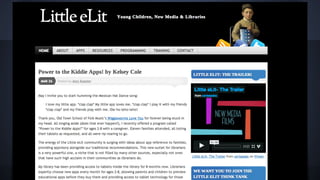
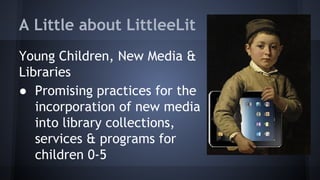
A Little about LittleeLit
Young Children, New Media &
Libraries
● Promising practices for the
incorporation of new media
into library collections,
services & programs for
children 0-5
Stretch
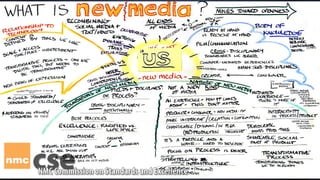
What is new media?
● Not just tablets & apps!
● Any Emergent Ed Tech
● Content creation via camera, video,
microphone & writing/drawing + book
creation tools, etc.
● Multimedia/Transmedia
● Wearable Tech & New, NEW Media!
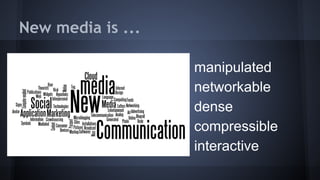
New media is ...
● manipulated
● networkable
● dense
● compressible
● interactive
New Media is Evolving …
What are some concerns about new
media & young children?
● Commercial messages
● Displacement of time doing other things
● Eye/Neck/Body/Brain strain
● Less creative and open-ended play
● Less time running around outside
● Sleep disruptions
● Age inappropriate content
● Under 2s (AAP)
These concerns are all valid.
How can children’s librarians provide guidance
for the use of new formats given that we have
no long term research on the effects of mobile
media with young children?
Apps & eBooks
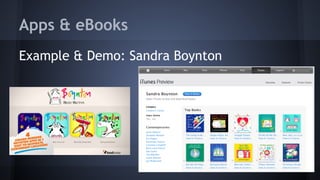
Example & Demo: Sandra Boynton
“The Sock Puppet Video”
Stretch!
Screen Time Poll
How much screen time is appropriate per day
for the following age groups:
1. 0-2 year olds
2. 3 year olds
3. 4 year olds
4. 5 year olds
What’s happening now?
What are the current controversies?
What have your heard or read about lately?
What’s brewing at LittleeLit ...
Model for Young Children, New Media
& Libraries is a combination of...
Pediatrics Pedagogy
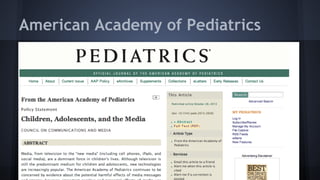
American Academy of Pediatrics
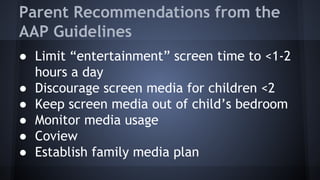
Parent Recommendations from the
AAP Guidelines
● Limit “entertainment” screen time to <1-2
hours a day
● Discourage screen media for children <2
● Keep screen media out of child’s bedroom
● Monitor media usage
● Coview
● Establish family media plan
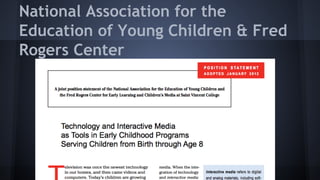
National Association for the
Education of Young Children & Fred
Rogers Center
Guidelines for Educators
● Select, use, integrate & evaluate media in
intentional & age-appropriate ways
● Balance of tech & non-tech
● Prohibit use of passive media
● Limit use for <2 year olds
● Consider recommendations from health orgs
● Equitable access to technology
Brazelton Touchpoints
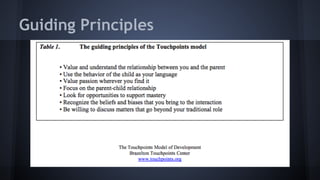
Guiding Principles
Guiding Principles to Focus on
● Focus on the parent-child relationship
● Recognize what you bring to the interaction
● Be willing to discuss matters that go beyond
your traditional role
Children’s Librarians Must Engage
with New Media for Young Children
● Ubiquity of tablet technology
● Whether it’s good for kids or not, parents
are handing the devices over
● Access to content (multilingual, diverse,
high quality)
● Societal need for Media Mentorship
● Potential to increase the overall quality of
content
Stretch!
Day 2
● Recap from yesterday
● Settings & Tech
● New media tools
● Access, Content & Engagement
● Talking to Families
● App reviews- finding them, evaluating
evaluators, low cost/free apps?
Thoughts from yesterday?
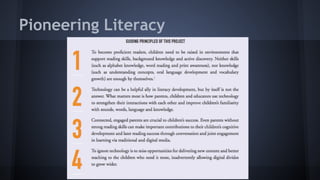
Pioneering Literacy
Every Child Ready to Read 2(.0)
Practices (ECRR2)
Talk, Sing, Read, Write, Play
Skills (ECRR)
Print Awareness, Letter Knowledge, Phonological
Awareness, Vocabulary, Narrative Skills, Print Motivation
Settings
● Guided Access
● Individual app settings
● Device settings
● WiFi/Network
Technological Set Up
● AppleTV
● iPad
● TV
● WiFi
● Plan B
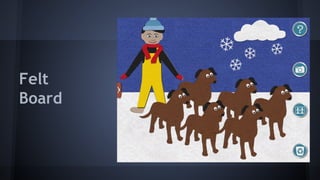
Felt
Board
Felt Board Activity
● Choose a song, story or rhyme you know
● Depict your song, story or rhyme using the
Felt Board app
● Explain how this activity supports one or
more of the early learning practices (talk,
sing, read, write,play)
Stretch!
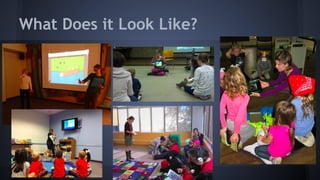
What Does it Look Like?
Demo:
Wee Sing ABC
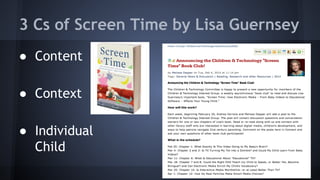
3 Cs of Screen Time by Lisa Guernsey
● Content
● Context
● Individual
Child
Mother Goose on the Loose
● Musical program for children 3 & under
● Children learn through routine & repetition
in a nurturing environment
● Support parents to be their child’s first &
best teacher
● Rhymes, music, felt board pieces, 80%/20%
MGOL Technology Use Statement
Technology handled with careful
consideration, in moderation; in ways that fit
in with the program’s intent and don’t
overwhelm, that enhance but don’t replace,
and that encourage parent/child interaction is
appropriate for use in a Mother Goose on the
Loose program.
LittleeLit Guidelines for New Media
in Storytime
● Access: Act as media mentor to your
community & support equitable access to
information
● Content: Content should be high quality &
age appropriate
● Engagement: Any technology use should
support the development of relationships
Talking Points Activity
● Engagement: Focus on the parent-child
relationship
● Resources/Research
● Technology as a tool (not a replacement)
● Not all screens are created equal
The Best App For Young Children...
...is one that supports the development of a
relationship with another human being.
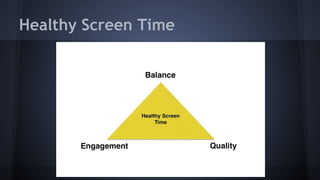
Healthy Screen Time
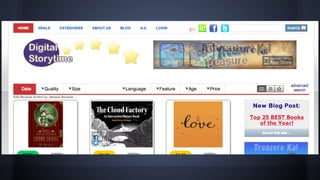
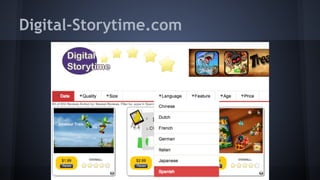
Digital-Storytime.com
App Treasure Hunt
What did you learn?
What was easy to find? Hard to find?
Impossible???
Review Sources
● Children’s Technology Review
● Common Sense Media
● Digital-Storytime.com
● Horn Book
● Kirkus Reviews
● Little eLit (suggested uses)
● School Library Journal
and your personal network….
Evaluating and Choosing Digital Media
● Make intentional decisions
● Explore newly downloaded apps on your own and then
with children
● Look for media that help adults and children write,
read, play, sing and talk TOGETHER
● Consider the 3 C’s: Context, Content, Child
Good Book Apps Have...
● Meaningful interactive elements that add to the story
and are not only for inter-activity’s sake
● A great story with high quality images
● Plain, highly-readable font
● Read-to-me and read-to-myself options
● Settings for turning on/off music and other sound
effects
Good Game/Activity Apps...
● Are fun to play over and over again
● Offer open-ended play
● Encourage creativity
● Strengthen one or more of the early literacy practices
● Are age appropriate
● Have Intuitive way-finding
● Use a clean, uncluttered display
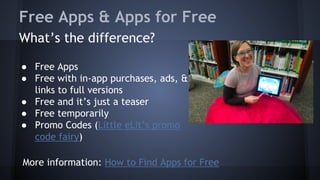
Free Apps & Apps for Free
What’s the difference?
● Free Apps
● Free with in-app purchases, ads, &
links to full versions
● Free and it’s just a teaser
● Free temporarily
● Promo Codes (Little eLit’s promo
code fairy)
More information: How to Find Apps for Free
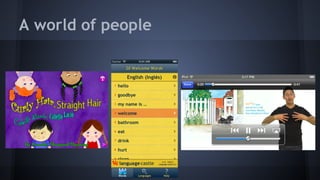
A world of people
Final Demo & Evaluation

Rancho Cucamonga Training March 2014

  • 1.
  • 2.
    New Media inStorytime Cen Campbell LittleeLit.com & Bookboard.com Carisa Kluver Digital-Storytime.com & DigitalMediaDiet.com
  • 5.
    Goals for theworkshop 1. Confidence to begin (or continue!) using new media in storytime 2. Evaluate Apps & eBooks (appvisory) 3. Traditional storytelling in the digital age 4. Model positive media behaviors
  • 6.
    Day 1 ● Introductions& Expectations ● What is new media? ● New media and kids- concerns ● What is screen time? ● The role of librarians in the new media conversation
  • 7.
    Day 2 ● Mediaand device demos (E-books, Book Apps, Game/Activity Apps, etc) ● Access, Content & Engagement ● Evaluating apps and other digital media ● App reviews- where do you find them? ● Positive media behaviors
  • 8.
    Introductions 1. Name 2. Position 3.Experience or Interest in New Media & Young Children
  • 9.
    Expectations 1. Share YourExperience 2. Share Your Concerns & Ideas 3. Listen & Engage 4. Share your learning goals ...
  • 10.
    Parking Lot Post yourthoughts, questions, comments during breaks.
  • 11.
    A Little aboutLittleeLit Young Children, New Media & Libraries ● Promising practices for the incorporation of new media into library collections, services & programs for children 0-5
  • 12.
  • 13.
    What is newmedia? ● Not just tablets & apps! ● Any Emergent Ed Tech ● Content creation via camera, video, microphone & writing/drawing + book creation tools, etc. ● Multimedia/Transmedia ● Wearable Tech & New, NEW Media!
  • 14.
    New media is... ● manipulated ● networkable ● dense ● compressible ● interactive
  • 15.
    New Media isEvolving …
  • 16.
    What are someconcerns about new media & young children? ● Commercial messages ● Displacement of time doing other things ● Eye/Neck/Body/Brain strain ● Less creative and open-ended play ● Less time running around outside ● Sleep disruptions ● Age inappropriate content ● Under 2s (AAP)
  • 17.
    These concerns areall valid. How can children’s librarians provide guidance for the use of new formats given that we have no long term research on the effects of mobile media with young children?
  • 18.
    Apps & eBooks Example& Demo: Sandra Boynton
  • 19.
  • 20.
  • 21.
    Screen Time Poll Howmuch screen time is appropriate per day for the following age groups: 1. 0-2 year olds 2. 3 year olds 3. 4 year olds 4. 5 year olds
  • 22.
    What’s happening now? Whatare the current controversies? What have your heard or read about lately? What’s brewing at LittleeLit ...
  • 23.
    Model for YoungChildren, New Media & Libraries is a combination of... Pediatrics Pedagogy
  • 24.
  • 25.
    Parent Recommendations fromthe AAP Guidelines ● Limit “entertainment” screen time to <1-2 hours a day ● Discourage screen media for children <2 ● Keep screen media out of child’s bedroom ● Monitor media usage ● Coview ● Establish family media plan
  • 26.
    National Association forthe Education of Young Children & Fred Rogers Center
  • 27.
    Guidelines for Educators ●Select, use, integrate & evaluate media in intentional & age-appropriate ways ● Balance of tech & non-tech ● Prohibit use of passive media ● Limit use for <2 year olds ● Consider recommendations from health orgs ● Equitable access to technology
  • 28.
  • 29.
  • 30.
    Guiding Principles toFocus on ● Focus on the parent-child relationship ● Recognize what you bring to the interaction ● Be willing to discuss matters that go beyond your traditional role
  • 31.
    Children’s Librarians MustEngage with New Media for Young Children ● Ubiquity of tablet technology ● Whether it’s good for kids or not, parents are handing the devices over ● Access to content (multilingual, diverse, high quality) ● Societal need for Media Mentorship ● Potential to increase the overall quality of content
  • 32.
  • 33.
    Day 2 ● Recapfrom yesterday ● Settings & Tech ● New media tools ● Access, Content & Engagement ● Talking to Families ● App reviews- finding them, evaluating evaluators, low cost/free apps?
  • 34.
  • 35.
  • 36.
    Every Child Readyto Read 2(.0) Practices (ECRR2) Talk, Sing, Read, Write, Play Skills (ECRR) Print Awareness, Letter Knowledge, Phonological Awareness, Vocabulary, Narrative Skills, Print Motivation
  • 37.
    Settings ● Guided Access ●Individual app settings ● Device settings ● WiFi/Network
  • 38.
    Technological Set Up ●AppleTV ● iPad ● TV ● WiFi ● Plan B
  • 39.
  • 40.
    Felt Board Activity ●Choose a song, story or rhyme you know ● Depict your song, story or rhyme using the Felt Board app ● Explain how this activity supports one or more of the early learning practices (talk, sing, read, write,play)
  • 41.
  • 42.
    What Does itLook Like?
  • 43.
  • 44.
    3 Cs ofScreen Time by Lisa Guernsey ● Content ● Context ● Individual Child
  • 45.
    Mother Goose onthe Loose ● Musical program for children 3 & under ● Children learn through routine & repetition in a nurturing environment ● Support parents to be their child’s first & best teacher ● Rhymes, music, felt board pieces, 80%/20%
  • 46.
    MGOL Technology UseStatement Technology handled with careful consideration, in moderation; in ways that fit in with the program’s intent and don’t overwhelm, that enhance but don’t replace, and that encourage parent/child interaction is appropriate for use in a Mother Goose on the Loose program.
  • 47.
    LittleeLit Guidelines forNew Media in Storytime ● Access: Act as media mentor to your community & support equitable access to information ● Content: Content should be high quality & age appropriate ● Engagement: Any technology use should support the development of relationships
  • 48.
    Talking Points Activity ●Engagement: Focus on the parent-child relationship ● Resources/Research ● Technology as a tool (not a replacement) ● Not all screens are created equal
  • 49.
    The Best AppFor Young Children... ...is one that supports the development of a relationship with another human being.
  • 50.
  • 51.
  • 52.
    App Treasure Hunt Whatdid you learn? What was easy to find? Hard to find? Impossible???
  • 53.
    Review Sources ● Children’sTechnology Review ● Common Sense Media ● Digital-Storytime.com ● Horn Book ● Kirkus Reviews ● Little eLit (suggested uses) ● School Library Journal and your personal network….
  • 54.
    Evaluating and ChoosingDigital Media ● Make intentional decisions ● Explore newly downloaded apps on your own and then with children ● Look for media that help adults and children write, read, play, sing and talk TOGETHER ● Consider the 3 C’s: Context, Content, Child
  • 55.
    Good Book AppsHave... ● Meaningful interactive elements that add to the story and are not only for inter-activity’s sake ● A great story with high quality images ● Plain, highly-readable font ● Read-to-me and read-to-myself options ● Settings for turning on/off music and other sound effects
  • 56.
    Good Game/Activity Apps... ●Are fun to play over and over again ● Offer open-ended play ● Encourage creativity ● Strengthen one or more of the early literacy practices ● Are age appropriate ● Have Intuitive way-finding ● Use a clean, uncluttered display
  • 57.
    Free Apps &Apps for Free What’s the difference? ● Free Apps ● Free with in-app purchases, ads, & links to full versions ● Free and it’s just a teaser ● Free temporarily ● Promo Codes (Little eLit’s promo code fairy) More information: How to Find Apps for Free
  • 58.
    A world ofpeople
  • 59.
    Final Demo &Evaluation