Basis for RAID
2
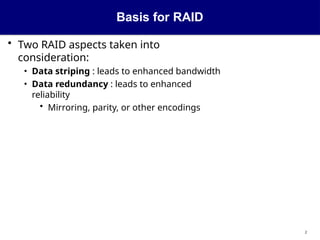
•Two RAID aspects taken into
consideration:
• Data striping : leads to enhanced bandwidth
• Data redundancy : leads to enhanced
reliability
• Mirroring, parity, or other encodings
3.
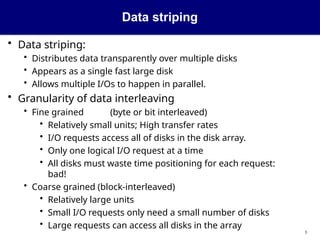
Data striping
3
• Datastriping:
• Distributes data transparently over multiple disks
• Appears as a single fast large disk
• Allows multiple I/Os to happen in parallel.
• Granularity of data interleaving
• Fine grained (byte or bit interleaved)
• Relatively small units; High transfer rates
• I/O requests access all of disks in the disk array.
• Only one logical I/O request at a time
• All disks must waste time positioning for each request:
bad!
• Coarse grained (block-interleaved)
• Relatively large units
• Small I/O requests only need a small number of disks
• Large requests can access all disks in the array
4.
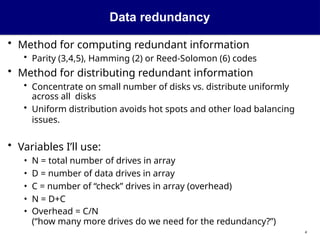
Data redundancy
4
• Methodfor computing redundant information
• Parity (3,4,5), Hamming (2) or Reed-Solomon (6) codes
• Method for distributing redundant information
• Concentrate on small number of disks vs. distribute uniformly
across all disks
• Uniform distribution avoids hot spots and other load balancing
issues.
• Variables I’ll use:
• N = total number of drives in array
• D = number of data drives in array
• C = number of “check” drives in array (overhead)
• N = D+C
• Overhead = C/N
(“how many more drives do we need for the redundancy?”)
5.
11
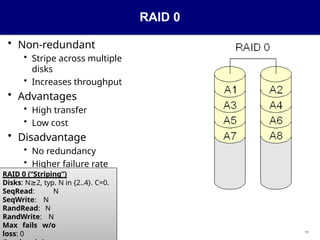
RAID 0
• Non-redundant
•Stripe across multiple
disks
• Increases throughput
• Advantages
• High transfer
• Low cost
• Disadvantage
• No redundancy
• Higher failure rate
RAID 0 (“Striping”)
Disks: N 2,
≥ typ. N in {2..4}. C=0.
SeqRead: N
SeqWrite: N
RandRead: N
RandWrite: N
Max fails w/o
loss: 0
6.
12
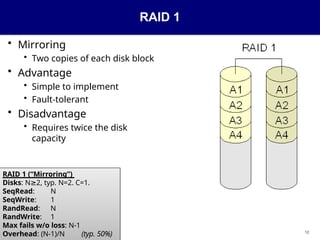
RAID 1
• Mirroring
•Two copies of each disk block
• Advantage
• Simple to implement
• Fault-tolerant
• Disadvantage
• Requires twice the disk
capacity
RAID 1 (“Mirroring”)
Disks: N 2,
≥ typ. N=2. C=1.
SeqRead: N
SeqWrite: 1
RandRead: N
RandWrite: 1
Max fails w/o loss: N-1
Overhead: (N-1)/N (typ. 50%)
7.
13
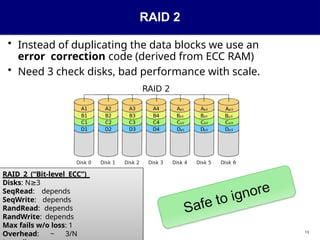
RAID 2
• Insteadof duplicating the data blocks we use an
error correction code (derived from ECC RAM)
• Need 3 check disks, bad performance with scale.
RAID 2 (“Bit-level ECC”)
Disks: N 3
≥
SeqRead: depends
SeqWrite: depends
RandRead: depends
RandWrite: depends
Max fails w/o loss: 1
Overhead: ~ 3/N
8.
14
XOR parity demo
•Given four 4-bit numbers: [0011, 0100, 1001,
0101]
• Given N values and one parity,
can recover the loss of any of the
001
1
0100
1001
0101
1011
XOR them
Lose one and
XOR what’s left
1011
0100
1001
0101
0011
Recovered!
9.
RAID 3
• N-1drives contain data, 1 contains parity data
• Last drive contains the parity of the corresponding
bytes of the other drives.
• Parity: XOR them all together
p[k] = b[k,1] b[k,2] ...
b[k,N]
Byte
RAID 3 (“Byte-level parity”)
Disks: N 3, C=1
≥
SeqRead: N
SeqWrite: N
RandRead: 1
RandWrite: 1
Max fails w/o loss: 1
Overhead: 1/N 9
10.
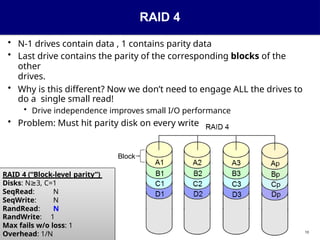
RAID 4
• N-1drives contain data , 1 contains parity data
• Last drive contains the parity of the corresponding blocks of the
other
drives.
• Why is this different? Now we don’t need to engage ALL the drives to
do a single small read!
• Drive independence improves small I/O performance
• Problem: Must hit parity disk on every write
Block
RAID 4 (“Block-level parity”)
Disks: N 3,
≥ C=1
SeqRead: N
SeqWrite: N
RandRead: N
RandWrite: 1
Max fails w/o loss: 1
Overhead: 1/N 10
11.
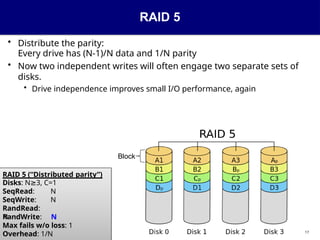
RAID 5
• Distributethe parity:
Every drive has (N-1)/N data and 1/N parity
• Now two independent writes will often engage two separate sets of
disks.
• Drive independence improves small I/O performance, again
Block
RAID 5 (“Distributed parity”)
Disks: N 3,
≥ C=1
SeqRead: N
SeqWrite: N
RandRead:
N
RandWrite: N
Max fails w/o loss: 1
Overhead: 1/N 17
12.
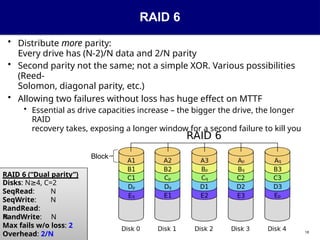
RAID 6
• Distributemore parity:
Every drive has (N-2)/N data and 2/N parity
• Second parity not the same; not a simple XOR. Various possibilities
(Reed-
Solomon, diagonal parity, etc.)
• Allowing two failures without loss has huge effect on MTTF
• Essential as drive capacities increase – the bigger the drive, the longer
RAID
recovery takes, exposing a longer window for a second failure to kill you
Block
RAID 6 (“Dual parity”)
Disks: N 4,
≥ C=2
SeqRead: N
SeqWrite: N
RandRead:
N
RandWrite: N
Max fails w/o loss: 2
Overhead: 2/N 18
13.
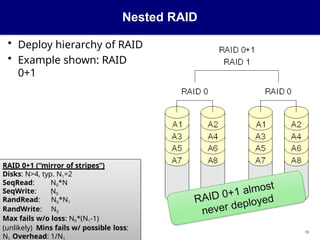
Nested RAID
• Deployhierarchy of RAID
• Example shown: RAID
0+1
RAID 0+1 (“mirror of stripes”)
Disks: N>4, typ. N1=2
SeqRead:
SeqWrite:
N0*N
1
N0
RandRead: N0*N1
RandWrite: N0
Max fails w/o loss: N0*(N1-1)
(unlikely) Mins fails w/ possible loss:
N Overhead: 1/N
13
14.
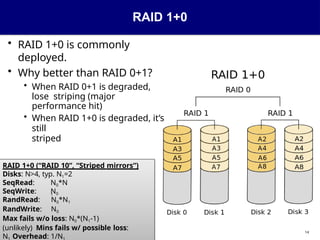
RAID 1+0
• RAID1+0 is commonly
deployed.
• Why better than RAID 0+1?
• When RAID 0+1 is degraded,
lose striping (major
performance hit)
• When RAID 1+0 is degraded, it’s
still
striped
RAID 1+0 (“RAID 10”, “Striped mirrors”)
Disks: N>4, typ. N1=2
SeqRead:
SeqWrite:
N0*N
1
N0
RandRead: N0*N1
RandWrite: N0
Max fails w/o loss: N0*(N1-1)
(unlikely) Mins fails w/ possible loss:
N Overhead: 1/N
14
15.
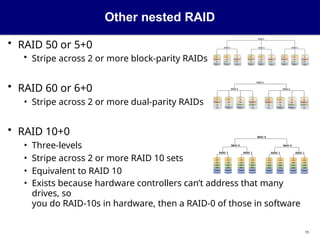
Other nested RAID
•RAID 50 or 5+0
• Stripe across 2 or more block-parity RAIDs
• RAID 60 or 6+0
• Stripe across 2 or more dual-parity RAIDs
• RAID 10+0
• Three-levels
• Stripe across 2 or more RAID 10 sets
• Equivalent to RAID 10
• Exists because hardware controllers can’t address that many
drives, so
you do RAID-10s in hardware, then a RAID-0 of those in software
15
16.
The small writeproblem
• Specific to block level striping
• Happens when we want to update a single
block
• Block belongs to a stripe
• How can we compute the new value of the parity
block
...
b[k+1] p[k]
b[k+2]
b[k]
16
17.
First solution
17
• Readvalues of N-1 other blocks in
stripe
• Recompute
p[k] = b[k] b[k+1] ... b[k+N-1]
• Solution requires
• N-1 reads
• 2 writes (new block and parity block)
18.
Second solution
18
• Assumewe want to update block b[m]
• Read old values of b[m] and parity block
p[k]
• Compute
p[k] = new_b[m] old_b[m] old_p[k]
• Solution requires
• 2 reads (old values of block and parity block)
• 2 writes (new block and parity block)
19.
Picking a RAIDconfiguration
19
• Just need raw throughput, don’t care about data
loss? (e.g., scratch disk for graphics/video work)
• RAID 0
• Small deployment? Need
simplicity? (e.g., Local boot
drives for servers)
• RAID 1, n=2
• Small deployment but need low
overhead?
(e.g., Home media storage)
• RAID 5, n=4..6
• Danger: big drives with large RAID-5’s increase risk of double failure
during repair
• Need simplicity and big throughput?
• RAID 1+0
• Large capacity?
• RAID 6 or RAID 6+0, n=15..30
• Simplicity when workload never has small writes?
20.
High availability vs.resiliency
20
• Main purpose of RAID is to build fault-tolerant file systems
for
high availability
• However,
RAID DOES
NOT REPLACE
BACKUPS
21.
What RAID can’tdo
21
• RAID does not protect against:
• Human error (e.g. accidental deletion)
• Malware
• Non-drive hardware failure (I/O card, motherboard, CPU, RAM,
etc.)
• Undetected read errors from disk
• Unless you’re reading all disks and checking against parity every
time...
• But that’s performance-prohibitive.
• Even then you wouldn’t know which drive’s data was bad.
• Data corruption due to power outage
• In fact, RAID makes it worse...what if you lose power when only some
of the drives in a stripe have been updated? The “write hole”
• Catastrophic destruction of the system, rack, building, city,
continent, or planet
22.
Recovering from failure
22
•When a disk fails in an array, the array becomes degraded
• While array is degraded, it is at risk of additional disk
failures!
• Remember, for RAID 1/4/5, double disk failure = death!
• When the disk is replaced, the degraded array can be
rebuilt
• For RAID-1, re-copy data. For RAID-4/5/6, reconstruct from parity.
• Hot spares: Disks that don’t participate in the array
• On failure, system immediately disables bad disk, promotes a
spare, and begins rebuilding.
• Reduces time spent in degraded state.
• Administrator can remove and replace bad disk at leisure (no
urgency).
23.
Issues
23
• What happenswhen new disks are added into the
system?
• Usually have to change layout, rearrange data
• (More advanced techniques can avoid/minimize this)
• How to “grow” the array by replacement with bigger
disks?
• Must replace every disk in turn, rebuilding between each
• Only a consideration for small deployments – large deployments
just
add whole shelves (i.e. entire RAID arrays) of disks at a time
24.
Optimizations in theArray Controller
24
• Access Coalescing
• Determine whether several disk I/Os on same disk are coalesced
into a single disk I/O.
• Load Balancing
• How the disk controller distributes the load between a disk and its
mirror.
• E.g. read from 3 disks or submit requests to 6 ( 3+ mirrors).
• Advantage: Reduced transfer time
• Disadvantage: Queue length longer at all disks. (Consider 2 3s
vs. 2 6s).
25.
More Array ControllerOptimizations
25
• Adaptive Prefetching
• Based on automatic detection of sequential I/O streams.
• Write-back Caching Policy
• When are dirty data written from cache to disk
• Parameter: max number of dirty blocks that can be held in
cache
without triggering disk writes.

![14
XOR parity demo
• Given four 4-bit numbers: [0011, 0100, 1001,
0101]
• Given N values and one parity,
can recover the loss of any of the
001
1
0100
1001
0101
1011
XOR them
Lose one and
XOR what’s left
1011
0100
1001
0101
0011
Recovered!](https://image.slidesharecdn.com/05-raid-250724113935-96b7de3b/85/presentasi-raid-server-cloud-computing-pptx-8-320.jpg)
![RAID 3
• N-1 drives contain data, 1 contains parity data
• Last drive contains the parity of the corresponding
bytes of the other drives.
• Parity: XOR them all together
p[k] = b[k,1] b[k,2] ...
b[k,N]
Byte
RAID 3 (“Byte-level parity”)
Disks: N 3, C=1
≥
SeqRead: N
SeqWrite: N
RandRead: 1
RandWrite: 1
Max fails w/o loss: 1
Overhead: 1/N 9](https://image.slidesharecdn.com/05-raid-250724113935-96b7de3b/85/presentasi-raid-server-cloud-computing-pptx-9-320.jpg)
![The small write problem
• Specific to block level striping
• Happens when we want to update a single
block
• Block belongs to a stripe
• How can we compute the new value of the parity
block
...
b[k+1] p[k]
b[k+2]
b[k]
16](https://image.slidesharecdn.com/05-raid-250724113935-96b7de3b/85/presentasi-raid-server-cloud-computing-pptx-16-320.jpg)
![First solution
17
• Read values of N-1 other blocks in
stripe
• Recompute
p[k] = b[k] b[k+1] ... b[k+N-1]
• Solution requires
• N-1 reads
• 2 writes (new block and parity block)](https://image.slidesharecdn.com/05-raid-250724113935-96b7de3b/85/presentasi-raid-server-cloud-computing-pptx-17-320.jpg)
![Second solution
18
• Assume we want to update block b[m]
• Read old values of b[m] and parity block
p[k]
• Compute
p[k] = new_b[m] old_b[m] old_p[k]
• Solution requires
• 2 reads (old values of block and parity block)
• 2 writes (new block and parity block)](https://image.slidesharecdn.com/05-raid-250724113935-96b7de3b/85/presentasi-raid-server-cloud-computing-pptx-18-320.jpg)


![Raid_structure_os[1].pdfhdgretrhfgfhfhyt](https://cdn.slidesharecdn.com/ss_thumbnails/raidstructureos1-250213084106-a1567d8d-thumbnail.jpg?width=640&height=640&fit=bounds)


