The Google File System
Tut Chi Io(Modified by
Fengchang)
WHAT IS GFS
• Google FILE SYSTEM(GFS)
• scalable distributed file system (DFS)
• falt tolerence
• Reliability
• Scalability
• availability and performance to large
networks and connected nodes.
WHAT IS GFS
• built from low-cost COMMODITY
HARDWARE components
• optimized to accomodate Google's
different data use and storage needs,
• capitalized on the strength of off-the-
shelf servers while minimizing
hardware weaknesses
Design Overview – Assumption
• Inexpensive commodity hardware
• Large files: Multi-GB
• Workloads
– Large streaming reads
– Small random reads
– Large, sequential appends
• Concurrent append to the same file
• High Throughput > Low Latency
Design Overview – Interface
• Create
• Delete
• Open
• Close
• Read
• Write
• Snapshot
• Record Append
What does it look like
Design Overview – Architecture
• Single master, multiple chunk servers,
multiple clients
– User-level process running on commodity
Linux machine
– GFS client code linked into each client
application to communicate
• File -> 64MB chunks -> Linux files
– on local disks of chunk servers
– replicated on multiple chunk servers (3r)
• Cache metadata but not chunk on
clients
Design Overview – Single Master
• Why centralization? Simplicity!
• Global knowledge is needed for
– Chunk placement
– Replication decisions
Design Overview – Chunk Size
• 64MB – Much Larger than ordinary,
why?
– Advantages
• Reduce client-master interaction
• Reduce network overhead
• Reduce the size of the metadata
– Disadvantages
• Internal fragmentation
– Solution: lazy space allocation
• Hot Spots – many clients accessing a 1-chunk
file, e.g. executables
– Solution:
– Higher replication factor
– Stagger application start times
– Client-to-client communication
Design Overview – Metadata
• File & chunk namespaces
– In master’s memory
– In master’s and chunk servers’ storage
• File-chunk mapping
– In master’s memory
– In master’s and chunk servers’ storage
• Location of chunk replicas
– In master’s memory
– Ask chunk servers when
• Master starts
• Chunk server joins the cluster
– If persistent, master and chunk servers must be
in sync
Design Overview – Metadata – In-memory DS
• Why in-memory data structure for the
master?
– Fast! For GC and LB
• Will it pose a limit on the number of
chunks -> total capacity?
– No, a 64MB chunk needs less than 64B
metadata (640TB needs less than 640MB)
• Most chunks are full
• Prefix compression on file names
Design Overview – Metadata – Log
• The only persistent record of metadata
• Defines the order of concurrent
operations
• Critical
– Replicated on multiple remote machines
– Respond to client only when log locally
and remotely
• Fast recovery by using checkpoints
– Use a compact B-tree like form directly
mapping into memory
– Switch to a new log, Create new
checkpoints in a separate threads
Design Overview – Consistency Model
• Consistent
– All clients will see the same data,
regardless of which replicas they read
from
• Defined
– Consistent, and clients will see what the
mutation writes in its entirety
Design Overview – Consistency Model
• After a sequence of success, a region
is guaranteed to be defined
– Same order on all replicas
– Chunk version number to detect stale
replicas
• Client cache stale chunk locations?
– Limited by cache entry’s timeout
– Most files are append-only
• A Stale replica return a premature end of
chunk
System Interactions – Lease
• Minimized management overhead
• Granted by the master to one of the
replicas to become the primary
• Primary picks a serial order of
mutation and all replicas follow
• 60 seconds timeout, can be extended
• Can be revoked
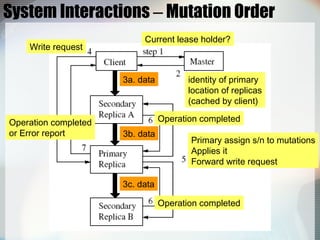
System Interactions – Mutation Order
Current lease holder?
identity of primary
location of replicas
(cached by client)
3a. data
3b. data
3c. data
Write request
Primary assign s/n to mutations
Applies it
Forward write request
Operation completed
Operation completed
Operation completed
or Error report
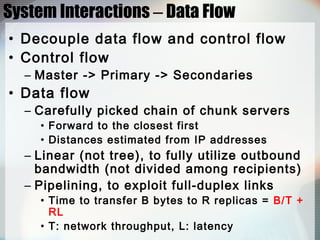
System Interactions – Data Flow
• Decouple data flow and control flow
• Control flow
– Master -> Primary -> Secondaries
• Data flow
– Carefully picked chain of chunk servers
• Forward to the closest first
• Distances estimated from IP addresses
– Linear (not tree), to fully utilize outbound
bandwidth (not divided among recipients)
– Pipelining, to exploit full-duplex links
• Time to transfer B bytes to R replicas = B/T +
RL
• T: network throughput, L: latency
System Interactions – Atomic Record Append
• Concurrent appends are serializable
– Client specifies only data
– GFS appends at least once atomically
– Return the offset to the client
– Heavily used by Google to use files as
• multiple-producer/single-consumer queues
• Merged results from many different clients
– On failures, the client retries the
operation
– Data are defined, intervening regions are
inconsistent
• A Reader can identify and discard extra
padding and record fragments using the
checksums
System Interactions – Snapshot
• Makes a copy of a file or a directory
tree almost instantaneously
• Use copy-on-write
• Steps
– Revokes lease
– Logs operations to disk
– Duplicates metadata, pointing to the same
chunks
• Create real duplicate locally
– Disks are 3 times as fast as 100 Mb
Ethernet links
Master Operation – Namespace Management
• No per-directory data structure
• No support for alias
• Lock over regions of namespace to
ensure serialization
• Lookup table mapping full pathnames
to metadata
– Prefix compression -> In-Memory
Master Operation – Namespace Locking
• Each node (file/directory) has a read-
write lock
• Scenario: prevent /home/user/foo from
being created while /home/user is
being snapshotted to /save/user
– Snapshot
• Read locks on /home, /save
• Write locks on /home/user, /save/user
– Create
• Read locks on /home, /home/user
• Write lock on /home/user/foo
Master Operation – Policies
• New chunks creation policy
– New replicas on below-average disk
utilization
– Limit # of “recent” creations on each chun
server
– Spread replicas of a chunk across racks
• Re-replication priority
– Far from replication goal first
– Chunk that is blocking client first
– Live files first (rather than deleted)
• Rebalance replicas periodically
Master Operation – Garbage Collection
• Lazy reclamation
– Logs deletion immediately
– Rename to a hidden name
• Remove 3 days later
• Undelete by renaming back
• Regular scan for orphaned chunks
– Not garbage:
• All references to chunks: file-chunk mapping
• All chunk replicas: Linux files under designated
directory on each chunk server
– Erase metadata
– HeartBeat message to tell chunk servers to
delete chunks
Master Operation – Garbage Collection
• Advantages
– Simple & reliable
• Chunk creation may failed
• Deletion messages may be lost
– Uniform and dependable way to clean up
unuseful replicas
– Done in batches and the cost is amortized
– Done when the master is relatively free
– Safety net against accidental, irreversible
deletion
Master Operation – Garbage Collection
• Disadvantage
– Hard to fine tune when storage is tight
• Solution
– Delete twice explicitly -> expedite storage
reclamation
– Different policies for different parts of the
namespace
• Stale Replica Detection
– Master maintains a chunk version number
Fault Tolerance – High Availability
• Fast Recovery
– Restore state and start in seconds
– Do not distinguish normal and abnormal
termination
• Chunk Replication
– Different replication levels for different
parts of the file namespace
– Keep each chunk fully replicated as chunk
servers go offline or detect corrupted
replicas through checksum verification
Fault Tolerance – High Availability
• Master Replication
– Log & checkpoints are replicated
– Master failures?
• Monitoring infrastructure outside GFS starts a
new master process
– “Shadow” masters
• Read-only access to the file system when the
primary master is down
• Enhance read availability
• Reads a replica of the growing operation log
Fault Tolerance – Data Integrity
• Use checksums to detect data corruption
• A chunk(64MB) is broken up into 64KB
blocks with 32-bit checksum
• Chunk server verifies the checksum before
returning, no error propagation
• Record append
– Incrementally update the checksum for the last
block, error will be detected when read
• Random write
– Read and verify the first and last block first
– Perform write, compute new checksums
Conclusion
• GFS supports large-scale data
processing using commodity hardware
• Reexamine traditional file system
assumption
– based on application workload and
technological environment
– Treat component failures as the norm
rather than the exception
– Optimize for huge files that are mostly
appended
– Relax the stand file system interface
Conclusion
• Fault tolerance
– Constant monitoring
– Replicating crucial data
– Fast and automatic recovery
– Checksumming to detect data corruption
at the disk or IDE subsystem level
• High aggregate throughput
– Decouple control and data transfer
– Minimize operations by large chunk size
and by chunk lease
Reference
• Sanjay Ghemawat, Howard Gobioff,
and Shun-Tak Leung, “The Google File
System”

Gfs google-file-system-13331

  • 1.
    The Google FileSystem Tut Chi Io(Modified by Fengchang)
  • 2.
    WHAT IS GFS •Google FILE SYSTEM(GFS) • scalable distributed file system (DFS) • falt tolerence • Reliability • Scalability • availability and performance to large networks and connected nodes.
  • 3.
    WHAT IS GFS •built from low-cost COMMODITY HARDWARE components • optimized to accomodate Google's different data use and storage needs, • capitalized on the strength of off-the- shelf servers while minimizing hardware weaknesses
  • 4.
    Design Overview –Assumption • Inexpensive commodity hardware • Large files: Multi-GB • Workloads – Large streaming reads – Small random reads – Large, sequential appends • Concurrent append to the same file • High Throughput > Low Latency
  • 5.
    Design Overview –Interface • Create • Delete • Open • Close • Read • Write • Snapshot • Record Append
  • 6.
    What does itlook like
  • 7.
    Design Overview –Architecture • Single master, multiple chunk servers, multiple clients – User-level process running on commodity Linux machine – GFS client code linked into each client application to communicate • File -> 64MB chunks -> Linux files – on local disks of chunk servers – replicated on multiple chunk servers (3r) • Cache metadata but not chunk on clients
  • 8.
    Design Overview –Single Master • Why centralization? Simplicity! • Global knowledge is needed for – Chunk placement – Replication decisions
  • 9.
    Design Overview –Chunk Size • 64MB – Much Larger than ordinary, why? – Advantages • Reduce client-master interaction • Reduce network overhead • Reduce the size of the metadata – Disadvantages • Internal fragmentation – Solution: lazy space allocation • Hot Spots – many clients accessing a 1-chunk file, e.g. executables – Solution: – Higher replication factor – Stagger application start times – Client-to-client communication
  • 10.
    Design Overview –Metadata • File & chunk namespaces – In master’s memory – In master’s and chunk servers’ storage • File-chunk mapping – In master’s memory – In master’s and chunk servers’ storage • Location of chunk replicas – In master’s memory – Ask chunk servers when • Master starts • Chunk server joins the cluster – If persistent, master and chunk servers must be in sync
  • 11.
    Design Overview –Metadata – In-memory DS • Why in-memory data structure for the master? – Fast! For GC and LB • Will it pose a limit on the number of chunks -> total capacity? – No, a 64MB chunk needs less than 64B metadata (640TB needs less than 640MB) • Most chunks are full • Prefix compression on file names
  • 12.
    Design Overview –Metadata – Log • The only persistent record of metadata • Defines the order of concurrent operations • Critical – Replicated on multiple remote machines – Respond to client only when log locally and remotely • Fast recovery by using checkpoints – Use a compact B-tree like form directly mapping into memory – Switch to a new log, Create new checkpoints in a separate threads
  • 13.
    Design Overview –Consistency Model • Consistent – All clients will see the same data, regardless of which replicas they read from • Defined – Consistent, and clients will see what the mutation writes in its entirety
  • 14.
    Design Overview –Consistency Model • After a sequence of success, a region is guaranteed to be defined – Same order on all replicas – Chunk version number to detect stale replicas • Client cache stale chunk locations? – Limited by cache entry’s timeout – Most files are append-only • A Stale replica return a premature end of chunk
  • 15.
    System Interactions –Lease • Minimized management overhead • Granted by the master to one of the replicas to become the primary • Primary picks a serial order of mutation and all replicas follow • 60 seconds timeout, can be extended • Can be revoked
  • 16.
    System Interactions –Mutation Order Current lease holder? identity of primary location of replicas (cached by client) 3a. data 3b. data 3c. data Write request Primary assign s/n to mutations Applies it Forward write request Operation completed Operation completed Operation completed or Error report
  • 17.
    System Interactions –Data Flow • Decouple data flow and control flow • Control flow – Master -> Primary -> Secondaries • Data flow – Carefully picked chain of chunk servers • Forward to the closest first • Distances estimated from IP addresses – Linear (not tree), to fully utilize outbound bandwidth (not divided among recipients) – Pipelining, to exploit full-duplex links • Time to transfer B bytes to R replicas = B/T + RL • T: network throughput, L: latency
  • 18.
    System Interactions –Atomic Record Append • Concurrent appends are serializable – Client specifies only data – GFS appends at least once atomically – Return the offset to the client – Heavily used by Google to use files as • multiple-producer/single-consumer queues • Merged results from many different clients – On failures, the client retries the operation – Data are defined, intervening regions are inconsistent • A Reader can identify and discard extra padding and record fragments using the checksums
  • 19.
    System Interactions –Snapshot • Makes a copy of a file or a directory tree almost instantaneously • Use copy-on-write • Steps – Revokes lease – Logs operations to disk – Duplicates metadata, pointing to the same chunks • Create real duplicate locally – Disks are 3 times as fast as 100 Mb Ethernet links
  • 20.
    Master Operation –Namespace Management • No per-directory data structure • No support for alias • Lock over regions of namespace to ensure serialization • Lookup table mapping full pathnames to metadata – Prefix compression -> In-Memory
  • 21.
    Master Operation –Namespace Locking • Each node (file/directory) has a read- write lock • Scenario: prevent /home/user/foo from being created while /home/user is being snapshotted to /save/user – Snapshot • Read locks on /home, /save • Write locks on /home/user, /save/user – Create • Read locks on /home, /home/user • Write lock on /home/user/foo
  • 22.
    Master Operation –Policies • New chunks creation policy – New replicas on below-average disk utilization – Limit # of “recent” creations on each chun server – Spread replicas of a chunk across racks • Re-replication priority – Far from replication goal first – Chunk that is blocking client first – Live files first (rather than deleted) • Rebalance replicas periodically
  • 23.
    Master Operation –Garbage Collection • Lazy reclamation – Logs deletion immediately – Rename to a hidden name • Remove 3 days later • Undelete by renaming back • Regular scan for orphaned chunks – Not garbage: • All references to chunks: file-chunk mapping • All chunk replicas: Linux files under designated directory on each chunk server – Erase metadata – HeartBeat message to tell chunk servers to delete chunks
  • 24.
    Master Operation –Garbage Collection • Advantages – Simple & reliable • Chunk creation may failed • Deletion messages may be lost – Uniform and dependable way to clean up unuseful replicas – Done in batches and the cost is amortized – Done when the master is relatively free – Safety net against accidental, irreversible deletion
  • 25.
    Master Operation –Garbage Collection • Disadvantage – Hard to fine tune when storage is tight • Solution – Delete twice explicitly -> expedite storage reclamation – Different policies for different parts of the namespace • Stale Replica Detection – Master maintains a chunk version number
  • 26.
    Fault Tolerance –High Availability • Fast Recovery – Restore state and start in seconds – Do not distinguish normal and abnormal termination • Chunk Replication – Different replication levels for different parts of the file namespace – Keep each chunk fully replicated as chunk servers go offline or detect corrupted replicas through checksum verification
  • 27.
    Fault Tolerance –High Availability • Master Replication – Log & checkpoints are replicated – Master failures? • Monitoring infrastructure outside GFS starts a new master process – “Shadow” masters • Read-only access to the file system when the primary master is down • Enhance read availability • Reads a replica of the growing operation log
  • 28.
    Fault Tolerance –Data Integrity • Use checksums to detect data corruption • A chunk(64MB) is broken up into 64KB blocks with 32-bit checksum • Chunk server verifies the checksum before returning, no error propagation • Record append – Incrementally update the checksum for the last block, error will be detected when read • Random write – Read and verify the first and last block first – Perform write, compute new checksums
  • 29.
    Conclusion • GFS supportslarge-scale data processing using commodity hardware • Reexamine traditional file system assumption – based on application workload and technological environment – Treat component failures as the norm rather than the exception – Optimize for huge files that are mostly appended – Relax the stand file system interface
  • 30.
    Conclusion • Fault tolerance –Constant monitoring – Replicating crucial data – Fast and automatic recovery – Checksumming to detect data corruption at the disk or IDE subsystem level • High aggregate throughput – Decouple control and data transfer – Minimize operations by large chunk size and by chunk lease
  • 31.
    Reference • Sanjay Ghemawat,Howard Gobioff, and Shun-Tak Leung, “The Google File System”