








Introducing Storage Replica
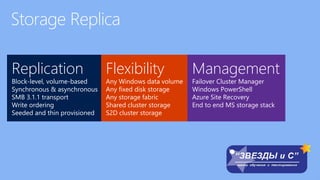
Replication
Block-level, volume-based
Synchronous & asynchronous
SMB 3.1.1 transport
Write ordering
Seeded and thin provisioned
Flexibility
Any Windows data volume
Any fixed disk storage
Any storage fabric
Shared cluster storage
S2D cluster storage
Management
Failover Cluster Manager
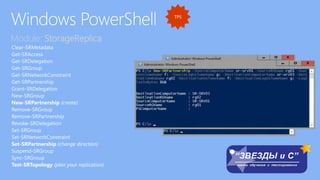
Windows PowerShell
Azure Site Recovery
End to end MS storage stack
SR and Storage Spaces
Direct close the loop on the
MS storage stack
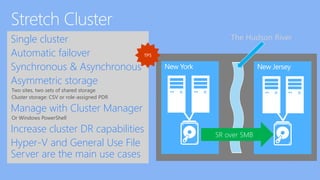
Single cluster
Automatic failover
Synchronous & Asynchronous
Asymmetric storage
Two sites, two sets of shared storage
Cluster storage: CSV or role-assigned PDR
Manage with Cluster Manager
Or Windows PowerShell
Increase cluster DR capabilities
Hyper-V and General Use File
Server are the main use cases
New York New Jersey
SR over SMB
The Hudson River
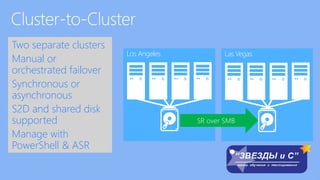
Two separate clusters
Manual or
orchestrated failover
Synchronous or
asynchronous
S2D and shared disk
supported
Manage with
PowerShell & ASR
Los Angeles Las Vegas
SR over SMB
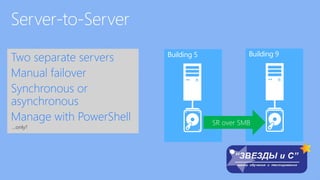
Two separate servers
Manual failover
Synchronous or
asynchronous
Manage with PowerShell
…only?
Building 5 Building 9
SR over SMB
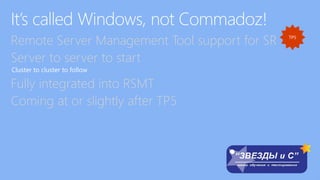
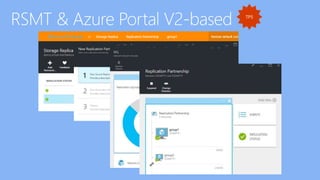
Remote Server Management Tool support for SR
Server to server to start
Cluster to cluster to follow
Fully integrated into RSMT
Coming at or slightly after TP5
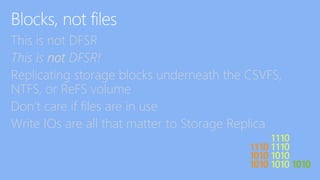
This is not DFSR
This is not DFSR!
Replicating storage blocks underneath the CSVFS,
NTFS, or ReFS volume
Don’t care if files are in use
Write IOs are all that matter to Storage Replica
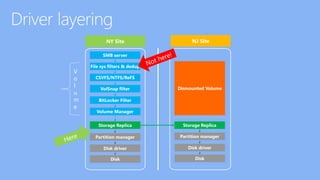
V
o
l
u
m
e
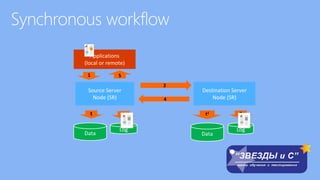
Applications
(local or remote)
Source Server
Node (SR)
Data
Log
1
t 2
Destination Server
Node (SR)
Data
Log
t1 3
2
5
4
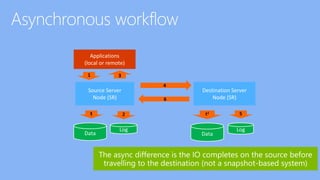
Applications
(local or remote)
Source Server
Node (SR)
Data
Log
1
t 2
Destination Server
Node (SR)
Data
Log
t1 5
4
3
6
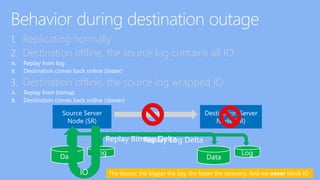
1. Replicating normally
2. Destination offline, the source log contains all IO:
A. Replay from log
B. Destination comes back online (faster)
3. Destination offline, the source log wrapped IO
A. Replay from bitmap
B. Destination comes back online (slower)
Source Server
Node (SR)
Data
Log
Destination Server
Node (SR)
Data
Log
OI
Replay Log DeltaReplay Bitmap Delta
The lesson: the bigger the log, the faster the recovery. And we never block IO
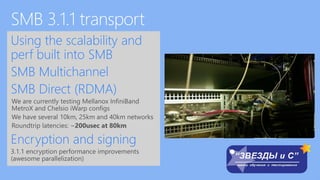
Using the scalability and
perf built into SMB
SMB Multichannel
SMB Direct (RDMA)
We are currently testing Mellanox InfiniBand
MetroX and Chelsio iWarp configs
We have several 10km, 25km and 40km networks
Roundtrip latencies: ~200usec at 80km
Encryption and signing
3.1.1 encryption performance improvements
(awesome parallelization)
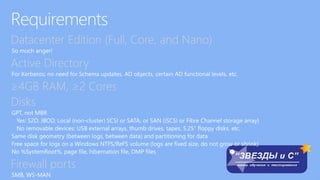
Datacenter Edition (Full, Core, and Nano)
Active Directory
≥4GB RAM, ≥2 Cores
Disks
Firewall ports
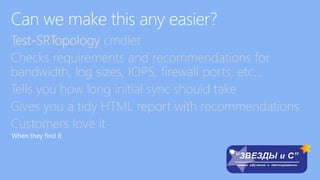
Test-SRTopology cmdlet
Checks requirements and recommendations for
bandwidth, log sizes, IOPS, firewall ports, etc…
Tells you how long initial sync should take
Gives you a tidy HTML report with recommendations
Customers love it
When they find it
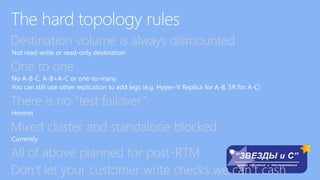
Destination volume is always dismounted
One to one
There is no “test failover”
Hmmm
Mixed cluster and standalone blocked
Currently
All of above planned for post-RTM
Don’t let your customer write checks we can’t cash
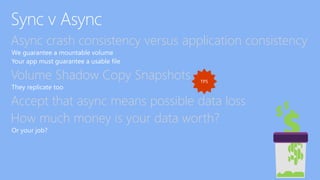
Async crash consistency versus application consistency
We guarantee a mountable volume
Your app must guarantee a usable file
Volume Shadow Copy Snapshots
They replicate too
Accept that async means possible data loss
How much money is your data worth?
Or your job?
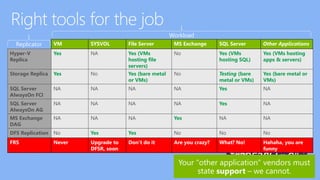
Hyper-V
Replica
Yes NA Yes (VMs
hosting file
servers)
No Yes (VMs
hosting SQL)
Yes (VMs hosting
apps & servers)
VM SYSVOL File Server MS Exchange SQL Server Other Applications
Storage Replica Yes No Yes (bare metal
or VMs)
No Testing (bare
metal or VMs)
Yes (bare metal or
VMs)
SQL Server
AlwaysOn FCI
NA NA NA NA Yes NA
MS Exchange
DAG
NA NA NA Yes NA NA
DFS Replication No Yes Yes No No No
FRS Never Upgrade to
DFSR, soon
Don’t do it Are you crazy? What? No! Hahaha, you are
funny
SQL Server
AlwaysOn AG
NA NA NA NA Yes NA
Workload
Replicator
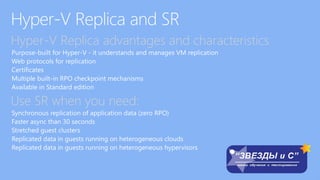
Hyper-V Replica advantages and characteristics
Use SR when you need:
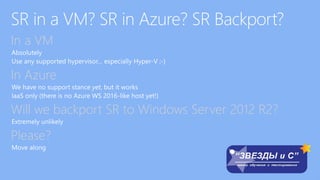
In a VM
In Azure
Will we backport SR to Windows Server 2012 R2?
Please?
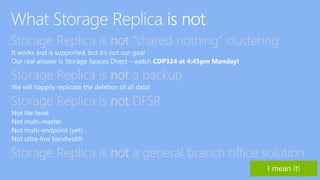
Storage Replica is not “shared nothing” clustering
Storage Replica is not a backup
Storage Replica is not DFSR
Storage Replica is not a general branch office solution
Module: StorageReplica
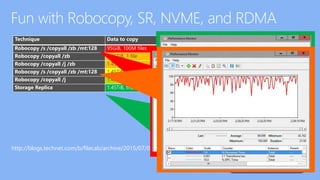
http://blogs.technet.com/b/filecab/archive/2015/07/09/storage-replica-versus-robocopy-fight.aspx
Technique Data to copy Time to complete
Robocopy /s /copyall /zb /mt:128 95GiB, 100M files 8 hours, 0 minutes and 12 seconds
Robocopy /copyall /zb 1.45TiB, 1 file 2 hours, 48 minutes, 26 seconds
Robocopy /copyall /j /zb 1.45TiB, 1 file 2 hours, 38 minutes, 8 seconds
Robocopy /s /copyall /zb /mt:128 1.45TiB, 1.11M files 25 minutes, 0 seconds
Robocopy /copyall /j 1.45TiB, 1 file 15 minutes, 23 seconds
Storage Replica 1.45TiB, the volume 14 minutes, 27 seconds
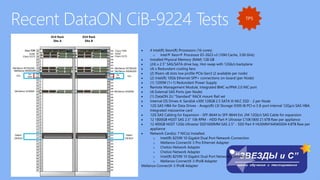
 4 Intel(R) Xeon(R) Processors (16 cores)
o Intel® Xeon® Processor E5-2623 v3 (10M Cache, 3.00 GHz)
 Installed Physical Memory (RAM) 128 GB
 (24) x 2.5" SAS/SATA drive bay, Hot-swap with 12Gb/s backplane
 (4) x Redundant cooling fans
 (2) Risers x8 slots low profile PCIe Gen3 (2 available per node)
 (2) Intel(R) 10Gb Ethernet SFP+ connections on-board (per Node)
 (1) 1200W (1+1) Redundant Power Supply
 Remote Management Module, Integrated BMC w/IPMI 2.0 NIC port
 (4) External SAS Ports (per Node)
 (1) DataON 2U "Standard" RACK mount Rail set
 Internal OS Drives 4: Sandisk x300 128GB 2.5 SATA III MLC SSD - 2 per Node
 12G SAS HBA for Data Drives - Avago(R) LSI Storage 9300-8i PCI-e 3 8-port internal 12Gp/s SAS HBA.
Integrated mezzanine card
 12G SAS Cabling for Expansion - SFF-8644 to SFF-8644 Ext. 2M 12Gb/s SAS Cable for expansion
 12 1800GB HGST SAS 2.5" 10k RPM - HDD Part # Ultrastar C10K1800 21.6TB Raw per appliance
 12 400GB HGST 12Gb Ultrastar SSD1600MM SAS 2.5" - SSD Part # HUSMM1640ASS04 4.8TB Raw per
appliance
 Network Card(s): 7 NIC(s) Installed.
o Intel(R) 82599 10 Gigabit Dual Port Network Connection
o Mellanox ConnectX-3 Pro Ethernet Adapter
o Chelsio Network Adapter
o Intel(R) 82599 10 Gigabit Dual Port Network Connection
o Mellanox ConnectX-3 IPoIB Adapter
Mellanox ConnectX-3 IPoIB Adapter
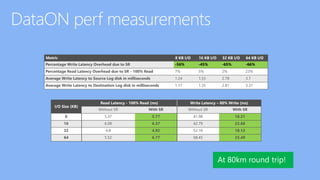
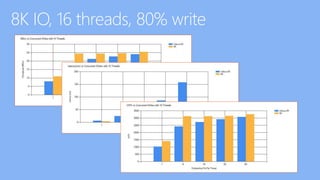
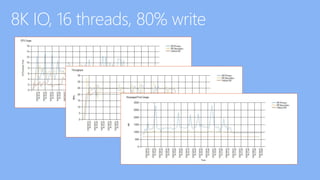
Metric 8 KB I/O 16 KB I/O 32 KB I/O 64 KB I/O
Percentage Write Latency Overhead due to SR -56% -45% -65% -66%
Percentage Read Latency Overhead due to SR - 100% Read 7% 5% 2% 23%
Average Write Latency to Source Log disk in milliseconds 1.24 1.53 2.78 3.7
Average Write Latency to Destination Log disk in milliseconds 1.17 1.35 2.81 3.31
I/O Size (KB)
Read Latency - 100% Read (ms) Write Latency – 80% Write (ms)
Without SR With SR Without SR With SR
8 5.37 5.77 41.98 18.31
16 6.08 6.37 42.79 23.68
32 4.8 4.92 52.16 18.12
64 5.52 6.77 68.45 23.49
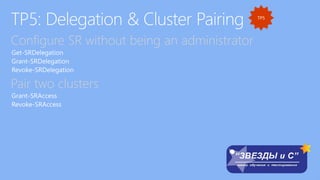
Configure SR without being an administrator
Pair two clusters
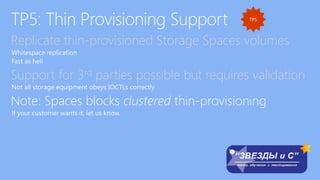
Replicate thin-provisioned Storage Spaces volumes
Support for 3rd parties possible but requires validation
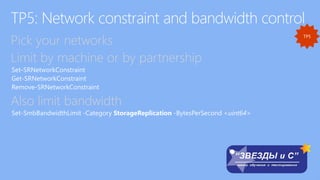
Pick your networks
Limit by machine or by partnership
Also limit bandwidth
Set-SmbBandwidthLimit -Category StorageReplication -BytesPerSecond <uint64>
Change partition sizes mid-replication
No need to recreate replication, not blocked while
replicating
ReFS is grow-only
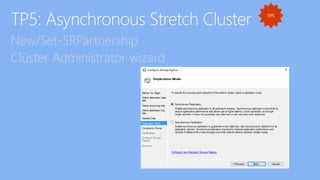
New/Set-SRPartnership
Cluster Administrator wizard
Lots of issues in TP4
All working in TP5
Probably
Please test and file bugs, Nano is very dynamic code
Hooked into new Cluster health system
RPO dial for async
Not a bandwidth limiter
More of an early warning system
Under-provisioned log warnings (maybe not TP5)
Технологии работы с дисковыми хранилищами и файловыми системами Windows Server 2016 (Часть 2)

Технологии работы с дисковыми хранилищами и файловыми системами Windows Server 2016 (Часть 2)

  • 3.
  • 7.
    Replication Block-level, volume-based Synchronous &asynchronous SMB 3.1.1 transport Write ordering Seeded and thin provisioned Flexibility Any Windows data volume Any fixed disk storage Any storage fabric Shared cluster storage S2D cluster storage Management Failover Cluster Manager Windows PowerShell Azure Site Recovery End to end MS storage stack
  • 8.
    SR and StorageSpaces Direct close the loop on the MS storage stack
  • 11.
    Single cluster Automatic failover Synchronous& Asynchronous Asymmetric storage Two sites, two sets of shared storage Cluster storage: CSV or role-assigned PDR Manage with Cluster Manager Or Windows PowerShell Increase cluster DR capabilities Hyper-V and General Use File Server are the main use cases New York New Jersey SR over SMB The Hudson River
  • 12.
    Two separate clusters Manualor orchestrated failover Synchronous or asynchronous S2D and shared disk supported Manage with PowerShell & ASR Los Angeles Las Vegas SR over SMB
  • 13.
    Two separate servers Manualfailover Synchronous or asynchronous Manage with PowerShell …only? Building 5 Building 9 SR over SMB
  • 14.
    Remote Server ManagementTool support for SR Server to server to start Cluster to cluster to follow Fully integrated into RSMT Coming at or slightly after TP5
  • 18.
    This is notDFSR This is not DFSR! Replicating storage blocks underneath the CSVFS, NTFS, or ReFS volume Don’t care if files are in use Write IOs are all that matter to Storage Replica
  • 19.
  • 20.
    Applications (local or remote) SourceServer Node (SR) Data Log 1 t 2 Destination Server Node (SR) Data Log t1 3 2 5 4
  • 21.
    Applications (local or remote) SourceServer Node (SR) Data Log 1 t 2 Destination Server Node (SR) Data Log t1 5 4 3 6
  • 22.
    1. Replicating normally 2.Destination offline, the source log contains all IO: A. Replay from log B. Destination comes back online (faster) 3. Destination offline, the source log wrapped IO A. Replay from bitmap B. Destination comes back online (slower) Source Server Node (SR) Data Log Destination Server Node (SR) Data Log OI Replay Log DeltaReplay Bitmap Delta The lesson: the bigger the log, the faster the recovery. And we never block IO
  • 23.
    Using the scalabilityand perf built into SMB SMB Multichannel SMB Direct (RDMA) We are currently testing Mellanox InfiniBand MetroX and Chelsio iWarp configs We have several 10km, 25km and 40km networks Roundtrip latencies: ~200usec at 80km Encryption and signing 3.1.1 encryption performance improvements (awesome parallelization)
  • 25.
    Datacenter Edition (Full,Core, and Nano) Active Directory ≥4GB RAM, ≥2 Cores Disks Firewall ports
  • 26.
    Test-SRTopology cmdlet Checks requirementsand recommendations for bandwidth, log sizes, IOPS, firewall ports, etc… Tells you how long initial sync should take Gives you a tidy HTML report with recommendations Customers love it When they find it
  • 29.
    Destination volume isalways dismounted One to one There is no “test failover” Hmmm Mixed cluster and standalone blocked Currently All of above planned for post-RTM Don’t let your customer write checks we can’t cash
  • 30.
    Async crash consistencyversus application consistency We guarantee a mountable volume Your app must guarantee a usable file Volume Shadow Copy Snapshots They replicate too Accept that async means possible data loss How much money is your data worth? Or your job?
  • 31.
    Hyper-V Replica Yes NA Yes(VMs hosting file servers) No Yes (VMs hosting SQL) Yes (VMs hosting apps & servers) VM SYSVOL File Server MS Exchange SQL Server Other Applications Storage Replica Yes No Yes (bare metal or VMs) No Testing (bare metal or VMs) Yes (bare metal or VMs) SQL Server AlwaysOn FCI NA NA NA NA Yes NA MS Exchange DAG NA NA NA Yes NA NA DFS Replication No Yes Yes No No No FRS Never Upgrade to DFSR, soon Don’t do it Are you crazy? What? No! Hahaha, you are funny SQL Server AlwaysOn AG NA NA NA NA Yes NA Workload Replicator
  • 32.
    Hyper-V Replica advantagesand characteristics Use SR when you need:
  • 33.
    In a VM InAzure Will we backport SR to Windows Server 2012 R2? Please?
  • 34.
    Storage Replica isnot “shared nothing” clustering Storage Replica is not a backup Storage Replica is not DFSR Storage Replica is not a general branch office solution
  • 37.
  • 42.
    http://blogs.technet.com/b/filecab/archive/2015/07/09/storage-replica-versus-robocopy-fight.aspx Technique Data tocopy Time to complete Robocopy /s /copyall /zb /mt:128 95GiB, 100M files 8 hours, 0 minutes and 12 seconds Robocopy /copyall /zb 1.45TiB, 1 file 2 hours, 48 minutes, 26 seconds Robocopy /copyall /j /zb 1.45TiB, 1 file 2 hours, 38 minutes, 8 seconds Robocopy /s /copyall /zb /mt:128 1.45TiB, 1.11M files 25 minutes, 0 seconds Robocopy /copyall /j 1.45TiB, 1 file 15 minutes, 23 seconds Storage Replica 1.45TiB, the volume 14 minutes, 27 seconds
  • 43.
     4 Intel(R)Xeon(R) Processors (16 cores) o Intel® Xeon® Processor E5-2623 v3 (10M Cache, 3.00 GHz)  Installed Physical Memory (RAM) 128 GB  (24) x 2.5" SAS/SATA drive bay, Hot-swap with 12Gb/s backplane  (4) x Redundant cooling fans  (2) Risers x8 slots low profile PCIe Gen3 (2 available per node)  (2) Intel(R) 10Gb Ethernet SFP+ connections on-board (per Node)  (1) 1200W (1+1) Redundant Power Supply  Remote Management Module, Integrated BMC w/IPMI 2.0 NIC port  (4) External SAS Ports (per Node)  (1) DataON 2U "Standard" RACK mount Rail set  Internal OS Drives 4: Sandisk x300 128GB 2.5 SATA III MLC SSD - 2 per Node  12G SAS HBA for Data Drives - Avago(R) LSI Storage 9300-8i PCI-e 3 8-port internal 12Gp/s SAS HBA. Integrated mezzanine card  12G SAS Cabling for Expansion - SFF-8644 to SFF-8644 Ext. 2M 12Gb/s SAS Cable for expansion  12 1800GB HGST SAS 2.5" 10k RPM - HDD Part # Ultrastar C10K1800 21.6TB Raw per appliance  12 400GB HGST 12Gb Ultrastar SSD1600MM SAS 2.5" - SSD Part # HUSMM1640ASS04 4.8TB Raw per appliance  Network Card(s): 7 NIC(s) Installed. o Intel(R) 82599 10 Gigabit Dual Port Network Connection o Mellanox ConnectX-3 Pro Ethernet Adapter o Chelsio Network Adapter o Chelsio Network Adapter o Intel(R) 82599 10 Gigabit Dual Port Network Connection o Mellanox ConnectX-3 IPoIB Adapter Mellanox ConnectX-3 IPoIB Adapter
  • 44.
    Metric 8 KBI/O 16 KB I/O 32 KB I/O 64 KB I/O Percentage Write Latency Overhead due to SR -56% -45% -65% -66% Percentage Read Latency Overhead due to SR - 100% Read 7% 5% 2% 23% Average Write Latency to Source Log disk in milliseconds 1.24 1.53 2.78 3.7 Average Write Latency to Destination Log disk in milliseconds 1.17 1.35 2.81 3.31 I/O Size (KB) Read Latency - 100% Read (ms) Write Latency – 80% Write (ms) Without SR With SR Without SR With SR 8 5.37 5.77 41.98 18.31 16 6.08 6.37 42.79 23.68 32 4.8 4.92 52.16 18.12 64 5.52 6.77 68.45 23.49
  • 47.
    Configure SR withoutbeing an administrator Pair two clusters
  • 48.
    Replicate thin-provisioned StorageSpaces volumes Support for 3rd parties possible but requires validation
  • 49.
    Pick your networks Limitby machine or by partnership Also limit bandwidth Set-SmbBandwidthLimit -Category StorageReplication -BytesPerSecond <uint64>
  • 50.
    Change partition sizesmid-replication No need to recreate replication, not blocked while replicating ReFS is grow-only
  • 51.
  • 52.
    Lots of issuesin TP4 All working in TP5 Probably Please test and file bugs, Nano is very dynamic code
  • 53.
    Hooked into newCluster health system RPO dial for async Not a bandwidth limiter More of an early warning system Under-provisioned log warnings (maybe not TP5)