QUEUES
A U T H O R : T U S I F U E D I S O N
DEFINITION
• Queue is a linear data structure where elements are ordered
in special fashion.
i.e. FIFO(First IN First Out). Which means element inserted first
to the queue will be removed first from the queue.
In other words: queue is a list or collection with the restriction
or constraints that insertion can be performed at one end (rear
or tail) and deletion can be performed at other end(front or
head)
Author:Tusifu Edison
ROLE OF THE QUEUES
Queue is most often used in a scenario where there is a
shared resource that’s supposed to serve some request but
the resource can handle only one request at a time.
A machine has a processor to process different
programs(or to execute all instructions), and it has the
ability to process one program at a time, so the processes
are put in the queue.
For the front process to be terminated
Author:Tusifu Edison
IMPLEMENTING QUEUES WITH LINKED
LIST VS ARRAY
Main disadvantages of implementing queues with arrays
And linked list is the solution
• By using array list you may store large memory which you will
not use,
• The array may get filled when you have other elements you
want to insert
That will cause to stop the insertion or create another big array
and copy the first array
And add the elements which you wantAuthor:Tusifu Edison
OPERATIONS AVAILABLE WITH QUEUE
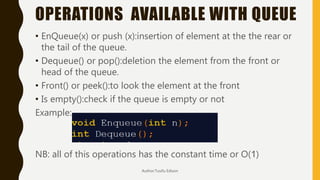
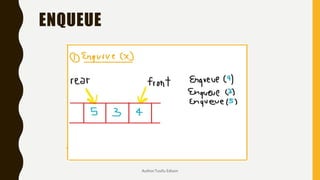
• EnQueue(x) or push (x):insertion of element at the the rear or
the tail of the queue.
• Dequeue() or pop():deletion the element from the front or
head of the queue.
• Front() or peek():to look the element at the front
• Is empty():check if the queue is empty or not
Example:
NB: all of this operations has the constant time or O(1)
Author:Tusifu Edison
ENQUEUE
Author:Tusifu Edison
DEQUEUE EXPLANATION
Author:Tusifu Edison
ENQUEUE IMPLEMENTATION USING
LINKED LIST (STRUCT+MAIN)
Author:Tusifu Edison
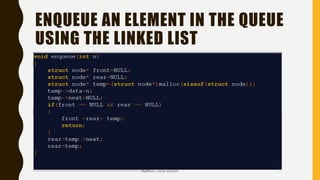
ENQUEUE AN ELEMENT IN THE QUEUE
USING THE LINKED LIST
Author:Tusifu Edison
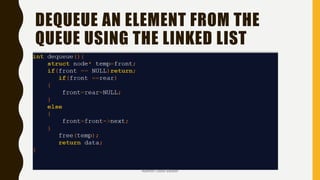
DEQUEUE AN ELEMENT FROM THE
QUEUE USING THE LINKED LIST
Author:Tusifu Edison
THE END

Queues in data structures

  • 1.
    QUEUES A U TH O R : T U S I F U E D I S O N
  • 2.
    DEFINITION • Queue isa linear data structure where elements are ordered in special fashion. i.e. FIFO(First IN First Out). Which means element inserted first to the queue will be removed first from the queue. In other words: queue is a list or collection with the restriction or constraints that insertion can be performed at one end (rear or tail) and deletion can be performed at other end(front or head) Author:Tusifu Edison
  • 3.
    ROLE OF THEQUEUES Queue is most often used in a scenario where there is a shared resource that’s supposed to serve some request but the resource can handle only one request at a time. A machine has a processor to process different programs(or to execute all instructions), and it has the ability to process one program at a time, so the processes are put in the queue. For the front process to be terminated Author:Tusifu Edison
  • 4.
    IMPLEMENTING QUEUES WITHLINKED LIST VS ARRAY Main disadvantages of implementing queues with arrays And linked list is the solution • By using array list you may store large memory which you will not use, • The array may get filled when you have other elements you want to insert That will cause to stop the insertion or create another big array and copy the first array And add the elements which you wantAuthor:Tusifu Edison
  • 5.
    OPERATIONS AVAILABLE WITHQUEUE • EnQueue(x) or push (x):insertion of element at the the rear or the tail of the queue. • Dequeue() or pop():deletion the element from the front or head of the queue. • Front() or peek():to look the element at the front • Is empty():check if the queue is empty or not Example: NB: all of this operations has the constant time or O(1) Author:Tusifu Edison
  • 6.
  • 7.
  • 8.
    ENQUEUE IMPLEMENTATION USING LINKEDLIST (STRUCT+MAIN) Author:Tusifu Edison
  • 9.
    ENQUEUE AN ELEMENTIN THE QUEUE USING THE LINKED LIST Author:Tusifu Edison
  • 10.
    DEQUEUE AN ELEMENTFROM THE QUEUE USING THE LINKED LIST Author:Tusifu Edison
  • 11.