1
Queues
• A queue is an ordered collection of items from which items may
be deleted at one end(front) and into which items are inserted at
the other end(rear).
• queue – similar to a supermarket checkout line
– first-in, first-out (FIFO)
– nodes are removed only from the head (front)
– nodes are inserted only at the tail(rear)
• The insert and remove operations are known as enqueue and
dequeue
Useful in computing
– Print spooling, packets in networks, file server requests
Three operations in the queue are
Insert(q,x) x=remove(q) empty(q)
2
Implementation of Queue
• Array implementation
#define MAXQUEUE 100
struct queue{
int items[MAXQUEUE];
int front,rear;
}q;
0
1
2
3
4
q.front=-1
q.rear=-1
q.items
0
1
2
3
4
q.items
A
B
C
q.front=0
q.rear=2
0
1
2
3
4
q.items
C q.front=q.rear=2
Queue is empty whenever q.rear<q.front
The number of elements in a queue is q.rear-q.front+1
3
Insert operation
QINSERT [ QUEUE, MAXSIZE, ITEM]
1. Initialization
Set Front = -1
Set Rear = -1
2. If Rear = = MAXSIZE-1 then Queue Overflow and Return
3. If Front = = -1 then
Front = 0
Rear = 0
Else
Rear = Rear + 1
4. Set Queue [Rear] = Item and Return
4
Delete Operation
QDELETE [ QUEUE, MAXSIZE, ITEM]
1. If Front = = -1 then Queue Underflow and Return
2. Set Item = Queue [ Front]
3. If Front = = Rear then
Set Front = -1
Set Rear = -1
Else
Front = Front + 1
4. Print, Deleted Item is “ITEM” and Return
5
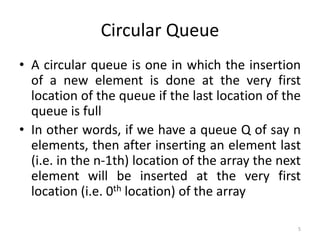
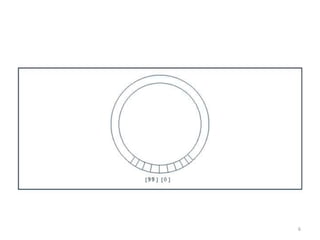
Circular Queue
• A circular queue is one in which the insertion
of a new element is done at the very first
location of the queue if the last location of the
queue is full
• In other words, if we have a queue Q of say n
elements, then after inserting an element last
(i.e. in the n-1th) location of the array the next
element will be inserted at the very first
location (i.e. 0th location) of the array
6
7
Insertion operation in Circular queue
QINSERT [ QUEUE, N, Front, Rear, ITEM]
1. If Front ==0 and Rear == N-1
OR
Front == Rear+1, then Write Overflow queue and Return
2. If Front = = -1 then
Front = 0
Rear = 0
Else if Rear ==N-1 then
Set Rear = 0
Else
Rear = Rear + 1
3. Set Queue [Rear] = Item and Return
8
Deletion operation in circular queue
QDELETE [ QUEUE, N, Front, Rear, ITEM]
1. If Front = = -1 then Queue Underflow and Return
2. Set Item = Queue [ Front]
3. If Front = = Rear then
Set Front = -1
Set Rear = -1
Else if Front ==N-1 then
Set Front = 0
Else
Front = Front + 1
4. Print, Deleted Item is “ITEM” and Return
9
Advantage of Circular Queue over Linear
Queue
• A circular queue overcomes the problem of
unutilized space in linear queue implemented
as arrays.
10
Linked Representation of Queue
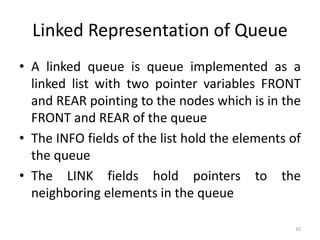
• A linked queue is queue implemented as a
linked list with two pointer variables FRONT
and REAR pointing to the nodes which is in the
FRONT and REAR of the queue
• The INFO fields of the list hold the elements of
the queue
• The LINK fields hold pointers to the
neighboring elements in the queue
11
Linked representation of Queue
Front Rear
Q
A B C D
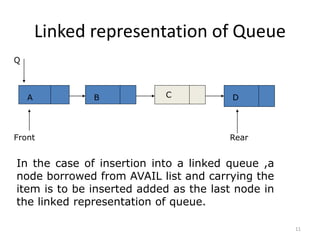
In the case of insertion into a linked queue ,a
node borrowed from AVAIL list and carrying the
item is to be inserted added as the last node in
the linked representation of queue.
12
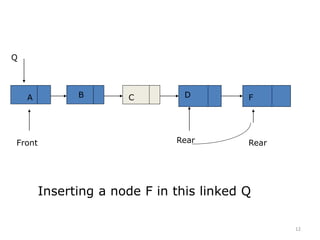
Rear
A B C D F
Rear
Q
Front
Inserting a node F in this linked Q
13
Insertion in Linked Representation of Queue
LINKQ_INSERT (INFO,LINK,FRONT,REAR,AVAIL,ITEM)
1. If AVAIL == NULL then write OVERFLOW and Exit
2. Set NEW = AVAIL and AVAIL = LINK[AVAIL]
3. Set INFO[NEW] = ITEM and LINK[NEW] = NULL
4. If (FRONT==NULL) then FRONT = REAR= NEW
Else Set LINK[REAR] = NEW and REAR = NEW
5. Exit
14
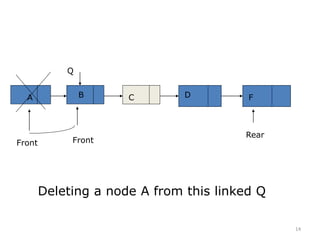
A B C D F
Rear
Front
Deleting a node A from this linked Q
Front
Q
15
Deletion in Linked Representation of Queue
LINKQ_DELETE
(INFO,LINK,FRONT,REAR,AVAIL,ITEM)
1. If FRONT == NULL then Write UNDERFLOW
and Exit
2. Set TEMP = FRONT
3. ITEM = INFO[TEMP]
4. FRONT = LINK[TEMP]
5. LINK[TEMP] = AVAIL and AVAIL = TEMP
6. Exit
16
Priority queues
• It is a collection of elements such that each
element has been assigned a priority such
that
-an element of higher priority
processed before any element of lower
priority
-two elements of equal priority are
processed according to the order in which
they were added to the queue.
17
Priority Queue
• FIFO rules of a queue are relaxed
• Customers or jobs with higher priority are
pushed to front (not rear) of queue
• To implement:
– use an ordinary linked list, which keeps the
items in order from the highest to lowest
priority
– use a treelike structure (heap)
18
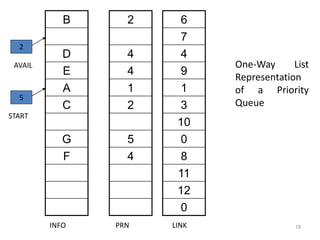
B
D
E
A
C
G
F
2
4
4
1
2
5
4
6
7
4
9
1
3
10
0
8
11
12
0
INFO PRN LINK
2
AVAIL
5
START
One-Way List
Representation
of a Priority
Queue
19
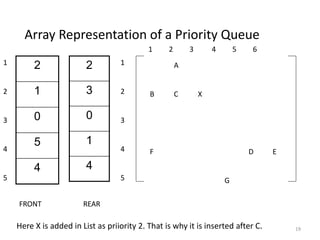
Array Representation of a Priority Queue
2
1
0
5
4
2
3
0
1
4
FRONT REAR
1
2
3
4
5
1
2
3
4
5
B
F
A
C X
G
D E
1 2 3 4 5 6
Here X is added in List as priiority 2. That is why it is inserted after C.
20
Application of priority queue
• Application: Scheduling jobs on a workstation
• Priority Queue holds jobs to be performed
and their priorities
• When a job is finished or interrupted, highest-
priority job is chosen using Extract-Max
• New jobs can be added using Insert

4. Queues in Data Structure

  • 1.
    1 Queues • A queueis an ordered collection of items from which items may be deleted at one end(front) and into which items are inserted at the other end(rear). • queue – similar to a supermarket checkout line – first-in, first-out (FIFO) – nodes are removed only from the head (front) – nodes are inserted only at the tail(rear) • The insert and remove operations are known as enqueue and dequeue Useful in computing – Print spooling, packets in networks, file server requests Three operations in the queue are Insert(q,x) x=remove(q) empty(q)
  • 2.
    2 Implementation of Queue •Array implementation #define MAXQUEUE 100 struct queue{ int items[MAXQUEUE]; int front,rear; }q; 0 1 2 3 4 q.front=-1 q.rear=-1 q.items 0 1 2 3 4 q.items A B C q.front=0 q.rear=2 0 1 2 3 4 q.items C q.front=q.rear=2 Queue is empty whenever q.rear<q.front The number of elements in a queue is q.rear-q.front+1
  • 3.
    3 Insert operation QINSERT [QUEUE, MAXSIZE, ITEM] 1. Initialization Set Front = -1 Set Rear = -1 2. If Rear = = MAXSIZE-1 then Queue Overflow and Return 3. If Front = = -1 then Front = 0 Rear = 0 Else Rear = Rear + 1 4. Set Queue [Rear] = Item and Return
  • 4.
    4 Delete Operation QDELETE [QUEUE, MAXSIZE, ITEM] 1. If Front = = -1 then Queue Underflow and Return 2. Set Item = Queue [ Front] 3. If Front = = Rear then Set Front = -1 Set Rear = -1 Else Front = Front + 1 4. Print, Deleted Item is “ITEM” and Return
  • 5.
    5 Circular Queue • Acircular queue is one in which the insertion of a new element is done at the very first location of the queue if the last location of the queue is full • In other words, if we have a queue Q of say n elements, then after inserting an element last (i.e. in the n-1th) location of the array the next element will be inserted at the very first location (i.e. 0th location) of the array
  • 6.
  • 7.
    7 Insertion operation inCircular queue QINSERT [ QUEUE, N, Front, Rear, ITEM] 1. If Front ==0 and Rear == N-1 OR Front == Rear+1, then Write Overflow queue and Return 2. If Front = = -1 then Front = 0 Rear = 0 Else if Rear ==N-1 then Set Rear = 0 Else Rear = Rear + 1 3. Set Queue [Rear] = Item and Return
  • 8.
    8 Deletion operation incircular queue QDELETE [ QUEUE, N, Front, Rear, ITEM] 1. If Front = = -1 then Queue Underflow and Return 2. Set Item = Queue [ Front] 3. If Front = = Rear then Set Front = -1 Set Rear = -1 Else if Front ==N-1 then Set Front = 0 Else Front = Front + 1 4. Print, Deleted Item is “ITEM” and Return
  • 9.
    9 Advantage of CircularQueue over Linear Queue • A circular queue overcomes the problem of unutilized space in linear queue implemented as arrays.
  • 10.
    10 Linked Representation ofQueue • A linked queue is queue implemented as a linked list with two pointer variables FRONT and REAR pointing to the nodes which is in the FRONT and REAR of the queue • The INFO fields of the list hold the elements of the queue • The LINK fields hold pointers to the neighboring elements in the queue
  • 11.
    11 Linked representation ofQueue Front Rear Q A B C D In the case of insertion into a linked queue ,a node borrowed from AVAIL list and carrying the item is to be inserted added as the last node in the linked representation of queue.
  • 12.
    12 Rear A B CD F Rear Q Front Inserting a node F in this linked Q
  • 13.
    13 Insertion in LinkedRepresentation of Queue LINKQ_INSERT (INFO,LINK,FRONT,REAR,AVAIL,ITEM) 1. If AVAIL == NULL then write OVERFLOW and Exit 2. Set NEW = AVAIL and AVAIL = LINK[AVAIL] 3. Set INFO[NEW] = ITEM and LINK[NEW] = NULL 4. If (FRONT==NULL) then FRONT = REAR= NEW Else Set LINK[REAR] = NEW and REAR = NEW 5. Exit
  • 14.
    14 A B CD F Rear Front Deleting a node A from this linked Q Front Q
  • 15.
    15 Deletion in LinkedRepresentation of Queue LINKQ_DELETE (INFO,LINK,FRONT,REAR,AVAIL,ITEM) 1. If FRONT == NULL then Write UNDERFLOW and Exit 2. Set TEMP = FRONT 3. ITEM = INFO[TEMP] 4. FRONT = LINK[TEMP] 5. LINK[TEMP] = AVAIL and AVAIL = TEMP 6. Exit
  • 16.
    16 Priority queues • Itis a collection of elements such that each element has been assigned a priority such that -an element of higher priority processed before any element of lower priority -two elements of equal priority are processed according to the order in which they were added to the queue.
  • 17.
    17 Priority Queue • FIFOrules of a queue are relaxed • Customers or jobs with higher priority are pushed to front (not rear) of queue • To implement: – use an ordinary linked list, which keeps the items in order from the highest to lowest priority – use a treelike structure (heap)
  • 18.
  • 19.
    19 Array Representation ofa Priority Queue 2 1 0 5 4 2 3 0 1 4 FRONT REAR 1 2 3 4 5 1 2 3 4 5 B F A C X G D E 1 2 3 4 5 6 Here X is added in List as priiority 2. That is why it is inserted after C.
  • 20.
    20 Application of priorityqueue • Application: Scheduling jobs on a workstation • Priority Queue holds jobs to be performed and their priorities • When a job is finished or interrupted, highest- priority job is chosen using Extract-Max • New jobs can be added using Insert