Question 6
Software’s
During this project I had to use a variety of
   software’s to construct my magazine. I
gained more experience in the software’s I
 already knew how to use and had time to
  adjust to the software I was not familiar
  with. These software’s were very useful
     during the making of my magazine
because they allowed me create and view
  images, pictures, fonts and much more
                 throughout.
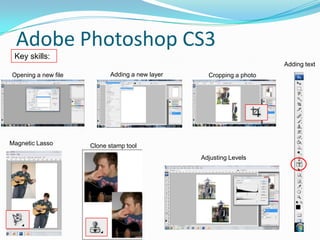
Adobe Photoshop CS3
 Key skills:
                                                                     Adding text
Opening a new file         Adding a new layer     Cropping a photo


Magnetic Lasso       Clone stamp tool
                                                Adjusting Levels
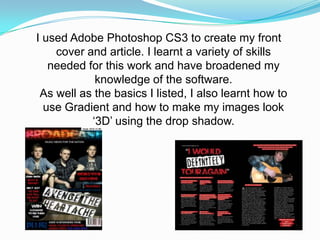
I used Adobe Photoshop CS3 to create my front
    cover and article. I learnt a variety of skills
   needed for this work and have broadened my
            knowledge of the software.
 As well as the basics I listed, I also learnt how to
  use Gradient and how to make my images look
           ‘3D’ using the drop shadow.
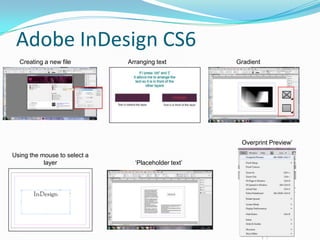
Adobe InDesign CS6
  Creating a new file         Arranging text         Gradient


                                                      Overprint Preview’

Using the mouse to select a
           layer                ‘Placeholder text’
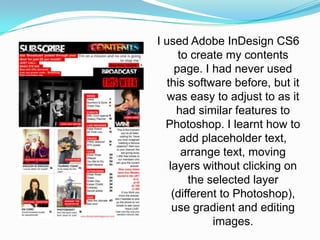
I used Adobe InDesign CS6
       to create my contents
      page. I had never used
   this software before, but it
   was easy to adjust to as it
      had similar features to
  Photoshop. I learnt how to
       add placeholder text,
        arrange text, moving
    layers without clicking on
         the selected layer
     (different to Photoshop),
     use gradient and editing
              images.
Microsoft Office PowerPoint 2007
                and
            SlideShare
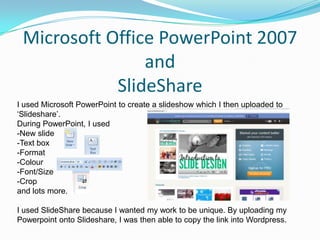
I used Microsoft PowerPoint to create a slideshow which I then uploaded to
‘Slideshare’.
During PowerPoint, I used
-New slide
-Text box
-Format
-Colour
-Font/Size
-Crop
and lots more.

I used SlideShare because I wanted my work to be unique. By uploading my
Powerpoint onto Slideshare, I was then able to copy the link into Wordpress.
Safari/Google
-I used Safari/Google to collect a few images to place
   into my work.(         )
-I used it to access my WordPress documents.
-I used it to add my PowerPoint to SlideShare.
-I used it for research into other music magazines
   before I started my own.
-I used it to download fonts (1001 fonts/Da Font)
Hardware

 I used my own hardware for the construction of my
  magazine. This included using items like a camera,
    tripod, a computer, SD card and a card reader.
Apple Mac OS X (version 10.5)
(2GHz Intel Core 2 Duo Processor – 3GB memory)

Acer Laptop
(2GHz Intel Core B940 processor - 4GB memory)


  I used both of these software’s to complete my
  magazine.

  Apple Mac’s allowed me to access my documents
  easily and to arrange my WordPress site.

  The laptop allowed me to save images from my
  camera and upload them to WordPress.
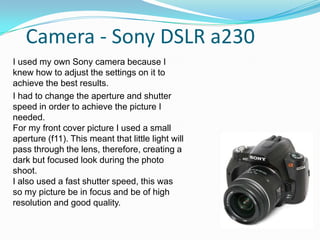
Camera - Sony DSLR a230
I used my own Sony camera because I
knew how to adjust the settings on it to
achieve the best results.
I had to change the aperture and shutter
speed in order to achieve the picture I
needed.
For my front cover picture I used a small
aperture (f11). This meant that little light will
pass through the lens, therefore, creating a
dark but focused look during the photo
shoot.
I also used a fast shutter speed, this was
so my picture be in focus and be of high
resolution and good quality.
SD card and Memory card reader
I used a 2GB Sony memory card to store the images
onto. This was useful because it allowed me to store
approximately 250 more pictures at roughly 3MB or
more each.

I used the card reader to import all of my
photographs from the camera to my laptop. I created
a folder called ‘Photoshop’ to store them all in.

Question 6 done

  • 1.
  • 2.
    Software’s During this projectI had to use a variety of software’s to construct my magazine. I gained more experience in the software’s I already knew how to use and had time to adjust to the software I was not familiar with. These software’s were very useful during the making of my magazine because they allowed me create and view images, pictures, fonts and much more throughout.
  • 3.
    Adobe Photoshop CS3 Key skills: Adding text Opening a new file Adding a new layer Cropping a photo Magnetic Lasso Clone stamp tool Adjusting Levels
  • 4.
    I used AdobePhotoshop CS3 to create my front cover and article. I learnt a variety of skills needed for this work and have broadened my knowledge of the software. As well as the basics I listed, I also learnt how to use Gradient and how to make my images look ‘3D’ using the drop shadow.
  • 5.
    Adobe InDesign CS6 Creating a new file Arranging text Gradient Overprint Preview’ Using the mouse to select a layer ‘Placeholder text’
  • 6.
    I used AdobeInDesign CS6 to create my contents page. I had never used this software before, but it was easy to adjust to as it had similar features to Photoshop. I learnt how to add placeholder text, arrange text, moving layers without clicking on the selected layer (different to Photoshop), use gradient and editing images.
  • 7.
    Microsoft Office PowerPoint2007 and SlideShare I used Microsoft PowerPoint to create a slideshow which I then uploaded to ‘Slideshare’. During PowerPoint, I used -New slide -Text box -Format -Colour -Font/Size -Crop and lots more. I used SlideShare because I wanted my work to be unique. By uploading my Powerpoint onto Slideshare, I was then able to copy the link into Wordpress.
  • 8.
    Safari/Google -I used Safari/Googleto collect a few images to place into my work.( ) -I used it to access my WordPress documents. -I used it to add my PowerPoint to SlideShare. -I used it for research into other music magazines before I started my own. -I used it to download fonts (1001 fonts/Da Font)
  • 9.
    Hardware I usedmy own hardware for the construction of my magazine. This included using items like a camera, tripod, a computer, SD card and a card reader.
  • 10.
    Apple Mac OSX (version 10.5) (2GHz Intel Core 2 Duo Processor – 3GB memory) Acer Laptop (2GHz Intel Core B940 processor - 4GB memory) I used both of these software’s to complete my magazine. Apple Mac’s allowed me to access my documents easily and to arrange my WordPress site. The laptop allowed me to save images from my camera and upload them to WordPress.
  • 11.
    Camera - SonyDSLR a230 I used my own Sony camera because I knew how to adjust the settings on it to achieve the best results. I had to change the aperture and shutter speed in order to achieve the picture I needed. For my front cover picture I used a small aperture (f11). This meant that little light will pass through the lens, therefore, creating a dark but focused look during the photo shoot. I also used a fast shutter speed, this was so my picture be in focus and be of high resolution and good quality.
  • 12.
    SD card andMemory card reader I used a 2GB Sony memory card to store the images onto. This was useful because it allowed me to store approximately 250 more pictures at roughly 3MB or more each. I used the card reader to import all of my photographs from the camera to my laptop. I created a folder called ‘Photoshop’ to store them all in.