THE QR CODE
Quick Response Code
CONTENTS
 What Is A QR Code?
 Technicality Of A QR Code
 Uses Of A QR Code
 Facts About QR Code
 Creativity With QR Code
 Advantages And Disadvantages
 QR Codes For Different Social Networking Sites
 Survey On QR Codes
 Voice QR Code
 Different Inputs On A QR Code
 Video By ConnectMeQR
WHAT IS A Q R CODE?
 QR Code is Quick Response Code
 A two dimensional bar code or a matrix
 More advanced barcoding system
 Fast readability and greater storage capacity
 Read by an imaging device (such as a camera)
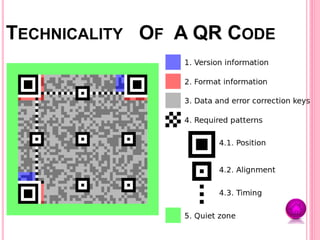
TECHNICALITY OF A QR CODE
USES OF A QR CODE
 Open a Uniform Resource Identifier (URI)
 Compose an e-mail or text message
 Display text to the user
 Industrial uses
 Advertisements
 Easy Wi-Fi access
 Re-inventing the shopping experience
 Add a vCard contact to the user's device
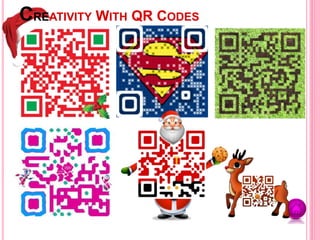
 QR codes don’t have to be black and white
 QR code scanning grew 1200% during the last quarter in 2010
 The largest QR code on record was by Audi, 159 sq. m
 Most popular scanning device-iPhone
 Two-thirds of QRC are scanned by women
 Print media is for only 1% of all scanned QRC
 Over one-fourth QRC were scanned by 35-44 year old consumers
 Excluding Japan, the United States has the highest QR code
usage
FACTS ABOUT QR CODE
CREATIVITY WITH QR CODES
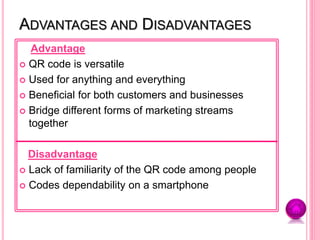
ADVANTAGES AND DISADVANTAGES
Advantage
 QR code is versatile
 Used for anything and everything
 Beneficial for both customers and businesses
 Bridge different forms of marketing streams
together
Disadvantage
 Lack of familiarity of the QR code among people
 Codes dependability on a smartphone
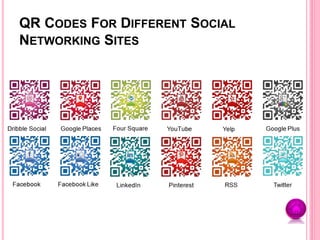
QR CODES FOR DIFFERENT SOCIAL
NETWORKING SITES
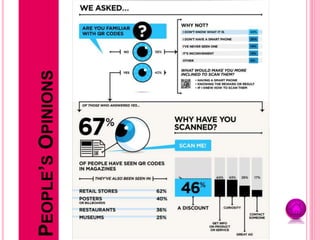
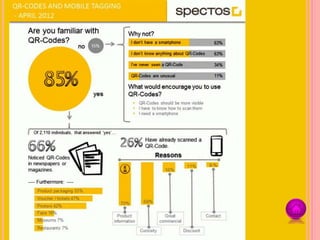
PEOPLE’SOPINIONS
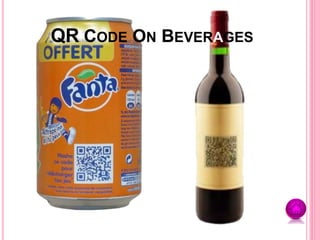
QR CODE ON BEVERAGES
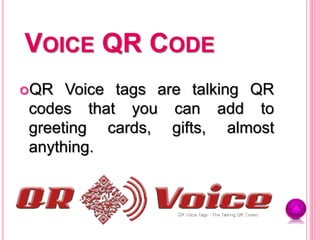
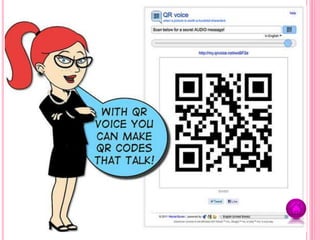
VOICE QR CODE
QR Voice tags are talking QR
codes that you can add to
greeting cards, gifts, almost
anything.
DIFFERENT INPUTS ON A QR CODE
Input Data Types
 Text - Show specific text
 URL - Connect to a specific web address
 Telephone - Telephone a specific number
 SMS - Text a specific number with a specific message
 E-mail - E-mail a specific address
and many others…….
Output type
 PNG image
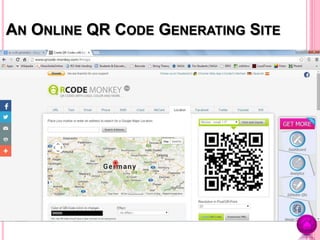
AN ONLINE QR CODE GENERATING SITE
QR CODE
PREPARED BY
Vishnu Pradeep

QR Code - Quick Response Code

  • 2.
    THE QR CODE QuickResponse Code
  • 3.
    CONTENTS  What IsA QR Code?  Technicality Of A QR Code  Uses Of A QR Code  Facts About QR Code  Creativity With QR Code  Advantages And Disadvantages  QR Codes For Different Social Networking Sites  Survey On QR Codes  Voice QR Code  Different Inputs On A QR Code  Video By ConnectMeQR
  • 4.
    WHAT IS AQ R CODE?  QR Code is Quick Response Code  A two dimensional bar code or a matrix  More advanced barcoding system  Fast readability and greater storage capacity  Read by an imaging device (such as a camera)
  • 5.
  • 6.
    USES OF AQR CODE  Open a Uniform Resource Identifier (URI)  Compose an e-mail or text message  Display text to the user  Industrial uses  Advertisements  Easy Wi-Fi access  Re-inventing the shopping experience  Add a vCard contact to the user's device
  • 8.
     QR codesdon’t have to be black and white  QR code scanning grew 1200% during the last quarter in 2010  The largest QR code on record was by Audi, 159 sq. m  Most popular scanning device-iPhone  Two-thirds of QRC are scanned by women  Print media is for only 1% of all scanned QRC  Over one-fourth QRC were scanned by 35-44 year old consumers  Excluding Japan, the United States has the highest QR code usage FACTS ABOUT QR CODE
  • 9.
  • 10.
    ADVANTAGES AND DISADVANTAGES Advantage QR code is versatile  Used for anything and everything  Beneficial for both customers and businesses  Bridge different forms of marketing streams together Disadvantage  Lack of familiarity of the QR code among people  Codes dependability on a smartphone
  • 11.
    QR CODES FORDIFFERENT SOCIAL NETWORKING SITES
  • 12.
  • 14.
    QR CODE ONBEVERAGES
  • 15.
    VOICE QR CODE QRVoice tags are talking QR codes that you can add to greeting cards, gifts, almost anything.
  • 17.
    DIFFERENT INPUTS ONA QR CODE Input Data Types  Text - Show specific text  URL - Connect to a specific web address  Telephone - Telephone a specific number  SMS - Text a specific number with a specific message  E-mail - E-mail a specific address and many others……. Output type  PNG image
  • 18.
    AN ONLINE QRCODE GENERATING SITE
  • 19.
  • 20.