QR Code
Presented By
Ajay Verma
M.Tech CSE
What is QR Code
• Type of matrix barcode (or two-dimensional barcode)
• First designed for the automotive industry in Japan.
• It is a special type of matrix barcode that can encode
information like numbers, letters, and Kanji characters.
• Greater storage capacity compared to standard barcodes.
History
• 1952 Patent of first barcode device
• 1966 Begins commercial use; lack of standard
• 1970 UGPIC established to make industry standard
• 1973 UGPIC turns into UPC (today’s standard barcode)
• 1974 Barcodes implemented in a supermarket for the first
time
• 1988 Intermec Corporation creates the first 2D barcode
• 1994 Denso Wave creates the QR Code for manufacturing
vehicles
• 2010 QR Readers appear as apps for Smart Phones
• 2011 QR Codes become mainstream advertisements
Its uses
• URL
• vCard
• YouTube Video
• Facebook
• Twitter Follow
• Google Maps:
• Plain text:
• Email Address:
• Application URL:
• And much more…
QR Code Design
• Position Markers
• Format
• Version Number
• Alignment Marker
QR Codes Versions
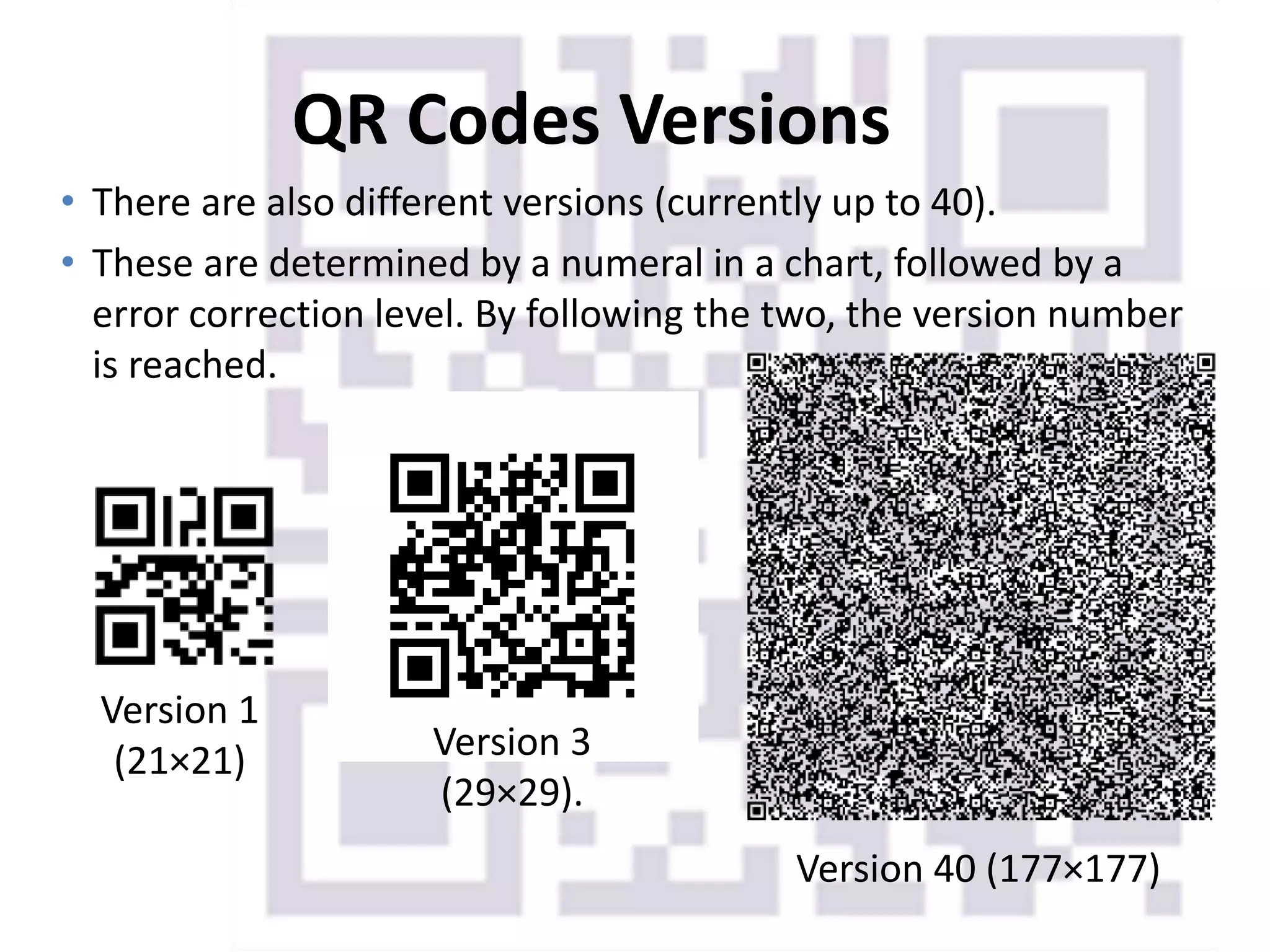
• There are also different versions (currently up to 40).
• These are determined by a numeral in a chart, followed by a
error correction level. By following the two, the version number
is reached.
Version 1
(21×21) Version 3
(29×29).
Version 40 (177×177)
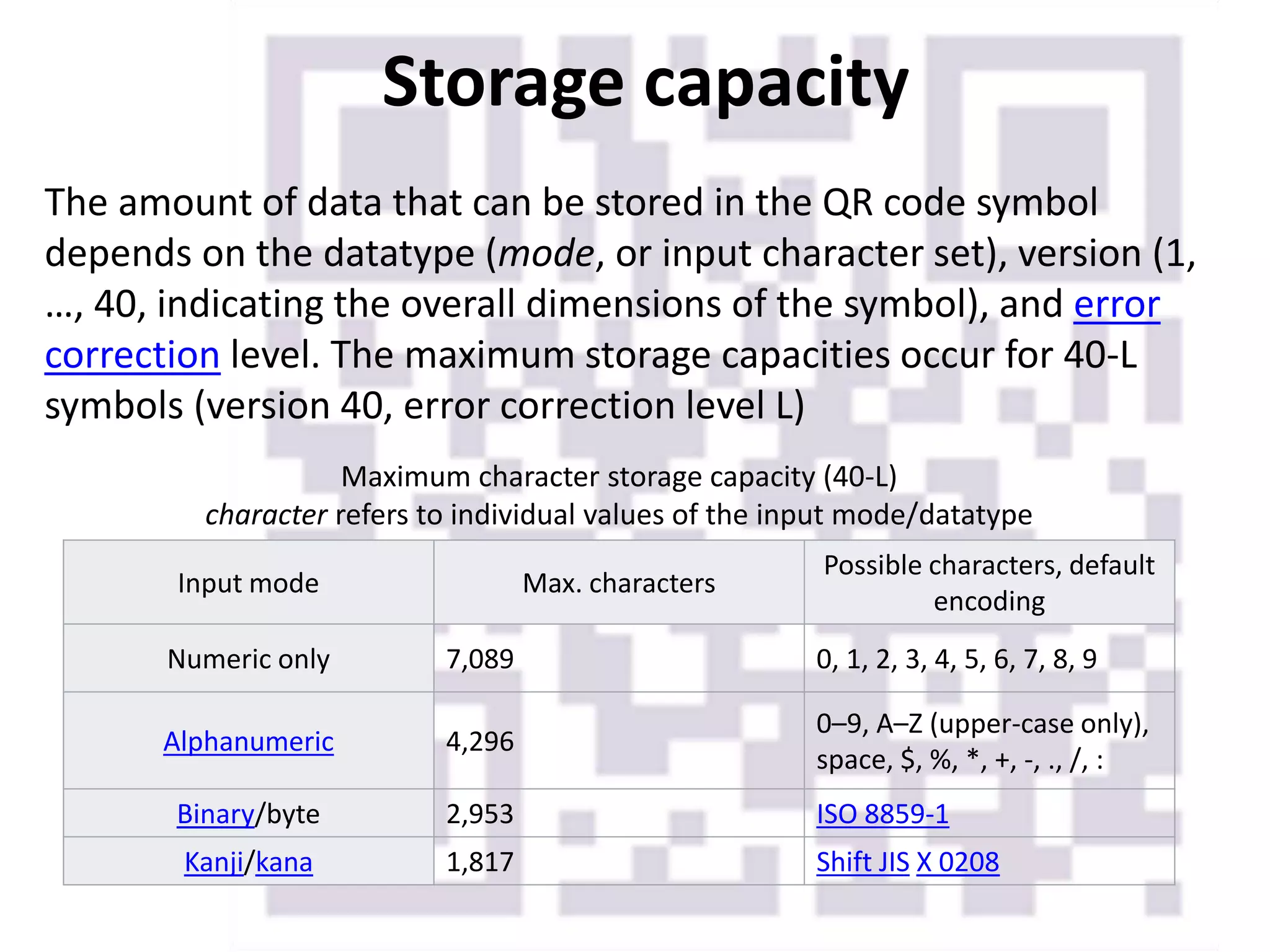
Storage capacity
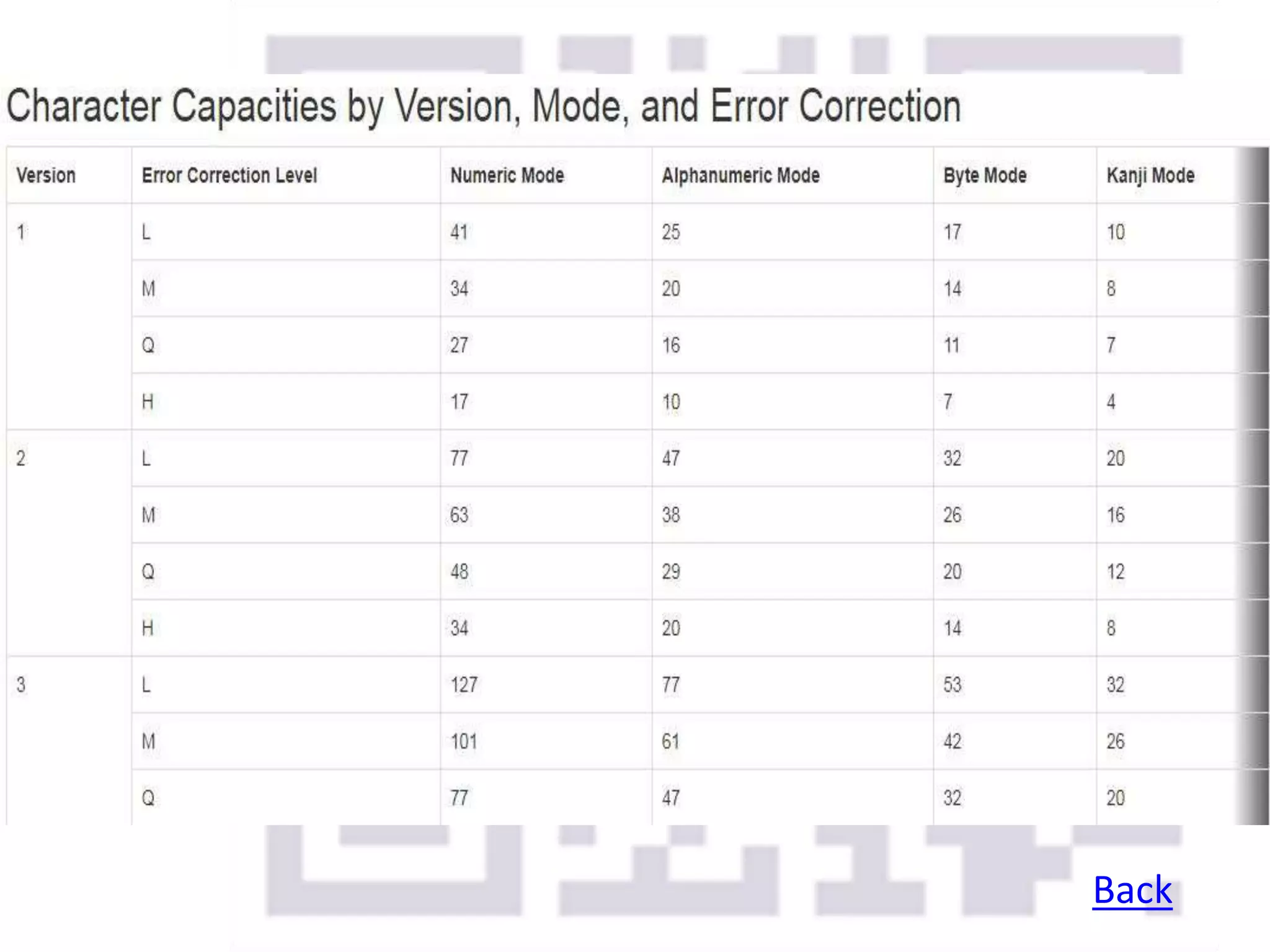
The amount of data that can be stored in the QR code symbol
depends on the datatype (mode, or input character set), version (1,
…, 40, indicating the overall dimensions of the symbol), and error
correction level. The maximum storage capacities occur for 40-L
symbols (version 40, error correction level L)
Input mode Max. characters
Possible characters, default
encoding
Numeric only 7,089 0, 1, 2, 3, 4, 5, 6, 7, 8, 9
Alphanumeric 4,296
0–9, A–Z (upper-case only),
space, $, %, *, +, -, ., /, :
Binary/byte 2,953 ISO 8859-1
Kanji/kana 1,817 Shift JIS X 0208
Maximum character storage capacity (40-L)
character refers to individual values of the input mode/datatype
Back
Error Correction
Still works!
•Use the Reed–Solomon error
correction algorithm with four
error correction levels.
•The higher the error correction
level, the less storage capacity.
•Due to error correction, it is
possible to create artistic QR
codes that still scan correctly
Encoding
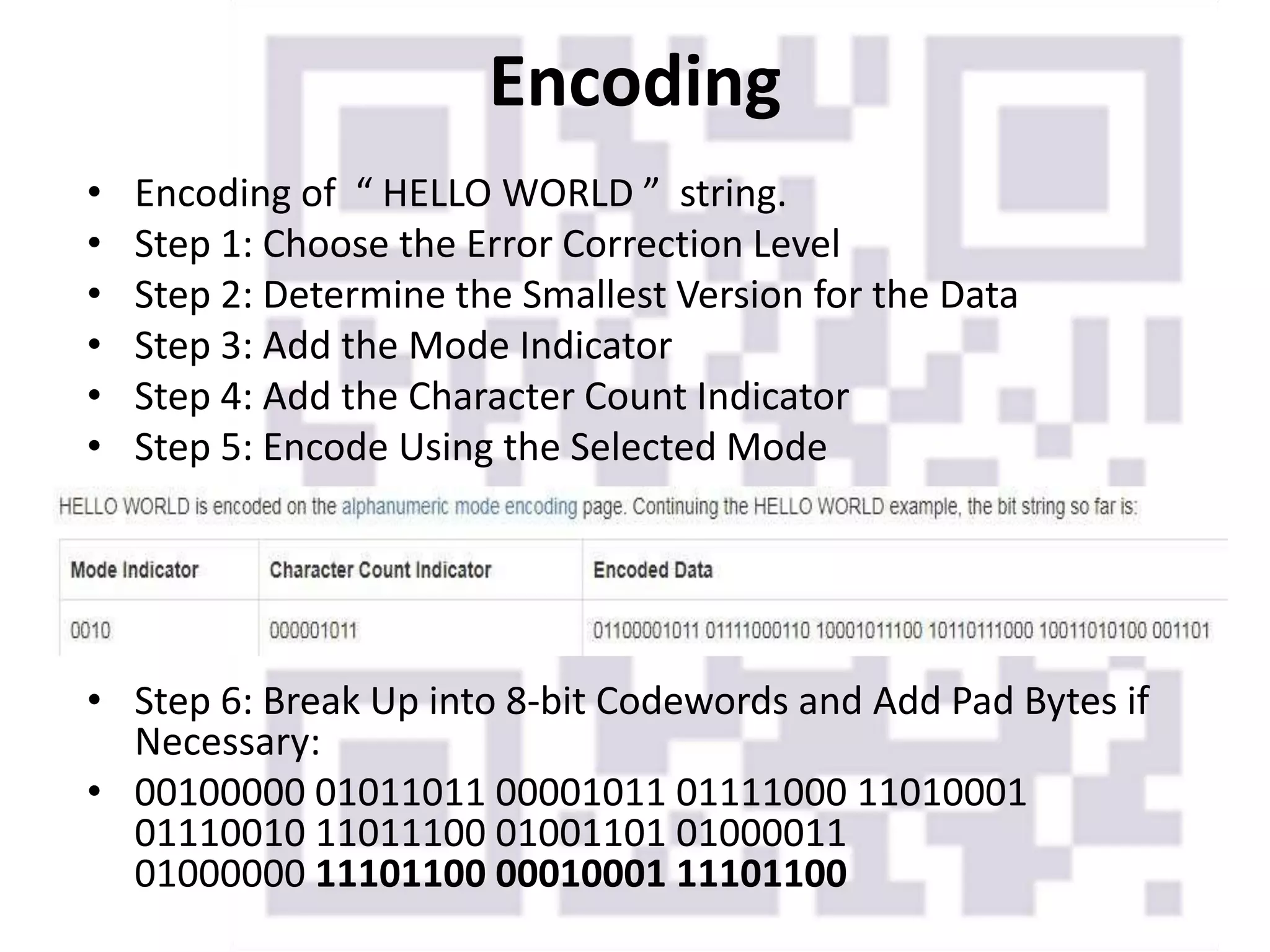
• Encoding of “ HELLO WORLD ” string.
• Step 1: Choose the Error Correction Level
• Step 2: Determine the Smallest Version for the Data
• Step 3: Add the Mode Indicator
• Step 4: Add the Character Count Indicator
• Step 5: Encode Using the Selected Mode
• Step 6: Break Up into 8-bit Codewords and Add Pad Bytes if
Necessary:
• 00100000 01011011 00001011 01111000 11010001
01110010 11011100 01001101 01000011
01000000 11101100 00010001 11101100
• Now in error correction coding section, we use Reed-Solomon
error correction algorithm to get data codewords and their
corresponding error correction codewords.
• the data and error correction codewords were interleaved,
and the final string of bits was obtained.
• The next step is to put them in the QR code matrix.
• The finder patterns are the three
blocks in the corners of the QR code at
the top left, top right, and bottom left.
• The separators are areas of
whitespace beside the finder patterns.
• The alignment patterns are similar to
finder patterns, but smaller, and are
placed throughout the code. They are
used in versions 2 and larger, and their
positions depend on the QR code
version.
• The timing patterns are dotted lines
that connect the finder patterns.
• The dark module is a single black
module that is always placed beside
the bottom left finder pattern.
Overview of Function Patterns
Alignment Patterns
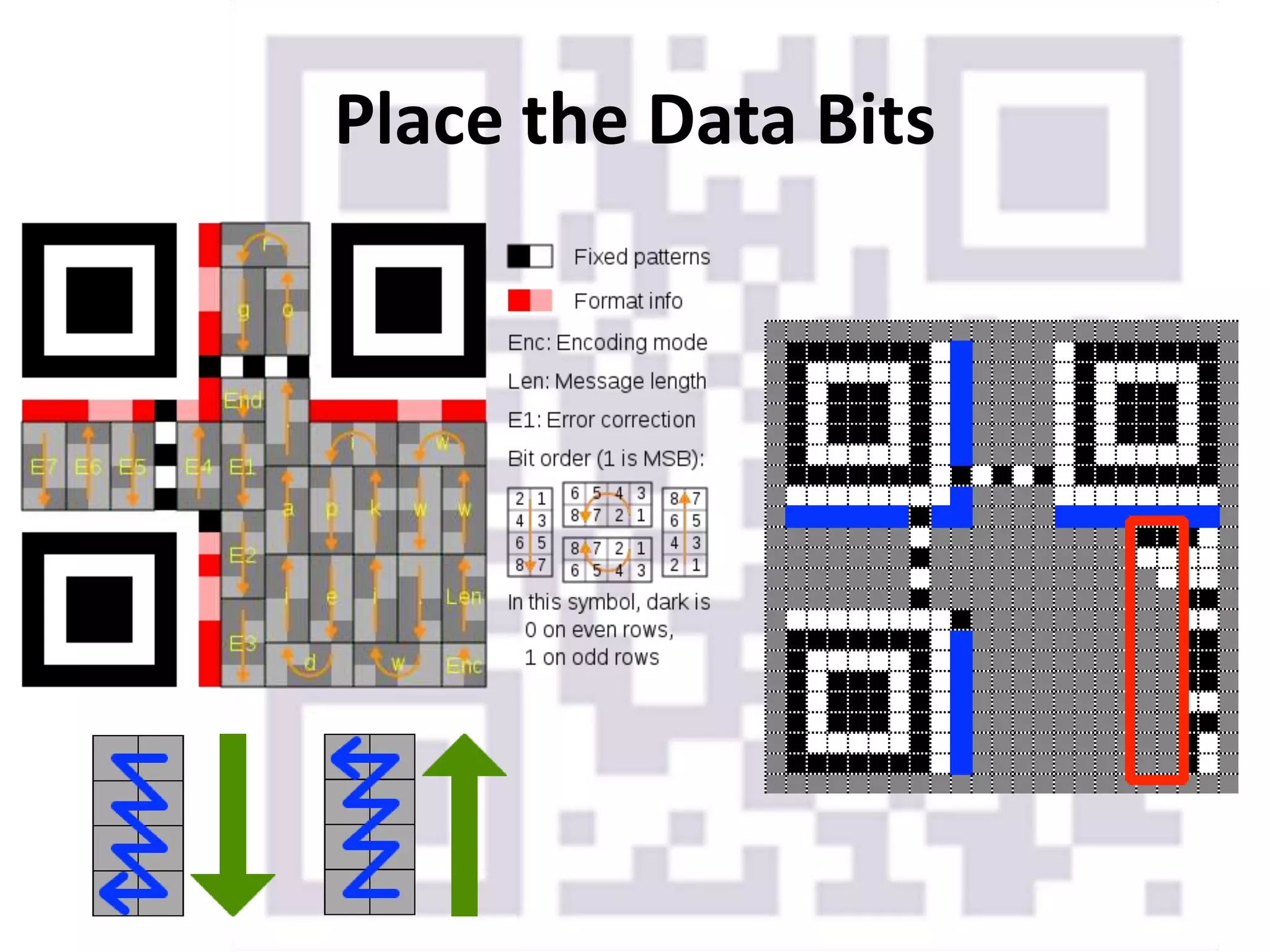
Place the Data Bits
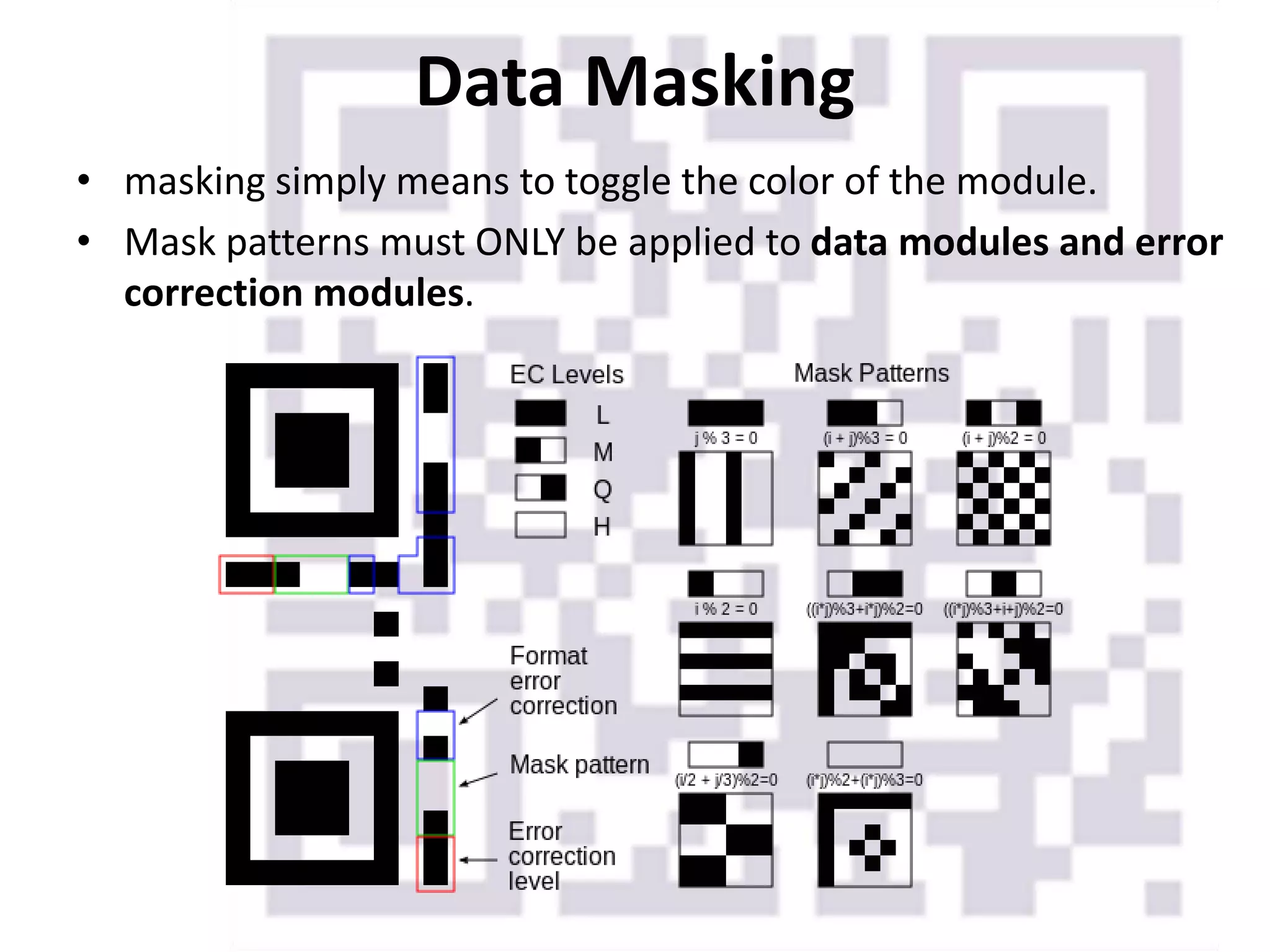
Data Masking
• masking simply means to toggle the color of the module.
• Mask patterns must ONLY be applied to data modules and error
correction modules.
Format Information
Version Information
If the QR Code is version 7 or larger, you must include an 18-
bit version information string in the bottom left and top
right corners of the QR code.
Final Output
A 1-Q code of HELLO WORLD
Conclusion
Advantage:-
• The main advantage of a QR code is its versatility
• Easy way to send mobile users to online content
• They appeal to mobile users' curiosity
• QR codes can be cost effective
Disadvantage:-
• Users need to download a QR code reader
• Lack of awareness
• Security
References
[1]. QR Code https://en.wikipedia.org/wiki/QR_code accessed on
21/10/2017 at 10:30 AM.
[2]. Error Correction Feature
http://www.qrcode.com/en/about/error_correction.html
accessed on 22/10/2017 at 11:30 AM.
[3]. Data Encoding http://www.thonky.com/qr-code-tutorial/data-
encoding accessed on 22/10/2017 at 1:30 PM.
THANKYOU

Qr code

  • 1.
    QR Code Presented By AjayVerma M.Tech CSE
  • 2.
    What is QRCode • Type of matrix barcode (or two-dimensional barcode) • First designed for the automotive industry in Japan. • It is a special type of matrix barcode that can encode information like numbers, letters, and Kanji characters. • Greater storage capacity compared to standard barcodes.
  • 3.
    History • 1952 Patentof first barcode device • 1966 Begins commercial use; lack of standard • 1970 UGPIC established to make industry standard • 1973 UGPIC turns into UPC (today’s standard barcode) • 1974 Barcodes implemented in a supermarket for the first time • 1988 Intermec Corporation creates the first 2D barcode • 1994 Denso Wave creates the QR Code for manufacturing vehicles • 2010 QR Readers appear as apps for Smart Phones • 2011 QR Codes become mainstream advertisements
  • 4.
    Its uses • URL •vCard • YouTube Video • Facebook • Twitter Follow • Google Maps: • Plain text: • Email Address: • Application URL: • And much more…
  • 5.
    QR Code Design •Position Markers • Format • Version Number • Alignment Marker
  • 6.
    QR Codes Versions •There are also different versions (currently up to 40). • These are determined by a numeral in a chart, followed by a error correction level. By following the two, the version number is reached. Version 1 (21×21) Version 3 (29×29). Version 40 (177×177)
  • 7.
    Storage capacity The amountof data that can be stored in the QR code symbol depends on the datatype (mode, or input character set), version (1, …, 40, indicating the overall dimensions of the symbol), and error correction level. The maximum storage capacities occur for 40-L symbols (version 40, error correction level L) Input mode Max. characters Possible characters, default encoding Numeric only 7,089 0, 1, 2, 3, 4, 5, 6, 7, 8, 9 Alphanumeric 4,296 0–9, A–Z (upper-case only), space, $, %, *, +, -, ., /, : Binary/byte 2,953 ISO 8859-1 Kanji/kana 1,817 Shift JIS X 0208 Maximum character storage capacity (40-L) character refers to individual values of the input mode/datatype
  • 8.
  • 9.
    Error Correction Still works! •Usethe Reed–Solomon error correction algorithm with four error correction levels. •The higher the error correction level, the less storage capacity. •Due to error correction, it is possible to create artistic QR codes that still scan correctly
  • 10.
    Encoding • Encoding of“ HELLO WORLD ” string. • Step 1: Choose the Error Correction Level • Step 2: Determine the Smallest Version for the Data • Step 3: Add the Mode Indicator • Step 4: Add the Character Count Indicator • Step 5: Encode Using the Selected Mode • Step 6: Break Up into 8-bit Codewords and Add Pad Bytes if Necessary: • 00100000 01011011 00001011 01111000 11010001 01110010 11011100 01001101 01000011 01000000 11101100 00010001 11101100
  • 11.
    • Now inerror correction coding section, we use Reed-Solomon error correction algorithm to get data codewords and their corresponding error correction codewords. • the data and error correction codewords were interleaved, and the final string of bits was obtained. • The next step is to put them in the QR code matrix.
  • 12.
    • The finderpatterns are the three blocks in the corners of the QR code at the top left, top right, and bottom left. • The separators are areas of whitespace beside the finder patterns. • The alignment patterns are similar to finder patterns, but smaller, and are placed throughout the code. They are used in versions 2 and larger, and their positions depend on the QR code version. • The timing patterns are dotted lines that connect the finder patterns. • The dark module is a single black module that is always placed beside the bottom left finder pattern. Overview of Function Patterns
  • 13.
  • 14.
  • 15.
    Data Masking • maskingsimply means to toggle the color of the module. • Mask patterns must ONLY be applied to data modules and error correction modules.
  • 16.
  • 17.
    Version Information If theQR Code is version 7 or larger, you must include an 18- bit version information string in the bottom left and top right corners of the QR code.
  • 18.
    Final Output A 1-Qcode of HELLO WORLD
  • 19.
    Conclusion Advantage:- • The mainadvantage of a QR code is its versatility • Easy way to send mobile users to online content • They appeal to mobile users' curiosity • QR codes can be cost effective Disadvantage:- • Users need to download a QR code reader • Lack of awareness • Security
  • 20.
    References [1]. QR Codehttps://en.wikipedia.org/wiki/QR_code accessed on 21/10/2017 at 10:30 AM. [2]. Error Correction Feature http://www.qrcode.com/en/about/error_correction.html accessed on 22/10/2017 at 11:30 AM. [3]. Data Encoding http://www.thonky.com/qr-code-tutorial/data- encoding accessed on 22/10/2017 at 1:30 PM.
  • 21.