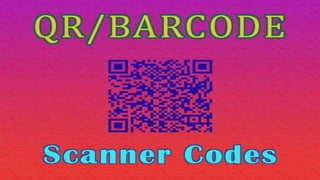
What is a QR Code?
QR Code stands for Quick Response Code.
QR Code is actually a 2 dimensional
barcode. A QR Code consist of black squares
over a white background, and it can store
some data, which can be read by camera or
other imaging devices. Below you can see a
sample QR Code.
QR Code And BarCode
Generating a QR Code
A QR code consists of black squares arranged in a square grid on a
white background, which can be read by an imaging device such as
a camera, and processed using Reed–Solomon error correction until
the image can be appropriately interpreted.
Creating a new Project
❖ As always create a new
Android Studio project.
❖ I just created Android QR
Code Scanner.
Adding Zxing Library
dependencies {
compile fileTree(dir: 'libs', include: ['*.jar'])
androidTestCompile('com.android.support.test.espresso:espresso-core:2.2.2', {
exclude group: 'com.android.support', module: 'support-annotations'
})
Now sync your project with gradle.
compile 'com.android.support:appcompat-v7:25.0.1'
testCompile 'junit:junit:4.12'
//add this dependency
compile 'com.journeyapps:zxing-android-embedded:3.4.0'
}
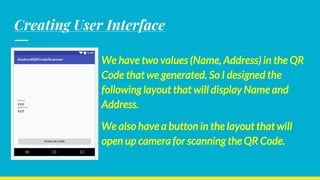
Creating User Interface
We have two values (Name, Address) in the QR
Code that we generated. So I designed the
following layout that will display Name and
Address.
We also have a button in the layout that will
open up camera for scanning the QR Code.
QR Barcode Scanner Android App Details
User-friendly QR/Barcode scanning layout developed in Android
Studio
https://abhiandroid.com/sourcecode/qrbarcode

Qr barcode scanner ppt

  • 2.
    What is aQR Code? QR Code stands for Quick Response Code. QR Code is actually a 2 dimensional barcode. A QR Code consist of black squares over a white background, and it can store some data, which can be read by camera or other imaging devices. Below you can see a sample QR Code.
  • 3.
    QR Code AndBarCode
  • 4.
    Generating a QRCode A QR code consists of black squares arranged in a square grid on a white background, which can be read by an imaging device such as a camera, and processed using Reed–Solomon error correction until the image can be appropriately interpreted.
  • 5.
    Creating a newProject ❖ As always create a new Android Studio project. ❖ I just created Android QR Code Scanner.
  • 6.
    Adding Zxing Library dependencies{ compile fileTree(dir: 'libs', include: ['*.jar']) androidTestCompile('com.android.support.test.espresso:espresso-core:2.2.2', { exclude group: 'com.android.support', module: 'support-annotations' })
  • 7.
    Now sync yourproject with gradle. compile 'com.android.support:appcompat-v7:25.0.1' testCompile 'junit:junit:4.12' //add this dependency compile 'com.journeyapps:zxing-android-embedded:3.4.0' }
  • 8.
    Creating User Interface Wehave two values (Name, Address) in the QR Code that we generated. So I designed the following layout that will display Name and Address. We also have a button in the layout that will open up camera for scanning the QR Code.
  • 9.
    QR Barcode ScannerAndroid App Details User-friendly QR/Barcode scanning layout developed in Android Studio https://abhiandroid.com/sourcecode/qrbarcode