The conventions
that my Digipak
follows
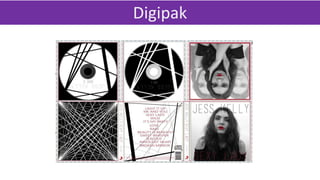
Digipak
The conventions of a front cover
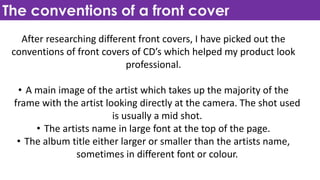
After researching different front covers, I have picked out the
conventions of front covers of CD’s which helped my product look
professional.
• A main image of the artist which takes up the majority of the
frame with the artist looking directly at the camera. The shot used
is usually a mid shot.
• The artists name in large font at the top of the page.
• The album title either larger or smaller than the artists name,
sometimes in different font or colour.
Comparing
my album
cover to
existing
products
Here is my album cover compared to a selection if pop album covers
that I have picked out. These existing album covers are what I drew
inspiration from whilst creating my own which feature artists such as
Ariana Grande and Demi Lovato. I liked the style, layout and colour
schemes of the album covers, especially Demi Lovato’s and Rita Ora’s.
All covers have just the artist in a close-up/ medium close-up shot
with most of them looking directly at the camera. I followed this
convention, having my artist re-create this and taking her photo from
a medium close-up. Whilst editing, I decided to make the theme black
and white with red, like Rita Ora’s album cover. Overall I think that it
looks professional because I followed the conventions of existing
products.
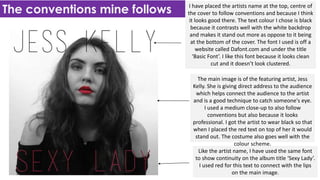
The conventions mine follows I have placed the artists name at the top, centre of
the cover to follow conventions and because I think
it looks good there. The text colour I chose is black
because it contrasts well with the white backdrop
and makes it stand out more as oppose to it being
at the bottom of the cover. The font I used is off a
website called Dafont.com and under the title
‘Basic Font’. I like this font because it looks clean
cut and it doesn’t look clustered.
The main image is of the featuring artist, Jess
Kelly. She is giving direct address to the audience
which helps connect the audience to the artist
and is a good technique to catch someone's eye.
I used a medium close-up to also follow
conventions but also because it looks
professional. I got the artist to wear black so that
when I placed the red text on top of her it would
stand out. The costume also goes well with the
colour scheme.
Like the artist name, I have used the same font
to show continuity on the album title ‘Sexy Lady’.
I used red for this text to connect with the lips
on the main image.
The conventions of a back cover
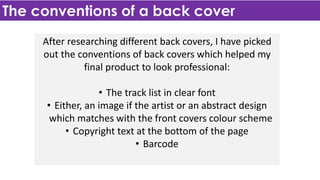
After researching different back covers, I have picked
out the conventions of back covers which helped my
final product to look professional:
• The track list in clear font
• Either, an image if the artist or an abstract design
which matches with the front covers colour scheme
• Copyright text at the bottom of the page
• Barcode
Comparing my
album back
cover to
existing
products
For my back cover I had one certain
existing product that I really liked and
wanted to re-create it. The product
that I am talking about is from Demi
Lovato’s album ‘Demi’ where there
are lines that are scattered around
the cover and text, following the
colour scheme black and white. I used
a similar style on my own product,
adding red on the text to give it more
colour.
The conventions mine follows The track list is a convention of back cover. I
have placed the list in the centre of the cover
to be the main focus. It is in a similar font that I
have used on the front cover and is in red to
stay with the theme of black, white and red.
The background of the cover is a numerous
amount of lines placed in certain places. They
are all black because, like the ‘Demi’ album, to
look good and interesting to look at.
Towards the bottom of the back there is the
‘compact disc’ logo, barcode and copyright
rights. These are conventional to have on the
back of a CD cover because things like the
barcode allow the customer to buy the CD.
The copyright text informs the customer and
any other people that this CD belongs to
artist.
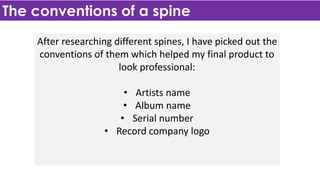
The conventions of a spine
After researching different spines, I have picked out the
conventions of them which helped my final product to
look professional:
• Artists name
• Album name
• Serial number
• Record company logo
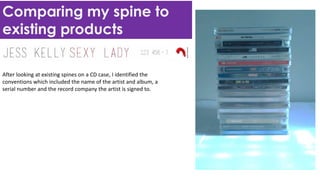
Comparing my spine to
existing products
After looking at existing spines on a CD case, I identified the
conventions which included the name of the artist and album, a
serial number and the record company the artist is signed to.
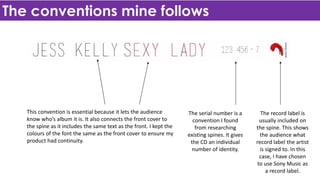
The conventions mine follows
This convention is essential because it lets the audience
know who’s album it is. It also connects the front cover to
the spine as it includes the same text as the front. I kept the
colours of the font the same as the front cover to ensure my
product had continuity.
The serial number is a
convention I found
from researching
existing spines. It gives
the CD an individual
number of identity.
The record label is
usually included on
the spine. This shows
the audience what
record label the artist
is signed to. In this
case, I have chosen
to use Sony Music as
a record label.
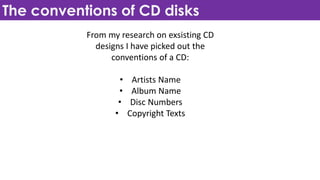
The conventions of CD disks
From my research on exsisting CD
designs I have picked out the
conventions of a CD:
• Artists Name
• Album Name
• Disc Numbers
• Copyright Texts
Comparing my
CD disks to
existing
products
From research, I decided that I wanted my
CD disk to be simple yet appealing. My main
inspirations for my designs where the JLS
Jukebox disk and the Demi Lovato. I chose
these two because I likes the colour scheme
of black and white, which goes with my
colours scheme of my ancillary texts. I also
liked the design of Demi Lovato’s disk
because of the lines on it, because it links
well with my inside cover an back cover.
The conventions of inside panels
After researching different inside, I have picked out the
conventions of them which helped my final product to
look professional:
• Picture of the artist
• Information Booklet with song lyrics
Comparing
my inside
panels to
existing
products
Looking at existing inside panels I
have found that there are a
number of way to set them out.
Looking at the images on the
right, these are four panelled
albums which is a little different
to mine as I have a six panelled
pack. Although, I have followed
conventions by including an
image of the artist inside and I
have also included an artistic
image which relates to the C and
back cover with the stripes.

Digipak Conventions

  • 1.
    The conventions that myDigipak follows
  • 2.
  • 3.
    The conventions ofa front cover After researching different front covers, I have picked out the conventions of front covers of CD’s which helped my product look professional. • A main image of the artist which takes up the majority of the frame with the artist looking directly at the camera. The shot used is usually a mid shot. • The artists name in large font at the top of the page. • The album title either larger or smaller than the artists name, sometimes in different font or colour.
  • 4.
    Comparing my album cover to existing products Hereis my album cover compared to a selection if pop album covers that I have picked out. These existing album covers are what I drew inspiration from whilst creating my own which feature artists such as Ariana Grande and Demi Lovato. I liked the style, layout and colour schemes of the album covers, especially Demi Lovato’s and Rita Ora’s. All covers have just the artist in a close-up/ medium close-up shot with most of them looking directly at the camera. I followed this convention, having my artist re-create this and taking her photo from a medium close-up. Whilst editing, I decided to make the theme black and white with red, like Rita Ora’s album cover. Overall I think that it looks professional because I followed the conventions of existing products.
  • 5.
    The conventions minefollows I have placed the artists name at the top, centre of the cover to follow conventions and because I think it looks good there. The text colour I chose is black because it contrasts well with the white backdrop and makes it stand out more as oppose to it being at the bottom of the cover. The font I used is off a website called Dafont.com and under the title ‘Basic Font’. I like this font because it looks clean cut and it doesn’t look clustered. The main image is of the featuring artist, Jess Kelly. She is giving direct address to the audience which helps connect the audience to the artist and is a good technique to catch someone's eye. I used a medium close-up to also follow conventions but also because it looks professional. I got the artist to wear black so that when I placed the red text on top of her it would stand out. The costume also goes well with the colour scheme. Like the artist name, I have used the same font to show continuity on the album title ‘Sexy Lady’. I used red for this text to connect with the lips on the main image.
  • 6.
    The conventions ofa back cover After researching different back covers, I have picked out the conventions of back covers which helped my final product to look professional: • The track list in clear font • Either, an image if the artist or an abstract design which matches with the front covers colour scheme • Copyright text at the bottom of the page • Barcode
  • 7.
    Comparing my album back coverto existing products For my back cover I had one certain existing product that I really liked and wanted to re-create it. The product that I am talking about is from Demi Lovato’s album ‘Demi’ where there are lines that are scattered around the cover and text, following the colour scheme black and white. I used a similar style on my own product, adding red on the text to give it more colour.
  • 8.
    The conventions minefollows The track list is a convention of back cover. I have placed the list in the centre of the cover to be the main focus. It is in a similar font that I have used on the front cover and is in red to stay with the theme of black, white and red. The background of the cover is a numerous amount of lines placed in certain places. They are all black because, like the ‘Demi’ album, to look good and interesting to look at. Towards the bottom of the back there is the ‘compact disc’ logo, barcode and copyright rights. These are conventional to have on the back of a CD cover because things like the barcode allow the customer to buy the CD. The copyright text informs the customer and any other people that this CD belongs to artist.
  • 9.
    The conventions ofa spine After researching different spines, I have picked out the conventions of them which helped my final product to look professional: • Artists name • Album name • Serial number • Record company logo
  • 10.
    Comparing my spineto existing products After looking at existing spines on a CD case, I identified the conventions which included the name of the artist and album, a serial number and the record company the artist is signed to.
  • 11.
    The conventions minefollows This convention is essential because it lets the audience know who’s album it is. It also connects the front cover to the spine as it includes the same text as the front. I kept the colours of the font the same as the front cover to ensure my product had continuity. The serial number is a convention I found from researching existing spines. It gives the CD an individual number of identity. The record label is usually included on the spine. This shows the audience what record label the artist is signed to. In this case, I have chosen to use Sony Music as a record label.
  • 12.
    The conventions ofCD disks From my research on exsisting CD designs I have picked out the conventions of a CD: • Artists Name • Album Name • Disc Numbers • Copyright Texts
  • 13.
    Comparing my CD disksto existing products From research, I decided that I wanted my CD disk to be simple yet appealing. My main inspirations for my designs where the JLS Jukebox disk and the Demi Lovato. I chose these two because I likes the colour scheme of black and white, which goes with my colours scheme of my ancillary texts. I also liked the design of Demi Lovato’s disk because of the lines on it, because it links well with my inside cover an back cover.
  • 14.
    The conventions ofinside panels After researching different inside, I have picked out the conventions of them which helped my final product to look professional: • Picture of the artist • Information Booklet with song lyrics
  • 15.
    Comparing my inside panels to existing products Lookingat existing inside panels I have found that there are a number of way to set them out. Looking at the images on the right, these are four panelled albums which is a little different to mine as I have a six panelled pack. Although, I have followed conventions by including an image of the artist inside and I have also included an artistic image which relates to the C and back cover with the stripes.