AGENDA
Email using SMTP
HTML e-mail
Python Sending Email using SMTP
●
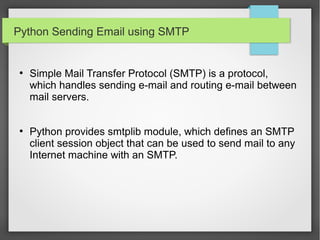
Simple Mail Transfer Protocol (SMTP) is a protocol,
which handles sending e-mail and routing e-mail between
mail servers.
●
Python provides smtplib module, which defines an SMTP
client session object that can be used to send mail to any
Internet machine with an SMTP.
import smtplib
smtpObj = smtplib.SMTP( [host [, port [,local_hostname]]] )
host: This is the host running your SMTP server. You can
specifiy IP address of the host or a domain name like
tutorialspoint.com. This is optional argument.
●
port: If you are providing host argument, then you need to
specify a port, where SMTP server is listening. Usually
this port would be 25.
●
local_hostname: If your SMTP server is running on your
local machine, then you can specify just localhost as of
this option.
●
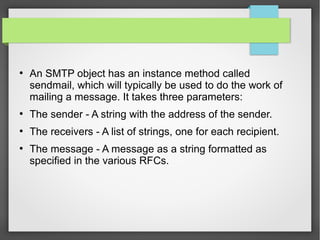
An SMTP object has an instance method called
sendmail, which will typically be used to do the work of
mailing a message. It takes three parameters:
●
The sender - A string with the address of the sender.
●
The receivers - A list of strings, one for each recipient.
●
The message - A message as a string formatted as
specified in the various RFCs.
import smtplib
sender = 'from@fromdomain.com'
receivers = ['to@todomain.com']
message = """From: From Person
<from@fromdomain.com>
To: To Person <to@todomain.com>
Subject: SMTP e-mail test
This is a test e-mail message.
"""
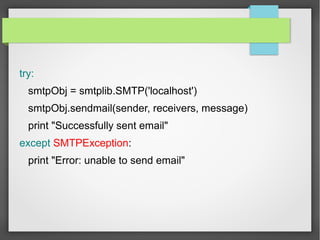
try:
smtpObj = smtplib.SMTP('localhost')
smtpObj.sendmail(sender, receivers, message)
print "Successfully sent email"
except SMTPException:
print "Error: unable to send email"
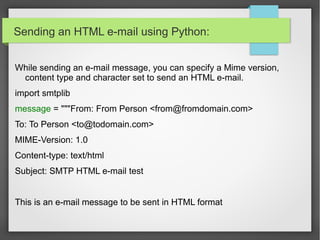
Sending an HTML e-mail using Python:
While sending an e-mail message, you can specify a Mime version,
content type and character set to send an HTML e-mail.
import smtplib
message = """From: From Person <from@fromdomain.com>
To: To Person <to@todomain.com>
MIME-Version: 1.0
Content-type: text/html
Subject: SMTP HTML e-mail test
This is an e-mail message to be sent in HTML format
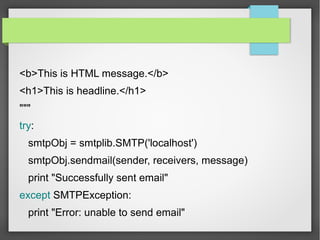
<b>This is HTML message.</b>
<h1>This is headline.</h1>
"""
try:
smtpObj = smtplib.SMTP('localhost')
smtpObj.sendmail(sender, receivers, message)
print "Successfully sent email"
except SMTPException:
print "Error: unable to send email"
Python session.11 By Shanmugam

Python session.11 By Shanmugam

  • 2.
  • 3.
    Python Sending Emailusing SMTP ● Simple Mail Transfer Protocol (SMTP) is a protocol, which handles sending e-mail and routing e-mail between mail servers. ● Python provides smtplib module, which defines an SMTP client session object that can be used to send mail to any Internet machine with an SMTP.
  • 4.
    import smtplib smtpObj =smtplib.SMTP( [host [, port [,local_hostname]]] ) host: This is the host running your SMTP server. You can specifiy IP address of the host or a domain name like tutorialspoint.com. This is optional argument. ● port: If you are providing host argument, then you need to specify a port, where SMTP server is listening. Usually this port would be 25. ● local_hostname: If your SMTP server is running on your local machine, then you can specify just localhost as of this option.
  • 5.
    ● An SMTP objecthas an instance method called sendmail, which will typically be used to do the work of mailing a message. It takes three parameters: ● The sender - A string with the address of the sender. ● The receivers - A list of strings, one for each recipient. ● The message - A message as a string formatted as specified in the various RFCs.
  • 6.
    import smtplib sender ='from@fromdomain.com' receivers = ['to@todomain.com'] message = """From: From Person <from@fromdomain.com> To: To Person <to@todomain.com> Subject: SMTP e-mail test This is a test e-mail message. """
  • 7.
    try: smtpObj = smtplib.SMTP('localhost') smtpObj.sendmail(sender,receivers, message) print "Successfully sent email" except SMTPException: print "Error: unable to send email"
  • 8.
    Sending an HTMLe-mail using Python: While sending an e-mail message, you can specify a Mime version, content type and character set to send an HTML e-mail. import smtplib message = """From: From Person <from@fromdomain.com> To: To Person <to@todomain.com> MIME-Version: 1.0 Content-type: text/html Subject: SMTP HTML e-mail test This is an e-mail message to be sent in HTML format
  • 9.
    <b>This is HTMLmessage.</b> <h1>This is headline.</h1> """ try: smtpObj = smtplib.SMTP('localhost') smtpObj.sendmail(sender, receivers, message) print "Successfully sent email" except SMTPException: print "Error: unable to send email"