Deepak H B
Full-Stack Developer
Gmail: deepakhb2@gmail.com
Linkedin: http://in.linkedin.com/in/deepakhb
GitHub: https://github.com/deepakhb2
Networking
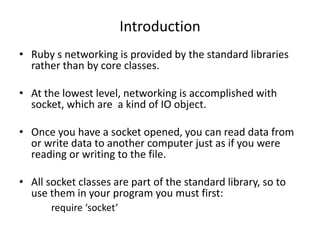
Introduction
• Ruby s networking is provided by the standard libraries
rather than by core classes.
• At the lowest level, networking is accomplished with
socket, which are a kind of IO object.
• Once you have a socket opened, you can read data from
or write data to another computer just as if you were
reading or writing to the file.
• All socket classes are part of the standard library, so to
use them in your program you must first:
require ‘socket’
A very simple client
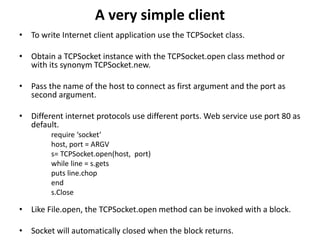
• To write Internet client application use the TCPSocket class.
• Obtain a TCPSocket instance with the TCPSocket.open class method or
with its synonym TCPSocket.new.
• Pass the name of the host to connect as first argument and the port as
second argument.
• Different internet protocols use different ports. Web service use port 80 as
default.
require ‘socket’
host, port = ARGV
s= TCPSocket.open(host, port)
while line = s.gets
puts line.chop
end
s.Close
• Like File.open, the TCPSocket.open method can be invoked with a block.
• Socket will automatically closed when the block returns.
A very simple server
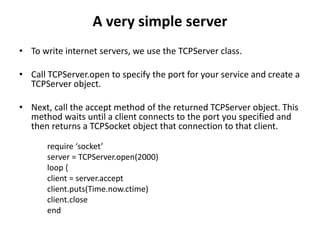
• To write internet servers, we use the TCPServer class.
• Call TCPServer.open to specify the port for your service and create a
TCPServer object.
• Next, call the accept method of the returned TCPServer object. This
method waits until a client connects to the port you specified and
then returns a TCPSocket object that connection to that client.
require ‘socket’
server = TCPServer.open(2000)
loop {
client = server.accept
client.puts(Time.now.ctime)
client.close
end
Datagrams
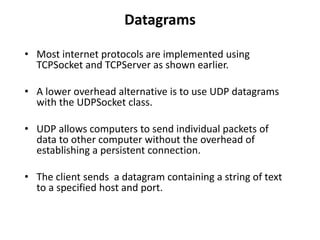
• Most internet protocols are implemented using
TCPSocket and TCPServer as shown earlier.
• A lower overhead alternative is to use UDP datagrams
with the UDPSocket class.
• UDP allows computers to send individual packets of
data to other computer without the overhead of
establishing a persistent connection.
• The client sends a datagram containing a string of text
to a specified host and port.
Contd..
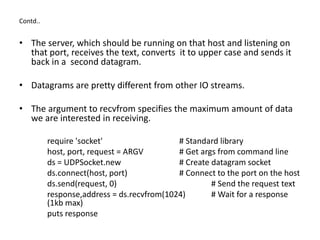
• The server, which should be running on that host and listening on
that port, receives the text, converts it to upper case and sends it
back in a second datagram.
• Datagrams are pretty different from other IO streams.
• The argument to recvfrom specifies the maximum amount of data
we are interested in receiving.
require 'socket' # Standard library
host, port, request = ARGV # Get args from command line
ds = UDPSocket.new # Create datagram socket
ds.connect(host, port) # Connect to the port on the host
ds.send(request, 0) # Send the request text
response,address = ds.recvfrom(1024) # Wait for a response
(1kb max)
puts response
Contd..
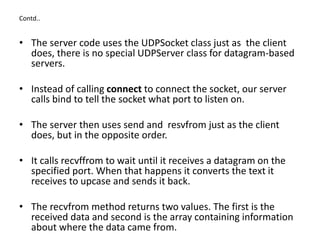
• The server code uses the UDPSocket class just as the client
does, there is no special UDPServer class for datagram-based
servers.
• Instead of calling connect to connect the socket, our server
calls bind to tell the socket what port to listen on.
• The server then uses send and resvfrom just as the client
does, but in the opposite order.
• It calls recvffrom to wait until it receives a datagram on the
specified port. When that happens it converts the text it
receives to upcase and sends it back.
• The recvfrom method returns two values. The first is the
received data and second is the array containing information
about where the data came from.
Contd..
require 'socket' # Standard library
port = ARGV[0] # The port to listen on
ds = UDPSocket.new # Create new socket
ds.bind(nil, port) # Make it listen on the port
loop do # Loop forever
request,address=ds.recvfrom(1024) # Wait to receive something
response = request.upcase # Convert request text to
uppercase
clientaddr = address[3] # What ip address sent the request?
clientname = address[2] # What is the host name?
clientport = address[1] # What port was it sent from
ds.send(response, 0, # Send the response back...
clientaddr, clientport) # ...where it came from
# Log the client connection
puts "Connection from: #{clientname} #{clientaddr} #{clientport}"
end
A Multiplexing Server
• The simple time server shown earlier never maintained a
connection with any client.
• The sophisticated servers maintain a connection and in order to
be useful they must allow multiple clients to connect and interact
at the same time.
• One way to do this is with threads.
• The alternate that we’ll consider here is to write a multiplexing
server using the Kernel.select method.
• When a server has multiple clients connected, it cannot call a
blocking method like gets on the socket of any one client.
• If it blocks waiting for input from one client, it won’t be able to
receive input from other clients or accept new connection.
• The select method solves this problem.
Fetching Web Pages
• We can use the socket liberary to implement any internet
protocol.
• We can use a prebuilt library like Net::HTTP for working
with HTTP.
• Similar libraries exist for working with the FTP, SMTP, POP
and IMAP.

10 Networking

  • 1.
    Deepak H B Full-StackDeveloper Gmail: deepakhb2@gmail.com Linkedin: http://in.linkedin.com/in/deepakhb GitHub: https://github.com/deepakhb2
  • 2.
  • 3.
    Introduction • Ruby snetworking is provided by the standard libraries rather than by core classes. • At the lowest level, networking is accomplished with socket, which are a kind of IO object. • Once you have a socket opened, you can read data from or write data to another computer just as if you were reading or writing to the file. • All socket classes are part of the standard library, so to use them in your program you must first: require ‘socket’
  • 4.
    A very simpleclient • To write Internet client application use the TCPSocket class. • Obtain a TCPSocket instance with the TCPSocket.open class method or with its synonym TCPSocket.new. • Pass the name of the host to connect as first argument and the port as second argument. • Different internet protocols use different ports. Web service use port 80 as default. require ‘socket’ host, port = ARGV s= TCPSocket.open(host, port) while line = s.gets puts line.chop end s.Close • Like File.open, the TCPSocket.open method can be invoked with a block. • Socket will automatically closed when the block returns.
  • 5.
    A very simpleserver • To write internet servers, we use the TCPServer class. • Call TCPServer.open to specify the port for your service and create a TCPServer object. • Next, call the accept method of the returned TCPServer object. This method waits until a client connects to the port you specified and then returns a TCPSocket object that connection to that client. require ‘socket’ server = TCPServer.open(2000) loop { client = server.accept client.puts(Time.now.ctime) client.close end
  • 6.
    Datagrams • Most internetprotocols are implemented using TCPSocket and TCPServer as shown earlier. • A lower overhead alternative is to use UDP datagrams with the UDPSocket class. • UDP allows computers to send individual packets of data to other computer without the overhead of establishing a persistent connection. • The client sends a datagram containing a string of text to a specified host and port.
  • 7.
    Contd.. • The server,which should be running on that host and listening on that port, receives the text, converts it to upper case and sends it back in a second datagram. • Datagrams are pretty different from other IO streams. • The argument to recvfrom specifies the maximum amount of data we are interested in receiving. require 'socket' # Standard library host, port, request = ARGV # Get args from command line ds = UDPSocket.new # Create datagram socket ds.connect(host, port) # Connect to the port on the host ds.send(request, 0) # Send the request text response,address = ds.recvfrom(1024) # Wait for a response (1kb max) puts response
  • 8.
    Contd.. • The servercode uses the UDPSocket class just as the client does, there is no special UDPServer class for datagram-based servers. • Instead of calling connect to connect the socket, our server calls bind to tell the socket what port to listen on. • The server then uses send and resvfrom just as the client does, but in the opposite order. • It calls recvffrom to wait until it receives a datagram on the specified port. When that happens it converts the text it receives to upcase and sends it back. • The recvfrom method returns two values. The first is the received data and second is the array containing information about where the data came from.
  • 9.
    Contd.. require 'socket' #Standard library port = ARGV[0] # The port to listen on ds = UDPSocket.new # Create new socket ds.bind(nil, port) # Make it listen on the port loop do # Loop forever request,address=ds.recvfrom(1024) # Wait to receive something response = request.upcase # Convert request text to uppercase clientaddr = address[3] # What ip address sent the request? clientname = address[2] # What is the host name? clientport = address[1] # What port was it sent from ds.send(response, 0, # Send the response back... clientaddr, clientport) # ...where it came from # Log the client connection puts "Connection from: #{clientname} #{clientaddr} #{clientport}" end
  • 10.
    A Multiplexing Server •The simple time server shown earlier never maintained a connection with any client. • The sophisticated servers maintain a connection and in order to be useful they must allow multiple clients to connect and interact at the same time. • One way to do this is with threads. • The alternate that we’ll consider here is to write a multiplexing server using the Kernel.select method. • When a server has multiple clients connected, it cannot call a blocking method like gets on the socket of any one client. • If it blocks waiting for input from one client, it won’t be able to receive input from other clients or accept new connection. • The select method solves this problem.
  • 11.
    Fetching Web Pages •We can use the socket liberary to implement any internet protocol. • We can use a prebuilt library like Net::HTTP for working with HTTP. • Similar libraries exist for working with the FTP, SMTP, POP and IMAP.