AGENDA
What is vSphere?
Components of vSphere.
Vmware vSphere client
Vmware Vcenter server
What is VMware vSphere?
Its one of the virtualization platform from VMware's Enterprise
Other VMware Virtualization Platforms:
 vsphere Desktop and Vmware view
 Vmware workstation
Other Vendor Virtualization Platforms:
Citrix Xenserver
Microsoft Hyper-V
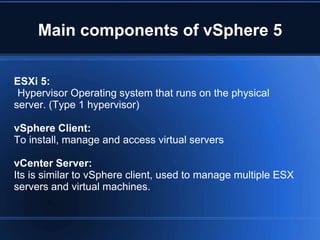
Main components of vSphere 5
ESXi 5:
Hypervisor Operating system that runs on the physical
server. (Type 1 hypervisor)
vSphere Client:
To install, manage and access virtual servers
vCenter Server:
Its is similar to vSphere client, used to manage multiple ESX
servers and virtual machines.
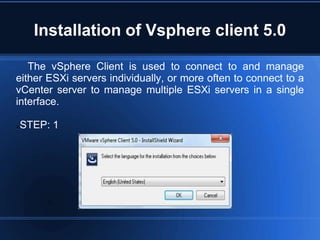
Installation of Vsphere client 5.0
The vSphere Client is used to connect to and manage
either ESXi servers individually, or more often to connect to a
vCenter server to manage multiple ESXi servers in a single
interface.
STEP: 1
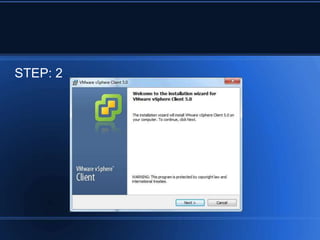
STEP: 2
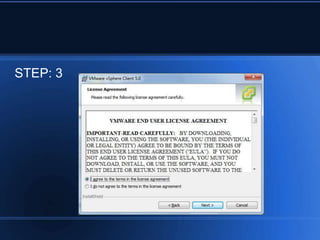
STEP: 3
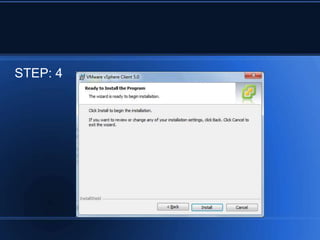
STEP: 4
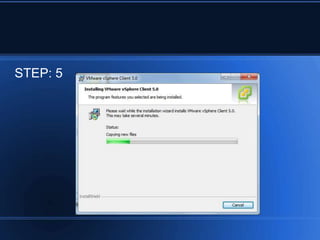
STEP: 5
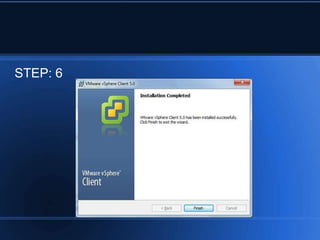
STEP: 6
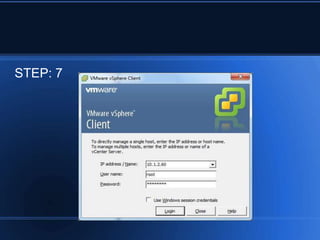
STEP: 7
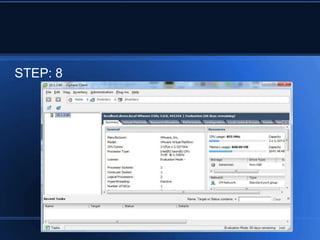
STEP: 8
Installation of Vcenter server 5.0
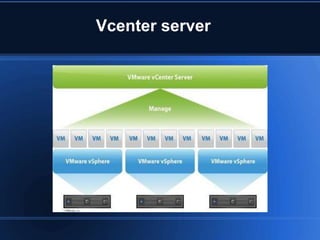
VMware vCenter Server is the management system for your VMware
vSphere private cloud It's used to manage your clusters of ESXi
servers, configure HA, DRS and vMotion, manage your virtual
networks and their interfaces to the physical network.
Its also used to provison storage (maybe even integrated with your
SAN) and create virtual machines, including templates and other
wonderful things.
Vcenter server
Minimum Requirements for the vCenter Server
 Processor: Two 64-bit CPUs Intel or AMD x64 2.0GHz or faster
 Memory: 4GB RAM (RAM requirements may be higher if your
database runs on the same machine)
 Disk storage: 5GB (Disk requirements may be higher if your
database runs on the same machine)
 Networking: 1GB recommended (If physical team NICs for
redundancy)
 Operating System: Windows Server 2008 (64-bit), Windows
Server 2008 R2
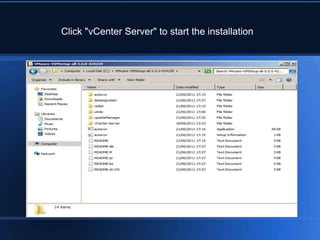
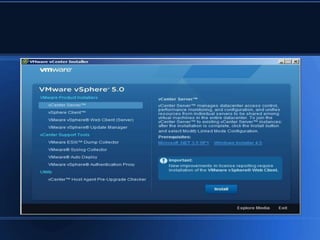
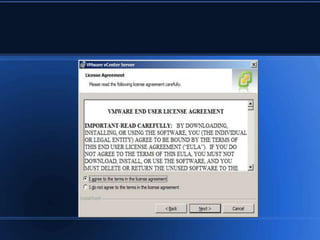
Click "vCenter Server" to start the installation
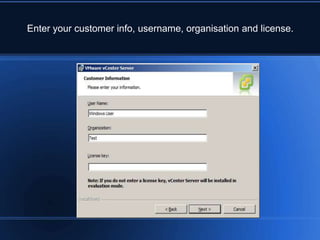
Enter your customer info, username, organisation and license.
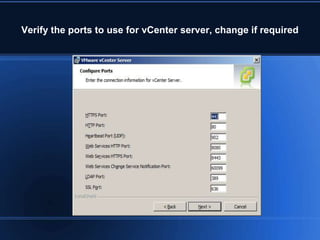
Verify the ports to use for vCenter server, change if required
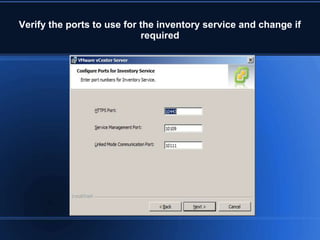
Verify the ports to use for the inventory service and change if
required
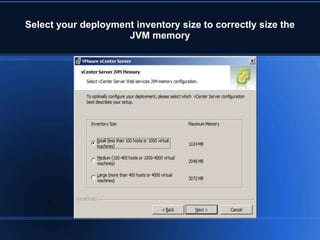
Select your deployment inventory size to correctly size the
JVM memory
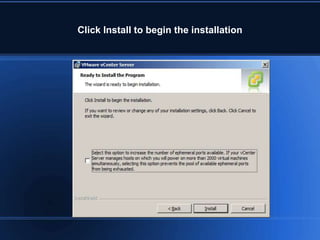
Click Install to begin the installation
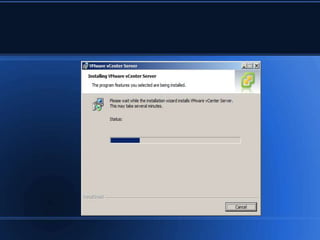
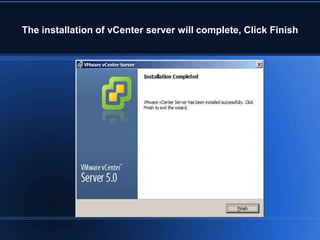
The installation of vCenter server will complete, Click Finish
REFERENCE
 http://www.vmadmin.co.uk/resources/36-virtualcenter/275-vcenter5install
 http://www.vmadmin.co.uk/vmware/36-virtualcenter/276-vsphere5clientinstall
 http://www.mustbegeek.com/installing-vsphere-in-vmware-workstation/
Virtualization s4.1

Virtualization s4.1

  • 2.
    AGENDA What is vSphere? Componentsof vSphere. Vmware vSphere client Vmware Vcenter server
  • 3.
    What is VMwarevSphere? Its one of the virtualization platform from VMware's Enterprise Other VMware Virtualization Platforms:  vsphere Desktop and Vmware view  Vmware workstation Other Vendor Virtualization Platforms: Citrix Xenserver Microsoft Hyper-V
  • 4.
    Main components ofvSphere 5 ESXi 5: Hypervisor Operating system that runs on the physical server. (Type 1 hypervisor) vSphere Client: To install, manage and access virtual servers vCenter Server: Its is similar to vSphere client, used to manage multiple ESX servers and virtual machines.
  • 5.
    Installation of Vsphereclient 5.0 The vSphere Client is used to connect to and manage either ESXi servers individually, or more often to connect to a vCenter server to manage multiple ESXi servers in a single interface. STEP: 1
  • 6.
  • 7.
  • 8.
  • 9.
  • 10.
  • 11.
  • 12.
  • 13.
    Installation of Vcenterserver 5.0 VMware vCenter Server is the management system for your VMware vSphere private cloud It's used to manage your clusters of ESXi servers, configure HA, DRS and vMotion, manage your virtual networks and their interfaces to the physical network. Its also used to provison storage (maybe even integrated with your SAN) and create virtual machines, including templates and other wonderful things.
  • 14.
  • 15.
    Minimum Requirements forthe vCenter Server  Processor: Two 64-bit CPUs Intel or AMD x64 2.0GHz or faster  Memory: 4GB RAM (RAM requirements may be higher if your database runs on the same machine)  Disk storage: 5GB (Disk requirements may be higher if your database runs on the same machine)  Networking: 1GB recommended (If physical team NICs for redundancy)  Operating System: Windows Server 2008 (64-bit), Windows Server 2008 R2
  • 16.
    Click "vCenter Server"to start the installation
  • 20.
    Enter your customerinfo, username, organisation and license.
  • 25.
    Verify the portsto use for vCenter server, change if required
  • 26.
    Verify the portsto use for the inventory service and change if required
  • 27.
    Select your deploymentinventory size to correctly size the JVM memory
  • 28.
    Click Install tobegin the installation
  • 30.
    The installation ofvCenter server will complete, Click Finish
  • 31.