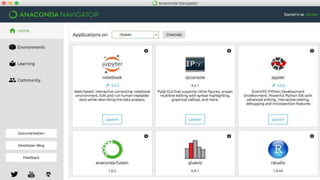
© 2016 Continuum Analytics - Confidential & Proprietary© 2016 Continuum Analytics - Confidential & Proprietary
Python for Data Science using
Anaconda
TDWI Accelerate
Travis E. Oliphant
President, Chief Data Scientist, Co-founder
© 2016 Continuum Analytics - Confidential & Proprietary
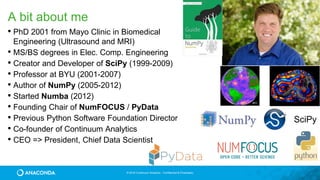
A bit about me
• PhD 2001 from Mayo Clinic in Biomedical
Engineering (Ultrasound and MRI)
• MS/BS degrees in Elec. Comp. Engineering
• Creator and Developer of SciPy (1999-2009)
• Professor at BYU (2001-2007)
• Author of NumPy (2005-2012)
• Started Numba (2012)
• Founding Chair of NumFOCUS / PyData
• Previous Python Software Foundation Director
• Co-founder of Continuum Analytics
• CEO => President, Chief Data Scientist
SciPy
© 2016 Continuum Analytics - Confidential & Proprietary
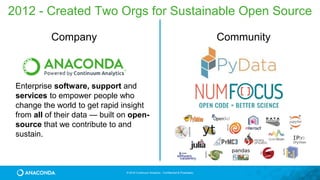
Company
2012 - Created Two Orgs for Sustainable Open Source
Community
Enterprise software, support and
services to empower people who
change the world to get rapid insight
from all of their data — built on open-
source that we contribute to and
sustain.
© 2016 Continuum Analytics - Confidential & Proprietary
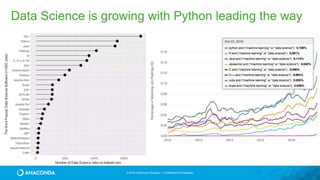
Data Science is growing with Python leading the way
© 2016 Continuum Analytics - Confidential & Proprietary
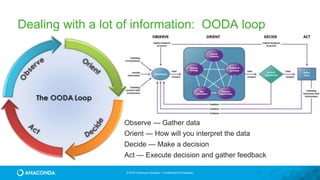
Dealing with a lot of information: OODA loop
Observe — Gather data
Orient — How will you interpret the data
Decide — Make a decision
Act — Execute decision and gather feedback
© 2016 Continuum Analytics - Confidential & Proprietary
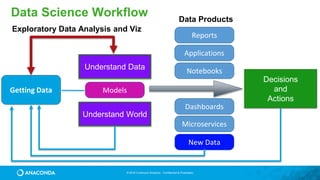
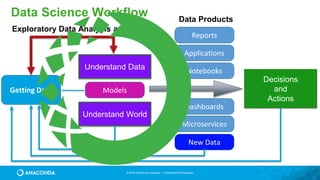
Data Science Workflow
New Data
NotebooksUnderstand Data
Getting Data
Understand World
Reports
Microservices
Dashboards
Applications
Decisions
and
Actions
Models
Exploratory Data Analysis and Viz
Data Products
© 2016 Continuum Analytics - Confidential & Proprietary
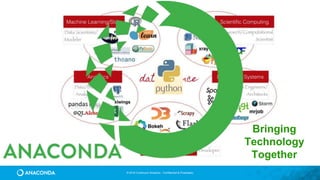
Bringing
Technology
Together
© 2017 Continuum Analytics - Confidential & Proprietary 9
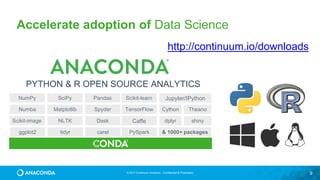
Accelerate adoption of Data Science
PYTHON & R OPEN SOURCE ANALYTICS
NumPy SciPy Pandas Scikit-learn Jupyter/IPython
Numba Matplotlib Spyder TensorFlow Cython Theano
Scikit-image NLTK Dask Caffe dplyr shiny
ggplot2 tidyr caret PySpark & 1000+ packages
http://continuum.io/downloads
© 2016 Continuum Analytics - Confidential & Proprietary
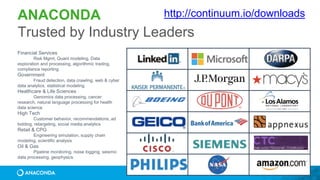
ANACONDA
Trusted by Industry Leaders
Financial Services
Risk Mgmt, Quant modeling, Data
exploration and processing, algorithmic trading,
compliance reporting
Government
Fraud detection, data crawling, web & cyber
data analytics, statistical modeling
Healthcare & Life Sciences
Genomics data processing, cancer
research, natural language processing for health
data science
High Tech
Customer behavior, recommendations, ad
bidding, retargeting, social media analytics
Retail & CPG
Engineering simulation, supply chain
modeling, scientific analysis
Oil & Gas
Pipeline monitoring, noise logging, seismic
data processing, geophysics
http://continuum.io/downloads
© 2016 Continuum Analytics - Confidential & Proprietary
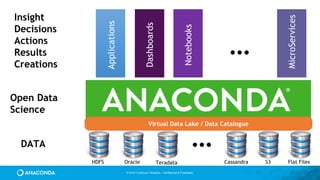
…DATA
Open Data
Science
Insight
Decisions
Actions
Results
Creations
…
Applications
Dashboards
Notebooks
MicroServices
HDFS Oracle Teradata Cassandra S3 Flat Files
Virtual Data Lake / Data Catalogue
© 2016 Continuum Analytics - Confidential & Proprietary
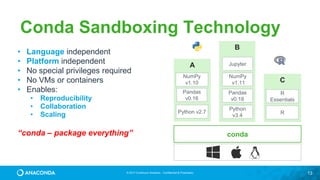
© 2017 Continuum Analytics - Confidential & Proprietary 13
A
Python v2.7
Conda Sandboxing Technology
B
Python
v3.4
Pandas
v0.18
Jupyter
C
R
R
Essentials
conda
NumPy
v1.11
NumPy
v1.10
Pandas
v0.16
• Language independent
• Platform independent
• No special privileges required
• No VMs or containers
• Enables:
• Reproducibility
• Collaboration
• Scaling
“conda – package everything”
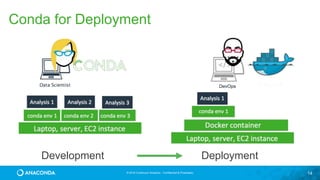
© 2016 Continuum Analytics - Confidential & Proprietary 14
Development Deployment
Conda for Deployment
© 2016 Continuum Analytics - Confidential & Proprietary
221 W. 6th Street
Suite #1550
Austin, TX 78701
+1 512.222.5440
info@continuum.io
@ContinuumIO
© 2016 Continuum Analytics - Confidential & Proprietary
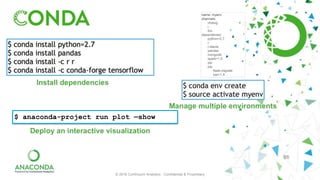
$ anaconda-project run plot —show
16
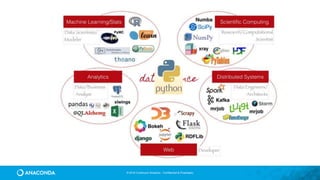
Python Ecosystem
© 2016 Continuum Analytics - Confidential & Proprietary
Numba
Bokeh
© 2016 Continuum Analytics - Confidential & Proprietary
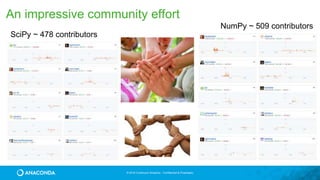
An impressive community effort
SciPy ~ 478 contributors
NumPy ~ 509 contributors
19
NumPy
© 2016 Continuum Analytics - Confidential & Proprietary
Without NumPyfrom math import sin, pi
def sinc(x):
if x == 0:
return 1.0
else:
pix = pi*x
return sin(pix)/pix
def step(x):
if x > 0:
return 1.0
elif x < 0:
return 0.0
else:
return 0.5
functions.py
>>> import functions as f
>>> xval = [x/3.0 for x in
range(-10,10)]
>>> yval1 = [f.sinc(x) for x
in xval]
>>> yval2 = [f.step(x) for x
in xval]
Python is a great language but
needed a way to operate quickly
and cleanly over multi-
dimensional arrays.
© 2016 Continuum Analytics - Confidential & Proprietary
With NumPy
from numpy import sin, pi
from numpy import vectorize
import functions as f
vsinc = vectorize(f.sinc)
def sinc(x):
pix = pi*x
val = sin(pix)/pix
val[x==0] = 1.0
return val
vstep = vectorize(f.step)
def step(x):
y = x*0.0
y[x>0] = 1
y[x==0] = 0.5
return y
>>> import functions2 as f
>>> from numpy import *
>>> x = r_[-10:10]/3.0
>>> y1 = f.sinc(x)
>>> y2 = f.step(x)
functions2.py
Offers N-D array, element-by-element
functions, and basic random numbers,
linear algebra, and FFT capability for
Python
http://numpy.org
Fiscally sponsored by NumFOCUS
© 2016 Continuum Analytics - Confidential & Proprietary
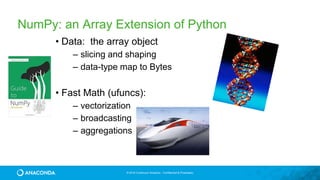
NumPy: an Array Extension of Python
• Data: the array object
– slicing and shaping
– data-type map to Bytes
• Fast Math (ufuncs):
– vectorization
– broadcasting
– aggregations
© 2016 Continuum Analytics - Confidential & Proprietary
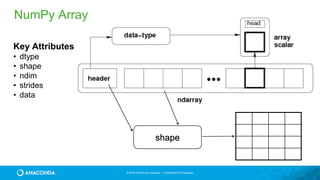
shape
NumPy Array
Key Attributes
• dtype
• shape
• ndim
• strides
• data
© 2016 Continuum Analytics - Confidential & Proprietary
NumPy Examples
2d array
3d array
[439 472 477]
[217 205 261 222 245 238]
9.98330639789 2.96677717122
© 2016 Continuum Analytics - Confidential & Proprietary
NumPy Slicing (Selection)
>>> a[0,3:5]
array([3, 4])
>>> a[4:,4:]
array([[44, 45],
[54, 55]])
>>> a[:,2]
array([2,12,22,32,42,52])
>>> a[2::2,::2]
array([[20, 22, 24],
[40, 42, 44]])
© 2016 Continuum Analytics - Confidential & Proprietary
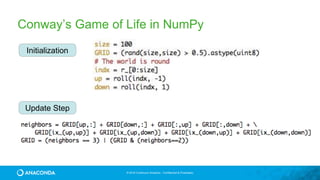
Conway’s game of Life
• Dead cell with exactly 3 live
neighbors will come to life
• A live cell with 2 or 3
neighbors will survive
• With too few or too many
neighbors, the cell dies
© 2016 Continuum Analytics - Confidential & Proprietary
Conway’s Game of Life in NumPy
Initialization
Update Step
© 2016 Continuum Analytics - Confidential & Proprietary
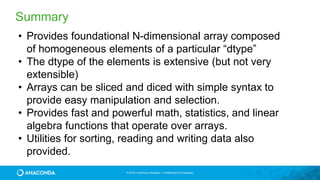
Summary
• Provides foundational N-dimensional array composed
of homogeneous elements of a particular “dtype”
• The dtype of the elements is extensive (but not very
extensible)
• Arrays can be sliced and diced with simple syntax to
provide easy manipulation and selection.
• Provides fast and powerful math, statistics, and linear
algebra functions that operate over arrays.
• Utilities for sorting, reading and writing data also
provided.
29
SciPy
© 2016 Continuum Analytics - Confidential & Proprietary
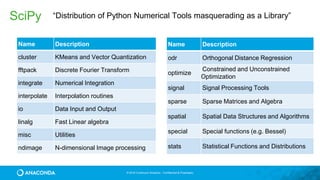
SciPy “Distribution of Python Numerical Tools masquerading as a Library”
Name Description
cluster KMeans and Vector Quantization
fftpack Discrete Fourier Transform
integrate Numerical Integration
interpolate Interpolation routines
io Data Input and Output
linalg Fast Linear algebra
misc Utilities
ndimage N-dimensional Image processing
Name Description
odr Orthogonal Distance Regression
optimize
Constrained and Unconstrained
Optimization
signal Signal Processing Tools
sparse Sparse Matrices and Algebra
spatial Spatial Data Structures and Algorithms
special Special functions (e.g. Bessel)
stats Statistical Functions and Distributions
© 2016 Continuum Analytics - Confidential & Proprietary
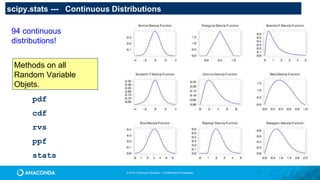
scipy.stats --- Continuous Distributions
94 continuous
distributions!
pdf
cdf
rvs
ppf
stats
Methods on all
Random Variable
Objets.
© 2016 Continuum Analytics - Confidential & Proprietary
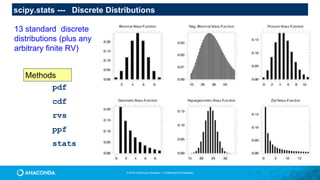
scipy.stats --- Discrete Distributions
13 standard discrete
distributions (plus any
arbitrary finite RV)
pdf
cdf
rvs
ppf
stats
Methods
33
Matplotlib
© 2016 Continuum Analytics - Confidential & Proprietary
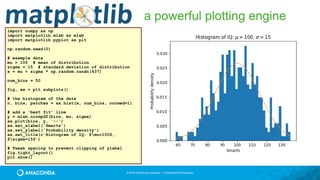
a powerful plotting engine
import numpy as np
import matplotlib.mlab as mlab
import matplotlib.pyplot as plt
np.random.seed(0)
# example data
mu = 100 # mean of distribution
sigma = 15 # standard deviation of distribution
x = mu + sigma * np.random.randn(437)
num_bins = 50
fig, ax = plt.subplots()
# the histogram of the data
n, bins, patches = ax.hist(x, num_bins, normed=1)
# add a 'best fit' line
y = mlab.normpdf(bins, mu, sigma)
ax.plot(bins, y, '--')
ax.set_xlabel('Smarts')
ax.set_ylabel('Probability density')
ax.set_title(r'Histogram of IQ: $mu=100$,
$sigma=15$')
# Tweak spacing to prevent clipping of ylabel
fig.tight_layout()
plt.show()
© 2016 Continuum Analytics - Confidential & Proprietary
a powerful plotting engine
import matplotlib.pyplot as plt
import scipy.misc as misc
im = misc.face()
ax = plt.imshow(im)
plt.title('Racoon Face of size
%d x %d' % im.shape[:2])
plt.savefig(‘face.png’)
© 2016 Continuum Analytics - Confidential & Proprietary
a powerful plotting engine
import matplotlib.pyplot as plt
import numpy as np
with plt.xkcd():
fig = plt.figure()
ax = fig.add_axes((0.1, 0.2, 0.8, 0.7))
ax.spines['right'].set_color('none')
ax.spines['top'].set_color('none')
plt.xticks([])
plt.yticks([])
ax.set_ylim([-30, 10])
data = np.ones(100)
data[70:] -= np.arange(30)
plt.annotate('THE DAY I REALIZEDnI COULD
COOK BACONnWHENEVER I WANTED’,
xy=(70, 1),
arrowprops=dict(arrowstyle=‘->'),
xytext=(15, -10))
plt.plot(data)
plt.xlabel('time')
plt.ylabel('my overall health')
fig.text(0.5, 0.05, '"Stove Ownership" from
xkcd by Randall Monroe',
ha='center')
© 2016 Continuum Analytics - Confidential & Proprietary
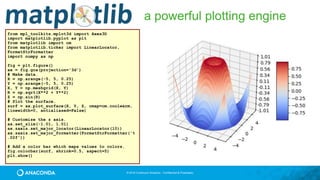
a powerful plotting engine
from mpl_toolkits.mplot3d import Axes3D
import matplotlib.pyplot as plt
from matplotlib import cm
from matplotlib.ticker import LinearLocator,
FormatStrFormatter
import numpy as np
fig = plt.figure()
ax = fig.gca(projection='3d')
# Make data.
X = np.arange(-5, 5, 0.25)
Y = np.arange(-5, 5, 0.25)
X, Y = np.meshgrid(X, Y)
R = np.sqrt(X**2 + Y**2)
Z = np.sin(R)
# Plot the surface.
surf = ax.plot_surface(X, Y, Z, cmap=cm.coolwarm,
linewidth=0, antialiased=False)
# Customize the z axis.
ax.set_zlim(-1.01, 1.01)
ax.zaxis.set_major_locator(LinearLocator(10))
ax.zaxis.set_major_formatter(FormatStrFormatter('%
.02f'))
# Add a color bar which maps values to colors.
fig.colorbar(surf, shrink=0.5, aspect=5)
plt.show()
38
Pandas
© 2016 Continuum Analytics - Confidential & Proprietary
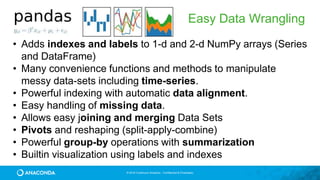
Easy Data Wrangling
• Adds indexes and labels to 1-d and 2-d NumPy arrays (Series
and DataFrame)
• Many convenience functions and methods to manipulate
messy data-sets including time-series.
• Powerful indexing with automatic data alignment.
• Easy handling of missing data.
• Allows easy joining and merging Data Sets
• Pivots and reshaping (split-apply-combine)
• Powerful group-by operations with summarization
• Builtin visualization using labels and indexes
© 2016 Continuum Analytics - Confidential & Proprietary
Easy Data Wrangling
• Series Data Structure
• built for 1-dimensional series data
• homogeneous data
• Two arrays. One of data and another which is the index that can be a
homogeneous array of any type like integers, objects, or date-times.
• DataFrame
• built for 2-dimensional collections of tabular data (think Excel sheet)
• heterogeneous data comprised of multiple Series
• includes an index column allowing sophisticated selection and alignment
© 2016 Continuum Analytics - Confidential & Proprietary
Easy Data Wrangling
medals = pd.read_csv('data/medals.csv', index_col='name')
medals.head()
gold = medals['medal'] == 'gold'
won = medals['count'] > 0
medals.loc[gold & won, 'count'].sort_values().plot(kind='bar', figsize=(12,8))
© 2016 Continuum Analytics - Confidential & Proprietary
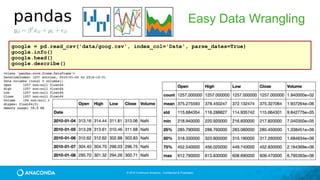
Easy Data Wrangling
google = pd.read_csv('data/goog.csv', index_col='Date', parse_dates=True)
google.info()
google.head()
google.describe()
© 2016 Continuum Analytics - Confidential & Proprietary
Easy Data Wrangling
df = pd.read_excel("data/pbpython/salesfunnel.xlsx")
df.head()
table = pd.pivot_table(df,
index=["Manager","Rep","Product"],
values=["Price","Quantity"],
aggfunc=[np.sum,np.mean])
44
Scikit-Learn
© 2016 Continuum Analytics - Confidential & Proprietary
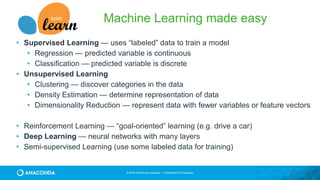
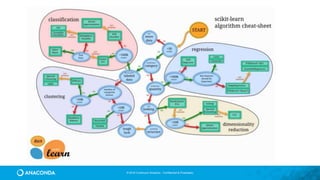
Machine Learning made easy
• Supervised Learning — uses “labeled” data to train a model
• Regression — predicted variable is continuous
• Classification — predicted variable is discrete
• Unsupervised Learning
• Clustering — discover categories in the data
• Density Estimation — determine representation of data
• Dimensionality Reduction — represent data with fewer variables or feature vectors
• Reinforcement Learning — “goal-oriented” learning (e.g. drive a car)
• Deep Learning — neural networks with many layers
• Semi-supervised Learning (use some labeled data for training)
© 2016 Continuum Analytics - Confidential & Proprietary
Basic scikit-learn experience
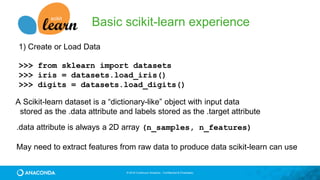
1) Create or Load Data
>>> from sklearn import datasets
>>> iris = datasets.load_iris()
>>> digits = datasets.load_digits()
A Scikit-learn dataset is a “dictionary-like” object with input data
stored as the .data attribute and labels stored as the .target attribute
.data attribute is always a 2D array (n_samples, n_features)
May need to extract features from raw data to produce data scikit-learn can use
© 2016 Continuum Analytics - Confidential & Proprietary
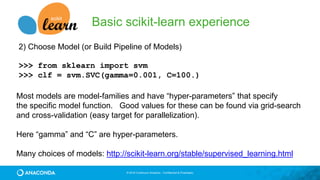
2) Choose Model (or Build Pipeline of Models)
>>> from sklearn import svm
>>> clf = svm.SVC(gamma=0.001, C=100.)
Most models are model-families and have “hyper-parameters” that specify
the specific model function. Good values for these can be found via grid-search
and cross-validation (easy target for parallelization).
Here “gamma” and “C” are hyper-parameters.
Many choices of models: http://scikit-learn.org/stable/supervised_learning.html
Basic scikit-learn experience
© 2016 Continuum Analytics - Confidential & Proprietary
Basic scikit-learn experience
3) Train the Model
>>> clf.fit(data[:-1], labels[:-1])
Models have a “fit” method which updates the parameters-to-be-estimated in
the model in-place so that after fitting the model is “trained”
For validation and scoring you need to leave out some of the data to use
later. cross-validation (e.g. k-fold) techniques can also be parallelized easily.
Here we “leave-one-out” (or n-fold)
© 2016 Continuum Analytics - Confidential & Proprietary
Basic scikit-learn experience
4) Predict new values
>>> clf.predict(data[-1:])
Prediction of new data uses the trained parameters of the model. Cross-
validation can be used to understand how sensitive the model is to different
partitions of the data.
>>> from sklearn.model_selection import cross_val_score
>>> scores = cross_val_score(clf, data, target, cv=10)
array([ 0.96…, 1. …, 0.96… , 1. ])
51
Jupyter
© 2016 Continuum Analytics - Confidential & Proprietary
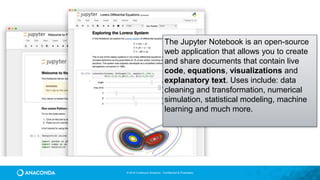
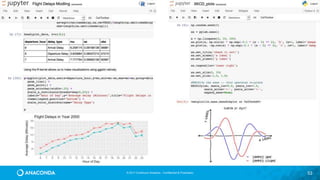
The Jupyter Notebook is an open-source
web application that allows you to create
and share documents that contain live
code, equations, visualizations and
explanatory text. Uses include: data
cleaning and transformation, numerical
simulation, statistical modeling, machine
learning and much more.
© 2017 Continuum Analytics - Confidential & Proprietary 53
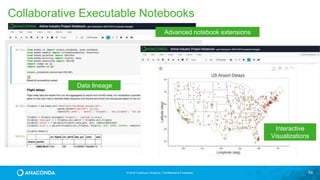
© 2016 Continuum Analytics - Confidential & Proprietary 54
Data lineage
Interactive
Visualizations
Advanced notebook extensions
Collaborative Executable Notebooks
55
Interactive Data Vizualization
Apps with Bokeh
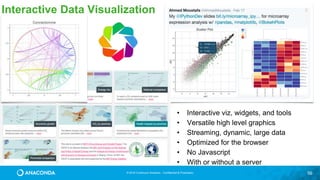
© 2016 Continuum Analytics - Confidential & Proprietary 56
Interactive Data Visualization
• Interactive viz, widgets, and tools
• Versatile high level graphics
• Streaming, dynamic, large data
• Optimized for the browser
• No Javascript
• With or without a server
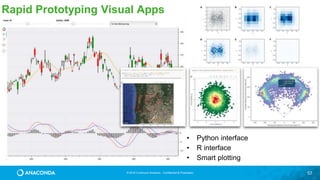
© 2016 Continuum Analytics - Confidential & Proprietary 57
Rapid Prototyping Visual Apps
• Python interface
• R interface
• Smart plotting
58
Plotting Billions of Points
and Map Integration with
Datashader
© 2016 Continuum Analytics - Confidential & Proprietary 59
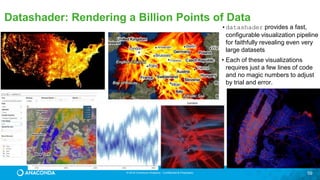
Datashader: Rendering a Billion Points of Data
•datashader provides a fast,
configurable visualization pipeline
for faithfully revealing even very
large datasets
• Each of these visualizations
requires just a few lines of code
and no magic numbers to adjust
by trial and error.
© 2016 Continuum Analytics - Confidential & Proprietary 60
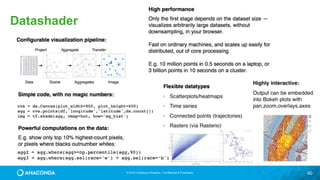
Datashader
61
Data Visualization and
Applications made easy with
Holoviews
© 2016 Continuum Analytics - Confidential & Proprietary
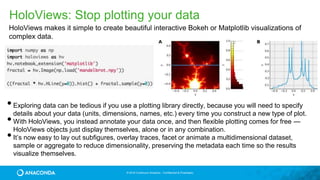
HoloViews: Stop plotting your data
•Exploring data can be tedious if you use a plotting library directly, because you will need to specify
details about your data (units, dimensions, names, etc.) every time you construct a new type of plot.
•With HoloViews, you instead annotate your data once, and then flexible plotting comes for free —
HoloViews objects just display themselves, alone or in any combination.
•It’s now easy to lay out subfigures, overlay traces, facet or animate a multidimensional dataset,
sample or aggregate to reduce dimensionality, preserving the metadata each time so the results
visualize themselves.
HoloViews makes it simple to create beautiful interactive Bokeh or Matplotlib visualizations of
complex data.
© 2016 Continuum Analytics - Confidential & Proprietary
tiles = gv.WMTS(WMTSTileSource(url='https://server.arcgisonline.com/ArcGIS/rest/services/'
'World_Imagery/MapServer/tile/{Z}/{Y}/{X}.jpg'))
tile_options = dict(width=800,height=475,xaxis=None,yaxis=None,bgcolor='black',show_grid=False)
passenger_counts = sorted(df.passenger_count.unique().tolist())
class Options(hv.streams.Stream):
alpha = param.Magnitude(default=0.75, doc="Alpha value for the map opacity")
colormap = param.ObjectSelector(default=cm["fire"], objects=cm.values())
plot = param.ObjectSelector(default="pickup", objects=["pickup","dropoff"])
passengers = param.ObjectSelector(default=1, objects=passenger_counts)
def make_plot(self, x_range=None, y_range=None, **kwargs):
map_tiles = tiles(style=dict(alpha=self.alpha), plot=tile_options)
df_filt = df[df.passenger_count==self.passengers]
points = hv.Points(gv.Dataset(df_filt, kdims=[self.plot+'_x', self.plot+'_y'], vdims=[]))
taxi_trips = datashade(points, width=800, height=475, x_sampling=1, y_sampling=1,
cmap=self.colormap, element_type=gv.Image,
dynamic=False, x_range=x_range, y_range=y_range)
return map_tiles * taxi_trips
selector = Options(name="")
paramnb.Widgets(selector, callback=selector.update)
hv.DynamicMap(selector.make_plot, kdims=[], streams=[selector, RangeXY()])
Data Widgets and
Applications from
Jupyter Notebooks!
https://anaconda.org/jbednar/nyc_taxi-paramnb/notebook
64
Scaling Up and Out with
Numba and Dask
© 2016 Continuum Analytics - Confidential & Proprietary
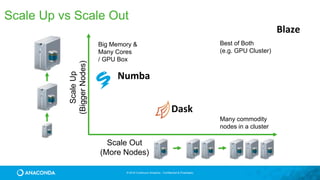
Scale Up vs Scale Out
Big Memory &
Many Cores
/ GPU Box
Best of Both
(e.g. GPU Cluster)
Many commodity
nodes in a cluster
ScaleUp
(BiggerNodes)
Scale Out
(More Nodes)
Numba
Dask
Blaze
66
Scaling Up! Optimized
Python with JIT compilation
from Numba
© 2016 Continuum Analytics - Confidential & Proprietary
Numba
• Started in 2012
• Release 31 (0.31) in February
• Version 1.0 coming in 2017
• Particularly suited to Numeric computing
• Lots of features!
• Ahead of Time Compilation
• Wide community adoption and use
conda install numba
© 2016 Continuum Analytics - Confidential & Proprietary
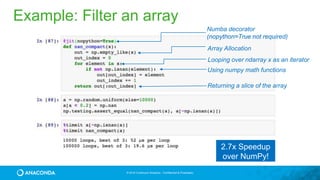
Array Allocation
Looping over ndarray x as an iterator
Using numpy math functions
Returning a slice of the array
Numba decorator
(nopython=True not required)
2.7x Speedup
over NumPy!
Example: Filter an array
© 2016 Continuum Analytics - Confidential & Proprietary
Image Processing
@jit('void(f8[:,:],f8[:,:],f8[:,:])')
def filter(image, filt, output):
M, N = image.shape
m, n = filt.shape
for i in range(m//2, M-m//2):
for j in range(n//2, N-n//2):
result = 0.0
for k in range(m):
for l in range(n):
result += image[i+k-m//2,j+l-n//2]*filt[k, l]
output[i,j] = result
~1500x speed-up
© 2016 Continuum Analytics - Confidential & Proprietary
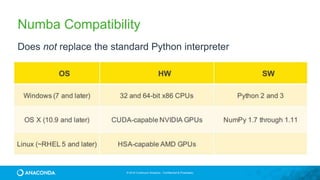
Does not replace the standard Python interpreter
(all of your existing Python libraries are still available)
Numba Compatibility
71
Scaling Out with Dask
(integrates with but doesn’t
depend on Hadoop)
© 2016 Continuum Analytics - Confidential & Proprietary
Dask
• Started as part of Blaze in early 2014.
• General parallel programming engine
• Flexible and therefore highly suited for
• Commodity Clusters
• Advanced Algorithms
• Wide community adoption and use
conda install -c conda-forge dask
pip install dask[complete] distributed --upgrade
© 2016 Continuum Analytics - Confidential & Proprietary
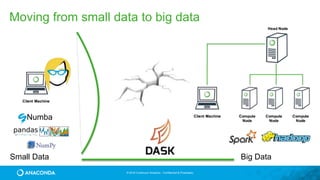
Big DataSmall Data
Numba
Moving from small data to big data
© 2016 Continuum Analytics - Confidential & Proprietary
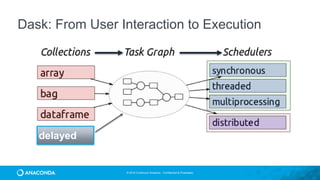
Dask: From User Interaction to Execution
delayed
© 2016 Continuum Analytics - Confidential & Proprietary 75
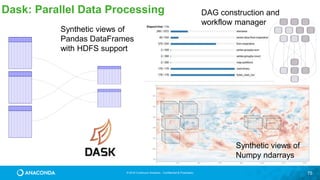
Dask: Parallel Data Processing
Synthetic views of
Numpy ndarrays
Synthetic views of
Pandas DataFrames
with HDFS support
DAG construction and
workflow manager
© 2016 Continuum Analytics - Confidential & Proprietary
Dask is a Python parallel computing library that is:
• Familiar: Implements parallel NumPy and Pandas objects
• Fast: Optimized for demanding for numerical applications
• Flexible: for sophisticated and messy algorithms
• Scales up: Runs resiliently on clusters of 100s of machines
• Scales down: Pragmatic in a single process on a laptop
• Interactive: Responsive and fast for interactive data science
Dask complements the rest of Anaconda. It was developed with
NumPy, Pandas, and scikit-learn developers.
Overview of Dask
© 2016 Continuum Analytics - Confidential & Proprietary
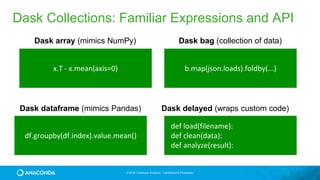
x.T - x.mean(axis=0)
df.groupby(df.index).value.mean()
def load(filename):
def clean(data):
def analyze(result):
Dask array (mimics NumPy)
Dask dataframe (mimics Pandas) Dask delayed (wraps custom code)
b.map(json.loads).foldby(...)
Dask bag (collection of data)
Dask Collections: Familiar Expressions and API
© 2016 Continuum Analytics - Confidential & Proprietary
>>> import pandas as pd
>>> df = pd.read_csv('iris.csv')
>>> df.head()
sepal_length sepal_width petal_length petal_width species
0 5.1 3.5 1.4 0.2 Iris-setosa
1 4.9 3.0 1.4 0.2 Iris-setosa
2 4.7 3.2 1.3 0.2 Iris-setosa
3 4.6 3.1 1.5 0.2 Iris-setosa
4 5.0 3.6 1.4 0.2 Iris-setosa
>>> max_sepal_length_setosa = df[df.species
== 'setosa'].sepal_length.max()
5.7999999999999998
>>> import dask.dataframe as dd
>>> ddf = dd.read_csv('*.csv')
>>> ddf.head()
sepal_length sepal_width petal_length petal_width species
0 5.1 3.5 1.4 0.2 Iris-setosa
1 4.9 3.0 1.4 0.2 Iris-setosa
2 4.7 3.2 1.3 0.2 Iris-setosa
3 4.6 3.1 1.5 0.2 Iris-setosa
4 5.0 3.6 1.4 0.2 Iris-setosa
…
>>> d_max_sepal_length_setosa = ddf[ddf.species
== 'setosa'].sepal_length.max()
>>> d_max_sepal_length_setosa.compute()
5.7999999999999998
Dask Dataframes
© 2016 Continuum Analytics - Confidential & Proprietary
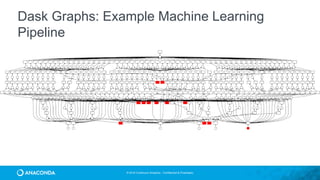
Dask Graphs: Example Machine Learning
Pipeline
© 2016 Continuum Analytics - Confidential & Proprietary
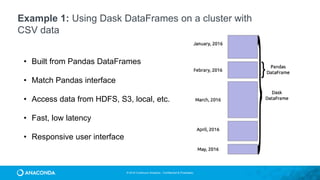
Example 1: Using Dask DataFrames on a cluster with
CSV data
• Built from Pandas DataFrames
• Match Pandas interface
• Access data from HDFS, S3, local, etc.
• Fast, low latency
• Responsive user interface
© 2016 Continuum Analytics - Confidential & Proprietary
>>> import numpy as np
>>> np_ones = np.ones((5000, 1000))
>>> np_ones
array([[ 1., 1., 1., ..., 1., 1., 1.],
[ 1., 1., 1., ..., 1., 1., 1.],
[ 1., 1., 1., ..., 1., 1., 1.],
...,
[ 1., 1., 1., ..., 1., 1., 1.],
[ 1., 1., 1., ..., 1., 1., 1.],
[ 1., 1., 1., ..., 1., 1., 1.]])
>>> np_y = np.log(np_ones + 1)[:5].sum(axis=1)
>>> np_y
array([ 693.14718056, 693.14718056,
693.14718056, 693.14718056, 693.14718056])
>>> import dask.array as da
>>> da_ones = da.ones((5000000, 1000000),
chunks=(1000, 1000))
>>> da_ones.compute()
array([[ 1., 1., 1., ..., 1., 1., 1.],
[ 1., 1., 1., ..., 1., 1., 1.],
[ 1., 1., 1., ..., 1., 1., 1.],
...,
[ 1., 1., 1., ..., 1., 1., 1.],
[ 1., 1., 1., ..., 1., 1., 1.],
[ 1., 1., 1., ..., 1., 1., 1.]])
>>> da_y = da.log(da_ones + 1)[:5].sum(axis=1)
>>> np_da_y = np.array(da_y) #fits in memory
array([ 693.14718056, 693.14718056,
693.14718056, 693.14718056, …, 693.14718056])
# If result doesn’t fit in memory
>>> da_y.to_hdf5('myfile.hdf5', 'result')
Dask Arrays
© 2016 Continuum Analytics - Confidential & Proprietary
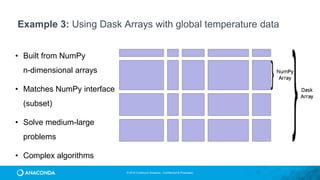
Example 3: Using Dask Arrays with global temperature data
• Built from NumPy
n-dimensional arrays
• Matches NumPy interface
(subset)
• Solve medium-large
problems
• Complex algorithms
© 2016 Continuum Analytics - Confidential & Proprietary
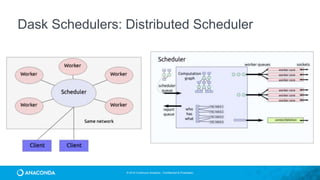
Dask Schedulers: Distributed Scheduler
© 2016 Continuum Analytics - Confidential & Proprietary
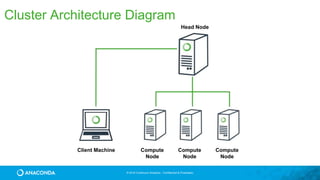
Cluster Architecture Diagram
Client Machine Compute
Node
Compute
Node
Compute
Node
Head Node
© 2016 Continuum Analytics - Confidential & Proprietary
• Single machine with multiple threads or processes
• On a cluster with SSH (dcluster)
• Resource management: YARN (knit), SGE, Slurm
• On the cloud with Amazon EC2 (dec2)
• On a cluster with Anaconda for cluster management
• Manage multiple conda environments and packages
on bare-metal or cloud-based clusters
Using Anaconda and Dask on your Cluster
© 2016 Continuum Analytics - Confidential & Proprietary
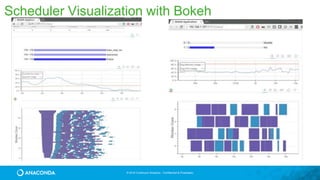
Scheduler Visualization with Bokeh
© 2016 Continuum Analytics - Confidential & Proprietary
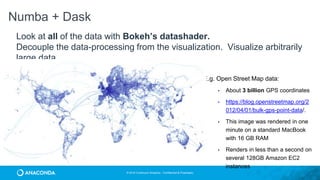
Look at all of the data with Bokeh’s datashader.
Decouple the data-processing from the visualization. Visualize arbitrarily
large data.
Numba + Dask
• E.g. Open Street Map data:
• About 3 billion GPS coordinates
• https://blog.openstreetmap.org/2
012/04/01/bulk-gps-point-data/.
• This image was rendered in one
minute on a standard MacBook
with 16 GB RAM
• Renders in less than a second on
several 128GB Amazon EC2
instances
© 2016 Continuum Analytics - Confidential & Proprietary
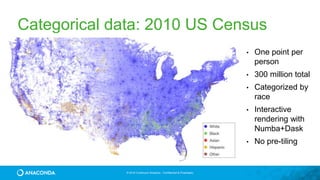
Categorical data: 2010 US Census
• One point per
person
• 300 million total
• Categorized by
race
• Interactive
rendering with
Numba+Dask
• No pre-tiling
89
Anaconda and Hadoop
© 2016 Continuum Analytics - Confidential & Proprietary
YARN
JVM
Bottom Line
2X-100X faster overall performance
• Interact with data in HDFS and
Amazon S3 natively from Python
• Distributed computations without the
JVM & Python/Java serialization
• Framework for easy, flexible
parallelism using directed acyclic
graphs (DAGs)
• Interactive, distributed computing
with in-memory persistence/caching
Bottom Line
• Leverage Python &
R with Spark
Batch
Processing
Interactive
Processing
HDFS
Ibis
Impala
PySpark & SparkR
Python & R
ecosystem
MPI
High Performance,
Interactive,
Batch
Processing
Native
read & write
NumPy, Pandas, …
720+ packages
High Performance
Hadoop
91
Jupyterlab (Where Jupyter is
heading)
© 2016 Continuum Analytics - Confidential & Proprietary
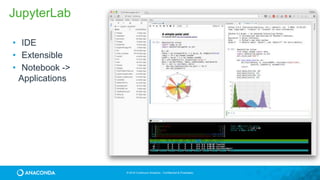
• IDE
• Extensible
• Notebook ->
Applications
JupyterLab
© 2016 Continuum Analytics - Confidential & Proprietary
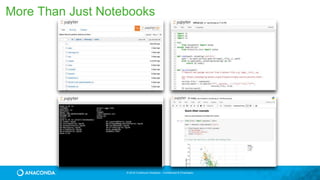
More Than Just Notebooks
© 2016 Continuum Analytics - Confidential & Proprietary
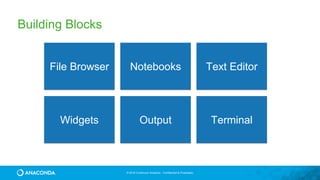
Building Blocks
File Browser Notebooks Text Editor
TerminalOutputWidgets
© 2016 Continuum Analytics - Confidential & Proprietary
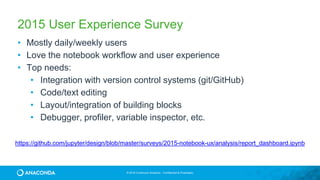
• Mostly daily/weekly users
• Love the notebook workflow and user experience
• Top needs:
• Integration with version control systems (git/GitHub)
• Code/text editing
• Layout/integration of building blocks
• Debugger, profiler, variable inspector, etc.
2015 User Experience Survey
https://github.com/jupyter/design/blob/master/surveys/2015-notebook-ux/analysis/report_dashboard.ipynb
© 2016 Continuum Analytics - Confidential & Proprietary
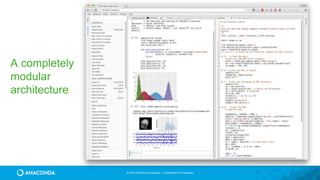
A completely
modular
architecture
© 2016 Continuum Analytics - Confidential & Proprietary
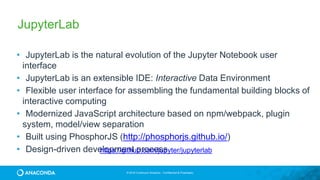
• JupyterLab is the natural evolution of the Jupyter Notebook user
interface
• JupyterLab is an extensible IDE: Interactive Data Environment
• Flexible user interface for assembling the fundamental building blocks of
interactive computing
• Modernized JavaScript architecture based on npm/webpack, plugin
system, model/view separation
• Built using PhosphorJS (http://phosphorjs.github.io/)
• Design-driven development process
JupyterLab
https://github.com/jupyter/jupyterlab
© 2016 Continuum Analytics - Confidential & Proprietary
The “Notebook”?
© 2016 Continuum Analytics - Confidential & Proprietary
Data Science Workflow
New Data
NotebooksUnderstand Data
Getting Data
Understand World
Reports
Microservices
Dashboards
Applications
Decisions
and
Actions
Models
Exploratory Data Analysis and Viz
Data Products

Python for Data Science with Anaconda

  • 1.
    © 2016 ContinuumAnalytics - Confidential & Proprietary© 2016 Continuum Analytics - Confidential & Proprietary Python for Data Science using Anaconda TDWI Accelerate Travis E. Oliphant President, Chief Data Scientist, Co-founder
  • 2.
    © 2016 ContinuumAnalytics - Confidential & Proprietary A bit about me • PhD 2001 from Mayo Clinic in Biomedical Engineering (Ultrasound and MRI) • MS/BS degrees in Elec. Comp. Engineering • Creator and Developer of SciPy (1999-2009) • Professor at BYU (2001-2007) • Author of NumPy (2005-2012) • Started Numba (2012) • Founding Chair of NumFOCUS / PyData • Previous Python Software Foundation Director • Co-founder of Continuum Analytics • CEO => President, Chief Data Scientist SciPy
  • 3.
    © 2016 ContinuumAnalytics - Confidential & Proprietary Company 2012 - Created Two Orgs for Sustainable Open Source Community Enterprise software, support and services to empower people who change the world to get rapid insight from all of their data — built on open- source that we contribute to and sustain.
  • 4.
    © 2016 ContinuumAnalytics - Confidential & Proprietary Data Science is growing with Python leading the way
  • 5.
    © 2016 ContinuumAnalytics - Confidential & Proprietary Dealing with a lot of information: OODA loop Observe — Gather data Orient — How will you interpret the data Decide — Make a decision Act — Execute decision and gather feedback
  • 6.
    © 2016 ContinuumAnalytics - Confidential & Proprietary Data Science Workflow New Data NotebooksUnderstand Data Getting Data Understand World Reports Microservices Dashboards Applications Decisions and Actions Models Exploratory Data Analysis and Viz Data Products
  • 7.
    © 2016 ContinuumAnalytics - Confidential & Proprietary
  • 8.
    © 2016 ContinuumAnalytics - Confidential & Proprietary Bringing Technology Together
  • 9.
    © 2017 ContinuumAnalytics - Confidential & Proprietary 9 Accelerate adoption of Data Science PYTHON & R OPEN SOURCE ANALYTICS NumPy SciPy Pandas Scikit-learn Jupyter/IPython Numba Matplotlib Spyder TensorFlow Cython Theano Scikit-image NLTK Dask Caffe dplyr shiny ggplot2 tidyr caret PySpark & 1000+ packages http://continuum.io/downloads
  • 10.
    © 2016 ContinuumAnalytics - Confidential & Proprietary ANACONDA Trusted by Industry Leaders Financial Services Risk Mgmt, Quant modeling, Data exploration and processing, algorithmic trading, compliance reporting Government Fraud detection, data crawling, web & cyber data analytics, statistical modeling Healthcare & Life Sciences Genomics data processing, cancer research, natural language processing for health data science High Tech Customer behavior, recommendations, ad bidding, retargeting, social media analytics Retail & CPG Engineering simulation, supply chain modeling, scientific analysis Oil & Gas Pipeline monitoring, noise logging, seismic data processing, geophysics http://continuum.io/downloads
  • 11.
    © 2016 ContinuumAnalytics - Confidential & Proprietary …DATA Open Data Science Insight Decisions Actions Results Creations … Applications Dashboards Notebooks MicroServices HDFS Oracle Teradata Cassandra S3 Flat Files Virtual Data Lake / Data Catalogue
  • 12.
    © 2016 ContinuumAnalytics - Confidential & Proprietary
  • 13.
    © 2017 ContinuumAnalytics - Confidential & Proprietary 13 A Python v2.7 Conda Sandboxing Technology B Python v3.4 Pandas v0.18 Jupyter C R R Essentials conda NumPy v1.11 NumPy v1.10 Pandas v0.16 • Language independent • Platform independent • No special privileges required • No VMs or containers • Enables: • Reproducibility • Collaboration • Scaling “conda – package everything”
  • 14.
    © 2016 ContinuumAnalytics - Confidential & Proprietary 14 Development Deployment Conda for Deployment
  • 15.
    © 2016 ContinuumAnalytics - Confidential & Proprietary 221 W. 6th Street Suite #1550 Austin, TX 78701 +1 512.222.5440 info@continuum.io @ContinuumIO © 2016 Continuum Analytics - Confidential & Proprietary $ anaconda-project run plot —show
  • 16.
  • 17.
    © 2016 ContinuumAnalytics - Confidential & Proprietary Numba Bokeh
  • 18.
    © 2016 ContinuumAnalytics - Confidential & Proprietary An impressive community effort SciPy ~ 478 contributors NumPy ~ 509 contributors
  • 19.
  • 20.
    © 2016 ContinuumAnalytics - Confidential & Proprietary Without NumPyfrom math import sin, pi def sinc(x): if x == 0: return 1.0 else: pix = pi*x return sin(pix)/pix def step(x): if x > 0: return 1.0 elif x < 0: return 0.0 else: return 0.5 functions.py >>> import functions as f >>> xval = [x/3.0 for x in range(-10,10)] >>> yval1 = [f.sinc(x) for x in xval] >>> yval2 = [f.step(x) for x in xval] Python is a great language but needed a way to operate quickly and cleanly over multi- dimensional arrays.
  • 21.
    © 2016 ContinuumAnalytics - Confidential & Proprietary With NumPy from numpy import sin, pi from numpy import vectorize import functions as f vsinc = vectorize(f.sinc) def sinc(x): pix = pi*x val = sin(pix)/pix val[x==0] = 1.0 return val vstep = vectorize(f.step) def step(x): y = x*0.0 y[x>0] = 1 y[x==0] = 0.5 return y >>> import functions2 as f >>> from numpy import * >>> x = r_[-10:10]/3.0 >>> y1 = f.sinc(x) >>> y2 = f.step(x) functions2.py Offers N-D array, element-by-element functions, and basic random numbers, linear algebra, and FFT capability for Python http://numpy.org Fiscally sponsored by NumFOCUS
  • 22.
    © 2016 ContinuumAnalytics - Confidential & Proprietary NumPy: an Array Extension of Python • Data: the array object – slicing and shaping – data-type map to Bytes • Fast Math (ufuncs): – vectorization – broadcasting – aggregations
  • 23.
    © 2016 ContinuumAnalytics - Confidential & Proprietary shape NumPy Array Key Attributes • dtype • shape • ndim • strides • data
  • 24.
    © 2016 ContinuumAnalytics - Confidential & Proprietary NumPy Examples 2d array 3d array [439 472 477] [217 205 261 222 245 238] 9.98330639789 2.96677717122
  • 25.
    © 2016 ContinuumAnalytics - Confidential & Proprietary NumPy Slicing (Selection) >>> a[0,3:5] array([3, 4]) >>> a[4:,4:] array([[44, 45], [54, 55]]) >>> a[:,2] array([2,12,22,32,42,52]) >>> a[2::2,::2] array([[20, 22, 24], [40, 42, 44]])
  • 26.
    © 2016 ContinuumAnalytics - Confidential & Proprietary Conway’s game of Life • Dead cell with exactly 3 live neighbors will come to life • A live cell with 2 or 3 neighbors will survive • With too few or too many neighbors, the cell dies
  • 27.
    © 2016 ContinuumAnalytics - Confidential & Proprietary Conway’s Game of Life in NumPy Initialization Update Step
  • 28.
    © 2016 ContinuumAnalytics - Confidential & Proprietary Summary • Provides foundational N-dimensional array composed of homogeneous elements of a particular “dtype” • The dtype of the elements is extensive (but not very extensible) • Arrays can be sliced and diced with simple syntax to provide easy manipulation and selection. • Provides fast and powerful math, statistics, and linear algebra functions that operate over arrays. • Utilities for sorting, reading and writing data also provided.
  • 29.
  • 30.
    © 2016 ContinuumAnalytics - Confidential & Proprietary SciPy “Distribution of Python Numerical Tools masquerading as a Library” Name Description cluster KMeans and Vector Quantization fftpack Discrete Fourier Transform integrate Numerical Integration interpolate Interpolation routines io Data Input and Output linalg Fast Linear algebra misc Utilities ndimage N-dimensional Image processing Name Description odr Orthogonal Distance Regression optimize Constrained and Unconstrained Optimization signal Signal Processing Tools sparse Sparse Matrices and Algebra spatial Spatial Data Structures and Algorithms special Special functions (e.g. Bessel) stats Statistical Functions and Distributions
  • 31.
    © 2016 ContinuumAnalytics - Confidential & Proprietary scipy.stats --- Continuous Distributions 94 continuous distributions! pdf cdf rvs ppf stats Methods on all Random Variable Objets.
  • 32.
    © 2016 ContinuumAnalytics - Confidential & Proprietary scipy.stats --- Discrete Distributions 13 standard discrete distributions (plus any arbitrary finite RV) pdf cdf rvs ppf stats Methods
  • 33.
  • 34.
    © 2016 ContinuumAnalytics - Confidential & Proprietary a powerful plotting engine import numpy as np import matplotlib.mlab as mlab import matplotlib.pyplot as plt np.random.seed(0) # example data mu = 100 # mean of distribution sigma = 15 # standard deviation of distribution x = mu + sigma * np.random.randn(437) num_bins = 50 fig, ax = plt.subplots() # the histogram of the data n, bins, patches = ax.hist(x, num_bins, normed=1) # add a 'best fit' line y = mlab.normpdf(bins, mu, sigma) ax.plot(bins, y, '--') ax.set_xlabel('Smarts') ax.set_ylabel('Probability density') ax.set_title(r'Histogram of IQ: $mu=100$, $sigma=15$') # Tweak spacing to prevent clipping of ylabel fig.tight_layout() plt.show()
  • 35.
    © 2016 ContinuumAnalytics - Confidential & Proprietary a powerful plotting engine import matplotlib.pyplot as plt import scipy.misc as misc im = misc.face() ax = plt.imshow(im) plt.title('Racoon Face of size %d x %d' % im.shape[:2]) plt.savefig(‘face.png’)
  • 36.
    © 2016 ContinuumAnalytics - Confidential & Proprietary a powerful plotting engine import matplotlib.pyplot as plt import numpy as np with plt.xkcd(): fig = plt.figure() ax = fig.add_axes((0.1, 0.2, 0.8, 0.7)) ax.spines['right'].set_color('none') ax.spines['top'].set_color('none') plt.xticks([]) plt.yticks([]) ax.set_ylim([-30, 10]) data = np.ones(100) data[70:] -= np.arange(30) plt.annotate('THE DAY I REALIZEDnI COULD COOK BACONnWHENEVER I WANTED’, xy=(70, 1), arrowprops=dict(arrowstyle=‘->'), xytext=(15, -10)) plt.plot(data) plt.xlabel('time') plt.ylabel('my overall health') fig.text(0.5, 0.05, '"Stove Ownership" from xkcd by Randall Monroe', ha='center')
  • 37.
    © 2016 ContinuumAnalytics - Confidential & Proprietary a powerful plotting engine from mpl_toolkits.mplot3d import Axes3D import matplotlib.pyplot as plt from matplotlib import cm from matplotlib.ticker import LinearLocator, FormatStrFormatter import numpy as np fig = plt.figure() ax = fig.gca(projection='3d') # Make data. X = np.arange(-5, 5, 0.25) Y = np.arange(-5, 5, 0.25) X, Y = np.meshgrid(X, Y) R = np.sqrt(X**2 + Y**2) Z = np.sin(R) # Plot the surface. surf = ax.plot_surface(X, Y, Z, cmap=cm.coolwarm, linewidth=0, antialiased=False) # Customize the z axis. ax.set_zlim(-1.01, 1.01) ax.zaxis.set_major_locator(LinearLocator(10)) ax.zaxis.set_major_formatter(FormatStrFormatter('% .02f')) # Add a color bar which maps values to colors. fig.colorbar(surf, shrink=0.5, aspect=5) plt.show()
  • 38.
  • 39.
    © 2016 ContinuumAnalytics - Confidential & Proprietary Easy Data Wrangling • Adds indexes and labels to 1-d and 2-d NumPy arrays (Series and DataFrame) • Many convenience functions and methods to manipulate messy data-sets including time-series. • Powerful indexing with automatic data alignment. • Easy handling of missing data. • Allows easy joining and merging Data Sets • Pivots and reshaping (split-apply-combine) • Powerful group-by operations with summarization • Builtin visualization using labels and indexes
  • 40.
    © 2016 ContinuumAnalytics - Confidential & Proprietary Easy Data Wrangling • Series Data Structure • built for 1-dimensional series data • homogeneous data • Two arrays. One of data and another which is the index that can be a homogeneous array of any type like integers, objects, or date-times. • DataFrame • built for 2-dimensional collections of tabular data (think Excel sheet) • heterogeneous data comprised of multiple Series • includes an index column allowing sophisticated selection and alignment
  • 41.
    © 2016 ContinuumAnalytics - Confidential & Proprietary Easy Data Wrangling medals = pd.read_csv('data/medals.csv', index_col='name') medals.head() gold = medals['medal'] == 'gold' won = medals['count'] > 0 medals.loc[gold & won, 'count'].sort_values().plot(kind='bar', figsize=(12,8))
  • 42.
    © 2016 ContinuumAnalytics - Confidential & Proprietary Easy Data Wrangling google = pd.read_csv('data/goog.csv', index_col='Date', parse_dates=True) google.info() google.head() google.describe()
  • 43.
    © 2016 ContinuumAnalytics - Confidential & Proprietary Easy Data Wrangling df = pd.read_excel("data/pbpython/salesfunnel.xlsx") df.head() table = pd.pivot_table(df, index=["Manager","Rep","Product"], values=["Price","Quantity"], aggfunc=[np.sum,np.mean])
  • 44.
  • 45.
    © 2016 ContinuumAnalytics - Confidential & Proprietary Machine Learning made easy • Supervised Learning — uses “labeled” data to train a model • Regression — predicted variable is continuous • Classification — predicted variable is discrete • Unsupervised Learning • Clustering — discover categories in the data • Density Estimation — determine representation of data • Dimensionality Reduction — represent data with fewer variables or feature vectors • Reinforcement Learning — “goal-oriented” learning (e.g. drive a car) • Deep Learning — neural networks with many layers • Semi-supervised Learning (use some labeled data for training)
  • 46.
    © 2016 ContinuumAnalytics - Confidential & Proprietary
  • 47.
    © 2016 ContinuumAnalytics - Confidential & Proprietary Basic scikit-learn experience 1) Create or Load Data >>> from sklearn import datasets >>> iris = datasets.load_iris() >>> digits = datasets.load_digits() A Scikit-learn dataset is a “dictionary-like” object with input data stored as the .data attribute and labels stored as the .target attribute .data attribute is always a 2D array (n_samples, n_features) May need to extract features from raw data to produce data scikit-learn can use
  • 48.
    © 2016 ContinuumAnalytics - Confidential & Proprietary 2) Choose Model (or Build Pipeline of Models) >>> from sklearn import svm >>> clf = svm.SVC(gamma=0.001, C=100.) Most models are model-families and have “hyper-parameters” that specify the specific model function. Good values for these can be found via grid-search and cross-validation (easy target for parallelization). Here “gamma” and “C” are hyper-parameters. Many choices of models: http://scikit-learn.org/stable/supervised_learning.html Basic scikit-learn experience
  • 49.
    © 2016 ContinuumAnalytics - Confidential & Proprietary Basic scikit-learn experience 3) Train the Model >>> clf.fit(data[:-1], labels[:-1]) Models have a “fit” method which updates the parameters-to-be-estimated in the model in-place so that after fitting the model is “trained” For validation and scoring you need to leave out some of the data to use later. cross-validation (e.g. k-fold) techniques can also be parallelized easily. Here we “leave-one-out” (or n-fold)
  • 50.
    © 2016 ContinuumAnalytics - Confidential & Proprietary Basic scikit-learn experience 4) Predict new values >>> clf.predict(data[-1:]) Prediction of new data uses the trained parameters of the model. Cross- validation can be used to understand how sensitive the model is to different partitions of the data. >>> from sklearn.model_selection import cross_val_score >>> scores = cross_val_score(clf, data, target, cv=10) array([ 0.96…, 1. …, 0.96… , 1. ])
  • 51.
  • 52.
    © 2016 ContinuumAnalytics - Confidential & Proprietary The Jupyter Notebook is an open-source web application that allows you to create and share documents that contain live code, equations, visualizations and explanatory text. Uses include: data cleaning and transformation, numerical simulation, statistical modeling, machine learning and much more.
  • 53.
    © 2017 ContinuumAnalytics - Confidential & Proprietary 53
  • 54.
    © 2016 ContinuumAnalytics - Confidential & Proprietary 54 Data lineage Interactive Visualizations Advanced notebook extensions Collaborative Executable Notebooks
  • 55.
  • 56.
    © 2016 ContinuumAnalytics - Confidential & Proprietary 56 Interactive Data Visualization • Interactive viz, widgets, and tools • Versatile high level graphics • Streaming, dynamic, large data • Optimized for the browser • No Javascript • With or without a server
  • 57.
    © 2016 ContinuumAnalytics - Confidential & Proprietary 57 Rapid Prototyping Visual Apps • Python interface • R interface • Smart plotting
  • 58.
    58 Plotting Billions ofPoints and Map Integration with Datashader
  • 59.
    © 2016 ContinuumAnalytics - Confidential & Proprietary 59 Datashader: Rendering a Billion Points of Data •datashader provides a fast, configurable visualization pipeline for faithfully revealing even very large datasets • Each of these visualizations requires just a few lines of code and no magic numbers to adjust by trial and error.
  • 60.
    © 2016 ContinuumAnalytics - Confidential & Proprietary 60 Datashader
  • 61.
  • 62.
    © 2016 ContinuumAnalytics - Confidential & Proprietary HoloViews: Stop plotting your data •Exploring data can be tedious if you use a plotting library directly, because you will need to specify details about your data (units, dimensions, names, etc.) every time you construct a new type of plot. •With HoloViews, you instead annotate your data once, and then flexible plotting comes for free — HoloViews objects just display themselves, alone or in any combination. •It’s now easy to lay out subfigures, overlay traces, facet or animate a multidimensional dataset, sample or aggregate to reduce dimensionality, preserving the metadata each time so the results visualize themselves. HoloViews makes it simple to create beautiful interactive Bokeh or Matplotlib visualizations of complex data.
  • 63.
    © 2016 ContinuumAnalytics - Confidential & Proprietary tiles = gv.WMTS(WMTSTileSource(url='https://server.arcgisonline.com/ArcGIS/rest/services/' 'World_Imagery/MapServer/tile/{Z}/{Y}/{X}.jpg')) tile_options = dict(width=800,height=475,xaxis=None,yaxis=None,bgcolor='black',show_grid=False) passenger_counts = sorted(df.passenger_count.unique().tolist()) class Options(hv.streams.Stream): alpha = param.Magnitude(default=0.75, doc="Alpha value for the map opacity") colormap = param.ObjectSelector(default=cm["fire"], objects=cm.values()) plot = param.ObjectSelector(default="pickup", objects=["pickup","dropoff"]) passengers = param.ObjectSelector(default=1, objects=passenger_counts) def make_plot(self, x_range=None, y_range=None, **kwargs): map_tiles = tiles(style=dict(alpha=self.alpha), plot=tile_options) df_filt = df[df.passenger_count==self.passengers] points = hv.Points(gv.Dataset(df_filt, kdims=[self.plot+'_x', self.plot+'_y'], vdims=[])) taxi_trips = datashade(points, width=800, height=475, x_sampling=1, y_sampling=1, cmap=self.colormap, element_type=gv.Image, dynamic=False, x_range=x_range, y_range=y_range) return map_tiles * taxi_trips selector = Options(name="") paramnb.Widgets(selector, callback=selector.update) hv.DynamicMap(selector.make_plot, kdims=[], streams=[selector, RangeXY()]) Data Widgets and Applications from Jupyter Notebooks! https://anaconda.org/jbednar/nyc_taxi-paramnb/notebook
  • 64.
    64 Scaling Up andOut with Numba and Dask
  • 65.
    © 2016 ContinuumAnalytics - Confidential & Proprietary Scale Up vs Scale Out Big Memory & Many Cores / GPU Box Best of Both (e.g. GPU Cluster) Many commodity nodes in a cluster ScaleUp (BiggerNodes) Scale Out (More Nodes) Numba Dask Blaze
  • 66.
    66 Scaling Up! Optimized Pythonwith JIT compilation from Numba
  • 67.
    © 2016 ContinuumAnalytics - Confidential & Proprietary Numba • Started in 2012 • Release 31 (0.31) in February • Version 1.0 coming in 2017 • Particularly suited to Numeric computing • Lots of features! • Ahead of Time Compilation • Wide community adoption and use conda install numba
  • 68.
    © 2016 ContinuumAnalytics - Confidential & Proprietary Array Allocation Looping over ndarray x as an iterator Using numpy math functions Returning a slice of the array Numba decorator (nopython=True not required) 2.7x Speedup over NumPy! Example: Filter an array
  • 69.
    © 2016 ContinuumAnalytics - Confidential & Proprietary Image Processing @jit('void(f8[:,:],f8[:,:],f8[:,:])') def filter(image, filt, output): M, N = image.shape m, n = filt.shape for i in range(m//2, M-m//2): for j in range(n//2, N-n//2): result = 0.0 for k in range(m): for l in range(n): result += image[i+k-m//2,j+l-n//2]*filt[k, l] output[i,j] = result ~1500x speed-up
  • 70.
    © 2016 ContinuumAnalytics - Confidential & Proprietary Does not replace the standard Python interpreter (all of your existing Python libraries are still available) Numba Compatibility
  • 71.
    71 Scaling Out withDask (integrates with but doesn’t depend on Hadoop)
  • 72.
    © 2016 ContinuumAnalytics - Confidential & Proprietary Dask • Started as part of Blaze in early 2014. • General parallel programming engine • Flexible and therefore highly suited for • Commodity Clusters • Advanced Algorithms • Wide community adoption and use conda install -c conda-forge dask pip install dask[complete] distributed --upgrade
  • 73.
    © 2016 ContinuumAnalytics - Confidential & Proprietary Big DataSmall Data Numba Moving from small data to big data
  • 74.
    © 2016 ContinuumAnalytics - Confidential & Proprietary Dask: From User Interaction to Execution delayed
  • 75.
    © 2016 ContinuumAnalytics - Confidential & Proprietary 75 Dask: Parallel Data Processing Synthetic views of Numpy ndarrays Synthetic views of Pandas DataFrames with HDFS support DAG construction and workflow manager
  • 76.
    © 2016 ContinuumAnalytics - Confidential & Proprietary Dask is a Python parallel computing library that is: • Familiar: Implements parallel NumPy and Pandas objects • Fast: Optimized for demanding for numerical applications • Flexible: for sophisticated and messy algorithms • Scales up: Runs resiliently on clusters of 100s of machines • Scales down: Pragmatic in a single process on a laptop • Interactive: Responsive and fast for interactive data science Dask complements the rest of Anaconda. It was developed with NumPy, Pandas, and scikit-learn developers. Overview of Dask
  • 77.
    © 2016 ContinuumAnalytics - Confidential & Proprietary x.T - x.mean(axis=0) df.groupby(df.index).value.mean() def load(filename): def clean(data): def analyze(result): Dask array (mimics NumPy) Dask dataframe (mimics Pandas) Dask delayed (wraps custom code) b.map(json.loads).foldby(...) Dask bag (collection of data) Dask Collections: Familiar Expressions and API
  • 78.
    © 2016 ContinuumAnalytics - Confidential & Proprietary >>> import pandas as pd >>> df = pd.read_csv('iris.csv') >>> df.head() sepal_length sepal_width petal_length petal_width species 0 5.1 3.5 1.4 0.2 Iris-setosa 1 4.9 3.0 1.4 0.2 Iris-setosa 2 4.7 3.2 1.3 0.2 Iris-setosa 3 4.6 3.1 1.5 0.2 Iris-setosa 4 5.0 3.6 1.4 0.2 Iris-setosa >>> max_sepal_length_setosa = df[df.species == 'setosa'].sepal_length.max() 5.7999999999999998 >>> import dask.dataframe as dd >>> ddf = dd.read_csv('*.csv') >>> ddf.head() sepal_length sepal_width petal_length petal_width species 0 5.1 3.5 1.4 0.2 Iris-setosa 1 4.9 3.0 1.4 0.2 Iris-setosa 2 4.7 3.2 1.3 0.2 Iris-setosa 3 4.6 3.1 1.5 0.2 Iris-setosa 4 5.0 3.6 1.4 0.2 Iris-setosa … >>> d_max_sepal_length_setosa = ddf[ddf.species == 'setosa'].sepal_length.max() >>> d_max_sepal_length_setosa.compute() 5.7999999999999998 Dask Dataframes
  • 79.
    © 2016 ContinuumAnalytics - Confidential & Proprietary Dask Graphs: Example Machine Learning Pipeline
  • 80.
    © 2016 ContinuumAnalytics - Confidential & Proprietary Example 1: Using Dask DataFrames on a cluster with CSV data • Built from Pandas DataFrames • Match Pandas interface • Access data from HDFS, S3, local, etc. • Fast, low latency • Responsive user interface
  • 81.
    © 2016 ContinuumAnalytics - Confidential & Proprietary >>> import numpy as np >>> np_ones = np.ones((5000, 1000)) >>> np_ones array([[ 1., 1., 1., ..., 1., 1., 1.], [ 1., 1., 1., ..., 1., 1., 1.], [ 1., 1., 1., ..., 1., 1., 1.], ..., [ 1., 1., 1., ..., 1., 1., 1.], [ 1., 1., 1., ..., 1., 1., 1.], [ 1., 1., 1., ..., 1., 1., 1.]]) >>> np_y = np.log(np_ones + 1)[:5].sum(axis=1) >>> np_y array([ 693.14718056, 693.14718056, 693.14718056, 693.14718056, 693.14718056]) >>> import dask.array as da >>> da_ones = da.ones((5000000, 1000000), chunks=(1000, 1000)) >>> da_ones.compute() array([[ 1., 1., 1., ..., 1., 1., 1.], [ 1., 1., 1., ..., 1., 1., 1.], [ 1., 1., 1., ..., 1., 1., 1.], ..., [ 1., 1., 1., ..., 1., 1., 1.], [ 1., 1., 1., ..., 1., 1., 1.], [ 1., 1., 1., ..., 1., 1., 1.]]) >>> da_y = da.log(da_ones + 1)[:5].sum(axis=1) >>> np_da_y = np.array(da_y) #fits in memory array([ 693.14718056, 693.14718056, 693.14718056, 693.14718056, …, 693.14718056]) # If result doesn’t fit in memory >>> da_y.to_hdf5('myfile.hdf5', 'result') Dask Arrays
  • 82.
    © 2016 ContinuumAnalytics - Confidential & Proprietary Example 3: Using Dask Arrays with global temperature data • Built from NumPy n-dimensional arrays • Matches NumPy interface (subset) • Solve medium-large problems • Complex algorithms
  • 83.
    © 2016 ContinuumAnalytics - Confidential & Proprietary Dask Schedulers: Distributed Scheduler
  • 84.
    © 2016 ContinuumAnalytics - Confidential & Proprietary Cluster Architecture Diagram Client Machine Compute Node Compute Node Compute Node Head Node
  • 85.
    © 2016 ContinuumAnalytics - Confidential & Proprietary • Single machine with multiple threads or processes • On a cluster with SSH (dcluster) • Resource management: YARN (knit), SGE, Slurm • On the cloud with Amazon EC2 (dec2) • On a cluster with Anaconda for cluster management • Manage multiple conda environments and packages on bare-metal or cloud-based clusters Using Anaconda and Dask on your Cluster
  • 86.
    © 2016 ContinuumAnalytics - Confidential & Proprietary Scheduler Visualization with Bokeh
  • 87.
    © 2016 ContinuumAnalytics - Confidential & Proprietary Look at all of the data with Bokeh’s datashader. Decouple the data-processing from the visualization. Visualize arbitrarily large data. Numba + Dask • E.g. Open Street Map data: • About 3 billion GPS coordinates • https://blog.openstreetmap.org/2 012/04/01/bulk-gps-point-data/. • This image was rendered in one minute on a standard MacBook with 16 GB RAM • Renders in less than a second on several 128GB Amazon EC2 instances
  • 88.
    © 2016 ContinuumAnalytics - Confidential & Proprietary Categorical data: 2010 US Census • One point per person • 300 million total • Categorized by race • Interactive rendering with Numba+Dask • No pre-tiling
  • 89.
  • 90.
    © 2016 ContinuumAnalytics - Confidential & Proprietary YARN JVM Bottom Line 2X-100X faster overall performance • Interact with data in HDFS and Amazon S3 natively from Python • Distributed computations without the JVM & Python/Java serialization • Framework for easy, flexible parallelism using directed acyclic graphs (DAGs) • Interactive, distributed computing with in-memory persistence/caching Bottom Line • Leverage Python & R with Spark Batch Processing Interactive Processing HDFS Ibis Impala PySpark & SparkR Python & R ecosystem MPI High Performance, Interactive, Batch Processing Native read & write NumPy, Pandas, … 720+ packages High Performance Hadoop
  • 91.
  • 92.
    © 2016 ContinuumAnalytics - Confidential & Proprietary • IDE • Extensible • Notebook -> Applications JupyterLab
  • 93.
    © 2016 ContinuumAnalytics - Confidential & Proprietary More Than Just Notebooks
  • 94.
    © 2016 ContinuumAnalytics - Confidential & Proprietary Building Blocks File Browser Notebooks Text Editor TerminalOutputWidgets
  • 95.
    © 2016 ContinuumAnalytics - Confidential & Proprietary • Mostly daily/weekly users • Love the notebook workflow and user experience • Top needs: • Integration with version control systems (git/GitHub) • Code/text editing • Layout/integration of building blocks • Debugger, profiler, variable inspector, etc. 2015 User Experience Survey https://github.com/jupyter/design/blob/master/surveys/2015-notebook-ux/analysis/report_dashboard.ipynb
  • 96.
    © 2016 ContinuumAnalytics - Confidential & Proprietary A completely modular architecture
  • 97.
    © 2016 ContinuumAnalytics - Confidential & Proprietary • JupyterLab is the natural evolution of the Jupyter Notebook user interface • JupyterLab is an extensible IDE: Interactive Data Environment • Flexible user interface for assembling the fundamental building blocks of interactive computing • Modernized JavaScript architecture based on npm/webpack, plugin system, model/view separation • Built using PhosphorJS (http://phosphorjs.github.io/) • Design-driven development process JupyterLab https://github.com/jupyter/jupyterlab
  • 98.
    © 2016 ContinuumAnalytics - Confidential & Proprietary The “Notebook”?
  • 99.
    © 2016 ContinuumAnalytics - Confidential & Proprietary Data Science Workflow New Data NotebooksUnderstand Data Getting Data Understand World Reports Microservices Dashboards Applications Decisions and Actions Models Exploratory Data Analysis and Viz Data Products

Editor's Notes

  • #10 Easy to install Agile data exploration Powerful data analysis Simple to collaborate Accessible to everyone 730+ popular Python & R packages Compiled for Windows, Mac, and Linux Single-user free for everyone Foundation of Anaconda Enterprise Extensible via conda package manager Sandbox packages & libraries It’s modular nature means you can customize your configuration or define sandboxes with just the set of tools you need for a particular project -- along with specific versions -- all without resorting to VMs or containers. Furthermore there are rolling updates of the individual packages so you can always be up to date with the latest releases of the 720+ Continuum-curated Open Data Science packages. While it is Python-centric, it is not Python-exclusive. There is strong support for R, with hundreds of R packages available in the Anaconda ecosystem.
  • #11 Michele
  • #13 Single user experience
  • #14 Essential for technical conversations and SE team.
  • #69 Does not replace the standard Python interpreter! End user does not need a C or C++ compiler (Compiler required to compile Numba packages) < 70 MB package Uses LLVM to do final optimization and machine code generation. Supports wide range of Python language constructs and numeric data types.
  • #88 * Many data scientists have to deliver dashboards to “app development” teams that use react, angular, and other javascript frameworks * BokehJS is highly reactive and designed to play nicely with other things in the JS ecosystem * Again, the JS snippet was only necessary to do custom linkage between the Slider and the Plot. All the basic pan, zoom, select capability in Bokeh is built-in and already can operate independently from a server.
  • #91 YARN = Resource Scheduler JVM = Java Virtual Machine MapReduce, Spark and Anaconda are all Compute Engines running inside Hadoop Anaconda can also be used outside of Hadoop to connect to Spark via PySpark and SparkR Bottom Line 10-100X faster performance Direct read/write No JVM overhead, No Python to Java serialization Framework for easy parallelism Distributed in-memory persistence/caching
  • #93 JupyterLab unifies the building blocks of scientific computing.
  • #94 More Than Just Notebooks Through your use of IPython notebooks or Jupyter Notebooks, you may have noticed that “The Notebook” in quotes is really more than just notebooks. The latest version of Jupyter -version 4- has a file browser - looking at the upper left there. There's also a text editor, you can open source code files- .py files for example, and edit those. There's a full-blown terminal so you can even run VI from the web browser and of course use the Notebooks.
  • #95 So all these different parts of Jupyter, file browsers, notebooks, text editors, widgets, output in the terminal, etc. [include Fernando’s Slide] are really building blocks for interactive computing. And that is how we think of the Jupyter ecosystem. The building blocks for interactive computing can be - Need a better segue to next slide
  • #96 2015 User Experience Survey As I mentioned at the beginning of this talk, the team conducted a User Experience Survey in 2015 with a great deal of support from IBM (namely Peter Parente). This survey showed us who is using the notebooks, how they’re using it, and where the needs are in terms of future development. Much of what you’re seeing on this slide comes from the survey. It also comes from watching how people like yourselves are using the Jupyter Notebook. One thing that came out the survey is that most respondents who use the notebook, use it daily. And after that, weekly, so users are generally spending a lot of time in the Jupyter Notebook environment. In the survey, we heard very strongly from our users that they love the notebook workflow and the user experience. However, what we've also heard is that there are a lot of workflows where the notebook is a little bit painful. As users start to transition from interactive exploratory work to more software engineering, there are numerous pain points. We've heard things like: there’s a strong need for more integration with version control systems, more support for better text editors and code editors. With the different building blocks that we have right now, you basically can only get one of those building blocks on one web page at a time. For example, you can't have a text editor next to the terminal above a notebook and also because you can't have those building blocks on the same page - it’s really hard to integrate them. For example, it would be really nice if you could take a notebook cell and just drag and drop it over a text file and have that content dropped into the text file. And then folks were looking for types of tools that show up in software engineering workflows like debuggers, profilers, and variable inspectors. (What’s that) Advantages = drag and drop, less error prone, file navigation and behavior- strong barriers across browser tabs. - Spend little time on this slide - spend on demo and wow with that
  • #97 Into a completely modular architecture
  • #98 JupyterLab We like to think of JupyterLab as the natural evolution of the Jupyter Notebook user interface. Since we first shared JupyterLab, people have asked us “is it an IDE? It looks like an IDE!” And our answer is yes, if by IDE you mean an interactive development environment. JupyterLab has a flexible user interface that allows users to combine the different building blocks of scientific computing in ways to support the workflows that they happen to have at the moment, whether its more the interactive exploratory workflow or something that looks more like DevOps or software engineering. We have a modernized JavaScript architecture underneath this. It's built using phosphor.js which is an open source library for building web applications that have a lot of capabilities of desktop applications. And we're really taking a very design-driven development approach. We have a number of designers working with us on this project. We're taking user testing very seriously; a number of people participated in user testing at SciPy in Austin recently and we really appreciate that. The response to JupyterLab has been fantastic. In fact, we had over a hundred people sign up or request to participate in the JupyterLab user testing.