M Vishnuvardhan
Control Structures
Control Structures are used to modify the flow of the program.
There are two types of control structures
» Branching statements
» Looping statements
M Vishnuvardhan
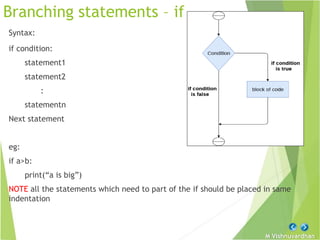
Branching statements – if
Syntax:
if condition:
statement1
statement2
:
statementn
Next statement
eg:
if a>b:
print(“a is big”)
NOTE all the statements which need to part of the if should be placed in same
indentation
M Vishnuvardhan
if else
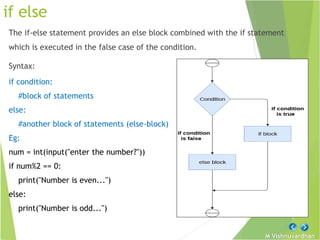
The if-else statement provides an else block combined with the if statement
which is executed in the false case of the condition.
Syntax:
if condition:
#block of statements
else:
#another block of statements (else-block)
Eg:
num = int(input("enter the number?"))
if num%2 == 0:
print("Number is even...")
else:
print("Number is odd...")
M Vishnuvardhan
elif statement
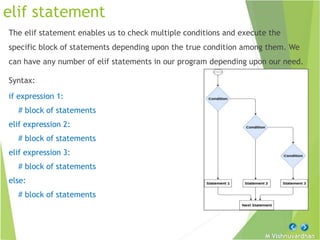
The elif statement enables us to check multiple conditions and execute the
specific block of statements depending upon the true condition among them. We
can have any number of elif statements in our program depending upon our need.
Syntax:
if expression 1:
# block of statements
elif expression 2:
# block of statements
elif expression 3:
# block of statements
else:
# block of statements
M Vishnuvardhan
Nested if
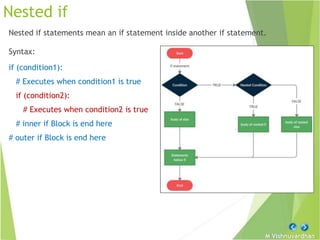
Nested if statements mean an if statement inside another if statement.
Syntax:
if (condition1):
# Executes when condition1 is true
if (condition2):
# Executes when condition2 is true
# inner if Block is end here
# outer if Block is end here
M Vishnuvardhan
Shorthand if & if else
If you have only one statement to execute, you can put it on the same line as the
if statement.
Syntax: if condition: #true block
Eg: if a > b: print("a is greater than b")
If you have only one statement to execute, one for if, and one for else, you can
put it all on the same line
Syntax: #true block if condition else #false block
Eg: print("A is big ") if a > b else print("B is big")
Note: This technique is known as Ternary Operators, or Conditional
Expressions.
M Vishnuvardhan
Looping - while
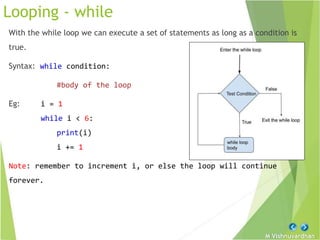
With the while loop we can execute a set of statements as long as a condition is
true.
Syntax: while condition:
#body of the loop
Eg: i = 1
while i < 6:
print(i)
i += 1
Note: remember to increment i, or else the loop will continue
forever.
M Vishnuvardhan
While loop with else
With the else statement we can run a block of code once when the condition no
longer is true
Syntax: while condition:
#body of the loop
else:
#false block
Eg: i = 1
while i < 6:
print(i)
i += 1
else:
print("i is no longer less than 6")
M Vishnuvardhan
For loop
For loop can used in two ways.
» Using on a sequence
» Using range()
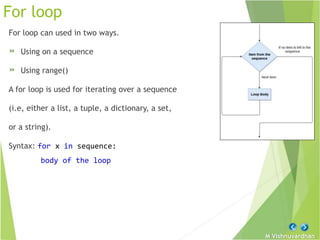
A for loop is used for iterating over a sequence
(i.e, either a list, a tuple, a dictionary, a set,
or a string).
Syntax: for x in sequence:
body of the loop
M Vishnuvardhan
For loop - sequence
Looping through a List
Eg: fruits = ["apple", "banana", "cherry"]
for x in fruits:
print(x)
Looping through a String
name=“ssbn”
for x in name:
print(x)
M Vishnuvardhan
For loop – range()
The range() function returns a sequence of numbers, starting from 0 by default,
and increments by 1 (by default), and ends at a specified number.
range (start, stop, step)
start is the starting value and is inclusive optional (default-0)
Stop is the end value and is exclusive and is mandatory
Step is incrementation from start to end optional (default -1)
Syntax: for var in range(start, stop, step):
#body of the loop
Eg: for x in range(0,6,1):
print(x)
M Vishnuvardhan
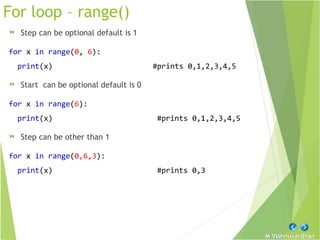
For loop – range()
» Step can be optional default is 1
for x in range(0, 6):
print(x) #prints 0,1,2,3,4,5
» Start can be optional default is 0
for x in range(6):
print(x) #prints 0,1,2,3,4,5
» Step can be other than 1
for x in range(0,6,3):
print(x) #prints 0,3
M Vishnuvardhan
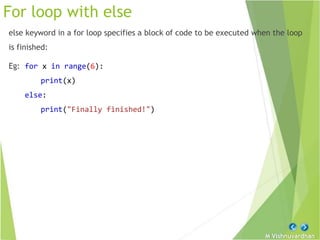
For loop with else
else keyword in a for loop specifies a block of code to be executed when the loop
is finished:
Eg: for x in range(6):
print(x)
else:
print("Finally finished!")
M Vishnuvardhan
Nested loops
A nested loop is a loop inside a loop. The "inner loop" will be executed one time
for each iteration of the "outer loop":
Eg:
adj = ["red", "big", "tasty"]
fruits = ["apple", "banana", "cherry"]
for x in adj:
for y in fruits:
print(x, y)
M Vishnuvardhan
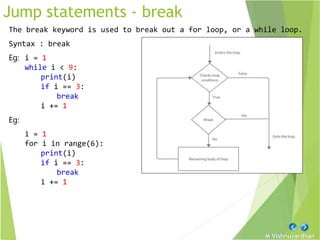
Jump statements - break
The break keyword is used to break out a for loop, or a while loop.
Syntax : break
Eg: i = 1
while i < 9:
print(i)
if i == 3:
break
i += 1
Eg:
i = 1
for i in range(6):
print(i)
if i == 3:
break
i += 1
M Vishnuvardhan
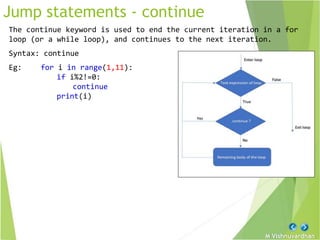
Jump statements - continue
The continue keyword is used to end the current iteration in a for
loop (or a while loop), and continues to the next iteration.
Syntax: continue
Eg: for i in range(1,11):
if i%2!=0:
continue
print(i)
M Vishnuvardhan
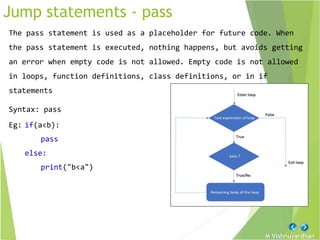
Jump statements - pass
The pass statement is used as a placeholder for future code. When
the pass statement is executed, nothing happens, but avoids getting
an error when empty code is not allowed. Empty code is not allowed
in loops, function definitions, class definitions, or in if
statements
Syntax: pass
Eg: if(a<b):
pass
else:
print("b<a")
M Vishnuvardhan

Python Control Structures.pptx

  • 2.
    M Vishnuvardhan Control Structures ControlStructures are used to modify the flow of the program. There are two types of control structures » Branching statements » Looping statements
  • 3.
    M Vishnuvardhan Branching statements– if Syntax: if condition: statement1 statement2 : statementn Next statement eg: if a>b: print(“a is big”) NOTE all the statements which need to part of the if should be placed in same indentation
  • 4.
    M Vishnuvardhan if else Theif-else statement provides an else block combined with the if statement which is executed in the false case of the condition. Syntax: if condition: #block of statements else: #another block of statements (else-block) Eg: num = int(input("enter the number?")) if num%2 == 0: print("Number is even...") else: print("Number is odd...")
  • 5.
    M Vishnuvardhan elif statement Theelif statement enables us to check multiple conditions and execute the specific block of statements depending upon the true condition among them. We can have any number of elif statements in our program depending upon our need. Syntax: if expression 1: # block of statements elif expression 2: # block of statements elif expression 3: # block of statements else: # block of statements
  • 6.
    M Vishnuvardhan Nested if Nestedif statements mean an if statement inside another if statement. Syntax: if (condition1): # Executes when condition1 is true if (condition2): # Executes when condition2 is true # inner if Block is end here # outer if Block is end here
  • 7.
    M Vishnuvardhan Shorthand if& if else If you have only one statement to execute, you can put it on the same line as the if statement. Syntax: if condition: #true block Eg: if a > b: print("a is greater than b") If you have only one statement to execute, one for if, and one for else, you can put it all on the same line Syntax: #true block if condition else #false block Eg: print("A is big ") if a > b else print("B is big") Note: This technique is known as Ternary Operators, or Conditional Expressions.
  • 8.
    M Vishnuvardhan Looping -while With the while loop we can execute a set of statements as long as a condition is true. Syntax: while condition: #body of the loop Eg: i = 1 while i < 6: print(i) i += 1 Note: remember to increment i, or else the loop will continue forever.
  • 9.
    M Vishnuvardhan While loopwith else With the else statement we can run a block of code once when the condition no longer is true Syntax: while condition: #body of the loop else: #false block Eg: i = 1 while i < 6: print(i) i += 1 else: print("i is no longer less than 6")
  • 10.
    M Vishnuvardhan For loop Forloop can used in two ways. » Using on a sequence » Using range() A for loop is used for iterating over a sequence (i.e, either a list, a tuple, a dictionary, a set, or a string). Syntax: for x in sequence: body of the loop
  • 11.
    M Vishnuvardhan For loop- sequence Looping through a List Eg: fruits = ["apple", "banana", "cherry"] for x in fruits: print(x) Looping through a String name=“ssbn” for x in name: print(x)
  • 12.
    M Vishnuvardhan For loop– range() The range() function returns a sequence of numbers, starting from 0 by default, and increments by 1 (by default), and ends at a specified number. range (start, stop, step) start is the starting value and is inclusive optional (default-0) Stop is the end value and is exclusive and is mandatory Step is incrementation from start to end optional (default -1) Syntax: for var in range(start, stop, step): #body of the loop Eg: for x in range(0,6,1): print(x)
  • 13.
    M Vishnuvardhan For loop– range() » Step can be optional default is 1 for x in range(0, 6): print(x) #prints 0,1,2,3,4,5 » Start can be optional default is 0 for x in range(6): print(x) #prints 0,1,2,3,4,5 » Step can be other than 1 for x in range(0,6,3): print(x) #prints 0,3
  • 14.
    M Vishnuvardhan For loopwith else else keyword in a for loop specifies a block of code to be executed when the loop is finished: Eg: for x in range(6): print(x) else: print("Finally finished!")
  • 15.
    M Vishnuvardhan Nested loops Anested loop is a loop inside a loop. The "inner loop" will be executed one time for each iteration of the "outer loop": Eg: adj = ["red", "big", "tasty"] fruits = ["apple", "banana", "cherry"] for x in adj: for y in fruits: print(x, y)
  • 16.
    M Vishnuvardhan Jump statements- break The break keyword is used to break out a for loop, or a while loop. Syntax : break Eg: i = 1 while i < 9: print(i) if i == 3: break i += 1 Eg: i = 1 for i in range(6): print(i) if i == 3: break i += 1
  • 17.
    M Vishnuvardhan Jump statements- continue The continue keyword is used to end the current iteration in a for loop (or a while loop), and continues to the next iteration. Syntax: continue Eg: for i in range(1,11): if i%2!=0: continue print(i)
  • 18.
    M Vishnuvardhan Jump statements- pass The pass statement is used as a placeholder for future code. When the pass statement is executed, nothing happens, but avoids getting an error when empty code is not allowed. Empty code is not allowed in loops, function definitions, class definitions, or in if statements Syntax: pass Eg: if(a<b): pass else: print("b<a")
  • 19.