Chapter 6: Flowof control
Presented by :MUSRATH AFSHAN
LECTURER IN COMPUTER SCIENCE
2.
INTRODUCTION
we see abus carrying the children to school. There is only one way to reach the school.
The driver has no choice, but to follow the road one milestone after another to reach
the school. We learnt in Chapter 5 that this is the concept of sequence, where Python
executes one statement after another from beginning to the end of the program. These
are the kind of programs we have been writing till now.
3.
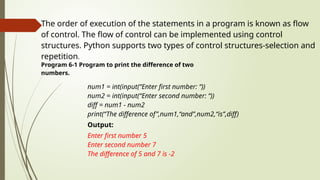
The order ofexecution of the statements in a program is known as flow
of control. The flow of control can be implemented using control
structures. Python supports two types of control structures-selection and
repetition.
Program 6-1 Program to print the difference of two
numbers.
num1 = int(input(“Enter first number: “))
num2 = int(input(“Enter second number: “))
diff = num1 - num2
print(“The difference of”,num1,“and”,num2,“is”,diff)
Output:
Enter first number 5
Enter second number 7
The difference of 5 and 7 is -2
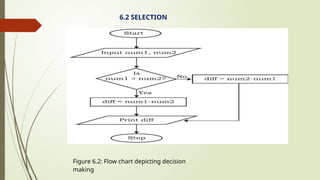
Now, suppose wewant to display the positive difference of the two numbers num 1 and num 2
given at program 6-1. For that, we need to modify our approach. Look at the flowchart shown in
Figure 6.2 that subtracts the smaller number from the bigger number so that we always get a
positive difference. This selection is based upon the values that are input for the two numbers
num 1 and num2.
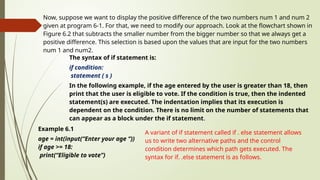
The syntax of if statement is:
if condition:
statement ( s )
In the following example, if the age entered by the user is greater than 18, then
print that the user is eligible to vote. If the condition is true, then the indented
statement(s) are executed. The indentation implies that its execution is
dependent on the condition. There is no limit on the number of statements that
can appear as a block under the if statement.
Example 6.1
age = int(input(“Enter your age “))
if age >= 18:
print(“Eligible to vote”)
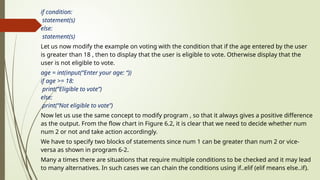
A variant of if statement called if . else statement allows
us to write two alternative paths and the control
condition determines which path gets executed. The
syntax for if. .else statement is as follows.
6.
if condition:
statement(s)
else:
statement(s)
Let usnow modify the example on voting with the condition that if the age entered by the user
is greater than 18 , then to display that the user is eligible to vote. Otherwise display that the
user is not eligible to vote.
age = int(input(“Enter your age: “))
if age >= 18:
print(“Eligible to vote”)
else:
print(“Not eligible to vote”)
Now let us use the same concept to modify program , so that it always gives a positive difference
as the output. From the flow chart in Figure 6.2, it is clear that we need to decide whether num
num 2 or not and take action accordingly.
We have to specify two blocks of statements since num 1 can be greater than num 2 or vice-
versa as shown in program 6-2.
Many a times there are situations that require multiple conditions to be checked and it may lead
to many alternatives. In such cases we can chain the conditions using if..elif (elif means else..if).
7.
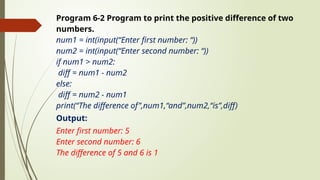
Program 6-2 Programto print the positive difference of two
numbers.
num1 = int(input(“Enter first number: “))
num2 = int(input(“Enter second number: “))
if num1 > num2:
diff = num1 - num2
else:
diff = num2 - num1
print(“The difference of”,num1,“and”,num2,“is”,diff)
Output:
Enter first number: 5
Enter second number: 6
The difference of 5 and 6 is 1
8.
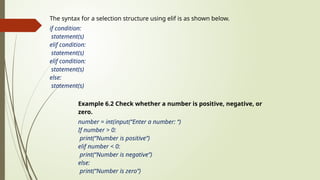
The syntax fora selection structure using elif is as shown below.
if condition:
statement(s)
elif condition:
statement(s)
elif condition:
statement(s)
else:
statement(s)
Example 6.2 Check whether a number is positive, negative, or
zero.
number = int(input(“Enter a number: “)
If number > 0:
print(“Number is positive”)
elif number < 0:
print(“Number is negative”)
else:
print(“Number is zero”)
9.
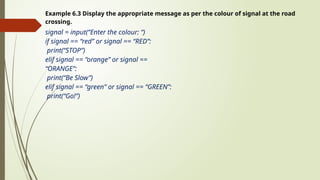
Example 6.3 Displaythe appropriate message as per the colour of signal at the road
crossing.
signal = input(“Enter the colour: “)
if signal == “red” or signal == “RED”:
print(“STOP”)
elif signal == “orange” or signal ==
“ORANGE”:
print(“Be Slow”)
elif signal == “green” or signal == “GREEN”:
print(“Go!”)
10.
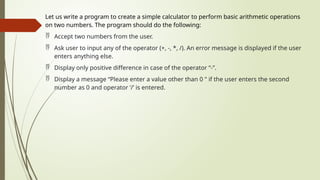
Let us writea program to create a simple calculator to perform basic arithmetic operations
on two numbers. The program should do the following:
Accept two numbers from the user.
Ask user to input any of the operator (+, -, *, /). An error message is displayed if the user
enters anything else.
Display only positive difference in case of the operator “-”.
Display a message “Please enter a value other than 0 " if the user enters the second
number as 0 and operator ‘/’ is entered.
11.
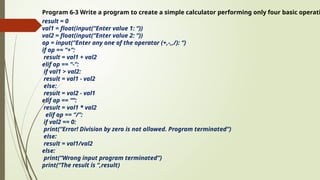
Program 6-3 Writea program to create a simple calculator performing only four basic operati
result = 0
val1 = float(input(“Enter value 1: “))
val2 = float(input(“Enter value 2: “))
op = input(“Enter any one of the operator (+,-,,/): “)
if op == “+”:
result = val1 + val2
elif op == “-”:
if val1 > val2:
result = val1 - val2
else:
result = val2 - val1
elif op == “”:
result = val1 * val2
elif op == “/”:
if val2 == 0:
print(“Error! Division by zero is not allowed. Program terminated”)
else:
result = val1/val2
else:
print(“Wrong input program terminated”)
print(“The result is “,result)
12.
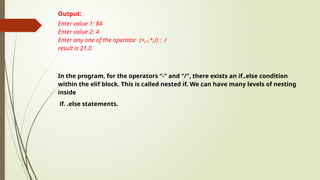
Output:
Enter value 1:84
Enter value 2: 4
Enter any one of the operator (+,-,*,/) : /
result is 21.0
In the program, for the operators “-” and “/”, there exists an if..else condition
within the elif block. This is called nested if. We can have many levels of nesting
inside
if. .else statements.
13.
6.3 INDENTATION
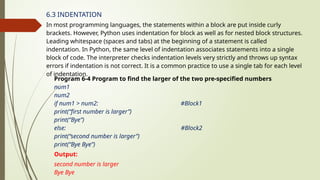
In mostprogramming languages, the statements within a block are put inside curly
brackets. However, Python uses indentation for block as well as for nested block structures.
Leading whitespace (spaces and tabs) at the beginning of a statement is called
indentation. In Python, the same level of indentation associates statements into a single
block of code. The interpreter checks indentation levels very strictly and throws up syntax
errors if indentation is not correct. It is a common practice to use a single tab for each level
of indentation.
Program 6-4 Program to find the larger of the two pre-specified numbers
num1
num2
if num1 > num2: #Block1
print(“first number is larger”)
print(“Bye”)
else: #Block2
print(“second number is larger”)
print(“Bye Bye”)
Output:
second number is larger
Bye Bye
14.
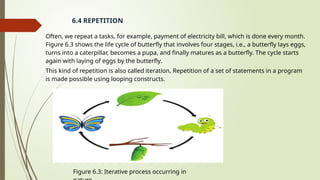
Often, we repeata tasks, for example, payment of electricity bill, which is done every month.
Figure 6.3 shows the life cycle of butterfly that involves four stages, i.e., a butterfly lays eggs,
turns into a caterpillar, becomes a pupa, and finally matures as a butterfly. The cycle starts
again with laying of eggs by the butterfly.
This kind of repetition is also called iteration. Repetition of a set of statements in a program
is made possible using looping constructs.
6.4 REPETITION
Figure 6.3: Iterative process occurring in
15.
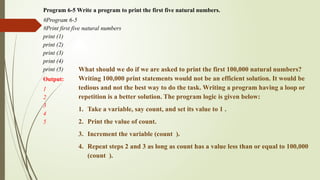
Program 6-5 Writea program to print the first five natural numbers.
#Program 6-5
#Print first five natural numbers
print (1)
print (2)
print (3)
print (4)
print (5)
Output:
1
2
3
4
5
What should we do if we are asked to print the first 100,000 natural numbers?
Writing 100,000 print statements would not be an efficient solution. It would be
tedious and not the best way to do the task. Writing a program having a loop or
repetition is a better solution. The program logic is given below:
1. Take a variable, say count, and set its value to 1 .
2. Print the value of count.
3. Increment the variable (count ).
4. Repeat steps 2 and 3 as long as count has a value less than or equal to 100,000
(count ).
16.
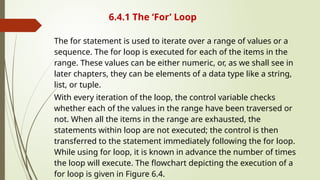
6.4.1 The ‘For’Loop
The for statement is used to iterate over a range of values or a
sequence. The for loop is executed for each of the items in the
range. These values can be either numeric, or, as we shall see in
later chapters, they can be elements of a data type like a string,
list, or tuple.
With every iteration of the loop, the control variable checks
whether each of the values in the range have been traversed or
not. When all the items in the range are exhausted, the
statements within loop are not executed; the control is then
transferred to the statement immediately following the for loop.
While using for loop, it is known in advance the number of times
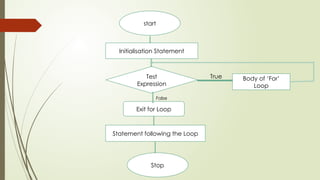
the loop will execute. The flowchart depicting the execution of a
for loop is given in Figure 6.4.
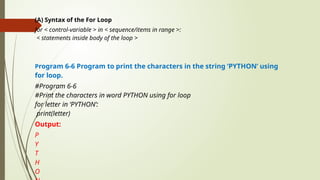
(A) Syntax ofthe For Loop
for < control-variable > in < sequence/items in range >:
< statements inside body of the loop >
Program 6-6 Program to print the characters in the string ‘PYTHON’ using
for loop.
#Program 6-6
#Print the characters in word PYTHON using for loop
for letter in ‘PYTHON’:
print(letter)
Output:
P
Y
T
H
O
19.
Program 6-7 Programto print the numbers in a given sequence using for loop.
count = [10,20,30,40,50]
for num in count:
print(num)
Output:
10
20
30
40
50
Program 6-8 Program to print even numbers in a given sequence using for loop.
numbers =[1,2,3,4,5,6,7,8,9,10]
for num in numbers:
if (num %2)==0:
print (num,‘is an even Number’)
Output:
2 is an even Number
4 is an even Number
6 is an even Number
8 is an even Number
10 is an even Number
Note: Body of the loop is indented with respect to the for statement.
20.
(B) The Range()Function
The range() is a built-in function in Python. Syntax of range() function is:
range([start], stop , step )
It is used to create a list containing a sequence of integers from the given start value up
to stop value (excluding stop value), with a difference of the given step value.
To begin with, simply remember that function takes parameters to work on. In function
range(), start, stop and step are parameters
The start and step parameters are optional. If start value is not specified, by default the
list starts from 0 . If step is also not specified, by default the value increases by 1 in each
iteration. All parameters of range() function must be integers. The step parameter can
be a positive or a negative integer excluding zero.
21.
#start and stepnot specified
>>> list(range(10) -)
[0, 1, 2, 3, 4, 5, 6, 7, 8, 9]
#default step value is 1
>>> list(range(2, 10))
[2, 3, 4, 5, 6, 7, 8, 9]
#step value is 5
>>> list(range(0, 30, 5))
[0, 5, 10, 15, 20, 25]
#step value is -1. Hence, decreasing
#sequence is generated
>>> list (range (0, -9, -1))
[0, -1, -2, -3, -4, -5, -6, -7, -8]
The function range() is often used in for loops for generating a sequence of numbers.
22.
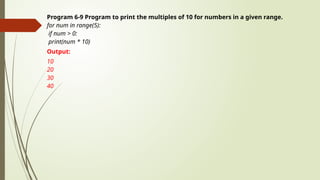
Program 6-9 Programto print the multiples of 10 for numbers in a given range.
for num in range(5):
if num > 0:
print(num * 10)
Output:
10
20
30
40
23.
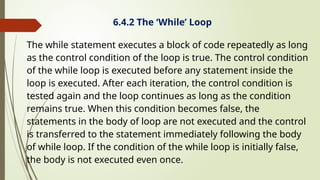
6.4.2 The ‘While’Loop
The while statement executes a block of code repeatedly as long
as the control condition of the loop is true. The control condition
of the while loop is executed before any statement inside the
loop is executed. After each iteration, the control condition is
tested again and the loop continues as long as the condition
remains true. When this condition becomes false, the
statements in the body of loop are not executed and the control
is transferred to the statement immediately following the body
of while loop. If the condition of the while loop is initially false,
the body is not executed even once.
24.
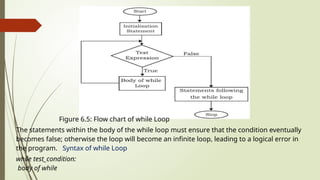
Figure 6.5: Flowchart of while Loop
The statements within the body of the while loop must ensure that the condition eventually
becomes false; otherwise the loop will become an infinite loop, leading to a logical error in
the program. Syntax of while Loop
while test_condition:
body of while
25.
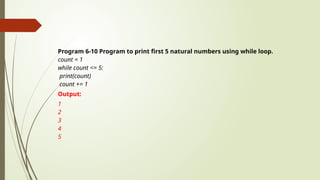
Program 6-10 Programto print first 5 natural numbers using while loop.
count = 1
while count <= 5:
print(count)
count += 1
Output:
1
2
3
4
5
26.
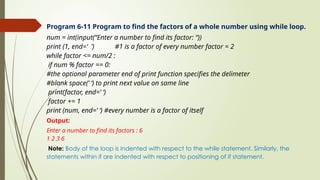
Program 6-11 Programto find the factors of a whole number using while loop.
num = int(input(“Enter a number to find its factor: “))
print (1, end=‘ ’) #1 is a factor of every number factor = 2
while factor <= num/2 :
if num % factor == 0:
#the optional parameter end of print function specifies the delimeter
#blank space(’ ‘) to print next value on same line
print(factor, end=’ ‘)
factor += 1
print (num, end=’ ‘) #every number is a factor of itself
Output:
Enter a number to find its factors : 6
1 2 3 6
Note: Body of the loop is indented with respect to the while statement. Similarly, the
statements within if are indented with respect to positioning of if statement.
27.
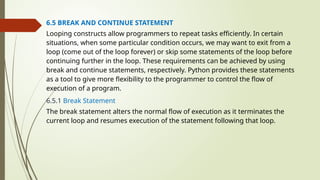
6.5 BREAK ANDCONTINUE STATEMENT
Looping constructs allow programmers to repeat tasks efficiently. In certain
situations, when some particular condition occurs, we may want to exit from a
loop (come out of the loop forever) or skip some statements of the loop before
continuing further in the loop. These requirements can be achieved by using
break and continue statements, respectively. Python provides these statements
as a tool to give more flexibility to the programmer to control the flow of
execution of a program.
6.5.1 Break Statement
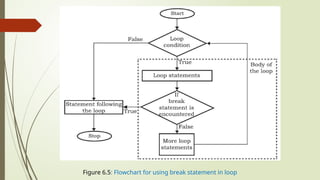
The break statement alters the normal flow of execution as it terminates the
current loop and resumes execution of the statement following that loop.
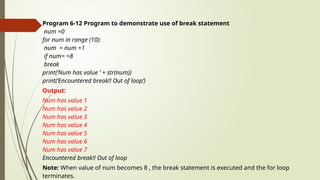
Program 6-12 Programto demonstrate use of break statement
num =0
for num in range (10):
num = num +1
if num= =8
break
print(‘Num has value ’ + str(num))
print(‘Encountered break!! Out of loop’)
Output:
Num has value 1
Num has value 2
Num has value 3
Num has value 4
Num has value 5
Num has value 6
Num has value 7
Encountered break!! Out of loop
Note: When value of num becomes 8 , the break statement is executed and the for loop
terminates.
30.
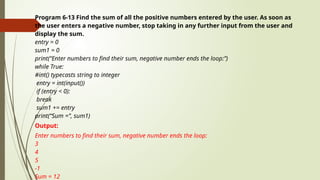
Program 6-13 Findthe sum of all the positive numbers entered by the user. As soon as
the user enters a negative number, stop taking in any further input from the user and
display the sum.
entry = 0
sum1 = 0
print(“Enter numbers to find their sum, negative number ends the loop:”)
while True:
#int() typecasts string to integer
entry = int(input())
if (entry < 0):
break
sum1 += entry
print(“Sum =”, sum1)
Output:
Enter numbers to find their sum, negative number ends the loop:
3
4
5
-1
Sum = 12
31.
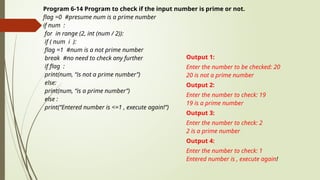
Program 6-14 Programto check if the input number is prime or not.
flag =0 #presume num is a prime number
if num :
for in range (2, int (num / 2)):
if ( num i ):
flag =1 #num is a not prime number
break #no need to check any further
if flag :
print(num, “is not a prime number”)
else:
print(num, “is a prime number”)
else :
print(“Entered number is <=1 , execute again!”)
Output 1:
Enter the number to be checked: 20
20 is not a prime number
Output 2:
Enter the number to check: 19
19 is a prime number
Output 3:
Enter the number to check: 2
2 is a prime number
Output 4:
Enter the number to check: 1
Entered number is , execute again!
32.
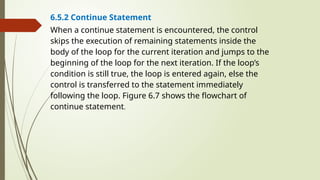
6.5.2 Continue Statement
Whena continue statement is encountered, the control
skips the execution of remaining statements inside the
body of the loop for the current iteration and jumps to the
beginning of the loop for the next iteration. If the loop’s
condition is still true, the loop is entered again, else the
control is transferred to the statement immediately
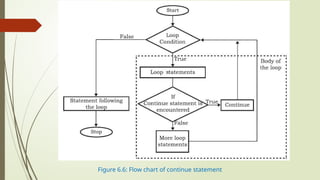
following the loop. Figure 6.7 shows the flowchart of
continue statement.
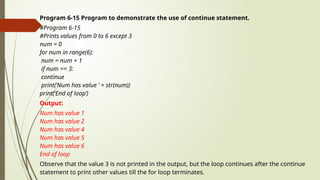
Program 6-15 Programto demonstrate the use of continue statement.
#Program 6-15
#Prints values from 0 to 6 except 3
num = 0
for num in range(6):
num = num + 1
if num == 3:
continue
print(‘Num has value ’ + str(num))
print(‘End of loop’)
Output:
Num has value 1
Num has value 2
Num has value 4
Num has value 5
Num has value 6
End of loop
Observe that the value 3 is not printed in the output, but the loop continues after the continue
statement to print other values till the for loop terminates.
35.
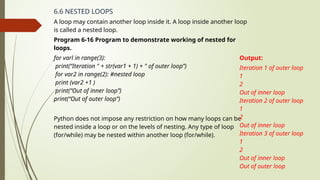
6.6 NESTED LOOPS
Aloop may contain another loop inside it. A loop inside another loop
is called a nested loop.
Program 6-16 Program to demonstrate working of nested for
loops.
for varl in range(3):
print(“Iteration " + str(var1 + 1) + " of outer loop”)
for var2 in range(2): #nested loop
print (var2 +1 )
print(“Out of inner loop”)
print(“Out of outer loop”)
Python does not impose any restriction on how many loops can be
nested inside a loop or on the levels of nesting. Any type of loop
(for/while) may be nested within another loop (for/while).
Output:
Iteration 1 of outer loop
1
2
Out of inner loop
Iteration 2 of outer loop
1
2
Out of inner loop
Iteration 3 of outer loop
1
2
Out of inner loop
Out of outer loop
36.
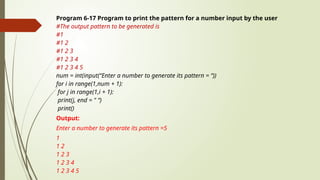
Program 6-17 Programto print the pattern for a number input by the user
#The output pattern to be generated is
#1
#1 2
#1 2 3
#1 2 3 4
#1 2 3 4 5
num = int(input(“Enter a number to generate its pattern = “))
for i in range(1,num + 1):
for j in range(1,i + 1):
print(j, end = " “)
print()
Output:
Enter a number to generate its pattern =5
1
1 2
1 2 3
1 2 3 4
1 2 3 4 5
37.
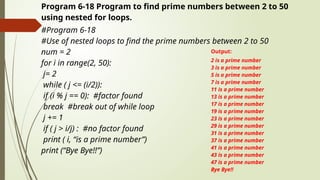
Program 6-18 Programto find prime numbers between 2 to 50
using nested for loops.
#Program 6-18
#Use of nested loops to find the prime numbers between 2 to 50
num = 2
for i in range(2, 50):
j= 2
while ( j <= (i/2)):
if (i % j == 0): #factor found
break #break out of while loop
j += 1
if ( j > i/j) : #no factor found
print ( i, “is a prime number”)
print (“Bye Bye!!”)
Output:
2 is a prime number
3 is a prime number
5 is a prime number
7 is a prime number
11 is a prime number
13 is a prime number
17 is a prime number
19 is a prime number
23 is a prime number
29 is a prime number
31 is a prime number
37 is a prime number
41 is a prime number
43 is a prime number
47 is a prime number
Bye Bye!!
38.
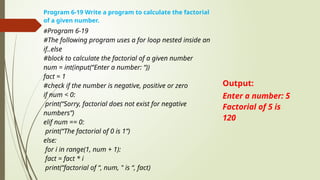
Program 6-19 Writea program to calculate the factorial
of a given number.
#Program 6-19
#The following program uses a for loop nested inside an
if..else
#block to calculate the factorial of a given number
num = int(input(“Enter a number: “))
fact = 1
#check if the number is negative, positive or zero
if num < 0:
print(“Sorry, factorial does not exist for negative
numbers”)
elif num == 0:
print(“The factorial of 0 is 1”)
else:
for i in range(1, num + 1):
fact = fact * i
print(“factorial of “, num, " is “, fact)
Output:
Enter a number: 5
Factorial of 5 is
120
39.
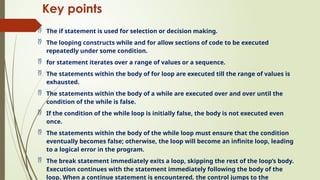
Key points
Theif statement is used for selection or decision making.
The looping constructs while and for allow sections of code to be executed
repeatedly under some condition.
for statement iterates over a range of values or a sequence.
The statements within the body of for loop are executed till the range of values is
exhausted.
The statements within the body of a while are executed over and over until the
condition of the while is false.
If the condition of the while loop is initially false, the body is not executed even
once.
The statements within the body of the while loop must ensure that the condition
eventually becomes false; otherwise, the loop will become an infinite loop, leading
to a logical error in the program.
The break statement immediately exits a loop, skipping the rest of the loop’s body.
Execution continues with the statement immediately following the body of the
loop. When a continue statement is encountered, the control jumps to the


![Program 6-7 Program to print the numbers in a given sequence using for loop.
count = [10,20,30,40,50]
for num in count:
print(num)
Output:
10
20
30
40
50
Program 6-8 Program to print even numbers in a given sequence using for loop.
numbers =[1,2,3,4,5,6,7,8,9,10]
for num in numbers:
if (num %2)==0:
print (num,‘is an even Number’)
Output:
2 is an even Number
4 is an even Number
6 is an even Number
8 is an even Number
10 is an even Number
Note: Body of the loop is indented with respect to the for statement.](https://image.slidesharecdn.com/chapter6presentationonflowofcontrol-251126070237-15ec7332/85/Chapter-6-presentation-on-flow-of-control-pptx-19-320.jpg)
![(B) The Range() Function
The range() is a built-in function in Python. Syntax of range() function is:
range([start], stop , step )
It is used to create a list containing a sequence of integers from the given start value up
to stop value (excluding stop value), with a difference of the given step value.
To begin with, simply remember that function takes parameters to work on. In function
range(), start, stop and step are parameters
The start and step parameters are optional. If start value is not specified, by default the
list starts from 0 . If step is also not specified, by default the value increases by 1 in each
iteration. All parameters of range() function must be integers. The step parameter can
be a positive or a negative integer excluding zero.](https://image.slidesharecdn.com/chapter6presentationonflowofcontrol-251126070237-15ec7332/85/Chapter-6-presentation-on-flow-of-control-pptx-20-320.jpg)
![#start and step not specified
>>> list(range(10) -)
[0, 1, 2, 3, 4, 5, 6, 7, 8, 9]
#default step value is 1
>>> list(range(2, 10))
[2, 3, 4, 5, 6, 7, 8, 9]
#step value is 5
>>> list(range(0, 30, 5))
[0, 5, 10, 15, 20, 25]
#step value is -1. Hence, decreasing
#sequence is generated
>>> list (range (0, -9, -1))
[0, -1, -2, -3, -4, -5, -6, -7, -8]
The function range() is often used in for loops for generating a sequence of numbers.](https://image.slidesharecdn.com/chapter6presentationonflowofcontrol-251126070237-15ec7332/85/Chapter-6-presentation-on-flow-of-control-pptx-21-320.jpg)