M Vishnuvardhan
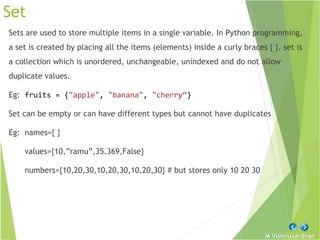
Set
Sets are used to store multiple items in a single variable. In Python programming,
a set is created by placing all the items (elements) inside a curly braces { }. set is
a collection which is unordered, unchangeable, unindexed and do not allow
duplicate values.
Eg: fruits = {"apple", "banana", "cherry“}
Set can be empty or can have different types but cannot have duplicates
Eg: names={ }
values={10,”ramu”,35.369,False}
numbers={10,20,30,10,20,30,10,20,30} # but stores only 10 20 30
M Vishnuvardhan
Set – Indexing
Sets are unordered, indexing have no meaning. It not possible to access or change
an element of set using indexing or slicing. Set does not support it
Eg: names = {"apple", "banana", "cherry“}
names[0] # TypeError: 'set' object is not subscriptable
In order to access the elements in the Set generally for loop is used
Eg: for x in names:
print(x)
Since indexing is not supported even slicing operator cannot be used on sets
M Vishnuvardhan
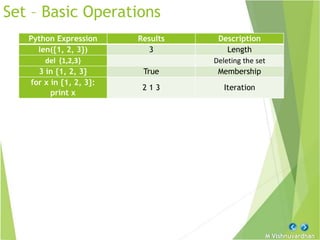
Set – Basic Operations
Python Expression Results Description
len({1, 2, 3}) 3 Length
del {1,2,3} Deleting the set
3 in {1, 2, 3} True Membership
for x in {1, 2, 3}:
print x
2 1 3 Iteration
M Vishnuvardhan
Built-in functions with Set
Function Description
all()
Return True if all elements of the set are true (or
if the list is empty).
any()
Return True if any element of the set is true. If
the list is empty, return False.
enumerate()
Return an enumerate object. It contains the index
and value of all the items of set as a tuple.
len() Return the length (the number of items) in the set.
set()
Convert an iterable (tuple, string, list,
dictionary) to a set.
max() Return the largest item in the set.
min() Return the smallest item in the set
sorted()
Return a new sorted set (does not sort the set
itself).
sum() Return the sum of all elements in the set.
M Vishnuvardhan
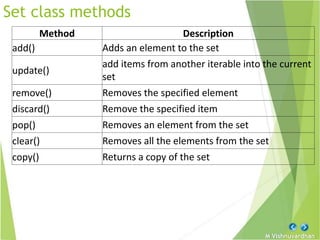
Set class methods
Method Description
add() Adds an element to the set
update()
add items from another iterable into the current
set
remove() Removes the specified element
discard() Remove the specified item
pop() Removes an element from the set
clear() Removes all the elements from the set
copy() Returns a copy of the set
M Vishnuvardhan
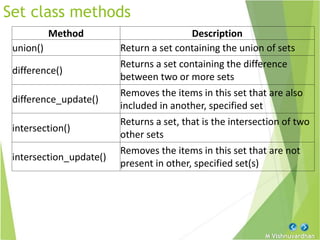
Set class methods
Method Description
union() Return a set containing the union of sets
difference()
Returns a set containing the difference
between two or more sets
difference_update()
Removes the items in this set that are also
included in another, specified set
intersection()
Returns a set, that is the intersection of two
other sets
intersection_update()
Removes the items in this set that are not
present in other, specified set(s)
M Vishnuvardhan
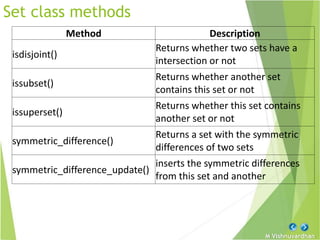
Set class methods
Method Description
isdisjoint()
Returns whether two sets have a
intersection or not
issubset()
Returns whether another set
contains this set or not
issuperset()
Returns whether this set contains
another set or not
symmetric_difference()
Returns a set with the symmetric
differences of two sets
symmetric_difference_update()
inserts the symmetric differences
from this set and another
M Vishnuvardhan
Frozen Sets
Frozenset is the same as set except the frozensets are immutable which means
that elements from the frozenset cannot be added or removed once created.
frozenset() function is used to create an unchangeable frozenset object (which is
like a set object, only unchangeable).
Syntax: frozenset(iterable) ( Iterable can be list, set, tuple etc.)
Eg: mylist = ['apple', 'banana', 'cherry’]
x = frozenset(mylist)
x[1] = "strawberry"
TypeError: 'frozenset' object does not support item assignment
M Vishnuvardhan
Frozen Sets
Frozenset supports methods like copy(), difference(), intersection(), isdisjoint(),
issubset(), issuperset(), symmetric_difference() and union().
Being immutable it does not have method that add or remove elements.
Eg: A = frozenset([1, 2, 3, 4])
B = frozenset([3, 4, 5, 6])
A.isdisjoint(B) # Output: False
A.difference(B) # Output: frozenset({1, 2})
A | B # Output: frozenset({1, 2, 3, 4, 5, 6})
A.add(3) # AttributeError: 'frozenset' object has no
attribute 'add'
M Vishnuvardhan
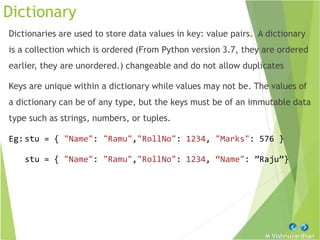
Dictionary
Dictionaries are used to store data values in key: value pairs. A dictionary
is a collection which is ordered (From Python version 3.7, they are ordered
earlier, they are unordered.) changeable and do not allow duplicates
Keys are unique within a dictionary while values may not be. The values of
a dictionary can be of any type, but the keys must be of an immutable data
type such as strings, numbers, or tuples.
Eg:stu = { "Name": "Ramu","RollNo": 1234, "Marks": 576 }
stu = { "Name": "Ramu","RollNo": 1234, “Name": ”Raju”}
M Vishnuvardhan
Properties
» Duplicate keys are not allowed but values can have duplicates.
Eg: dict = {'Name’: ‘Ramu', 'Age': 7, 'Name’: ‘Ravi’}
» Keys must be immutable. i.e., strings, numbers or tuples are allowed as
dictionary keys but lists are not allowed.
Eg: dict = {['Name']: ‘Ramu’, 'Age': 7}
# TypeError: unhashable type: 'list'
M Vishnuvardhan
Indexing
In order to access dictionary elements dictionary name followed by square
brackets along with the key name to obtain its value.
Syntax: dictionaryName [ “keyName”] # returns the value
associated with the keyName
Eg: details = {'Name’: ‘Ramu’, 'Age': 5, 'Class': 'First’}
print (details['Name']) # Output: Ramu
print ( details['Age']) # Output: 5
print(details['Class']) # Output: First
print(details[‘dob’]) # Throws KeyError: 'dob'
M Vishnuvardhan
Updating
Python allows to update the value of a specific item by referring to its key
name. It allows to add a new key-value pair, modifying an existing entry, or
deleting an existing entry.
Eg: details={"Name":“Ramu","Age":5,"Class":"First"}
details[“age”]=4 # update value
details[“city”] = “Anantapur” # add a new key: value pair
del details[“city”] # deletes key named city
del details # deletes dictionary
M Vishnuvardhan
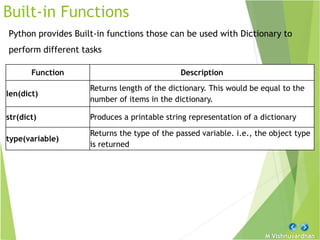
Built-in Functions
Python provides Built-in functions those can be used with Dictionary to
perform different tasks
Function Description
len(dict)
Returns length of the dictionary. This would be equal to the
number of items in the dictionary.
str(dict) Produces a printable string representation of a dictionary
type(variable)
Returns the type of the passed variable. i.e., the object type
is returned
M Vishnuvardhan
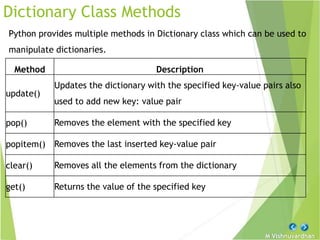
Dictionary Class Methods
Python provides multiple methods in Dictionary class which can be used to
manipulate dictionaries.
Method Description
update()
Updates the dictionary with the specified key-value pairs also
used to add new key: value pair
pop() Removes the element with the specified key
popitem() Removes the last inserted key-value pair
clear() Removes all the elements from the dictionary
get() Returns the value of the specified key
M Vishnuvardhan
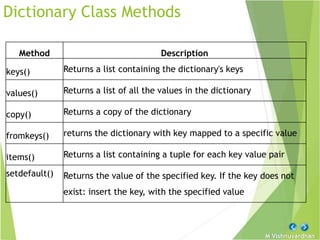
Dictionary Class Methods
Method Description
keys() Returns a list containing the dictionary's keys
values() Returns a list of all the values in the dictionary
copy() Returns a copy of the dictionary
fromkeys() returns the dictionary with key mapped to a specific value
items() Returns a list containing a tuple for each key value pair
setdefault() Returns the value of the specified key. If the key does not
exist: insert the key, with the specified value
M Vishnuvardhan
Using for loop
When looping through a dictionary, the return value are the keys of the
dictionary, but there are methods to return the values as well.
Eg: stu={"name":"ramu","age":25,"class":"mpcs","medium":"english"}
#get values
for x in stu:
print(stu[x])
#get values
for x in stu.values():
print(x)
#get keys
for x in stu.keys():
print(x)
OR
OR
#get keys
for x in stu:
print(x)
#getting both keys and values
for x,y in stu.items():
print(x,y)
M Vishnuvardhan

Python Sets_Dictionary.pptx

  • 2.
    M Vishnuvardhan Set Sets areused to store multiple items in a single variable. In Python programming, a set is created by placing all the items (elements) inside a curly braces { }. set is a collection which is unordered, unchangeable, unindexed and do not allow duplicate values. Eg: fruits = {"apple", "banana", "cherry“} Set can be empty or can have different types but cannot have duplicates Eg: names={ } values={10,”ramu”,35.369,False} numbers={10,20,30,10,20,30,10,20,30} # but stores only 10 20 30
  • 3.
    M Vishnuvardhan Set –Indexing Sets are unordered, indexing have no meaning. It not possible to access or change an element of set using indexing or slicing. Set does not support it Eg: names = {"apple", "banana", "cherry“} names[0] # TypeError: 'set' object is not subscriptable In order to access the elements in the Set generally for loop is used Eg: for x in names: print(x) Since indexing is not supported even slicing operator cannot be used on sets
  • 4.
    M Vishnuvardhan Set –Basic Operations Python Expression Results Description len({1, 2, 3}) 3 Length del {1,2,3} Deleting the set 3 in {1, 2, 3} True Membership for x in {1, 2, 3}: print x 2 1 3 Iteration
  • 5.
    M Vishnuvardhan Built-in functionswith Set Function Description all() Return True if all elements of the set are true (or if the list is empty). any() Return True if any element of the set is true. If the list is empty, return False. enumerate() Return an enumerate object. It contains the index and value of all the items of set as a tuple. len() Return the length (the number of items) in the set. set() Convert an iterable (tuple, string, list, dictionary) to a set. max() Return the largest item in the set. min() Return the smallest item in the set sorted() Return a new sorted set (does not sort the set itself). sum() Return the sum of all elements in the set.
  • 6.
    M Vishnuvardhan Set classmethods Method Description add() Adds an element to the set update() add items from another iterable into the current set remove() Removes the specified element discard() Remove the specified item pop() Removes an element from the set clear() Removes all the elements from the set copy() Returns a copy of the set
  • 7.
    M Vishnuvardhan Set classmethods Method Description union() Return a set containing the union of sets difference() Returns a set containing the difference between two or more sets difference_update() Removes the items in this set that are also included in another, specified set intersection() Returns a set, that is the intersection of two other sets intersection_update() Removes the items in this set that are not present in other, specified set(s)
  • 8.
    M Vishnuvardhan Set classmethods Method Description isdisjoint() Returns whether two sets have a intersection or not issubset() Returns whether another set contains this set or not issuperset() Returns whether this set contains another set or not symmetric_difference() Returns a set with the symmetric differences of two sets symmetric_difference_update() inserts the symmetric differences from this set and another
  • 9.
    M Vishnuvardhan Frozen Sets Frozensetis the same as set except the frozensets are immutable which means that elements from the frozenset cannot be added or removed once created. frozenset() function is used to create an unchangeable frozenset object (which is like a set object, only unchangeable). Syntax: frozenset(iterable) ( Iterable can be list, set, tuple etc.) Eg: mylist = ['apple', 'banana', 'cherry’] x = frozenset(mylist) x[1] = "strawberry" TypeError: 'frozenset' object does not support item assignment
  • 10.
    M Vishnuvardhan Frozen Sets Frozensetsupports methods like copy(), difference(), intersection(), isdisjoint(), issubset(), issuperset(), symmetric_difference() and union(). Being immutable it does not have method that add or remove elements. Eg: A = frozenset([1, 2, 3, 4]) B = frozenset([3, 4, 5, 6]) A.isdisjoint(B) # Output: False A.difference(B) # Output: frozenset({1, 2}) A | B # Output: frozenset({1, 2, 3, 4, 5, 6}) A.add(3) # AttributeError: 'frozenset' object has no attribute 'add'
  • 11.
    M Vishnuvardhan Dictionary Dictionaries areused to store data values in key: value pairs. A dictionary is a collection which is ordered (From Python version 3.7, they are ordered earlier, they are unordered.) changeable and do not allow duplicates Keys are unique within a dictionary while values may not be. The values of a dictionary can be of any type, but the keys must be of an immutable data type such as strings, numbers, or tuples. Eg:stu = { "Name": "Ramu","RollNo": 1234, "Marks": 576 } stu = { "Name": "Ramu","RollNo": 1234, “Name": ”Raju”}
  • 12.
    M Vishnuvardhan Properties » Duplicatekeys are not allowed but values can have duplicates. Eg: dict = {'Name’: ‘Ramu', 'Age': 7, 'Name’: ‘Ravi’} » Keys must be immutable. i.e., strings, numbers or tuples are allowed as dictionary keys but lists are not allowed. Eg: dict = {['Name']: ‘Ramu’, 'Age': 7} # TypeError: unhashable type: 'list'
  • 13.
    M Vishnuvardhan Indexing In orderto access dictionary elements dictionary name followed by square brackets along with the key name to obtain its value. Syntax: dictionaryName [ “keyName”] # returns the value associated with the keyName Eg: details = {'Name’: ‘Ramu’, 'Age': 5, 'Class': 'First’} print (details['Name']) # Output: Ramu print ( details['Age']) # Output: 5 print(details['Class']) # Output: First print(details[‘dob’]) # Throws KeyError: 'dob'
  • 14.
    M Vishnuvardhan Updating Python allowsto update the value of a specific item by referring to its key name. It allows to add a new key-value pair, modifying an existing entry, or deleting an existing entry. Eg: details={"Name":“Ramu","Age":5,"Class":"First"} details[“age”]=4 # update value details[“city”] = “Anantapur” # add a new key: value pair del details[“city”] # deletes key named city del details # deletes dictionary
  • 15.
    M Vishnuvardhan Built-in Functions Pythonprovides Built-in functions those can be used with Dictionary to perform different tasks Function Description len(dict) Returns length of the dictionary. This would be equal to the number of items in the dictionary. str(dict) Produces a printable string representation of a dictionary type(variable) Returns the type of the passed variable. i.e., the object type is returned
  • 16.
    M Vishnuvardhan Dictionary ClassMethods Python provides multiple methods in Dictionary class which can be used to manipulate dictionaries. Method Description update() Updates the dictionary with the specified key-value pairs also used to add new key: value pair pop() Removes the element with the specified key popitem() Removes the last inserted key-value pair clear() Removes all the elements from the dictionary get() Returns the value of the specified key
  • 17.
    M Vishnuvardhan Dictionary ClassMethods Method Description keys() Returns a list containing the dictionary's keys values() Returns a list of all the values in the dictionary copy() Returns a copy of the dictionary fromkeys() returns the dictionary with key mapped to a specific value items() Returns a list containing a tuple for each key value pair setdefault() Returns the value of the specified key. If the key does not exist: insert the key, with the specified value
  • 18.
    M Vishnuvardhan Using forloop When looping through a dictionary, the return value are the keys of the dictionary, but there are methods to return the values as well. Eg: stu={"name":"ramu","age":25,"class":"mpcs","medium":"english"} #get values for x in stu: print(stu[x]) #get values for x in stu.values(): print(x) #get keys for x in stu.keys(): print(x) OR OR #get keys for x in stu: print(x) #getting both keys and values for x,y in stu.items(): print(x,y)
  • 19.