Pangasinan State University
LINGAYEN CAMPUS
Lingayen, Pangasinan
PSU ECONOMICS
STUDENT GUIDE
S.Y 2016 - 2017 Edition
E-LEARNING
www.psuecon.neolms.com
JAMESON N. ESTRADA
Preface
Pangasinan State University VMIO
AB Economics Program Outcomes
Assignments
Lessons
Example of a Class
E-learning Classes
Accessing PSU E-learningPortal
Features of PSU Economics E-learning
Functions of PSU Economics E-learning
About PSU Economics E-learning
Home Page and Navigation
Help Center
Viewing Grades
Enrolling in Classes
Communicating with Users
Notifications
Profile
Adding Friends
2
11
10
9
8
7
6
4
3
7
8
12
15
16
17
18
19
20
22
TABLE OF CONTENTS
PSU ECONOMICS E-LEARNING PORTAL (www.psuecon.neolms.com) STUDENT GUIDE MANUAL
PREFACE
Everything we do at AB Economics program is oriented to students’ success. This is why the
program is designed to produce graduates who can demonstrate expertise on economic
concepts and theories necessary to understand the functioning of the economy for economic
analysis and policy-making, develop skills in the formulation of project proposals, undertaking of
economic researches, solving mathematical problems and constructing economic models and
perform with competence and dynamism as a productive and innovative economic player who
takes the initiative to lead for good governance, economic growth and economic development.
In line with this, one thing is certain, upon completion of the program students will be prepared
and equipped with the skills and competencies needed to meet or exceed their career pathway
expectations.
We proudly assert in our University vision to become an ASEAN Premier State University in
2020 and we deeply commit in our University’s mission to develop highly principled, morally
upright, innovative and globally competent individuals capable of meeting the needs of industry,
public service and civil society. Our program always commits to serve those who strive to make
a difference and go an extra mile in their lives. This commitment is evident in our program’s
policies, best academic practices, student activities and support services.
It is indeed our objective to guide the students in pursuing their educational goals and ensure
that they receive the quality education they have constantly envisioned. One way of doing this
is by furnishing them with a very essential academic tool in the form of a SYLLABI CATALOG.
This instrument will serve as a contract between the students and the teacher regarding course
expectations, requirements and policies as it clearly communicates what the teacher expects of
students and what students can expect from the teacher.
The program develops a learning management system dubbed, PSU Economics E-learning,
which aims to provide AB Economics students an online portal that enables them to access and
get learning content and educational resources trough online virtual courses about their different
core subjects in Economics. This is an essential online portal where the AB Economics students
can easily connect and collaborate with their teachers and can continue
their educational endeavors online 24/7, anywhere.
We are happy to encourage our dear AB Economics students to familiarize this E-learning
student guide so they can maximize the utilization of the PSU Economics E-leaning.
Engage, enjoy and keep on learning with us. Wishing you best regards and more power to your
academic endeavor.
AB ECONOMICS FACULTY
PSU ECONOMICS E-LEARNING PORTAL (www.psuecon.neolms.com) STUDENT GUIDE MANUAL
UNIVERSITY VISION, MISSION AND INSTITUTIONAL OUTCOMES
UNIVERSITY VISION
To become an ASEAN Premier State University by 2020
UNIVERSITY MISSION
The Pangasinan State University, through instruction, research, extension and production, commits to
develop highly principled, morally upright , innovative and globally competent individuals capable of meeting
the needs of industry, public service and civil society.
GUIDING PHILOSOPHY
The Pangasinan State University’s leadership adheres to the Filipino educational philosophy that education
is geared towards better citizenship and livelihood and the United Nation’s declaration that education is for
all giving access to quality education
STRATEGIC GOALS
■ Excellent student learning and career development
■ Strong research culture and technology transfer
■ Good governance
■ Sustainable social responsibilities
■ Quality human resources management and development
■ Efficient management of assets and finances
■ Responsive to globalization
INSTITUTIONAL OUTCOMES AND CORE VALUES
The Pangasinan State University Institutional Learning Outcomes (PSU ILO) are the qualities that PSUnians
must possess. These outcomes are anchored on the following core values: Accountability and
Transparency, Credibility and Integrity, Competence and Commitment to Achieve, Excellence in Service
Delivery, Social and Environmental Responsiveness, and Spirituality – (ACCESS). Anchored on these core
values, the PSU graduates are able to
1. Demonstrate through institutional mechanisms, systems, policies, and processes which are reflective of
transparency, equity, participatory decision making, and accountability.
2. Engage in relevant, comprehensive and sustainable development initiatives through multiple perspectives
in decisions and actions that build personal and professional credibility and integrity.
3. Set challenging goals and tasks with determination and sense of urgency which provide continuous
improvement and producing quality outputs leading to inclusive growth.
4. Exhibit life-long learning and global competency proficiency in communication skills,
inter/interpersonal skills, entrepreneurial skills, innovative mindset, research and production initiatives and
capability in meeting the industry requirements of local, ASEAN and international human capital market
through relevant and comprehensive programs.
5. Display, socially and environmentally responsive organizational culture, which ensures higher productivity
among the university constituents and elevate the welfare of the multi-sectoral communities.
6. Practice spiritual values and morally upright behavior which promote and inspire greater harmony to
project a credible public image
PSU ECONOMICS E-LEARNING PORTAL (www.psuecon.neolms.com) STUDENT GUIDE MANUAL
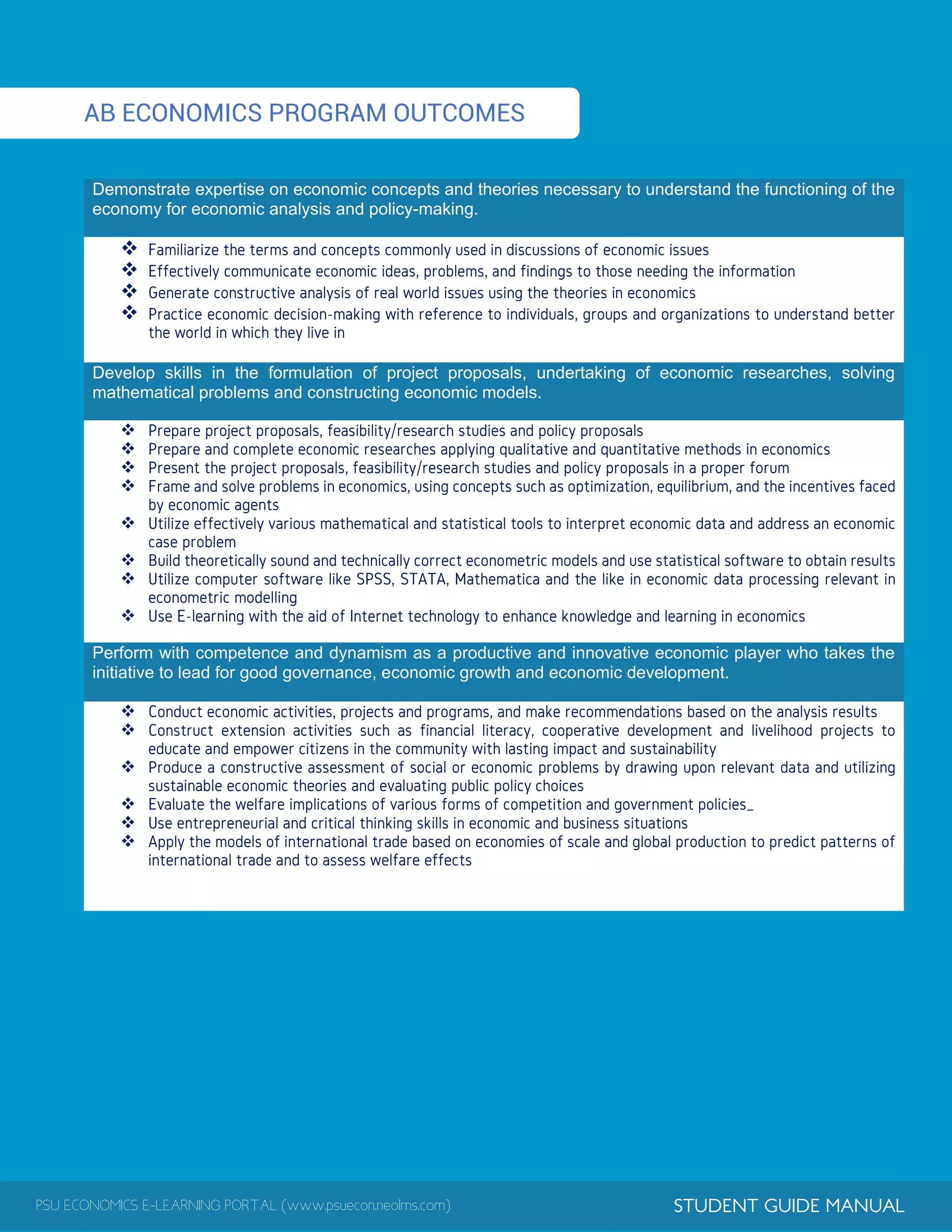
AB ECONOMICS PROGRAM OUTCOMES
Demonstrate expertise on economic concepts and theories necessary to understand the functioning of the
economy for economic analysis and policy-making.




Develop skills in the formulation of project proposals, undertaking of economic researches, solving
mathematical problems and constructing economic models.








Perform with competence and dynamism as a productive and innovative economic player who takes the
initiative to lead for good governance, economic growth and economic development.






PSU ECONOMICS E-LEARNING PORTAL (www.psuecon.neolms.com) STUDENT GUIDE MANUAL
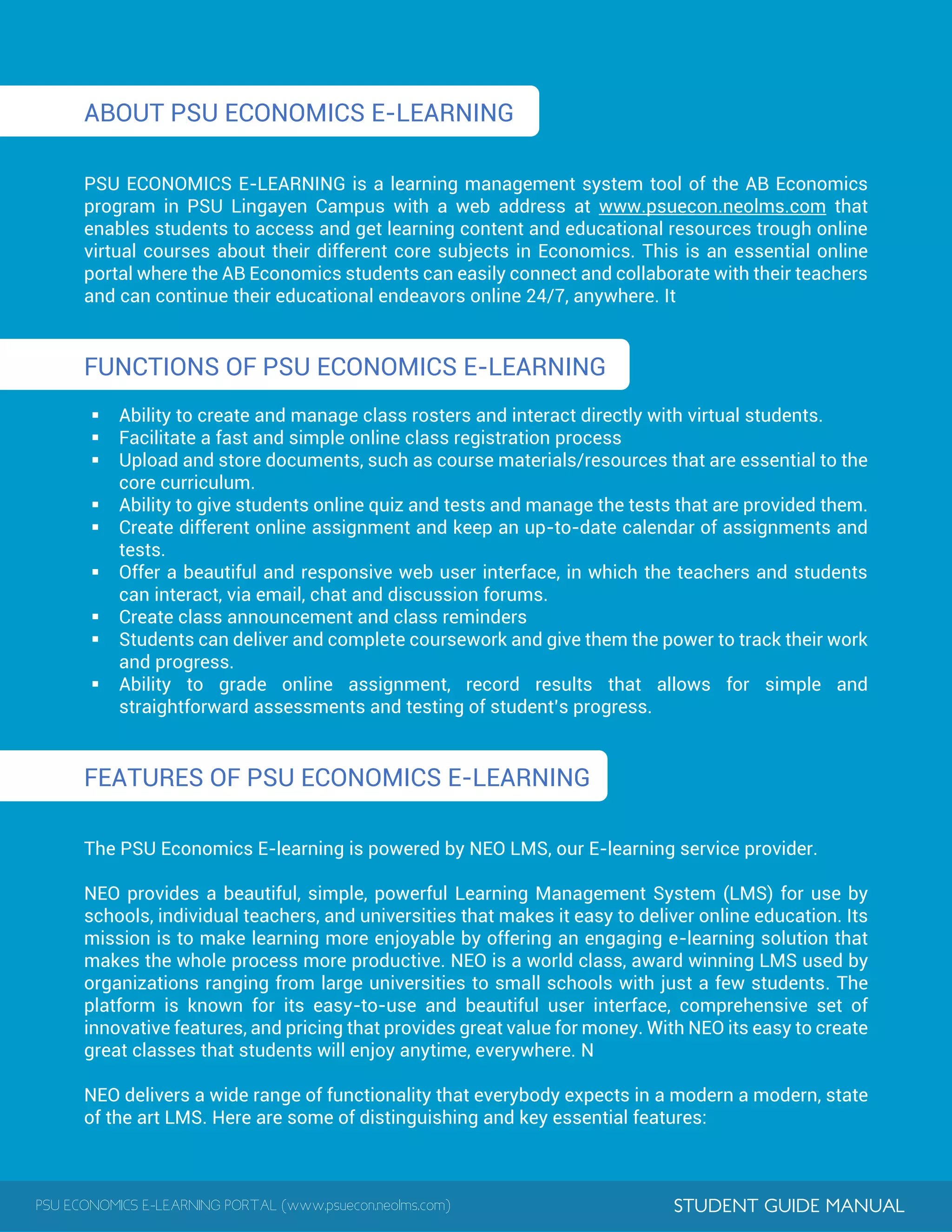
ABOUT PSU ECONOMICS E-LEARNING
PSU ECONOMICS E-LEARNING is a learning management system tool of the AB Economics
program in PSU Lingayen Campus with a web address at www.psuecon.neolms.com that
enables students to access and get learning content and educational resources trough online
virtual courses about their different core subjects in Economics. This is an essential online
portal where the AB Economics students can easily connect and collaborate with their teachers
and can continue their educational endeavors online 24/7, anywhere. It
FUNCTIONS OF PSU ECONOMICS E-LEARNING
 Ability to create and manage class rosters and interact directly with virtual students.
 Facilitate a fast and simple online class registration process
 Upload and store documents, such as course materials/resources that are essential to the
core curriculum.
 Ability to give students online quiz and tests and manage the tests that are provided them.
 Create different online assignment and keep an up-to-date calendar of assignments and
tests.
 Offer a beautiful and responsive web user interface, in which the teachers and students
can interact, via email, chat and discussion forums.
 Create class announcement and class reminders
 Students can deliver and complete coursework and give them the power to track their work
and progress.
 Ability to grade online assignment, record results that allows for simple and
straightforward assessments and testing of student’s progress.
FEATURES OF PSU ECONOMICS E-LEARNING
The PSU Economics E-learning is powered by NEO LMS, our E-learning service provider.
NEO provides a beautiful, simple, powerful Learning Management System (LMS) for use by
schools, individual teachers, and universities that makes it easy to deliver online education. Its
mission is to make learning more enjoyable by offering an engaging e-learning solution that
makes the whole process more productive. NEO is a world class, award winning LMS used by
organizations ranging from large universities to small schools with just a few students. The
platform is known for its easy-to-use and beautiful user interface, comprehensive set of
innovative features, and pricing that provides great value for money. With NEO its easy to create
great classes that students will enjoy anytime, everywhere. N
NEO delivers a wide range of functionality that everybody expects in a modern a modern, state
of the art LMS. Here are some of distinguishing and key essential features:
PSU ECONOMICS E-LEARNING PORTAL (www.psuecon.neolms.com) STUDENT GUIDE MANUAL
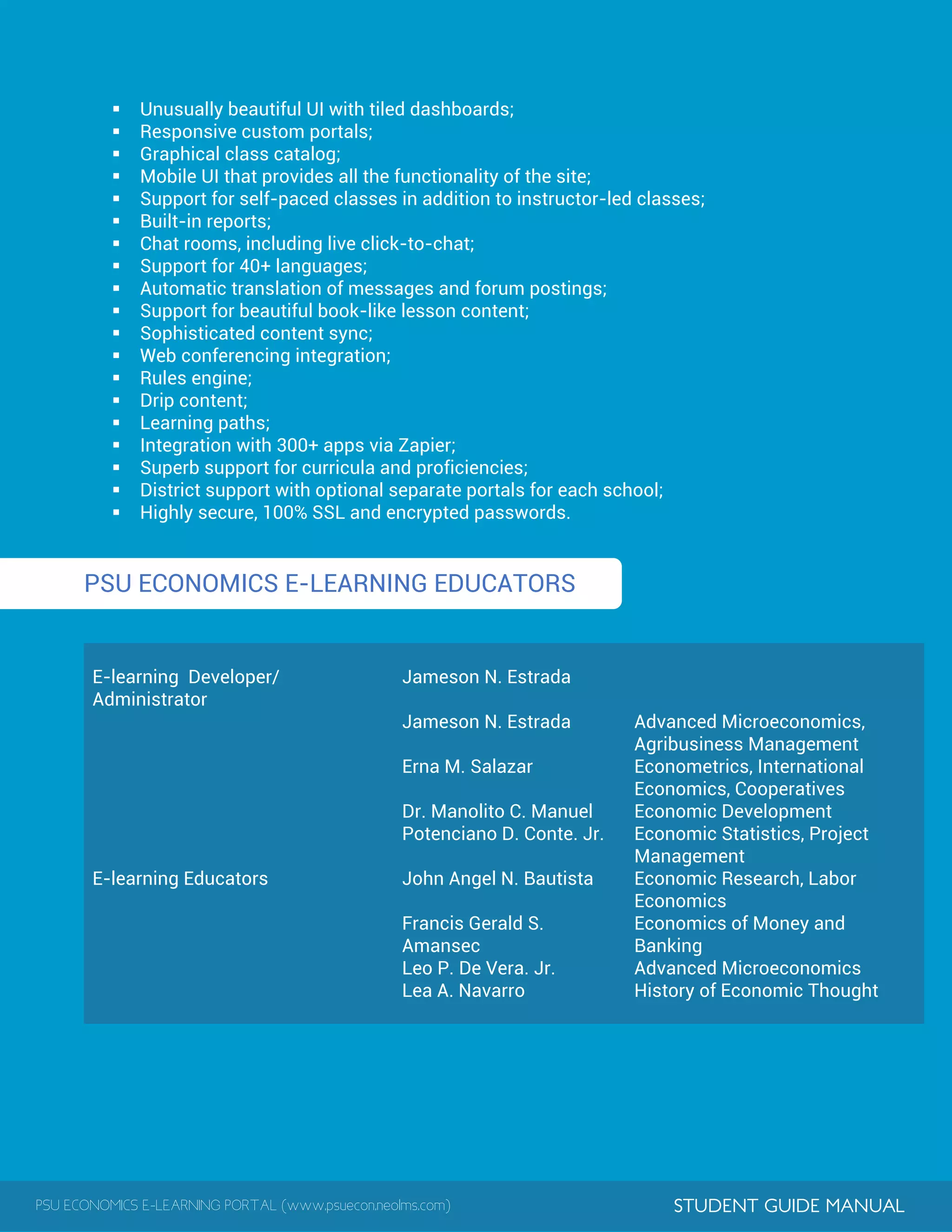
 Unusually beautiful UI with tiled dashboards;
 Responsive custom portals;
 Graphical class catalog;
 Mobile UI that provides all the functionality of the site;
 Support for self-paced classes in addition to instructor-led classes;
 Built-in reports;
 Chat rooms, including live click-to-chat;
 Support for 40+ languages;
 Automatic translation of messages and forum postings;
 Support for beautiful book-like lesson content;
 Sophisticated content sync;
 Web conferencing integration;
 Rules engine;
 Drip content;
 Learning paths;
 Integration with 300+ apps via Zapier;
 Superb support for curricula and proficiencies;
 District support with optional separate portals for each school;
 Highly secure, 100% SSL and encrypted passwords.
PSU ECONOMICS E-LEARNING EDUCATORS
E-learning Developer/
Administrator
Jameson N. Estrada
E-learning Educators
Jameson N. Estrada Advanced Microeconomics,
Agribusiness Management
Erna M. Salazar Econometrics, International
Economics, Cooperatives
Dr. Manolito C. Manuel Economic Development
Potenciano D. Conte. Jr. Economic Statistics, Project
Management
John Angel N. Bautista Economic Research, Labor
Economics
Francis Gerald S.
Amansec
Economics of Money and
Banking
Leo P. De Vera. Jr. Advanced Microeconomics
Lea A. Navarro History of Economic Thought
PSU ECONOMICS E-LEARNING PORTAL (www.psuecon.neolms.com) STUDENT GUIDE MANUAL
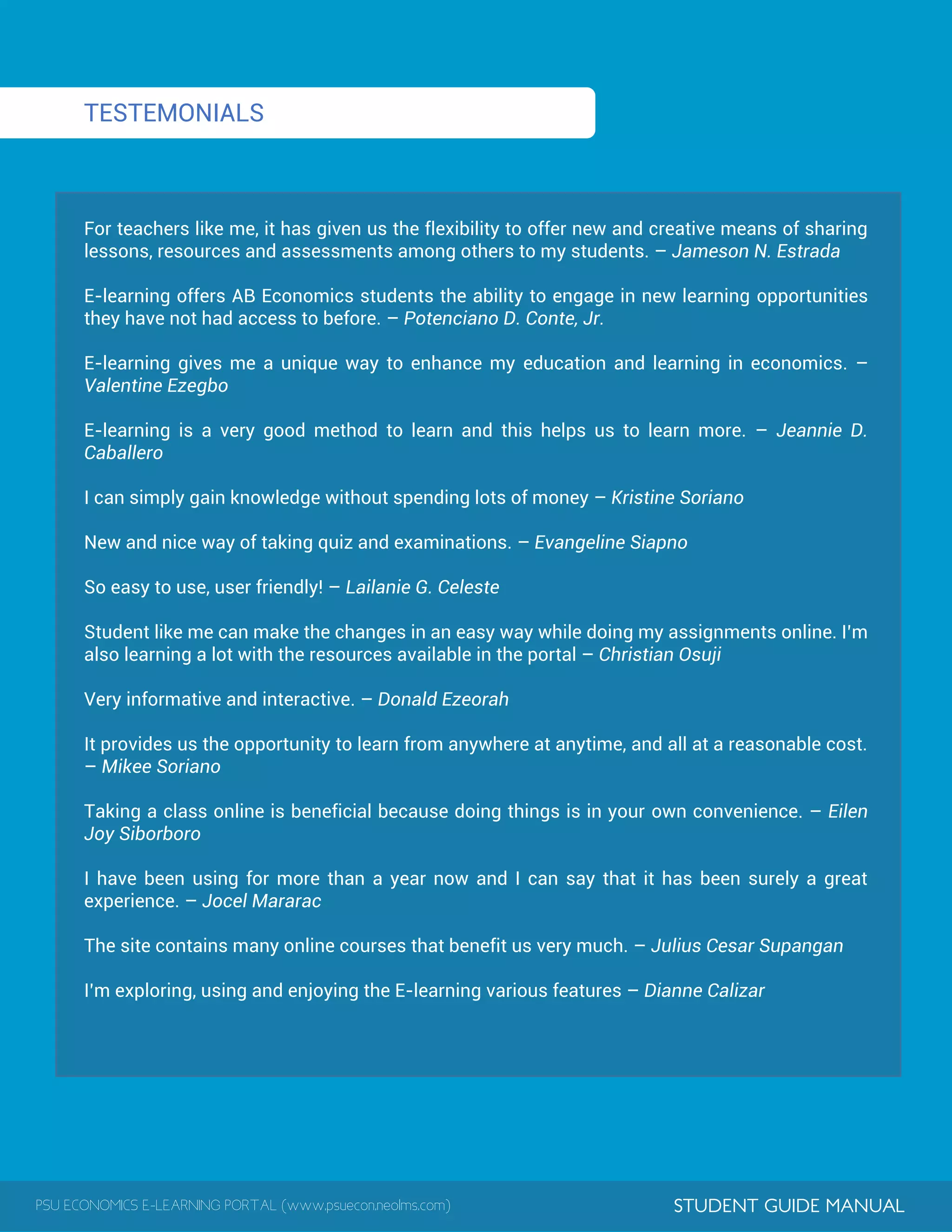
TESTEMONIALS
For teachers like me, it has given us the flexibility to offer new and creative means of sharing
lessons, resources and assessments among others to my students. – Jameson N. Estrada
E-learning offers AB Economics students the ability to engage in new learning opportunities
they have not had access to before. – Potenciano D. Conte, Jr.
E-learning gives me a unique way to enhance my education and learning in economics. –
Valentine Ezegbo
E-learning is a very good method to learn and this helps us to learn more. – Jeannie D.
Caballero
I can simply gain knowledge without spending lots of money – Kristine Soriano
New and nice way of taking quiz and examinations. – Evangeline Siapno
So easy to use, user friendly! – Lailanie G. Celeste
Student like me can make the changes in an easy way while doing my assignments online. I’m
also learning a lot with the resources available in the portal – Christian Osuji
Very informative and interactive. – Donald Ezeorah
It provides us the opportunity to learn from anywhere at anytime, and all at a reasonable cost.
– Mikee Soriano
Taking a class online is beneficial because doing things is in your own convenience. – Eilen
Joy Siborboro
I have been using for more than a year now and I can say that it has been surely a great
experience. – Jocel Mararac
The site contains many online courses that benefit us very much. – Julius Cesar Supangan
I’m exploring, using and enjoying the E-learning various features – Dianne Calizar
PSU ECONOMICS E-LEARNING PORTAL (www.psuecon.neolms.com) STUDENT GUIDE MANUAL
ACCESSING PSU E-LEARNING PORTAL
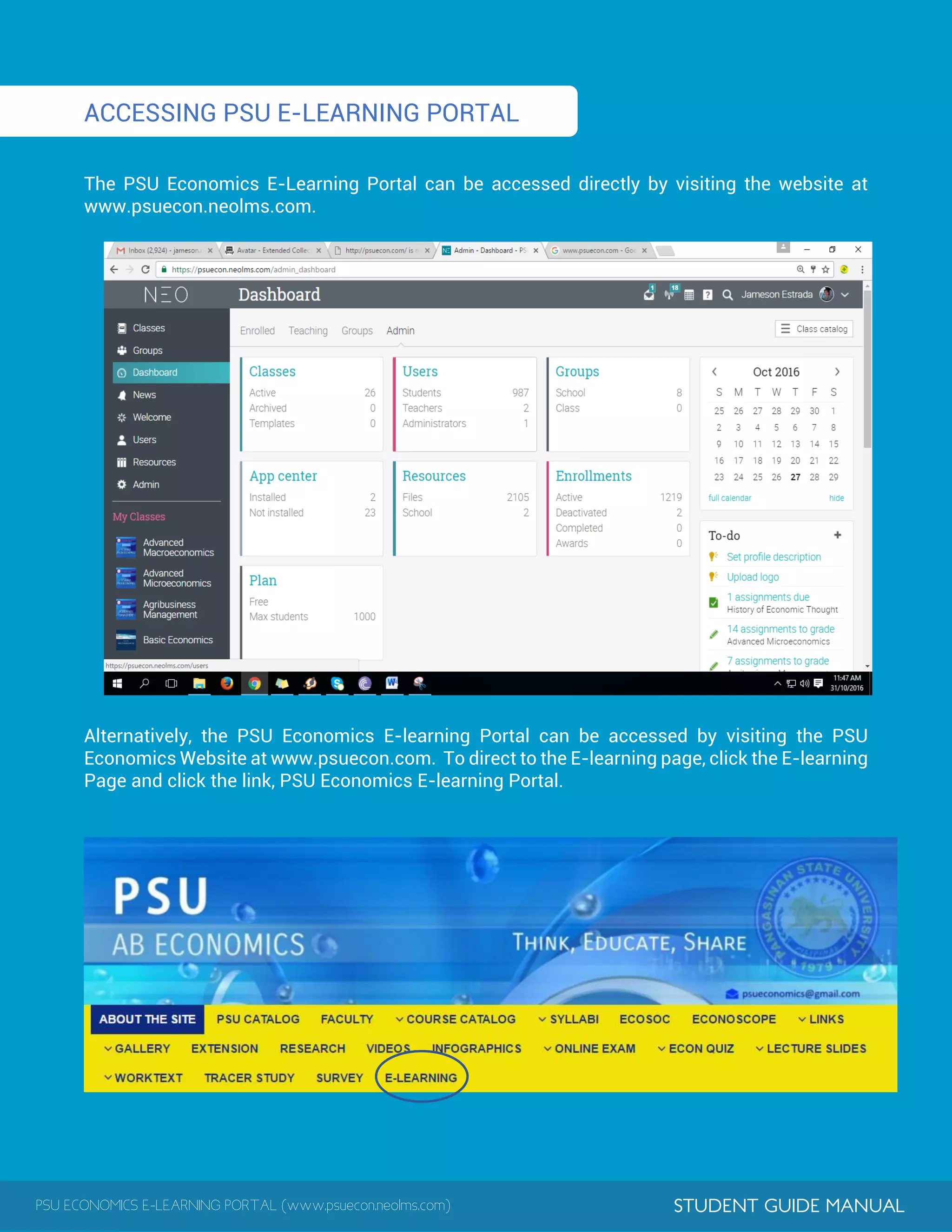
The PSU Economics E-Learning Portal can be accessed directly by visiting the website at
www.psuecon.neolms.com.
Alternatively, the PSU Economics E-learning Portal can be accessed by visiting the PSU
Economics Website at www.psuecon.com. To direct to the E-learning page, click the E-learning
Page and click the link, PSU Economics E-learning Portal.
PSU ECONOMICS E-LEARNING PORTAL (www.psuecon.neolms.com) STUDENT GUIDE MANUAL
CLASSES
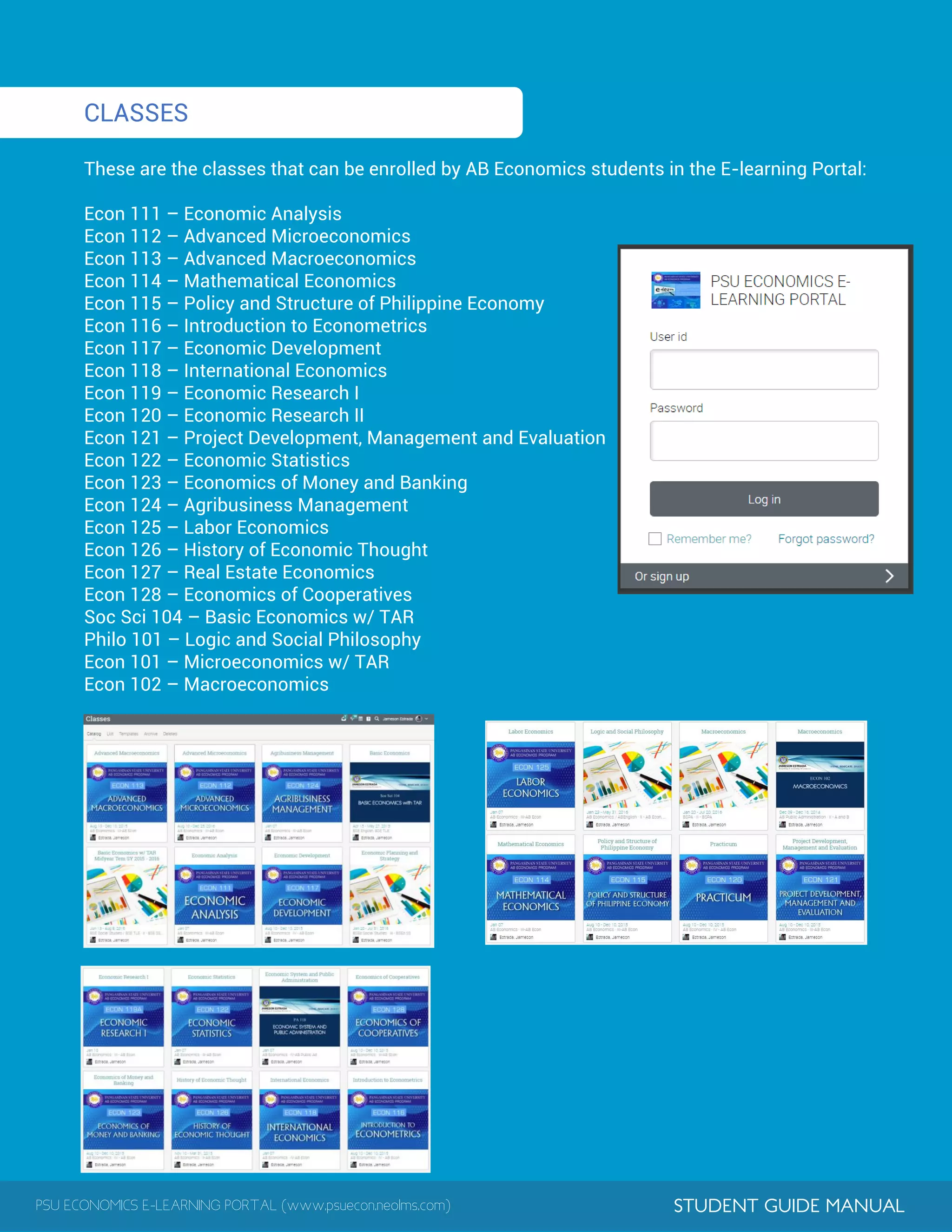
These are the classes that can be enrolled by AB Economics students in the E-learning Portal:
Econ 111 – Economic Analysis
Econ 112 – Advanced Microeconomics
Econ 113 – Advanced Macroeconomics
Econ 114 – Mathematical Economics
Econ 115 – Policy and Structure of Philippine Economy
Econ 116 – Introduction to Econometrics
Econ 117 – Economic Development
Econ 118 – International Economics
Econ 119 – Economic Research I
Econ 120 – Economic Research II
Econ 121 – Project Development, Management and Evaluation
Econ 122 – Economic Statistics
Econ 123 – Economics of Money and Banking
Econ 124 – Agribusiness Management
Econ 125 – Labor Economics
Econ 126 – History of Economic Thought
Econ 127 – Real Estate Economics
Econ 128 – Economics of Cooperatives
Soc Sci 104 – Basic Economics w/ TAR
Philo 101 – Logic and Social Philosophy
Econ 101 – Microeconomics w/ TAR
Econ 102 – Macroeconomics
PSU ECONOMICS E-LEARNING PORTAL (www.psuecon.neolms.com) STUDENT GUIDE MANUAL
HOME PAGE AND NAVIGATION
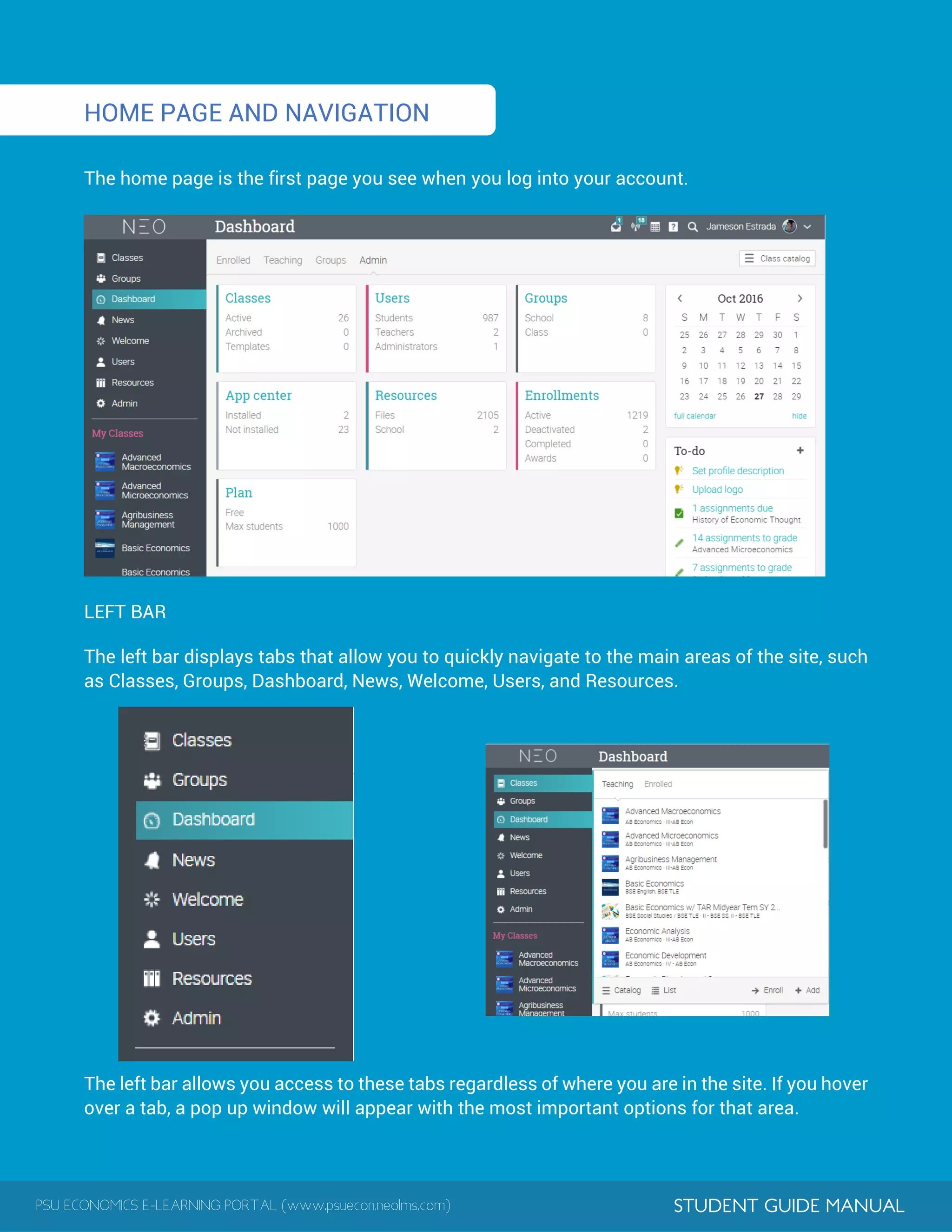
The home page is the first page you see when you log into your account.
LEFT BAR
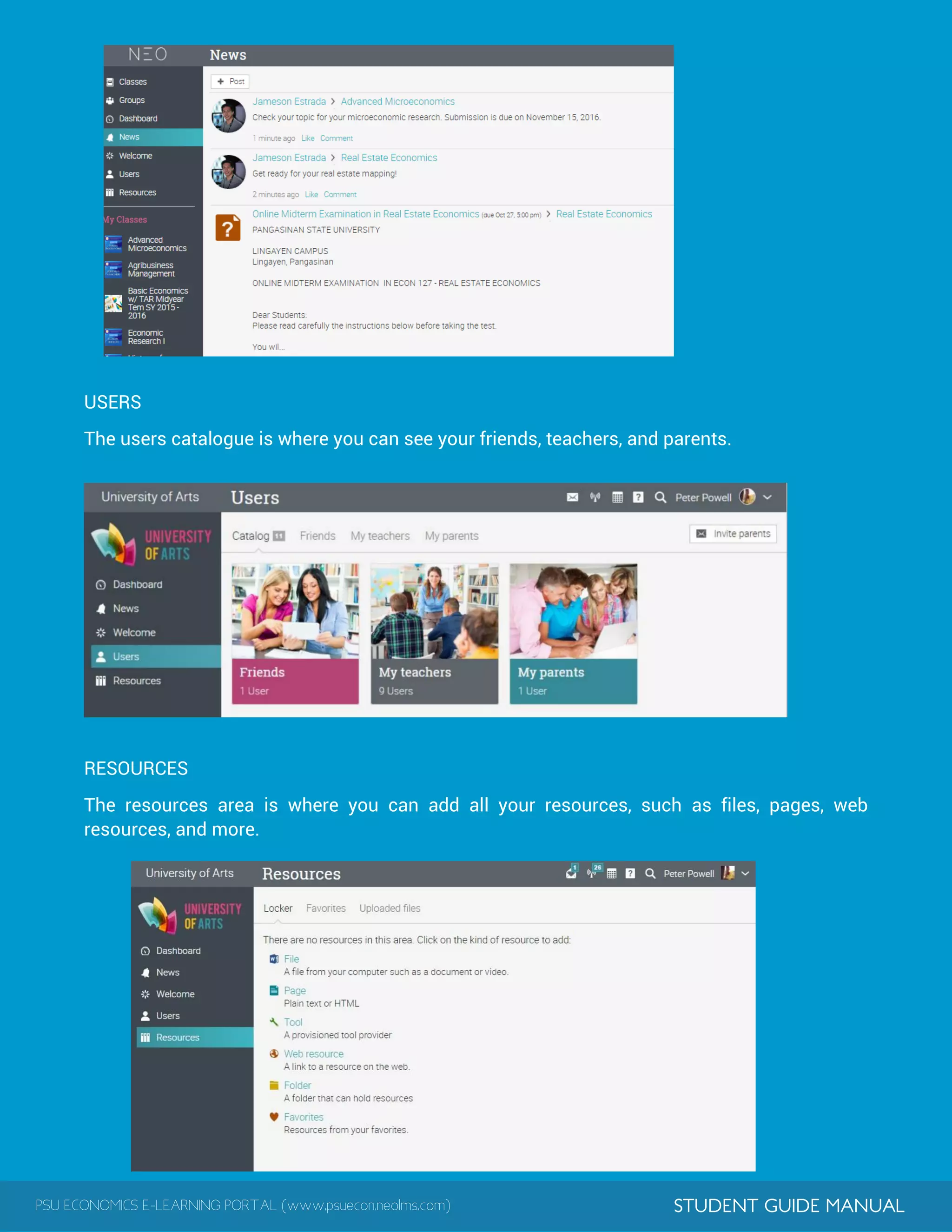
The left bar displays tabs that allow you to quickly navigate to the main areas of the site, such
as Classes, Groups, Dashboard, News, Welcome, Users, and Resources.
The left bar allows you access to these tabs regardless of where you are in the site. If you hover
over a tab, a pop up window will appear with the most important options for that area.
PSU ECONOMICS E-LEARNING PORTAL (www.psuecon.neolms.com) STUDENT GUIDE MANUAL
TOP RIGHT BAR
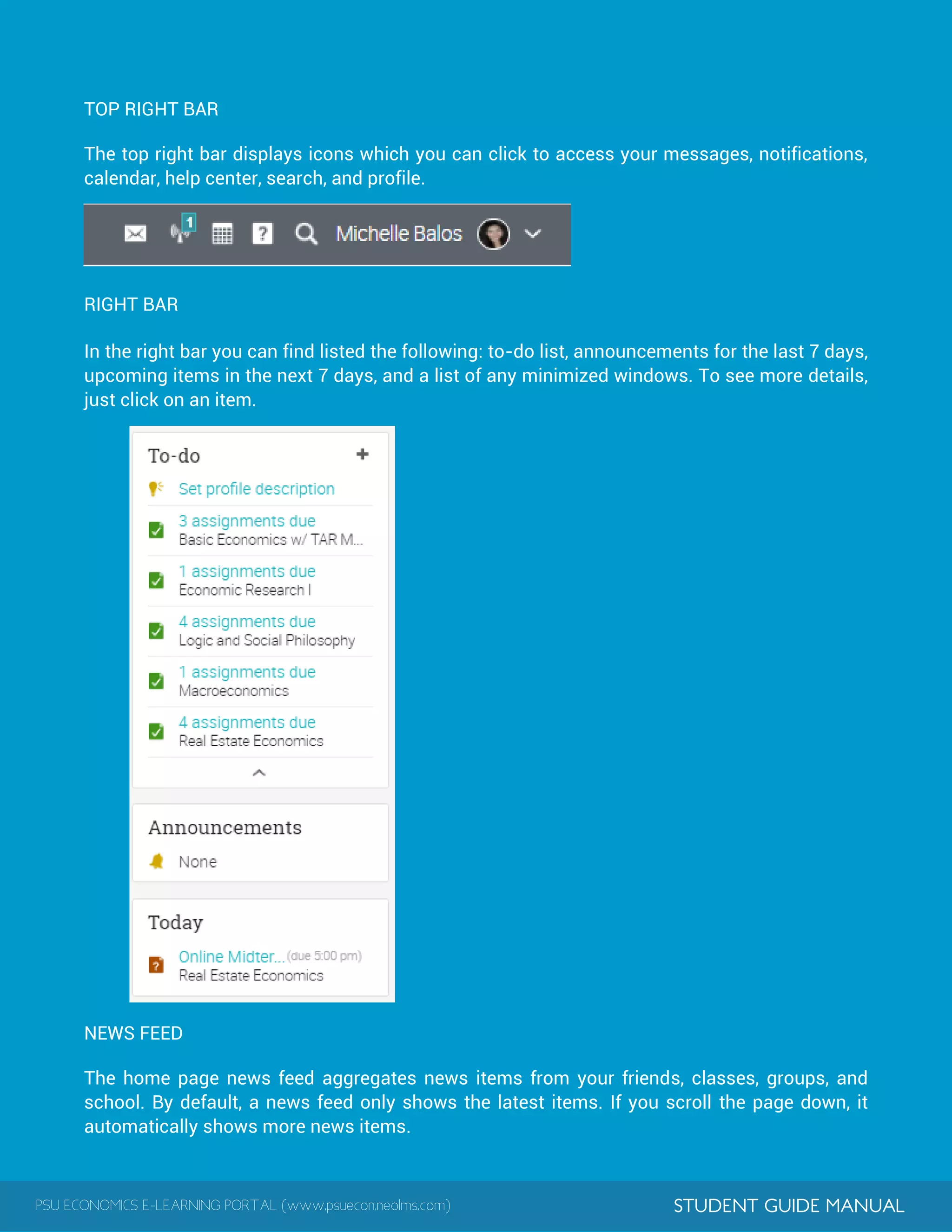
The top right bar displays icons which you can click to access your messages, notifications,
calendar, help center, search, and profile.
RIGHT BAR
In the right bar you can find listed the following: to-do list, announcements for the last 7 days,
upcoming items in the next 7 days, and a list of any minimized windows. To see more details,
just click on an item.
NEWS FEED
The home page news feed aggregates news items from your friends, classes, groups, and
school. By default, a news feed only shows the latest items. If you scroll the page down, it
automatically shows more news items.
PSU ECONOMICS E-LEARNING PORTAL (www.psuecon.neolms.com) STUDENT GUIDE MANUAL
USERS
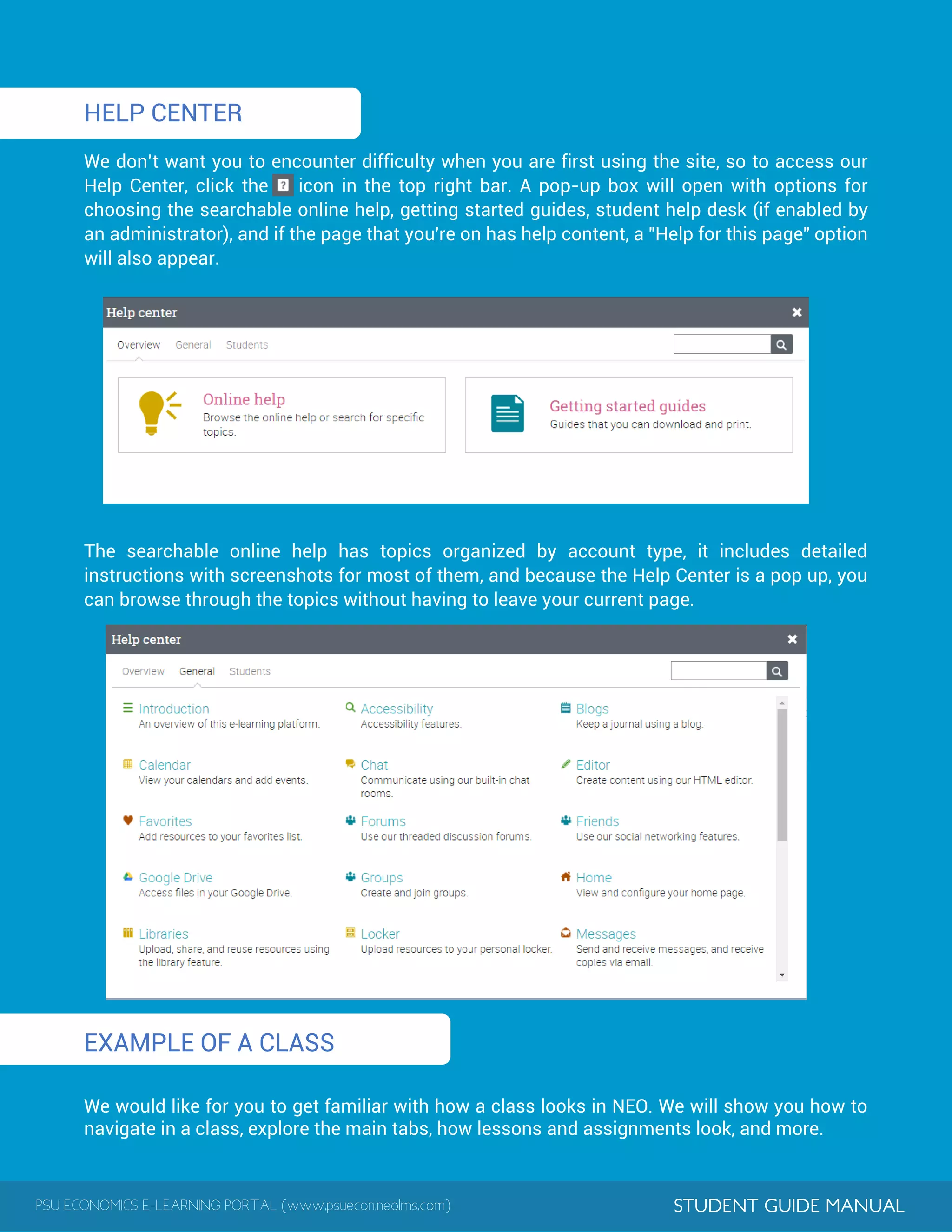
The users catalogue is where you can see your friends, teachers, and parents.
RESOURCES
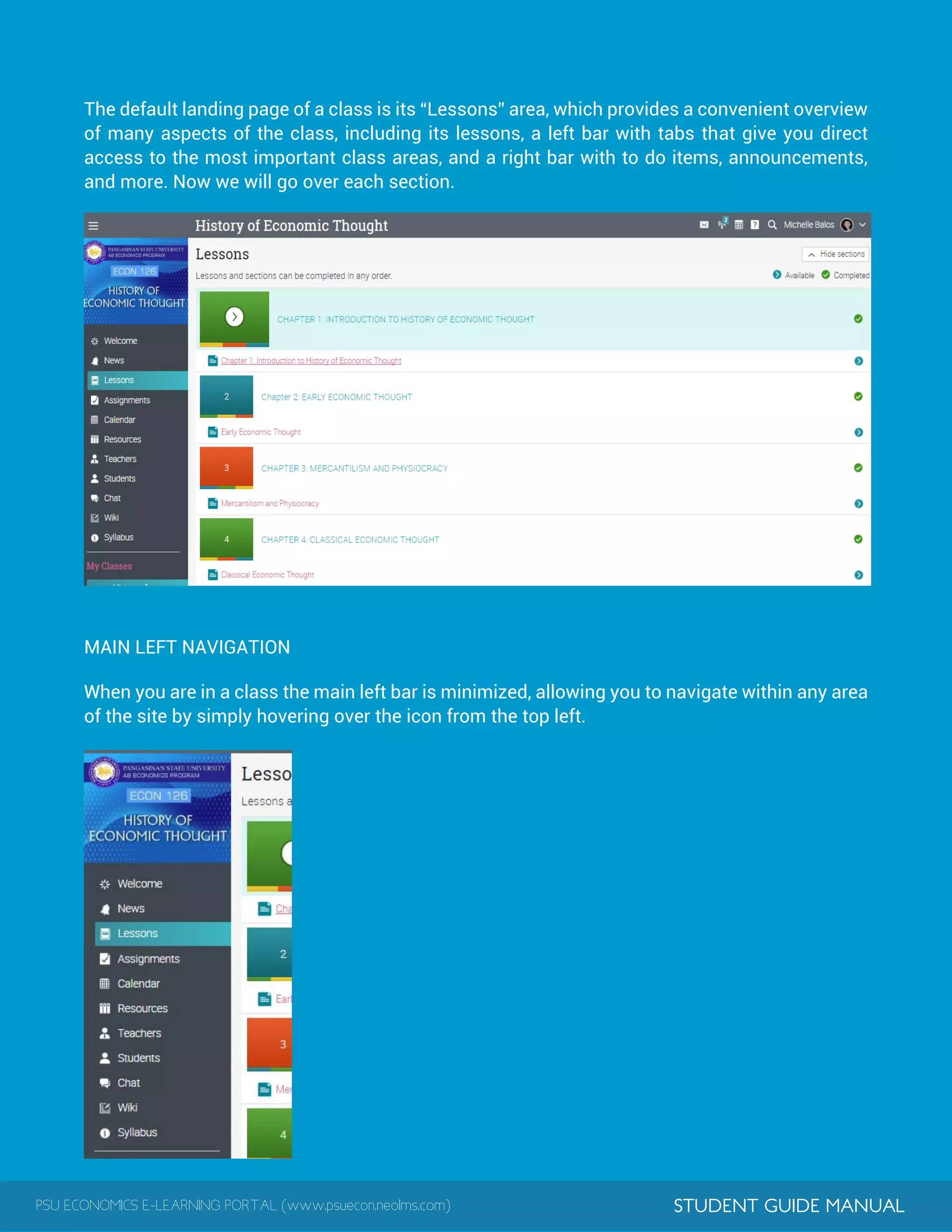
The resources area is where you can add all your resources, such as files, pages, web
resources, and more.
PSU ECONOMICS E-LEARNING PORTAL (www.psuecon.neolms.com) STUDENT GUIDE MANUAL
HELP CENTER
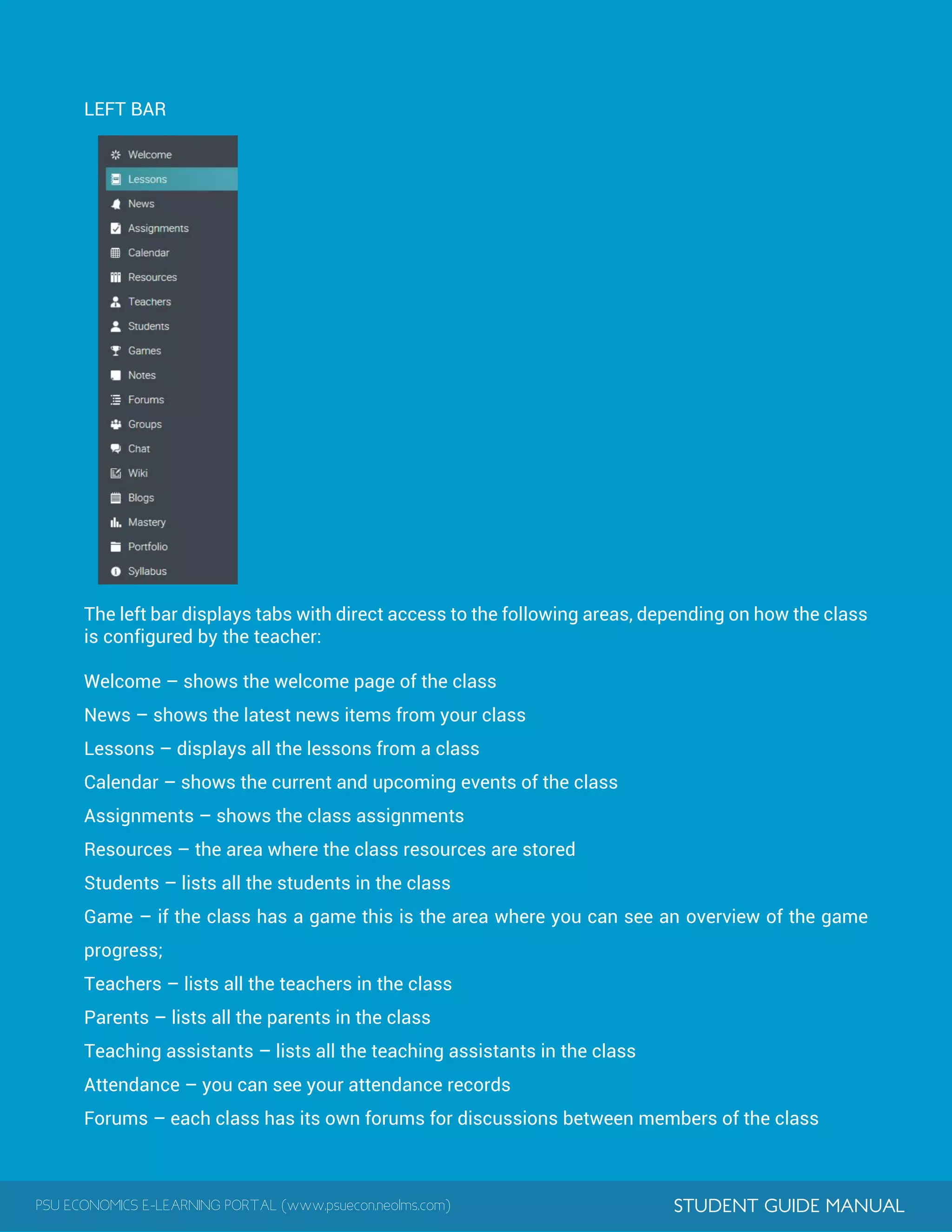
We don’t want you to encounter difficulty when you are first using the site, so to access our
Help Center, click the icon in the top right bar. A pop-up box will open with options for
choosing the searchable online help, getting started guides, student help desk (if enabled by
an administrator), and if the page that you're on has help content, a "Help for this page" option
will also appear.
The searchable online help has topics organized by account type, it includes detailed
instructions with screenshots for most of them, and because the Help Center is a pop up, you
can browse through the topics without having to leave your current page.
EXAMPLE OF A CLASS
We would like for you to get familiar with how a class looks in NEO. We will show you how to
navigate in a class, explore the main tabs, how lessons and assignments look, and more.
PSU ECONOMICS E-LEARNING PORTAL (www.psuecon.neolms.com) STUDENT GUIDE MANUAL
The default landing page of a class is its “Lessons” area, which provides a convenient overview
of many aspects of the class, including its lessons, a left bar with tabs that give you direct
access to the most important class areas, and a right bar with to do items, announcements,
and more. Now we will go over each section.
MAIN LEFT NAVIGATION
When you are in a class the main left bar is minimized, allowing you to navigate within any area
of the site by simply hovering over the icon from the top left.
PSU ECONOMICS E-LEARNING PORTAL (www.psuecon.neolms.com) STUDENT GUIDE MANUAL
LEFT BAR
The left bar displays tabs with direct access to the following areas, depending on how the class
is configured by the teacher:
Welcome – shows the welcome page of the class
News – shows the latest news items from your class
Lessons – displays all the lessons from a class
Calendar – shows the current and upcoming events of the class
Assignments – shows the class assignments
Resources – the area where the class resources are stored
Students – lists all the students in the class
Game – if the class has a game this is the area where you can see an overview of the game
progress;
Teachers – lists all the teachers in the class
Parents – lists all the parents in the class
Teaching assistants – lists all the teaching assistants in the class
Attendance – you can see your attendance records
Forums – each class has its own forums for discussions between members of the class
PSU ECONOMICS E-LEARNING PORTAL (www.psuecon.neolms.com) STUDENT GUIDE MANUAL
Groups – groups for the members of the class
Chat – chat rooms, where members can exchange text messages in real time
Wiki – wikis, which are a collection of pages that more than one person can edit
Blog – blog area, where students and teachers can share their online journals
Mastery – the ratings of your proficiencies in the curriculum of the class
Portfolio – here students can store copies of valuable resources of the class
Syllabus – the syllabus provides an overview of the class
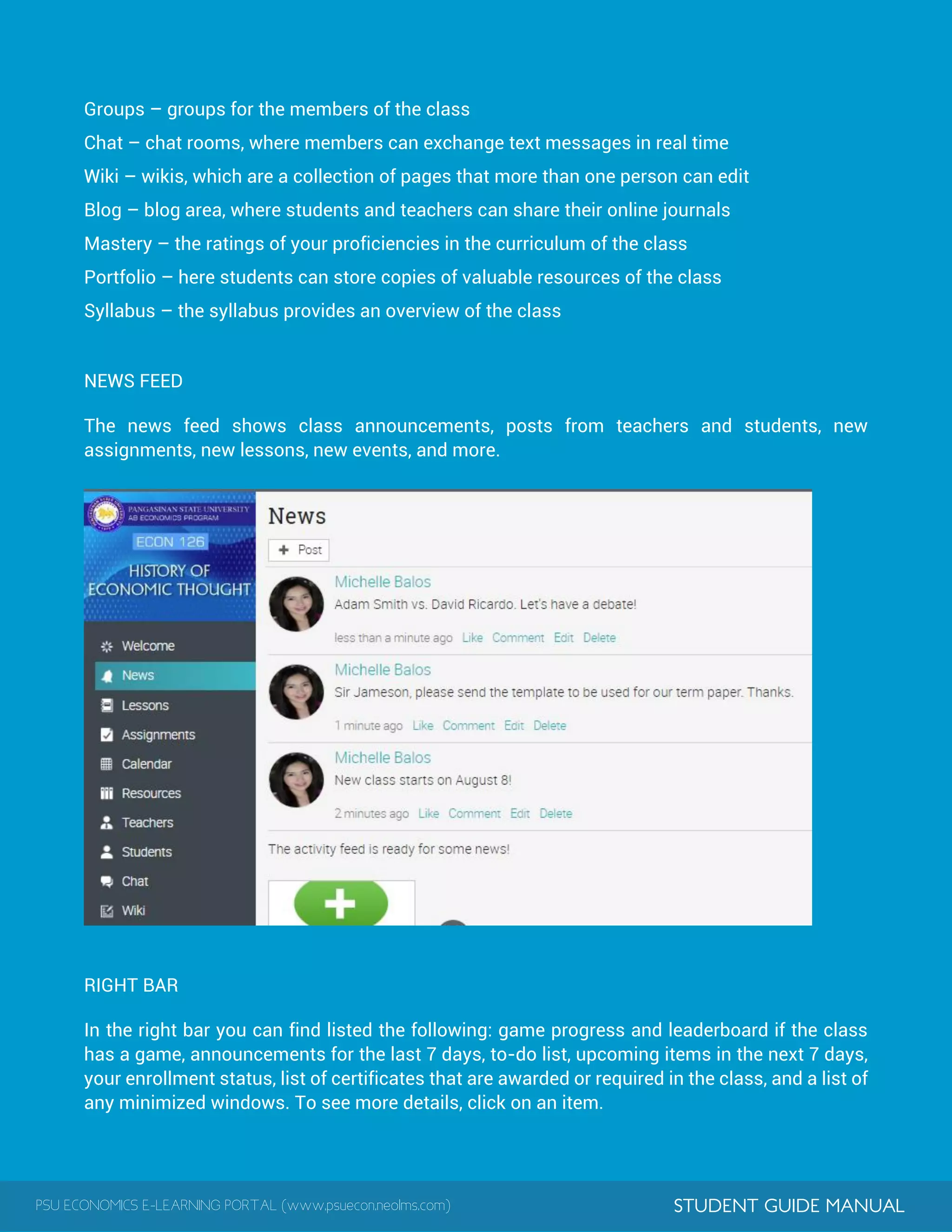
NEWS FEED
The news feed shows class announcements, posts from teachers and students, new
assignments, new lessons, new events, and more.
RIGHT BAR
In the right bar you can find listed the following: game progress and leaderboard if the class
has a game, announcements for the last 7 days, to-do list, upcoming items in the next 7 days,
your enrollment status, list of certificates that are awarded or required in the class, and a list of
any minimized windows. To see more details, click on an item.
PSU ECONOMICS E-LEARNING PORTAL (www.psuecon.neolms.com) STUDENT GUIDE MANUAL
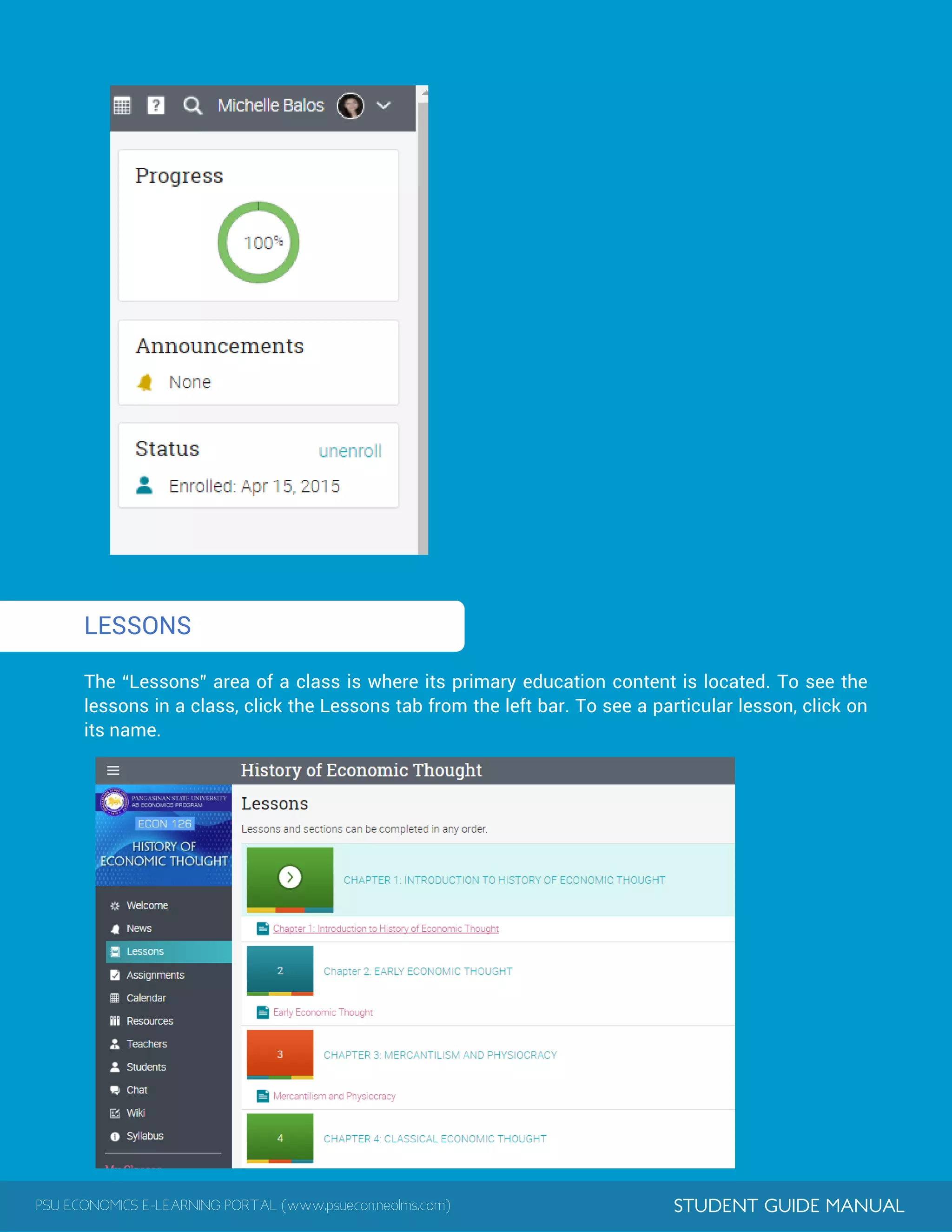
1LESSONS
The “Lessons” area of a class is where its primary education content is located. To see the
lessons in a class, click the Lessons tab from the left bar. To see a particular lesson, click on
its name.
PSU ECONOMICS E-LEARNING PORTAL (www.psuecon.neolms.com) STUDENT GUIDE MANUAL
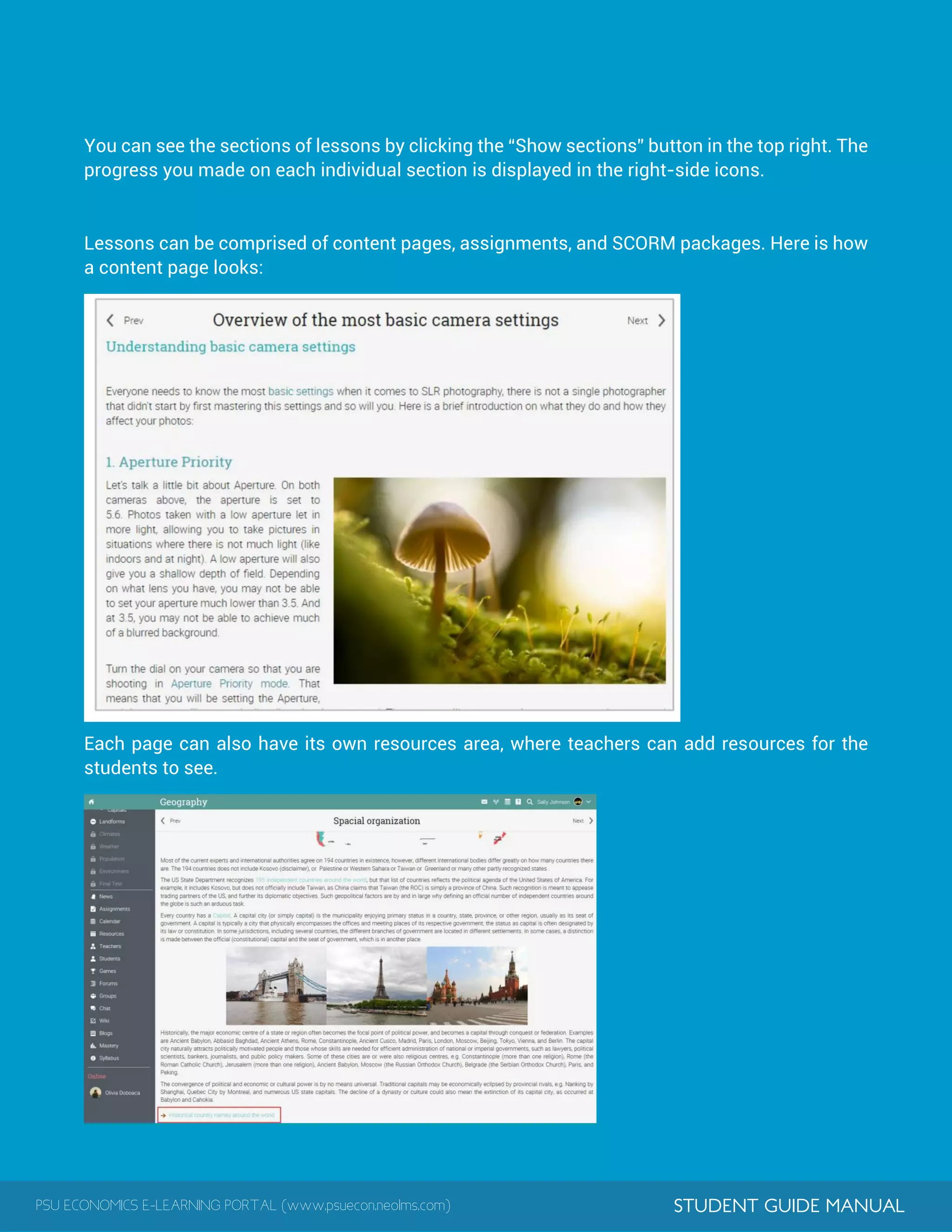
You can see the sections of lessons by clicking the “Show sections” button in the top right. The
progress you made on each individual section is displayed in the right-side icons.
Lessons can be comprised of content pages, assignments, and SCORM packages. Here is how
a content page looks:
Each page can also have its own resources area, where teachers can add resources for the
students to see.
PSU ECONOMICS E-LEARNING PORTAL (www.psuecon.neolms.com) STUDENT GUIDE MANUAL
1
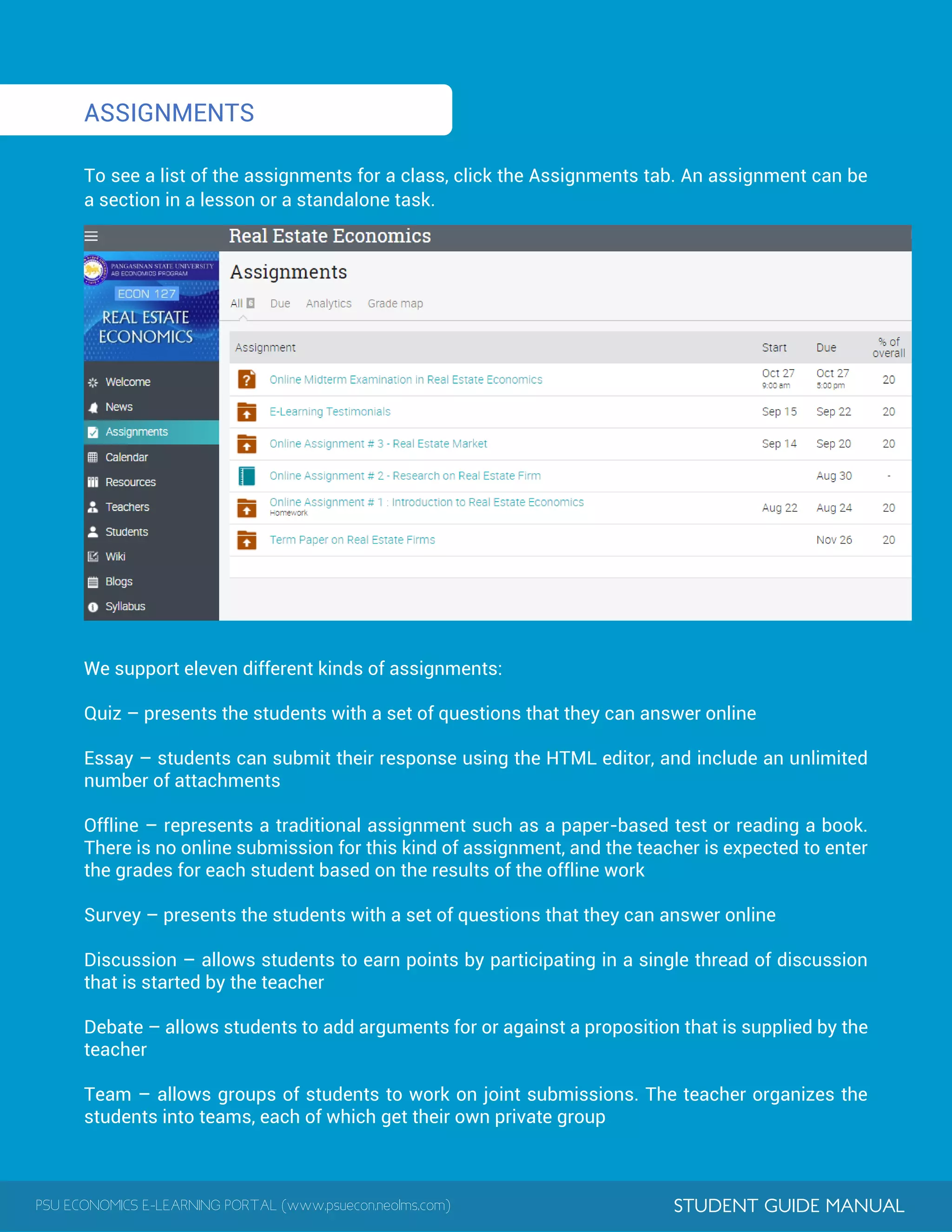
ASSIGNMENTS
To see a list of the assignments for a class, click the Assignments tab. An assignment can be
a section in a lesson or a standalone task.
We support eleven different kinds of assignments:
Quiz – presents the students with a set of questions that they can answer online
Essay – students can submit their response using the HTML editor, and include an unlimited
number of attachments
Offline – represents a traditional assignment such as a paper-based test or reading a book.
There is no online submission for this kind of assignment, and the teacher is expected to enter
the grades for each student based on the results of the offline work
Survey – presents the students with a set of questions that they can answer online
Discussion – allows students to earn points by participating in a single thread of discussion
that is started by the teacher
Debate – allows students to add arguments for or against a proposition that is supplied by the
teacher
Team – allows groups of students to work on joint submissions. The teacher organizes the
students into teams, each of which get their own private group
PSU ECONOMICS E-LEARNING PORTAL (www.psuecon.neolms.com) STUDENT GUIDE MANUAL
Dropbox – requires students to upload one or more files as their submission
SCORM – captures the results of a SCORM item
Attendance – awards points based on a student's attendance record
TurnItIn – add assignments that can have an originality checking through our TurnItIn
integration
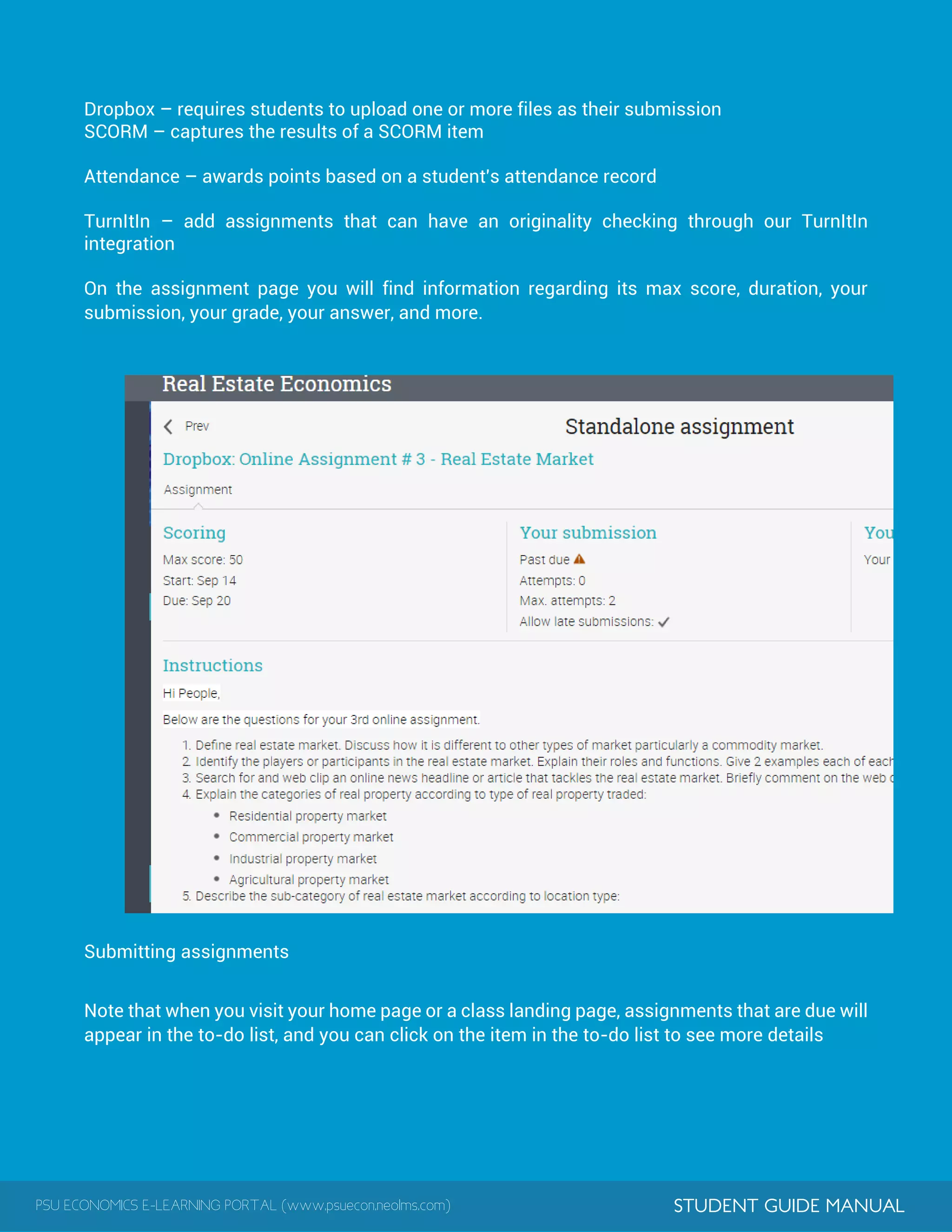
On the assignment page you will find information regarding its max score, duration, your
submission, your grade, your answer, and more.
Submitting assignments
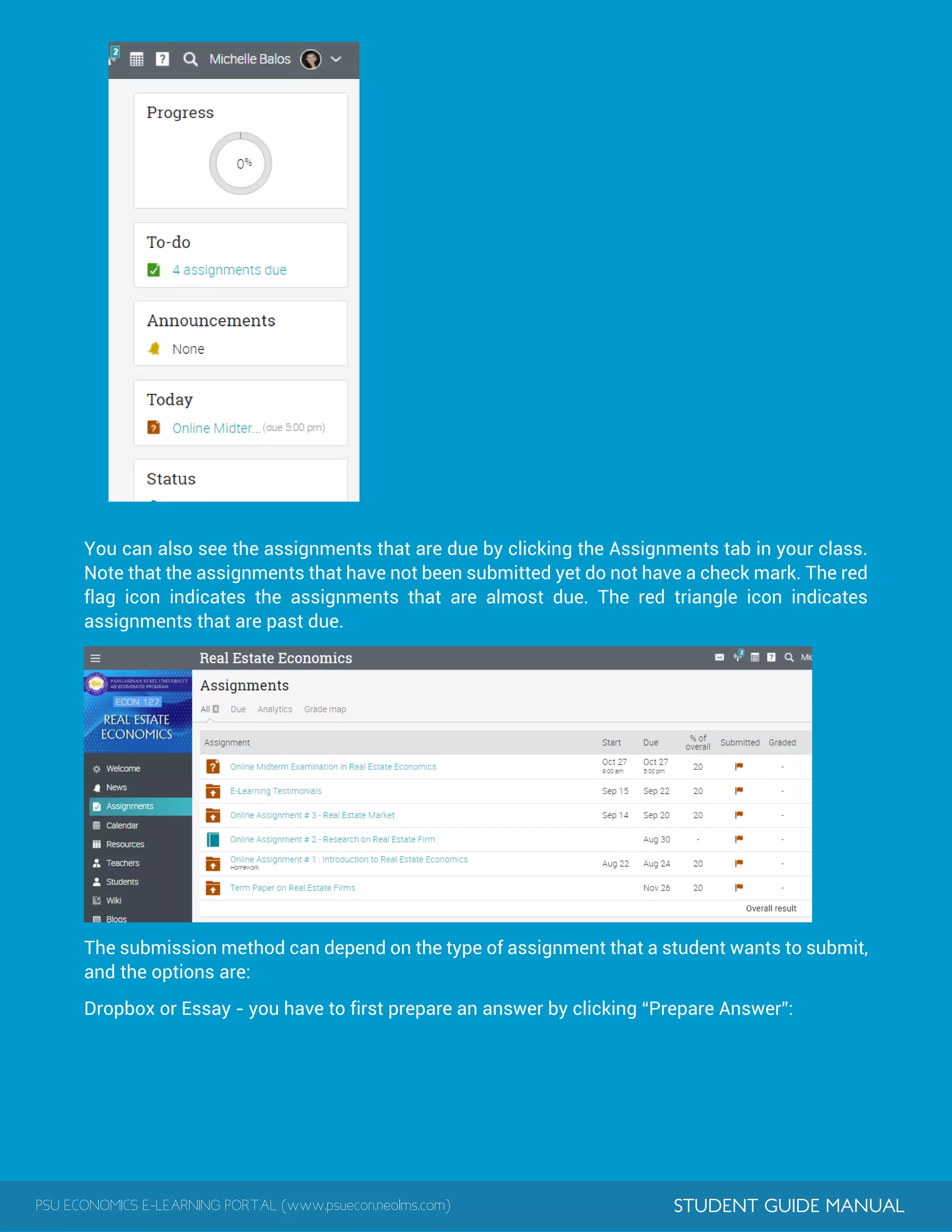
Note that when you visit your home page or a class landing page, assignments that are due will
appear in the to-do list, and you can click on the item in the to-do list to see more details
PSU ECONOMICS E-LEARNING PORTAL (www.psuecon.neolms.com) STUDENT GUIDE MANUAL
You can also see the assignments that are due by clicking the Assignments tab in your class.
Note that the assignments that have not been submitted yet do not have a check mark. The red
flag icon indicates the assignments that are almost due. The red triangle icon indicates
assignments that are past due.
The submission method can depend on the type of assignment that a student wants to submit,
and the options are:
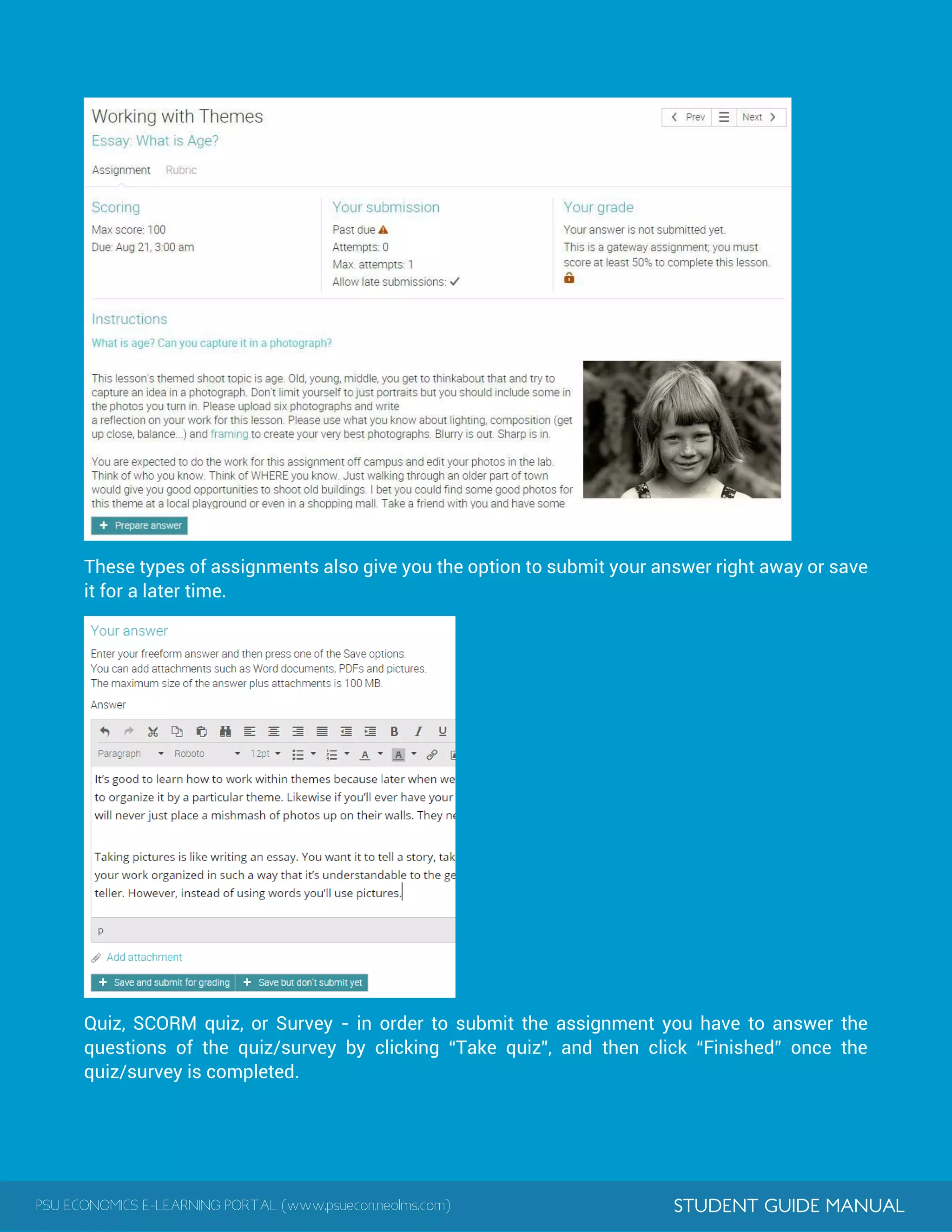
Dropbox or Essay - you have to first prepare an answer by clicking “Prepare Answer”:
PSU ECONOMICS E-LEARNING PORTAL (www.psuecon.neolms.com) STUDENT GUIDE MANUAL
These types of assignments also give you the option to submit your answer right away or save
it for a later time.
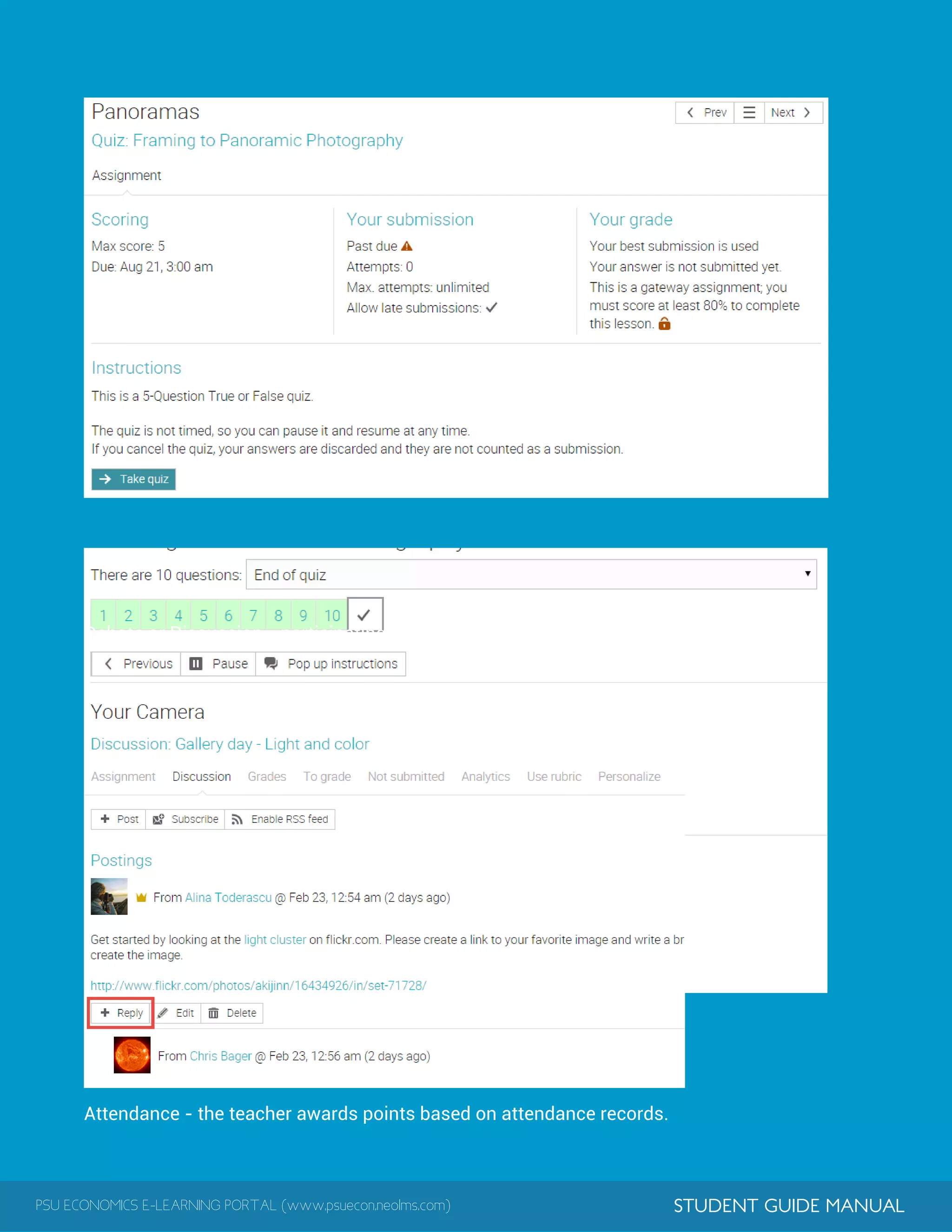
Quiz, SCORM quiz, or Survey - in order to submit the assignment you have to answer the
questions of the quiz/survey by clicking “Take quiz”, and then click “Finished” once the
quiz/survey is completed.
PSU ECONOMICS E-LEARNING PORTAL (www.psuecon.neolms.com) STUDENT GUIDE MANUAL
.
Debate or Discussion - participating in the discussions is considered a submission.
Attendance - the teacher awards points based on attendance records.
PSU ECONOMICS E-LEARNING PORTAL (www.psuecon.neolms.com) STUDENT GUIDE MANUAL
1
1
Offline - there is no online submission by students for this type of assignment.
TurnItIn - the submission is made on the TurnItIn site.
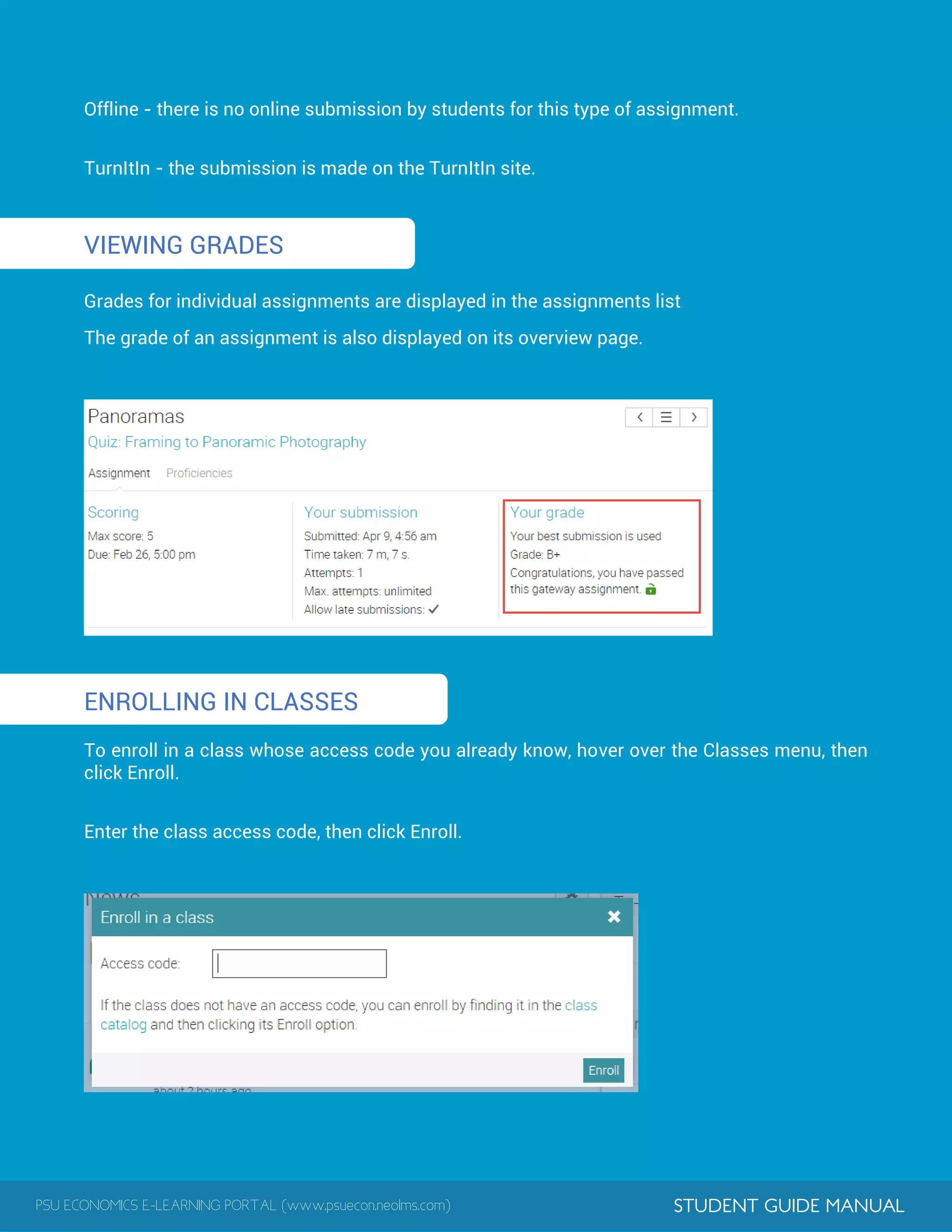
VIEWING GRADES
Grades for individual assignments are displayed in the assignments list
The grade of an assignment is also displayed on its overview page.
ENROLLING IN CLASSES
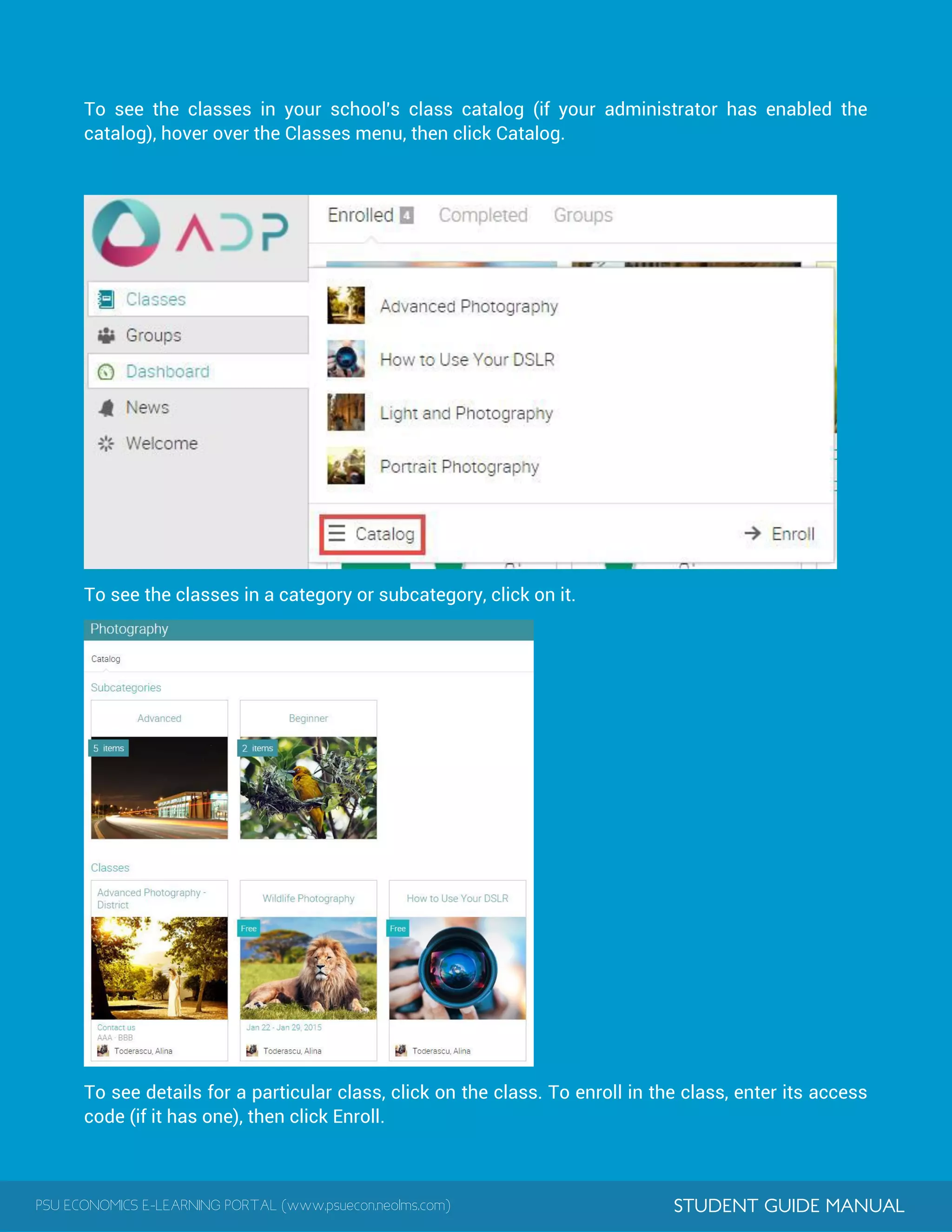
To enroll in a class whose access code you already know, hover over the Classes menu, then
click Enroll.
Enter the class access code, then click Enroll.
PSU ECONOMICS E-LEARNING PORTAL (www.psuecon.neolms.com) STUDENT GUIDE MANUAL
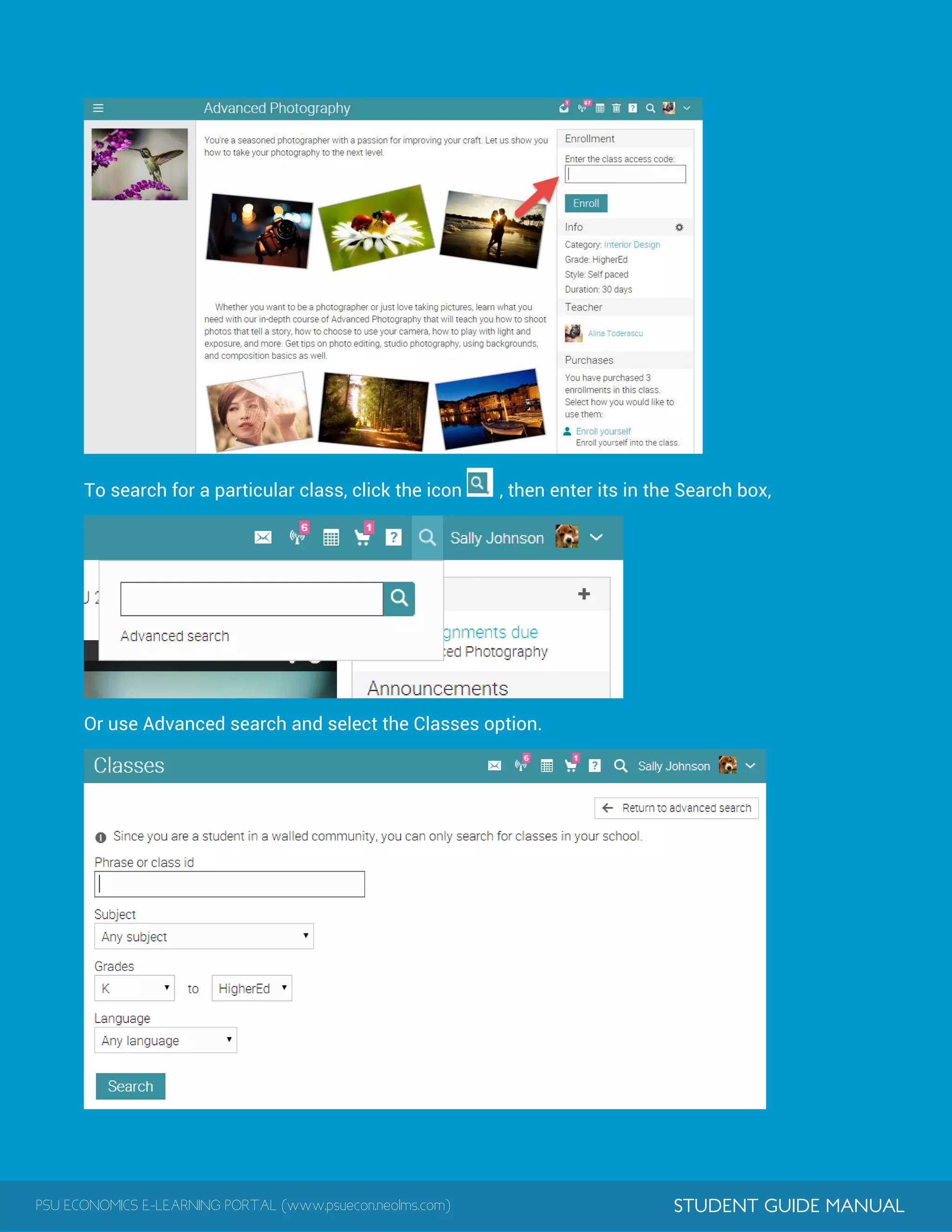
To see the classes in your school's class catalog (if your administrator has enabled the
catalog), hover over the Classes menu, then click Catalog.
To see the classes in a category or subcategory, click on it.
To see details for a particular class, click on the class. To enroll in the class, enter its access
code (if it has one), then click Enroll.
PSU ECONOMICS E-LEARNING PORTAL (www.psuecon.neolms.com) STUDENT GUIDE MANUAL
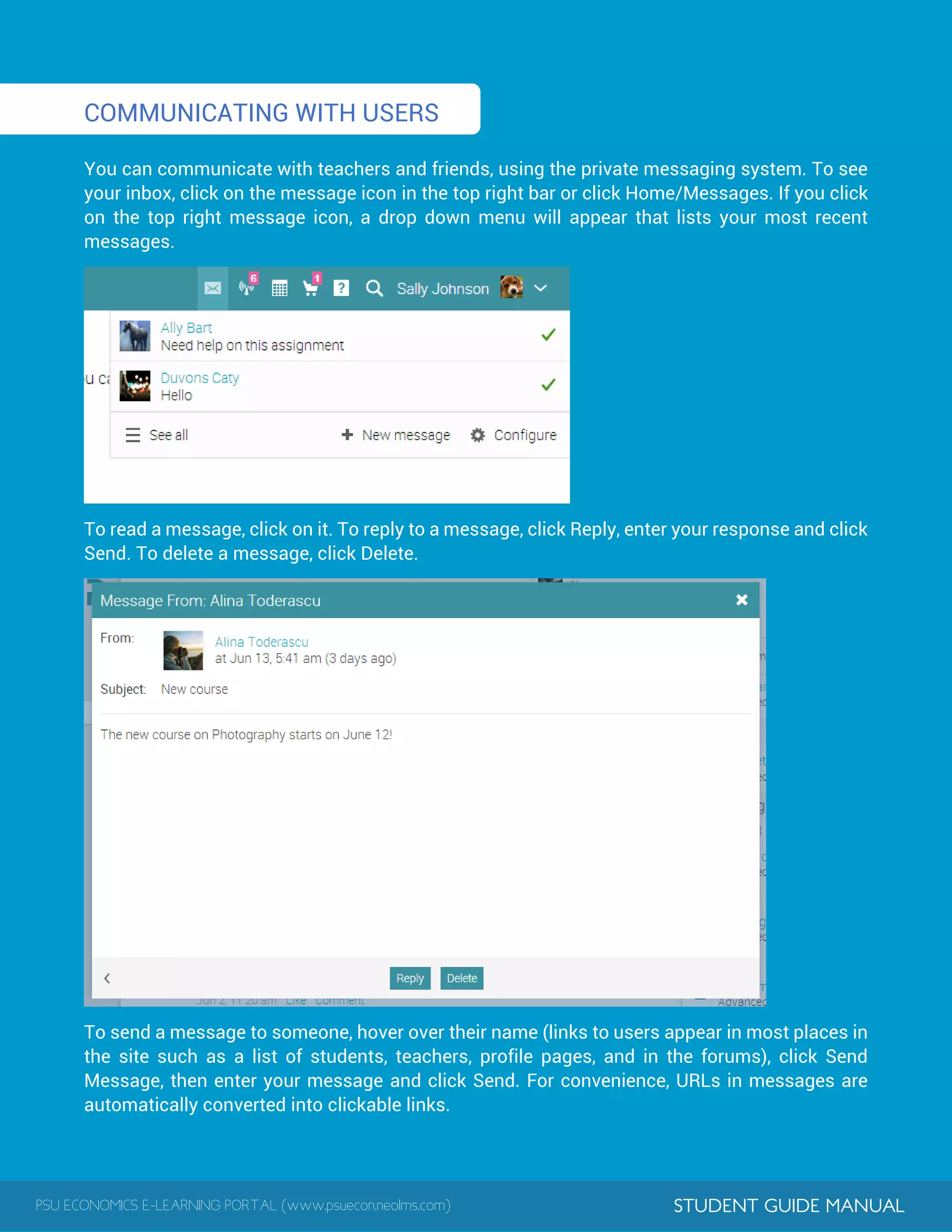
To search for a particular class, click the icon , then enter its in the Search box,
Or use Advanced search and select the Classes option.
PSU ECONOMICS E-LEARNING PORTAL (www.psuecon.neolms.com) STUDENT GUIDE MANUAL
1
COMMUNICATING WITH USERS
You can communicate with teachers and friends, using the private messaging system. To see
your inbox, click on the message icon in the top right bar or click Home/Messages. If you click
on the top right message icon, a drop down menu will appear that lists your most recent
messages.
To read a message, click on it. To reply to a message, click Reply, enter your response and click
Send. To delete a message, click Delete.
To send a message to someone, hover over their name (links to users appear in most places in
the site such as a list of students, teachers, profile pages, and in the forums), click Send
Message, then enter your message and click Send. For convenience, URLs in messages are
automatically converted into clickable links.
PSU ECONOMICS E-LEARNING PORTAL (www.psuecon.neolms.com) STUDENT GUIDE MANUAL
1
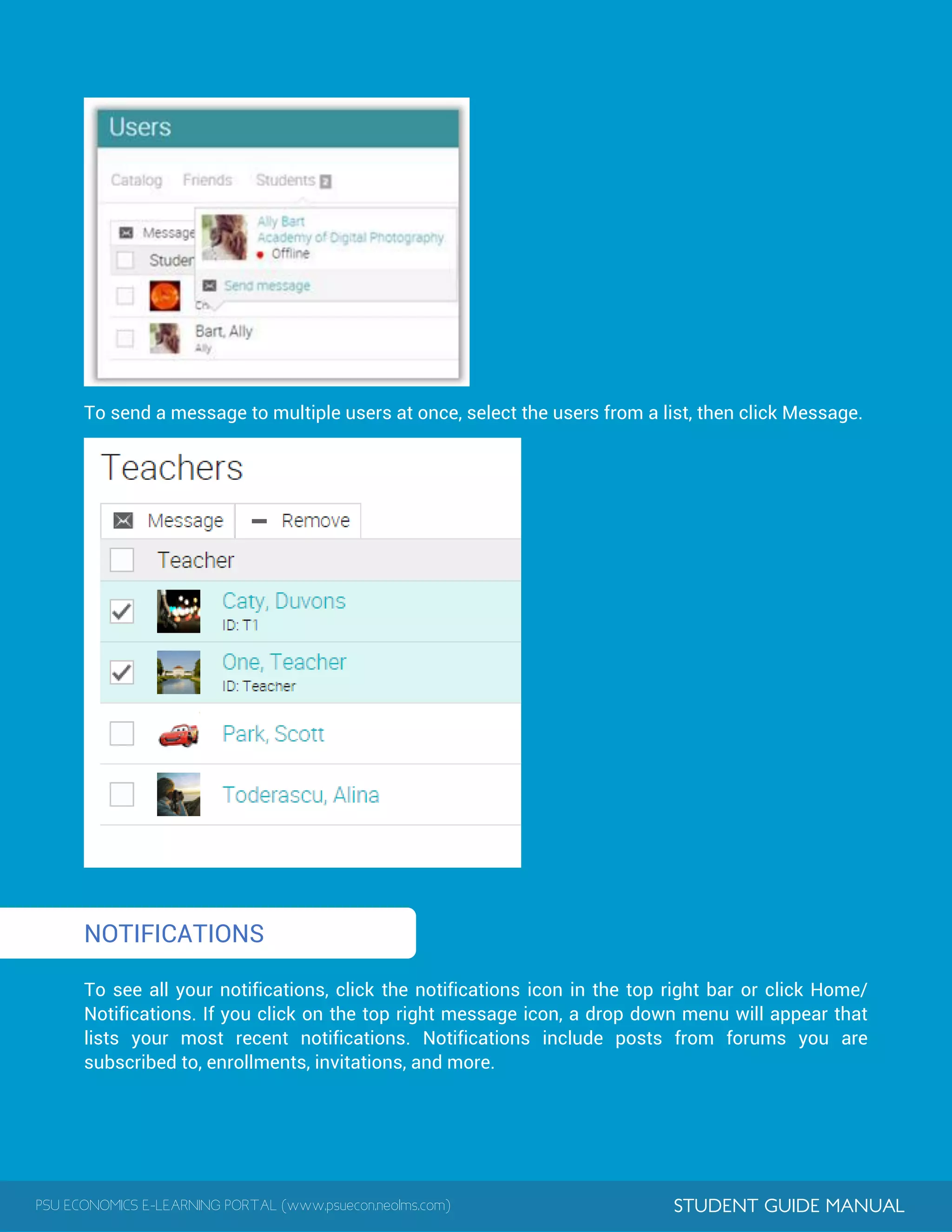
To send a message to multiple users at once, select the users from a list, then click Message.
NOTIFICATIONS
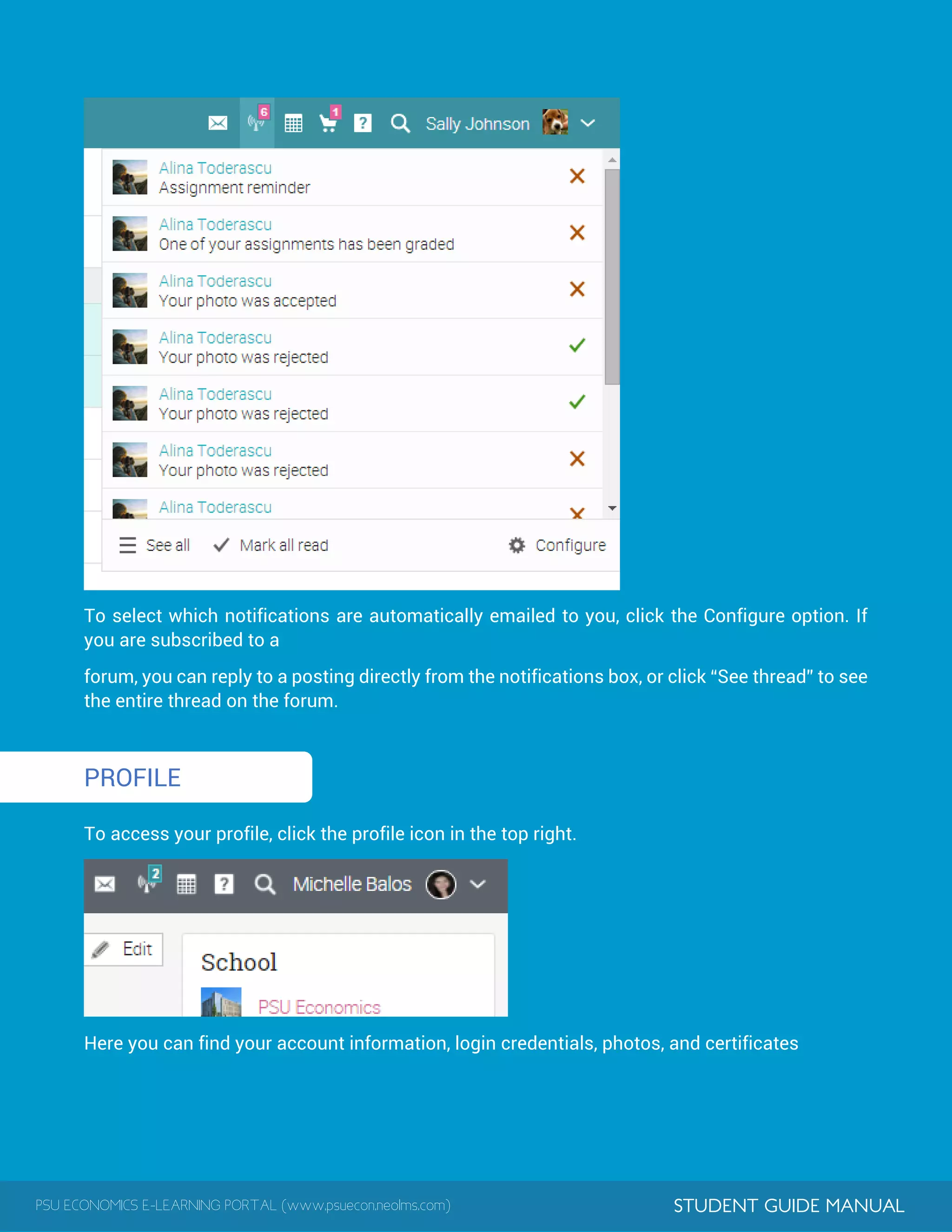
To see all your notifications, click the notifications icon in the top right bar or click Home/
Notifications. If you click on the top right message icon, a drop down menu will appear that
lists your most recent notifications. Notifications include posts from forums you are
subscribed to, enrollments, invitations, and more.
PSU ECONOMICS E-LEARNING PORTAL (www.psuecon.neolms.com) STUDENT GUIDE MANUAL
1
To select which notifications are automatically emailed to you, click the Configure option. If
you are subscribed to a
forum, you can reply to a posting directly from the notifications box, or click “See thread” to see
the entire thread on the forum.
PROFILE
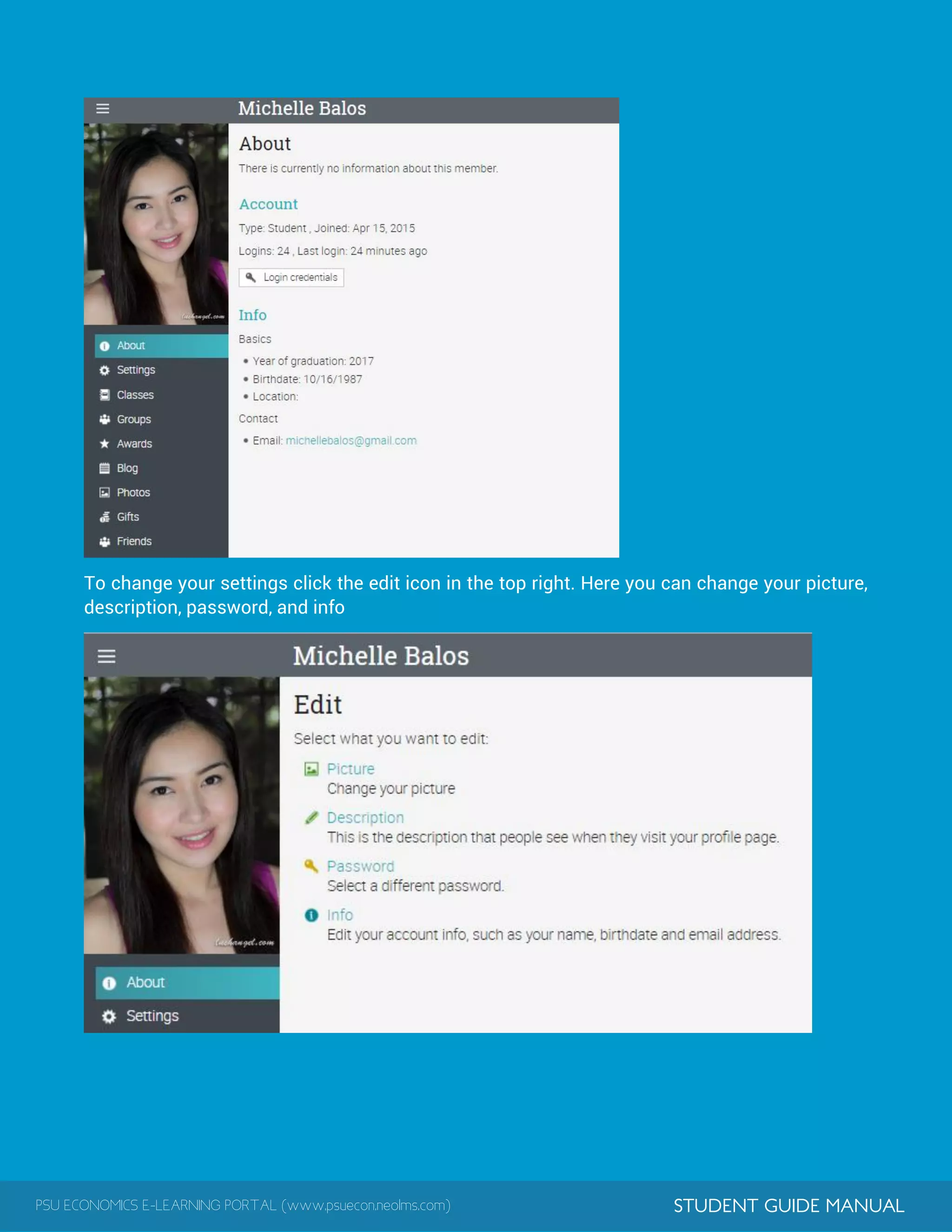
To access your profile, click the profile icon in the top right.
Here you can find your account information, login credentials, photos, and certificates
PSU ECONOMICS E-LEARNING PORTAL (www.psuecon.neolms.com) STUDENT GUIDE MANUAL
To change your settings click the edit icon in the top right. Here you can change your picture,
description, password, and info
PSU ECONOMICS E-LEARNING PORTAL (www.psuecon.neolms.com) STUDENT GUIDE MANUAL
1
ADDING FRIENDS
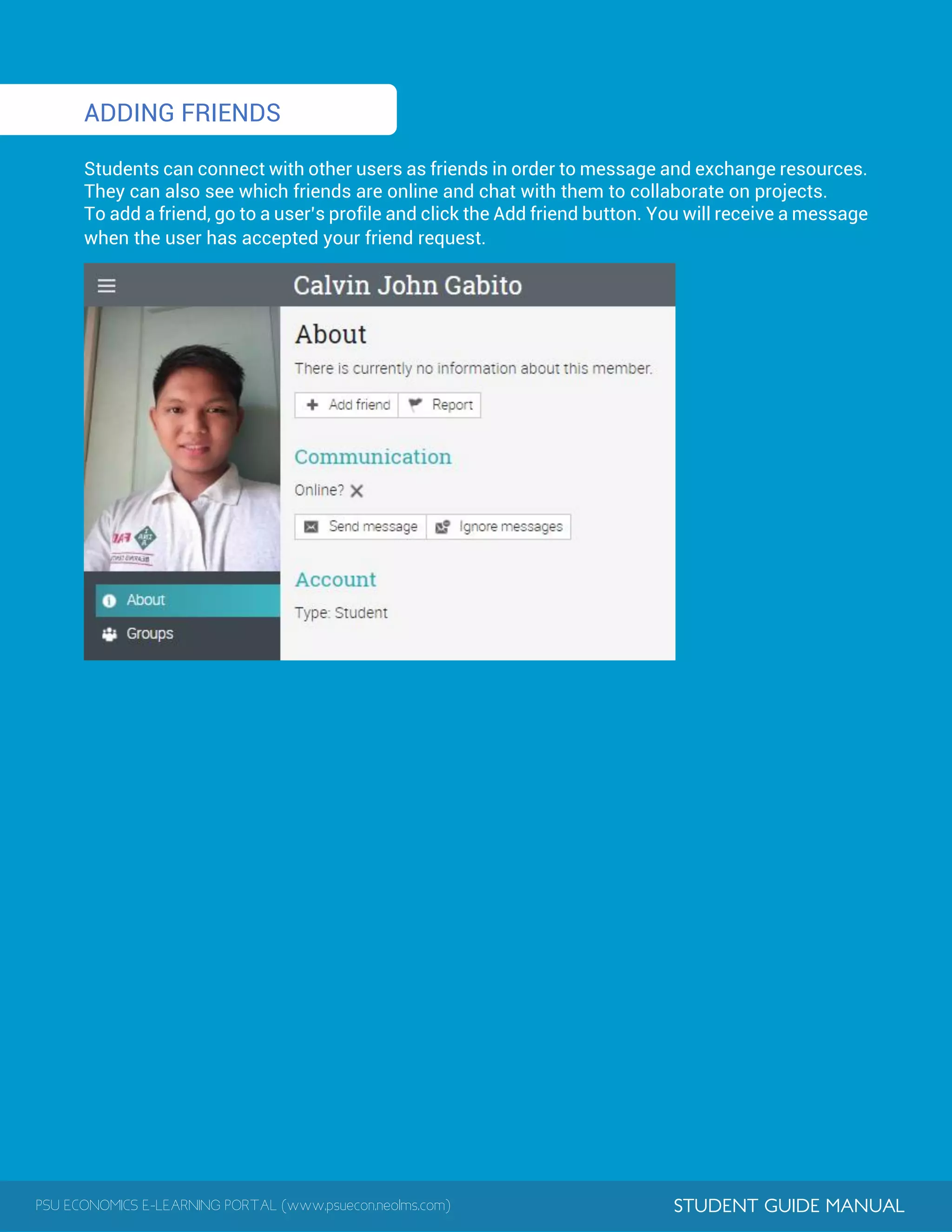
Students can connect with other users as friends in order to message and exchange resources.
They can also see which friends are online and chat with them to collaborate on projects.
To add a friend, go to a user’s profile and click the Add friend button. You will receive a message
when the user has accepted your friend request.
FREE Download of this Syllabi Catalog and other relevant materials
Visit www.psuecon.com or scan the code
AB Economics Program
Lingayen Campus
PANGASINAN STATE UNIVERSITY
PSU ECONOMICS E-LEARNING STUDENT GUIDE
S.Y 2016 - 2017 Edition

PSU Economics E-learning Guide for Students

  • 1.
    Pangasinan State University LINGAYENCAMPUS Lingayen, Pangasinan PSU ECONOMICS STUDENT GUIDE S.Y 2016 - 2017 Edition E-LEARNING www.psuecon.neolms.com JAMESON N. ESTRADA
  • 2.
    Preface Pangasinan State UniversityVMIO AB Economics Program Outcomes Assignments Lessons Example of a Class E-learning Classes Accessing PSU E-learningPortal Features of PSU Economics E-learning Functions of PSU Economics E-learning About PSU Economics E-learning Home Page and Navigation Help Center Viewing Grades Enrolling in Classes Communicating with Users Notifications Profile Adding Friends 2 11 10 9 8 7 6 4 3 7 8 12 15 16 17 18 19 20 22 TABLE OF CONTENTS
  • 3.
    PSU ECONOMICS E-LEARNINGPORTAL (www.psuecon.neolms.com) STUDENT GUIDE MANUAL PREFACE Everything we do at AB Economics program is oriented to students’ success. This is why the program is designed to produce graduates who can demonstrate expertise on economic concepts and theories necessary to understand the functioning of the economy for economic analysis and policy-making, develop skills in the formulation of project proposals, undertaking of economic researches, solving mathematical problems and constructing economic models and perform with competence and dynamism as a productive and innovative economic player who takes the initiative to lead for good governance, economic growth and economic development. In line with this, one thing is certain, upon completion of the program students will be prepared and equipped with the skills and competencies needed to meet or exceed their career pathway expectations. We proudly assert in our University vision to become an ASEAN Premier State University in 2020 and we deeply commit in our University’s mission to develop highly principled, morally upright, innovative and globally competent individuals capable of meeting the needs of industry, public service and civil society. Our program always commits to serve those who strive to make a difference and go an extra mile in their lives. This commitment is evident in our program’s policies, best academic practices, student activities and support services. It is indeed our objective to guide the students in pursuing their educational goals and ensure that they receive the quality education they have constantly envisioned. One way of doing this is by furnishing them with a very essential academic tool in the form of a SYLLABI CATALOG. This instrument will serve as a contract between the students and the teacher regarding course expectations, requirements and policies as it clearly communicates what the teacher expects of students and what students can expect from the teacher. The program develops a learning management system dubbed, PSU Economics E-learning, which aims to provide AB Economics students an online portal that enables them to access and get learning content and educational resources trough online virtual courses about their different core subjects in Economics. This is an essential online portal where the AB Economics students can easily connect and collaborate with their teachers and can continue their educational endeavors online 24/7, anywhere. We are happy to encourage our dear AB Economics students to familiarize this E-learning student guide so they can maximize the utilization of the PSU Economics E-leaning. Engage, enjoy and keep on learning with us. Wishing you best regards and more power to your academic endeavor. AB ECONOMICS FACULTY
  • 4.
    PSU ECONOMICS E-LEARNINGPORTAL (www.psuecon.neolms.com) STUDENT GUIDE MANUAL UNIVERSITY VISION, MISSION AND INSTITUTIONAL OUTCOMES UNIVERSITY VISION To become an ASEAN Premier State University by 2020 UNIVERSITY MISSION The Pangasinan State University, through instruction, research, extension and production, commits to develop highly principled, morally upright , innovative and globally competent individuals capable of meeting the needs of industry, public service and civil society. GUIDING PHILOSOPHY The Pangasinan State University’s leadership adheres to the Filipino educational philosophy that education is geared towards better citizenship and livelihood and the United Nation’s declaration that education is for all giving access to quality education STRATEGIC GOALS ■ Excellent student learning and career development ■ Strong research culture and technology transfer ■ Good governance ■ Sustainable social responsibilities ■ Quality human resources management and development ■ Efficient management of assets and finances ■ Responsive to globalization INSTITUTIONAL OUTCOMES AND CORE VALUES The Pangasinan State University Institutional Learning Outcomes (PSU ILO) are the qualities that PSUnians must possess. These outcomes are anchored on the following core values: Accountability and Transparency, Credibility and Integrity, Competence and Commitment to Achieve, Excellence in Service Delivery, Social and Environmental Responsiveness, and Spirituality – (ACCESS). Anchored on these core values, the PSU graduates are able to 1. Demonstrate through institutional mechanisms, systems, policies, and processes which are reflective of transparency, equity, participatory decision making, and accountability. 2. Engage in relevant, comprehensive and sustainable development initiatives through multiple perspectives in decisions and actions that build personal and professional credibility and integrity. 3. Set challenging goals and tasks with determination and sense of urgency which provide continuous improvement and producing quality outputs leading to inclusive growth. 4. Exhibit life-long learning and global competency proficiency in communication skills, inter/interpersonal skills, entrepreneurial skills, innovative mindset, research and production initiatives and capability in meeting the industry requirements of local, ASEAN and international human capital market through relevant and comprehensive programs. 5. Display, socially and environmentally responsive organizational culture, which ensures higher productivity among the university constituents and elevate the welfare of the multi-sectoral communities. 6. Practice spiritual values and morally upright behavior which promote and inspire greater harmony to project a credible public image
  • 5.
    PSU ECONOMICS E-LEARNINGPORTAL (www.psuecon.neolms.com) STUDENT GUIDE MANUAL AB ECONOMICS PROGRAM OUTCOMES Demonstrate expertise on economic concepts and theories necessary to understand the functioning of the economy for economic analysis and policy-making.     Develop skills in the formulation of project proposals, undertaking of economic researches, solving mathematical problems and constructing economic models.         Perform with competence and dynamism as a productive and innovative economic player who takes the initiative to lead for good governance, economic growth and economic development.      
  • 6.
    PSU ECONOMICS E-LEARNINGPORTAL (www.psuecon.neolms.com) STUDENT GUIDE MANUAL ABOUT PSU ECONOMICS E-LEARNING PSU ECONOMICS E-LEARNING is a learning management system tool of the AB Economics program in PSU Lingayen Campus with a web address at www.psuecon.neolms.com that enables students to access and get learning content and educational resources trough online virtual courses about their different core subjects in Economics. This is an essential online portal where the AB Economics students can easily connect and collaborate with their teachers and can continue their educational endeavors online 24/7, anywhere. It FUNCTIONS OF PSU ECONOMICS E-LEARNING  Ability to create and manage class rosters and interact directly with virtual students.  Facilitate a fast and simple online class registration process  Upload and store documents, such as course materials/resources that are essential to the core curriculum.  Ability to give students online quiz and tests and manage the tests that are provided them.  Create different online assignment and keep an up-to-date calendar of assignments and tests.  Offer a beautiful and responsive web user interface, in which the teachers and students can interact, via email, chat and discussion forums.  Create class announcement and class reminders  Students can deliver and complete coursework and give them the power to track their work and progress.  Ability to grade online assignment, record results that allows for simple and straightforward assessments and testing of student’s progress. FEATURES OF PSU ECONOMICS E-LEARNING The PSU Economics E-learning is powered by NEO LMS, our E-learning service provider. NEO provides a beautiful, simple, powerful Learning Management System (LMS) for use by schools, individual teachers, and universities that makes it easy to deliver online education. Its mission is to make learning more enjoyable by offering an engaging e-learning solution that makes the whole process more productive. NEO is a world class, award winning LMS used by organizations ranging from large universities to small schools with just a few students. The platform is known for its easy-to-use and beautiful user interface, comprehensive set of innovative features, and pricing that provides great value for money. With NEO its easy to create great classes that students will enjoy anytime, everywhere. N NEO delivers a wide range of functionality that everybody expects in a modern a modern, state of the art LMS. Here are some of distinguishing and key essential features:
  • 7.
    PSU ECONOMICS E-LEARNINGPORTAL (www.psuecon.neolms.com) STUDENT GUIDE MANUAL  Unusually beautiful UI with tiled dashboards;  Responsive custom portals;  Graphical class catalog;  Mobile UI that provides all the functionality of the site;  Support for self-paced classes in addition to instructor-led classes;  Built-in reports;  Chat rooms, including live click-to-chat;  Support for 40+ languages;  Automatic translation of messages and forum postings;  Support for beautiful book-like lesson content;  Sophisticated content sync;  Web conferencing integration;  Rules engine;  Drip content;  Learning paths;  Integration with 300+ apps via Zapier;  Superb support for curricula and proficiencies;  District support with optional separate portals for each school;  Highly secure, 100% SSL and encrypted passwords. PSU ECONOMICS E-LEARNING EDUCATORS E-learning Developer/ Administrator Jameson N. Estrada E-learning Educators Jameson N. Estrada Advanced Microeconomics, Agribusiness Management Erna M. Salazar Econometrics, International Economics, Cooperatives Dr. Manolito C. Manuel Economic Development Potenciano D. Conte. Jr. Economic Statistics, Project Management John Angel N. Bautista Economic Research, Labor Economics Francis Gerald S. Amansec Economics of Money and Banking Leo P. De Vera. Jr. Advanced Microeconomics Lea A. Navarro History of Economic Thought
  • 8.
    PSU ECONOMICS E-LEARNINGPORTAL (www.psuecon.neolms.com) STUDENT GUIDE MANUAL TESTEMONIALS For teachers like me, it has given us the flexibility to offer new and creative means of sharing lessons, resources and assessments among others to my students. – Jameson N. Estrada E-learning offers AB Economics students the ability to engage in new learning opportunities they have not had access to before. – Potenciano D. Conte, Jr. E-learning gives me a unique way to enhance my education and learning in economics. – Valentine Ezegbo E-learning is a very good method to learn and this helps us to learn more. – Jeannie D. Caballero I can simply gain knowledge without spending lots of money – Kristine Soriano New and nice way of taking quiz and examinations. – Evangeline Siapno So easy to use, user friendly! – Lailanie G. Celeste Student like me can make the changes in an easy way while doing my assignments online. I’m also learning a lot with the resources available in the portal – Christian Osuji Very informative and interactive. – Donald Ezeorah It provides us the opportunity to learn from anywhere at anytime, and all at a reasonable cost. – Mikee Soriano Taking a class online is beneficial because doing things is in your own convenience. – Eilen Joy Siborboro I have been using for more than a year now and I can say that it has been surely a great experience. – Jocel Mararac The site contains many online courses that benefit us very much. – Julius Cesar Supangan I’m exploring, using and enjoying the E-learning various features – Dianne Calizar
  • 9.
    PSU ECONOMICS E-LEARNINGPORTAL (www.psuecon.neolms.com) STUDENT GUIDE MANUAL ACCESSING PSU E-LEARNING PORTAL The PSU Economics E-Learning Portal can be accessed directly by visiting the website at www.psuecon.neolms.com. Alternatively, the PSU Economics E-learning Portal can be accessed by visiting the PSU Economics Website at www.psuecon.com. To direct to the E-learning page, click the E-learning Page and click the link, PSU Economics E-learning Portal.
  • 10.
    PSU ECONOMICS E-LEARNINGPORTAL (www.psuecon.neolms.com) STUDENT GUIDE MANUAL CLASSES These are the classes that can be enrolled by AB Economics students in the E-learning Portal: Econ 111 – Economic Analysis Econ 112 – Advanced Microeconomics Econ 113 – Advanced Macroeconomics Econ 114 – Mathematical Economics Econ 115 – Policy and Structure of Philippine Economy Econ 116 – Introduction to Econometrics Econ 117 – Economic Development Econ 118 – International Economics Econ 119 – Economic Research I Econ 120 – Economic Research II Econ 121 – Project Development, Management and Evaluation Econ 122 – Economic Statistics Econ 123 – Economics of Money and Banking Econ 124 – Agribusiness Management Econ 125 – Labor Economics Econ 126 – History of Economic Thought Econ 127 – Real Estate Economics Econ 128 – Economics of Cooperatives Soc Sci 104 – Basic Economics w/ TAR Philo 101 – Logic and Social Philosophy Econ 101 – Microeconomics w/ TAR Econ 102 – Macroeconomics
  • 11.
    PSU ECONOMICS E-LEARNINGPORTAL (www.psuecon.neolms.com) STUDENT GUIDE MANUAL HOME PAGE AND NAVIGATION The home page is the first page you see when you log into your account. LEFT BAR The left bar displays tabs that allow you to quickly navigate to the main areas of the site, such as Classes, Groups, Dashboard, News, Welcome, Users, and Resources. The left bar allows you access to these tabs regardless of where you are in the site. If you hover over a tab, a pop up window will appear with the most important options for that area.
  • 12.
    PSU ECONOMICS E-LEARNINGPORTAL (www.psuecon.neolms.com) STUDENT GUIDE MANUAL TOP RIGHT BAR The top right bar displays icons which you can click to access your messages, notifications, calendar, help center, search, and profile. RIGHT BAR In the right bar you can find listed the following: to-do list, announcements for the last 7 days, upcoming items in the next 7 days, and a list of any minimized windows. To see more details, just click on an item. NEWS FEED The home page news feed aggregates news items from your friends, classes, groups, and school. By default, a news feed only shows the latest items. If you scroll the page down, it automatically shows more news items.
  • 13.
    PSU ECONOMICS E-LEARNINGPORTAL (www.psuecon.neolms.com) STUDENT GUIDE MANUAL USERS The users catalogue is where you can see your friends, teachers, and parents. RESOURCES The resources area is where you can add all your resources, such as files, pages, web resources, and more.
  • 14.
    PSU ECONOMICS E-LEARNINGPORTAL (www.psuecon.neolms.com) STUDENT GUIDE MANUAL HELP CENTER We don’t want you to encounter difficulty when you are first using the site, so to access our Help Center, click the icon in the top right bar. A pop-up box will open with options for choosing the searchable online help, getting started guides, student help desk (if enabled by an administrator), and if the page that you're on has help content, a "Help for this page" option will also appear. The searchable online help has topics organized by account type, it includes detailed instructions with screenshots for most of them, and because the Help Center is a pop up, you can browse through the topics without having to leave your current page. EXAMPLE OF A CLASS We would like for you to get familiar with how a class looks in NEO. We will show you how to navigate in a class, explore the main tabs, how lessons and assignments look, and more.
  • 15.
    PSU ECONOMICS E-LEARNINGPORTAL (www.psuecon.neolms.com) STUDENT GUIDE MANUAL The default landing page of a class is its “Lessons” area, which provides a convenient overview of many aspects of the class, including its lessons, a left bar with tabs that give you direct access to the most important class areas, and a right bar with to do items, announcements, and more. Now we will go over each section. MAIN LEFT NAVIGATION When you are in a class the main left bar is minimized, allowing you to navigate within any area of the site by simply hovering over the icon from the top left.
  • 16.
    PSU ECONOMICS E-LEARNINGPORTAL (www.psuecon.neolms.com) STUDENT GUIDE MANUAL LEFT BAR The left bar displays tabs with direct access to the following areas, depending on how the class is configured by the teacher: Welcome – shows the welcome page of the class News – shows the latest news items from your class Lessons – displays all the lessons from a class Calendar – shows the current and upcoming events of the class Assignments – shows the class assignments Resources – the area where the class resources are stored Students – lists all the students in the class Game – if the class has a game this is the area where you can see an overview of the game progress; Teachers – lists all the teachers in the class Parents – lists all the parents in the class Teaching assistants – lists all the teaching assistants in the class Attendance – you can see your attendance records Forums – each class has its own forums for discussions between members of the class
  • 17.
    PSU ECONOMICS E-LEARNINGPORTAL (www.psuecon.neolms.com) STUDENT GUIDE MANUAL Groups – groups for the members of the class Chat – chat rooms, where members can exchange text messages in real time Wiki – wikis, which are a collection of pages that more than one person can edit Blog – blog area, where students and teachers can share their online journals Mastery – the ratings of your proficiencies in the curriculum of the class Portfolio – here students can store copies of valuable resources of the class Syllabus – the syllabus provides an overview of the class NEWS FEED The news feed shows class announcements, posts from teachers and students, new assignments, new lessons, new events, and more. RIGHT BAR In the right bar you can find listed the following: game progress and leaderboard if the class has a game, announcements for the last 7 days, to-do list, upcoming items in the next 7 days, your enrollment status, list of certificates that are awarded or required in the class, and a list of any minimized windows. To see more details, click on an item.
  • 18.
    PSU ECONOMICS E-LEARNINGPORTAL (www.psuecon.neolms.com) STUDENT GUIDE MANUAL 1LESSONS The “Lessons” area of a class is where its primary education content is located. To see the lessons in a class, click the Lessons tab from the left bar. To see a particular lesson, click on its name.
  • 19.
    PSU ECONOMICS E-LEARNINGPORTAL (www.psuecon.neolms.com) STUDENT GUIDE MANUAL You can see the sections of lessons by clicking the “Show sections” button in the top right. The progress you made on each individual section is displayed in the right-side icons. Lessons can be comprised of content pages, assignments, and SCORM packages. Here is how a content page looks: Each page can also have its own resources area, where teachers can add resources for the students to see.
  • 20.
    PSU ECONOMICS E-LEARNINGPORTAL (www.psuecon.neolms.com) STUDENT GUIDE MANUAL 1 ASSIGNMENTS To see a list of the assignments for a class, click the Assignments tab. An assignment can be a section in a lesson or a standalone task. We support eleven different kinds of assignments: Quiz – presents the students with a set of questions that they can answer online Essay – students can submit their response using the HTML editor, and include an unlimited number of attachments Offline – represents a traditional assignment such as a paper-based test or reading a book. There is no online submission for this kind of assignment, and the teacher is expected to enter the grades for each student based on the results of the offline work Survey – presents the students with a set of questions that they can answer online Discussion – allows students to earn points by participating in a single thread of discussion that is started by the teacher Debate – allows students to add arguments for or against a proposition that is supplied by the teacher Team – allows groups of students to work on joint submissions. The teacher organizes the students into teams, each of which get their own private group
  • 21.
    PSU ECONOMICS E-LEARNINGPORTAL (www.psuecon.neolms.com) STUDENT GUIDE MANUAL Dropbox – requires students to upload one or more files as their submission SCORM – captures the results of a SCORM item Attendance – awards points based on a student's attendance record TurnItIn – add assignments that can have an originality checking through our TurnItIn integration On the assignment page you will find information regarding its max score, duration, your submission, your grade, your answer, and more. Submitting assignments Note that when you visit your home page or a class landing page, assignments that are due will appear in the to-do list, and you can click on the item in the to-do list to see more details
  • 22.
    PSU ECONOMICS E-LEARNINGPORTAL (www.psuecon.neolms.com) STUDENT GUIDE MANUAL You can also see the assignments that are due by clicking the Assignments tab in your class. Note that the assignments that have not been submitted yet do not have a check mark. The red flag icon indicates the assignments that are almost due. The red triangle icon indicates assignments that are past due. The submission method can depend on the type of assignment that a student wants to submit, and the options are: Dropbox or Essay - you have to first prepare an answer by clicking “Prepare Answer”:
  • 23.
    PSU ECONOMICS E-LEARNINGPORTAL (www.psuecon.neolms.com) STUDENT GUIDE MANUAL These types of assignments also give you the option to submit your answer right away or save it for a later time. Quiz, SCORM quiz, or Survey - in order to submit the assignment you have to answer the questions of the quiz/survey by clicking “Take quiz”, and then click “Finished” once the quiz/survey is completed.
  • 24.
    PSU ECONOMICS E-LEARNINGPORTAL (www.psuecon.neolms.com) STUDENT GUIDE MANUAL . Debate or Discussion - participating in the discussions is considered a submission. Attendance - the teacher awards points based on attendance records.
  • 25.
    PSU ECONOMICS E-LEARNINGPORTAL (www.psuecon.neolms.com) STUDENT GUIDE MANUAL 1 1 Offline - there is no online submission by students for this type of assignment. TurnItIn - the submission is made on the TurnItIn site. VIEWING GRADES Grades for individual assignments are displayed in the assignments list The grade of an assignment is also displayed on its overview page. ENROLLING IN CLASSES To enroll in a class whose access code you already know, hover over the Classes menu, then click Enroll. Enter the class access code, then click Enroll.
  • 26.
    PSU ECONOMICS E-LEARNINGPORTAL (www.psuecon.neolms.com) STUDENT GUIDE MANUAL To see the classes in your school's class catalog (if your administrator has enabled the catalog), hover over the Classes menu, then click Catalog. To see the classes in a category or subcategory, click on it. To see details for a particular class, click on the class. To enroll in the class, enter its access code (if it has one), then click Enroll.
  • 27.
    PSU ECONOMICS E-LEARNINGPORTAL (www.psuecon.neolms.com) STUDENT GUIDE MANUAL To search for a particular class, click the icon , then enter its in the Search box, Or use Advanced search and select the Classes option.
  • 28.
    PSU ECONOMICS E-LEARNINGPORTAL (www.psuecon.neolms.com) STUDENT GUIDE MANUAL 1 COMMUNICATING WITH USERS You can communicate with teachers and friends, using the private messaging system. To see your inbox, click on the message icon in the top right bar or click Home/Messages. If you click on the top right message icon, a drop down menu will appear that lists your most recent messages. To read a message, click on it. To reply to a message, click Reply, enter your response and click Send. To delete a message, click Delete. To send a message to someone, hover over their name (links to users appear in most places in the site such as a list of students, teachers, profile pages, and in the forums), click Send Message, then enter your message and click Send. For convenience, URLs in messages are automatically converted into clickable links.
  • 29.
    PSU ECONOMICS E-LEARNINGPORTAL (www.psuecon.neolms.com) STUDENT GUIDE MANUAL 1 To send a message to multiple users at once, select the users from a list, then click Message. NOTIFICATIONS To see all your notifications, click the notifications icon in the top right bar or click Home/ Notifications. If you click on the top right message icon, a drop down menu will appear that lists your most recent notifications. Notifications include posts from forums you are subscribed to, enrollments, invitations, and more.
  • 30.
    PSU ECONOMICS E-LEARNINGPORTAL (www.psuecon.neolms.com) STUDENT GUIDE MANUAL 1 To select which notifications are automatically emailed to you, click the Configure option. If you are subscribed to a forum, you can reply to a posting directly from the notifications box, or click “See thread” to see the entire thread on the forum. PROFILE To access your profile, click the profile icon in the top right. Here you can find your account information, login credentials, photos, and certificates
  • 31.
    PSU ECONOMICS E-LEARNINGPORTAL (www.psuecon.neolms.com) STUDENT GUIDE MANUAL To change your settings click the edit icon in the top right. Here you can change your picture, description, password, and info
  • 32.
    PSU ECONOMICS E-LEARNINGPORTAL (www.psuecon.neolms.com) STUDENT GUIDE MANUAL 1 ADDING FRIENDS Students can connect with other users as friends in order to message and exchange resources. They can also see which friends are online and chat with them to collaborate on projects. To add a friend, go to a user’s profile and click the Add friend button. You will receive a message when the user has accepted your friend request.
  • 33.
    FREE Download ofthis Syllabi Catalog and other relevant materials Visit www.psuecon.com or scan the code AB Economics Program Lingayen Campus PANGASINAN STATE UNIVERSITY PSU ECONOMICS E-LEARNING STUDENT GUIDE S.Y 2016 - 2017 Edition