Digital Image Processing
Project # 4
Dr.Nathir Rawashdeh
Name : Majd Ali Khaleel
ID # :2008102003
26.Dec.2010
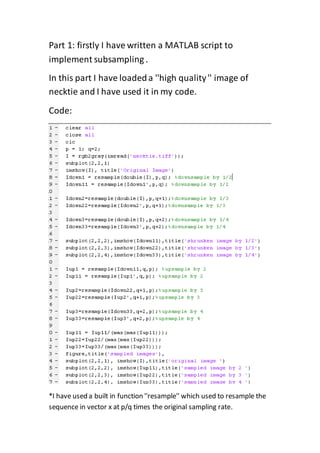
Part 1: firstly I have written a MATLAB script to
implement subsampling .
In this part I have loadeda ''high quality'' image of
necktie and I have used it in my code.
Code:
*I have used a built in function ''resample'' which used to resample the
sequence in vector x at p/q times the original sampling rate.
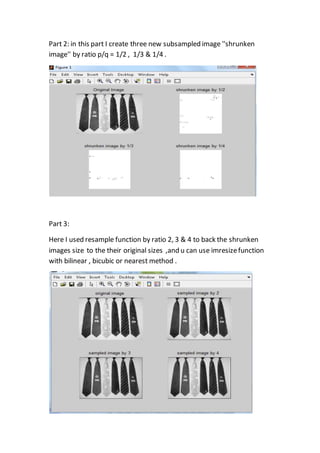
Part 2: in this part I create three new subsampled image ''shrunken
image'' by ratio p/q = 1/2 , 1/3 & 1/4 .
Part 3:
Here I used resample function by ratio 2, 3 & 4 to back the shrunken
images size to the their original sizes ,and u can use imresizefunction
with bilinear , bicubic or nearest method .
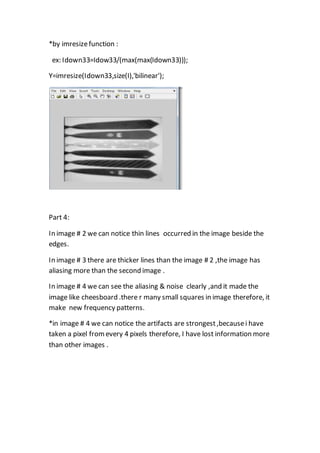
*by imresizefunction :
Idown33=Idow33/(max(max(Idown33)));ex:
Y=imresize(Idown33,size(I),'bilinear');
Part 4:
In image # 2 we can notice thin lines occurred in the image beside the
edges.
In image # 3 there are thicker lines than the image # 2 ,the image has
aliasing more than the second image .
In image # 4 we can see the aliasing & noise clearly ,and it made the
image like cheesboard .there r many small squares in image therefore, it
make new frequency patterns.
*in image # 4 we can notice the artifacts are strongest,becausei have
taken a pixel fromevery 4 pixels therefore, I have lost information more
than other images .

Image Processing using Matlab ( implement sub sampling and re sampling functions )

  • 1.
    Digital Image Processing Project# 4 Dr.Nathir Rawashdeh Name : Majd Ali Khaleel ID # :2008102003 26.Dec.2010
  • 2.
    Part 1: firstlyI have written a MATLAB script to implement subsampling . In this part I have loadeda ''high quality'' image of necktie and I have used it in my code. Code: *I have used a built in function ''resample'' which used to resample the sequence in vector x at p/q times the original sampling rate.
  • 3.
    Part 2: inthis part I create three new subsampled image ''shrunken image'' by ratio p/q = 1/2 , 1/3 & 1/4 . Part 3: Here I used resample function by ratio 2, 3 & 4 to back the shrunken images size to the their original sizes ,and u can use imresizefunction with bilinear , bicubic or nearest method .
  • 4.
    *by imresizefunction : Idown33=Idow33/(max(max(Idown33)));ex: Y=imresize(Idown33,size(I),'bilinear'); Part4: In image # 2 we can notice thin lines occurred in the image beside the edges. In image # 3 there are thicker lines than the image # 2 ,the image has aliasing more than the second image . In image # 4 we can see the aliasing & noise clearly ,and it made the image like cheesboard .there r many small squares in image therefore, it make new frequency patterns. *in image # 4 we can notice the artifacts are strongest,becausei have taken a pixel fromevery 4 pixels therefore, I have lost information more than other images .