Digital Productivity Solutions Built
for the Microsoft Cloud
Program and Project
Financial Management
Reimagine Business Productivity
• Project Financial Management
• Microsoft Project Online
• OnePlan Financial Planner (for Project Online)
• Financial Reporting and Analysis
• Demonstration
• Summary & Wrap Up
Topics
PROJECT FINANCIAL MANAGEMENT
Project Portfolio Management
PPM provides program and project managers with the capabilities needed to manage the time, resources, skills, and budgets
necessary to accomplish all interrelated tasks. It provides a framework for issue resolution and risk mitigation, as well as the
centralized visibility to help planning and scheduling teams to identify the fastest, cheapest, or most suitable approach to deliver
projects and programs.
Pipeline Management - This is the determination of whether (and how) a set of projects in the portfolio can be executed by a company
with finite development resources in a specified time. Fundamental to pipeline management is the ability to align the decision-making process
for estimating and selecting new capital investment projects with the strategic plan.
Resource Management - The focus on efficient and effective deployment of an organization’s resources where and when they are
needed. These can include financial resources, inventory, human resources, technical skills, production and design. In addition to project-
level resource allocation, users can also model ‘what-if’ resource scenarios, and extend this view across the portfolio.
Change Control - The capture and prioritization of change requests that can include new requirements, features, functions, operational
constraints, regulatory demands, and technical enhancements. PPM provides a central repository for these change requests and the ability to
match available resources to evolving demand within the financial and operational constraints of individual projects.
Financial Management - With PPM, the Finance can improve their accuracy for estimating and managing the financial resources of a
project or group of projects. In addition, the value of projects can be demonstrated in relation to the strategic objectives and priorities of the
organization through financial controls and to assess progress through earned value and other project financial techniques.
Risk Management - An analysis of the risk sensitivities residing within each project, as the basis for determining confidence levels
across the portfolio. The integration of cost and schedule risk management with techniques for determining contingency and risk response
plans, enable organizations to gain an objective view of a project uncertainties
What is Project Financial/Cost
Management?
It is one of the ten Knowledge Areas outlined in
the Project Management Body of Knowledge
(PMBOK)
Project Financial
Management Delivers
Financial Management Process
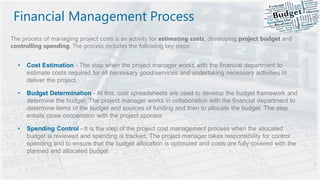
The process of managing project costs is an activity for estimating costs, developing project budget and
controlling spending. The process includes the following key steps:
• Cost Estimation - The step when the project manager works with the financial department to
estimate costs required for all necessary good/services and undertaking necessary activities to
deliver the project.
• Budget Determination - At this, cost spreadsheets are used to develop the budget framework and
determine the budget. The project manager works in collaboration with the financial department to
determine items of the budget and sources of funding and then to allocate the budget. The step
entails close cooperation with the project sponsor.
• Spending Control - It is the step of the project cost management process when the allocated
budget is reviewed and spending is tracked. The project manager takes responsibility for control
spending and to ensure that the budget allocation is optimized and costs are fully covered with the
planned and allocated budget.
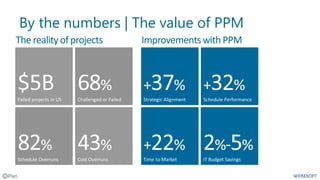
By the numbers | The value of PPM
Improvementswith PPMThe realityof projects
MICROSOFT PROJECT ONLINE
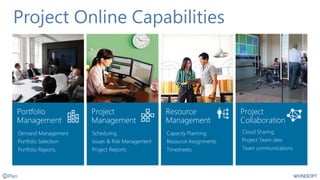
Project Online Capabilities
Office 365
productivity
platform
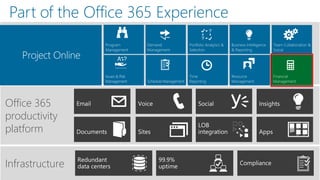
Part of the Office 365 Experience
Infrastructure
Financial Planning
Options in Microsoft
Project
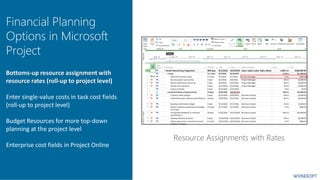
Bottoms-up resource assignment with
resource rates (roll-up to project level)
Enter single-value costs in task cost fields
(roll-up to project level)
Budget Resources for more top-down
planning at the project level
Enterprise cost fields in Project Online
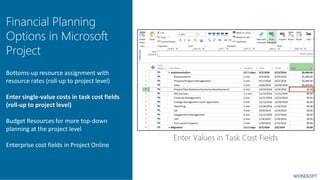
Financial Planning
Options in Microsoft
Project
Bottoms-up resource assignment with
resource rates (roll-up to project level)
Enter single-value costs in task cost fields
(roll-up to project level)
Budget Resources for more top-down
planning at the project level
Enterprise cost fields in Project Online
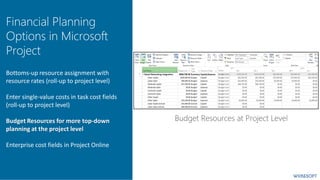
Financial Planning
Options in Microsoft
Project
Bottoms-up resource assignment with
resource rates (roll-up to project level)
Enter single-value costs in task cost fields
(roll-up to project level)
Budget Resources for more top-down
planning at the project level
Enterprise cost fields in Project Online
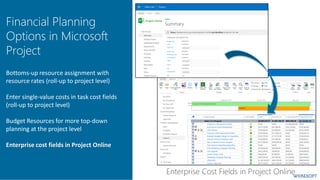
Financial Planning
Options in Microsoft
Project
Bottoms-up resource assignment with
resource rates (roll-up to project level)
Enter single-value costs in task cost fields
(roll-up to project level)
Budget Resources for more top-down
planning at the project level
Enterprise cost fields in Project Online
FINANCIAL PLANNER FOR PROJECT ONLINE
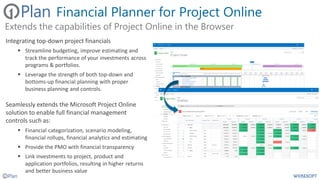
Financial Planner for Project Online
Integrating top-down project financials
▪ Streamline budgeting, improve estimating and
track the performance of your investments across
programs & portfolios.
▪ Leverage the strength of both top-down and
bottoms-up financial planning with proper
business planning and controls.
Seamlessly extends the Microsoft Project Online
solution to enable full financial management
controls such as:
▪ Financial categorization, scenario modeling,
financial rollups, financial analytics and estimating
▪ Provide the PMO with financial transparency
▪ Link investments to project, product and
application portfolios, resulting in higher returns
and better business value
Extends the capabilities of Project Online in the Browser
Financial Planner for Project Online
OnePlan Financial Planner includes the following
capabilities:
▪ Full integration with Microsoft Project Online
▪ Financial visibility across multiple portfolios
▪ Time-phased costs planning/tracking in the
browser
▪ Financial planner with flexible cost category
structure
▪ Multiple cost types for budget, actual, forecast,
benefits
▪ Financial impact analyzer & heat maps
▪ Financial Reporting and What-if modeling
Value-Added Financial Capabilities
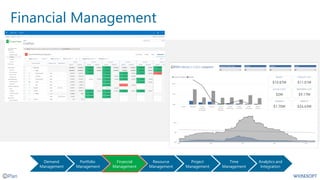
Financial Management
Project
planning
Financial
Management
Team
collaboration
Customer
billing
Analytics and
integration
Opportunity
management
Time and
expenses
Portfolio
Management
Resource
Management
Time
Management
Analytics and
Integration
Demand
Management
Project
Management
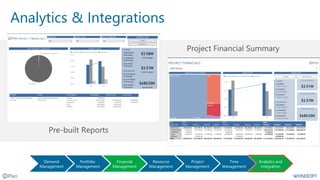
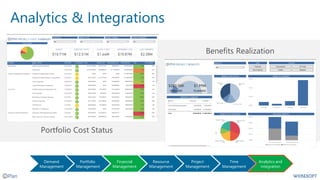
Analytics & Integrations
Project
planning
Resource
management
Team
collaboration
Time
Management
Analytics and
integration
Opportunity
management
Project
Management
Portfolio
Management
Financial
Management
Resource
Management
Demand
Management
Analytics & Integrations
Project
planning
Resource
management
Team
collaboration
Time
Management
Analytics and
integration
Opportunity
management
Project
Management
Portfolio
Management
Financial
Management
Resource
Management
Demand
Management
Software
Development
Project Portfolio
Management
Professional
Services
Financial
Management
Work
Management
Service
Management
Configurable
Business Rules
Built in
Alerts & Notifications
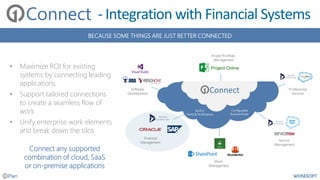
BECAUSE SOME THINGS ARE JUST BETTER CONNECTED
• Maximize ROI for existing
systems by connecting leading
applications
• Support tailored connections
to create a seamless flow of
work
• Unify enterprise work elements
and break down the silos
Connect
Connect
Connect any supported
combination of cloud, SaaS
or on-premise applications
- Integration with Financial Systems
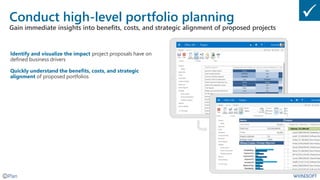
Conduct high-level portfolio planning
Gain immediate insights into benefits, costs, and strategic alignment of proposed projects
Identify and visualize the impact project proposals have on
defined business drivers
Quickly understand the benefits, costs, and strategic
alignment of proposed portfolios
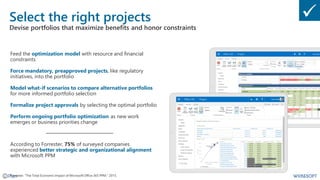
Select the right projects
Devise portfolios that maximize benefits and honor constraints
Feed the optimization model with resource and financial
constraints
Force mandatory, preapproved projects, like regulatory
initiatives, into the portfolio
Model what-if scenarios to compare alternative portfolios
for more informed portfolio selection
Formalize project approvals by selecting the optimal portfolio
Perform ongoing portfolio optimization as new work
emerges or business priorities change
According to Forrester, 75% of surveyed companies
experienced better strategic and organizational alignment
with Microsoft PPM
Forrester. “The Total Economic Impact of Microsoft Office 365 PPM.” 2015.
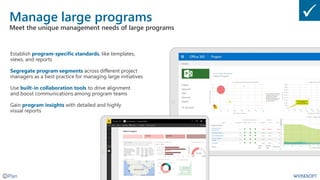
Manage large programs
Meet the unique management needs of large programs
Establish program-specific standards, like templates,
views, and reports
Segregate program segments across different project
managers as a best practice for managing large initiatives
Use built-in collaboration tools to drive alignment
and boost communications among program teams
Gain program insights with detailed and highly
visual reports
DEMONSTRATION
SUMMARY & WRAP UP
Summary
• Financial Management is a critical success factor
for project, program and portfolio management
• Microsoft Project and Project Online offer some
native capabilities for managing costs
• Wicresoft’s OnePlan provides additional and
enhanced capabilities beyond what is offered by
Microsoft
• OnePlan is fully integrated with Project Online
from both data and UX perspectives
• Power BI and Wicresoft report packs provide pre-
built financial/cost reports and dashboards
• Wicresoft’s OneConnect provides productized
connecters to financial systems, and other sources
of cost data
• OnePlan is fully integrated and embedded in
Project Online
Value of
• Reduce reliance on disconnected spreadsheets or
manual processes
• Improve cost management of initiatives and projects
• Accurately measure project financials, budgets, and ROI
to stay on track with key performance metrics.
• Provide visibility into a centralized organization-wide
view of project & portfolio financials
• Integrate project planning with financial planning &
forecasting to meet project objectives and stakeholder
expectations
• Integrate with existing financial applications
Financial Planner
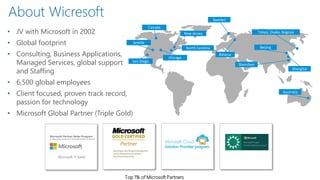
• JV with Microsoft in 2002
• Global footprint
• Consulting, Business Applications,
Managed Services, global support
and Staffing
• 6,500 global employees
• Client focused, proven track record,
passion for technology
• Microsoft Global Partner (Triple Gold)
About Wicresoft
San Diego
Seattle
Canada
Chicago
New Jersey
North Carolina
Sweden
Belarus
Beijing
Shenzhen
Tokyo, Osaka, Nagoya
Shanghai
Australia
Top 1% of Microsoft Partners
Microsoft P-Seller
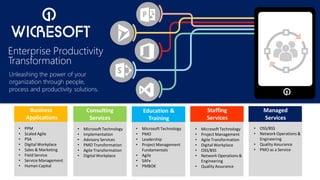
Business
Applications
Education &
Training
Consulting
Services
Staffing
Services
Managed
Services
• PPM
• Scaled Agile
• PSA
• Digital Workplace
• Sales & Marketing
• Field Service
• Service Management
• Human Capital
• Microsoft Technology
• PMO
• Leadership
• Project Management
Fundamentals
• Agile
• SAFe
• PMBOK
• Microsoft Technology
• Implementation
• Advisory Services
• PMO Transformation
• Agile Transformation
• Digital Workplace
• Microsoft Technology
• Project Management
• Agile Transformation
• Digital Workplace
• OSS/BSS
• Network Operations &
Engineering
• Quality Assurance
• OSS/BSS
• Network Operations &
Engineering
• Quality Assurance
• PMO as a Service
Enterprise Productivity
Transformation
Unleashing the power of your
organization through people,
process and productivity solutions.
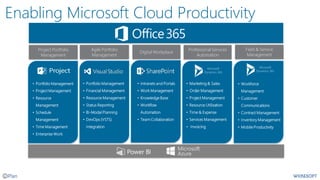
Project Portfolio
Management
• Portfolio Management
• Project Management
• Resource
Management
• Schedule
Management
• Time Management
• Enterprise Work
Agile Portfolio
Management
• Portfolio Management
• Financial Management
• Resource Management
• Status Reporting
• Bi-Modal Planning
• DevOps (VSTS)
Integration
• Intranets and Portals
• Work Management
• Knowledge Base
• Workflow
Automation
• Team Collaboration
Digital Workplace
Field & Service
Management
• Marketing & Sales
• Order Management
• Project Management
• Resource Utilization
• Time & Expense
• Services Management
• Invoicing
Professional Services
Automation
• Workforce
Management
• Customer
Communications
• Contract Management
• Inventory Management
• Mobile Productivity
Enabling Microsoft Cloud Productivity
Next Steps
Email Wicresoft
contactus@wicresoft.com
Websites:
Wicresoft us.wicresoft.com
Project Online www.project-online.com
On-Demand and Upcoming Webinars:
• FREE – Assessment and Roadmap
• FREE – Project Online Trial & Wicresoft Support
• Personalized 1:1 demo for your organization

Program and Project Financial Management in Project Online

  • 1.
    Digital Productivity SolutionsBuilt for the Microsoft Cloud Program and Project Financial Management Reimagine Business Productivity
  • 2.
    • Project FinancialManagement • Microsoft Project Online • OnePlan Financial Planner (for Project Online) • Financial Reporting and Analysis • Demonstration • Summary & Wrap Up Topics
  • 3.
  • 4.
    Project Portfolio Management PPMprovides program and project managers with the capabilities needed to manage the time, resources, skills, and budgets necessary to accomplish all interrelated tasks. It provides a framework for issue resolution and risk mitigation, as well as the centralized visibility to help planning and scheduling teams to identify the fastest, cheapest, or most suitable approach to deliver projects and programs. Pipeline Management - This is the determination of whether (and how) a set of projects in the portfolio can be executed by a company with finite development resources in a specified time. Fundamental to pipeline management is the ability to align the decision-making process for estimating and selecting new capital investment projects with the strategic plan. Resource Management - The focus on efficient and effective deployment of an organization’s resources where and when they are needed. These can include financial resources, inventory, human resources, technical skills, production and design. In addition to project- level resource allocation, users can also model ‘what-if’ resource scenarios, and extend this view across the portfolio. Change Control - The capture and prioritization of change requests that can include new requirements, features, functions, operational constraints, regulatory demands, and technical enhancements. PPM provides a central repository for these change requests and the ability to match available resources to evolving demand within the financial and operational constraints of individual projects. Financial Management - With PPM, the Finance can improve their accuracy for estimating and managing the financial resources of a project or group of projects. In addition, the value of projects can be demonstrated in relation to the strategic objectives and priorities of the organization through financial controls and to assess progress through earned value and other project financial techniques. Risk Management - An analysis of the risk sensitivities residing within each project, as the basis for determining confidence levels across the portfolio. The integration of cost and schedule risk management with techniques for determining contingency and risk response plans, enable organizations to gain an objective view of a project uncertainties
  • 5.
    What is ProjectFinancial/Cost Management? It is one of the ten Knowledge Areas outlined in the Project Management Body of Knowledge (PMBOK) Project Financial Management Delivers
  • 6.
    Financial Management Process Theprocess of managing project costs is an activity for estimating costs, developing project budget and controlling spending. The process includes the following key steps: • Cost Estimation - The step when the project manager works with the financial department to estimate costs required for all necessary good/services and undertaking necessary activities to deliver the project. • Budget Determination - At this, cost spreadsheets are used to develop the budget framework and determine the budget. The project manager works in collaboration with the financial department to determine items of the budget and sources of funding and then to allocate the budget. The step entails close cooperation with the project sponsor. • Spending Control - It is the step of the project cost management process when the allocated budget is reviewed and spending is tracked. The project manager takes responsibility for control spending and to ensure that the budget allocation is optimized and costs are fully covered with the planned and allocated budget.
  • 7.
    By the numbers| The value of PPM Improvementswith PPMThe realityof projects
  • 8.
  • 9.
  • 10.
    Office 365 productivity platform Part ofthe Office 365 Experience Infrastructure
  • 11.
    Financial Planning Options inMicrosoft Project Bottoms-up resource assignment with resource rates (roll-up to project level) Enter single-value costs in task cost fields (roll-up to project level) Budget Resources for more top-down planning at the project level Enterprise cost fields in Project Online
  • 12.
    Financial Planning Options inMicrosoft Project Bottoms-up resource assignment with resource rates (roll-up to project level) Enter single-value costs in task cost fields (roll-up to project level) Budget Resources for more top-down planning at the project level Enterprise cost fields in Project Online
  • 13.
    Financial Planning Options inMicrosoft Project Bottoms-up resource assignment with resource rates (roll-up to project level) Enter single-value costs in task cost fields (roll-up to project level) Budget Resources for more top-down planning at the project level Enterprise cost fields in Project Online
  • 14.
    Financial Planning Options inMicrosoft Project Bottoms-up resource assignment with resource rates (roll-up to project level) Enter single-value costs in task cost fields (roll-up to project level) Budget Resources for more top-down planning at the project level Enterprise cost fields in Project Online
  • 15.
    FINANCIAL PLANNER FORPROJECT ONLINE
  • 16.
    Financial Planner forProject Online Integrating top-down project financials ▪ Streamline budgeting, improve estimating and track the performance of your investments across programs & portfolios. ▪ Leverage the strength of both top-down and bottoms-up financial planning with proper business planning and controls. Seamlessly extends the Microsoft Project Online solution to enable full financial management controls such as: ▪ Financial categorization, scenario modeling, financial rollups, financial analytics and estimating ▪ Provide the PMO with financial transparency ▪ Link investments to project, product and application portfolios, resulting in higher returns and better business value Extends the capabilities of Project Online in the Browser
  • 17.
    Financial Planner forProject Online OnePlan Financial Planner includes the following capabilities: ▪ Full integration with Microsoft Project Online ▪ Financial visibility across multiple portfolios ▪ Time-phased costs planning/tracking in the browser ▪ Financial planner with flexible cost category structure ▪ Multiple cost types for budget, actual, forecast, benefits ▪ Financial impact analyzer & heat maps ▪ Financial Reporting and What-if modeling Value-Added Financial Capabilities
  • 18.
    Financial Management Project planning Financial Management Team collaboration Customer billing Analytics and integration Opportunity management Timeand expenses Portfolio Management Resource Management Time Management Analytics and Integration Demand Management Project Management
  • 19.
    Analytics & Integrations Project planning Resource management Team collaboration Time Management Analyticsand integration Opportunity management Project Management Portfolio Management Financial Management Resource Management Demand Management
  • 20.
    Analytics & Integrations Project planning Resource management Team collaboration Time Management Analyticsand integration Opportunity management Project Management Portfolio Management Financial Management Resource Management Demand Management
  • 21.
    Software Development Project Portfolio Management Professional Services Financial Management Work Management Service Management Configurable Business Rules Builtin Alerts & Notifications BECAUSE SOME THINGS ARE JUST BETTER CONNECTED • Maximize ROI for existing systems by connecting leading applications • Support tailored connections to create a seamless flow of work • Unify enterprise work elements and break down the silos Connect Connect Connect any supported combination of cloud, SaaS or on-premise applications - Integration with Financial Systems
  • 22.
    Conduct high-level portfolioplanning Gain immediate insights into benefits, costs, and strategic alignment of proposed projects Identify and visualize the impact project proposals have on defined business drivers Quickly understand the benefits, costs, and strategic alignment of proposed portfolios
  • 23.
    Select the rightprojects Devise portfolios that maximize benefits and honor constraints Feed the optimization model with resource and financial constraints Force mandatory, preapproved projects, like regulatory initiatives, into the portfolio Model what-if scenarios to compare alternative portfolios for more informed portfolio selection Formalize project approvals by selecting the optimal portfolio Perform ongoing portfolio optimization as new work emerges or business priorities change According to Forrester, 75% of surveyed companies experienced better strategic and organizational alignment with Microsoft PPM Forrester. “The Total Economic Impact of Microsoft Office 365 PPM.” 2015.
  • 24.
    Manage large programs Meetthe unique management needs of large programs Establish program-specific standards, like templates, views, and reports Segregate program segments across different project managers as a best practice for managing large initiatives Use built-in collaboration tools to drive alignment and boost communications among program teams Gain program insights with detailed and highly visual reports
  • 25.
  • 26.
  • 27.
    Summary • Financial Managementis a critical success factor for project, program and portfolio management • Microsoft Project and Project Online offer some native capabilities for managing costs • Wicresoft’s OnePlan provides additional and enhanced capabilities beyond what is offered by Microsoft • OnePlan is fully integrated with Project Online from both data and UX perspectives • Power BI and Wicresoft report packs provide pre- built financial/cost reports and dashboards • Wicresoft’s OneConnect provides productized connecters to financial systems, and other sources of cost data • OnePlan is fully integrated and embedded in Project Online
  • 28.
    Value of • Reducereliance on disconnected spreadsheets or manual processes • Improve cost management of initiatives and projects • Accurately measure project financials, budgets, and ROI to stay on track with key performance metrics. • Provide visibility into a centralized organization-wide view of project & portfolio financials • Integrate project planning with financial planning & forecasting to meet project objectives and stakeholder expectations • Integrate with existing financial applications Financial Planner
  • 29.
    • JV withMicrosoft in 2002 • Global footprint • Consulting, Business Applications, Managed Services, global support and Staffing • 6,500 global employees • Client focused, proven track record, passion for technology • Microsoft Global Partner (Triple Gold) About Wicresoft San Diego Seattle Canada Chicago New Jersey North Carolina Sweden Belarus Beijing Shenzhen Tokyo, Osaka, Nagoya Shanghai Australia Top 1% of Microsoft Partners Microsoft P-Seller
  • 30.
    Business Applications Education & Training Consulting Services Staffing Services Managed Services • PPM •Scaled Agile • PSA • Digital Workplace • Sales & Marketing • Field Service • Service Management • Human Capital • Microsoft Technology • PMO • Leadership • Project Management Fundamentals • Agile • SAFe • PMBOK • Microsoft Technology • Implementation • Advisory Services • PMO Transformation • Agile Transformation • Digital Workplace • Microsoft Technology • Project Management • Agile Transformation • Digital Workplace • OSS/BSS • Network Operations & Engineering • Quality Assurance • OSS/BSS • Network Operations & Engineering • Quality Assurance • PMO as a Service Enterprise Productivity Transformation Unleashing the power of your organization through people, process and productivity solutions.
  • 31.
    Project Portfolio Management • PortfolioManagement • Project Management • Resource Management • Schedule Management • Time Management • Enterprise Work Agile Portfolio Management • Portfolio Management • Financial Management • Resource Management • Status Reporting • Bi-Modal Planning • DevOps (VSTS) Integration • Intranets and Portals • Work Management • Knowledge Base • Workflow Automation • Team Collaboration Digital Workplace Field & Service Management • Marketing & Sales • Order Management • Project Management • Resource Utilization • Time & Expense • Services Management • Invoicing Professional Services Automation • Workforce Management • Customer Communications • Contract Management • Inventory Management • Mobile Productivity Enabling Microsoft Cloud Productivity
  • 32.
    Next Steps Email Wicresoft contactus@wicresoft.com Websites: Wicresoftus.wicresoft.com Project Online www.project-online.com On-Demand and Upcoming Webinars: • FREE – Assessment and Roadmap • FREE – Project Online Trial & Wicresoft Support • Personalized 1:1 demo for your organization