Flarenet Model Setup Fan, Yi
Preparation before model setup PRV Datasheets (only those relieve to flare) Type, number and size Set pressure and relief Condition (T, P) Relief Load (required flow, and rated flow) Plot Plan (if isometric drawing not available) To identify PRV location To measure the preliminary line length To determine the fire zone Relief load composition for global, fire and controlling case for each control valve Basis for a correct and accurate Flarenet model Obtained from simulator (HYSYS, Pro II or ASPEN Plus) Suggestion: Create a composition list in relief valve calculation sheet, at least global case, fire case and controlling case.
Preparation before model setup Utility P&ID of Flare System Help to find P&ID for each relief valve Get line number for header and laterals. Flare System Piping Class From System group and ensure correct piping schedule used for model calculation Relief System Design Basis Get constraints for specific project. Mach Number, Velocity, Noise
Flarenet Model Setup - Start a new model Basic info Main component Select Unit Edit preference Input piping class
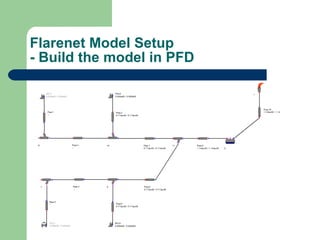
Flarenet Model Setup - Build the model in PFD
Flarenet Model Setup - Build the model in PFD Data input for model component Flare tip and KO drum Piping Tee and Connector PRV
Flarenet Model Setup - Build the model in PFD Create Scenarios Global relief scenario Fire Zone scenario Depressurization scenario Individual PRV controlling scenario
Running Flare Model Calculation Option Header sizing Global Scenarios (Power failure, Cooling water failure, Instrument air failure, and Steam failure, etc. Depressurization Some big individual relief (non-global) Fire Zone Tailpipe sizing Use rated flow Normally 1 or 2 nominal size above PRV outlet flange size Main concern is MABP
Result Check Variable check Result Message check Visual check
Some Tips Thermodynamic deviation Choking problem during tail pipe sizing How to speed up tail pipe sizing Import data from HYSYS Aspen Support:  http://support.aspentech.com/
Question? Thanks!

Process Flarenet Model Setup(Fan, Yi)

  • 1.
  • 2.
    Preparation before modelsetup PRV Datasheets (only those relieve to flare) Type, number and size Set pressure and relief Condition (T, P) Relief Load (required flow, and rated flow) Plot Plan (if isometric drawing not available) To identify PRV location To measure the preliminary line length To determine the fire zone Relief load composition for global, fire and controlling case for each control valve Basis for a correct and accurate Flarenet model Obtained from simulator (HYSYS, Pro II or ASPEN Plus) Suggestion: Create a composition list in relief valve calculation sheet, at least global case, fire case and controlling case.
  • 3.
    Preparation before modelsetup Utility P&ID of Flare System Help to find P&ID for each relief valve Get line number for header and laterals. Flare System Piping Class From System group and ensure correct piping schedule used for model calculation Relief System Design Basis Get constraints for specific project. Mach Number, Velocity, Noise
  • 4.
    Flarenet Model Setup- Start a new model Basic info Main component Select Unit Edit preference Input piping class
  • 5.
    Flarenet Model Setup- Build the model in PFD
  • 6.
    Flarenet Model Setup- Build the model in PFD Data input for model component Flare tip and KO drum Piping Tee and Connector PRV
  • 7.
    Flarenet Model Setup- Build the model in PFD Create Scenarios Global relief scenario Fire Zone scenario Depressurization scenario Individual PRV controlling scenario
  • 8.
    Running Flare ModelCalculation Option Header sizing Global Scenarios (Power failure, Cooling water failure, Instrument air failure, and Steam failure, etc. Depressurization Some big individual relief (non-global) Fire Zone Tailpipe sizing Use rated flow Normally 1 or 2 nominal size above PRV outlet flange size Main concern is MABP
  • 9.
    Result Check Variablecheck Result Message check Visual check
  • 10.
    Some Tips Thermodynamicdeviation Choking problem during tail pipe sizing How to speed up tail pipe sizing Import data from HYSYS Aspen Support: http://support.aspentech.com/
  • 11.